light TOYOTA MATRIX 2013 E140 / 2.G Service Manual
[x] Cancel search | Manufacturer: TOYOTA, Model Year: 2013, Model line: MATRIX, Model: TOYOTA MATRIX 2013 E140 / 2.GPages: 500, PDF Size: 14.83 MB
Page 112 of 500

112 2-1. Driving procedures
CAUTION
●When stopped on an inclined surface, use the brake pedal and parking
brake to prevent the vehicle from rolling backward or forward and causing
an accident.
●Do not adjust the position of the steering wheel, the seat, or the inside or
outside rear view mirrors while driving. Doing so may result in a loss of
vehicle control that can cause accidents that may result in death or serious
injury.
●Always check that all passengers' arms, heads or other parts of their bod-
ies are not outside the vehicle, as this may result in death or serious injury.
●Do not drive the vehicle off-road.
This is not a AWD vehicle designed for real off-road driving. Proceed with
all due caution if it becomes unavoidable to drive off-road.
●Do not drive across river crossings or through other bodies of water.
This may cause electric/electronic components to short circuit, damage
the engine or cause other serious damage to the vehicle.
●Do not drive in excess of the speed limit. Even if the legal speed limit per-
mits it, do not drive over 85 mph (140 km/h) unless your vehicle has high-
speed capability tires. Driving over 85 mph (140 km/h) may result in tire
failure, loss of control and possible injury. Be sure to consult a tire dealer
to determine whether the tires on your vehicle are high-speed capability
tires or not before driving at such speeds.
■When driving on slippery road surfaces
●Sudden braking, acceleration and steering may cause tire slippage and
reduce your ability to control the vehicle, resulting in an accident.
●Sudden changes in engine speed, such as engine braking caused by up-
shifting or down-shifting, may cause the vehicle to skid, resulting in an
accident.
●After driving through a puddle, lightly depress the brake pedal to make
sure that the brakes are functioning properly. Wet brake pads may prevent
the brakes from functioning properly. If the brakes on only one side are wet
and not functioning properly, steering control may be affected, resulting in
an accident.
Page 113 of 500

113 2-1. Driving procedures
2
When driving
CAUTION
■When shifting the shift lever (vehicles with an automatic transmission)
Be careful not to shift the shift lever with the accelerator pedal depressed.
This may lead to unexpected rapid acceleration of the vehicle that may
cause an accident and result in death or serious injury.
■When the vehicle is stopped
●Do not race the engine. If the vehicle is in any gear other than P (vehicles
with an automatic transmission) or N, the vehicle may accelerate suddenly
and unexpectedly, and may cause an accident.
●Do not leave the vehicle with the engine running for a long time.
If such a situation cannot be avoided, park the vehicle in an open space
and check that exhaust fumes do not enter the vehicle interior.
●Vehicles with an automatic transmission: In order to prevent accidents due
to the vehicle rolling away, always keep depressing the brake pedal while
the engine is running, and apply the parking brake as necessary.
●If the vehicle is stopped on an incline, in order to prevent accidents caused
by the vehicle rolling forward or backward, always depress the brake pedal
and securely apply the parking brake as needed.
●Avoid revving or racing the engine.
Running the engine at high speed while the vehicle is stopped may cause
the exhaust system to overheat, which could result in a fire if combustible
material is nearby.
■When the vehicle is parked
●Do not leave glasses, cigarette lighters, spray cans, or soft drink cans in
the vehicle when it is in the sun. Doing so may result in the following.
• Gas may leak from a cigarette lighter or spray can, and may lead to a
fire.
• The temperature inside the vehicle may cause the plastic lenses and
plastic material of eye glasses to deform or crack.
• Soft drink cans may fracture, causing the contents to spray over the
interior of the vehicle, and may also cause a short circuit in the vehi-
cle's electrical components.
Page 120 of 500
120 2-1. Driving procedures
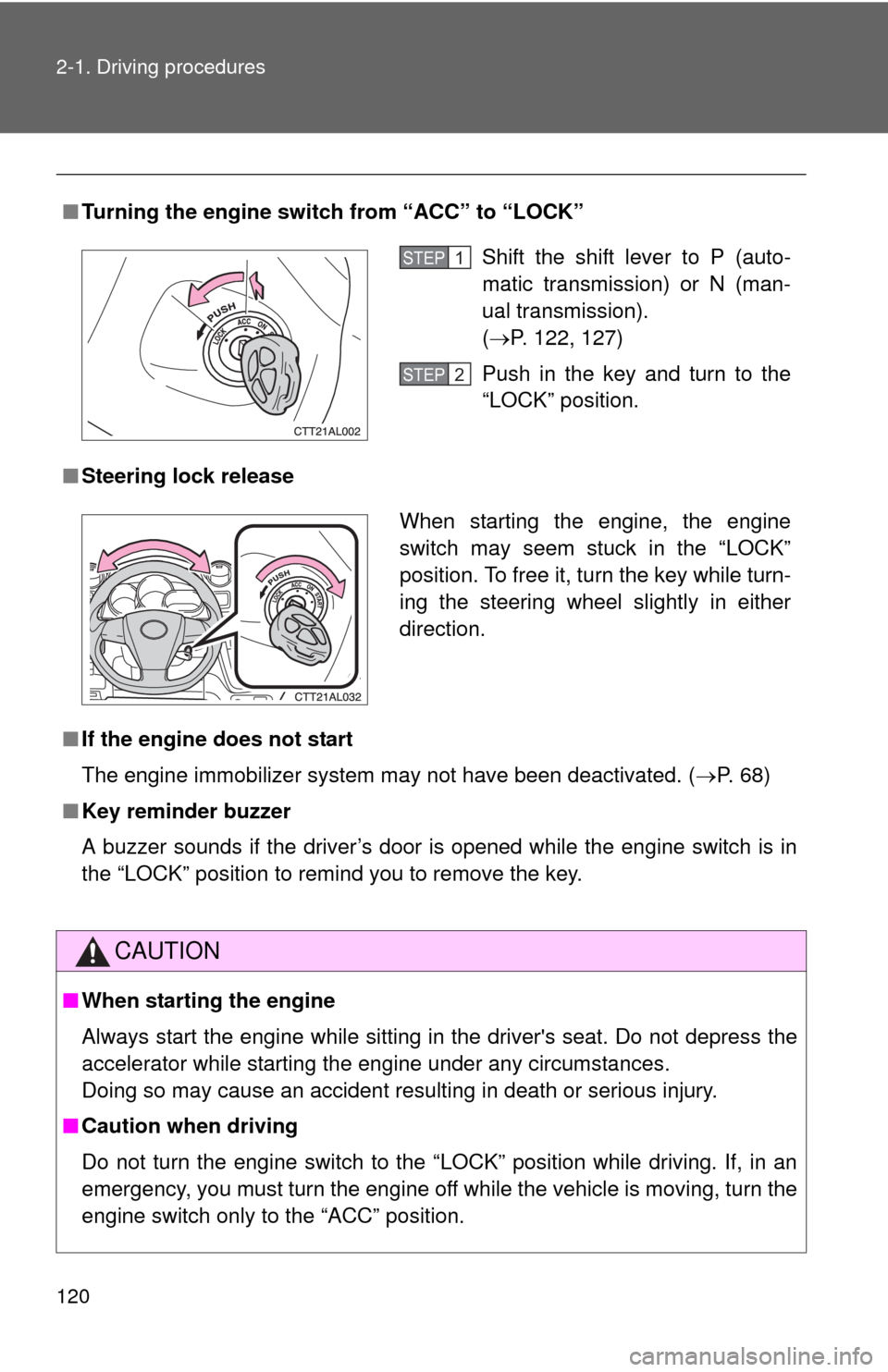
■Turning the engine switch from “ACC” to “LOCK”
■Steering lock release
■If the engine does not start
The engine immobilizer system may not have been deactivated. (P. 68)
■Key reminder buzzer
A buzzer sounds if the driver’s door is opened while the engine switch is in
the “LOCK” position to remind you to remove the key.
CAUTION
■When starting the engine
Always start the engine while sitting in the driver's seat. Do not depress the
accelerator while starting the engine under any circumstances.
Doing so may cause an accident resulting in death or serious injury.
■Caution when driving
Do not turn the engine switch to the “LOCK” position while driving. If, in an
emergency, you must turn the engine off while the vehicle is moving, turn the
engine switch only to the “ACC” position.
Shift the shift lever to P (auto-
matic transmission) or N (man-
ual transmission).
(P. 122, 127)
Push in the key and turn to the
“LOCK” position.STEP1
STEP2
When starting the engine, the engine
switch may seem stuck in the “LOCK”
position. To free it, turn the key while turn-
ing the steering wheel slightly in either
direction.
Page 129 of 500
129
2-1. Driving procedures
2
When driving
Tur n signal lever
■Turn signals can be operated when
The engine switch is in the “ON” position.
■If the indicators flash faster than usual
Check that a light bulb in the front or rear turn signal lights has not burned
out.
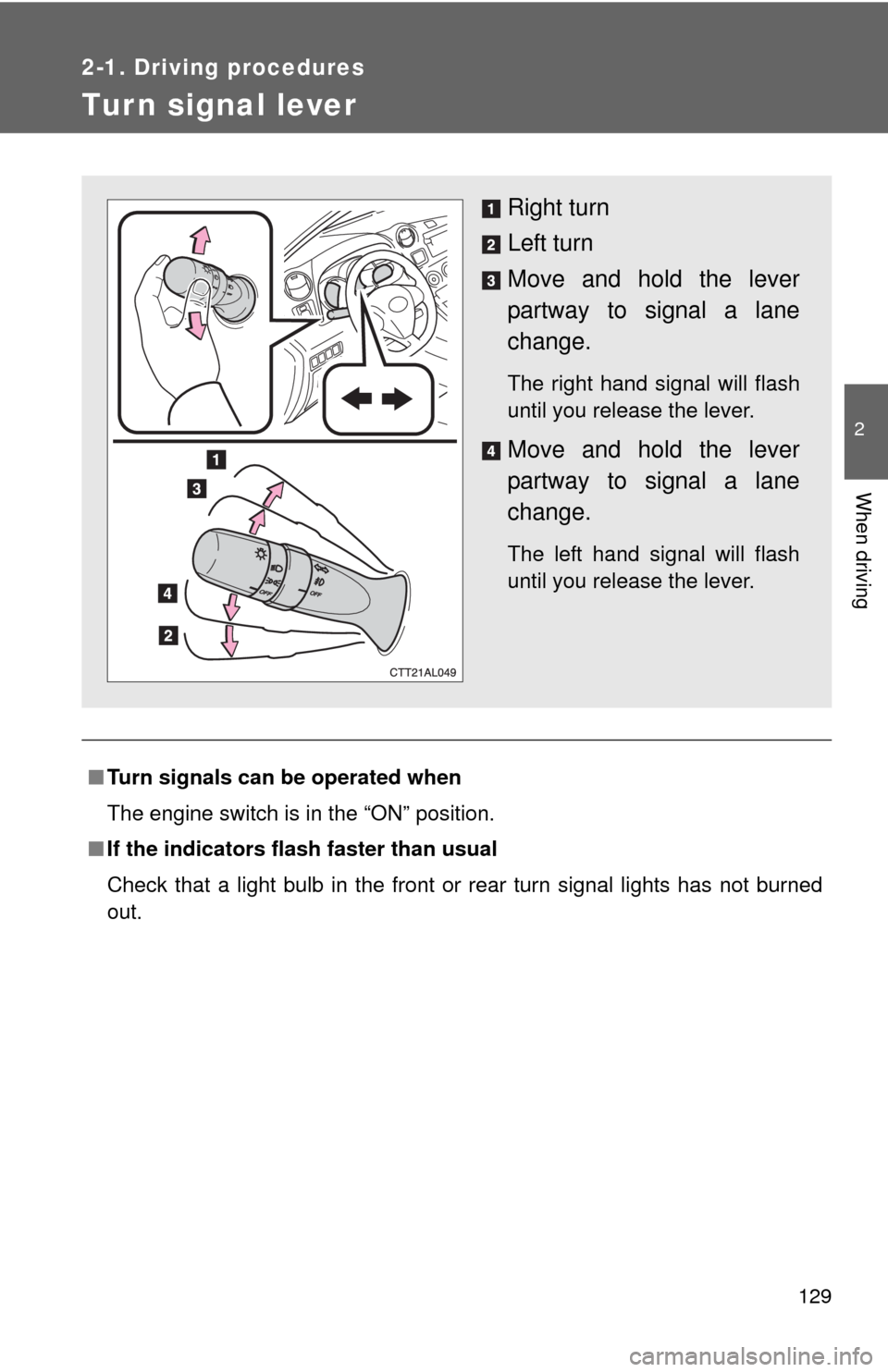
Right turn
Left turn
Move and hold the lever
partway to signal a lane
change.
The right hand signal will flash
until you release the lever.
Move and hold the lever
partway to signal a lane
change.
The left hand signal will flash
until you release the lever.
Page 130 of 500
130
2-1. Driving procedures
Parking brake
■Usage in winter time
See “Winter driving tips” for parking brake usage in winter time. (P. 162)
NOTICE
■Before driving
Fully release the parking brake.
Driving the vehicle with the parking brake set will lead to brake components
overheating, which may affect braking performance and increase brake
wear.
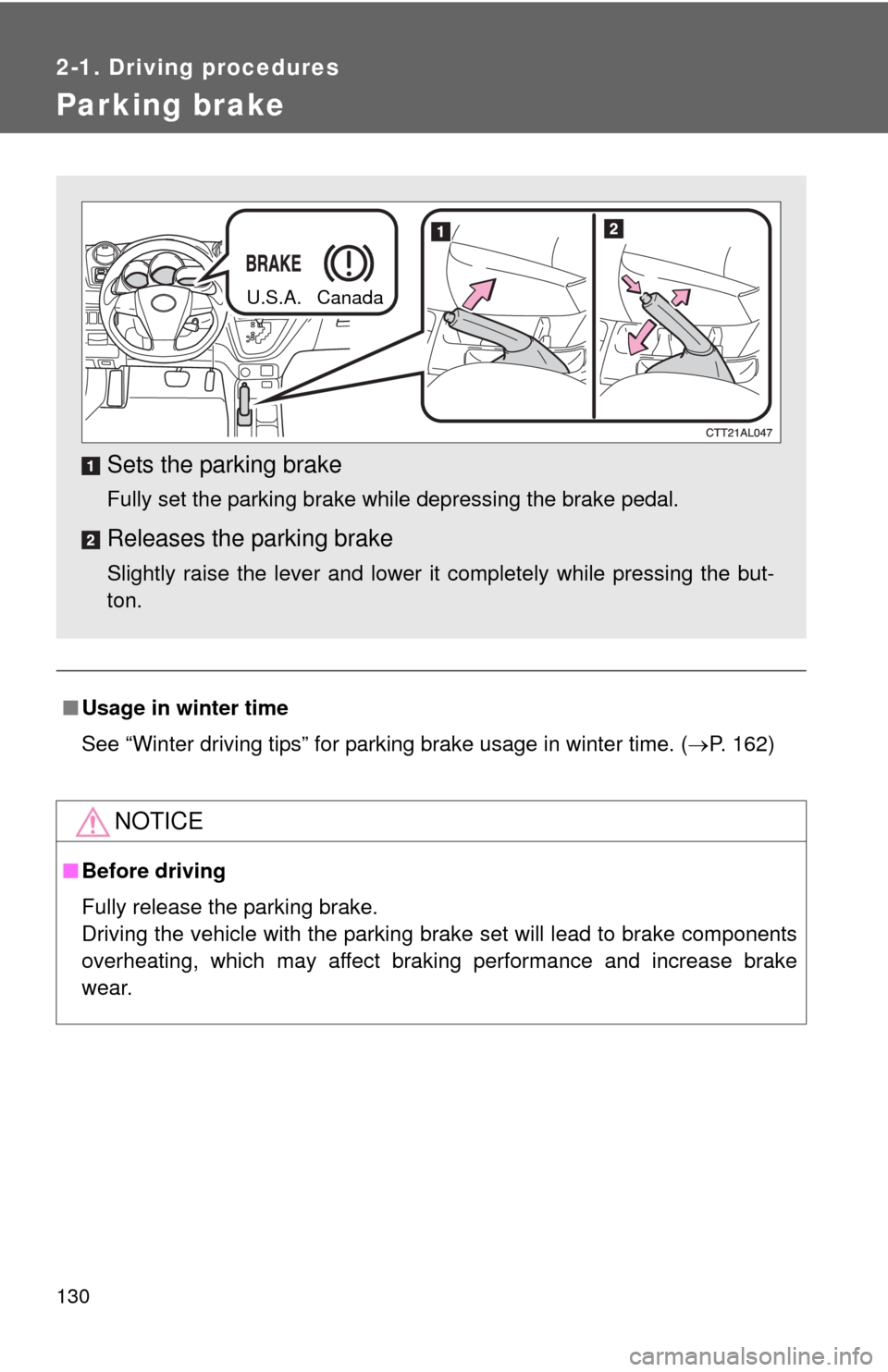
Sets the parking brake
Fully set the parking brake while depressing the brake pedal.
Releases the parking brake
Slightly raise the lever and lower it completely while pressing the but-
ton.
U.S.A. Canada
Page 132 of 500
132
2-2. Instrument cluster
Gauges and meters
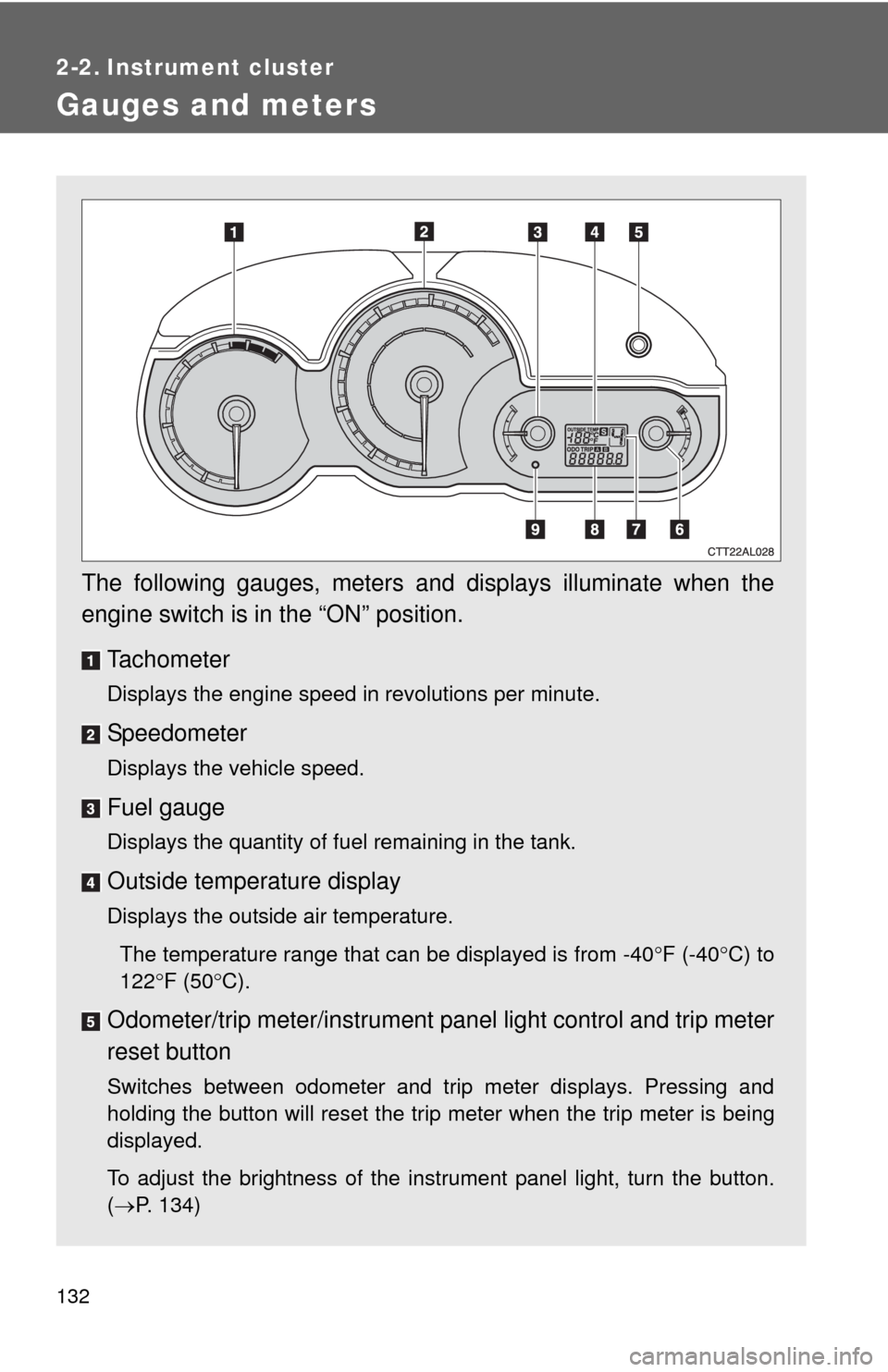
The following gauges, meters and displays illuminate when the
engine switch is in the “ON” position.
Tachometer
Displays the engine speed in revolutions per minute.
Speedometer
Displays the vehicle speed.
Fuel gauge
Displays the quantity of fuel remaining in the tank.
Outside temperature display
Displays the outside air temperature.
The temperature range that can be displayed is from -40F (-40C) to
122F (50C).
Odometer/trip meter/instrument panel light control and trip meter
reset button
Switches between odometer and trip meter displays. Pressing and
holding the button will reset the trip meter when the trip meter is being
displayed.
To adjust the brightness of the instrument panel light, turn the button.
(P. 134)
Page 133 of 500
133 2-2. Instrument cluster
2
When driving
Engine coolant temperature gauge
Displays the engine coolant temperature.
Automatic transmission shift position indicator lights (if
equipped)
P. 122
Odometer and trip meter
Odometer: Displays the total distance the vehicle has been driven.
Trip meter: Displays the distance the vehicle has been driven since the
meter was last reset. Trip meters A and B can be used to record and
display different distances independently.
Low fuel level warning light
P. 400
Page 134 of 500
134 2-2. Instrument cluster
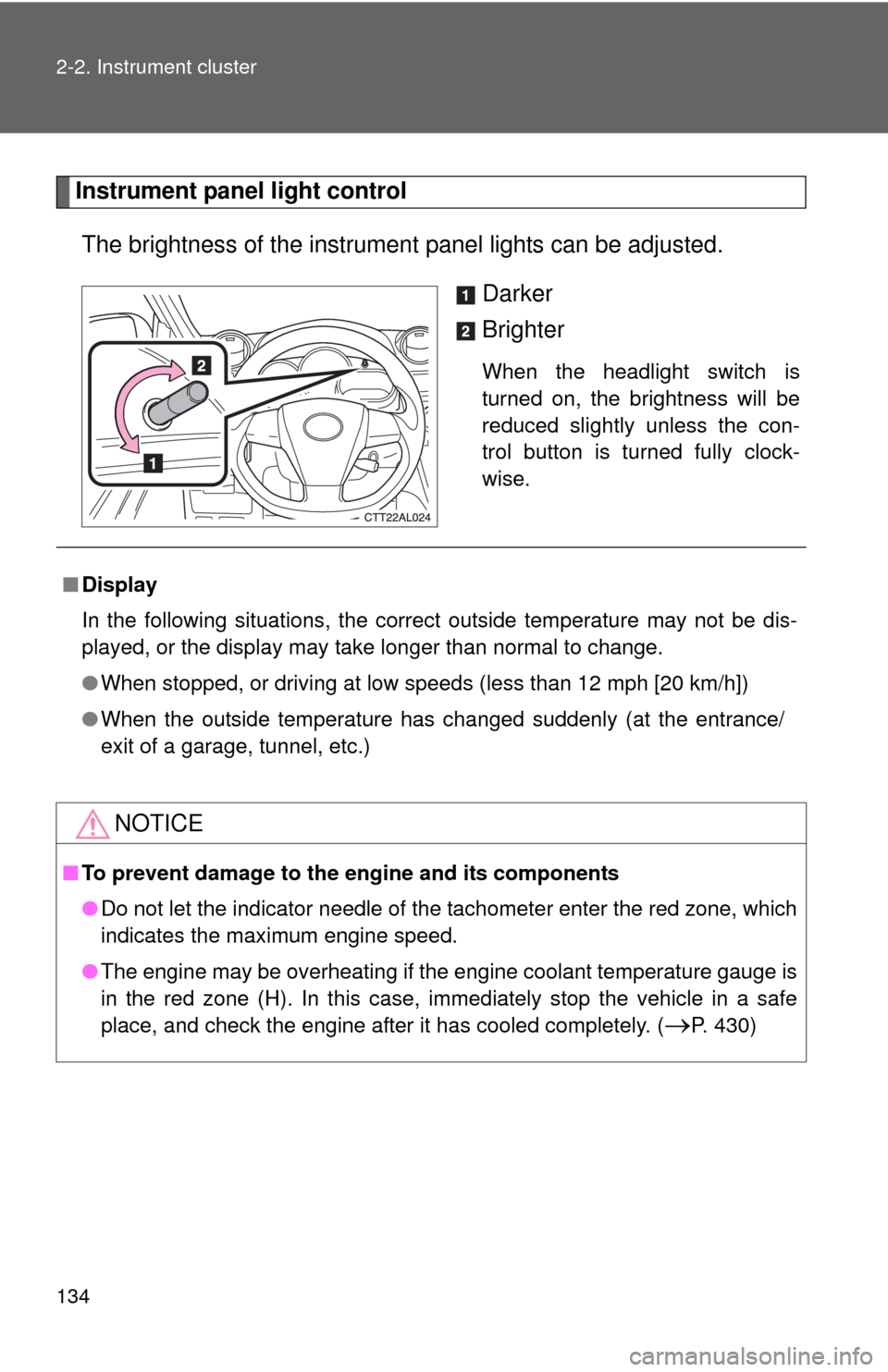
Instrument panel light control
The brightness of the instrument panel lights can be adjusted.
Darker
Brighter
When the headlight switch is
turned on, the brightness will be
reduced slightly unless the con-
trol button is turned fully clock-
wise.
■Display
In the following situations, the correct outside temperature may not be dis-
played, or the display may take longer than normal to change.
●When stopped, or driving at low speeds (less than 12 mph [20 km/h])
●When the outside temperature has changed suddenly (at the entrance/
exit of a garage, tunnel, etc.)
NOTICE
■To prevent damage to the engine and its components
●Do not let the indicator needle of the tachometer enter the red zone, which
indicates the maximum engine speed.
●The engine may be overheating if the engine coolant temperature gauge is
in the red zone (H). In this case, immediately stop the vehicle in a safe
place, and check the engine after it has cooled completely. (
P. 430)
Page 135 of 500
135
2-2. Instrument cluster
2
When driving
Indicators and warning lights
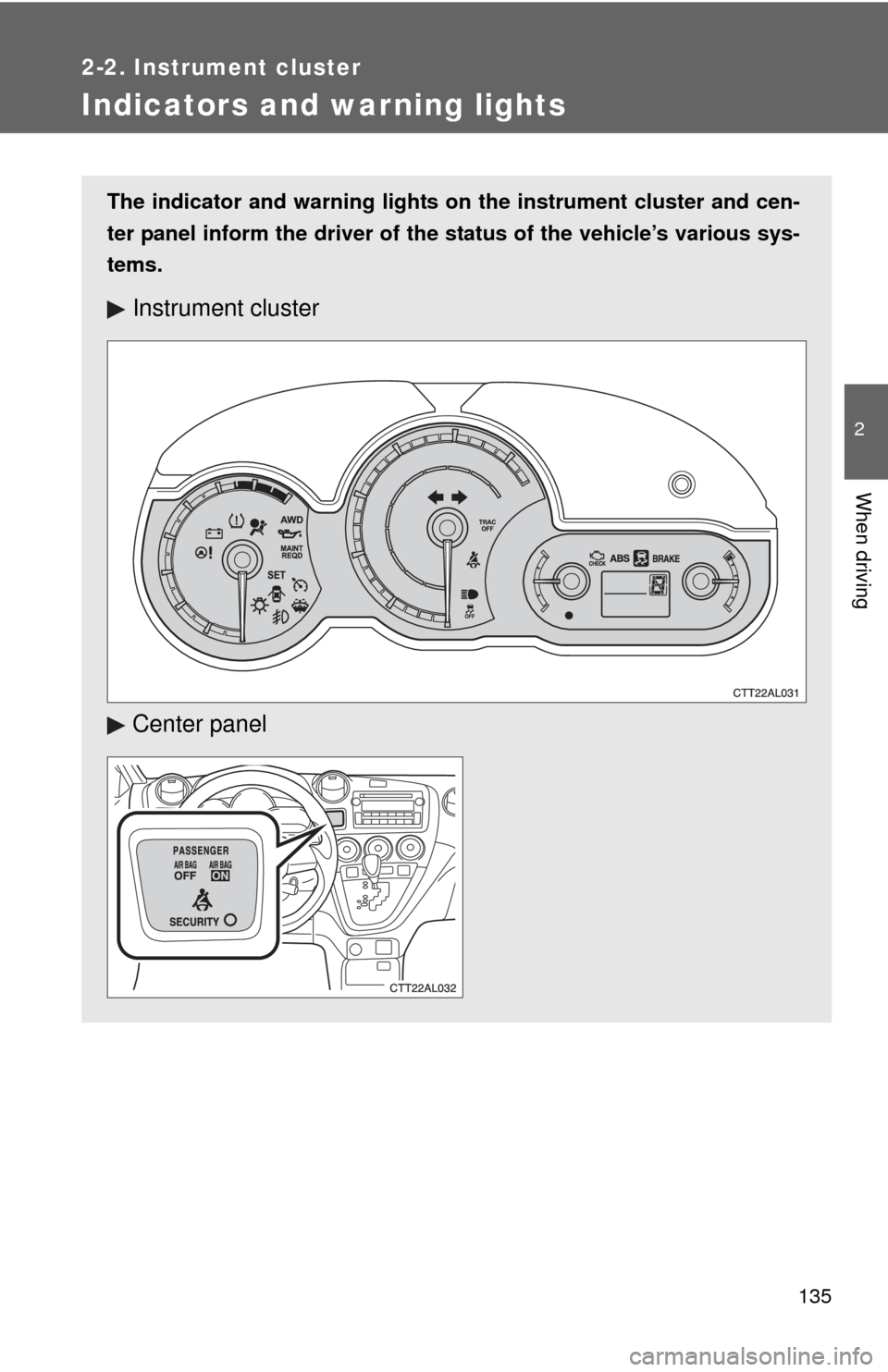
The indicator and warning lights on the instrument cluster and cen-
ter panel inform the driver of the status of the vehicle’s various sys-
tems.
Instrument cluster
Center panel
Page 136 of 500
136 2-2. Instrument cluster
■Indicators
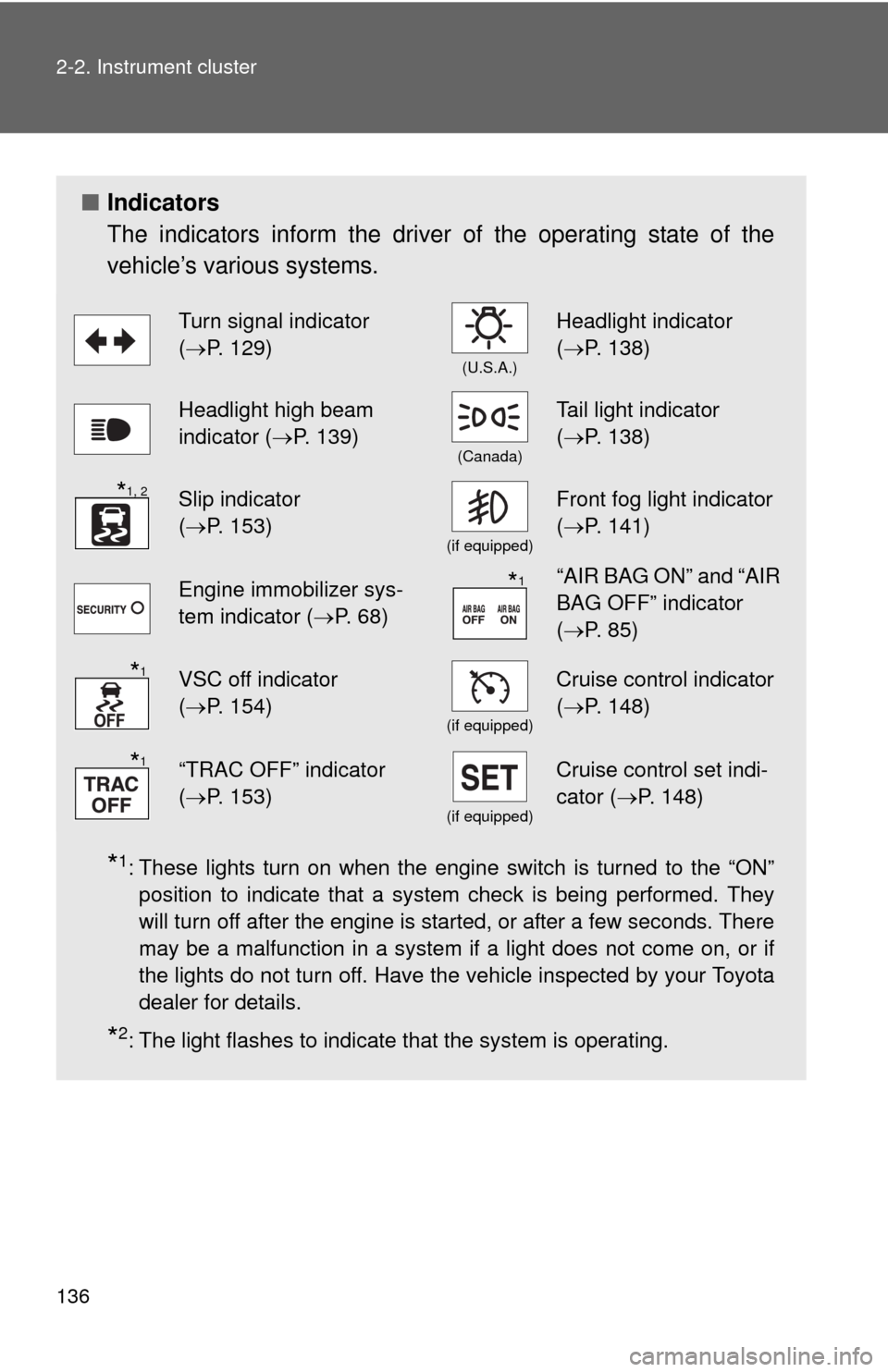
The indicators inform the driver of the operating state of the
vehicle’s various systems.
*1: These lights turn on when the engine switch is turned to the “ON”
position to indicate that a system check is being performed. They
will turn off after the engine is started, or after a few seconds. There
may be a malfunction in a system if a light does not come on, or if
the lights do not turn off. Have the vehicle inspected by your Toyota
dealer for details.
*2: The light flashes to indicate that the system is operating.
Turn signal indicator
(P. 129)
(U.S.A.)
Headlight indicator
(P. 138)
Headlight high beam
indicator (P. 139)
(Canada)
Tail light indicator
(P. 138)
Slip indicator
(P. 153)
(if equipped)
Front fog light indicator
(P. 141)
Engine immobilizer sys-
tem indicator (P. 68)“AIR BAG ON” and “AIR
BAG OFF” indicator
(P. 85)
VSC off indicator
(P. 154)
(if equipped)
Cruise control indicator
(P. 148)
“TRAC OFF” indicator
(P. 153)
(if equipped)
Cruise control set indi-
cator (P. 148)
*1, 2
*1
*1
*1