ESP TOYOTA MATRIX 2014 E140 / 2.G Owner's Manual
[x] Cancel search | Manufacturer: TOYOTA, Model Year: 2014, Model line: MATRIX, Model: TOYOTA MATRIX 2014 E140 / 2.GPages: 500, PDF Size: 7.02 MB
Page 230 of 500

230 3-2. Using the audio system
■About iPod
●“Made for iPod” and “Made for iPhone” mean that an electroni\
c acces-
sory has been designed to connect specifically to iPod, or iPhone,
respectively, and has been certified by the developer to meet Apple per-
formance standards.
● Apple is not responsible for the operation of this device or its compliance
with safety and regulatory standards. Please note that the use of this
accessory with iPod or iPhone may affect wireless performance.
● iPhone, iPod, iPod classic, iPod n ano and iPod touch are trademarks of
Apple Inc., registered in the U.S. and other countries.
■ iPod functions
●When an iPod is connected and the audio source is changed to iPod
mode, the iPod will resume play from the same point in which it was last
used.
● Depending on the iPod that is connected to the system, certain functions
may not be available. If a function is unavailable due to a malfunction (as
opposed to a system specification), disconnecting the device and recon-
necting it once again may resolve the problem.
● While connected to the system, the iPod cannot be operated with its own
controls. It is necessary to use the controls of the vehicle’s audio system
instead.
Page 238 of 500

238 3-2. Using the audio system
■USB memory functions
●Depending on the USB memory that is connected to the system, the
device itself may not be operable and certain functions may not be avail-
able. If the device is inoperable or a function is unavailable due to a mal-
function (as opposed to a system specification), disconnecting the device
and reconnecting it once again may resolve the problem.
● If the USB memory still does not begin operation after being discon-
nected and reconnected, format the memory.
■ Display
P. 212
■ Error messages
“ERROR”: This indicates a problem in the USB memory or its connection.
“NO MUSIC”: This indicates that no MP3/WMA files are included in the USB memory.
■ USB memory
●Compatible device
USB memory that can be used for MP3 and WMA playback.
● Compatible device formats
The following device formats can be used:
• USB communication formats: USB2.0 FS (12 mbps)
• File formats: FAT16/32 (Windows)
• Correspondence class: Mass storage class
MP3 and WMA files written in any format other than those listed above
may not play correctly, and their file names and folder names may not be
displayed correctly.
Items related to standards and limitations are as follows:
• Maximum directory hierarchy: 8 levels
• Maximum number of folder in device: 999 (including the root)
• Maximum number of files in device: 9999
• Maximum number of files per folder: 255
Page 252 of 500
252 3-3. Using the Bluetooth
® audio system
■When transferring ownership of the vehicle
Be sure to initialize the system to prevent personal data from being improp-
erly accessed. ( P. 272)
■ About Bluetooth
®
■Compatible models
●Bluetooth
® specifications:
Ver. 1.1, or higher (recommended: Ver. 2.1 + EDR or higher)
● Following Profiles:
• A2DP (Advanced Audio Distribution Prof ile) Ver. 1.0, or higher (recom-
mended: Ver. 1.2 or higher)
• AVRCP (Audio/Video Remote Control Profile) Ver. 1.0 or higher (rec- ommended: Ver. 1.3 or higher)
Portable players must correspond to the above specifications in order to be
connected to the Bluetooth
® audio system. However, please note that some
functions may be limited depending on the type of portable player.
● Cellular phone
• HFP (Hands Free Profile) Ver. 1.0 or higher (recommended: Ver. 1.5)
• OPP (Object Push Profile) Ver. 1.1
• PBAP (Phone Book Access Profile) Ver. 1.0
Bluetooth is a registered trademark of
Bluetooth SIG. Inc.
Page 301 of 500
301
3-7. Other interior features
3
Interior features
Floor mat
CAUTION
Observe the following precautions.
Failure to do so may cause the driver's floor mat to slip, possibly interfering
with the pedals while driving. An unexpectedly high speed may result or it may
become difficult to stop the vehicle, leading to a serious accident.
■When installing the driver's floor mat
●Do not use floor mats designed for other models or different model year
vehicles, even if they are Toyota Genuine floor mats.
● Only use floor mats designed for the driver's seat.
● Always install the floor mat securely using the retaining hooks (clips) pro-
vided.
● Do not use two or more floor mats on top of each other.
● Do not place the floor mat bottom-side up or upside-down.
■ Before driving
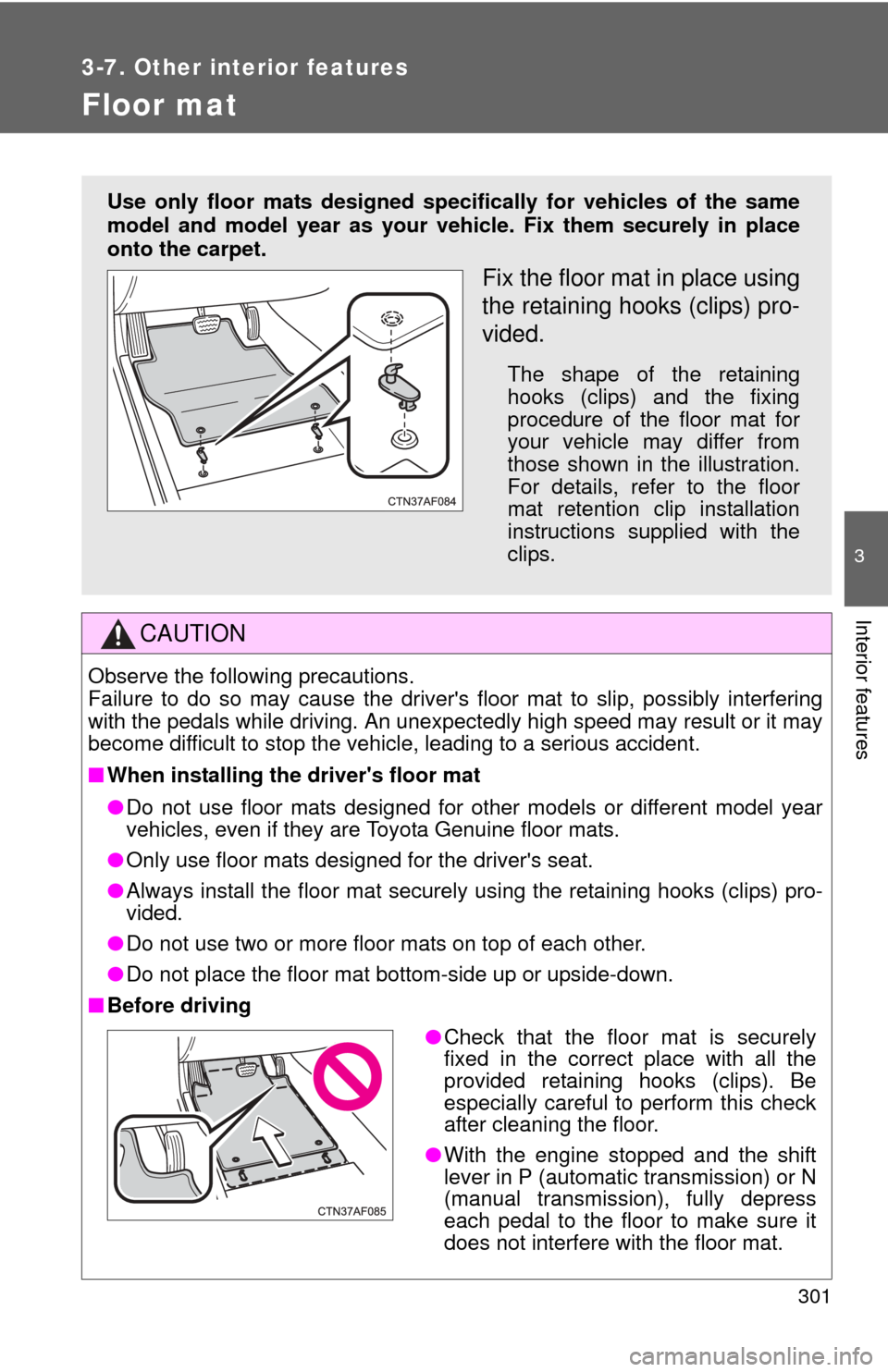
Use only floor mats designed specifically for vehicles of the same
model and model year as your vehic le. Fix them securely in place
onto the carpet.
Fix the floor mat in place using
the retaining hooks (clips) pro-
vided.
The shape of the retaining
hooks (clips) and the fixing
procedure of the floor mat for
your vehicle may differ from
those shown in the illustration.
For details, refer to the floor
mat retention clip installation
instructions supplied with the
clips.
● Check that the floor mat is securely
fixed in the correct place with all the
provided retaining hooks (clips). Be
especially careful to perform this check
after cleaning the floor.
● With the engine stopped and the shift
lever in P (automatic transmission) or N
(manual transmission), fully depress
each pedal to the floor to make sure it
does not interfere with the floor mat.
Page 318 of 500
318 4-1. Maintenance and care
■Caring for leather areas
Toyota recommends cleaning the interior of the vehicle at least twice a year
to maintain the quality of the vehicle's interior.
■ Shampooing the carpets
There are several commercial foaming-type cleaners available. Use a
sponge or brush to apply the foam. Rub in overlapping circles. Do not apply
water. Excellent results are obtained by keeping the carpet as dry as possi-
ble.
■ Seat belts
Clean with mild soap and lukewarm water using a cloth or sponge. Also
check the belts periodically for excessive wear, fraying or cuts.
CAUTION
■Water in the vehicle
●Do not splash or spill liquid in the vehicle. Doing so may cause electrical
components etc. to malfunction or catch fire.
● Do not get any of the SRS components or wiring in the vehicle interior wet.
( P. 7 4 )
Electrical malfunction may cause the airbags to deploy or not function
properly, resulting in death or severe injury.
■ Cleaning the interior (esp ecially instrument panel)
Do not use polish wax or polish cleaner. The instrument panel may reflect off
the windshield, obstructing the driver 's view and leading to an accident,
resulting in death or serious injury.
Page 319 of 500

319
4-1. Maintenance and care
4
Maintenance and care
NOTICE
■
Cleaning detergents
●Do not use organic substances such as benzene or gasoline, acidic or
alkaline solutions, dye, bleach or other detergent. Doing so may discolor
the vehicle interior or cause streaks or damage to painted surfaces.
● Do not use polish wax or polish cleaner. The instrument panel's or other
interior part's painted surface may be damaged.
■ Preventing damage to leather surfaces
Observe the following precautions to avoid damage to and deterioration o\
f
leather surfaces.
●Remove any dust or dirt on leather surfaces immediately.
● Do not expose the vehicle to direct sunlight for extended periods of time.
Park the vehicle in the shade, especially during summer.
● Do not place items made of vinyl, plastic, or that contain wax, on the
upholstery, as they may stick to the leather surface if the vehicle interior
heats up significantly.
■ Water on the floor
Do not wash the vehicle floor with water.
Vehicle systems such as the audio system may be damaged if water comes
into contact with electrical components under the floor of the vehicle, and
may also cause the body to rust.
■ Cleaning the inside of the rear window
●Do not use glass cleaner to clean the rear window, as this may cause
damage to the rear window defogger heater wires. Use a cloth dampened
with lukewarm water to gently wipe the window clean. Wipe the window in
strokes running parallel to the heater wires.
● Be careful not to scratch or damage the heater wires.
Page 320 of 500
320
4-2. Maintenance
Maintenance requirements
■Repair and replacement
It is recommended that genuine Toyota parts be used for repair to ensure
performance of each system. If non-Toyota parts are used in replacement or
if a repair shop other than a Toyota dealer performs repairs, confirm the war-
ranty coverage.
To ensure safe and economical driv ing, day-to-day care and regular
maintenance is essential. It is the owner’s responsibility to perform
regular checks. Toyota recommen ds the following maintenance.
■General maintenance
Should be performed on a daily basis. This can be done by your-
self or by a Toyota dealer.
■ Scheduled maintenance
Should be performed at specified intervals according to the
maintenance schedule.
For details about maintenance items and schedules, refer to the
“Scheduled Maintenance Guide” or “Owner’s Manual Supplement”.
■Do-it-yourself maintenance
You can perform some maintenance procedures yourself.
Please be aware that do-it-yourself maintenance may affect war-
ranty coverage.
The use of Toyota Repair Manuals is recommended.
For details about warranty coverage, see the separate “Owner’s War-
ranty Information Booklet” or “Owner’s Manual Supplement”.
Page 355 of 500

355
4-3. Do-it-yourself maintenance
4
Maintenance and care
■Tire pressure warning system certification
FCC ID: PAXPMV107J
FCC ID: HYQ13BCX
For vehicles sold in the U.S.A.
This device complies with Part 15 of the FCC Rules. Operation is subject
to the following two conditions: (1) This device may not cause harmful
interference, and (2) this device must accept any interference received,
including interference that may cause undesired operation.
FCC WARNING:
Changes or modifications not expre ssly approved by the party responsi-
ble for compliance could void the user's authority to operate the equip-
ment.
For vehicles sold in Canada
Operation is subject to the following two conditions: (1) this device may
not cause interference, and (2) this de vice must accept any interference,
including interference that may caus e undesired operation of the device.
Page 406 of 500

406 5-2. Steps to take in an emergency
CAUTION
As an added safety feature, your vehicle has been equipped with a tire
pressure monitoring system (TPMS-ti re pressure warning system) that
illuminates a low tire pressure telltal e (tire pressure warning light) when
one or more of your tires is significantly under-inflated. Accordingly,
when the low tire pressu re telltale (tire pressure warning light) illumi-
nates, you should stop and check your tires as soon as possible, and
inflate them to the proper pressure. Driving on a significantly under-
inflated tire causes the tire to overheat and can lead to tire failure.
Under-inflation also reduces fuel effi ciency and tire tread life, and may
affect the vehicle's hand ling and stopping ability.
Please note that the TPMS (tire pressure warning system) is not a sub-
stitute for proper ti re maintenance, an d it is the driver's responsibility to
maintain correct tire pressure, even if under-inflation has not reached the
level to trigger illu mination of the TPMS low tire pressure telltale (tire
pressure warning light).
Your vehicle has also been equipped with a TPMS (tire pressure warning
system) malfunction indicator to indi cate when the system is not operat-
ing properly. The TPMS (tire pressure warning system) malfunction indi-
cator is combined with the low tire pressure telltale (tire pressure
warning light). When the system det ects a malfunction, the telltale will
flash for approximately one minute an d then remain continuously illumi-
nated. This sequence will continue upon subsequent vehicle start-ups as
long as the malfunction exists. When the malfunction indi cator is illumi-
nated, the system may not be able to detect or signal low tire pressure
as intended.
TPMS (tire pressure warning system) malfunctions may occur for a vari-
ety of reasons, including the installati on of replacement or alternate tires
or wheels on the vehicle that prevent the TPMS (tire pressure warning
system) from functioning properly. Always check the TPMS (tire pres-
sure warning system) malfunction te lltale after replacing one or more
tires or wheels on your vehicle to ensure that the replacement or alter-
nate tires and wheels allow the TPMS (tire pressure warning system) to
continue to function properly.
Page 432 of 500

432 5-2. Steps to take in an emergency
CAUTION
■To prevent an accident or injury when inspecting under the hood of
your vehicle
● If steam is seen coming from under the hood, do not open the hood until
the steam has subsided. The engine compartment may be very hot, caus-
ing serious injury such as burns.
● Keep hands and clothing (especially a tie, a scarf or a muffler) away from
the fan and belts. Failure to do so may cause the hands or clothing to be
caught, resulting in serious injury.
● Do not loosen the coolant reservoir cap while the engine and radiator are
hot.
Serious injury, such as burns, may result from hot coolant and steam
released under pressure.
NOTICE
■When adding engine coolant
Wait until the engine has cooled down before adding engine coolant.
When adding coolant, do so slowly. Adding cool coolant to a hot engine too
quickly can cause damage to the engine.
■ To prevent damage to the cooling system
Observe the following precautions:
●Avoid contaminating the coolant with foreign matter (such as sand or dust
etc.).
● Do not use commercially available coolant additives.