warning TOYOTA MIRAI 2017 1.G Owners Manual
[x] Cancel search | Manufacturer: TOYOTA, Model Year: 2017, Model line: MIRAI, Model: TOYOTA MIRAI 2017 1.GPages: 464, PDF Size: 12.09 MB
Page 240 of 464
2405-5. Using the driving support systems
MIRAI_OM_USA_OM62023U
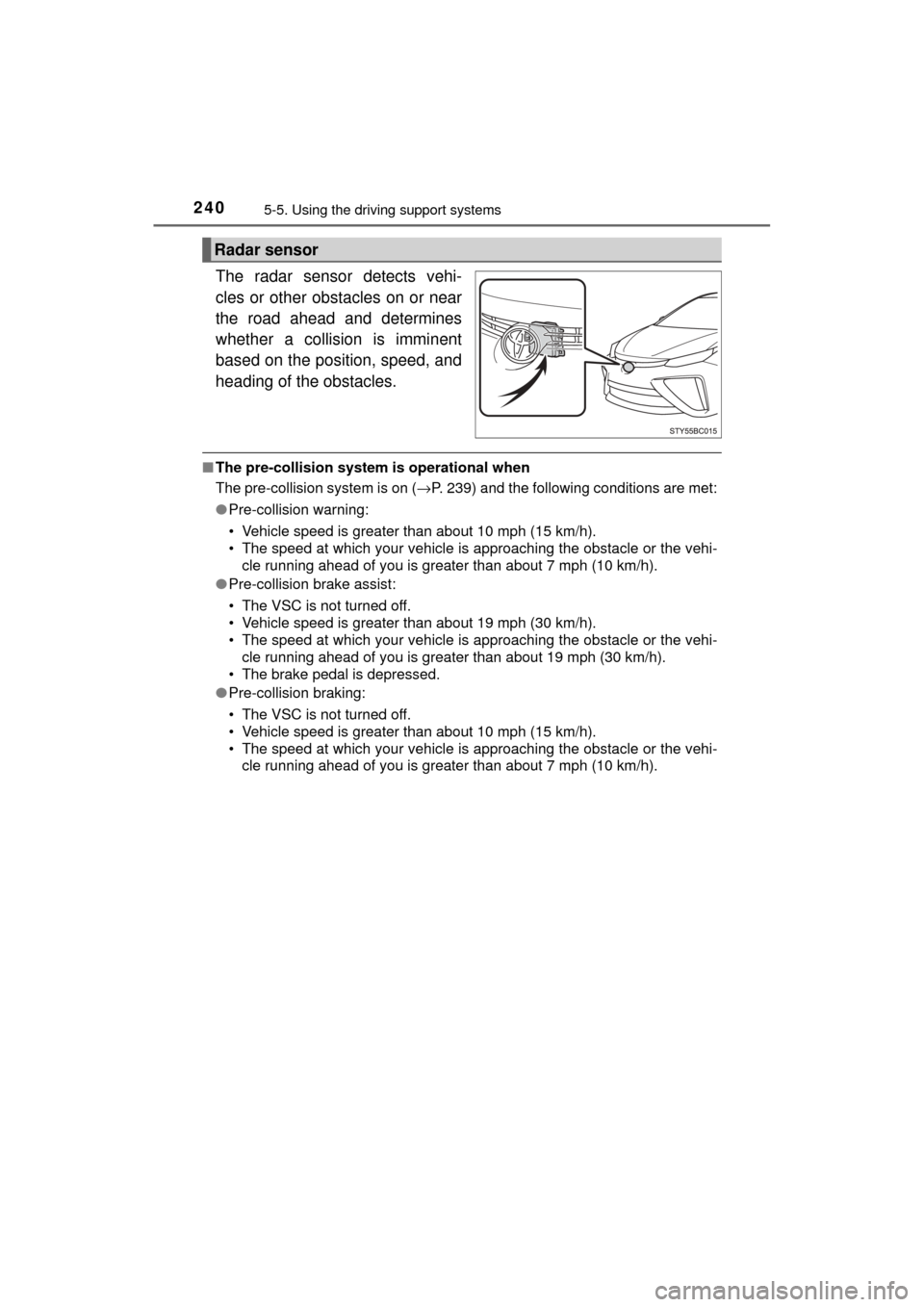
The radar sensor detects vehi-
cles or other obstacles on or near
the road ahead and determines
whether a collision is imminent
based on the position, speed, and
heading of the obstacles.
■The pre-collision system is operational when
The pre-collision system is on ( →P. 239) and the following conditions are met:
● Pre-collision warning:
• Vehicle speed is greater than about 10 mph (15 km/h).
• The speed at which your vehicle is approaching the obstacle or the vehi-
cle running ahead of you is greater than about 7 mph (10 km/h).
● Pre-collision brake assist:
• The VSC is not turned off.
• Vehicle speed is greater than about 19 mph (30 km/h).
• The speed at which your vehicle is approaching the obstacle or the vehi-
cle running ahead of you is greater than about 19 mph (30 km/h).
• The brake pedal is depressed.
● Pre-collision braking:
• The VSC is not turned off.
• Vehicle speed is greater than about 10 mph (15 km/h).
• The speed at which your vehicle is approaching the obstacle or the vehi-
cle running ahead of you is greater than about 7 mph (10 km/h).
Radar sensor
Page 242 of 464

2425-5. Using the driving support systems
MIRAI_OM_USA_OM62023U■
Automatic cancelation of the pre-collision system
When a malfunction occurs due to sensor contamination, etc., that results in
the sensors being unable to detect obstacles, the pre-collision system will be
automatically disabled. In this case, the system will not activate even if there
is a collision possibility.
■ When there is a malfunction in the system, or if the system is temporar-
ily unavailable
The PCS warning light flashes and a warning message is shown on the multi-
information display. If a warning message is shown on the multi-information
display, read the message and follow the instructions.
■ When the TRAC and VSC are turned off
●When the TRAC and VSC operations are turned off ( →P. 234), the pre-colli-
sion brake assist and pre-collision braking are also turned off. However, the
alert function operates.
● The PCS warning light turns on and the “Pre-Collision Brake is Disabled due
to VSC OFF” is displayed on the multi-information display.
■ Certification for the radar sensor
FCC ID: HYQDNMWR007
This device complies with part 15 of the FCC Rules. Operation is subject to
the following two conditions: (1) This device may not cause harmful interfer-
ence, and (2) this device must accept any interference received, including
interference that may cause undesired operation.
FCC WARNING
Changes or modifications not expressly approved by the party responsible for
compliance could void the user’s authority to operate the equipment.
Radiofrequency radiation exposure Information:
This equipment complies with FCC radiation exposure limits set forth for an
uncontrolled environment.
This equipment should be installed and operated with minimum distance of
20 cm between the radiator (antenna) and your body. This transmitter must
not be co-located or operating in conjunction with any other antenna or trans-
mitter.
Page 243 of 464
2435-5. Using the driving support systems
5
Driving
MIRAI_OM_USA_OM62023U
WARNING
■Limitations of the pre-collision system
The driver is solely responsible for safe driving. Always drive safely, taking
care to observe your surroundings.
Do not use the pre-collision system instead of normal braking operations
under any circumstances. This system will not prevent collisions or lessen
damage or injuries in all cases. Do not overly rely on this system. Failure to
do so may cause an accident, resulting in death or serious injury.
This system has been designed to help avoid and reduce the impact of col-
lisions.
However, the system operates differently depending on the situation
(→ P. 240).
As a result, the same level of performance may not be expected in all
cases. Also, the pre-collision brakes may not operate if the driver is
depressing the brake pedal or turning the steering wheel, as the system will
determine such conditions as collision avoidance operations.
■ Handling the radar sensor
Observe the following to ensure the pre-collision system can function effec-
tively.
Otherwise, the system may not function correctly and could result in an
accident.
● Keep the sensor and grille cover clean at all times.
Clean the sensor and grille cover with a soft cloth so you do not mark or
damage them.
● Do not subject the sensor or surrounding area to a strong impact.
If the sensor moves even slightly off position, the system may not work
normally or malfunction. If the sensor or surrounding area is subject to a
strong impact, always have the area inspected and adjusted by your
Toyota dealer.
● Do not disassemble the sensor.
● Do not attach accessories or stickers to the sensor, grille cover or sur-
rounding area.
● Do not modify or paint the sensor and grille cover.
● If the radar sensor needs to be replaced, contact your Toyota dealer.
Page 244 of 464

2445-5. Using the driving support systems
MIRAI_OM_USA_OM62023U
WARNING
■Cautions regarding the assist contents of the system
By means of alarms and brake control, the pre-collision system is intended
to assist the driver in avoiding collisions through the process of LOOK-
JUDGE-ACT. There are limits to the degree of assistance the system can
provide, so please keep in mind the following important points.
● Assisting the driver in watching the road
The pre-collision system is only able to detect obstacles directly in front of
the vehicle, and only within a limited range. It is not a mechanism that
allows careless or inattentive driving, and it is not a system that can assist
the driver in low-visibility conditions. It is still necessary for the driver to
pay close attention to the vehicle’s surroundings.
● Assisting the driver in making correct judgement
When attempting to estimate the possibility of a collision, the only data
available to the pre-collision system is that from obstacles it has detected
directly in front of the vehicle. Therefore, it is absolutely necessary for the
driver to remain vigilant and to determine whether or not there is a possi-
bility of collision in any given situation.
● Assisting the driver in taking action
The pre-collision system’s braking assist feature is designed to help
reduce the severity of a collision, and so only acts when the system has
judged that a collision is unavoidable. This system is not capable of auto-
matically avoiding a collision or bringing the vehicle to a stop safely with-
out appropriate operations performed by the driver. For this reason, when
encountering a dangerous situation the driver must take direct and imme-
diate action in order to ensure the safety of all involved.
Page 247 of 464
2475-5. Using the driving support systems
5
Driving
MIRAI_OM_USA_OM62023U■
Certification for the Blind Spot Monitor system
FCC ID: OAYSRR2A
This device complies with part 15 of the FCC Rules. Operation is subject to
the following two conditions:
(1) This device may not cause harmful interference, and
(2) this device must accept any interference received, including interference
that may cause undesired operation.
FCC Warning
Changes or modifications not expressly approved by the party responsible for
compliance could void the user’s authority to operate the equipment.
The Blind Spot Monitor function uses radar sensors to detect vehicles
that are traveling in an adjacent lane in the area that is not reflected in
the outside rear view mirror (the b lind spot), and advises the driver of
the vehicles existence via the BSM outside rear view mirror indicator.
WARNING
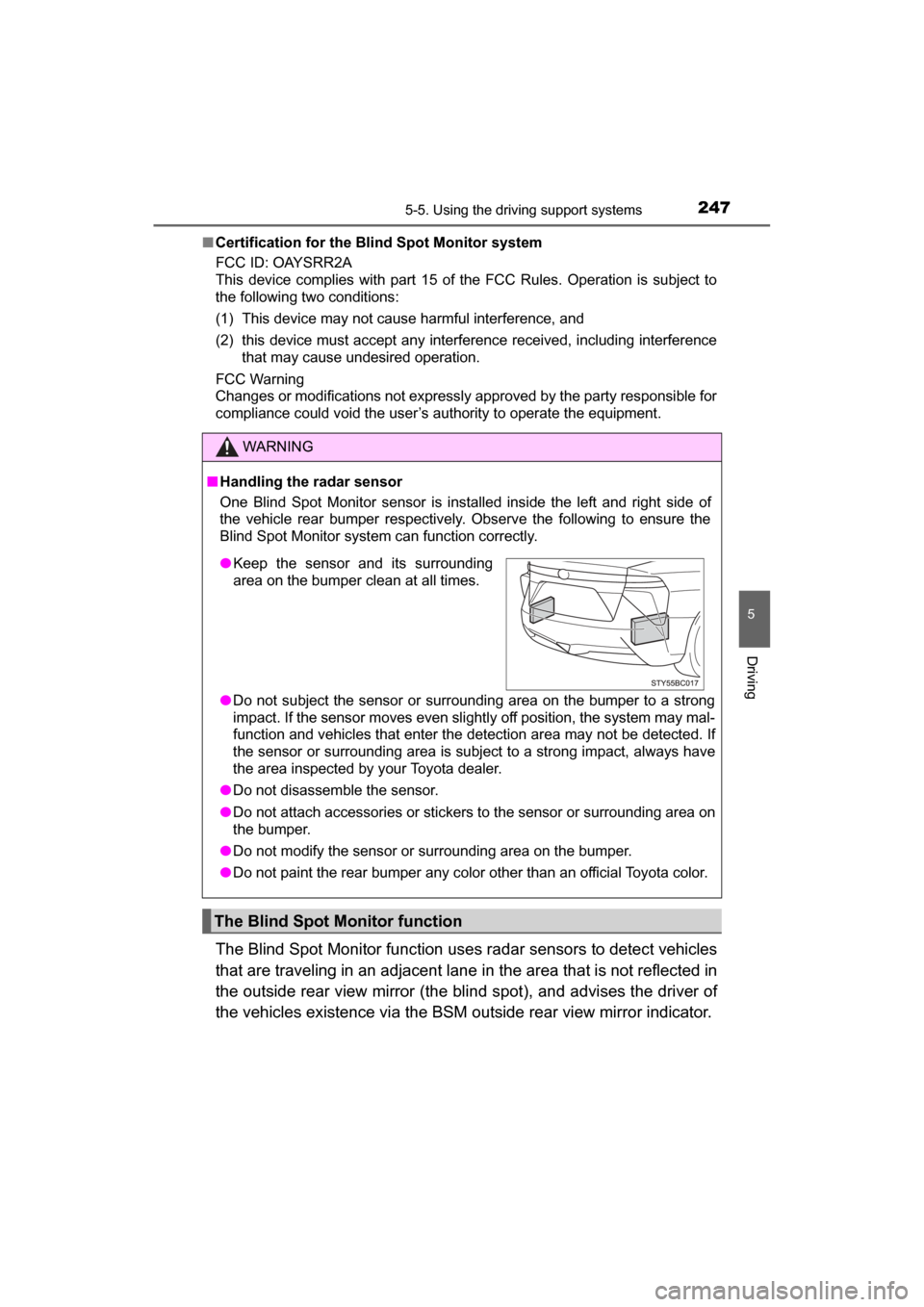
■ Handling the radar sensor
One Blind Spot Monitor sensor is installed inside the left and right side of
the vehicle rear bumper respectively. Observe the following to ensure the
Blind Spot Monitor system can function correctly.
● Do not subject the sensor or surrounding area on the bumper to a strong
impact. If the sensor moves even slightly off position, the system may mal-
function and vehicles that enter the detection area may not be detected. If
the sensor or surrounding area is subject to a strong impact, always have
the area inspected by your Toyota dealer.
● Do not disassemble the sensor.
● Do not attach accessories or stickers to the sensor or surrounding area on
the bumper.
● Do not modify the sensor or surrounding area on the bumper.
● Do not paint the rear bumper any color other than an official Toyota color.
The Blind Spot Monitor function
●Keep the sensor and its surrounding
area on the bumper clean at all times.
Page 248 of 464
2485-5. Using the driving support systems
MIRAI_OM_USA_OM62023U
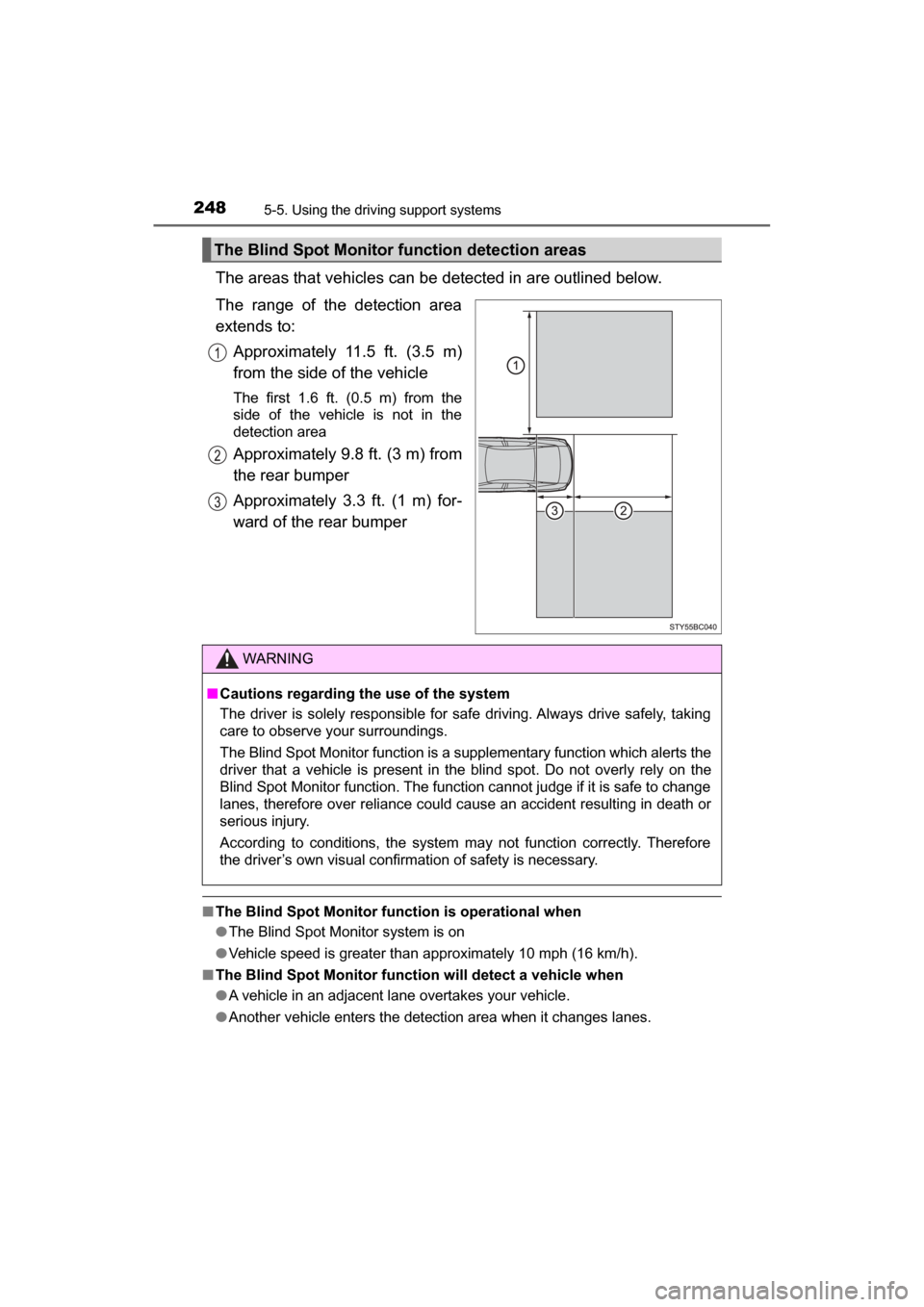
The areas that vehicles can be detected in are outlined below.
The range of the detection area
extends to: Approximately 11.5 ft. (3.5 m)
from the side of the vehicle
The first 1.6 ft. (0.5 m) from the
side of the vehicle is not in the
detection area
Approximately 9.8 ft. (3 m) from
the rear bumper
Approximately 3.3 ft. (1 m) for-
ward of the rear bumper
■The Blind Spot Monitor function is operational when
●The Blind Spot Monitor system is on
● Vehicle speed is greater than approximately 10 mph (16 km/h).
■ The Blind Spot Monitor function will detect a vehicle when
●A vehicle in an adjacent lane overtakes your vehicle.
● Another vehicle enters the detection area when it changes lanes.
The Blind Spot Monitor function detection areas
WARNING
■Cautions regarding the use of the system
The driver is solely responsible for safe driving. Always drive safely, taking
care to observe your surroundings.
The Blind Spot Monitor function is a supplementary function which alerts the
driver that a vehicle is present in the blind spot. Do not overly rely on the
Blind Spot Monitor function. The function cannot judge if it is safe to change
lanes, therefore over reliance could cause an accident resulting in death or
serious injury.
According to conditions, the system may not function correctly. Therefore
the driver’s own visual confirmation of safety is necessary.
Page 250 of 464
2505-5. Using the driving support systems
MIRAI_OM_USA_OM62023U
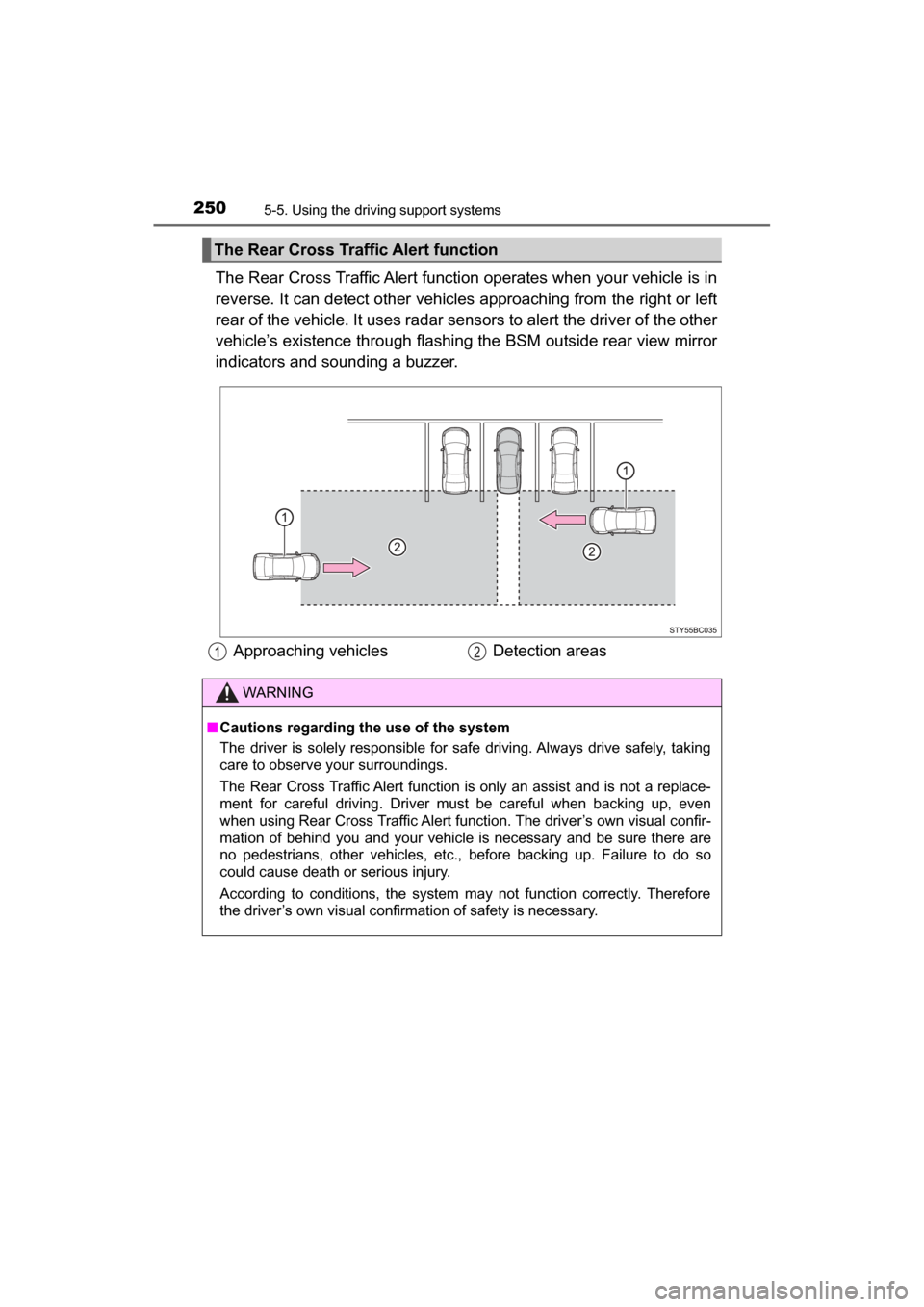
The Rear Cross Traffic Alert function operates when your vehicle is in
reverse. It can detect other vehicles approaching from the right or left
rear of the vehicle. It uses radar sens ors to alert the driver of the other
vehicle’s existence through flashing the BSM outside rear view mirror
indicators and sounding a buzzer.
The Rear Cross Traffic Alert function
Approaching vehicles Detection areas
WARNING
■Cautions regarding the use of the system
The driver is solely responsible for safe driving. Always drive safely, taking
care to observe your surroundings.
The Rear Cross Traffic Alert function is only an assist and is not a replace-
ment for careful driving. Driver must be careful when backing up, even
when using Rear Cross Traffic Alert function. The driver’s own visual confir-
mation of behind you and your vehicle is necessary and be sure there are
no pedestrians, other vehicles, etc., before backing up. Failure to do so
could cause death or serious injury.
According to conditions, the system may not function correctly. Therefore
the driver’s own visual confirmation of safety is necessary.
Page 255 of 464
2555-6. Driving tips
5
Driving
MIRAI_OM_USA_OM62023U
WARNING
■Driving with snow tires
Observe the following precautions to reduce the risk of accidents.
Failure to do so may result in a loss of vehicle control and cause death or
serious injury.
● Use tires of the specified size.
● Maintain the recommended level of air pressure.
● Do not drive in excess of 75 mph (120 km/h), regardless of the type of
snow tires being used.
● Use snow tires on all, not just some wheels.
■ Driving with tire chains
Observe the following precautions to reduce the risk of accidents.
Failure to do so may result in the vehicle being unable to be driven safely,
and may cause death or serious injury.
● Do not drive in excess of the speed limit specified for the tire chains being
used, or 30 mph (50 km/h), whichever is lower.
● Avoid driving on bumpy road surfaces or over potholes.
● Avoid sudden acceleration, abrupt steering, sudden braking and shifting
operations that cause sudden regenerative braking.
● Slow down sufficiently before entering a curve to ensure that vehicle con-
trol is maintained.
● Do not use LDA (Lane Departure Alert) system.
NOTICE
■ Repairing or replacing snow tires
Request repairs or replacement of snow tires from Toyota dealers or legiti-
mate tire retailers.
This is because the removal and attachment of snow tires affects the opera-
tion of the tire pressure warning valves and transmitters.
■ Fitting tire chains
The tire pressure warning valves and transmitters may not function correctly
when tire chains are fitted.
Page 266 of 464
2666-1. Using the air conditioning system and defogger
MIRAI_OM_USA_OM62023U
WARNING
■To prevent the windshield from fogging up
● Do not use during cool air operation in extremely humid weather.
The difference between the temperature of the outside air and that of the
windshield can cause the outer surface of the windshield to fog up, block-
ing your vision.
■ To prevent burns
● Do not touch the rear view mirror surfaces when the outside rear view mir-
ror defoggers are on.
● Do not touch the glass at lower part of the windshield or to the side of the
front pillars when the windshield wiper de-icer is on.
NOTICE
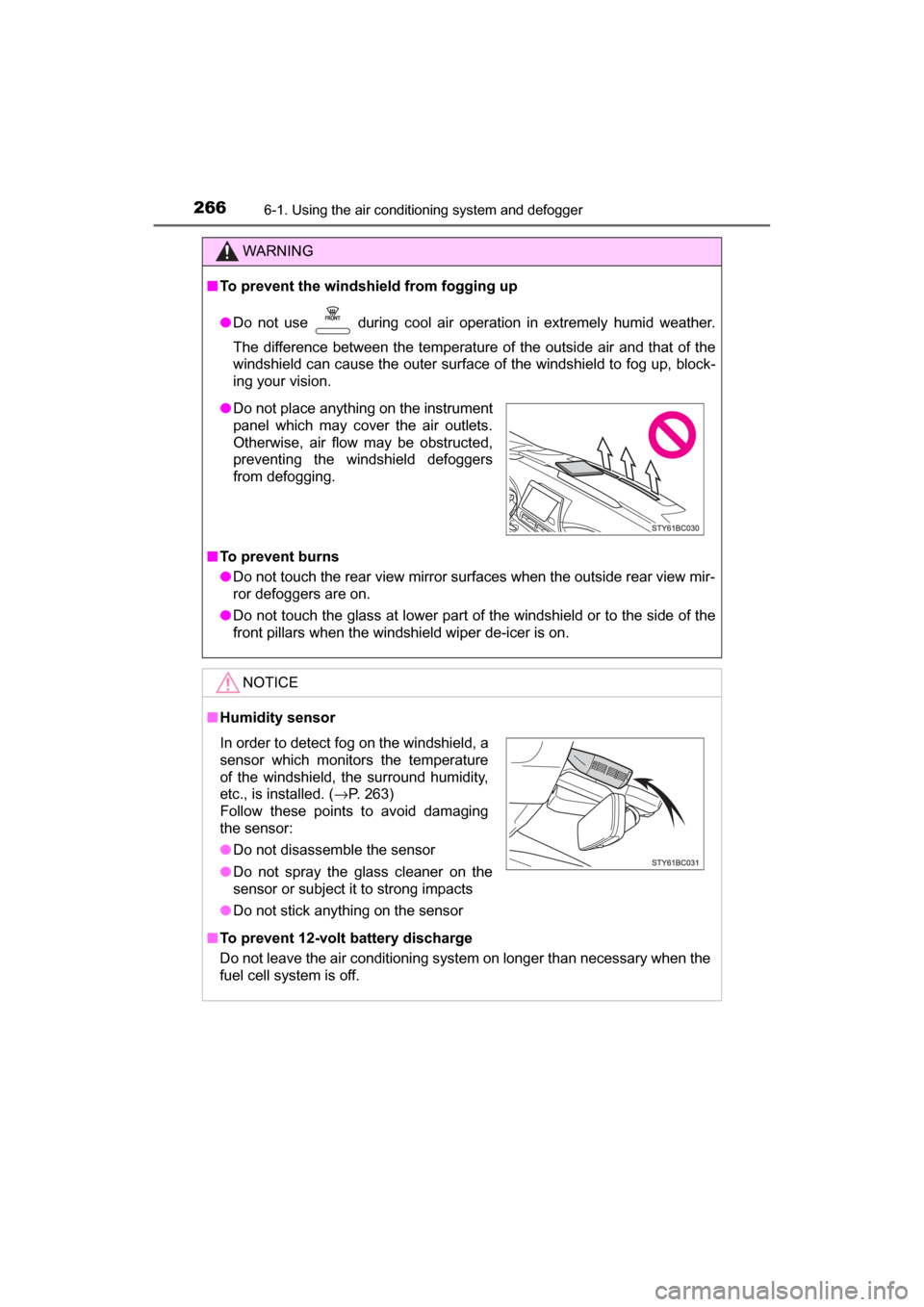
■ Humidity sensor
■ To prevent 12-volt battery discharge
Do not leave the air conditioning system on longer than necessary when the
fuel cell system is off.
● Do not place anything on the instrument
panel which may cover the air outlets.
Otherwise, air flow may be obstructed,
preventing the windshield defoggers
from defogging.
In order to detect fog on the windshield, a
sensor which monitors the temperature
of the windshield, the surround humidity,
etc., is installed. ( →P. 263)
Follow these points to avoid damaging
the sensor:
● Do not disassemble the sensor
● Do not spray the glass cleaner on the
sensor or subject it to strong impacts
● Do not stick anything on the sensor
Page 267 of 464
2676-1. Using the air conditioning system and defogger
6
Interior features
MIRAI_OM_USA_OM62023U
Heated steering wheel/seat heaters
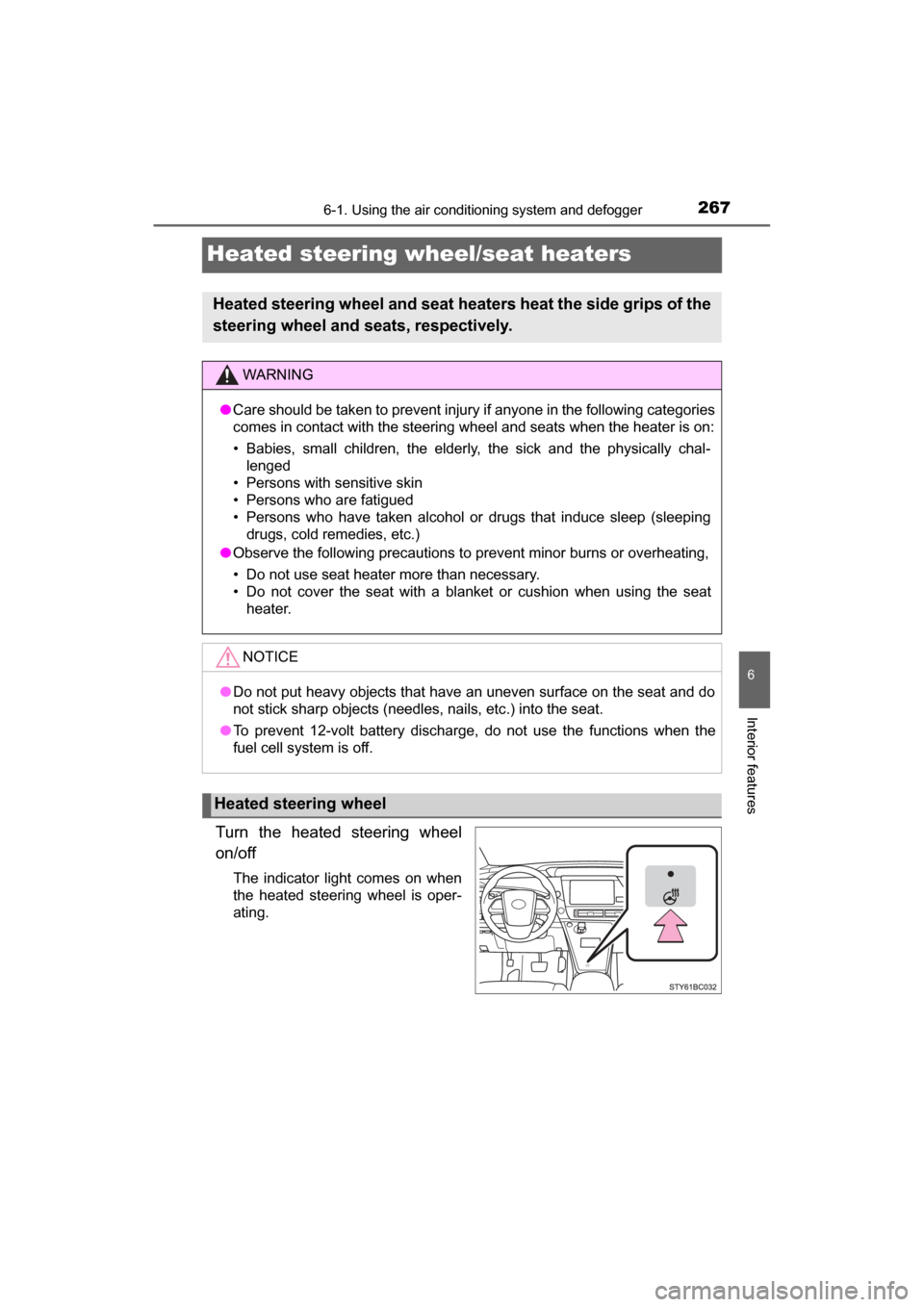
Turn the heated steering wheel
on/off
The indicator light comes on when
the heated steering wheel is oper-
ating.
Heated steering wheel and seat heaters heat the side grips of the
steering wheel and seats, respectively.
WARNING
● Care should be taken to prevent injury if anyone in the following categories
comes in contact with the steering wheel and seats when the heater is on:
• Babies, small children, the elderly, the sick and the physically chal-
lenged
• Persons with sensitive skin
• Persons who are fatigued
• Persons who have taken alcohol or drugs that induce sleep (sleeping drugs, cold remedies, etc.)
● Observe the following precautions to prevent minor burns or overheating,
• Do not use seat heater more than necessary.
• Do not cover the seat with a blanket or cushion when using the seat
heater.
NOTICE
●Do not put heavy objects that have an uneven surface on the seat and do
not stick sharp objects (needles, nails, etc.) into the seat.
● To prevent 12-volt battery discharge, do not use the functions when the
fuel cell system is off.
Heated steering wheel