warning TOYOTA MIRAI 2017 1.G Owners Manual
[x] Cancel search | Manufacturer: TOYOTA, Model Year: 2017, Model line: MIRAI, Model: TOYOTA MIRAI 2017 1.GPages: 464, PDF Size: 12.09 MB
Page 215 of 464
2155-5. Using the driving support systems
5
Driving
MIRAI_OM_USA_OM62023U
WARNING
■Handling the radar sensor
Observe the following to ensure the dynamic radar cruise control can func-
tion effectively.
Otherwise, the radar sensor may not detect correctly and could result in an
accident.
● Keep the sensor and grille cover clean at all times.
Clean the sensor and grille cover with a soft cloth so you do not mark or
damage them.
● Do not subject the sensor or surrounding area to a strong impact.
If the sensor moves even slightly off position, the system may malfunction.
If the sensor or surrounding area is subject to a strong impact, always
have the area inspected and adjusted by your Toyota dealer.
● Do not disassemble the sensor.
● Do not attach accessories or stickers to the sensor, grille cover or sur-
rounding area.
● Do not modify or paint the sensor and grille cover.
● If the radar sensor needs to be replaced, contact your Toyota dealer.
Page 219 of 464

2195-5. Using the driving support systems
5
Driving
MIRAI_OM_USA_OM62023U
■Temporary cancelation of the LDA system functions
If any of the following occurs, the LDA system functions will be temporarily
canceled. The functions will resume after the necessary operating conditions
have returned.
●The turn signal lever is operated.
● The vehicle speed deviates from the operating range of the LDA system
functions.
● When the lane lines cannot be recognized while driving.
● When the lane departure warning function is activated.
The lane departure warning function will not operate again for a several sec-
onds after it has been activated, even if the vehicle leaves the lane again.
■ Alert buzzer for lane departure alert
Depending on the audio system sound level or air conditioning fan noise
while the audio system or air conditioning system is in use, it may be difficult
to hear the alert buzzer.
■ After the vehicle has been parked in the sun
The LDA system may not be available and a warning message is displayed
for a while after driving has started. When the temperature in the cabin
decreases and the temperature around the camera sensor ( →P. 216)
becomes suitable for its operation, turn the LDA switch on again after a
short time.
■ If there are lane markers on only one side of the vehicle
The lane departure alert will not operate for the side on which lane markers
could not be recognized.
Page 220 of 464

2205-5. Using the driving support systems
MIRAI_OM_USA_OM62023U■
Conditions in which the function may not operate correctly
In the following situations, the camera sensor may be unable to recognize
lane markers causing the lane departure warning function to operate incor-
rectly. However, this does not indicate a malfunction.
●When there are shadows on the road running parallel with lane markers, or
if a shadow covers the lane markers
● When driving through an area with no lane markers, such as a toll booth, a
crossing or before a ticket checkpoint
● When the lane markers are broken, Botts’ dots (raised pavement markers)
or stones
● When lane markers are obscured or partially obscured by sand, dirt, etc.
● When driving on a road surface that is wet due to rain, previous rainfall,
standing water, etc.
● When the lane markers are yellow (These may be more difficult for the sys-
tem to recognize compared to white markers.)
● When the lane markers are on a curb, etc.
● When driving on a particularly bright road surface, such as concrete
● When driving on a road surface that is bright due to reflected light
● When driving in a location where the light level changes rapidly, such as the
entrance to or exit from a tunnel
● When sunlight or the headlights of oncoming vehicles are shining directly
into the camera lens
● When driving on roads that are branching or merging
● When driving on winding roads or roads that are uneven
● When driving on rough or unpaved roads
● When driving on a sharp curve
● When lane markers are extremely narrow or extremely wide
● When the vehicle leans to one side an unusual amount due to a heavy load
or improper tire inflation pressure
● When the following distance between your vehicle and the vehicle ahead is
extremely short
● When the vehicle experiences strong up-and-down motion such as when
driving on an extremely rough road or on a seam in the pavement
● When headlight brightness at nighttime is reduced due to dirt on the lenses,
or when the headlights are misaligned
■ When changing the tires
Depending on the tires used, sufficient performance may not be maintainable.
Page 221 of 464

2215-5. Using the driving support systems
5
Driving
MIRAI_OM_USA_OM62023U■
Warning messages for the LDA system
Warning messages are used to indicate a system malfunction or to inform th\
e
driver of the need for caution while driving. If a warning message is shown on
the multi-information display, read the message and follow the instructions.
Also, even if a warning message is displayed, it will not impede normal driv-
ing.
WARNING
■Before using the LDA system
Do not rely solely on the LDA system. The LDA system does not drive the
vehicle automatically, nor does it reduce the amount of care you need to
take. As such, the driver must always assume full responsibility for under-
standing his/her surroundings, for operating the steering wheel to correct
the driving line, and for driving safely. Also, take occasional rests from
fatigue due to driving over long periods of time, etc.
Inappropriate or negligent driving could lead to an unexpected accident.
■ To avoid operating the LDA system by mistake
Switch the LDA system off using the LDA switch when not in use.
(→P. 217)
■ Situations unsuitable for LDA system
Do not use the LDA system in any of the following situations.
Otherwise, the system may not function correctly and could result in an
accident.
● When driving with tire chains, a spare tire, or similar equipment
● When there are objects or structures along the roadside that might be mis-
interpreted as lane markers (such as guardrails, a curb, reflector posts,
etc.)
● When driving on snowy roads
● When pavement lane markers are difficult to see due to rain, snow, fog,
sand, dirt, etc.
● When there are visible lines on the pav ement from road repairs, or if the
remains of old lane markers are still visible on the road
● When driving on a road with lane closures due to maintenance, or when
driving in a temporary lane
● When driving through construction areas
Page 230 of 464

2305-5. Using the driving support systems
MIRAI_OM_USA_OM62023U●
The following situations may occur during use.
• Depending on the shape of the obstacle and other factors, the detection
distance may shorten, or detection may be impossible.
• Obstacles may not be detected if they are too close to the sensor.
• There will be a short delay between obstacle detection and display. Even at slow speeds, there is a possibility that the obstacle will come within the
sensor’s detection areas before the display is shown and the buzzer
sounds.
• Thin posts or objects lower than the sensor may not be detected when approached, even if they have been detected once.
• It might be difficult to hear beeps due to the volume of audio system or air flow noise of the air conditioning system.
■ If “Clean Parking Assist Sensor” is displayed on the multi-information
display
A sensor may be dirty or covered with snow or ice. In such cases, if it is
removed from the sensor, the system should return to normal.
Also, due to the sensor being frozen at low temperatures, a malfunction dis-
play may appear or an obstacle may not be detected. If the sensor thaws out,
the system should return to normal.
■ If “Parking Assist Malfunction” is displayed on the multi-information dis-
play
Depending on the malfunction of the sensor, the device may not be working
normally.
Have the vehicle inspected by your Toyota dealer.
■ Certification for the intuitive parking assist
This device complies with Part 15 of the FCC Rules. Operation is subject to
the following two conditions: (1) This device may not cause harmful interfer-
ence, and (2) This device must accept any interference received, including
interference that may cause undesired operation.
■ Customization
Settings (e.g. buzzer sounds volume) can be changed.
(Customizable features: →P. 228, 440)
WARNING
■When using the intuitive parking assist
Observe the following precautions.
Failing to do so may result in the vehicle being unable to be driven safely
and possibly cause an accident.
● Do not use the sensor at speeds in excess of 6 mph (10 km/h).
● The sensors’ detection areas and reaction times are limited. When moving
forward or reversing, check the areas surrounding the vehicle (especially
the sides of the vehicle) for safety, and drive slowly, using the brake to
control the vehicle’s speed.
● Do not install accessories within the sensors’ detection areas.
Page 234 of 464
2345-5. Using the driving support systems
MIRAI_OM_USA_OM62023U
■Turning off both TRAC and VSC systems
To turn the TRAC and VSC systems off, press and hold for more than 3
seconds while the vehicle is stopped.
The VSC OFF indicator will come on and the “TRAC OFF” is displayed on the
multi-information display.
Press again to turn the systems back on.
Pre-collision brake assist and pre-collisi on braking will also be disabled. The
PCS warning light will come on and the message is shown on the multi-infor-
mation display. ( →P. 242)
■ When the message is displayed on th e multi-information display show-
ing that TRAC has been disable d even if has not been pressed
TRAC and hill-start assist control cannot be operated. Contact your Toyota
dealer.
■ Sounds and vibrations caused by the ABS, brake assist, VSC, TRAC and
hill-start assist control systems
Any of the following conditions may occur when the above systems are oper-
ating. None of these indicates that a malfunction has occurred.
●Vibrations may be felt through the vehicle body and steering.
● A motor sound may be heard after the vehicle comes to a stop.
● The brake pedal may pulsate slightly after the ABS is activated.
● The brake pedal may move down slightly after the ABS is activated.
■ ECB operating sound
ECB operating sound may be heard in the following cases, but it does not
indicate that a malfunction has occurred.
●Operating sound heard from motor compartment when the brake pedal is
operated.
● Motor sound of the brake system heard from the front part of the vehicle
when the driver’s door is opened.
● Operating sound heard from the motor compartment when 1 or 2 minutes
passed after the stop of the fuel cell system.
■ EPS operation sound
When the steering wheel is operated, a motor sound (whirring sound) may be
heard. This does not indicate a malfunction.
Page 236 of 464
2365-5. Using the driving support systems
MIRAI_OM_USA_OM62023U
WARNING
■The ABS does not operate effectively when
● The limits of tire gripping performance have been exceeded (such as
excessively worn tires on a snow covered road).
● The vehicle hydroplanes while driving at high speed on wet or slick roads.
■ Stopping distance when the ABS is operating may exceed that of nor-
mal conditions
The ABS is not designed to shorten the vehicle’s stopping distance. Always
maintain a safe distance from the vehicle in front of you, especially in the
following situations:
● When driving on dirt, gravel or snow-covered roads
● When driving with tire chains
● When driving over bumps in the road
● When driving over roads with potholes or uneven surfaces
■ TRAC may not operat e effectively when
Directional control and power may not be achievable while driving on slip-
pery road surfaces, even if the TRAC system is operating.
Drive the vehicle carefully in conditions where stability and power may be
lost.
■ Hill- start assist control does not operate effectively when
● Do not overly rely on the hill-start assist control. The hill-start assist control
may not operate effectively on steep inclines and roads covered with ice.
● Unlike the parking brake, hill-start assist control is not intended to hold the
vehicle stationary for an extended period of time. Do not attempt to use
hill-start assist control to hold the vehicle on an incline, as doing so may
lead to an accident.
■ When the TRAC, VSC an d/or ABS is activated
The slip indicator flashes. Always drive carefully. Reckless driving may
cause an accident. Exercise particular care when the indicator flashes.
■ When the TRAC/VSC systems are turned off
Be especially careful and drive at a speed appropriate to the road condi-
tions. As these are the systems to help ensure vehicle stability and driving
force, do not turn the TRAC/VSC systems off unless necessary.
Page 237 of 464

2375-5. Using the driving support systems
5
Driving
MIRAI_OM_USA_OM62023U
WARNING
■Replacing tires
Make sure that all tires are of the specified size, brand, tread pattern and
total load capacity. In addition, make sure that the tires are inflated to the
recommended tire inflation pressure level.
The ABS, TRAC and VSC systems will not function correctly if different tires
are installed on the vehicle.
Contact your Toyota dealer for further information when replacing tires or
wheels.
■ Handling of tires and the suspension
Using tires with any kind of problem or modifying the suspension will affect
the driving assist systems, and may cause a system to malfunction.
Page 238 of 464
2385-5. Using the driving support systems
MIRAI_OM_USA_OM62023U
PCS (Pre-Collision System)
0
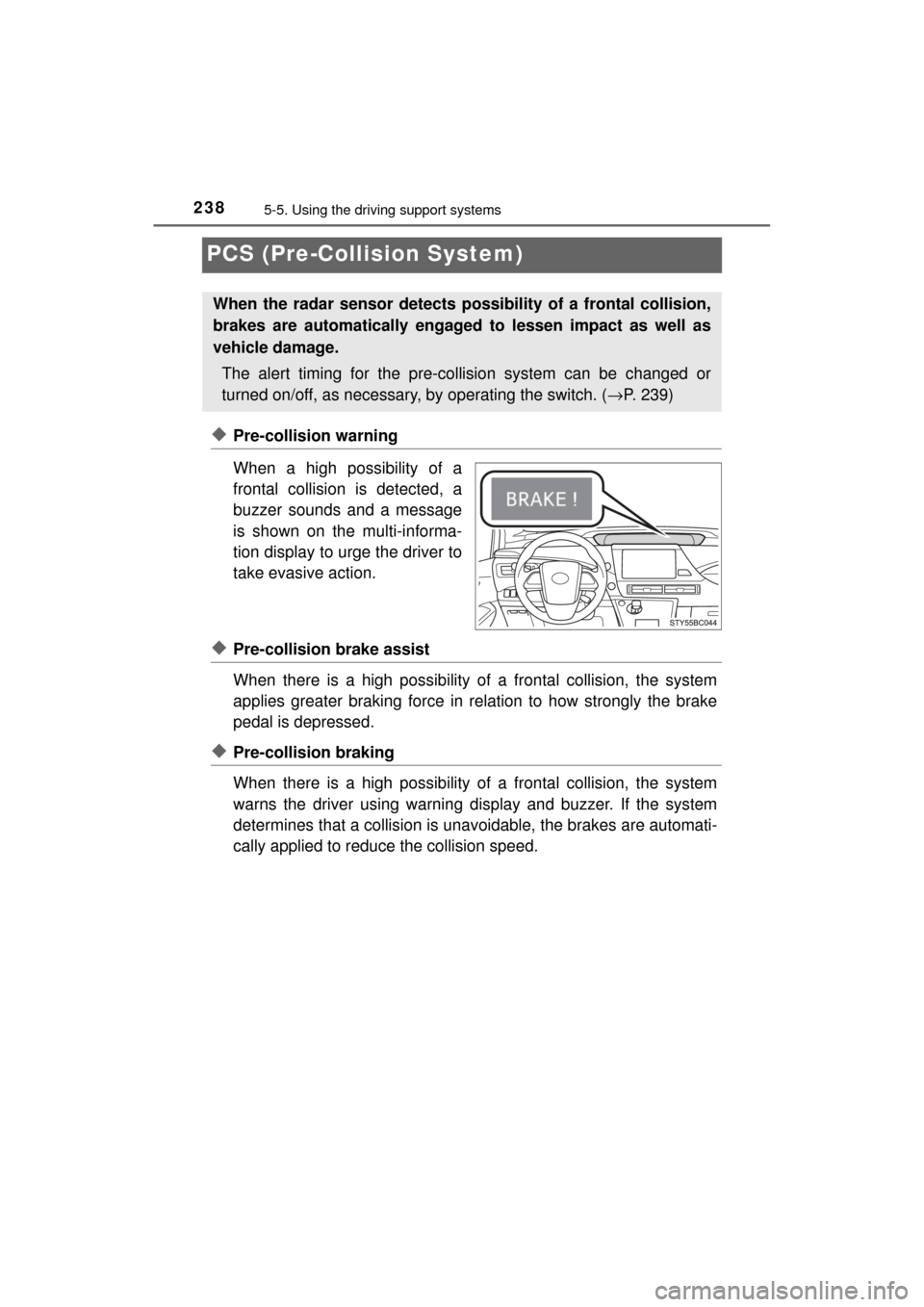
◆Pre-collision warning
When a high possibility of a
frontal collision is detected, a
buzzer sounds and a message
is shown on the multi-informa-
tion display to urge the driver to
take evasive action.
◆Pre-collision brake assist
When there is a high possibility of a frontal collision, the system
applies greater braking force in relation to how strongly the brake
pedal is depressed.
◆Pre-collision braking
When there is a high possibility of a frontal collision, the system
warns the driver using warning display and buzzer. If the system
determines that a collis ion is unavoidable, the brakes are automati-
cally applied to reduc e the collision speed.
When the radar sensor detects possibility of a frontal collision,
brakes are automatically engaged to lessen impact as well as
vehicle damage.
The alert timing for the pre-co llision system can be changed or
turned on/off, as necessary, by operating the switch. (→P. 239)
Page 239 of 464
2395-5. Using the driving support systems
5
Driving
MIRAI_OM_USA_OM62023U■
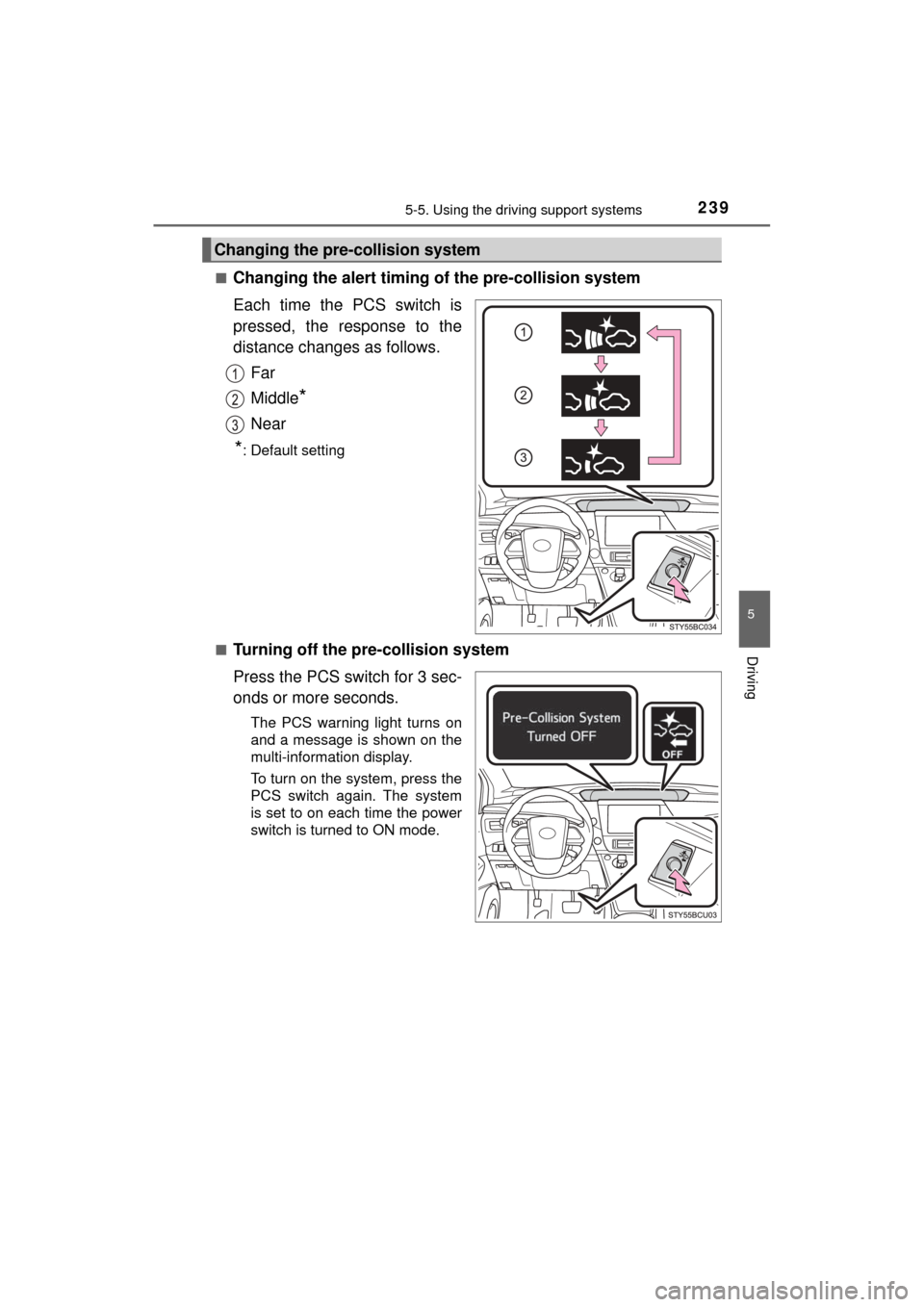
Changing the alert timing of the pre-collision system
Each time the PCS switch is
pressed, the response to the
distance changes as follows.
Far
Middle
*
Near
*: Default setting
■
Turning off the pre-collision system
Press the PCS switch for 3 sec-
onds or more seconds.
The PCS warning light turns on
and a message is shown on the
multi-information display.
To turn on the system, press the
PCS switch again. The system
is set to on each time the power
switch is turned to ON mode.
Changing the pre-collision system