ESP TOYOTA MIRAI 2017 1.G User Guide
[x] Cancel search | Manufacturer: TOYOTA, Model Year: 2017, Model line: MIRAI, Model: TOYOTA MIRAI 2017 1.GPages: 464, PDF Size: 12.09 MB
Page 88 of 464

882. Fuel cell vehicle
MIRAI_OM_USA_OM62023U■
Power output restriction
When the power output is restricted, the vehicle may fail to accelerate or even
decelerate, even though the accelerator pedal is depressed. If a safe driving
speed cannot be maintained, stop the vehicle in a safe place away from the
traffic. This may be caused by the following conditions:
●The coolant temperature may be too high. This can be caused by driving
conditions such as repeated sudden acceleration and deceleration, continu-
ous driving on an incline, continuous driving at high altitudes with a high
load, etc. In such situations, the power output restriction indicator (amber) is
displayed on the main display, “High FC Temperature Reduced Power” is
displayed on the multi-information display, and the power output is
restricted. Once the coolant returns to normal temperature, the power out-
put will return to normal. ( →P. 377)
● The remaining fuel may be low. After the low fuel warning indicator comes
on, the output power will be gradually restricted in order to extend the possi-
ble driving distance. Once getting to this point, the remaining driving dis-
tance possible is short. Immediately refill the vehicle with hydrogen.
● On cold days, the low fuel warning indicator comes on faster than usual and
the output power is restricted.
■ Vehicle proximity notification system
In the following cases, the vehicle proximity notification system may be diffi-
cult to hear for people around.
●In very noisy areas
● In wind or rain
Also, because the vehicle proximity notification system is located in the front
of the vehicle, it may be more difficult to hear from the rear of the vehicle
compared to the front.
■ Electromagnetic waves (EMF)
●High-voltage parts and cables in fuel cell vehicles have an electromagne\
tic
shielding configuration, and therefore emit approximately the same amount
of electromagnetic waves as conventional gasoline-powered vehicles or
home electronic appliances.
● Your vehicle may cause sound interference in some third party-produced
radio parts.
■ Traction battery
The traction battery has a limited service life. The lifespan of the traction bat-
tery can change according to driving style and driving conditions.
Page 125 of 464

1254-2. Opening, closing and locking the doors
4
Operation of each component
MIRAI_OM_USA_OM62023U■
Conditions affecting the operation of the smart key system or wireless
remote control
→P. 134
■ Customization
Settings (e.g. unlocking function using a key) can be changed.
(Customizable features: →P. 435)
WARNING
■To prevent an accident
Observe the following precautions while driving the vehicle.
Failure to do so may result in a door opening and an occupant falling out,
resulting in death or serious injury.
● Ensure that all doors are properly closed and locked.
● Do not pull the inside handle of the doors while driving.
Be especially careful for the front doors, as the doors may be opened
even if the inside lock buttons are in locked position.
● Set the rear door child-protector locks when children are seated in the rear
seats.
■ When opening or closing a door
Check the surroundings of the vehicle such as whether the vehicle is on an
incline, whether there is enough space for a door to open and whether a
strong wind is blowing.
When opening or closing the door, hold the door handle tightly to prepare
for any unpredictable movement.
■ When using the wireless remote control and operating the power win-
dows
Operate the power window after checking to make sure that there is no pos-
sibility of any passenger having any of their body parts caught in the win-
dow. Also, do not allow children to operate the wireless remote control. It is
possible for children and other passengers to get caught in the power win-
dow.
Page 132 of 464
1324-2. Opening, closing and locking the doors
MIRAI_OM_USA_OM62023U■
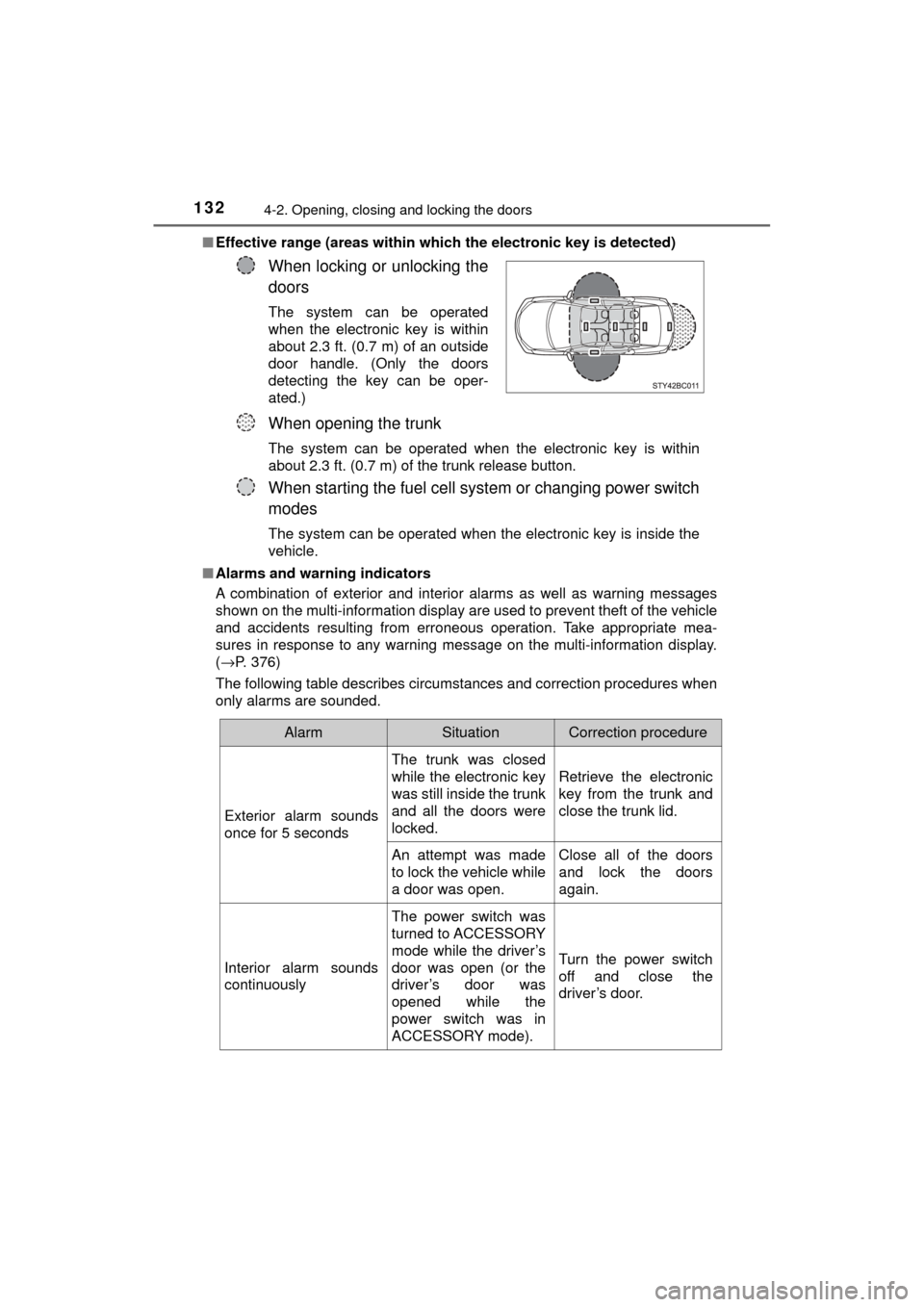
Effective range (areas within whic h the electronic key is detected)
■ Alarms and warning indicators
A combination of exterior and interior alarms as well as warning messages
shown on the multi-information display are used to prevent theft of the vehicle
and accidents resulting from erroneous operation. Take appropriate mea-
sures in response to any warning message on the multi-information display.
(→P. 376)
The following table describes circumstances and correction procedures when
only alarms are sounded.
When locking or unlocking the
doors
The system can be operated
when the electronic key is within
about 2.3 ft. (0.7 m) of an outside
door handle. (Only the doors
detecting the key can be oper-
ated.)
When opening the trunk
The system can be operated when the electronic key is within
about 2.3 ft. (0.7 m) of the trunk release button.
When starting the fuel cell system or changing power switch
modes
The system can be operated when the electronic key is inside the
vehicle.
AlarmSituationCorrection procedure
Exterior alarm sounds
once for 5 seconds The trunk was closed
while the electronic key
was still inside the trunk
and all the doors were
locked.
Retrieve the electronic
key from the trunk and
close the trunk lid.
An attempt was made
to lock the vehicle while
a door was open. Close all of the doors
and lock the doors
again.
Interior alarm sounds
continuously The power switch was
turned to ACCESSORY
mode while the driver’s
door was open (or the
driver’s door was
opened while the
power switch was in
ACCESSORY mode).Turn the power switch
off and close the
driver’s door.
Page 137 of 464

1374-2. Opening, closing and locking the doors
4
Operation of each component
MIRAI_OM_USA_OM62023U■
Certification for the smart key system
FCC ID: NI4TMLF12-6
FCC ID: HYQ23AAB
FCC ID: HYQ14FBA
NOTE:
This device complies with part 15 of the FCC Rules. Operation is subject to
the following two conditions: (1) This device may not cause harmful interfer-
ence, and (2) this device must accept any interference received, including
interference that may cause undesired operation.
FCC WARNING:
Changes or modifications not expressly approved by the party responsible for
compliance could void the user's authority to operate the equipment.
WARNING
■ Caution regarding interfer ence with electronic devices
● People with implantable cardiac pacemakers, cardiac resynchronization
therapy-pacemakers or implantable card ioverter defibrillators should keep
away from the smart key system antennas. ( →P. 132)
The radio waves may affect the operation of such devices. If necessary,
the entry function can be disabled. Ask your Toyota dealer for details, such
as the frequency of radio waves and timing of the emitted radio waves.
Then, consult your doctor to see if you should disable the entry function.
● User of any electrical medical device other than implantable cardiac pace-
makers, cardiac resynchronization therapy-pacemakers or implantable
cardioverter defibrillators should consult the manufacturer of the devic\
e for
information about its operation under the influence of radio waves.
Radio waves could have unexpected effects on the operation of such
medical devices.
Ask your Toyota dealer for details for disabling the entry function.
Page 146 of 464
1464-3. Adjusting the seats
MIRAI_OM_USA_OM62023U
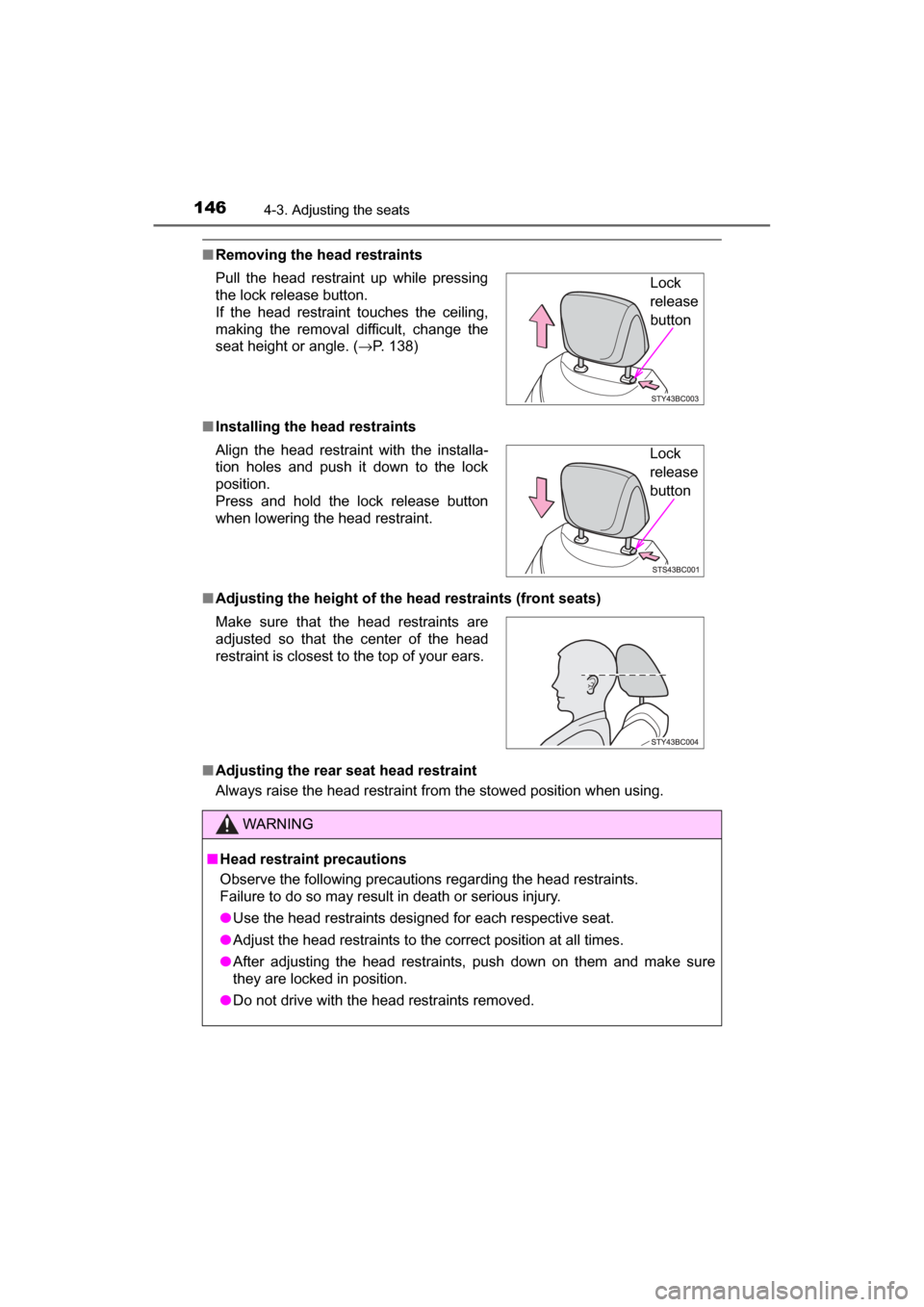
■Removing the head restraints
■ Installing the head restraints
■ Adjusting the height of the head restraints (front seats)
■ Adjusting the rear seat head restraint
Always raise the head restraint from the stowed position when using. Pull the head restraint up while pressing
the lock release button.
If the head restraint touches the ceiling,
making the removal difficult, change the
seat height or angle. ( →P. 138)
Align the head restraint with the installa-
tion holes and push it down to the lock
position.
Press and hold the lock release button
when lowering the head restraint.
Make sure that the head restraints are
adjusted so that the center of the head
restraint is closest to the top of your ears.
WARNING
■ Head restraint precautions
Observe the following precautions regarding the head restraints.
Failure to do so may result in death or serious injury.
● Use the head restraints designed for each respective seat.
● Adjust the head restraints to the correct position at all times.
● After adjusting the head restraints, push down on them and make sure
they are locked in position.
● Do not drive with the head restraints removed.
Lock
release
button
Lock
release
button
Page 149 of 464
1494-4. Adjusting the steering wheel and mirrors
4
Operation of each component
MIRAI_OM_USA_OM62023U
Inside rear view mirror
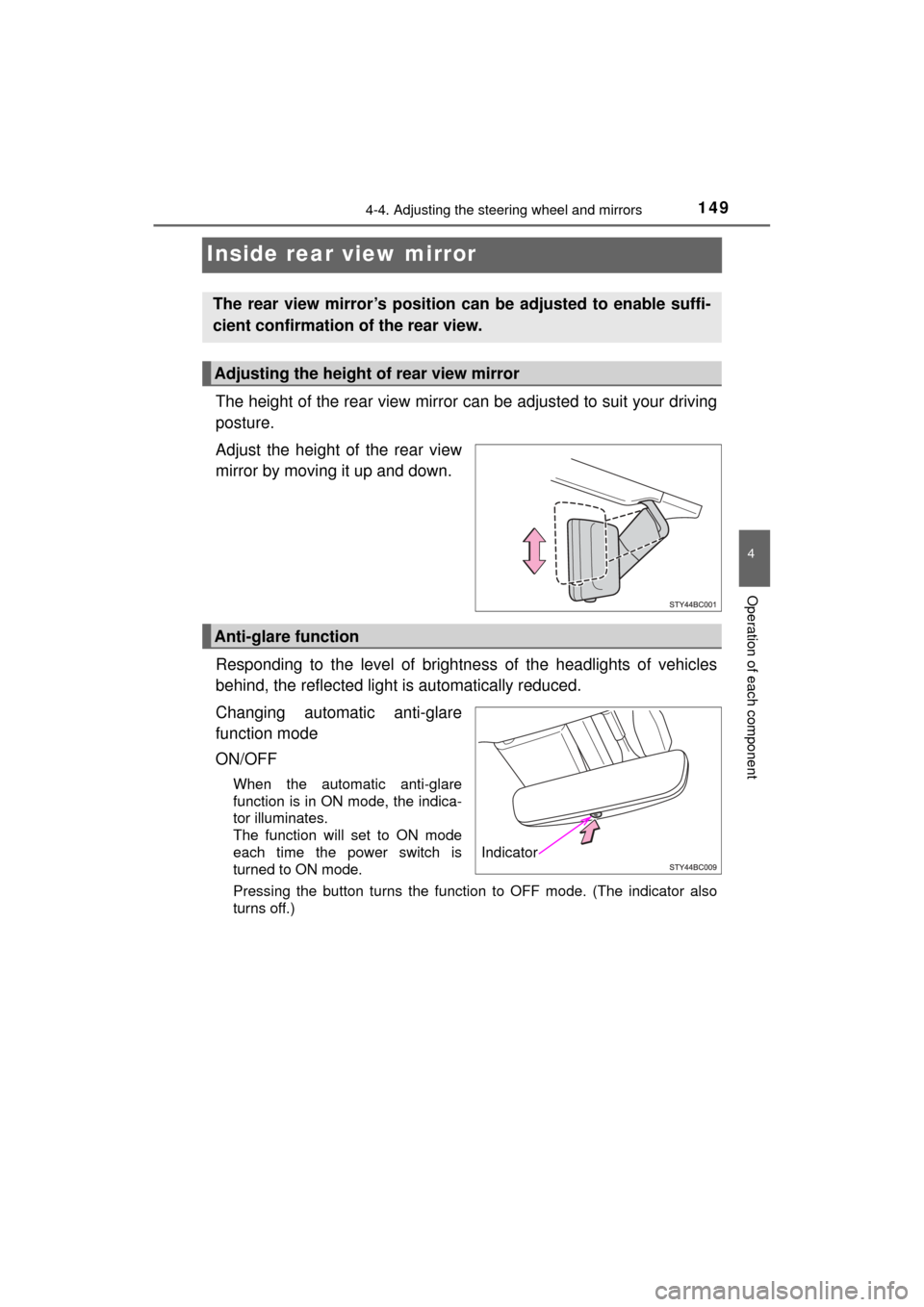
The height of the rear view mirror can be adjusted to suit your driving
posture.
Adjust the height of the rear view
mirror by moving it up and down.
Responding to the level of brightne ss of the headlights of vehicles
behind, the reflected light is automatically reduced.
Changing automatic anti-glare
function mode
ON/OFF
When the automatic anti-glare
function is in ON mode, the indica-
tor illuminates.
The function will set to ON mode
each time the power switch is
turned to ON mode.
Pressing the button turns the function to OFF mode. (The indicator also
turns off.)
The rear view mirror’s position can be adjusted to enable suffi-
cient confirmation of the rear view.
Adjusting the height of rear view mirror
Anti-glare function
Indicator
Page 156 of 464

1564-5. Opening and closing the windows
MIRAI_OM_USA_OM62023U
WARNING
Observe the following precautions.
Failure to do so may result in death or serious injury.
■Closing the windows
● The driver is responsible for all the power window operations, including the
operation for the passengers. In order to prevent accidental operation,
especially by a child, do not let a child operate the power windows. It is
possible for children and other passengers to have body parts caught in
the power window. Also, when riding with a child, it is recommended to use
the window lock switch. ( →P. 154)
● Check to make sure that all passengers do not have any part of their body
in a position where it could be caught when a window is being operated.
● When using the wireless remote control or mechanical key and operating
the power windows, operate the power window after checking to make
sure that there is no possibility of any passenger having any of their body
parts caught in the window. Also do not let a child operate window by the
wireless remote control or mechanical key. It is possible for children and
other passengers to get caught in the power window.
● When exiting the vehicle, turn the power switch off, carry the key and exit
the vehicle along with the child. There may be accidental operation, due to
mischief, etc., that may possibly lead to an accident.
■ Up jam protection function
● Never use any part of your body to intentionally activate the jam protection
function.
● The jam protection function may not work if something gets caught just
before the window fully closes.
■ Down jam protection function
● Never allow passengers to use hands, arms, cloths, etc., to intentionally
activate the down jam protection function.
● The down jam protection function may not work if a foreign object gets
caught just before the window completely opens. Be careful not to get
hands, arms, clothes, etc., caught in the window.
Page 159 of 464

1595-1. Before driving
5
Driving
MIRAI_OM_USA_OM62023U
■When starting off on an uphill
The hill-start assist control will activate. ( →P. 232)
■ For fuel-efficient driving
Keep in mind that fuel cell vehicles are similar to conventional vehicles, and it
is necessary to refrain from activities such as sudden acceleration. ( →P. 94)
■ Driving in the rain
●Drive carefully when it is raining, because visibility will be reduced, the win-
dows may become fogged-up, and the road will be slippery.
● Drive carefully when it starts to rain, because the road surface will be espe-
cially slippery.
● Refrain from high speeds when driving on an expressway in the rain,
because there may be a layer of water between the tires and the road sur-
face, preventing the steering and brakes from operating properly.
■ Restraining the fuel cell system output (Brake Override System)
● When the accelerator and brake pedals are depressed at the same time, the
fuel cell system output may be restrained.
● A warning message is displayed on the multi-information display while the
system is operating. If a warning message is shown on the multi-information
display, read the message and follow the instructions.
■ Restraining sudden star t (Drive-Start Control)
● When the following unusual operation is performed, the fuel cell system out-
put may be restrained.
• When the shift lever is shifted from R to D, D to R, N to R, P to D, or P to
R with the accelerator pedal depressed, a warning message appears on
the multi-information display. If a warning message is shown on the multi-
information display, read the message and follow the instructions.
• When the accelerator pedal is depressed too while the vehicle is in
reverse.
● While Drive-Start Control is being activated, your vehicle may have trou-
ble escaping from the mud or fresh snow. In such case, deactivate TRAC
(→ P. 233) to cancel Drive-Start Control so that the vehicle may become
able to escape from the mud or fresh snow.
Page 161 of 464

1615-1. Before driving
5
Driving
MIRAI_OM_USA_OM62023U
WARNING
Observe the following precautions.
Failure to do so may result in death or serious injury.
■When starting the vehicle
Always keep your foot on the brake pedal while stopped with the “READY”
indicator is illuminated. This prevents the vehicle from creeping.
■ When driving the vehicle
● Do not drive if you are unfamiliar with the location of the brake and accel-
erator pedals to avoid depressing the wrong pedal.
• Accidentally depressing the accelerator pedal instead of the brake
pedal will result in sudden acceleration that may lead to an accident.
• When backing up, you may twist your body around, leading to difficulty in operating the pedals. Make sure to operate the pedals properly.
• Make sure to keep a correct driving posture even when moving the vehicle only slightly. This allows you to depress the brake and accelera-
tor pedals properly.
• Depress the brake pedal using your right foot. Depressing the brake pedal using your left foot may delay response in an emergency, result-
ing in an accident.
● The driver should pay extra attention to pedestrians when the fuel cell sys-
tem is on. As there are no engine sounds, pedestrians may misjudge the
vehicle’s movement.
● During normal driving, do not turn off the fuel cell system. Turning the fuel
cell system off while driving will not cause loss of steering or braking con-
trol, however, power assist to the steering will be lost. This will make it
more difficult to steer smoothly, so you should pull over and stop the vehi-
cle as soon as it is safe to do so.
In the event of an emergency, such as if it becomes impossible to stop the
vehicle in the normal way: →P. 361
● Do not adjust the positions of the steering wheel, the seat, or the inside or
outside rear view mirrors while driving.
Doing so may result in a loss of vehicle control.
● Always check that all passengers’ arms, heads or other parts of their body
are not outside the vehicle.
Page 181 of 464
1815-2. Driving procedures
5
Driving
MIRAI_OM_USA_OM62023U
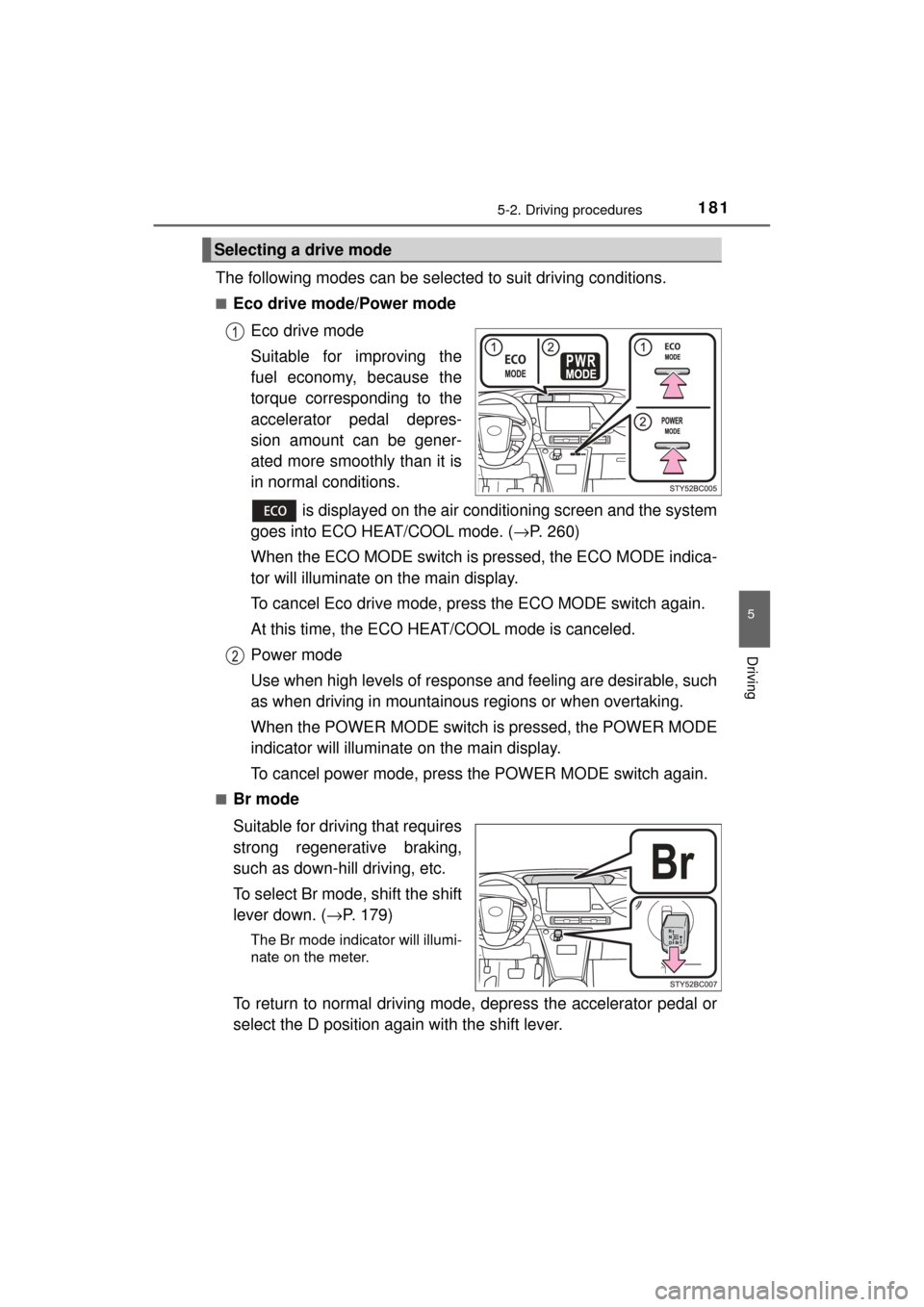
The following modes can be selected to suit driving conditions.
■Eco drive mode/Power modeEco drive mode
Suitable for improving the
fuel economy, because the
torque corresponding to the
accelerator pedal depres-
sion amount can be gener-
ated more smoothly than it is
in normal conditions.
is displayed on the air conditioning screen and the system
goes into ECO HEAT/COOL mode. ( →P. 260)
When the ECO MODE switch is pr essed, the ECO MODE indica-
tor will illuminate on the main display.
To cancel Eco drive mode, press the ECO MODE switch again.
At this time, the ECO HE AT/COOL mode is canceled.
Power mode
Use when high levels of response and feeling are desirable, such
as when driving in mountainous regions or when overtaking.
When the POWER MODE switch is pressed, the POWER MODE
indicator will illuminate on the main display.
To cancel power mode, press the POWER MODE switch again.
■Br mode
Suitable for driving that requires
strong regenerative braking,
such as down-hill driving, etc.
To select Br mode, shift the shift
lever down. ( →P. 179)
The Br mode indicator will illumi-
nate on the meter.
To return to normal driving mode, depress the accelerator pedal or
select the D position again with the shift lever.
Selecting a drive mode