ESP TOYOTA MIRAI 2017 1.G Owner's Manual
[x] Cancel search | Manufacturer: TOYOTA, Model Year: 2017, Model line: MIRAI, Model: TOYOTA MIRAI 2017 1.GPages: 464, PDF Size: 12.09 MB
Page 207 of 464
2075-5. Using the driving support systems
5
Driving
MIRAI_OM_USA_OM62023U
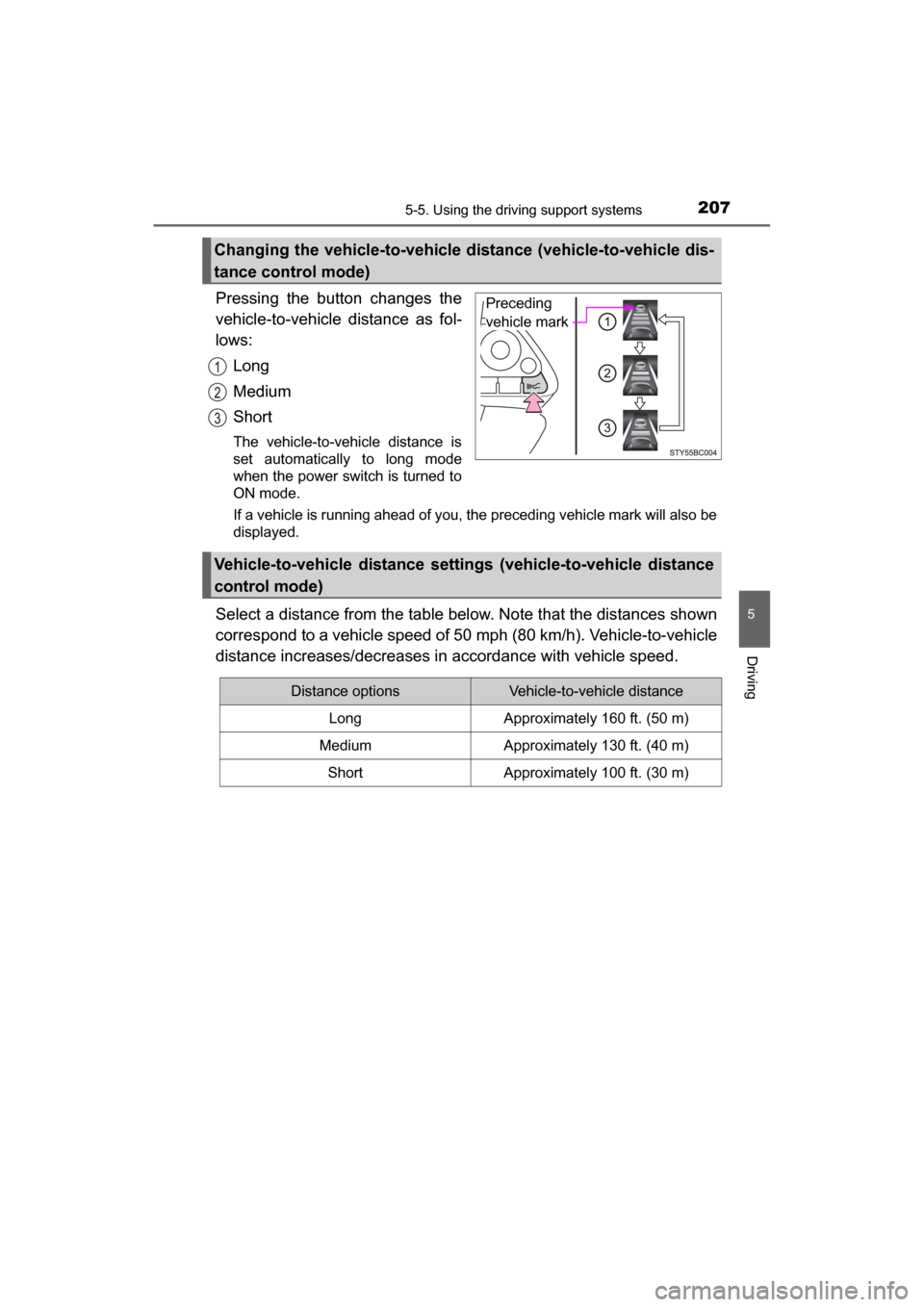
Pressing the button changes the
vehicle-to-vehicle distance as fol-
lows:Long
Medium
Short
The vehicle-to-vehicle distance is
set automatically to long mode
when the power switch is turned to
ON mode.
If a vehicle is running ahead of you, the preceding vehicle mark will also be
displayed.
Select a distance from the table bel ow. Note that the distances shown
correspond to a vehicle speed of 50 mph (80 km/h). Vehicle-to-vehicle
distance increases/decreases in accordance with vehicle speed.
Changing the vehicle-to-vehicle di stance (vehicle-to-vehicle dis-
tance control mode)
Preceding
vehicle mark
Vehicle-to-vehicle distance settings (vehicle-to-vehicle distance
control mode)
Distance optionsVehicle-to-vehicle distance
LongApproximately 160 ft. (50 m)
MediumApproximately 130 ft. (40 m)
ShortApproximately 100 ft. (30 m)
Page 211 of 464
2115-5. Using the driving support systems
5
Driving
MIRAI_OM_USA_OM62023U■
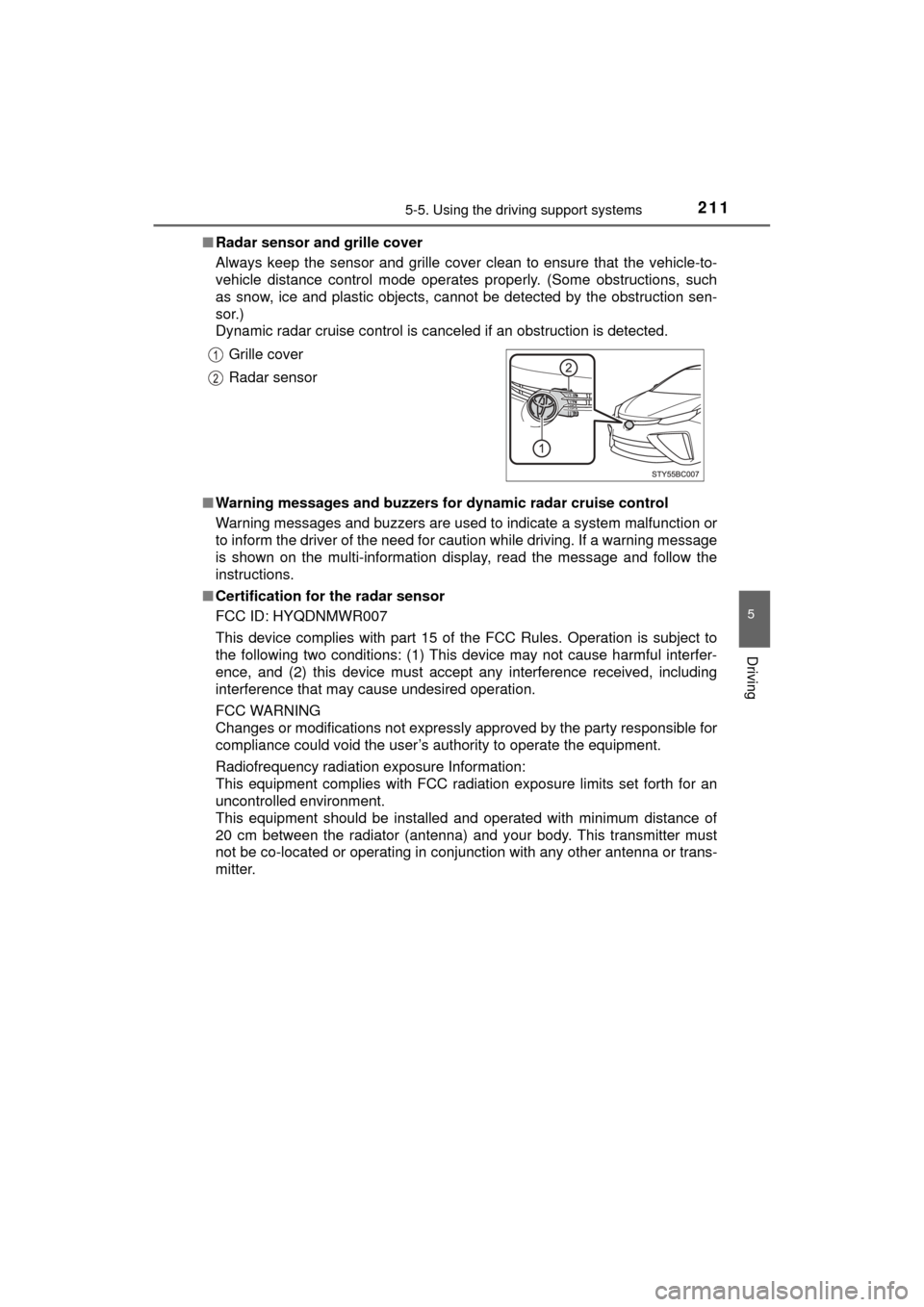
Radar sensor and grille cover
Always keep the sensor and grille cover clean to ensure that the vehicle-to-
vehicle distance control mode operates properly. (Some obstructions, such
as snow, ice and plastic objects, cannot be detected by the obstruction sen-
sor.)
Dynamic radar cruise control is canceled if an obstruction is detected.
■ Warning messages and buzzers for dynamic radar cruise control
Warning messages and buzzers are used to indicate a system malfunction or
to inform the driver of the need for caution while driving. If a warning message
is shown on the multi-information display, read the message and follow the
instructions.
■ Certification for the radar sensor
FCC ID: HYQDNMWR007
This device complies with part 15 of the FCC Rules. Operation is subject to
the following two conditions: (1) This device may not cause harmful interfer-
ence, and (2) this device must accept any interference received, including
interference that may cause undesired operation.
FCC WARNING
Changes or modifications not expressly approved by the party responsible for
compliance could void the user’s authority to operate the equipment.
Radiofrequency radiation exposure Information:
This equipment complies with FCC radiation exposure limits set forth for an
uncontrolled environment.
This equipment should be installed and operated with minimum distance of
20 cm between the radiator (antenna) and your body. This transmitter must
not be co-located or operating in conjunction with any other antenna or trans-
mitter. Grille cover
Radar sensor
Page 221 of 464

2215-5. Using the driving support systems
5
Driving
MIRAI_OM_USA_OM62023U■
Warning messages for the LDA system
Warning messages are used to indicate a system malfunction or to inform th\
e
driver of the need for caution while driving. If a warning message is shown on
the multi-information display, read the message and follow the instructions.
Also, even if a warning message is displayed, it will not impede normal driv-
ing.
WARNING
■Before using the LDA system
Do not rely solely on the LDA system. The LDA system does not drive the
vehicle automatically, nor does it reduce the amount of care you need to
take. As such, the driver must always assume full responsibility for under-
standing his/her surroundings, for operating the steering wheel to correct
the driving line, and for driving safely. Also, take occasional rests from
fatigue due to driving over long periods of time, etc.
Inappropriate or negligent driving could lead to an unexpected accident.
■ To avoid operating the LDA system by mistake
Switch the LDA system off using the LDA switch when not in use.
(→P. 217)
■ Situations unsuitable for LDA system
Do not use the LDA system in any of the following situations.
Otherwise, the system may not function correctly and could result in an
accident.
● When driving with tire chains, a spare tire, or similar equipment
● When there are objects or structures along the roadside that might be mis-
interpreted as lane markers (such as guardrails, a curb, reflector posts,
etc.)
● When driving on snowy roads
● When pavement lane markers are difficult to see due to rain, snow, fog,
sand, dirt, etc.
● When there are visible lines on the pav ement from road repairs, or if the
remains of old lane markers are still visible on the road
● When driving on a road with lane closures due to maintenance, or when
driving in a temporary lane
● When driving through construction areas
Page 227 of 464
2275-5. Using the driving support systems
5
Driving
MIRAI_OM_USA_OM62023U■
Buzzer operation and distance to an obstacle
A buzzer sounds when t
he sensors are operating.
● The buzzer sounds faster as the vehicle approac hes an obstacle.
When the vehicle comes within the following distance of the
obstacle, the buzzer so unds continuously.
• Front corner sensors: A pproximately 1.0 ft. (30 cm)
• Rear corner sensors: Approximately 1.0 ft. (30 cm)
• Rear center sensors: Approximately 1.2 ft. (35 cm)
● When 2 or more obstacles ar e detected simultaneously, the
buzzer system responds to the nearest obstacle. If one or both
come within the above distanc es, the beep will repeat a long
tone, followed by fast beeps.
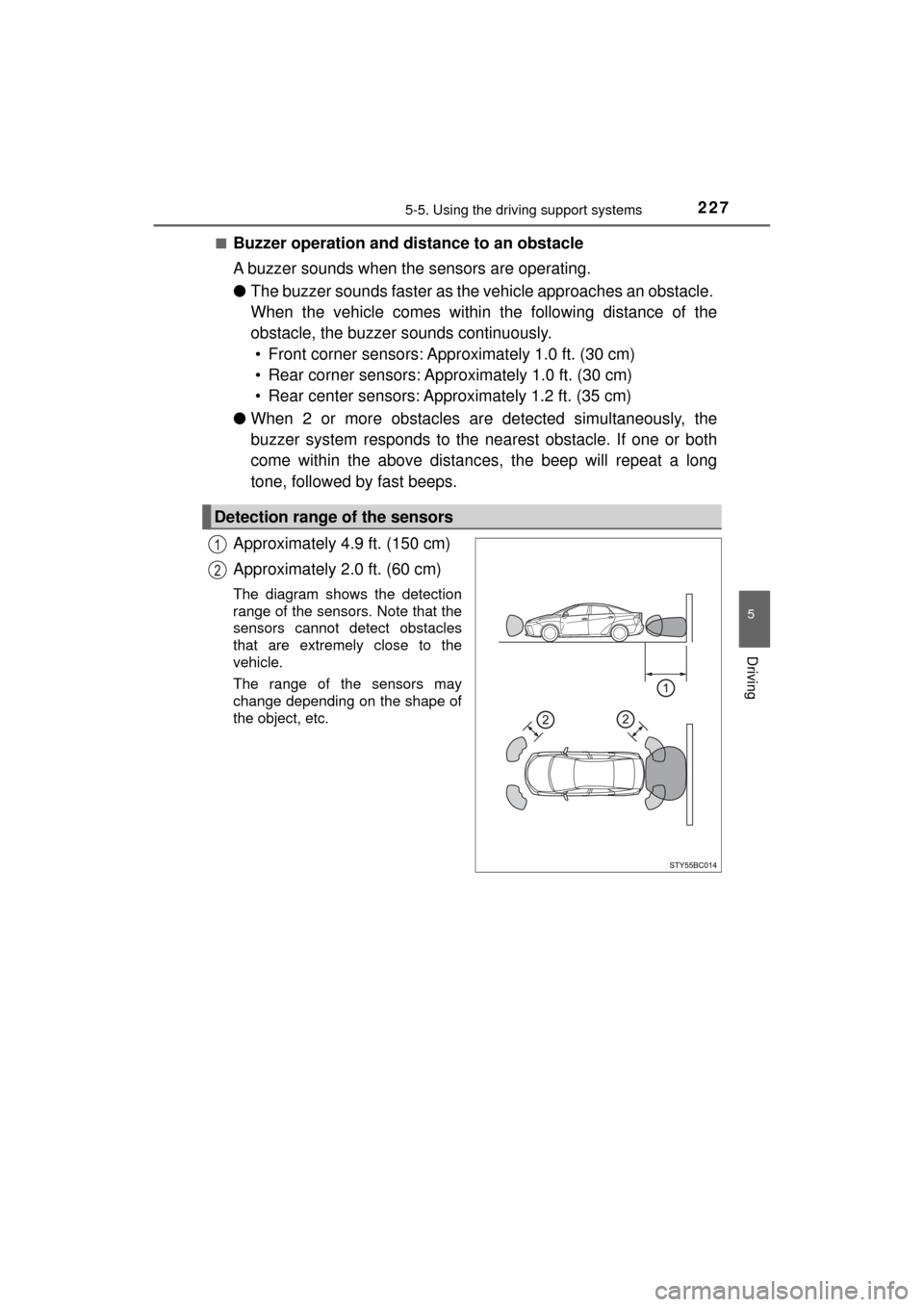
Approximately 4.9 ft. (150 cm)
Approximately 2.0 ft. (60 cm)
The diagram shows the detection
range of the sensors. Note that the
sensors cannot detect obstacles
that are extremely close to the
vehicle.
The range of the sensors may
change depending on the shape of
the object, etc.
Detection range of the sensors
Page 229 of 464

2295-5. Using the driving support systems
5
Driving
MIRAI_OM_USA_OM62023U■
Sensor detection information
●The sensor’s detection areas are limited to the areas around the vehicle’s
bumper.
● Certain vehicle conditions and the surrounding environment may affect the
ability of a sensor to correctly detect an obstacle. Particular instances where
this may occur are listed below.
• There is dirt, snow or ice on the sensor. (Wiping the sensors will resolve
this problem.)
• The sensor is frozen. (Thawing the area will resolve this problem.)
In especially cold weather, if a sensor is frozen the screen may show an
abnormal display, or obstacles may not be detected.
• The sensor is covered in any way.
• The vehicle is leaning considerably to one side.
• On an extremely bumpy road, on an incline, on gravel, or on grass.
• The vicinity of the vehicle is noisy due to vehicle horns, motorcycle
engines, air brakes of large vehicles, or other loud noises producing ultra-
sonic waves.
• There is another vehicle equipped with parking assist sensors in the
vicinity.
• The sensor is coated with a sheet of spray or heavy rain.
• The vehicle is equipped with a fender pole or wireless antenna.
• Towing eyelets are installed.
• The bumper or sensor receives a strong impact.
• The vehicle is approaching a tall or curved curb.
• In harsh sunlight or intense cold weather.
• The area directly under the bumpers is not detected.
• If obstacles draw too close to the sensor.
• A non-genuine Toyota suspension (lowered suspension etc.) is installed.
• People may not be detected if they are wearing certain types of clothing.
In addition to the examples above, there are instances in which, because of
their shape, signs and other objects may be judged by a sensor to be closer
than they are.
● The shape of the obstacle may prevent a sensor from detecting it. Pay par-
ticular attention to the following obstacles:
• Wires, fences, ropes, etc.
• Cotton, snow and other materials that absorb sound waves
• Sharply-angled objects
• Low obstacles
• Tall obstacles with upper sections projecting outwards in the direction of
your vehicle
Page 230 of 464

2305-5. Using the driving support systems
MIRAI_OM_USA_OM62023U●
The following situations may occur during use.
• Depending on the shape of the obstacle and other factors, the detection
distance may shorten, or detection may be impossible.
• Obstacles may not be detected if they are too close to the sensor.
• There will be a short delay between obstacle detection and display. Even at slow speeds, there is a possibility that the obstacle will come within the
sensor’s detection areas before the display is shown and the buzzer
sounds.
• Thin posts or objects lower than the sensor may not be detected when approached, even if they have been detected once.
• It might be difficult to hear beeps due to the volume of audio system or air flow noise of the air conditioning system.
■ If “Clean Parking Assist Sensor” is displayed on the multi-information
display
A sensor may be dirty or covered with snow or ice. In such cases, if it is
removed from the sensor, the system should return to normal.
Also, due to the sensor being frozen at low temperatures, a malfunction dis-
play may appear or an obstacle may not be detected. If the sensor thaws out,
the system should return to normal.
■ If “Parking Assist Malfunction” is displayed on the multi-information dis-
play
Depending on the malfunction of the sensor, the device may not be working
normally.
Have the vehicle inspected by your Toyota dealer.
■ Certification for the intuitive parking assist
This device complies with Part 15 of the FCC Rules. Operation is subject to
the following two conditions: (1) This device may not cause harmful interfer-
ence, and (2) This device must accept any interference received, including
interference that may cause undesired operation.
■ Customization
Settings (e.g. buzzer sounds volume) can be changed.
(Customizable features: →P. 228, 440)
WARNING
■When using the intuitive parking assist
Observe the following precautions.
Failing to do so may result in the vehicle being unable to be driven safely
and possibly cause an accident.
● Do not use the sensor at speeds in excess of 6 mph (10 km/h).
● The sensors’ detection areas and reaction times are limited. When moving
forward or reversing, check the areas surrounding the vehicle (especially
the sides of the vehicle) for safety, and drive slowly, using the brake to
control the vehicle’s speed.
● Do not install accessories within the sensors’ detection areas.
Page 232 of 464
2325-5. Using the driving support systems
MIRAI_OM_USA_OM62023U
Driving assist systems
◆ECB (Electronically Controlled Brake System)
The electronically controlled system generates braking force corre-
sponding to the brake operation
◆ABS (Anti-lock Brake System)
Helps to prevent wheel lock when the brakes are applied suddenly,
or if the brakes are applied while driving on a slippery road surface
◆Brake assist
Generates an increased level of braking force after the brake pedal
is depressed when the system detects a panic stop situation
◆VSC (Vehicle Stability Control)
Helps the driver to control skidding when swerving suddenly or
turning on slippery road surfaces
◆Enhanced VSC (Enhanced Ve hicle Stability Control)
Provides cooperative control of the ABS, TRAC, VSC and EPS.
Helps to maintain directional stability when swerving on slippery
road surfaces by controllin g steering performance.
◆TRAC (Traction Control)
Helps to maintain drive power and prevent the drive wheels from
spinning when starting the vehicle or accelerating on slippery roads
◆Hill-start assist control
Helps to prevent the vehicle from rolling backward when starting on
an incline.
To help enhance driving safety and performance, the following
systems operate automatically in response to various driving
situations. Be aware, however, that these systems are supple-
mentary and should not be relied upon too heavily when operat-
ing the vehicle.
Page 236 of 464
2365-5. Using the driving support systems
MIRAI_OM_USA_OM62023U
WARNING
■The ABS does not operate effectively when
● The limits of tire gripping performance have been exceeded (such as
excessively worn tires on a snow covered road).
● The vehicle hydroplanes while driving at high speed on wet or slick roads.
■ Stopping distance when the ABS is operating may exceed that of nor-
mal conditions
The ABS is not designed to shorten the vehicle’s stopping distance. Always
maintain a safe distance from the vehicle in front of you, especially in the
following situations:
● When driving on dirt, gravel or snow-covered roads
● When driving with tire chains
● When driving over bumps in the road
● When driving over roads with potholes or uneven surfaces
■ TRAC may not operat e effectively when
Directional control and power may not be achievable while driving on slip-
pery road surfaces, even if the TRAC system is operating.
Drive the vehicle carefully in conditions where stability and power may be
lost.
■ Hill- start assist control does not operate effectively when
● Do not overly rely on the hill-start assist control. The hill-start assist control
may not operate effectively on steep inclines and roads covered with ice.
● Unlike the parking brake, hill-start assist control is not intended to hold the
vehicle stationary for an extended period of time. Do not attempt to use
hill-start assist control to hold the vehicle on an incline, as doing so may
lead to an accident.
■ When the TRAC, VSC an d/or ABS is activated
The slip indicator flashes. Always drive carefully. Reckless driving may
cause an accident. Exercise particular care when the indicator flashes.
■ When the TRAC/VSC systems are turned off
Be especially careful and drive at a speed appropriate to the road condi-
tions. As these are the systems to help ensure vehicle stability and driving
force, do not turn the TRAC/VSC systems off unless necessary.
Page 239 of 464
2395-5. Using the driving support systems
5
Driving
MIRAI_OM_USA_OM62023U■
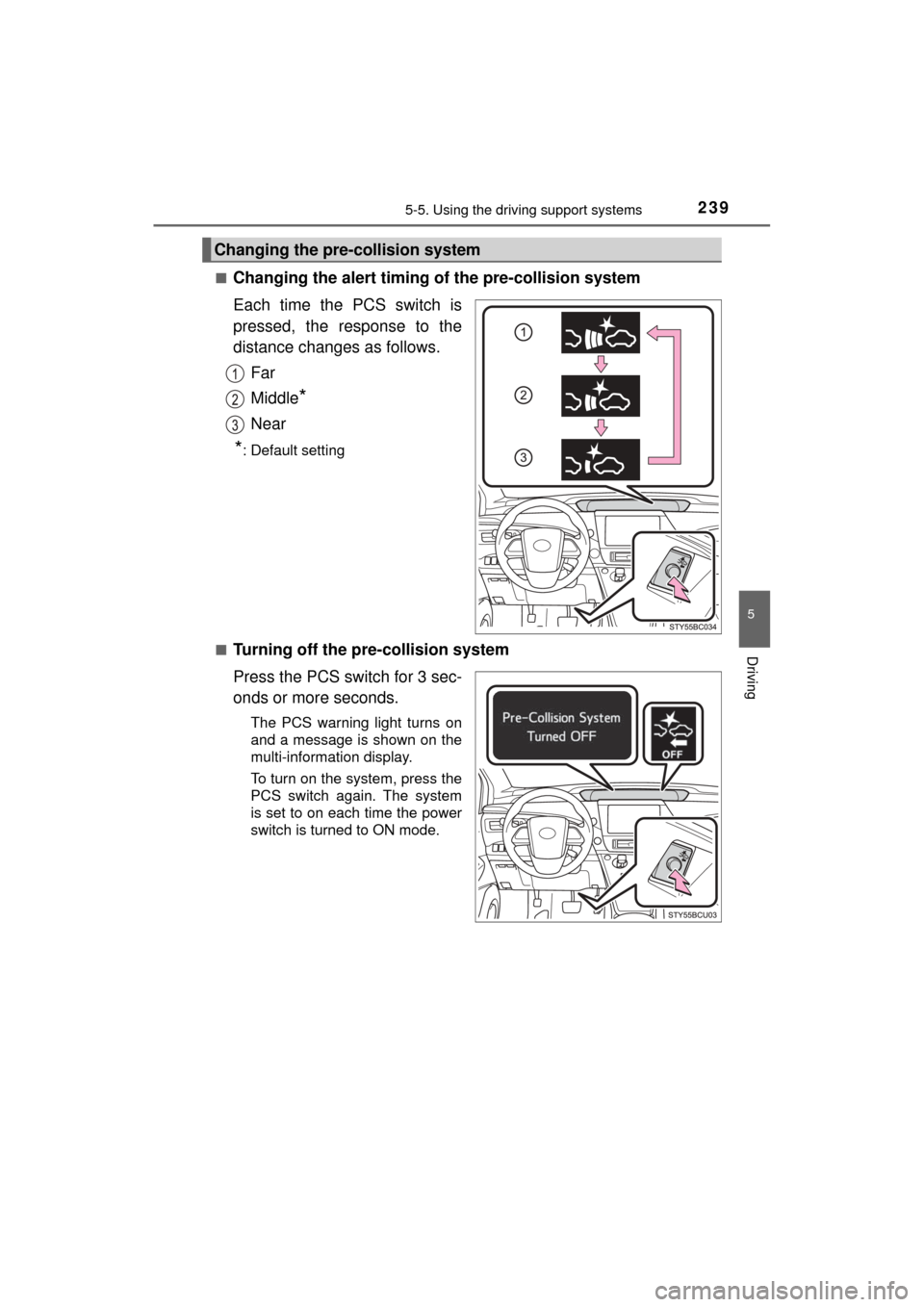
Changing the alert timing of the pre-collision system
Each time the PCS switch is
pressed, the response to the
distance changes as follows.
Far
Middle
*
Near
*: Default setting
■
Turning off the pre-collision system
Press the PCS switch for 3 sec-
onds or more seconds.
The PCS warning light turns on
and a message is shown on the
multi-information display.
To turn on the system, press the
PCS switch again. The system
is set to on each time the power
switch is turned to ON mode.
Changing the pre-collision system
Page 242 of 464

2425-5. Using the driving support systems
MIRAI_OM_USA_OM62023U■
Automatic cancelation of the pre-collision system
When a malfunction occurs due to sensor contamination, etc., that results in
the sensors being unable to detect obstacles, the pre-collision system will be
automatically disabled. In this case, the system will not activate even if there
is a collision possibility.
■ When there is a malfunction in the system, or if the system is temporar-
ily unavailable
The PCS warning light flashes and a warning message is shown on the multi-
information display. If a warning message is shown on the multi-information
display, read the message and follow the instructions.
■ When the TRAC and VSC are turned off
●When the TRAC and VSC operations are turned off ( →P. 234), the pre-colli-
sion brake assist and pre-collision braking are also turned off. However, the
alert function operates.
● The PCS warning light turns on and the “Pre-Collision Brake is Disabled due
to VSC OFF” is displayed on the multi-information display.
■ Certification for the radar sensor
FCC ID: HYQDNMWR007
This device complies with part 15 of the FCC Rules. Operation is subject to
the following two conditions: (1) This device may not cause harmful interfer-
ence, and (2) this device must accept any interference received, including
interference that may cause undesired operation.
FCC WARNING
Changes or modifications not expressly approved by the party responsible for
compliance could void the user’s authority to operate the equipment.
Radiofrequency radiation exposure Information:
This equipment complies with FCC radiation exposure limits set forth for an
uncontrolled environment.
This equipment should be installed and operated with minimum distance of
20 cm between the radiator (antenna) and your body. This transmitter must
not be co-located or operating in conjunction with any other antenna or trans-
mitter.