lock TOYOTA MIRAI 2017 1.G Owner's Manual
[x] Cancel search | Manufacturer: TOYOTA, Model Year: 2017, Model line: MIRAI, Model: TOYOTA MIRAI 2017 1.GPages: 464, PDF Size: 12.09 MB
Page 91 of 464
912. Fuel cell vehicle
2
Fuel cell system
MIRAI_OM_USA_OM62023U
WARNING
■Tailpipe
● Do not directly touch the water or steam coming out of the tailpipe. Doing
so may cause low-temperature burns.
● The fuel cell vehicle generates water during power generation. The gener-
ated water discharged from the tailpipe is not suitable for drinking. Never
drink the water coming out of the tailpipe.
● You may notice a strange odor from the tailpipe for a while after the pur-
chase of a new vehicle or after an extended period of non-use, but this is
not a malfunction. Also, the odor is harmless but it may be unpleasant, so
do not breathe in the exhaust.
■ High-voltage and high-temperature precautions
This vehicle is equipped with a high-voltage system. Follow the instructions
below as high-voltages can cause severe burns and electric shock that may
result in death or serious injury.
● Never touch, disassemble, remove, or replace the high-voltage parts,
cables (orange), or connectors.
● The components inside the motor compartment will become hot during
operation. Be careful of both the high-voltage and high-temperature, and
always obey the warning labels on the vehicle.
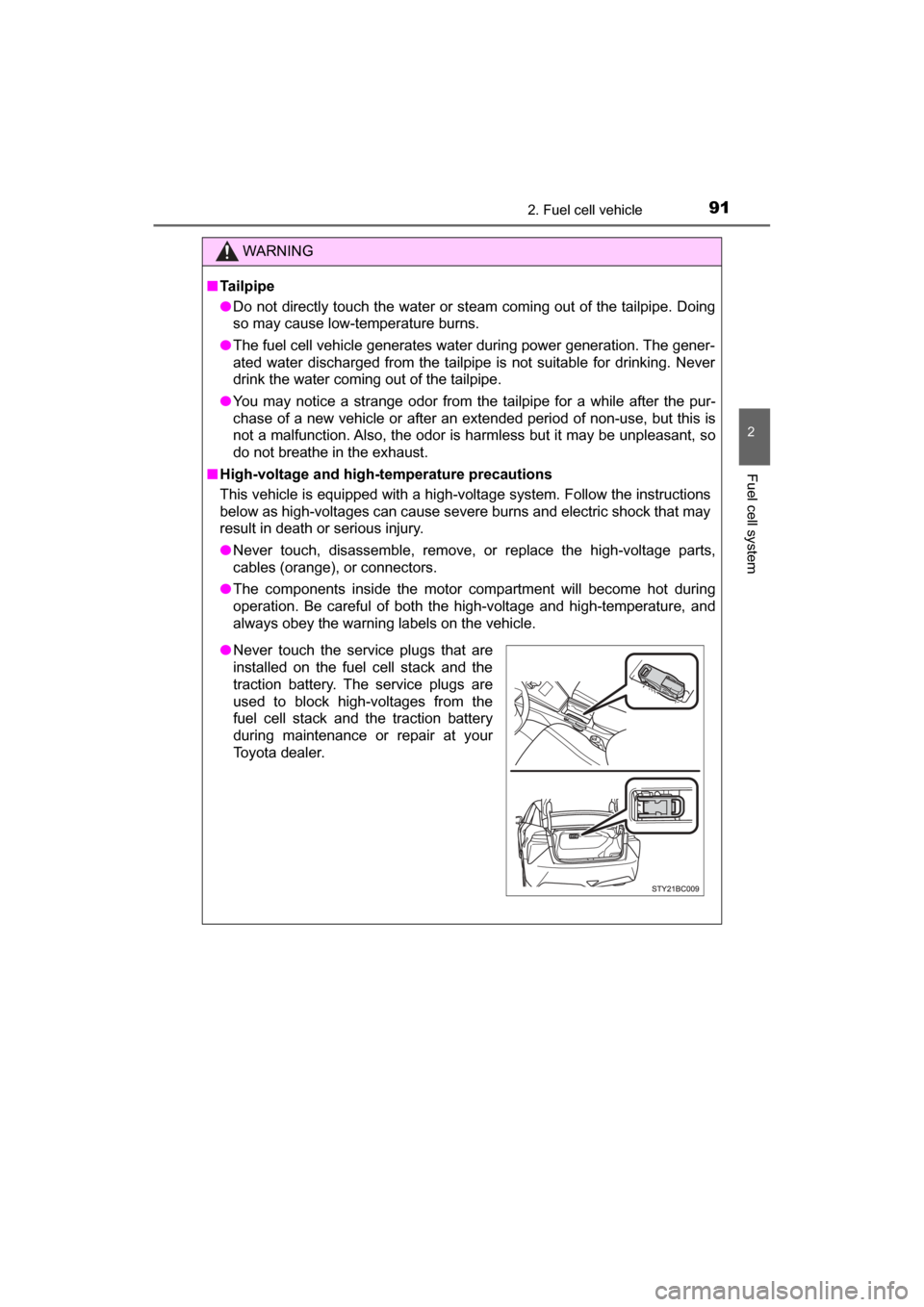
●Never touch the service plugs that are
installed on the fuel cell stack and the
traction battery. The service plugs are
used to block high-voltages from the
fuel cell stack and the traction battery
during maintenance or repair at your
Toyota dealer.
Page 102 of 464
1023. Instrument cluster
MIRAI_OM_USA_OM62023U
Gauges and meters
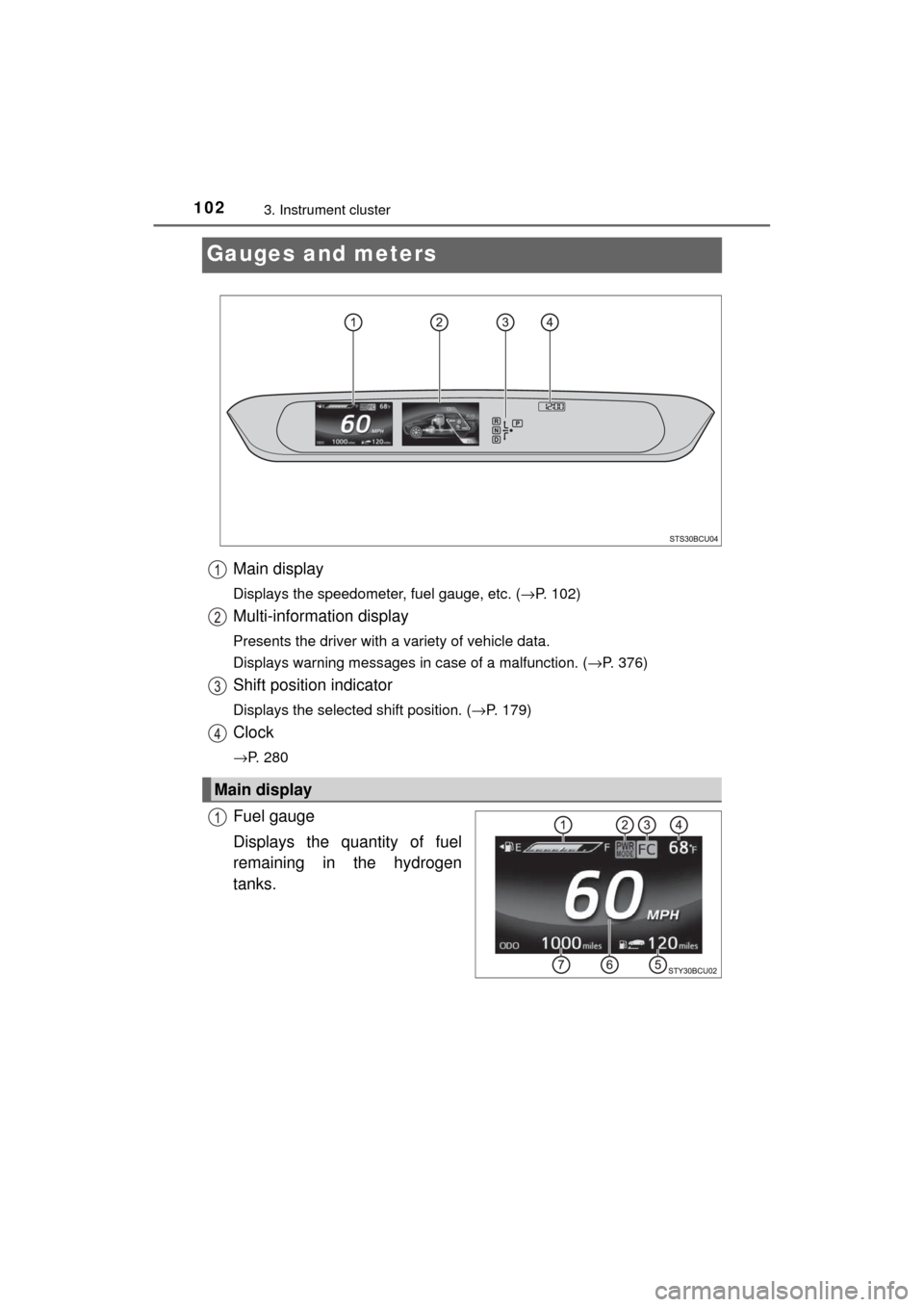
Main display
Displays the speedometer, fuel gauge, etc. (→P. 102)
Multi-information display
Presents the driver with a variety of vehicle data.
Displays warning messages in case of a malfunction. ( →P. 376)
Shift position indicator
Displays the selected shift position. (→P. 179)
Clock
→P. 280
Fuel gauge
Displays the quantity of fuel
remaining in the hydrogen
tanks.
Main display
Page 108 of 464
1083. Instrument cluster
MIRAI_OM_USA_OM62023U
Settings display
When using each equipment, it is possible to toggle the switch and
change the settings of the meter display. • Intuitive parking assist ( →P. 223)
• BSM (Blind Spot Monitor) ( →P. 245)
•Clock ( →P. 280)
• Customize ( →P. 439)
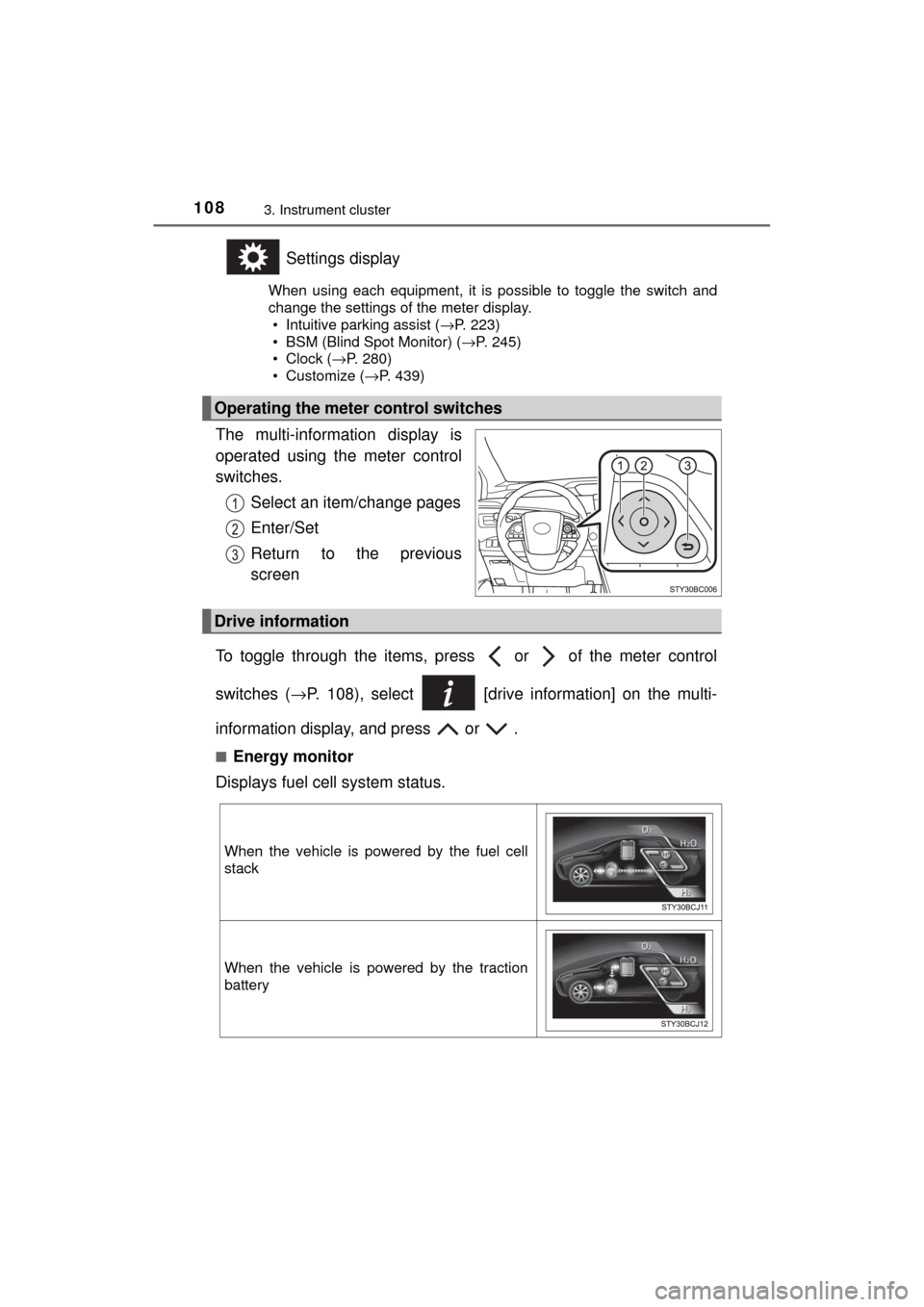
The multi-information display is
operated using the meter control
switches.
Select an item/change pages
Enter/Set
Return to the previous
screen
To toggle through the items, pr ess or of the meter control
switches ( →P. 108), select [drive information] on the multi-
information display, and press or .
■Energy monitor
Displays fuel cell system status.
Operating the meter control switches
Drive information
When the vehicle is powered by the fuel cell
stack
When the vehicle is powered by the traction
battery
Page 115 of 464
115
4
Operation of
each component
MIRAI_OM_USA_OM62023U 4-1. Key information
Keys .................................. 116
4-2. Opening, closing and locking the doors
Doors ................................ 120
Trunk ................................. 126
Smart key system ............. 131
4-3. Adjusting the seats Front seats ........................ 138
Driving position memory ... 140
Head restraints.................. 145
4-4. Adjusting the steering wheel and mirrors
Steering wheel .................. 147
Inside rear view mirror ...... 149
Outside rear view mirrors ............................. 151
4-5. Opening and closing the windows
Power windows ................. 154
Page 116 of 464
1164-1. Key information
MIRAI_OM_USA_OM62023U
Keys
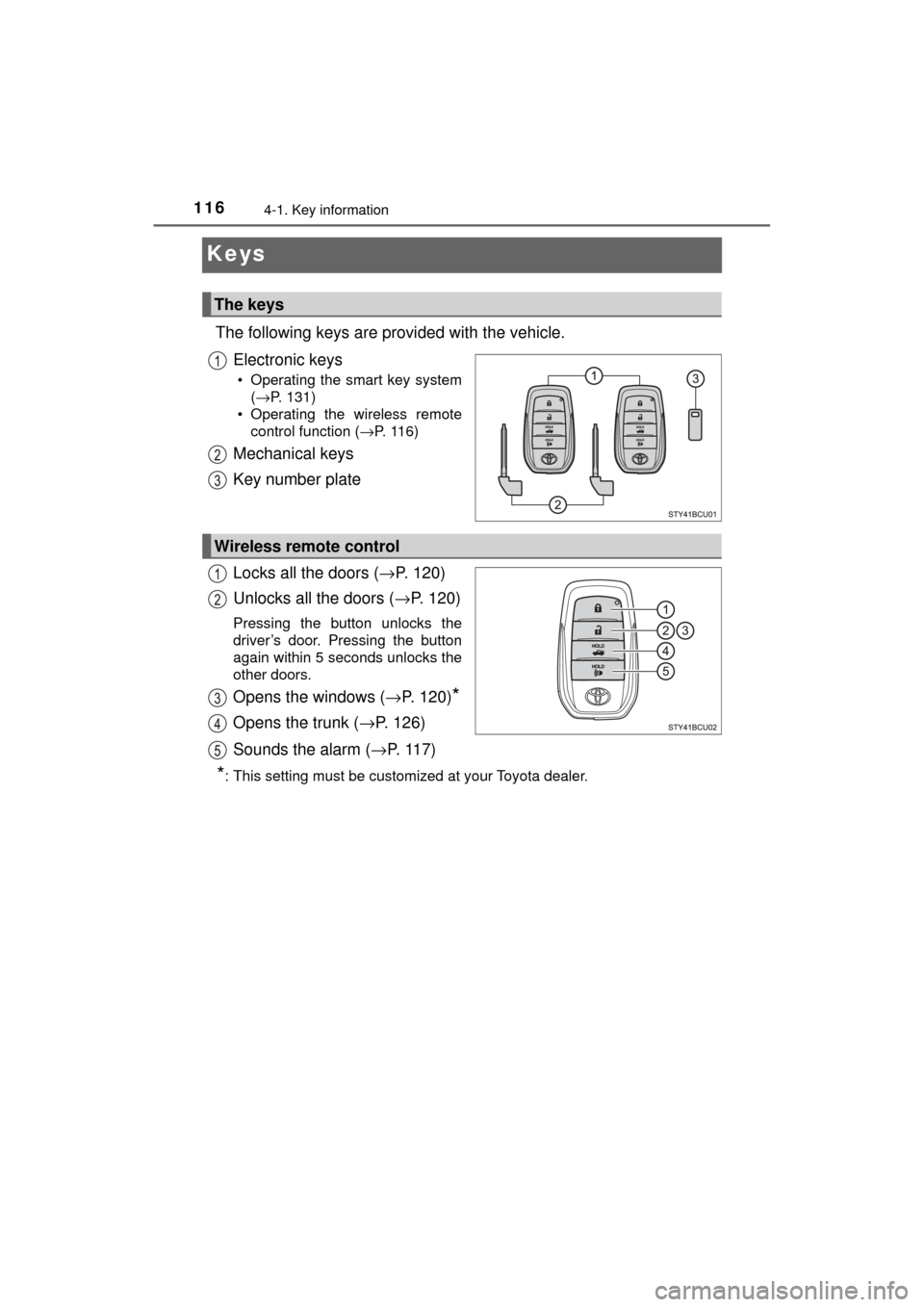
The following keys are provided with the vehicle.Electronic keys
• Operating the smart key system(→P. 131)
• Operating the wireless remote control function ( →P. 116)
Mechanical keys
Key number plate
Locks all the doors ( →P. 120)
Unlocks all the doors ( →P. 120)
Pressing the button unlocks the
driver’s door. Pressing the button
again within 5 seconds unlocks the
other doors.
Opens the windows ( →P. 120)*
Opens the trunk ( →P. 126)
Sounds the alarm ( →P. 117)
*: This setting must be customized at your Toyota dealer.
The keys
Wireless remote control
Page 117 of 464
1174-1. Key information
4
Operation of each component
MIRAI_OM_USA_OM62023U
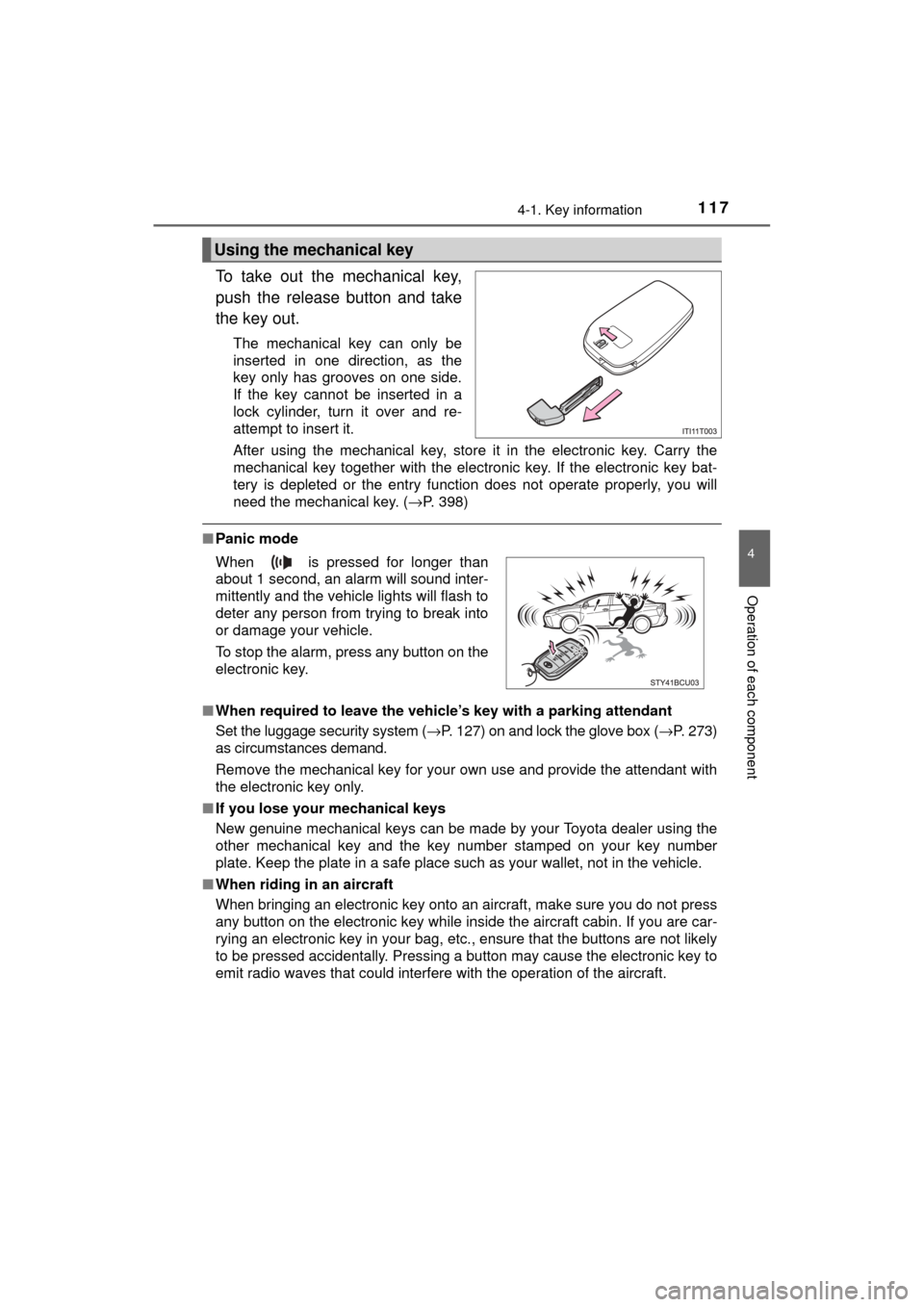
To take out the mechanical key,
push the release button and take
the key out.
The mechanical key can only be
inserted in one direction, as the
key only has grooves on one side.
If the key cannot be inserted in a
lock cylinder, turn it over and re-
attempt to insert it.
After using the mechanical key, store it in the electronic key. Carry the
mechanical key together with the electronic key. If the electronic key bat-
tery is depleted or the entry function does not operate properly, you will
need the mechanical key. (→P. 398)
■Panic mode
■ When required to leave the vehicle’s key with a parking attendant
Set the luggage security system ( →P. 127) on and lock the glove box ( →P. 273)
as circumstances demand.
Remove the mechanical key for your own use and provide the attendant with
the electronic key only.
■ If you lose your mechanical keys
New genuine mechanical keys can be made by your Toyota dealer using the
other mechanical key and the key number stamped on your key number
plate. Keep the plate in a safe place such as your wallet, not in the vehicle.
■ When riding in an aircraft
When bringing an electronic key onto an aircraft, make sure you do not press
any button on the electronic key while inside the aircraft cabin. If you are car-
rying an electronic key in your bag, etc., ensure that the buttons are not likely
to be pressed accidentally. Pressing a button may cause the electronic key to
emit radio waves that could interfere with the operation of the aircraft.
Using the mechanical key
When is pressed for longer than
about 1 second, an alarm will sound inter-
mittently and the vehicle lights will flash to
deter any person from trying to break into
or damage your vehicle.
To stop the alarm, press any button on the
electronic key.
Page 120 of 464
1204-2. Opening, closing and locking the doors
MIRAI_OM_USA_OM62023U
Doors
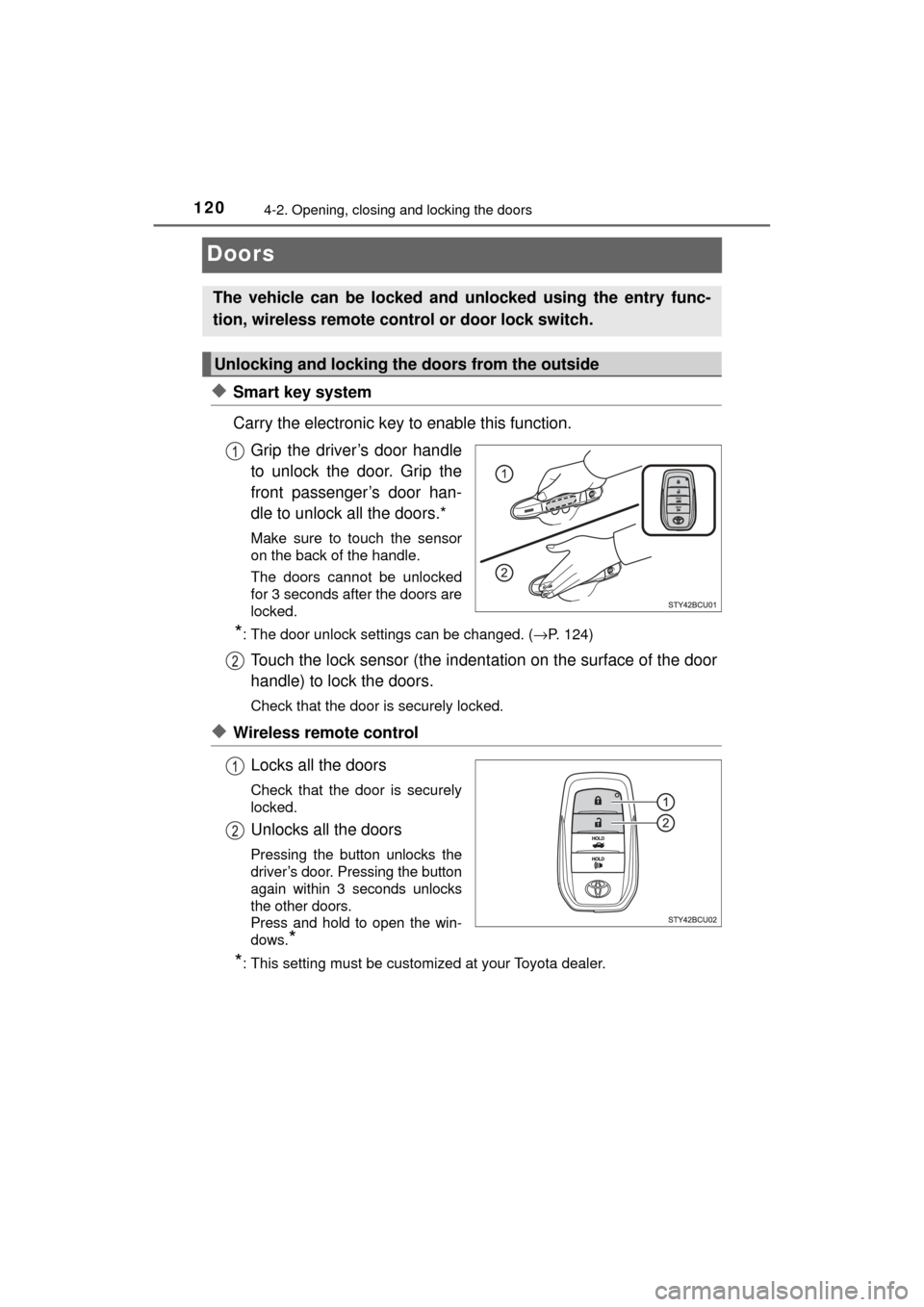
◆Smart key system
Carry the electronic key to enable this function.Grip the driver’s door handle
to unlock the door. Grip the
front passenger’s door han-
dle to unlock all the doors.*
Make sure to touch the sensor
on the back of the handle.
The doors cannot be unlocked
for 3 seconds after the doors are
locked.
*: The door unlock settings can be changed. ( →P. 124)
Touch the lock sensor (the indentation on the surface of the door
handle) to lock the doors.
Check that the door is securely locked.
◆Wireless remote control
Locks all the doors
Check that the door is securely
locked.
Unlocks all the doors
Pressing the button unlocks the
driver’s door. Pressing the button
again within 3 seconds unlocks
the other doors.
Press and hold to open the win-
dows.
*
*: This setting must be customized at your Toyota dealer.
The vehicle can be locked and unlocked using the entry func-
tion, wireless remote c ontrol or door lock switch.
Unlocking and locking the doors from the outside
Page 121 of 464
1214-2. Opening, closing and locking the doors
4
Operation of each component
MIRAI_OM_USA_OM62023U
■Operation signals
Doors:
A buzzer sounds and the emergency flashers flash to indicate that the doors
have been locked/unlocked. (Locked: Once; Unlocked: Twice)
Windows:
A buzzer sounds to indicate that the windows are opening.
■ Security feature
If a door is not opened within approximately 60 seconds after the vehicle is
unlocked, the security feature automatically locks the vehicle again.
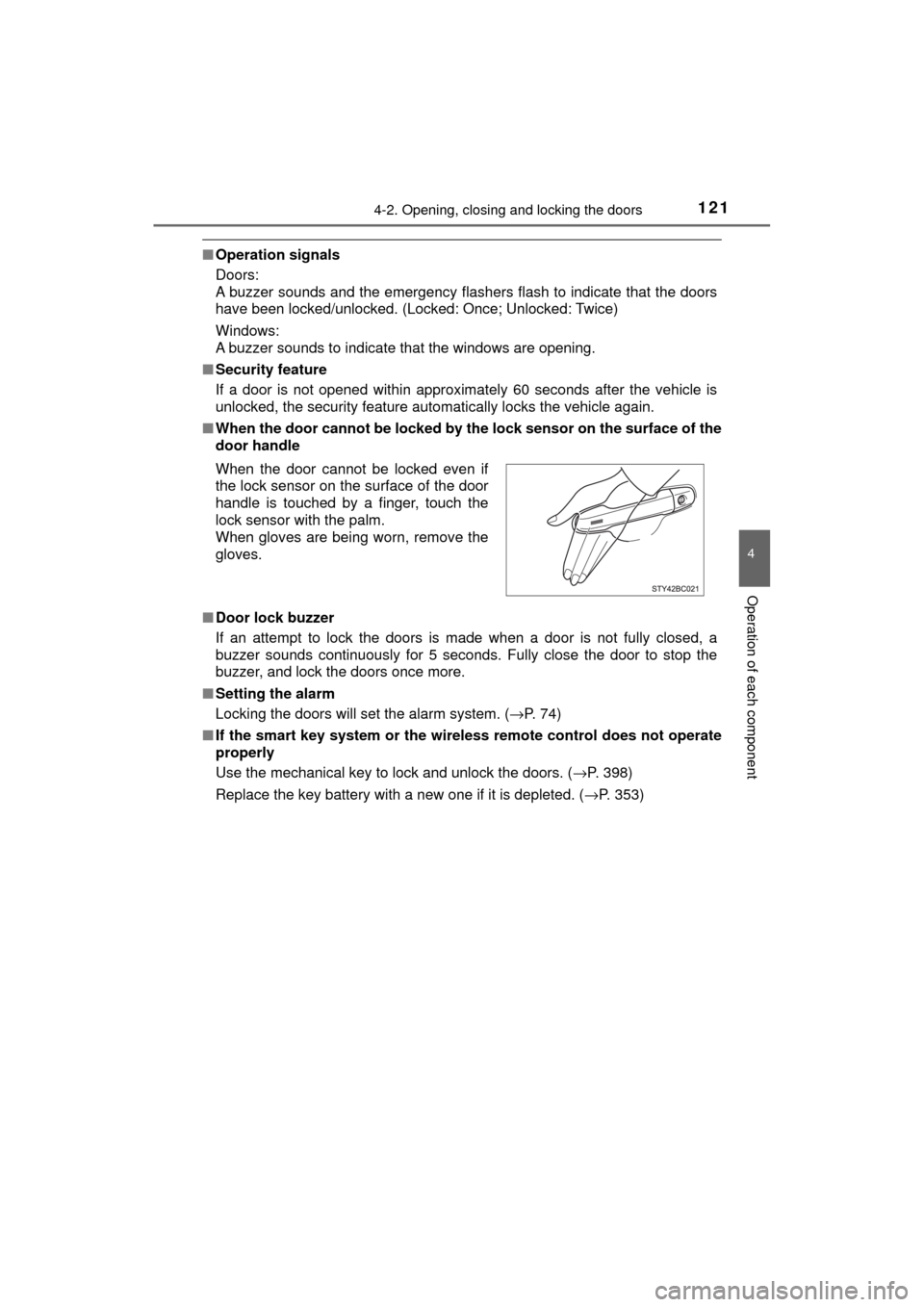
■ When the door cannot be locked by th e lock sensor on the surface of the
door handle
■ Door lock buzzer
If an attempt to lock the doors is made when a door is not fully closed, a
buzzer sounds continuously for 5 seconds. Fully close the door to stop the
buzzer, and lock the doors once more.
■ Setting the alarm
Locking the doors will set the alarm system. ( →P. 74)
■ If the smart key system or the wireless remote control does not operate
properly
Use the mechanical key to lock and unlock the doors. ( →P. 398)
Replace the key battery with a new one if it is depleted. ( →P. 353)
When the door cannot be locked even if
the lock sensor on the surface of the door
handle is touched by a finger, touch the
lock sensor with the palm.
When gloves are being worn, remove the
gloves.
Page 122 of 464
1224-2. Opening, closing and locking the doors
MIRAI_OM_USA_OM62023U
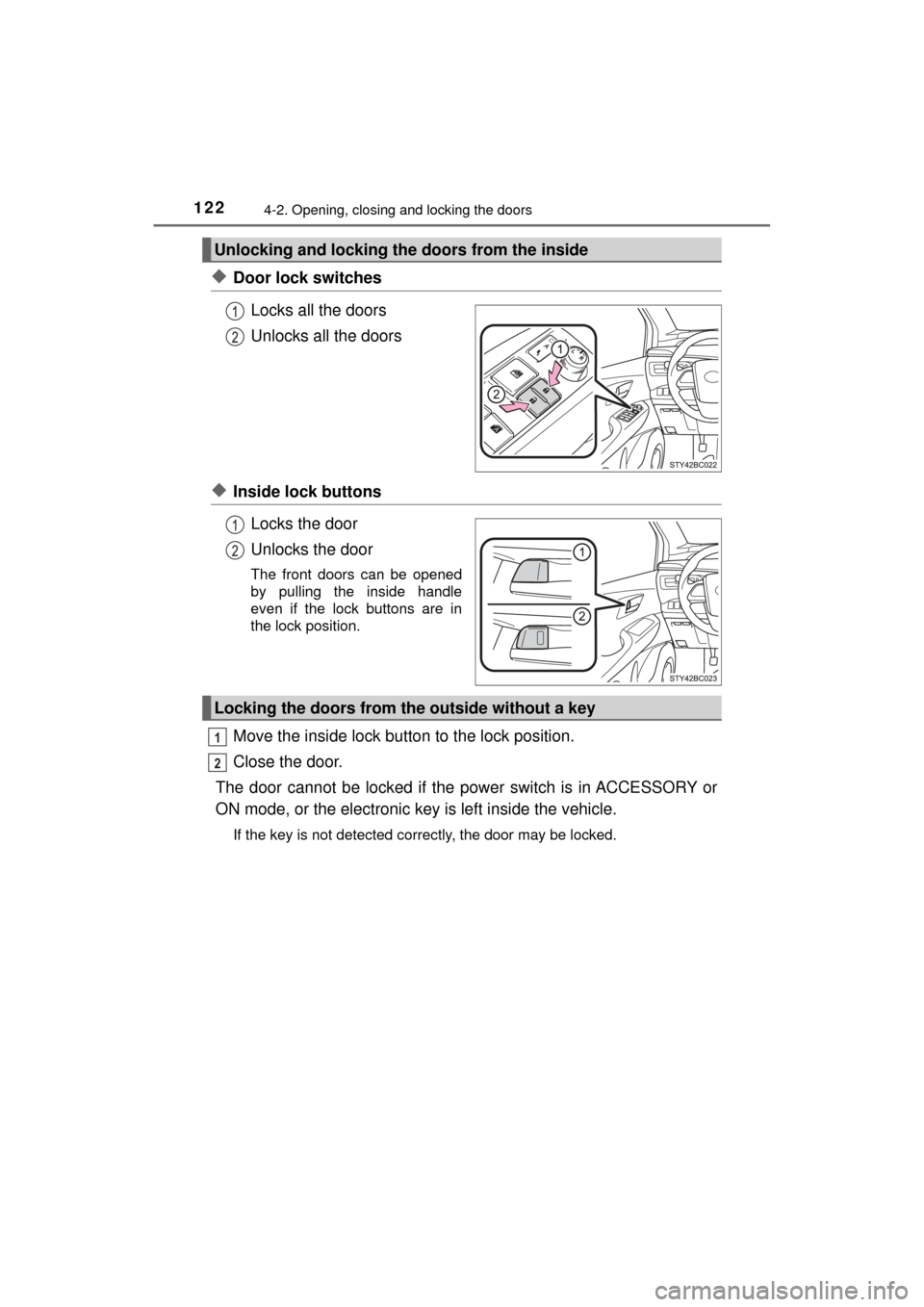
◆Door lock switchesLocks all the doors
Unlocks all the doors
◆Inside lock buttonsLocks the door
Unlocks the door
The front doors can be opened
by pulling the inside handle
even if the lock buttons are in
the lock position.
Move the inside lock button to the lock position.
Close the door.
The door cannot be locked if the power switch is in ACCESSORY or
ON mode, or the electronic ke y is left inside the vehicle.
If the key is not detected correctly, the door may be locked.
Unlocking and locking the doors from the inside
Locking the doors from the outside without a key
1
2
Page 123 of 464
1234-2. Opening, closing and locking the doors
4
Operation of each component
MIRAI_OM_USA_OM62023U
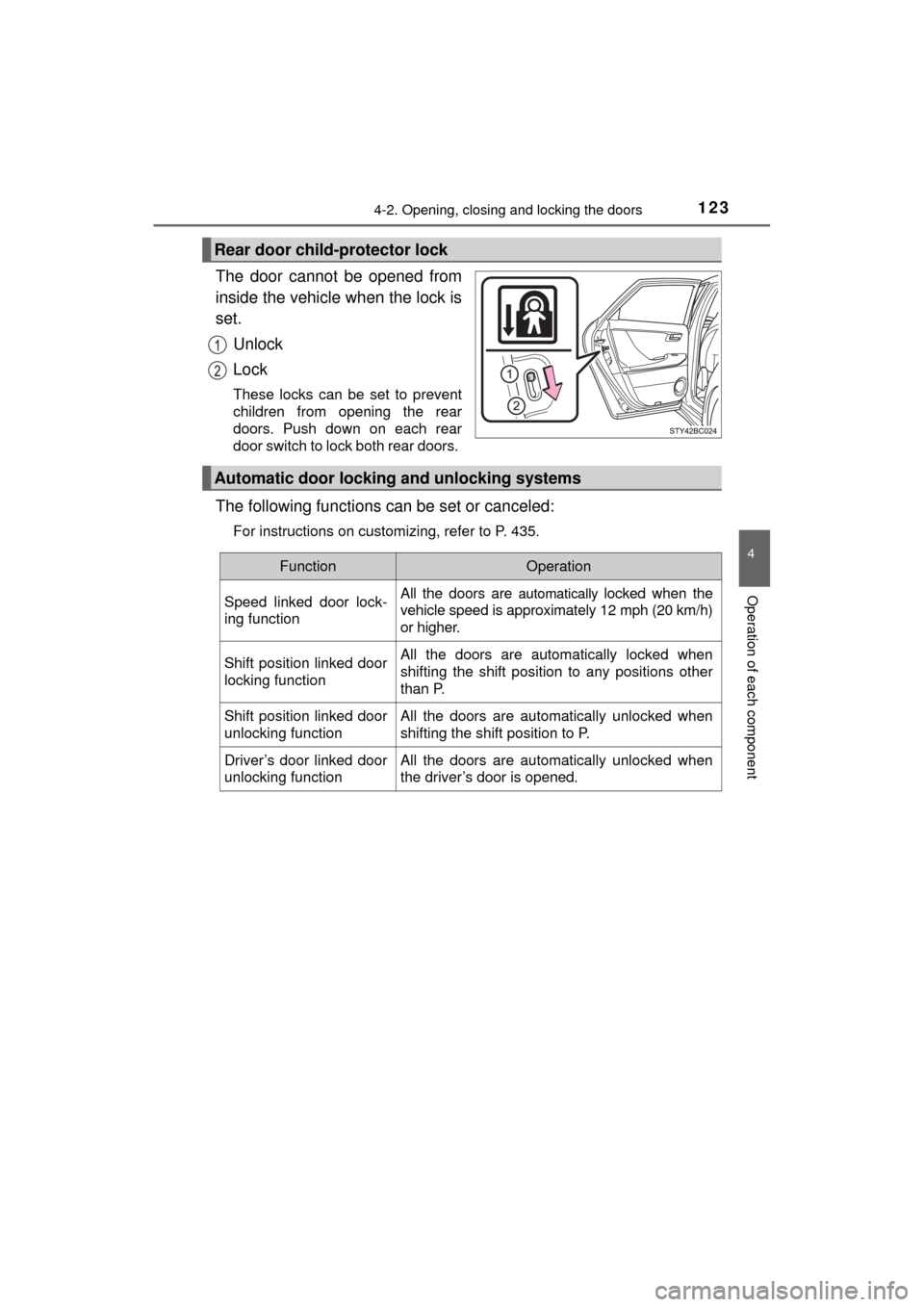
The door cannot be opened from
inside the vehicle when the lock is
set.Unlock
Lock
These locks can be set to prevent
children from opening the rear
doors. Push down on each rear
door switch to lock both rear doors.
The following functions can be set or canceled:
For instructions on customizing, refer to P. 435.
Rear door child-protector lock
Automatic door lockin g and unlocking systems
FunctionOperation
Speed linked door lock-
ing function All the doors are
automatically locked when the
vehicle speed is approximately 12 mph (20 km/h)
or higher.
Shift position linked door
locking function All the doors are automatically locked when
shifting the shift position to any positions other
than P.
Shift position linked door
unlocking function All the doors are automatically unlocked when
shifting the shift position to P.
Driver’s door linked door
unlocking function All the doors are automatically unlocked when
the driver’s door is opened.