lock TOYOTA MIRAI 2017 1.G Repair Manual
[x] Cancel search | Manufacturer: TOYOTA, Model Year: 2017, Model line: MIRAI, Model: TOYOTA MIRAI 2017 1.GPages: 464, PDF Size: 12.09 MB
Page 199 of 464
1995-4. Refueling
5
Driving
MIRAI_OM_USA_OM62023U
WARNING
■When filling
Observe the following precautions while fueling the vehicle.
Failure to do so may result in death or serious injury.
● Turn the power switch off before fueling.
● Ensure the hydrogen gas nozzle is locked onto the vehicle receptacle
before filling. This can be done by pulling on the hydrogen gas nozzle to
check that it cannot be pulled off.
Failure to do so may result in injury or damage to the hydrogen gas nozzle
or vehicle.
● Do not smoke while fueling.
● Because the fuel is cold, the hydrogen gas nozzle and vehicle receptacle
surface will become cold, and frost may develop. After fueling is com-
pleted, remove the hydrogen gas nozzle by the plastic handle only. Do not
touch any other parts of the hydrogen gas nozzle or vehicle receptacle
with bare hands immediately after fueling, as frostbite may occur.
NOTICE
■ When filling
● Fuel only with compressed hydrogen gas at stations compliant with the
Society of Automotive Engineers (SAE) J2601 fueling protocol or laws that
may supersede such SAE protocols.
If improper fuels are used, the fuel cell stack will be damaged.
● Do not swing or drop the hydrogen gas nozzle, or subject it to a large
amount of force. Doing so may cause damage.
● If the hydrogen gas nozzle cannot be removed after fueling, it may be fro-
zen to the vehicle receptacle. Wait for the hydrogen gas nozzle to thaw
before attempting to remove. Do not pull or rotate the hydrogen gas nozzle
forcibly. Failure to follow these precautions may cause damage.
● Be sure to replace the cap after filling. If foreign material gets in the vehicle
receptacle, it may cause damage.
● Do not put anything sharp, such as a screwdriver, blade, or any foreign
object into the mouth of the vehicle receptacle. If the vehicle receptacle is
damaged, hydrogen gas may leak during fueling.
● If you notice anything unusual about the vehicle receptacle, please notify
your Toyota dealer.
● If you notice anything unusual with the hydrogen dispenser or hydrogen
gas nozzle, please notify the hydrogen station operator. Contact informa-
tion is usually displayed on the dispenser.
Page 200 of 464
2005-4. Refueling
MIRAI_OM_USA_OM62023U
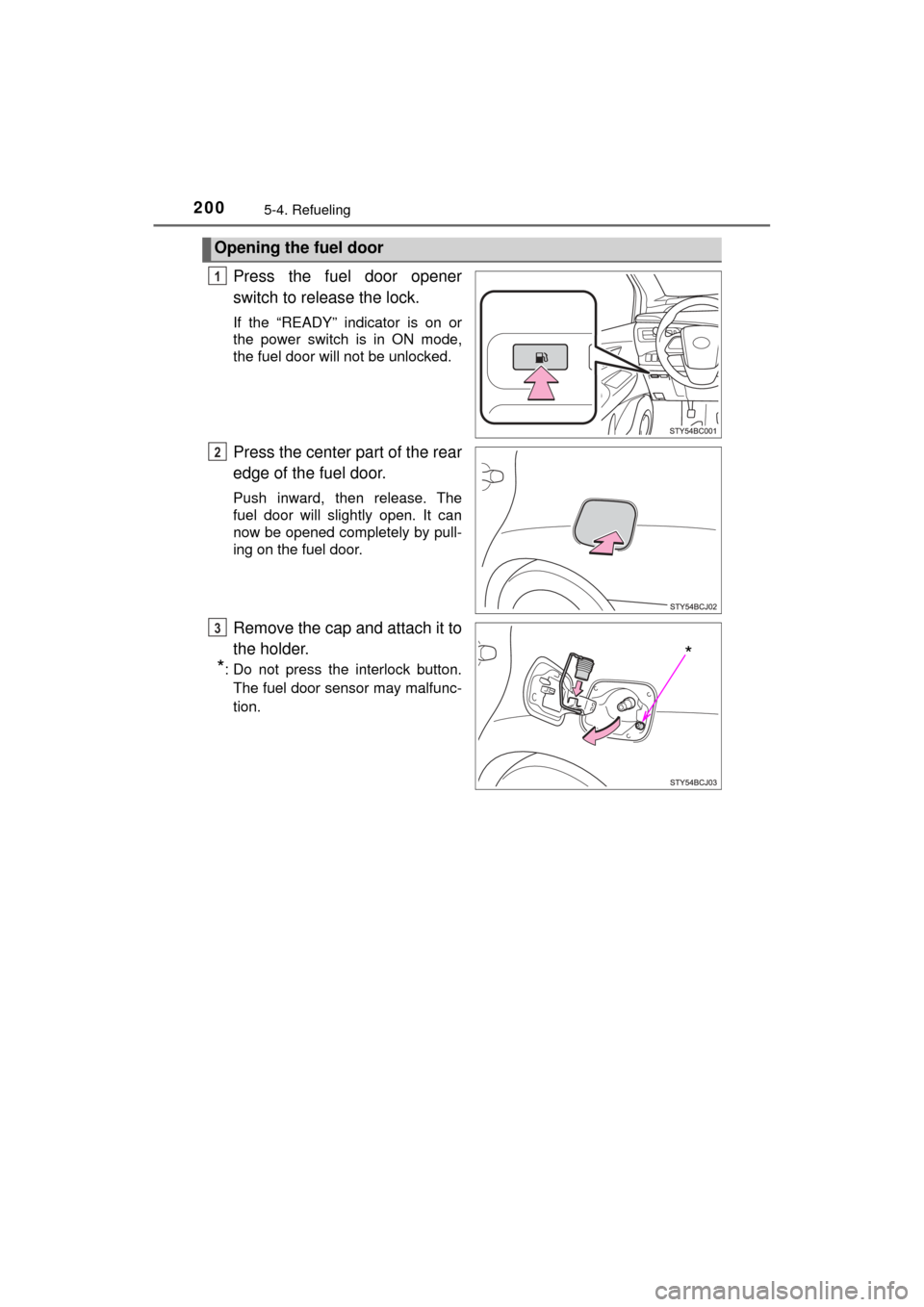
Press the fuel door opener
switch to release the lock.
If the “READY” indicator is on or
the power switch is in ON mode,
the fuel door will not be unlocked.
Press the center part of the rear
edge of the fuel door.
Push inward, then release. The
fuel door will slightly open. It can
now be opened completely by pull-
ing on the fuel door.
Remove the cap and attach it to
the holder.
*: Do not press the interlock button.The fuel door sensor may malfunc-
tion.
Opening the fuel door
1
2
*
3
Page 201 of 464
2015-4. Refueling
5
Driving
MIRAI_OM_USA_OM62023U
■If “Open H2 Filler Door in a Safe Place when Vehicle is Powered OFF” is
displayed on the mult i-information display
Stop the vehicle in a safe place and press the fuel door opener switch once
more with the following procedure:
Shift the shift position to P.
Turn the power switch off.
Press the fuel door opener switch.
■ If the fuel door lock cannot be released (i.e., if it is damaged)
■ Sounds during filling
When fueling with compressed hydrogen gas, noises from gas flowing
through the hydrogen gas nozzle and hydrogen tank valves can sometimes
be heard. ( →P. 80)
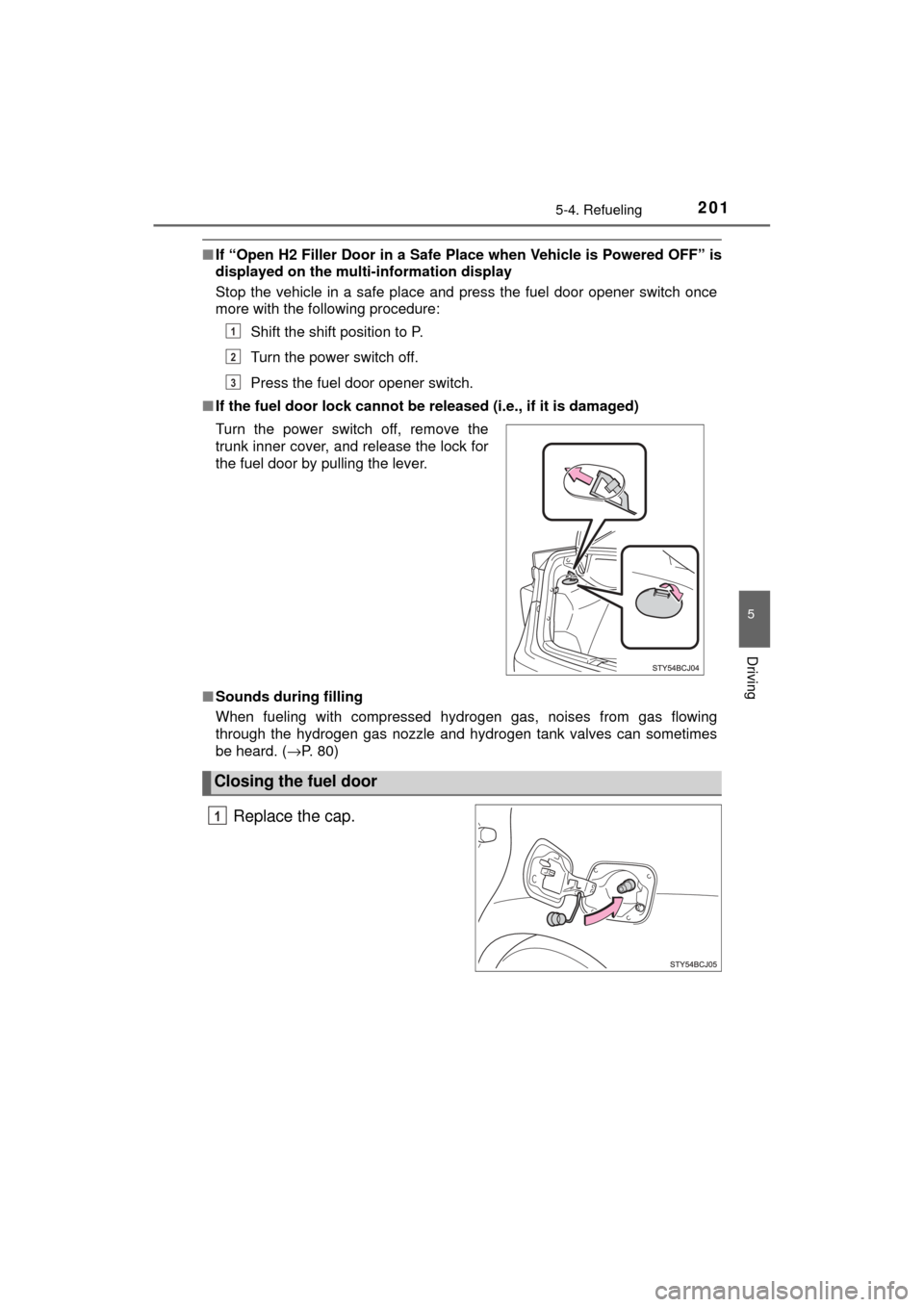
Replace the cap.
Turn the power switch off, remove the
trunk inner cover, and release the lock for
the fuel door by pulling the lever.
Closing the fuel door
1
2
3
1
Page 232 of 464
2325-5. Using the driving support systems
MIRAI_OM_USA_OM62023U
Driving assist systems
◆ECB (Electronically Controlled Brake System)
The electronically controlled system generates braking force corre-
sponding to the brake operation
◆ABS (Anti-lock Brake System)
Helps to prevent wheel lock when the brakes are applied suddenly,
or if the brakes are applied while driving on a slippery road surface
◆Brake assist
Generates an increased level of braking force after the brake pedal
is depressed when the system detects a panic stop situation
◆VSC (Vehicle Stability Control)
Helps the driver to control skidding when swerving suddenly or
turning on slippery road surfaces
◆Enhanced VSC (Enhanced Ve hicle Stability Control)
Provides cooperative control of the ABS, TRAC, VSC and EPS.
Helps to maintain directional stability when swerving on slippery
road surfaces by controllin g steering performance.
◆TRAC (Traction Control)
Helps to maintain drive power and prevent the drive wheels from
spinning when starting the vehicle or accelerating on slippery roads
◆Hill-start assist control
Helps to prevent the vehicle from rolling backward when starting on
an incline.
To help enhance driving safety and performance, the following
systems operate automatically in response to various driving
situations. Be aware, however, that these systems are supple-
mentary and should not be relied upon too heavily when operat-
ing the vehicle.
Page 257 of 464

257
6Interior features
MIRAI_OM_USA_OM62023U6-1. Using the air
conditioning system
and defogger
Automatic air conditioning system............................. 258
Heated steering wheel/ seat heaters .................... 267
6-2. Using the interior lights
Interior lights list ................ 269 • Interior lights ................. 270
• Personal lights .............. 270 6-3. Using the storage
features
List of storage features ..... 272 • Glove box...................... 273
• Console box .................. 273
• Cup holders .................. 274
• Bottle holders ................ 276
• Auxiliary box ................. 276
Trunk features ................... 277
6-4. Other interior features Other interior features ....... 279• Sun visors ..................... 279
• Vanity mirrors................ 279
• Clock ............................. 280
• Armrest ......................... 281
• Coat hooks.................... 281
• Assist grips ................... 282
• Power outlet .................. 283
• Wireless charger ........... 284
Garage door opener.......... 292
Safety Connect ................. 299
Page 266 of 464
2666-1. Using the air conditioning system and defogger
MIRAI_OM_USA_OM62023U
WARNING
■To prevent the windshield from fogging up
● Do not use during cool air operation in extremely humid weather.
The difference between the temperature of the outside air and that of the
windshield can cause the outer surface of the windshield to fog up, block-
ing your vision.
■ To prevent burns
● Do not touch the rear view mirror surfaces when the outside rear view mir-
ror defoggers are on.
● Do not touch the glass at lower part of the windshield or to the side of the
front pillars when the windshield wiper de-icer is on.
NOTICE
■ Humidity sensor
■ To prevent 12-volt battery discharge
Do not leave the air conditioning system on longer than necessary when the
fuel cell system is off.
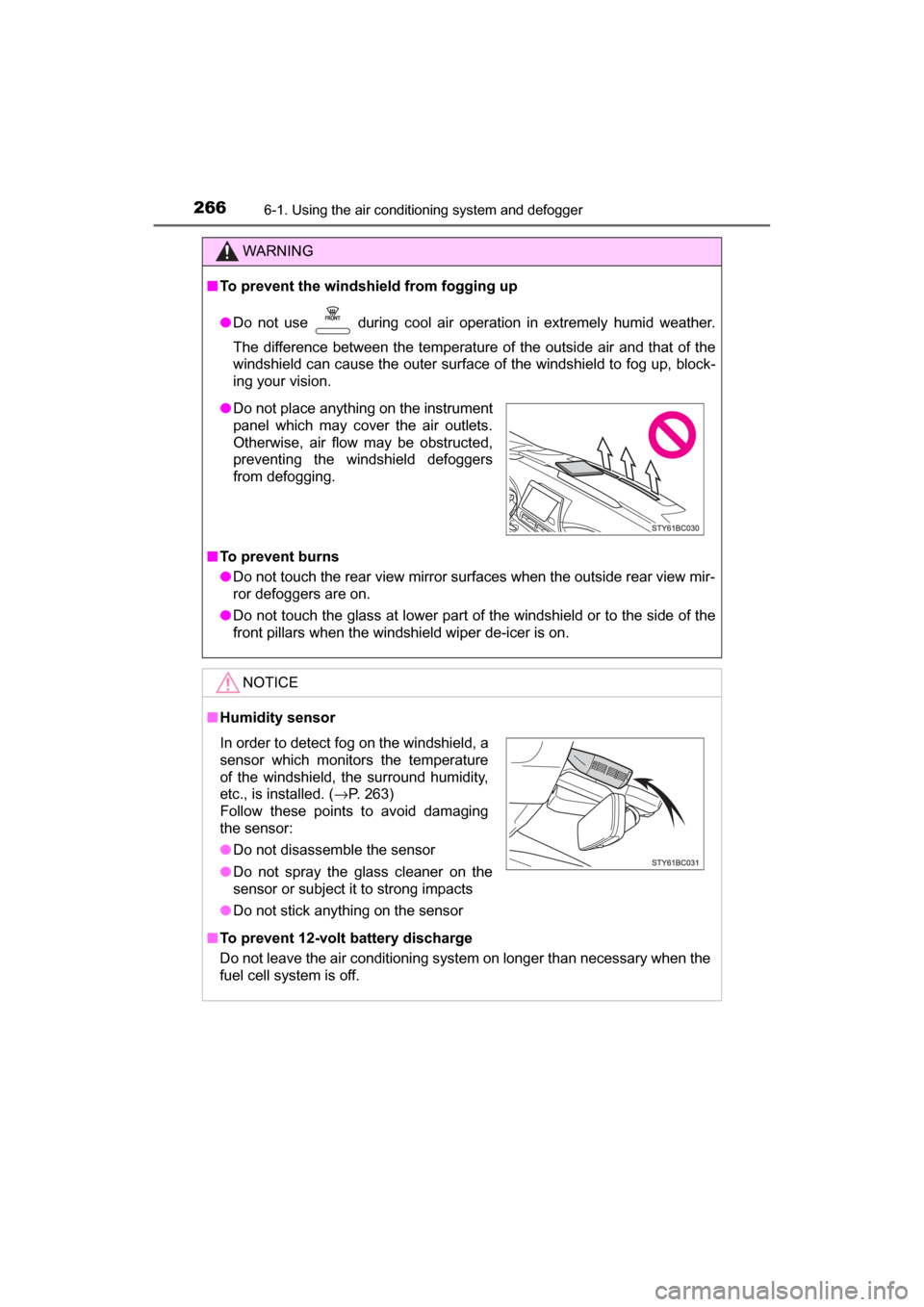
● Do not place anything on the instrument
panel which may cover the air outlets.
Otherwise, air flow may be obstructed,
preventing the windshield defoggers
from defogging.
In order to detect fog on the windshield, a
sensor which monitors the temperature
of the windshield, the surround humidity,
etc., is installed. ( →P. 263)
Follow these points to avoid damaging
the sensor:
● Do not disassemble the sensor
● Do not spray the glass cleaner on the
sensor or subject it to strong impacts
● Do not stick anything on the sensor
Page 271 of 464
2716-2. Using the interior lights
6
Interior features
MIRAI_OM_USA_OM62023U
■Illuminated entry system
The lights automatically turn on/off according to power switch mode, the pres-
ence of the electronic key, whether the doors are locked/unlocked, and
whether the doors are opened/closed.
■ To prevent 12-volt battery discharge
If the following lights remain on when the power switch is turned off, the lights
will go off automatically after 20 minutes:
●Front interior lights
● Rear interior lights
● Personal lights
● Door courtesy lights
● Vanity lights
● Trunk light
■ Customization
Setting (e.g. the time elapsed before lights turn off) can be changed.
(Customizable features: →P. 438)
NOTICE
■ To prevent 12-volt battery discharge
Do not leave the lights on longer than necessary when the fuel cell system
is off.
Page 273 of 464
2736-3. Using the storage features
6
Interior features
MIRAI_OM_USA_OM62023U
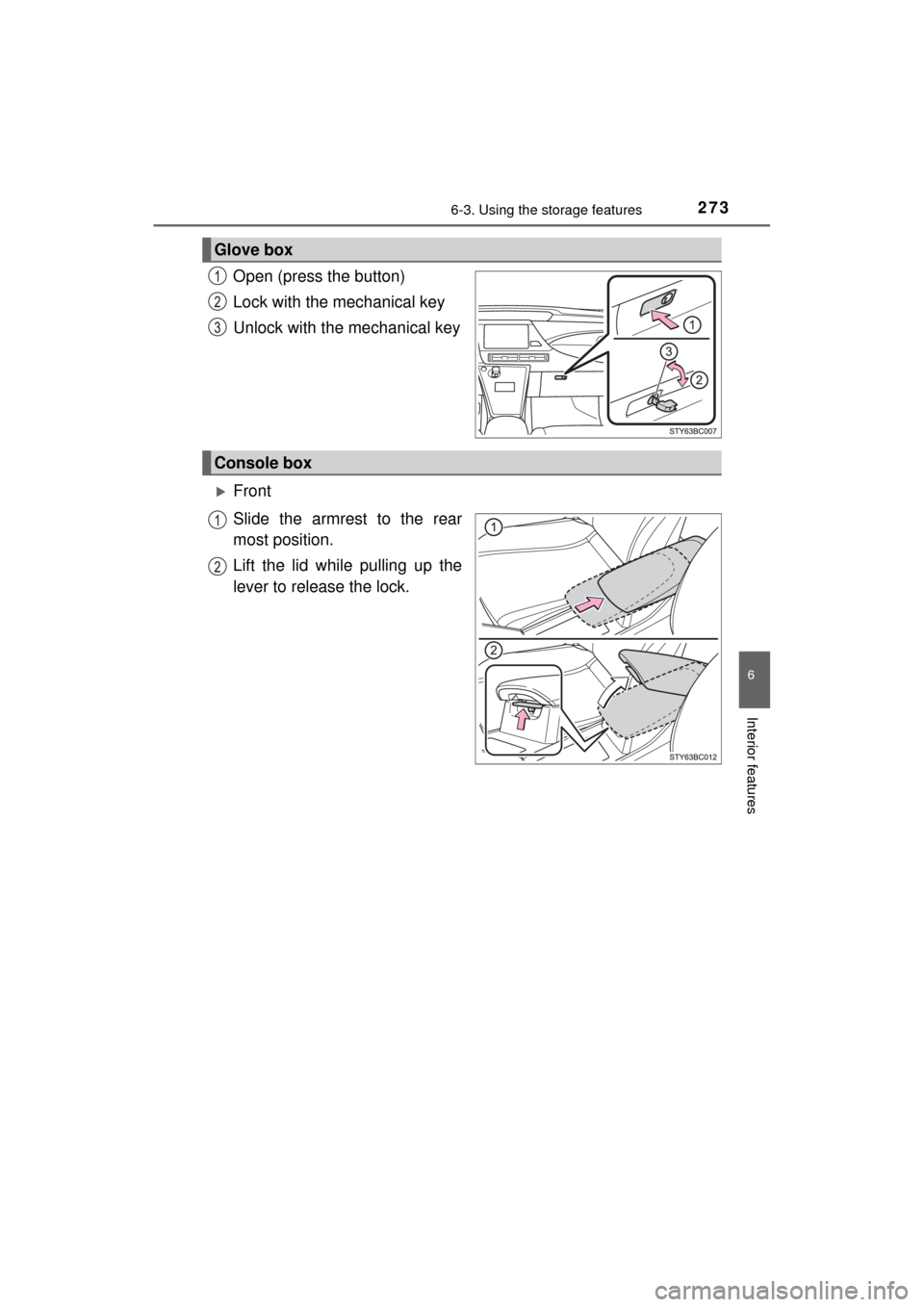
Open (press the button)
Lock with the mechanical key
Unlock with the mechanical key
Front
Slide the armrest to the rear
most position.
Lift the lid while pulling up the
lever to release the lock.
Glove box
Console box
Page 274 of 464
2746-3. Using the storage features
MIRAI_OM_USA_OM62023U
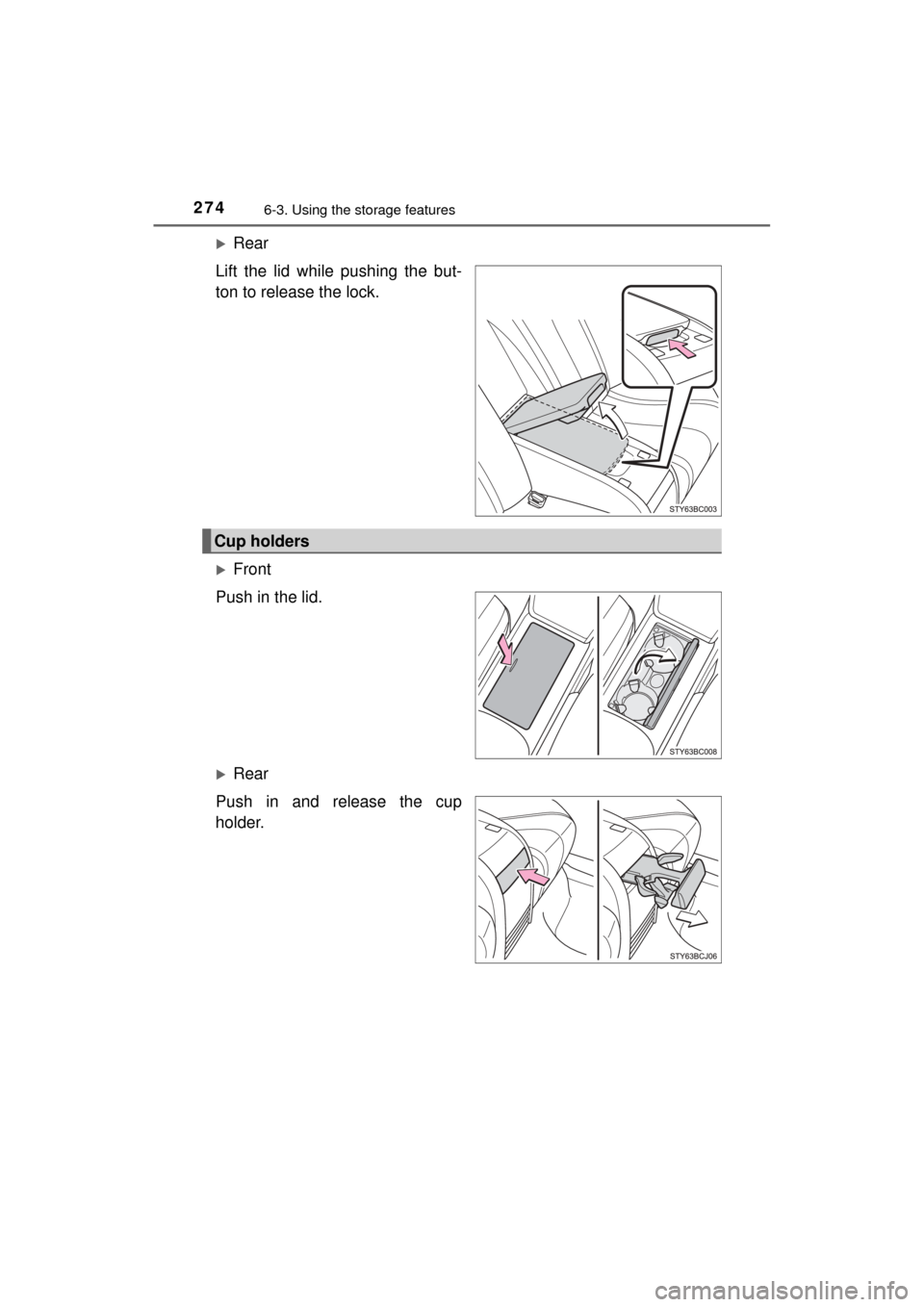
Rear
Lift the lid while pushing the but-
ton to release the lock.
Front
Push in the lid.
Rear
Push in and release the cup
holder.
Cup holders
Page 280 of 464
![TOYOTA MIRAI 2017 1.G Repair Manual 2806-4. Other interior features
MIRAI_OM_USA_OM62023U
The time can be adjusted through the [settings display] for the
multi-information display (→P. 107)
◆Round to the nearest hour
Press or](/img/14/6553/w960_6553-279.png "TOYOTA MIRAI 2017 1.G Repair Manual 2806-4. Other interior features
MIRAI_OM_USA_OM62023U
The time can be adjusted through the [settings display] for the
multi-information display (→P. 107)
◆Round to the nearest hour
Press or")
2806-4. Other interior features
MIRAI_OM_USA_OM62023U
The time can be adjusted through the [settings display] for the
multi-information display (→P. 107)
◆Round to the nearest hour
Press or of the meter control switches ( →P. 108), select
and press .
The minute section of the clock goes to 00.*
*
: e.g.1:00 to 1:29 → 1:00
1:30 to 1:59 → 2:00
◆Time adjustment
Press or of the meter control switches ( →P. 108), select
and press .
Press or on the meter control switches, select hours, min-
utes, or 12/24-hour clock, pres s or of the meter operation
switches to adjust.
When the adjustments are finished, press and check the time.
The clock is displayed when the power switch is in ON mode.
Clock
1
2
3