door lock TOYOTA MIRAI 2017 1.G Owner's Guide
[x] Cancel search | Manufacturer: TOYOTA, Model Year: 2017, Model line: MIRAI, Model: TOYOTA MIRAI 2017 1.GPages: 464, PDF Size: 12.09 MB
Page 144 of 464

1444-3. Adjusting the seats
MIRAI_OM_USA_OM62023U
■Recalling the driving position us ing the memory recall function
● Different driving positions can be registered for each electronic key. There-
fore, the driving position that is recalled may be different depending on the
key being carried.
● If a door other than the driver’s door is unlocked with the smart key system,
the driving position cannot be recalled. In this case, press the driving posi-
tion button which has been set.
■ Customization
The unlock door settings of the memory recall function can be customized.
(Customizable features: →P. 437)
WARNING
■ Seat adjustment caution
Take care during seat adjustment so that the seat does not strike the rear
passenger or squeeze your body against the steering wheel.
Page 151 of 464
1514-4. Adjusting the steering wheel and mirrors
4
Operation of each component
MIRAI_OM_USA_OM62023U
Outside rear view mirrors
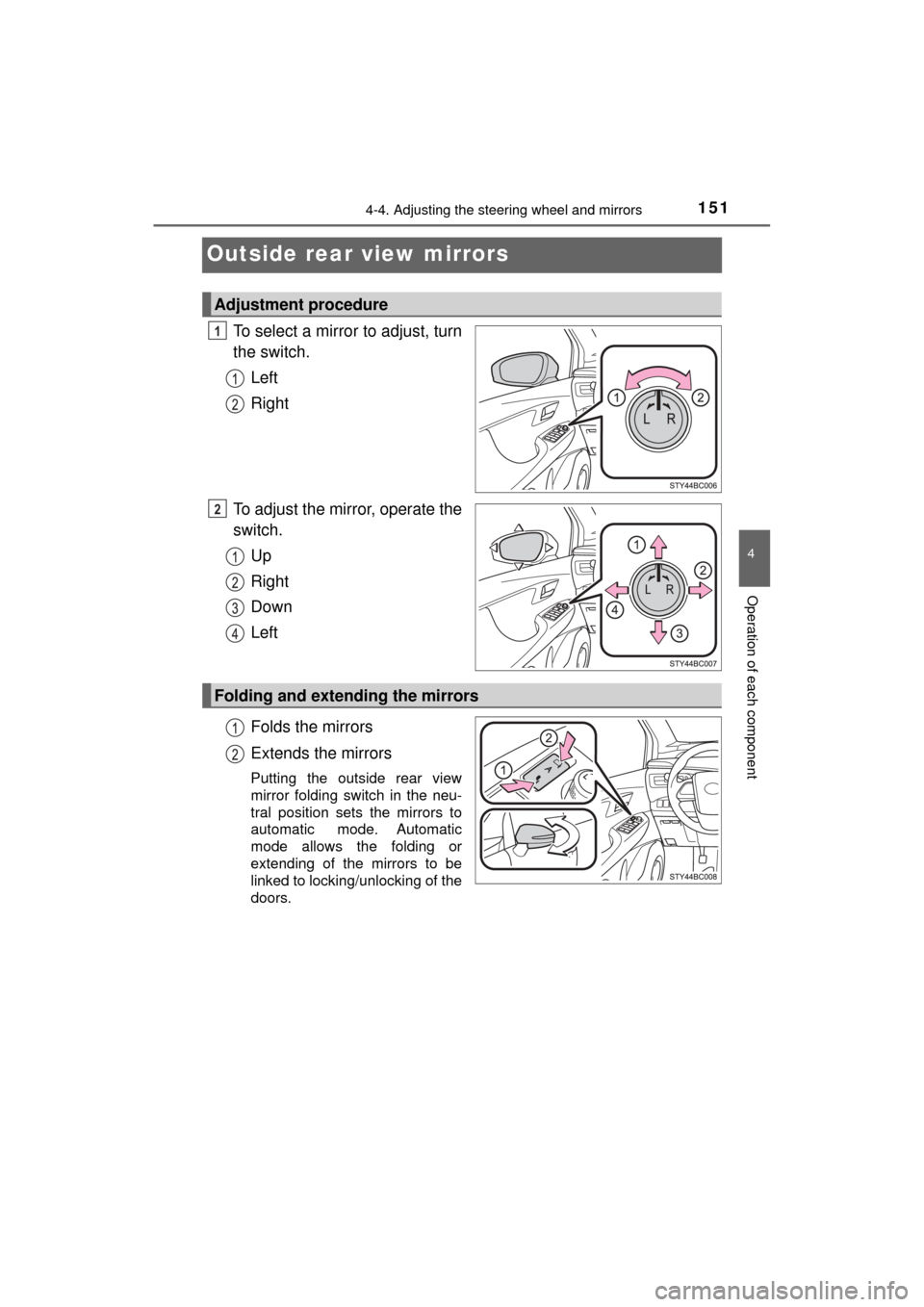
To select a mirror to adjust, turn
the switch.Left
Right
To adjust the mirror, operate the
switch. Up
Right
Down
Left
Folds the mirrors
Extends the mirrors
Putting the outside rear view
mirror folding switch in the neu-
tral position sets the mirrors to
automatic mode. Automatic
mode allows the folding or
extending of the mirrors to be
linked to locking/unlocking of the
doors.
Adjustment procedure
1
2
Folding and extending the mirrors
Page 154 of 464
1544-5. Opening and closing the windows
MIRAI_OM_USA_OM62023U
Power windows
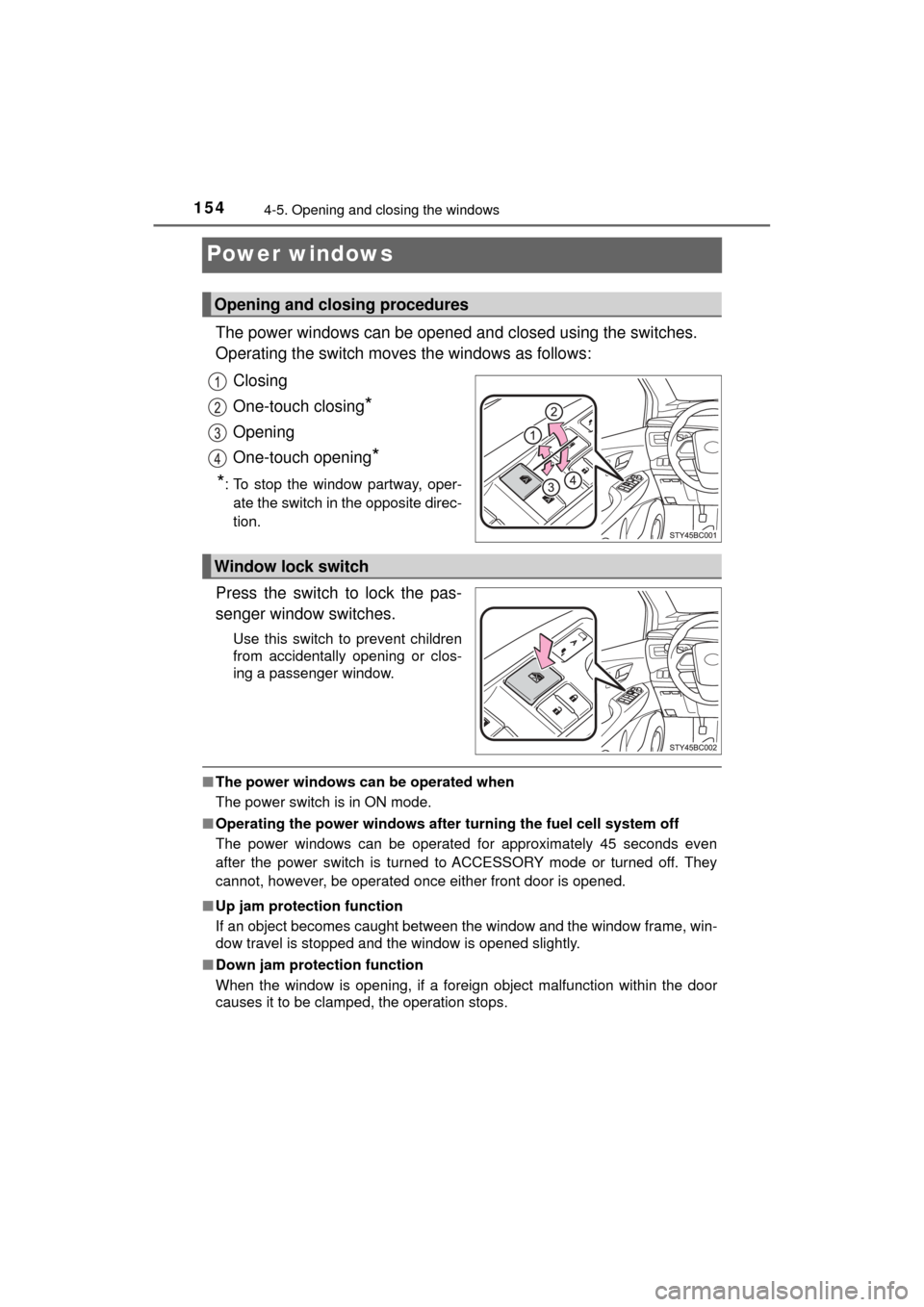
The power windows can be opened and closed using the switches.
Operating the switch moves the windows as follows:
Closing
One-touch closing
*
Opening
One-touch opening
*
*
: To stop the window partway, oper- ate the switch in the opposite direc-
tion.
Press the switch to lock the pas-
senger window switches.
Use this switch to prevent children
from accidentally opening or clos-
ing a passenger window.
■ The power windows can be operated when
The power switch is in ON mode.
■ Operating the power windows after turning the fuel cell system off
The power windows can be operated for approximately 45 seconds even
after the power switch is turned to ACCESSORY mode or turned off. They
cannot, however, be operated once either front door is opened.
■ Up jam protection function
If an object becomes caught between the window and the window frame, win-
dow travel is stopped and the window is opened slightly.
■ Down jam protection function
When the window is opening, if a foreign object malfunction within the doo\
r
causes it to be clamped, the operation stops.
Opening and closing procedures
Window lock switch
Page 155 of 464

1554-5. Opening and closing the windows
4
Operation of each component
MIRAI_OM_USA_OM62023U■
When opening and closing the window cannot be done
When the up or down jam protection function operates unusually or the door
window cannot be fully opened and closed, perform the following operations
with the power window switch of that door.
● Stop the vehicle, with the power switch in ON mode, continually operate the
power window switch in the one-touch closing position within 4 seconds
after the up jam or down jam protection function was activated. Otherwise,
by continually operating the power window switch in the one-touch opening
position, the door window can be opened and closed.
● If the door window cannot be opened and closed even when performing the
above operations, implement the following procedure for function initializa-
tion.
Turn the power switch to ON mode.
Pull and hold the power window switch in the one-touch closing position
and completely close the door window.
Release the power window switch for a moment and then resume pulling
and holding the switch in the one-touch closing position for approximately
4 seconds.
Press and hold the power window switch in the one-touch opening posi-
tion and after the door window is completely opened, continue holding the
switch for a further 1 second or more.
Pull and hold the power window switch in the one-touch closing position,
once more, and after the door window is completely closed, continue
holding the switch for a further 1 second or more.
If you release the switch while the window is moving, start again from t\
he
beginning.
If the window reverses and cannot be closed or completely open, have the
vehicle inspected by your Toyota dealer.
■ Door lock linked window operation
●The power windows can be opened using the mechanical key.
* (→P. 399)
● The power windows can be opened using the wireless remote control.
*
(→P. 120)
*: These settings must be customized at your Toyota dealer.
■ Power windows open warning buzzer
The buzzer sounds and a message is shown on the multi-information display
in the instrument cluster when the power switch is turned off and the driver’s
door is opened with the power windows open.
■ Customization
Settings (e.g. key linked operation) can be changed.
(Customizable features: →P. 438)
1
2
3
4
5
Page 158 of 464
1585-1. Before driving
MIRAI_OM_USA_OM62023U
Driving the vehicle
→P. 1 7 2
With the brake pedal depressed, shift the shift position to D.
( → P. 179)
Check that the shift position indicator shows D.
Release the parking brake. ( →P. 186)
Gradually release the brake pedal and gently depress the accelera-
tor pedal to accelerate the vehicle.
With the shift position in D, depress the brake pedal.
If necessary, set the parking brake.
If the vehicle is to be stopped for an extended period of time, shift the shift
position to P. ( →P. 180)
With the shift position in D, depress the brake pedal.
Set the parking brake. ( →P. 186)
Shift the shift position to P. ( →P. 180)
Check that the shift position indicator shows P.
Press the power switch to stop the fuel cell system.
Lock the door, making sure that you have the key on your person.
If parking on a hill, block the wheels as needed.
Firmly set the parking brake and t hen shift the shift position to D.
Gently depress the accelerator pedal.
Release the parking brake.
The following procedures should be observed to ensure safe
driving:
Starting the fuel cell system
Driving
Stopping
Parking the vehicle
Starting off on a steep uphill
1
2
3
1
2
1
2
3
4
5
1
2
3
Page 164 of 464
1645-1. Before driving
MIRAI_OM_USA_OM62023U
WARNING
Observe the following precautions.
Failure to do so may result in death or serious injury.
■When the vehicle is parked
● Do not leave a door or window open if the curved glass is coated with a
metallized film such as a silver-colored one. Reflected sunlight may cause
the glass to act as a lens, causing a fire.
● Always apply the parking brake, shift the shift position to P, stop the fuel
cell system and lock the vehicle.
Do not leave the vehicle unattended while the “READY” indicator is illumi-
nated.
■ When taking a nap in the vehicle
Always turn the fuel cell system off. Otherwise, if you accidentally move the
shift lever or depress the accelerator pedal, causing the vehicle to uninten-
tionally move, which can lead to an accident, resulting in death or serious
injury.
■ When braking
● When the brakes are wet, drive more cautiously.
Braking distance increases when the brakes are wet, and this may cause
one side of the vehicle to brake differently than the other side. Also, the
parking brake may not securely hold the vehicle.
● If the electronically controlled brake system does not operate, do not fol-
low other vehicles closely and avoid hills or sharp turns that require brak-
ing.
In this case, braking is still possible, but the brake pedal should be
depressed more firmly than usual. Also, the braking distance will increase.
Have your brakes fixed immediately.
● The brake system consists of 2 or more individual hydraulic systems; if
one of the systems fails, the other(s) will still operate. In this case, the
brake pedal should be depressed more firmly than usual and the braking
distance will increase. Have your brakes fixed immediately.
NOTICE
■ When driving the vehicle
● Do not depress the accelerator and brake pedals at the same time during
driving, as this may restrain the fuel cell system output.
● Do not use the accelerator pedal or depress the accelerator and brake
pedals at the same time to hold the vehicle on a hill.
■ When parking the vehicle
Always shift the shift position to P, set the parking brake. Failure to do so
may cause the vehicle to move or the vehicle may accelerate suddenly if
the accelerator pedal is accidentally depressed.
Page 189 of 464
1895-3. Operating the lights and wipers
5
Driving
MIRAI_OM_USA_OM62023U■
Automatic light off system
●When the headlights are on: The headlights and tail lights turn off 30 sec-
onds after a door is opened and closed if the power switch is turned to
ACCESSORY mode or turned off. (The lights turn off immediately if
on the key is pressed after all the doors are locked.)
● When only the tail lights are on: The tail lights turn off automatically if the
power switch is turned to ACCESSORY mode or turned off and the driver’s
door is opened.
To turn the lights on again, turn the power switch to ON mode, or turn the\
light
switch off once and then back to or .
If any of the doors or trunk lid is kept open, the lights automatically turn off
after 20 minutes.
■ Automatic headlight leveling system
The level of the headlights is automatically adjusted according to the number
of passengers and the loading condition of the vehicle to ensure that the
headlights do not interfere with other road users.
■ Light reminder buzzer
A buzzer sounds when the power switch is turned off or turned to ACCES-
SORY mode and the driver's door is opened while the lights are turned on.
■ 12-volt battery-saving function
In order to prevent the 12-volt battery of the vehicle from discharging, if the
headlights and/or tail lights are on when the power switch is turned off the
12-volt battery saving function will operate and automatically turn off all the
lights after approximately 20 minutes. When the power switch is turned to ON
mode, the 12-volt battery-saving function will be disabled.
When any of the following are performed, the 12-volt battery-saving function
is canceled once and then reactivated. All the lights will turn off automatically
20 minutes after the 12-volt battery-saving function has been reactivated:
●When the headlight switch is operated
● When a door is opened or closed
■ Customization
Settings (e.g. light sensor sensitivity) can be changed.
(Customizable features: →P. 438)
NOTICE
■ To prevent 12-volt battery discharge
Do not leave the lights on longer than necessary when the fuel cell system
is off.
Page 200 of 464
2005-4. Refueling
MIRAI_OM_USA_OM62023U
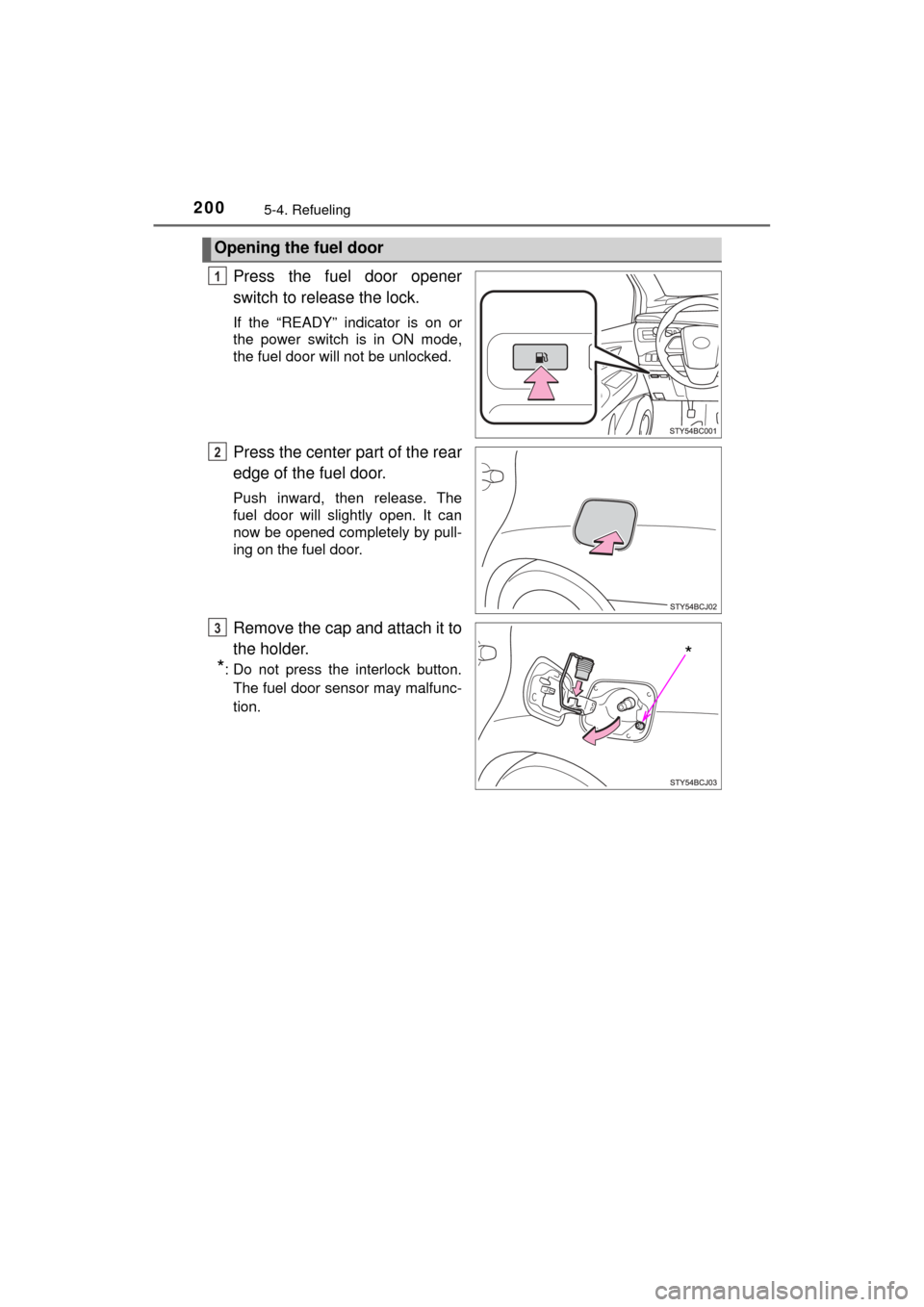
Press the fuel door opener
switch to release the lock.
If the “READY” indicator is on or
the power switch is in ON mode,
the fuel door will not be unlocked.
Press the center part of the rear
edge of the fuel door.
Push inward, then release. The
fuel door will slightly open. It can
now be opened completely by pull-
ing on the fuel door.
Remove the cap and attach it to
the holder.
*: Do not press the interlock button.The fuel door sensor may malfunc-
tion.
Opening the fuel door
1
2
*
3
Page 201 of 464
2015-4. Refueling
5
Driving
MIRAI_OM_USA_OM62023U
■If “Open H2 Filler Door in a Safe Place when Vehicle is Powered OFF” is
displayed on the mult i-information display
Stop the vehicle in a safe place and press the fuel door opener switch once
more with the following procedure:
Shift the shift position to P.
Turn the power switch off.
Press the fuel door opener switch.
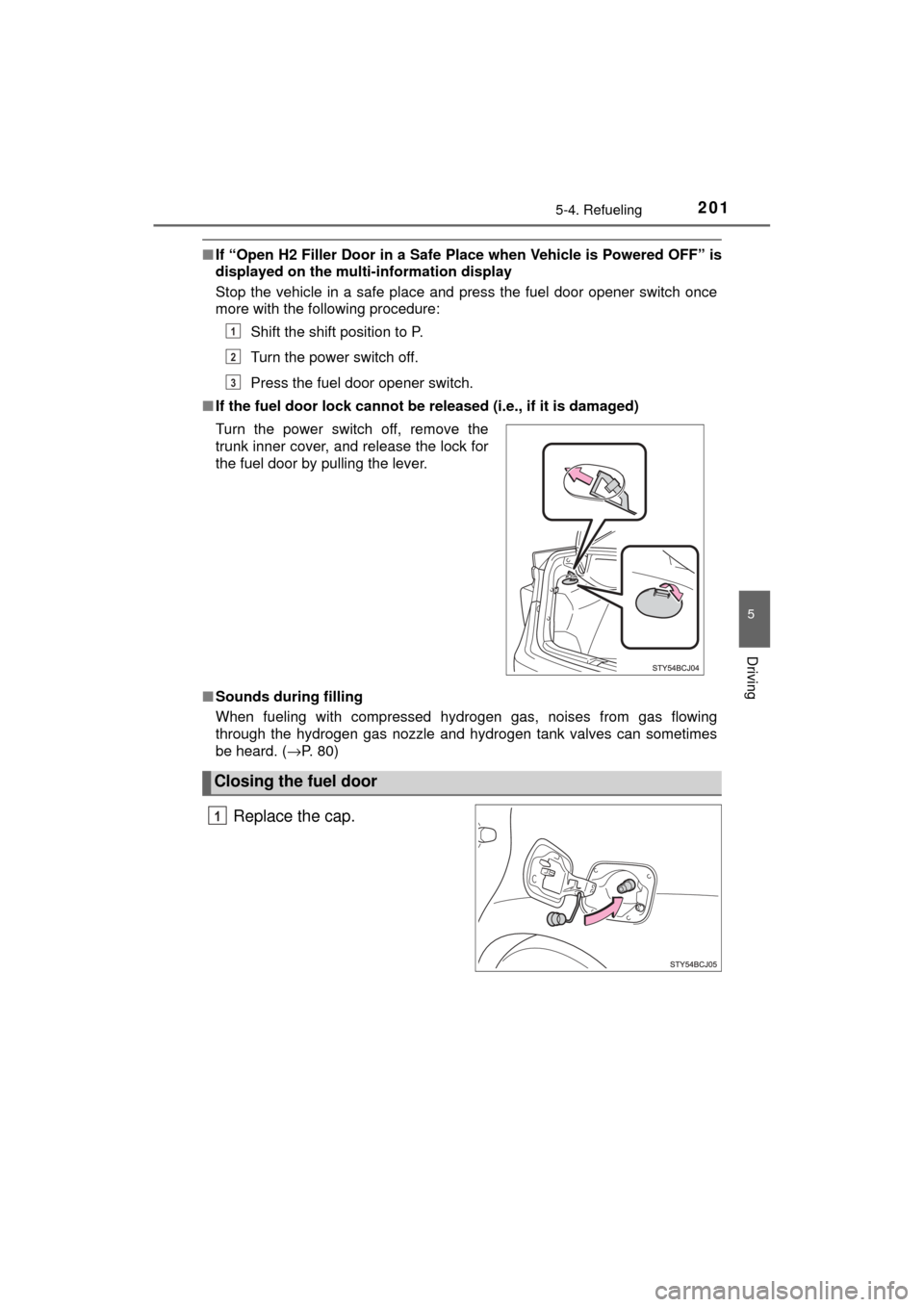
■ If the fuel door lock cannot be released (i.e., if it is damaged)
■ Sounds during filling
When fueling with compressed hydrogen gas, noises from gas flowing
through the hydrogen gas nozzle and hydrogen tank valves can sometimes
be heard. ( →P. 80)
Replace the cap.
Turn the power switch off, remove the
trunk inner cover, and release the lock for
the fuel door by pulling the lever.
Closing the fuel door
1
2
3
1
Page 257 of 464
257
6Interior features
MIRAI_OM_USA_OM62023U6-1. Using the air
conditioning system
and defogger
Automatic air conditioning system............................. 258
Heated steering wheel/ seat heaters .................... 267
6-2. Using the interior lights
Interior lights list ................ 269 • Interior lights ................. 270
• Personal lights .............. 270 6-3. Using the storage
features
List of storage features ..... 272 • Glove box...................... 273
• Console box .................. 273
• Cup holders .................. 274
• Bottle holders ................ 276
• Auxiliary box ................. 276
Trunk features ................... 277
6-4. Other interior features Other interior features ....... 279• Sun visors ..................... 279
• Vanity mirrors................ 279
• Clock ............................. 280
• Armrest ......................... 281
• Coat hooks.................... 281
• Assist grips ................... 282
• Power outlet .................. 283
• Wireless charger ........... 284
Garage door opener.......... 292
Safety Connect ................. 299