door lock TOYOTA MIRAI 2017 1.G Service Manual
[x] Cancel search | Manufacturer: TOYOTA, Model Year: 2017, Model line: MIRAI, Model: TOYOTA MIRAI 2017 1.GPages: 464, PDF Size: 12.09 MB
Page 271 of 464
2716-2. Using the interior lights
6
Interior features
MIRAI_OM_USA_OM62023U
■Illuminated entry system
The lights automatically turn on/off according to power switch mode, the pres-
ence of the electronic key, whether the doors are locked/unlocked, and
whether the doors are opened/closed.
■ To prevent 12-volt battery discharge
If the following lights remain on when the power switch is turned off, the lights
will go off automatically after 20 minutes:
●Front interior lights
● Rear interior lights
● Personal lights
● Door courtesy lights
● Vanity lights
● Trunk light
■ Customization
Setting (e.g. the time elapsed before lights turn off) can be changed.
(Customizable features: →P. 438)
NOTICE
■ To prevent 12-volt battery discharge
Do not leave the lights on longer than necessary when the fuel cell system
is off.
Page 292 of 464
2926-4. Other interior features
MIRAI_OM_USA_OM62023U
Garage door opener
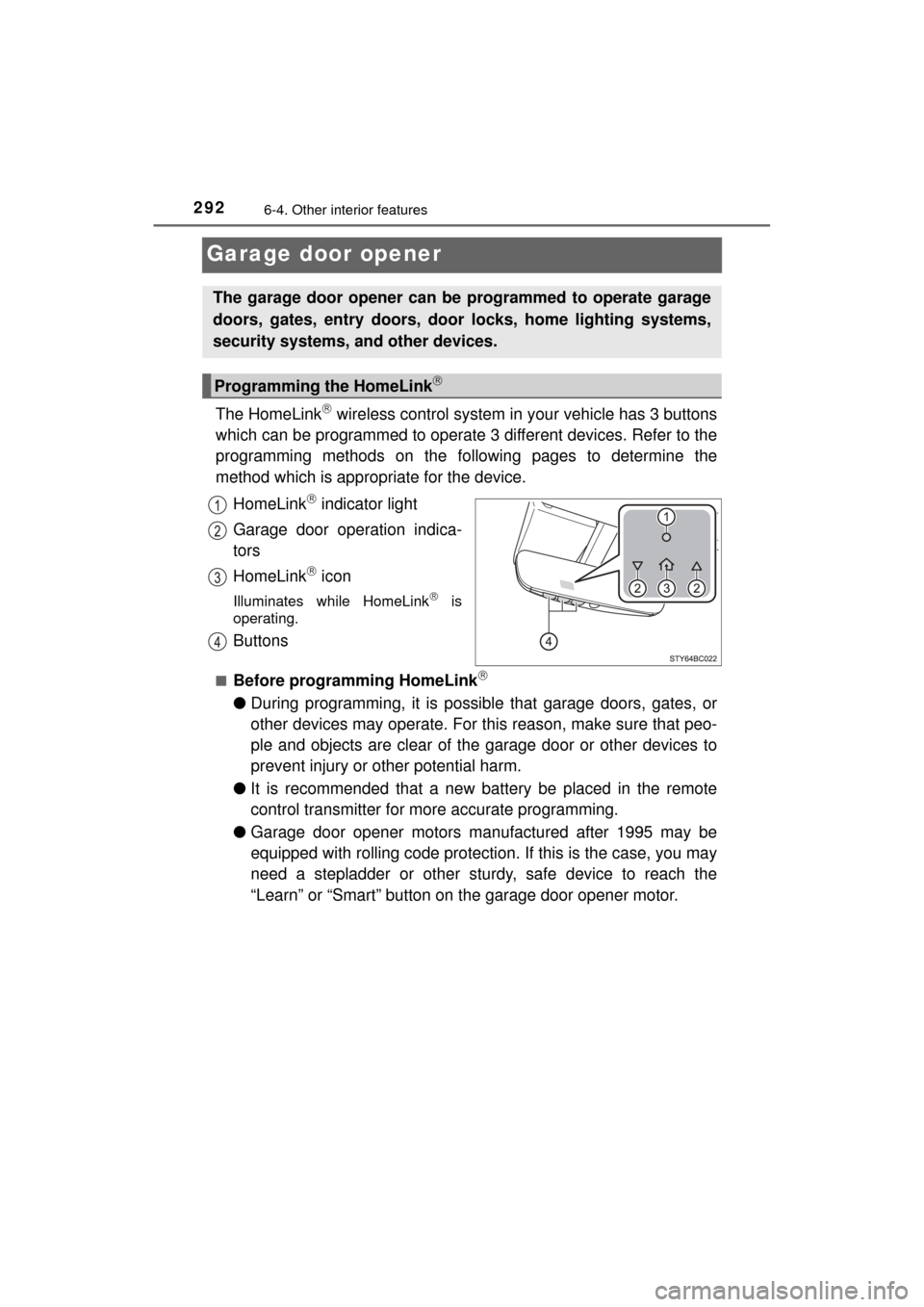
The HomeLink wireless control system in your vehicle has 3 buttons
which can be programmed to operate 3 different devices. Refer to the
programming methods on the foll owing pages to determine the
method which is appr opriate for the device.
HomeLink
indicator light
Garage door operation indica-
tors
HomeLink
icon
Illuminates while HomeLink is
operating.
Buttons
■Before programming HomeLink
● During programming, it is possible that garage doors, gates, or
other devices may operate. For this reason, make sure that peo-
ple and objects are clear of the garage door or other devices to
prevent injury or other potential harm.
● It is recommended that a new battery be placed in the remote
control transmitter for more accurate programming.
● Garage door opener motors manufactured after 1995 may be
equipped with rolling code protection. If this is the case, you may
need a stepladder or other sturdy, safe device to reach the
“Learn” or “Smart” button on the garage door opener motor.
The garage door opener can be programmed to operate garage
doors, gates, entry doors, door locks, home lighting systems,
security systems, and other devices.
Programming the HomeLink
Page 307 of 464

3077-1. Maintenance and care
MIRAI_OM_USA_OM62023U
7
Maintenance and care
■When using a car wash
If the door handle becomes wet while the electronic key is within the ef\
fective
range, the door may lock and unlock repeatedly. In that case, follow the fol-
lowing correction procedures to wash the vehicle:
●Place the key in a position 6 ft. (2 m) or more separate from the vehicle
while the vehicle is being washed. (Take care to ensure that the key is not
stolen.)
● Set the electronic key to battery-saving mode to disable the smart key sys-
tem. ( →P. 133)
■ Aluminum wheels
●Remove any dirt immediately by using a neutral detergent. Do not use hard
brushes or abrasive cleaners. Do not use strong or harsh chemical clean-
ers.
Use the same mild detergent and wax as used on the paint.
● Do not use detergent on the wheels when they are hot, for example after
driving for long distance in the hot weather.
● Wash detergent from the wheels immediately after use.
■ Bumpers
Do not scrub with abrasive cleaners.
■ Front side windows water-repellent coating
●The following precautions can extend the effectiveness of the water-repel-
lent coating.
• Remove any dirt, etc., from the front side windows regularly.
• Do not allow dirt and dust to accumulate on the windows for a long
period.
Clean the windows with a soft, damp cloth as soon as possible.
• Do not use wax or glass cleaners that contain abrasives when cleaning the windows.
• Do not use any metallic objects to remove condensation build up.
● When the water-repellent performance has become insufficient, the coating
can be repaired. Contact your Toyota dealer.
■ Restoration work for rain clearing effect of the rain clearing mirror
The rain clearing effect on the mirror surface will gradually recover after expo-
sure to sunlight ( →P. 152). However, if you want to restore the effect immedi-
ately, conduct the following procedures:
Apply water to the mirror surface to wash the dirt away from it.
Remove the dirt by using a clean, soft and wet cloth.
Clean the mirror surface with gla ss cleaner or detergent. When detergent is
used, rinse the mirror surface with a lot of water.
Wipe water on the mirror surface by using a clean and soft cloth, etc.
Park your vehicle outdoors to expose the mirror surface to sunlight for
about 5 hours. (The restoration time differs depending on the amount and
type of dirt.)
1
2
3
4
5
Page 317 of 464
3177-2. Maintenance
MIRAI_OM_USA_OM62023U
7
Maintenance and care
Seat belts
• Do the seat belts operatesmoothly?
• The seat belts should not be dam-
aged.
Seats• Do the seat controls operate prop-erly?
Steering wheel
• Does the steering wheel rotatesmoothly?
• Does the steering wheel have the correct amount of free play?
• There should not be any strange sounds coming from the steering
wheel.
Vehicle exterior
ItemsCheck points
ItemsCheck points
Doors/trunk• Do the doors/trunk operatesmoothly?
Hood• Does the hood lock system workproperly?
Fluid leaks
• There should not be any signs of
fluid leakage after the vehicle has
been parked.
Tires
• Is the tire inflation pressure cor-rect?
• The tires should not be dam- aged or excessively worn.
• Have the tires been rotated
according to the maintenance
schedule?
• The wheel nuts should not be
loose.
Windshield wipers
• The wiper blades should not show
any signs of cracking, splitting,
wear, contamination or deforma-
tion.
• The wiper blades should clear the windshield without streaking or
skipping.
Page 329 of 464
3297-3. Do-it-yourself maintenance
MIRAI_OM_USA_OM62023U
7
Maintenance and care
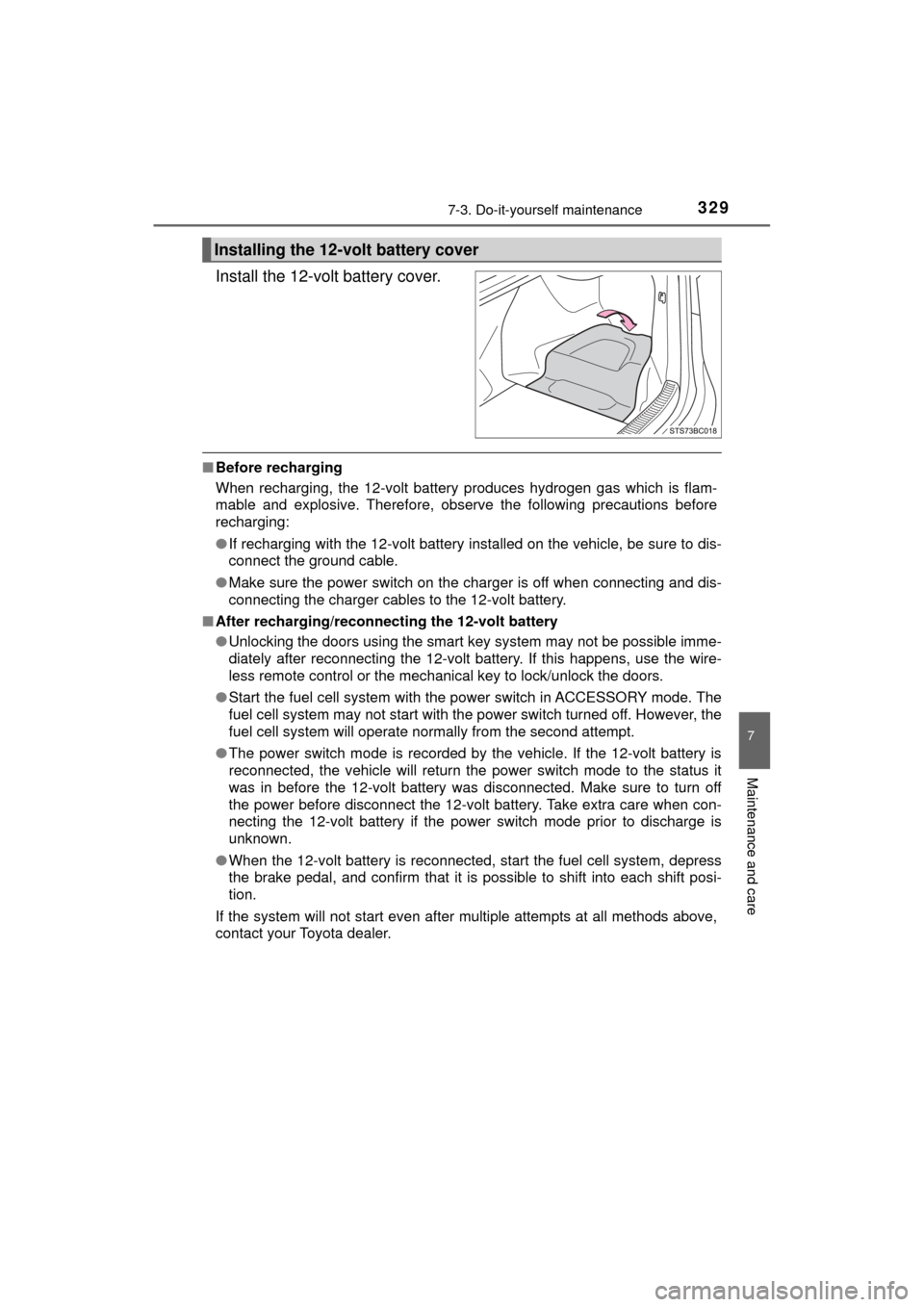
Install the 12-volt battery cover.
■Before recharging
When recharging, the 12-volt battery produces hydrogen gas which is flam-
mable and explosive. Therefore, observe the following precautions before
recharging:
●If recharging with the 12-volt battery installed on the vehicle, be sure to dis-
connect the ground cable.
● Make sure the power switch on the charger is off when connecting and dis-
connecting the charger cables to the 12-volt battery.
■ After recharging/reconnect ing the 12-volt battery
● Unlocking the doors using the smart key system may not be possible imme-
diately after reconnecting the 12-volt battery. If this happens, use the wire-
less remote control or the mechanical key to lock/unlock the doors.
● Start the fuel cell system with the power switch in ACCESSORY mode. The
fuel cell system may not start with the power switch turned off. However, the
fuel cell system will operate normally from the second attempt.
● The power switch mode is recorded by the vehicle. If the 12-volt battery is
reconnected, the vehicle will return the power switch mode to the status it
was in before the 12-volt battery was disconnected. Make sure to turn off
the power before disconnect the 12-volt battery. Take extra care when con-
necting the 12-volt battery if the power switch mode prior to discharge is
unknown.
● When the 12-volt battery is reconnected, start the fuel cell system, depress
the brake pedal, and confirm that it is possible to shift into each shift posi-
tion.
If the system will not start even after multiple attempts at all methods above,
contact your Toyota dealer.
Installing the 12-volt battery cover
Page 377 of 464
3778-2. Steps to take in an emergency
MIRAI_OM_USA_OM62023U
8
When trouble arises
*: A buzzer sounds the first time a message is shown on the multi-informa-tion display.
■ System warning lights
The master warning light does not come on or flash in the following cases.
Instead, a separate system warning light will come on along with a message
shown on the multi-information display.
●Malfunction of the ABS
The ABS warning light comes on. ( →P. 370)
● Malfunction of the charging system
The charging system warning light comes on. ( →P. 369)
■ If “High FC Temperature Re duced Power” is displayed
Lower the speed while check the safety, and run the vehicle like this for
several minutes.
If the message goes off, the vehicle can be driven as is, since it temporarily
overheated.
This message may be displayed when driving under severe operating con-
ditions.
(For example, when driving up a long steep hill.)
■ If “Maintenance Required for Hybr id Battery Cooling Parts at Your
Dealer” is displayed
The filter may be clogged, or the air intake vent or duct may be blocked. Have
the vehicle inspected by your Toyota dealer.
■ If “Shift to P Before Exiting Vehicle” is displayed
Message is displayed when the driver’s door is opened without turning the
power switch to off with the shift position in any position other than P.
Shift the shift position to P.
■ If “Shift is in N Release Accelerat or Before Shifting” is displayed
Message is displayed when the accelerator pedal has been depressed and
the shift position is in N. Release the accelerator pedal and shift the shift posi-
tion to D or R.
Comes on⎯Does not sound
Indicates a condition, such as mal-
function of electrical components,
their condition, or indicates the
need for maintenance
Flashes⎯Does not sound
Indicates a situation, such as
when an operation has been per-
formed incorrectly, or indicates
how to perform an operation cor-
rectly
System
warning
light
Warning buzzer*Warning
1
2
Page 398 of 464
3988-2. Steps to take in an emergency
MIRAI_OM_USA_OM62023U
If the electronic key does not operate
properly
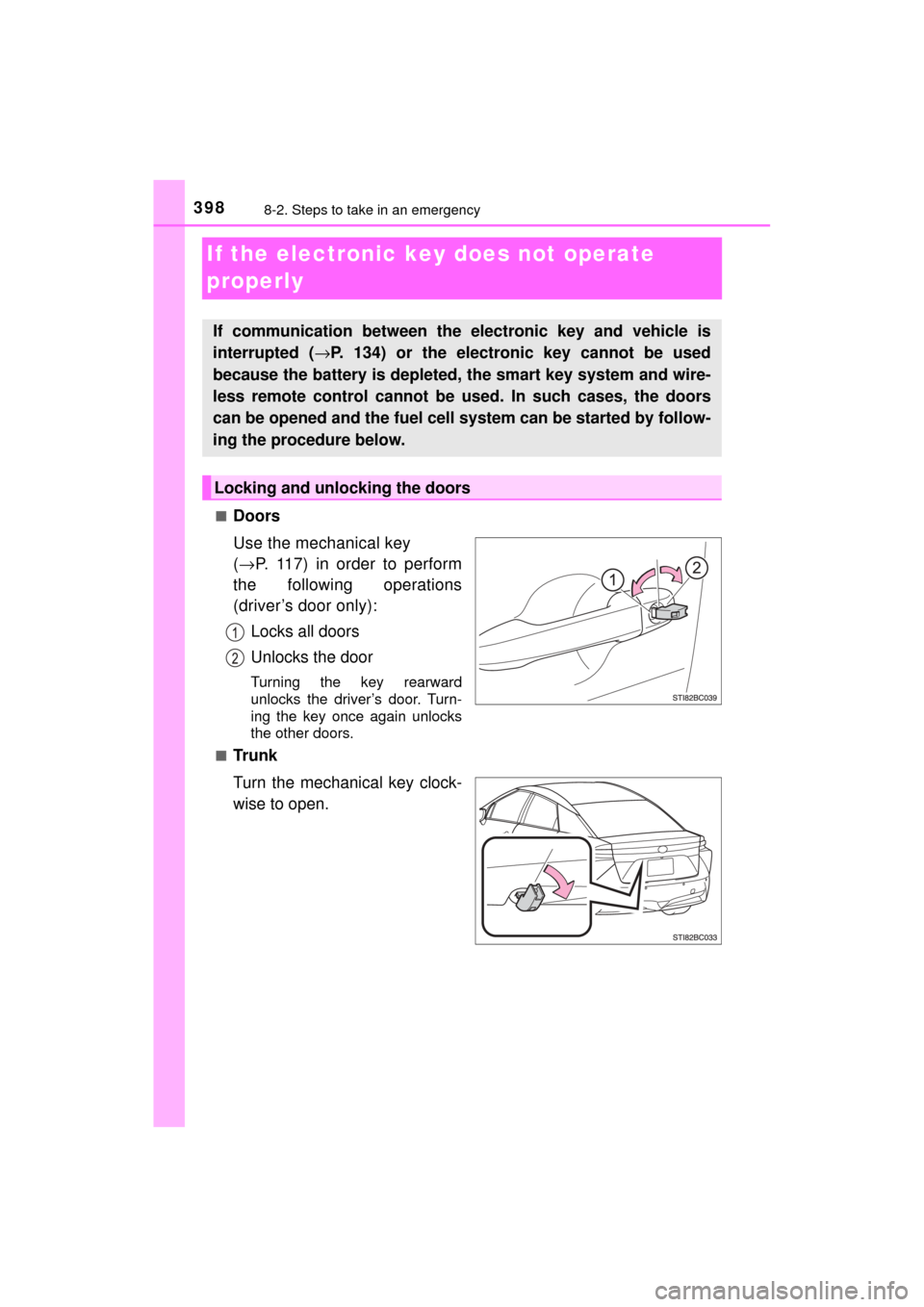
■Doors
Use the mechanical key
(→ P. 117) in order to perform
the following operations
(driver’s door only):
Locks all doors
Unlocks the door
Turning the key rearward
unlocks the driver’s door. Turn-
ing the key once again unlocks
the other doors.
■
Tr u n k
Turn the mechanical key clock-
wise to open.
If communication between the electronic key and vehicle is
interrupted ( →P. 134) or the electronic key cannot be used
because the battery is depleted, the smart key system and wire-
less remote control cannot be used. In such cases, the doors
can be opened and the fuel cell system can be started by follow-
ing the procedure below.
Locking and unlocking the doors
Page 400 of 464
4008-2. Steps to take in an emergency
MIRAI_OM_USA_OM62023U
■Stopping the fuel cell system
Shift the shift position to P and press the power switch as you normally do
when stopping the fuel cell system.
■ Replacing the key battery
As the above procedure is a temporary measure, it is recommended that the
electronic key battery be replaced immediately when the battery is depleted.
(→P. 353)
■ Alarm
Using the mechanical key to lock the doors will not set the alarm system.
If a door is unlocked using the mechanical key when the alarm system is set,
the alarm may be triggered. ( →P. 75)
■ When the electronic key does not work properly
●Make sure that the smart key system has not been deactivated in the cus-
tomization setting. If it is off, turn the function on.
(Customizable features →P. 436)
● Check if battery-saving mode is set. If it is set, cancel the function.
(→P. 133)
■ Changing power switch modes
Release the brake pedal and press the power switch in step above.
The fuel cell system does not start and modes will be changed each time the
switch is pressed. (→P. 174)
WARNING
■ When using the mechanical key and operating the power windows
Operate the power window after checking to make sure that there is no pos-
sibility of any passenger having any of their body parts caught in the win-
dow.
Also, do not allow children to operate the mechanical key. It is possible for
children and other passengers to get caught in the power window.
3
Page 403 of 464
4038-2. Steps to take in an emergency
MIRAI_OM_USA_OM62023U
8
When trouble arises
Close the exclusive jump starting terminal cover, reinstall the motor
cover and the fuse box cover to its original position.
Once the fuel cell system starts, have the vehicle inspected at your
Toyota dealer as soon as possible.
■ Starting the fuel cell system when the 12-volt battery is discharged
The fuel cell system cannot be started by push-starting.
■ To prevent 12-volt battery discharge
●Turn off the headlights and the audio system while the fuel cell system is off.
● Turn off any unnecessary electrical components when the vehicle is running
at a low speed for an extended period, such as in heavy traffic.
■ Charging the 12-volt battery
The electricity stored in the 12-volt battery will discharge gradually even when
the vehicle is not in use, due to natural discharge and the draining effects of
certain electrical appliances. If the vehicle is left for a long time, the 12-volt
battery may discharge, and the fuel cell system may be unable to start. \
(The
12-volt battery recharges automatically while the fuel cell system is operat-
ing.)
■ When the 12-volt battery is removed or discharged
●In some cases, it may not be possible to unlock the doors using the smart
key system when the 12-volt battery is discharged. Use the wireless remote
control or the mechanical key to lock or unlock the doors.
● The fuel cell system may not start on the first attempt after the 12-volt bat-
tery has recharged but will start normally after the second attempt. This is
not a malfunction.
● The power switch mode is memorized by the vehicle. When the 12-volt bat-
tery is reconnected, the system will return to the mode it was in before the
12-volt battery was discharged. Before disconnecting the 12-volt battery,
turn the power switch off.
If you are unsure what mode the power switch was in before the 12-volt bat-
tery discharged, be especially careful when reconnecting the 12-volt battery.
● If the 12-volt battery is depleted with the shift position in P, it will not be pos-
sible to shift the shift position other than P. In this case, the vehicle cannot
be towed without lifting both front wheels because the front wheels are
locked by the parking lock. ( →P. 363)
● When the 12-volt battery is reconnected, start the fuel cell system, depress
the brake pedal, and confirm that it is possible to shift into each shift posi-
tion.
● Make sure that the key is not inside the vehicle when recharging or replac-
ing the 12-volt battery. The key may be locked in the vehicle if the alarm is
activated. ( →P. 75)
9
Page 435 of 464
4359-2. Customization
MIRAI_OM_USA_OM62023U
9
Vehicle specifications
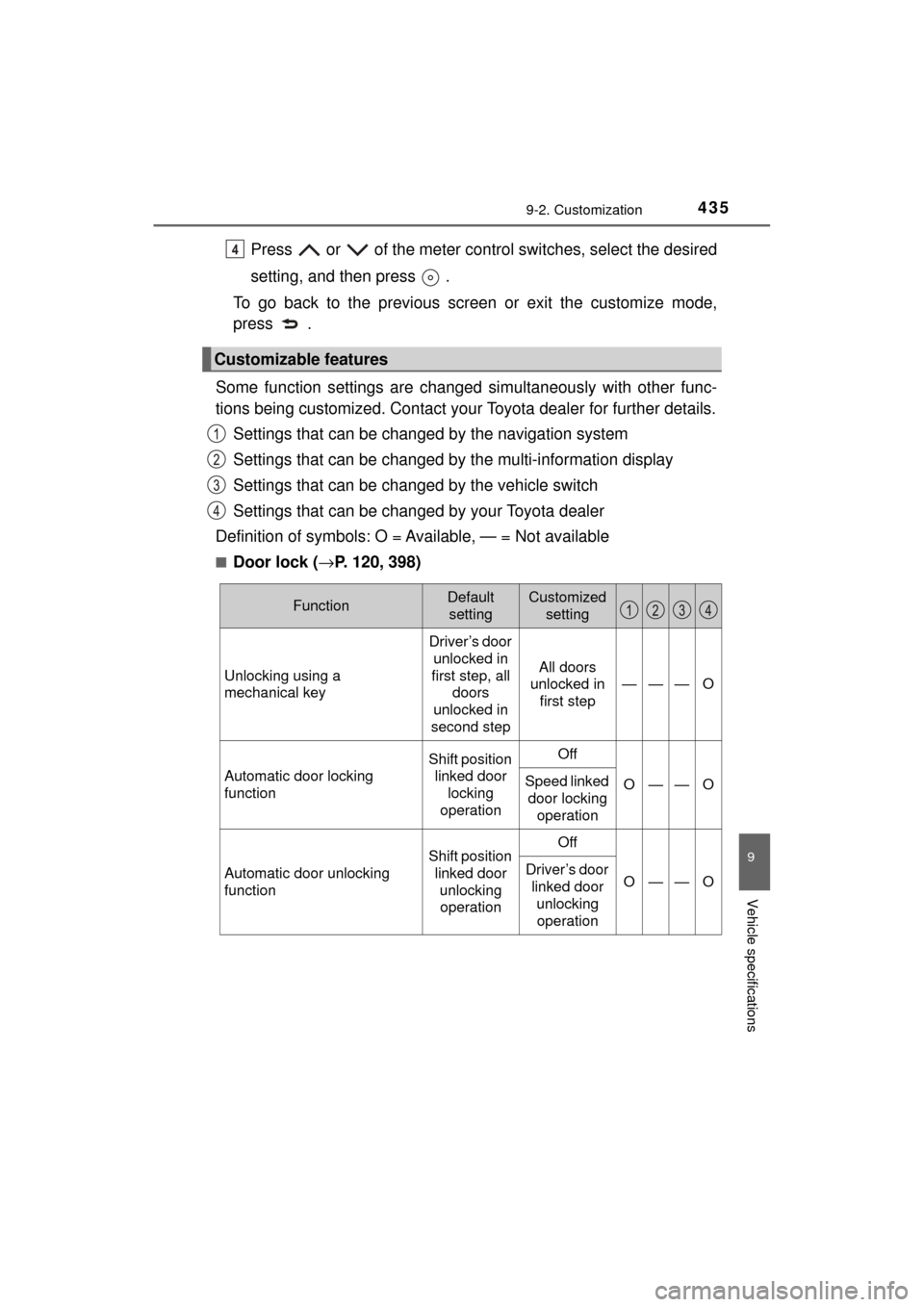
Press or of the meter control switches, select the desired
setting, and then press .
To go back to the previous screen or exit the customize mode,
press .
Some function settings are changed simultaneously with other func-
tions being customized. Contact your Toyota dealer for further details.
Settings that can be chan ged by the navigation system
Settings that can be changed by the multi-information display
Settings that can be changed by the vehicle switch
Settings that can be changed by your Toyota dealer
Definition of symbols: O = Av ailable, — = Not available
■Door lock (→P. 120, 398)
Customizable features
4
FunctionDefault
settingCustomized setting
Unlocking using a
mechanical key
Driver’s door unlocked in
first step, all doors
unlocked in
second step
All doors
unlocked in
first step
———O
Automatic door locking
function
Shift position linked door locking
operationOff
O——OSpeed linked door locking
operation
Automatic door unlocking
function
Shift position linked door unlocking operationOff
O——ODriver’s door linked door
unlocking operation