window TOYOTA MIRAI 2017 1.G Owner's Guide
[x] Cancel search | Manufacturer: TOYOTA, Model Year: 2017, Model line: MIRAI, Model: TOYOTA MIRAI 2017 1.GPages: 464, PDF Size: 12.09 MB
Page 307 of 464

3077-1. Maintenance and care
MIRAI_OM_USA_OM62023U
7
Maintenance and care
■When using a car wash
If the door handle becomes wet while the electronic key is within the ef\
fective
range, the door may lock and unlock repeatedly. In that case, follow the fol-
lowing correction procedures to wash the vehicle:
●Place the key in a position 6 ft. (2 m) or more separate from the vehicle
while the vehicle is being washed. (Take care to ensure that the key is not
stolen.)
● Set the electronic key to battery-saving mode to disable the smart key sys-
tem. ( →P. 133)
■ Aluminum wheels
●Remove any dirt immediately by using a neutral detergent. Do not use hard
brushes or abrasive cleaners. Do not use strong or harsh chemical clean-
ers.
Use the same mild detergent and wax as used on the paint.
● Do not use detergent on the wheels when they are hot, for example after
driving for long distance in the hot weather.
● Wash detergent from the wheels immediately after use.
■ Bumpers
Do not scrub with abrasive cleaners.
■ Front side windows water-repellent coating
●The following precautions can extend the effectiveness of the water-repel-
lent coating.
• Remove any dirt, etc., from the front side windows regularly.
• Do not allow dirt and dust to accumulate on the windows for a long
period.
Clean the windows with a soft, damp cloth as soon as possible.
• Do not use wax or glass cleaners that contain abrasives when cleaning the windows.
• Do not use any metallic objects to remove condensation build up.
● When the water-repellent performance has become insufficient, the coating
can be repaired. Contact your Toyota dealer.
■ Restoration work for rain clearing effect of the rain clearing mirror
The rain clearing effect on the mirror surface will gradually recover after expo-
sure to sunlight ( →P. 152). However, if you want to restore the effect immedi-
ately, conduct the following procedures:
Apply water to the mirror surface to wash the dirt away from it.
Remove the dirt by using a clean, soft and wet cloth.
Clean the mirror surface with gla ss cleaner or detergent. When detergent is
used, rinse the mirror surface with a lot of water.
Wipe water on the mirror surface by using a clean and soft cloth, etc.
Park your vehicle outdoors to expose the mirror surface to sunlight for
about 5 hours. (The restoration time differs depending on the amount and
type of dirt.)
1
2
3
4
5
Page 312 of 464

3127-1. Maintenance and care
MIRAI_OM_USA_OM62023U
NOTICE
■Cleaning detergents
● Do not use the following types of detergent, as they may discolor the vehi-
cle interior or cause streaks or damage to painted surfaces:
• Non-seat portions: Organic substances such as benzene or gasoline,
alkaline or acidic solutions, dye, and bleach
• Seats: Alkaline or acidic solutions, such as thinner, benzene, and alco- hol
● Do not use a polish wax or polish cleaner. The instrument panel’s or other
interior part’s painted surface may be damaged.
■ Preventing damage to leather surfaces
Observe the following precautions to avoid damage to and deterioration of
leather surfaces:
● Remove any dust or dirt from leather surfaces immediately.
● Do not expose the vehicle to direct sunlight for extended periods of time.
Park the vehicle in the shade, especially during summer.
● Do not place items made of vinyl, plastic, or containing wax on the uphol-
stery, as they may stick to the leather surface if the vehicle interior heats
up significantly.
■ Water on the floor
Do not wash the vehicle floor with water.
Vehicle systems such as the audio system may be damaged if water comes
into contact with electrical components such as the audio system above or
under the floor of the vehicle. Water may also cause the body to rust.
■ When cleaning the inside of the windshield
Be careful not to touch the camera sensor ( →P. 216).
If the camera is accidentally scratched or hit, LDA system and Automatic
High Beam may not operate properly or may cause a malfunction.
■ Cleaning the inside of the rear window
● Do not use glass cleaner to clean the rear window, as this may cause
damage to the rear window defogger heater wires or antenna. Use a cloth
dampened with lukewarm water to gently wipe the window clean. Wipe the
window in strokes running parallel to the heater wires or antenna.
● Be careful not to scratch or damage the heater wires or antenna.
Page 336 of 464

3367-3. Do-it-yourself maintenance
MIRAI_OM_USA_OM62023U■
Situations in which the tire pressure warning system may not oper-
ate properly
●In the following cases, the tire pr
essure warning system may not operate
properly.
• If non-genuine Toyota wheels are used.
• A tire has been replaced with a tire that is not an OE (Original Equip- ment) tire.
• A tire has been replaced with a tire that is not of the specified size.
• Tire chains, etc., are equipped.
• An auxiliary-supported run- flat tire is equipped.
• If a window tint that affects the radio wave signals is installed.
• If there is a lot of snow or ice on the vehicle, particularly around the wheels or wheel housings.
• If the tire inflation pressure is extremely higher than the specified level.
• If wheels without the tire pressure warning valves and transmitters
are used.
• If the ID code on the tire pressure warning valves and transmitters is not registered in the tire pressure warning computer.
●Performance may be affected in the following situations.
• Near a TV tower, electric power plant, gas station, radio station, largedisplay, airport or other facility that generates strong radio waves or
electrical noise
• When carrying a portable radio, cellular phone, cordless phone or other wireless communication device
●When the vehicle is parked, the time taken for the warning to start or go
off could be extended.
●When tire inflation pressure declines rapidly for example when a tire has
burst, the warning may not function.
Page 399 of 464
3998-2. Steps to take in an emergency
MIRAI_OM_USA_OM62023U
8
When trouble arises
■Key linked functions
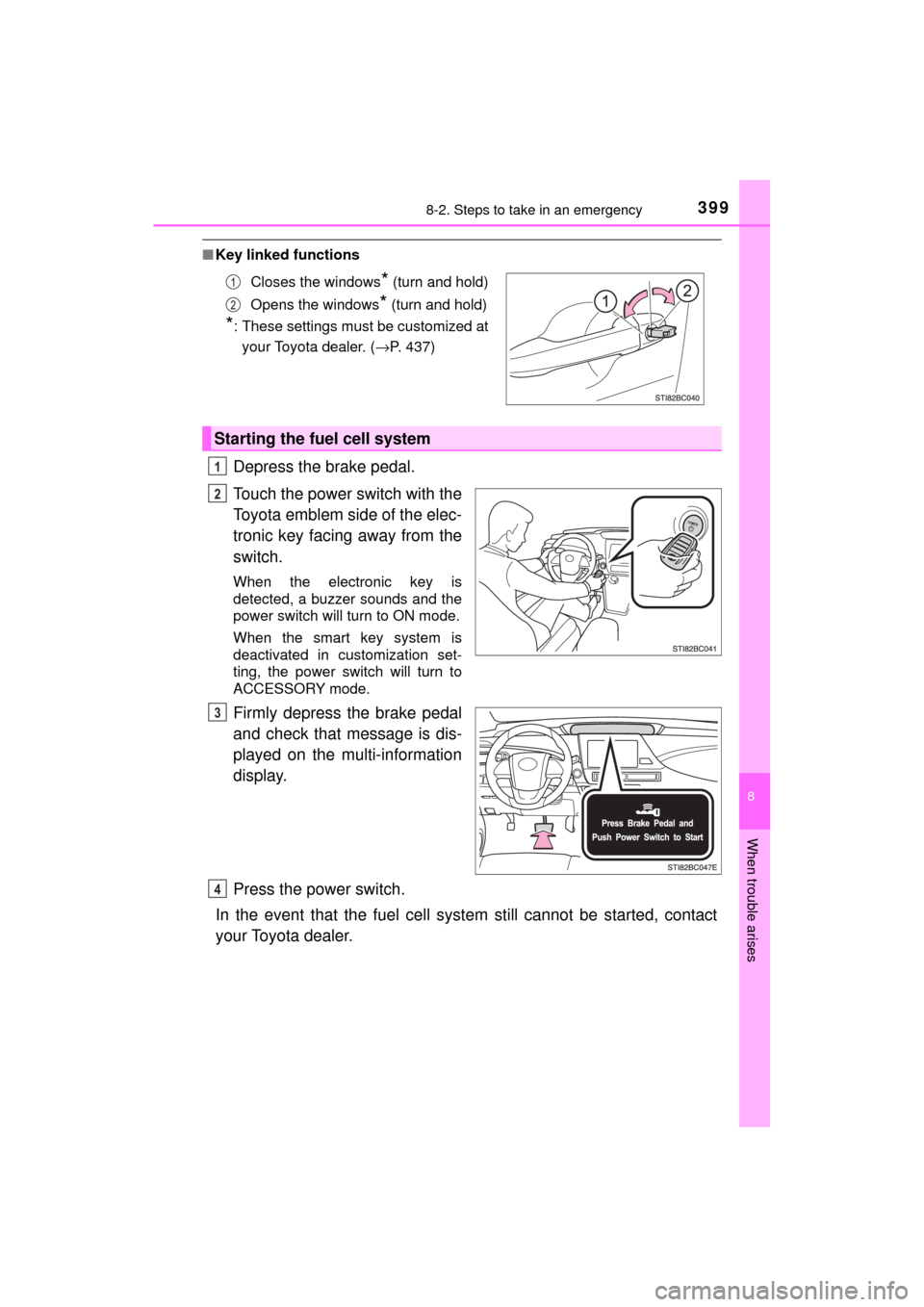
Depress the brake pedal.
Touch the power switch with the
Toyota emblem side of the elec-
tronic key facing away from the
switch.
When the electronic key is
detected, a buzzer sounds and the
power switch will turn to ON mode.
When the smart key system is
deactivated in customization set-
ting, the power switch will turn to
ACCESSORY mode.
Firmly depress the brake pedal
and check that message is dis-
played on the multi-information
display.
Press the power switch.
In the event that the fuel cell syst em still cannot be started, contact
your Toyota dealer.
Closes the windows* (turn and hold)
Opens the windows
* (turn and hold)
*: These settings must be customized at your Toyota dealer. ( →P. 437)
Starting the fuel cell system
1
2
3
4
Page 400 of 464

4008-2. Steps to take in an emergency
MIRAI_OM_USA_OM62023U
■Stopping the fuel cell system
Shift the shift position to P and press the power switch as you normally do
when stopping the fuel cell system.
■ Replacing the key battery
As the above procedure is a temporary measure, it is recommended that the
electronic key battery be replaced immediately when the battery is depleted.
(→P. 353)
■ Alarm
Using the mechanical key to lock the doors will not set the alarm system.
If a door is unlocked using the mechanical key when the alarm system is set,
the alarm may be triggered. ( →P. 75)
■ When the electronic key does not work properly
●Make sure that the smart key system has not been deactivated in the cus-
tomization setting. If it is off, turn the function on.
(Customizable features →P. 436)
● Check if battery-saving mode is set. If it is set, cancel the function.
(→P. 133)
■ Changing power switch modes
Release the brake pedal and press the power switch in step above.
The fuel cell system does not start and modes will be changed each time the
switch is pressed. (→P. 174)
WARNING
■ When using the mechanical key and operating the power windows
Operate the power window after checking to make sure that there is no pos-
sibility of any passenger having any of their body parts caught in the win-
dow.
Also, do not allow children to operate the mechanical key. It is possible for
children and other passengers to get caught in the power window.
3
Page 428 of 464
4289-1. Specifications
MIRAI_OM_USA_OM62023U
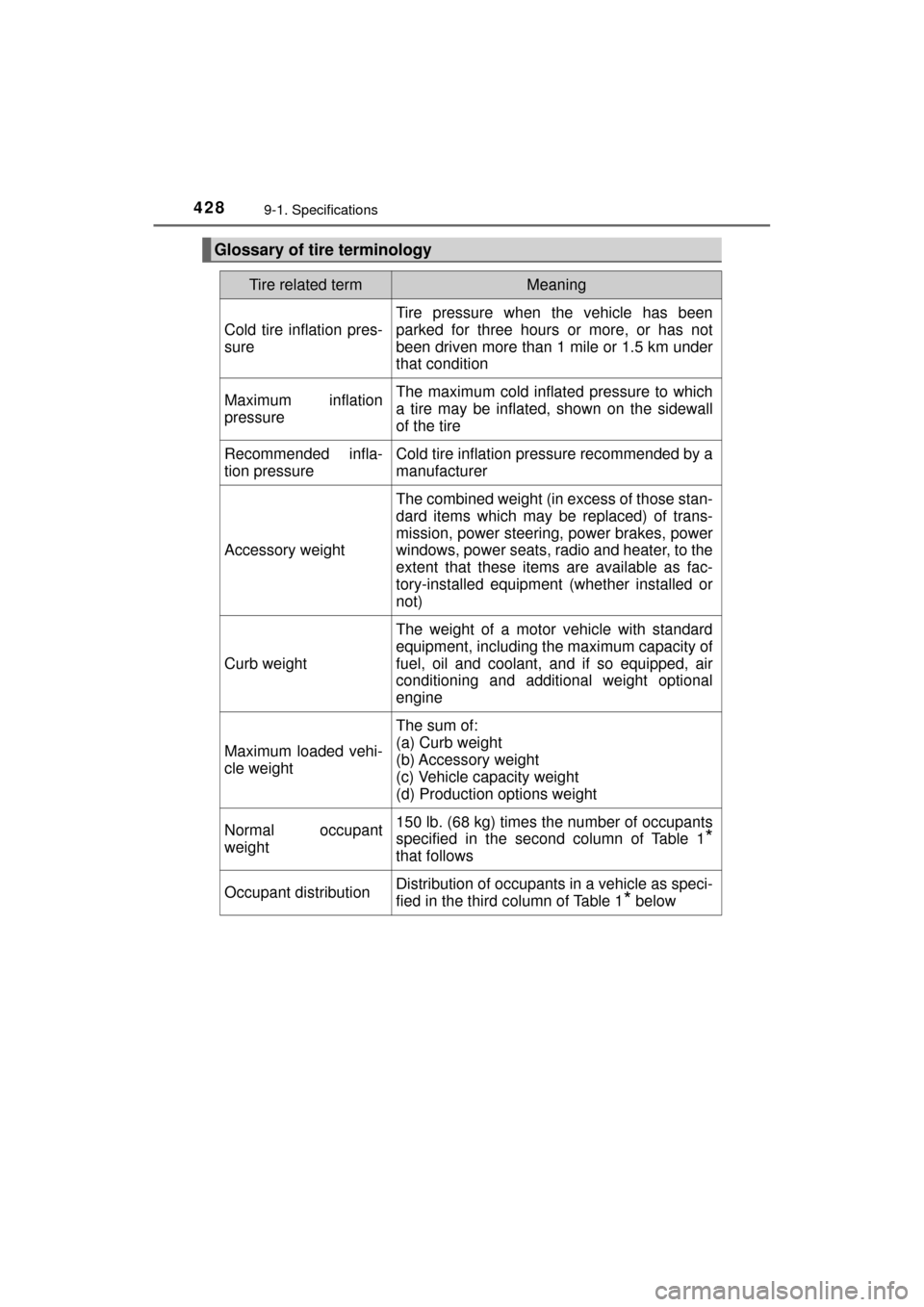
Glossary of tire terminology
Tire related termMeaning
Cold tire inflation pres-
sure
Tire pressure when the vehicle has been
parked for three hours or more, or has not
been driven more than 1 mile or 1.5 km under
that condition
Maximum inflation
pressureThe maximum cold inflated pressure to which
a tire may be inflated, shown on the sidewall
of the tire
Recommended infla-
tion pressureCold tire inflation pressure recommended by a
manufacturer
Accessory weight
The combined weight (in excess of those stan-
dard items which may be replaced) of trans-
mission, power steering, power brakes, power
windows, power seats, radio and heater, to the
extent that these item s are available as fac-
tory-installed equipment (whether installed or
not)
Curb weight
The weight of a motor vehicle with standard
equipment, including the maximum capacity of
fuel, oil and coolant, and if so equipped, air
conditioning and additional weight optional
engine
Maximum loaded vehi-
cle weight
The sum of:
(a) Curb weight
(b) Accessory weight
(c) Vehicle capacity weight
(d) Production options weight
Normal occupant
weight150 lb. (68 kg) times the number of occupants
specified in the second column of Table 1
*
that follows
Occupant distributionDistribution of occupants in a vehicle as speci-
fied in the third column of Table 1
* below
Page 437 of 464
4379-2. Customization
MIRAI_OM_USA_OM62023U
9
Vehicle specifications
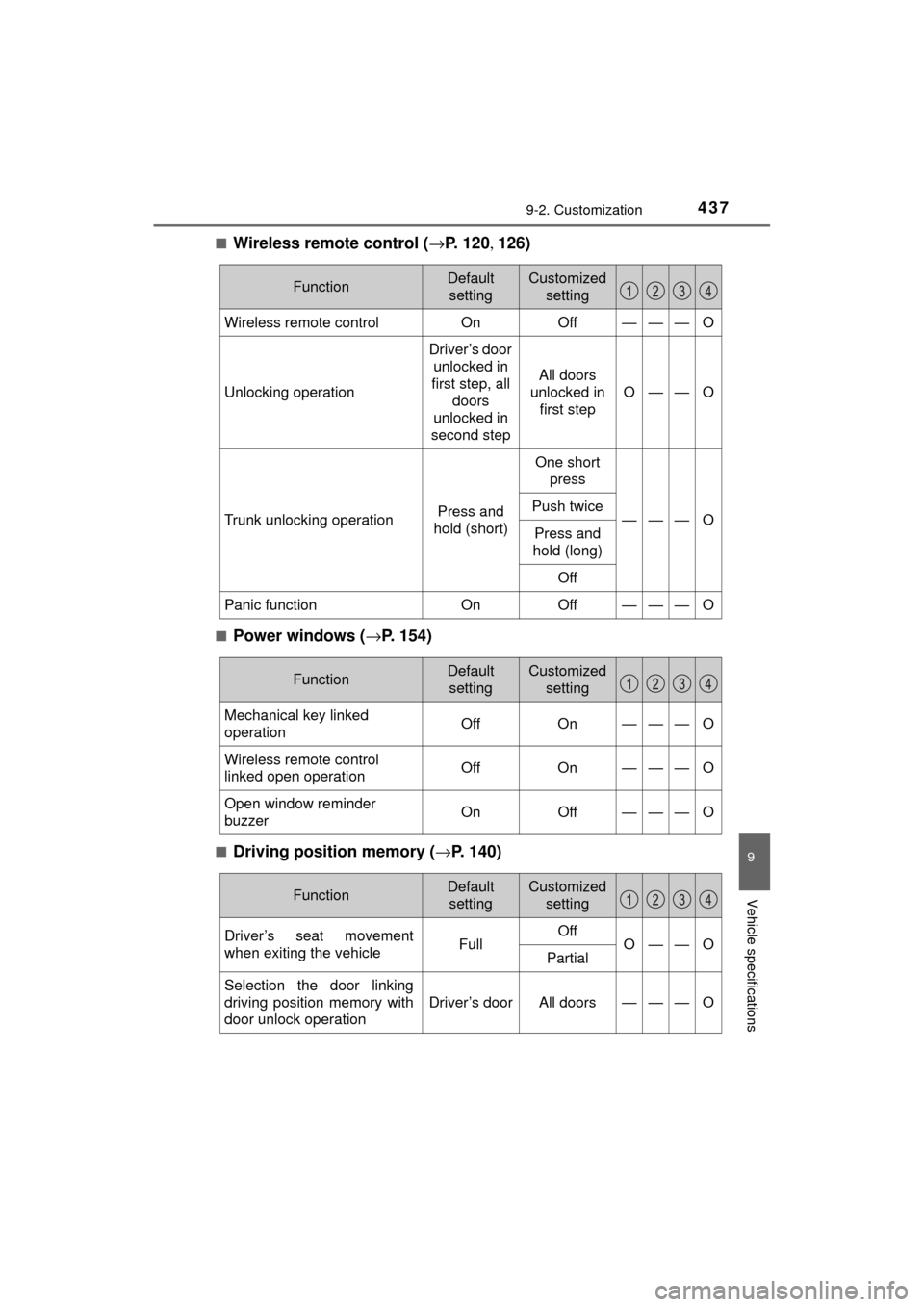
■Wireless remote control (→P. 1 2 0 , 126)
■Power windows ( →P. 154)
■Driving position memory ( →P. 140)
FunctionDefault
settingCustomized setting
Wireless remote controlOnOff———O
Unlocking operation
Driver’s door
unlocked in
first step, all doors
unlocked in
second step
All doors
unlocked in first step
O——O
Trunk unlocking operationPress and
hold (short)
One short press
———OPush twice
Press and
hold (long)
Off
Panic functionOnOff———O
FunctionDefault settingCustomized setting
Mechanical key linked
operationOffOn———O
Wireless remote control
linked open operationOffOn———O
Open window reminder
buzzerOnOff———O
FunctionDefault settingCustomized setting
Driver’s seat movement
when exiting the vehicleFullOffO——OPartial
Selection the door linking
driving position memory with
door unlock operation
Driver’s doorAll doors———O
Page 442 of 464
4429-3. Items to initialize
MIRAI_OM_USA_OM62023U
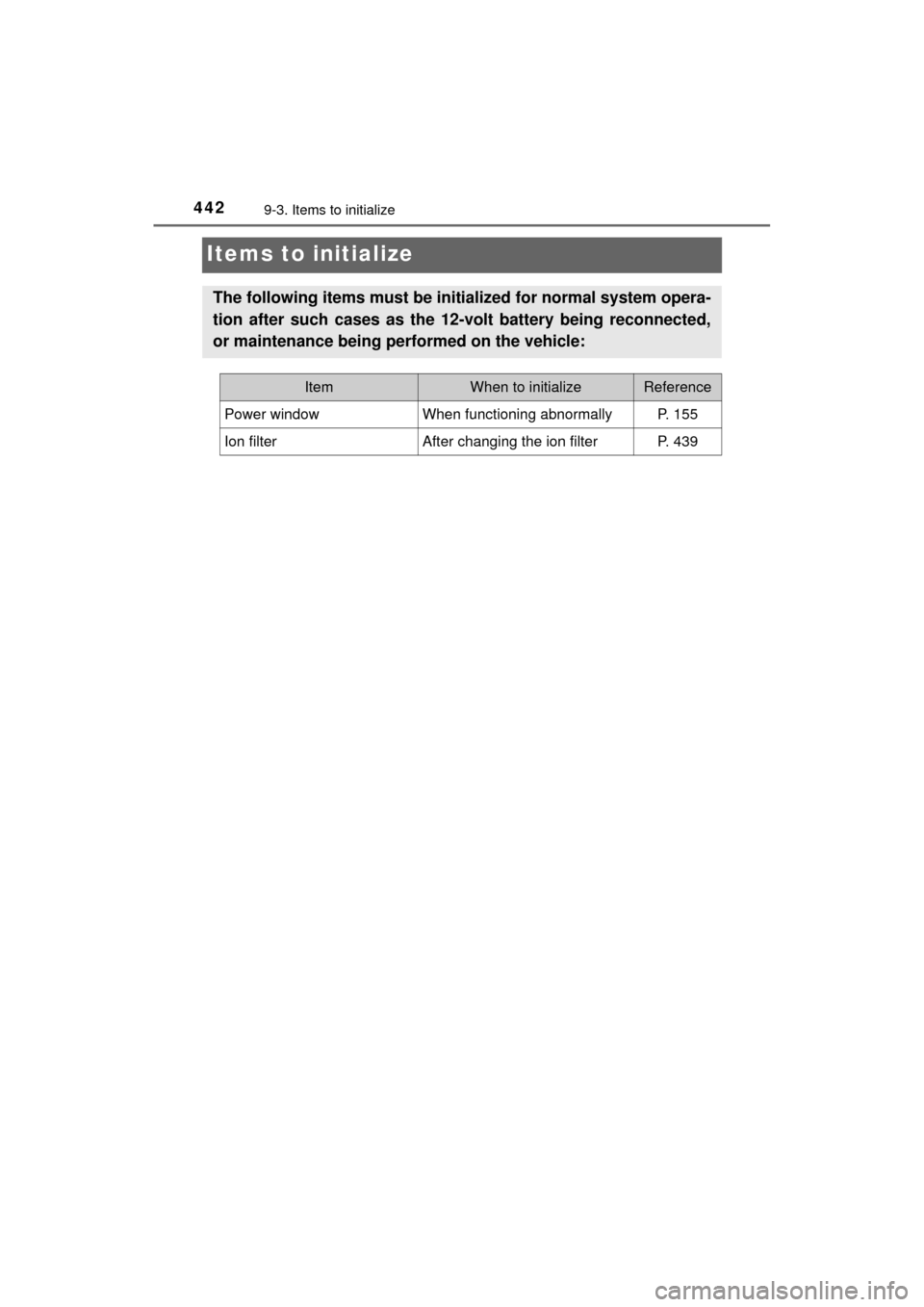
Items to initialize
The following items must be initialized for normal system opera-
tion after such cases as the 12-volt battery being reconnected,
or maintenance being performed on the vehicle:
ItemWhen to initializeReference
Power windowWhen functioning abnormallyP. 155
Ion filterAfter changing the ion filterP. 439
Page 447 of 464
447What to do if... (Troubleshooting)
MIRAI_OM_USA_OM62023U
●Did you press the power switch while firmly depressing the brake pedal?
(→P. 172)
●Is the shift position in P? ( →P. 180)
●Is the electronic key anywhere detectable inside the vehicle? ( →P. 132)
●Is the electronic key battery weak or depleted?
In this case, the fuel cell system can be started in a temporary way.
(→P. 399)
●Is the 12-volt battery discharged? ( →P. 401)
●Is the window lock switch pressed?
The power window except for the one at the driver’s seat cannot be oper-
ated if the window lock switch is pressed. ( →P. 154)
●The auto power off function will be operated if the vehicle is left in ACCES-
SORY or ON mode (the fuel cell system is not operating) for a period of
time. ( →P. 174)
If you think something is wrong
The fuel cell system does not start
The windows do not open or close by operating the power
window switches
The power switch is turned off automatically
Page 450 of 464

450Alphabetical index
MIRAI_OM_USA_OM62023U
Back-up lightsReplacing light bulb .............. 358
Battery (12-volt battery) .......... 328 Battery checking ................... 328
If the 12-volt battery is discharged .......................... 401
Preparing and checking before winter....................... 253
Warning message ................. 376
Battery (traction battery)..... 78, 83 Air intake vent ......................... 85
Charging ................................. 81
Location ............................ 78, 83
Warning message ................. 376
Blind Spot Monitor (BSM) ....... 245 Blind Spot Monitor function ... 247
Rear Crossing Traffic Alert function ............................... 251
Bluetooth
®*
Audio system*
Hands-free system (for cellular phone)
*
Navigation system*
Bottle holders .......................... 276
Brake Fluid ...................................... 420
Parking brake........................ 186
Regenerative braking.............. 81
Warning light ......................... 369
Brake assist ............................. 232
Break-in tips ............................ 160
Brightness control Instrument panel light
control................................. 104
BSM (Blind Spot Monitor) ....... 245 Blind Spot Monitor function ... 247
Rear Cross Traffic Alert
function ............................... 250 Care .................................. 306, 310
Aluminum wheels ................. 307
Exterior ................................. 306
Interior .................................. 310
Seat belts.............................. 311
Cargo capacity......................... 169
CD player
*
Chains ...................................... 254
Child restraint system............... 56 Booster seats installation........ 64
Convertible seats installation ............................ 63
Front passenger occupant classification syst em ............ 49
Infant seats definition.............. 58
Infant seats installation ........... 62
Installing a CRS to the passenger seat..................... 59
Installing CRS with LATCH anchors ................................ 67
Installing CRS with seat belts...................................... 62
Installing CRS with top tether
strap ..................................... 69
Child safety ................................ 55 12-volt battery precautions................. 330, 404
Airbag precautions.................. 39
Child restraint system ............. 56
How your child should wear the seat belt.......................... 32
Power window lock switch .... 154
Power window precautions ... 156
Rear door child-protectors .... 123
Removed electronic key battery precautions............. 354
Seat belt extender precautions........................... 35
Seat belt precautions .............. 34
Seat heater precautions ....... 267
Trunk precautions ................. 129
BC