warning TOYOTA MIRAI 2017 1.G Workshop Manual
[x] Cancel search | Manufacturer: TOYOTA, Model Year: 2017, Model line: MIRAI, Model: TOYOTA MIRAI 2017 1.GPages: 464, PDF Size: 12.09 MB
Page 102 of 464
1023. Instrument cluster
MIRAI_OM_USA_OM62023U
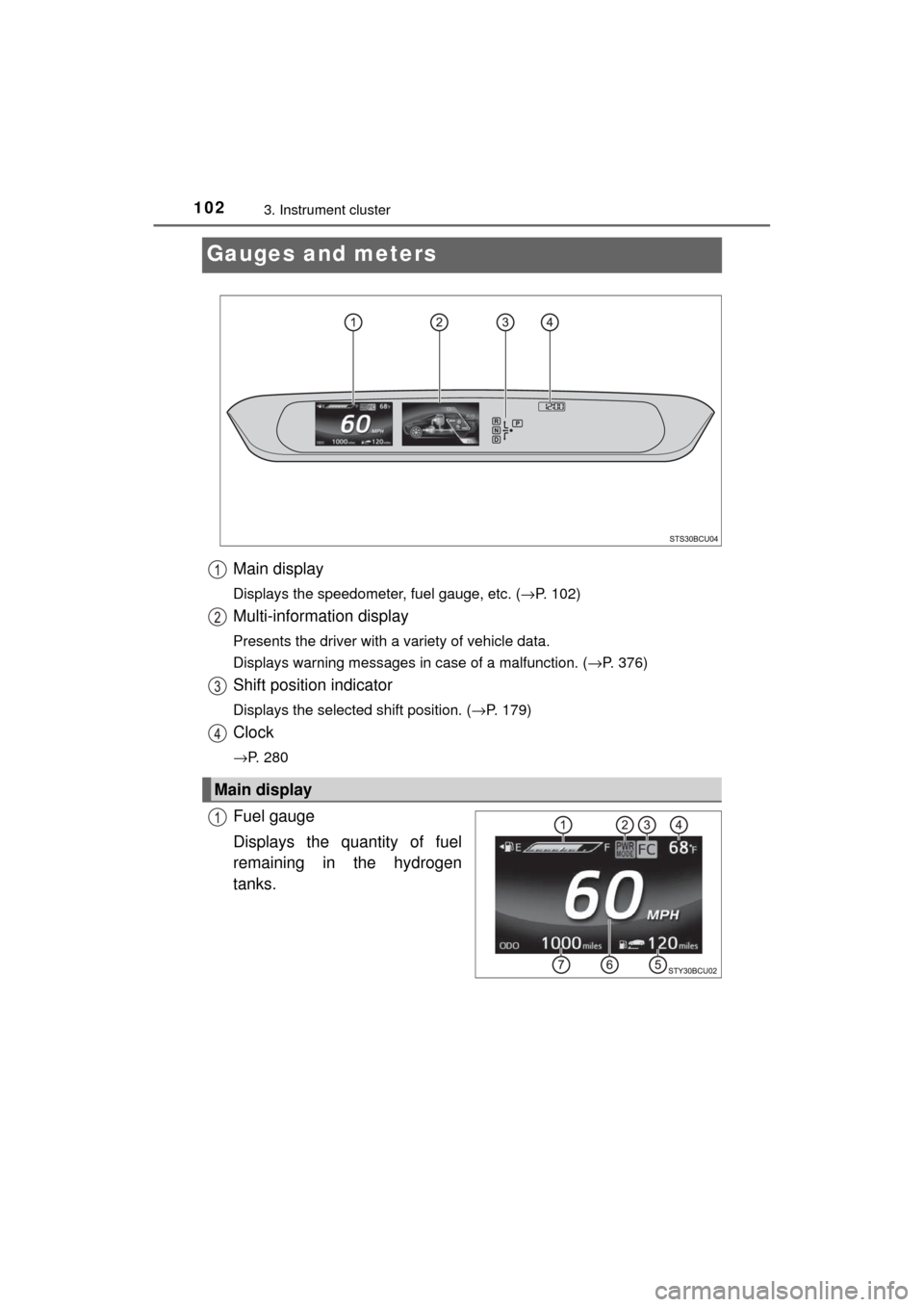
Gauges and meters
Main display
Displays the speedometer, fuel gauge, etc. (→P. 102)
Multi-information display
Presents the driver with a variety of vehicle data.
Displays warning messages in case of a malfunction. ( →P. 376)
Shift position indicator
Displays the selected shift position. (→P. 179)
Clock
→P. 280
Fuel gauge
Displays the quantity of fuel
remaining in the hydrogen
tanks.
Main display
Page 106 of 464
1063. Instrument cluster
MIRAI_OM_USA_OM62023U■
Outside temperature display
●In the following situations, the correct outside temperature may not be dis-
played, or the display may take longer than normal to change.
• When stopped, or driving at low speeds (less than 16 mph [25 km/h])
• When the outside temperature has changed suddenly (at the entrance/
exit of a garage, tunnel, etc.)
● When “--” or “E” is displayed, the system may be malfunctioning.
Take your vehicle to your Toyota dealer.
■ Liquid crystal display
Small spots or light spots may appear on the display. This phenomenon is
characteristic of liquid crystal displays, and there is no problem continuing to
use the display.
■ Customization
The meter display can be customized on the multi-information display.
(Customizable features: →P. 439)
NOTICE
■To prevent damage to the fuel cell system and its components
This vehicle is equipped with high coolant temperature warning light
(→ P. 369), instead of, coolant temperature gauge.
The fuel cell system may be overheating if the high coolant temperature
warning light flashes or comes on. In this case, immediately stop the
vehicle in a safe place, and check the fuel cell system after it has cooled
completely.
Page 107 of 464
1073. Instrument cluster
3
Instrument cluster
MIRAI_OM_USA_OM62023U
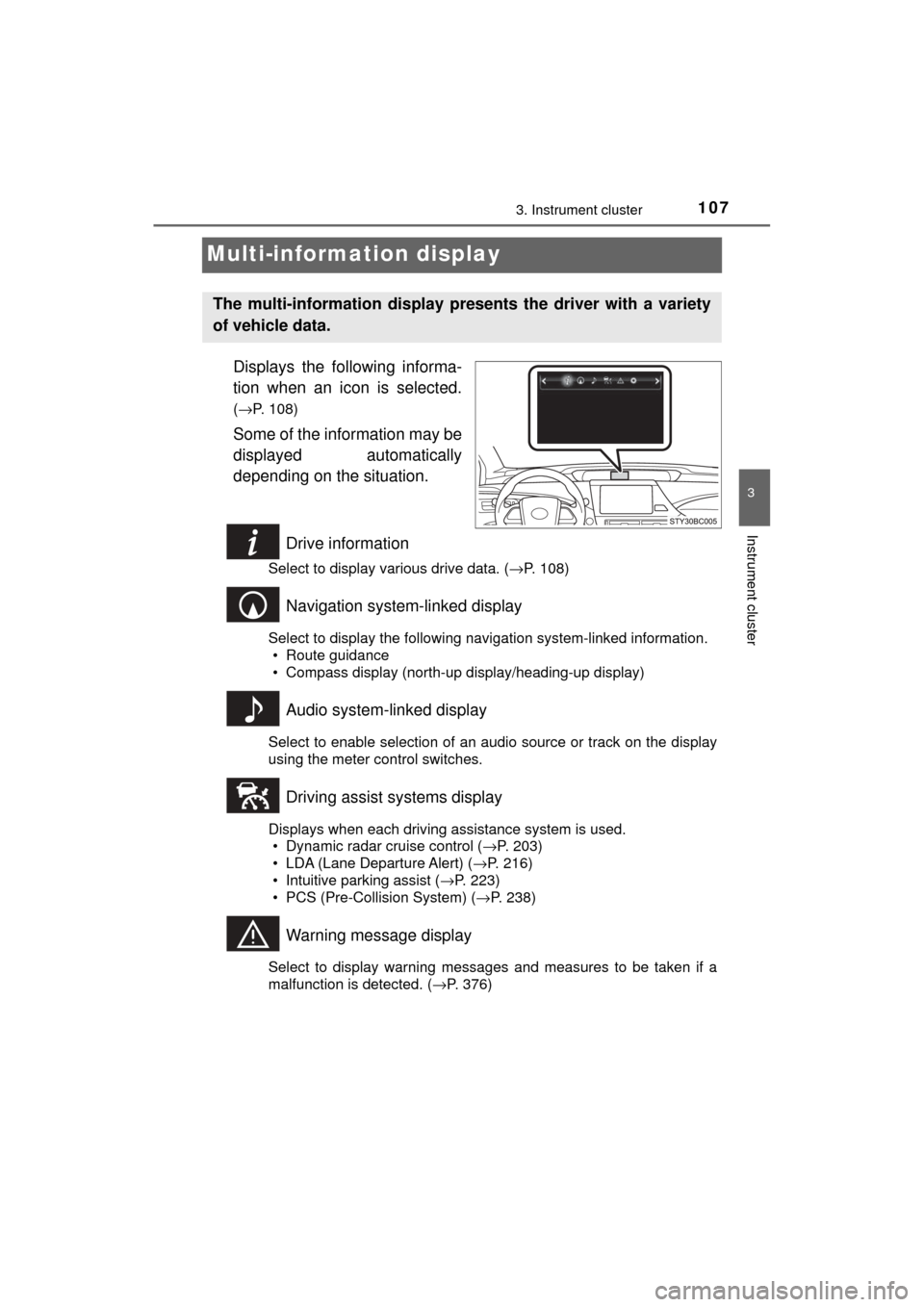
Multi-information display
Displays the following informa-
tion when an icon is selected.
(→P. 108)
Some of the information may be
displayed automatically
depending on the situation.
Drive information
Select to display various drive data. ( →P. 108)
Navigation system-linked display
Select to display the following navigation system-linked information.
• Route guidance
• Compass display (north-up display/heading-up display)
Audio system-linked display
Select to enable selection of an audio source or track on the display
using the meter control switches.
Driving assist systems display
Displays when each driving assistance system is used.• Dynamic radar cruise control ( →P. 203)
• LDA (Lane Departure Alert) ( →P. 216)
• Intuitive parking assist ( →P. 223)
• PCS (Pre-Collision System) ( →P. 238)
Warning message display
Select to display warning messages and measures to be taken if a
malfunction is detected. (→P. 376)
The multi-information display pre sents the driver with a variety
of vehicle data.
Page 114 of 464
1143. Instrument cluster
MIRAI_OM_USA_OM62023U
■Suspension of the settings display
In the following situations, the settings display using the meter control
switches will be suspended.
●When a warning message appears on the multi-information display
● When the vehicle begins to move
■ When the 12-volt battery terminal is disconnected and reconnected
The following data is reset when the 12-volt battery terminal is disconnected
and reconnected.
●1-minute fuel consumption
● 5-minute fuel consumption
● Driving time
● Average vehicle speed
● Average fuel consumption
■ Liquid crystal display
→P. 106
NOTICE
■During setting up the display
To prevent 12-volt battery discharge, ensure that the fuel cell system is
operating while setting up the display features.
Page 124 of 464
1244-2. Opening, closing and locking the doors
MIRAI_OM_USA_OM62023U
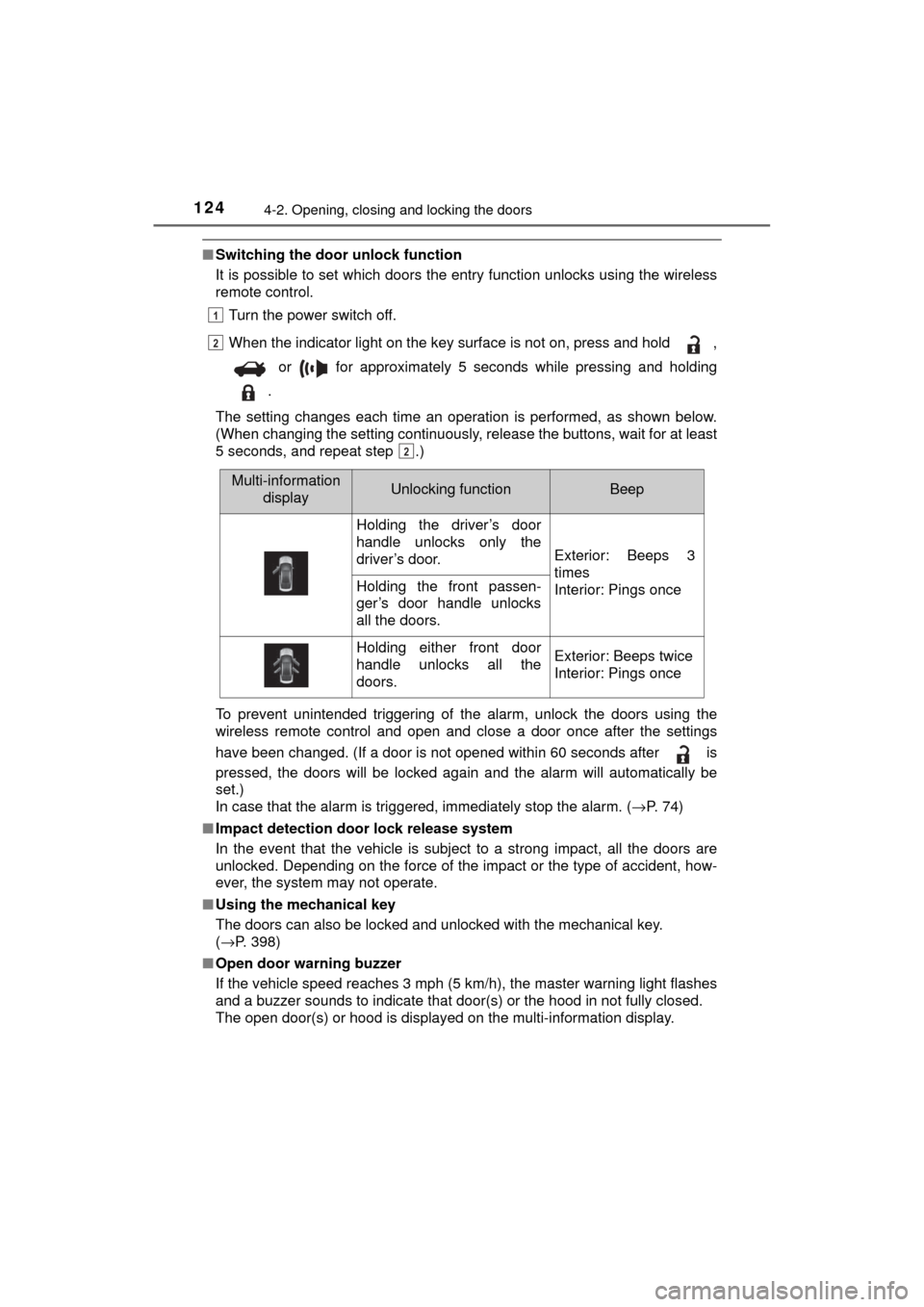
■Switching the door unlock function
It is possible to set which doors the entry function unlocks using the wireless
remote control.
Turn the power switch off.
When the indicator light on the key surface is not on, press and hold ,
or for approximately 5 seconds while pressing and holding
.
The setting changes each time an operation is performed, as shown below.
(When changing the setting continuously, release the buttons, wait for at least
5 seconds, and repeat step .)
To prevent unintended triggering of the alarm, unlock the doors using the
wireless remote control and open and close a door once after the settings
have been changed. (If a door is not opened within 60 seconds after is
pressed, the doors will be locked again and the alarm will automatically be
set.)
In case that the alarm is triggered, immediately stop the alarm. ( →P. 74)
■ Impact detection door lock release system
In the event that the vehicle is subject to a strong impact, all the doors are
unlocked. Depending on the force of the impact or the type of accident, how-
ever, the system may not operate.
■ Using the mechanical key
The doors can also be locked and unlocked with the mechanical key.
(→P. 398)
■ Open door warning buzzer
If the vehicle speed reaches 3 mph (5 km/h), the master warning light flashes
and a buzzer sounds to indicate that door(s) or the hood in not fully closed.
The open door(s) or hood is displayed on the multi-information display.
1
2
2
Multi-information
displayUnlocking functionBeep
Holding the driver’s door
handle unlocks only the
driver’s door.
Exterior: Beeps 3
times
Interior: Pings once
Holding the front passen-
ger’s door handle unlocks
all the doors.
Holding either front door
handle unlocks all the
doors.Exterior: Beeps twice
Interior: Pings once
Page 125 of 464

1254-2. Opening, closing and locking the doors
4
Operation of each component
MIRAI_OM_USA_OM62023U■
Conditions affecting the operation of the smart key system or wireless
remote control
→P. 134
■ Customization
Settings (e.g. unlocking function using a key) can be changed.
(Customizable features: →P. 435)
WARNING
■To prevent an accident
Observe the following precautions while driving the vehicle.
Failure to do so may result in a door opening and an occupant falling out,
resulting in death or serious injury.
● Ensure that all doors are properly closed and locked.
● Do not pull the inside handle of the doors while driving.
Be especially careful for the front doors, as the doors may be opened
even if the inside lock buttons are in locked position.
● Set the rear door child-protector locks when children are seated in the rear
seats.
■ When opening or closing a door
Check the surroundings of the vehicle such as whether the vehicle is on an
incline, whether there is enough space for a door to open and whether a
strong wind is blowing.
When opening or closing the door, hold the door handle tightly to prepare
for any unpredictable movement.
■ When using the wireless remote control and operating the power win-
dows
Operate the power window after checking to make sure that there is no pos-
sibility of any passenger having any of their body parts caught in the win-
dow. Also, do not allow children to operate the wireless remote control. It is
possible for children and other passengers to get caught in the power win-
dow.
Page 129 of 464

1294-2. Opening, closing and locking the doors
4
Operation of each component
MIRAI_OM_USA_OM62023U
P. 11 7
WARNING
Observe the following precautions.
Failure to do so may result in death or serious injury.
■Before driving
● Make sure that the trunk lid is fully closed. If the trunk lid is not fully closed,
it may open unexpectedly while driving and hit near-by objects or luggage
in the trunk may be thrown out, causing an accident.
● Do not allow children to play in the trunk.
If a child is accidentally locked in the trunk, they could suffer from heat
exhaustion, suffocation or other injuries.
● Do not allow a child to open or close the trunk lid.
Doing so may cause the trunk lid to open unexpectedly, or cause the
child’s hands, head, or neck to be caught by the closing trunk lid.
■ Important points while driving
Never let anyone sit in the trunk. In the event of sudden braking or a colli-
sion, they are susceptible to death or serious injury.
Page 130 of 464
1304-2. Opening, closing and locking the doors
MIRAI_OM_USA_OM62023U
WARNING
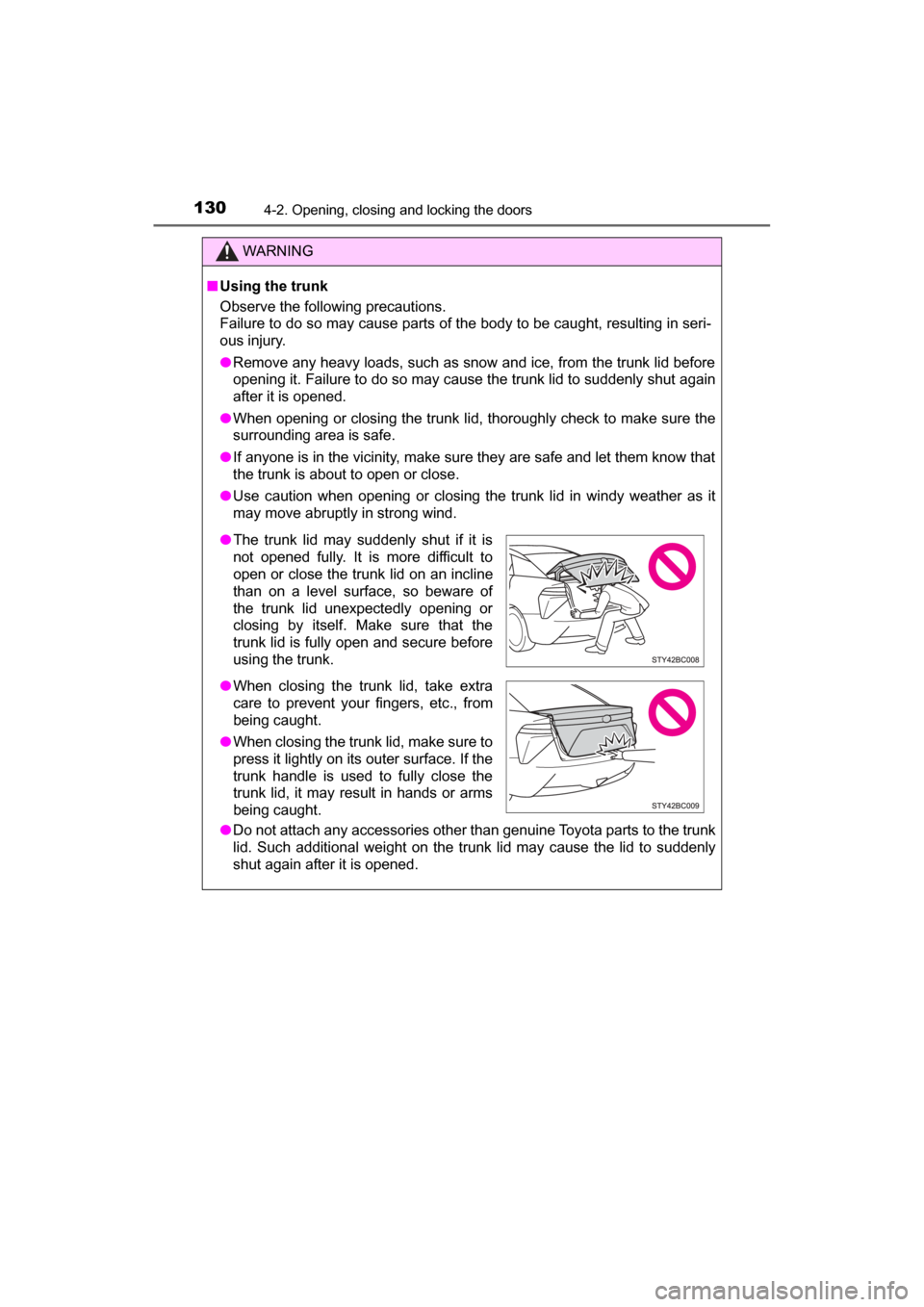
■Using the trunk
Observe the following precautions.
Failure to do so may cause parts of the body to be caught, resulting in seri-
ous injury.
● Remove any heavy loads, such as snow and ice, from the trunk lid before
opening it. Failure to do so may cause the trunk lid to suddenly shut again
after it is opened.
● When opening or closing the trunk lid, thoroughly check to make sure the
surrounding area is safe.
● If anyone is in the vicinity, make sure they are safe and let them know that
the trunk is about to open or close.
● Use caution when opening or closing the trunk lid in windy weather as it
may move abruptly in strong wind.
● Do not attach any accessories other than genuine Toyota parts to the trunk
lid. Such additional weight on the trunk lid may cause the lid to suddenly
shut again after it is opened.
●The trunk lid may suddenly shut if it is
not opened fully. It is more difficult to
open or close the trunk lid on an incline
than on a level surface, so beware of
the trunk lid unexpectedly opening or
closing by itself. Make sure that the
trunk lid is fully open and secure before
using the trunk.
● When closing the trunk lid, take extra
care to prevent your fingers, etc., from
being caught.
● When closing the trunk lid, make sure to
press it lightly on its outer surface. If the
trunk handle is used to fully close the
trunk lid, it may result in hands or arms
being caught.
Page 132 of 464
1324-2. Opening, closing and locking the doors
MIRAI_OM_USA_OM62023U■
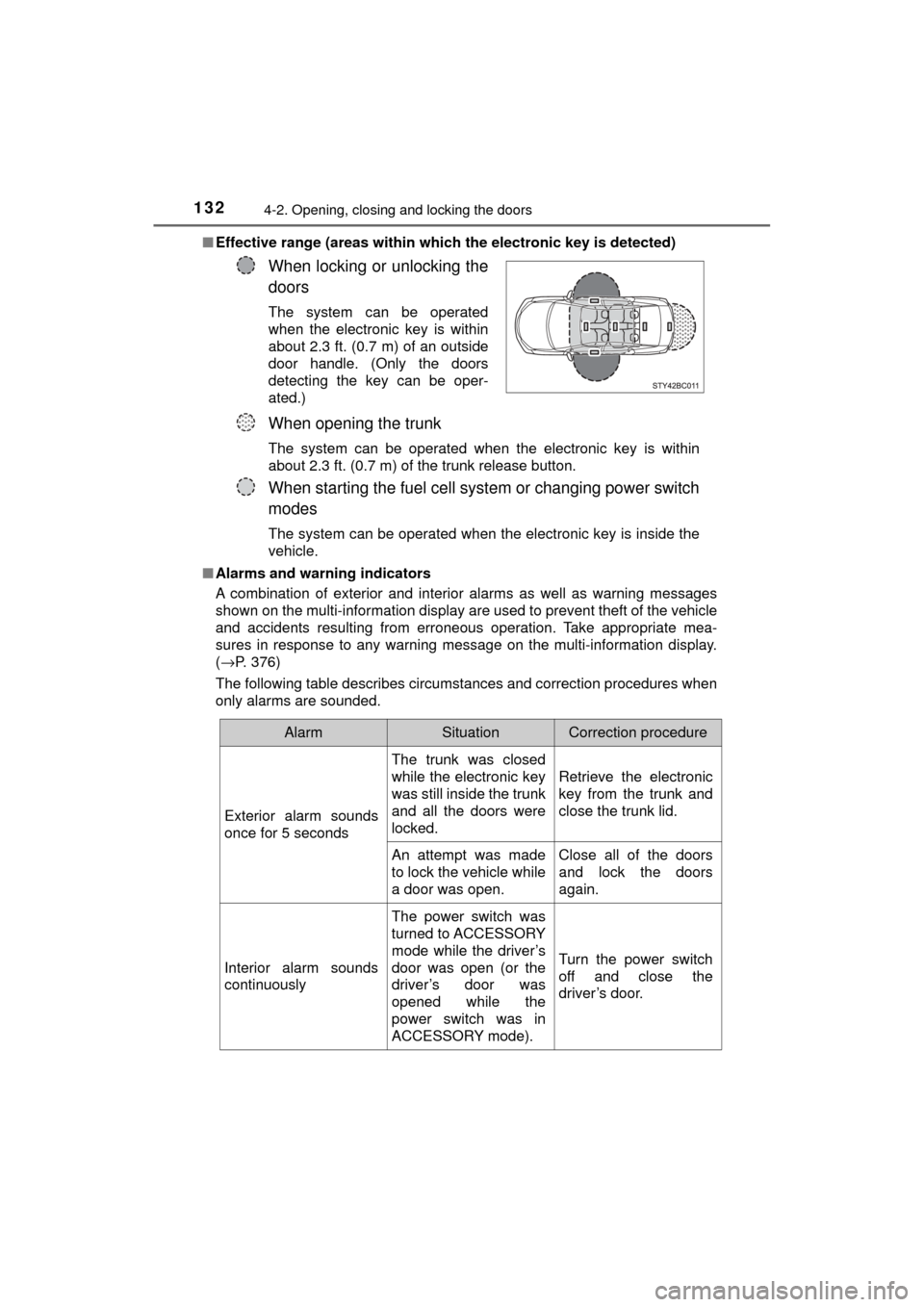
Effective range (areas within whic h the electronic key is detected)
■ Alarms and warning indicators
A combination of exterior and interior alarms as well as warning messages
shown on the multi-information display are used to prevent theft of the vehicle
and accidents resulting from erroneous operation. Take appropriate mea-
sures in response to any warning message on the multi-information display.
(→P. 376)
The following table describes circumstances and correction procedures when
only alarms are sounded.
When locking or unlocking the
doors
The system can be operated
when the electronic key is within
about 2.3 ft. (0.7 m) of an outside
door handle. (Only the doors
detecting the key can be oper-
ated.)
When opening the trunk
The system can be operated when the electronic key is within
about 2.3 ft. (0.7 m) of the trunk release button.
When starting the fuel cell system or changing power switch
modes
The system can be operated when the electronic key is inside the
vehicle.
AlarmSituationCorrection procedure
Exterior alarm sounds
once for 5 seconds The trunk was closed
while the electronic key
was still inside the trunk
and all the doors were
locked.
Retrieve the electronic
key from the trunk and
close the trunk lid.
An attempt was made
to lock the vehicle while
a door was open. Close all of the doors
and lock the doors
again.
Interior alarm sounds
continuously The power switch was
turned to ACCESSORY
mode while the driver’s
door was open (or the
driver’s door was
opened while the
power switch was in
ACCESSORY mode).Turn the power switch
off and close the
driver’s door.
Page 137 of 464
1374-2. Opening, closing and locking the doors
4
Operation of each component
MIRAI_OM_USA_OM62023U■
Certification for the smart key system
FCC ID: NI4TMLF12-6
FCC ID: HYQ23AAB
FCC ID: HYQ14FBA
NOTE:
This device complies with part 15 of the FCC Rules. Operation is subject to
the following two conditions: (1) This device may not cause harmful interfer-
ence, and (2) this device must accept any interference received, including
interference that may cause undesired operation.
FCC WARNING:
Changes or modifications not expressly approved by the party responsible for
compliance could void the user's authority to operate the equipment.
WARNING
■ Caution regarding interfer ence with electronic devices
● People with implantable cardiac pacemakers, cardiac resynchronization
therapy-pacemakers or implantable card ioverter defibrillators should keep
away from the smart key system antennas. ( →P. 132)
The radio waves may affect the operation of such devices. If necessary,
the entry function can be disabled. Ask your Toyota dealer for details, such
as the frequency of radio waves and timing of the emitted radio waves.
Then, consult your doctor to see if you should disable the entry function.
● User of any electrical medical device other than implantable cardiac pace-
makers, cardiac resynchronization therapy-pacemakers or implantable
cardioverter defibrillators should consult the manufacturer of the devic\
e for
information about its operation under the influence of radio waves.
Radio waves could have unexpected effects on the operation of such
medical devices.
Ask your Toyota dealer for details for disabling the entry function.