warning light TOYOTA MIRAI 2017 1.G Repair Manual
[x] Cancel search | Manufacturer: TOYOTA, Model Year: 2017, Model line: MIRAI, Model: TOYOTA MIRAI 2017 1.GPages: 464, PDF Size: 12.09 MB
Page 375 of 464

3758-2. Steps to take in an emergency
MIRAI_OM_USA_OM62023U
8
When trouble arises
WARNING
■Maintenance of the tires
Each tire, including the spare (if provided), should be checked monthly
when cold and inflated to the inflation pressure recommended by the
vehicle manufacturer on the vehicle placard or tire inflation pressure
label (tire and load information label). (If your vehicle has tires of a dif-
ferent size than the size indicated on the vehicle placard or tire inflation
pressure label [tire and load information label], you should determine
the proper tire inflation pressure for those tires.)
As an added safety feature, your vehicle has been equipped with a tire
pressure monitoring system (TPMS-ti re pressure warning system) that
illuminates a low tire pre ssure telltale (tire pressure warning light) when
one or more of your tires is significantly under-inflated. Accordingly,
when the low tire pressure telltale (tire pressure warning light) illumi-
nates, you should stop and check your tires as soon as possible, and
inflate them to the proper pressure. Driving on a significantly under-
inflated tire causes the tire to overheat and can lead to tire failure.
Under-inflation also reduces fuel effi ciency and tire tread life, and may
affect the vehicle’s handling and stopping ability.
Please note that the TPMS (tire pressure warning system) is not a sub-
stitute for proper ti re maintenance, and it is the driver’s responsibility to
maintain correct tire pressure, even if under-inflation has not reached
the level to trigger illumination of the TPMS low tire pressure telltale (tire
pressure warning light).
Your vehicle has also been equipped with a TPMS (tire pressure warn-
ing system) malfunction indicator to indicate when the system is not
operating properly. The TPMS (tire pressure warning system) malfunc-
tion indicator is combined with the lo w tire pressure telltale (tire pressure
warning light). When the system detects a malfunction, the telltale will
flash for approximately one minute and then remain continuously illumi-
nated. This sequence will continue upon subsequent vehicle start-ups as long as the malfunction exists. When the malfunction indicator is illu-
minated, the system may not be able to detect or signal low tire pres-
sure as intended.
TPMS (tire pressure warning system) malfunctions may occur for a vari-
ety of reasons, including the installation of replacement or alternate tires
or wheels on the vehicle that prevent the TPMS (tire pressure warning
system) from functioning properly. Always check the TPMS (tire pres-
sure warning system) malfunction te lltale after replacing one or more
tires or wheels on your vehicle to ensure that the replacement or alter-
nate tires and wheels allow the TPMS (tire pressure warning system) to
continue to function properly.
Page 376 of 464
3768-2. Steps to take in an emergency
MIRAI_OM_USA_OM62023U
If a warning message is displayed
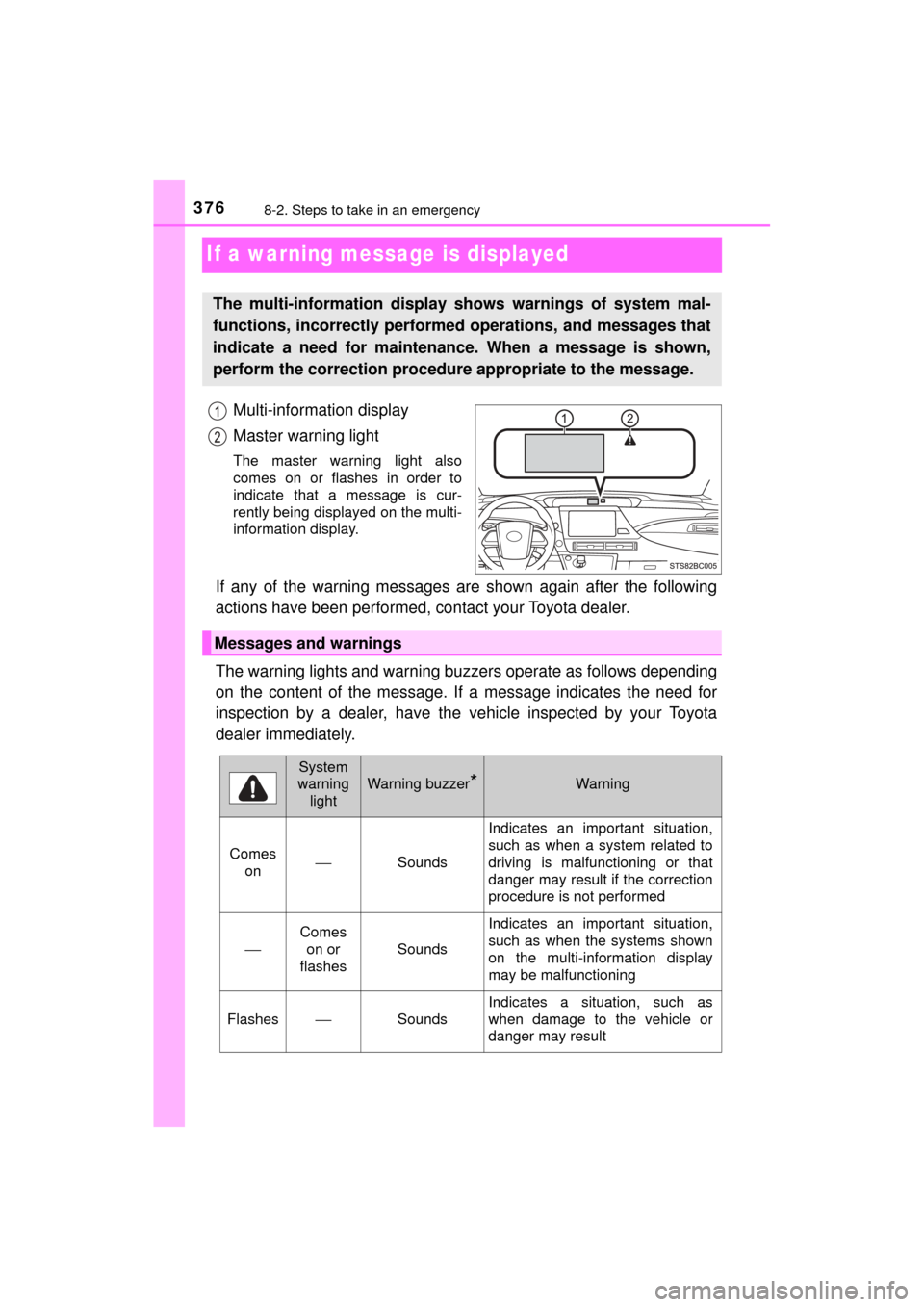
Multi-information display
Master warning light
The master warning light also
comes on or flashes in order to
indicate that a message is cur-
rently being displayed on the multi-
information display.
If any of the warning messages are shown again after the following
actions have been performed, contact your Toyota dealer.
The warning lights and warning buzzers operate as follows depending
on the content of the message. If a message indicates the need for
inspection by a dealer, have the vehicle inspected by your Toyota
dealer immediately.
The multi-information display shows warnings of system mal-
functions, incorrectly performe d operations, and messages that
indicate a need for maintenance. When a message is shown,
perform the correction procedur e appropriate to the message.
Messages and warnings
System
warning light
Warning buzzer*Warning
Comes on ⎯
Sounds Indicates an important situation,
such as when a system related to
driving is malfunctioning or that
danger may result if the correction
procedure is not performed
⎯
Comes
on or
flashes
Sounds
Indicates an important situation,
such as when the systems shown
on the multi-information display
may be malfunctioning
Flashes⎯Sounds
Indicates a situation, such as
when damage to the vehicle or
danger may result
Page 377 of 464
3778-2. Steps to take in an emergency
MIRAI_OM_USA_OM62023U
8
When trouble arises
*: A buzzer sounds the first time a message is shown on the multi-informa-tion display.
■ System warning lights
The master warning light does not come on or flash in the following cases.
Instead, a separate system warning light will come on along with a message
shown on the multi-information display.
●Malfunction of the ABS
The ABS warning light comes on. ( →P. 370)
● Malfunction of the charging system
The charging system warning light comes on. ( →P. 369)
■ If “High FC Temperature Re duced Power” is displayed
Lower the speed while check the safety, and run the vehicle like this for
several minutes.
If the message goes off, the vehicle can be driven as is, since it temporarily
overheated.
This message may be displayed when driving under severe operating con-
ditions.
(For example, when driving up a long steep hill.)
■ If “Maintenance Required for Hybr id Battery Cooling Parts at Your
Dealer” is displayed
The filter may be clogged, or the air intake vent or duct may be blocked. Have
the vehicle inspected by your Toyota dealer.
■ If “Shift to P Before Exiting Vehicle” is displayed
Message is displayed when the driver’s door is opened without turning the
power switch to off with the shift position in any position other than P.
Shift the shift position to P.
■ If “Shift is in N Release Accelerat or Before Shifting” is displayed
Message is displayed when the accelerator pedal has been depressed and
the shift position is in N. Release the accelerator pedal and shift the shift posi-
tion to D or R.
Comes on⎯Does not sound
Indicates a condition, such as mal-
function of electrical components,
their condition, or indicates the
need for maintenance
Flashes⎯Does not sound
Indicates a situation, such as
when an operation has been per-
formed incorrectly, or indicates
how to perform an operation cor-
rectly
System
warning
light
Warning buzzer*Warning
1
2
Page 392 of 464
3928-2. Steps to take in an emergency
MIRAI_OM_USA_OM62023U■
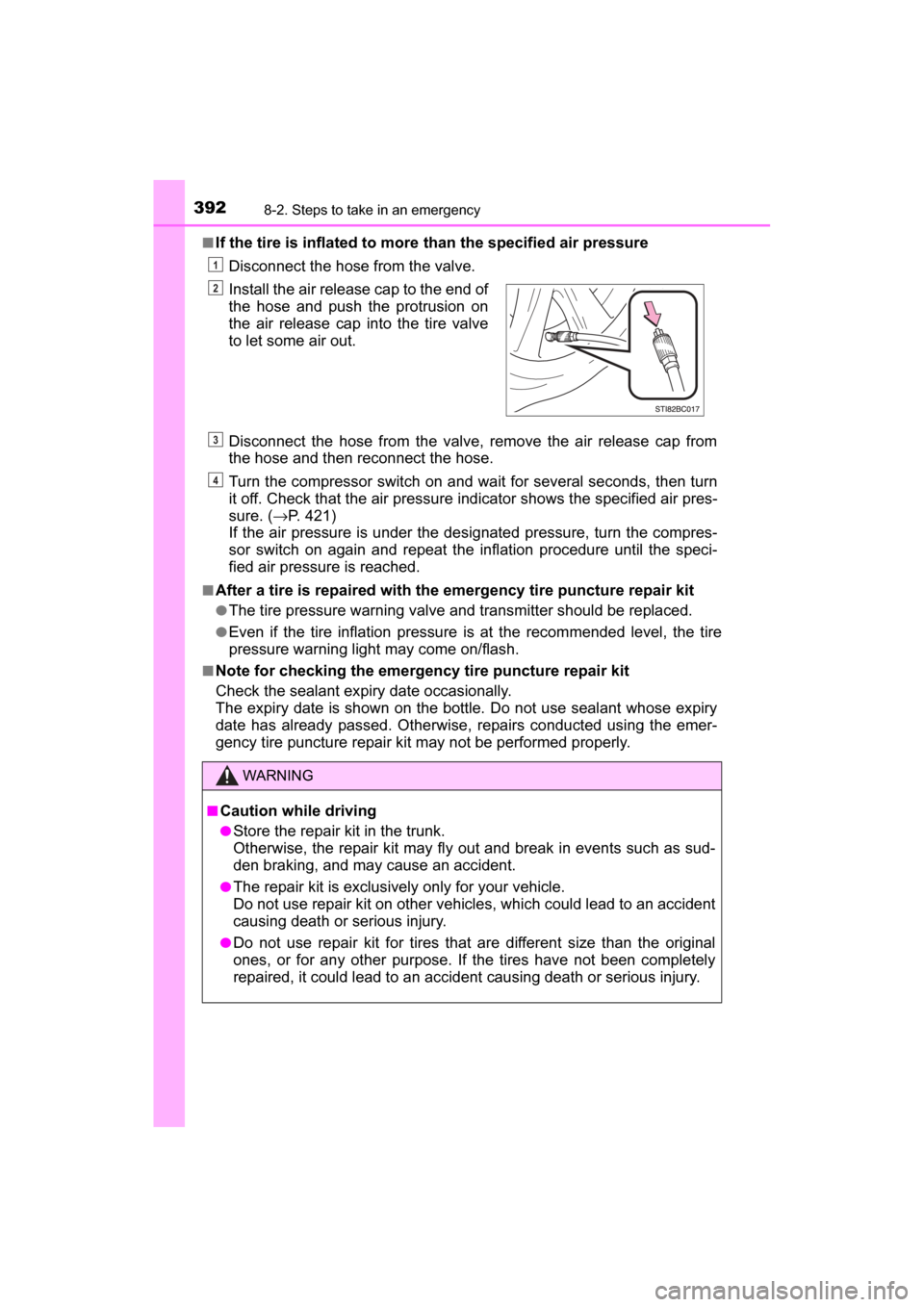
If the tire is inflated to more
than the specified air pressure
Disconnect the hose from the valve.
Disconnect the hose from the valve, remove the air release cap from
the hose and then reconnect the hose.
Turn the compressor switch on and wait for several se conds, then turn
it off. Check that the air pressure indicator shows the specified air pres-
sure. ( →P. 421)
If the air pressure is under the designated pressure, turn the compres-
sor switch on again and repeat the inflation procedure until the speci-
fied air pressure is reached.
■After a tire is repaired with the emergency tire puncture repair kit
●The tire pressure warning valve and transmitter should be replaced.
●Even if the tire inflation pressure is at the recommended level, the tire
pressure warning light may come on/flash.
■Note for checking the emergency tire puncture repair kit
Check the sealant expiry date occasionally.
The expiry date is shown on the bottle. Do not use sealant whose expiry
date has already passed. Otherwise, repairs conducted using the emer-
gency tire puncture repair kit may not be performed properly.Install the air release cap to the end of
the hose and push the protrusion on
the air release cap into the tire valve
to let some air out.
WARNING
■
Caution while driving
●Store the repair kit in the trunk.
Otherwise, the repair kit may fly out and break in events such as sud-
den braking, and may cause an accident.
●The repair kit is exclusively only for your vehicle.
Do not use repair kit on other vehicles, which could lead to an accident
causing death or serious injury.
●Do not use repair kit for tires that are different size than the original
ones, or for any other purpose. If the tires have not been completely
repaired, it could lead to an accide nt causing death or serious injury.
1
2
3
4
Page 404 of 464
4048-2. Steps to take in an emergency
MIRAI_OM_USA_OM62023U■
When exchanging the 12-volt battery
Use a Central Degassing type 12-volt battery (Japanese Industrial Stan-
dards). Also, use 12-volt batteries with case sizes similar to one prior the
exchange and an equivalent 20 hour rate capacity (20HR) or greater.
• If the sizes differ, the 12-volt battery cannot be properly secured.
• If the 20 hour rate capacity is low, even if the time period where the vehicle
is not used is a short time, the 12-volt battery may discharge and fuel cell
system may not be able to start.
For details, consult your Toyota dealer.
WARNING
■ Avoiding 12-volt battery fires or explosions
Observe the following precautions to prevent accidentally igniting the flam-
mable gas that may be emitted from the 12-volt battery:
● Make sure each jumper cable is connected to the correct terminal and that
it is not unintentionally in contact with any other than the intended terminal.
● Do not allow the other end of the jumper cable connected to the “+” termi-
nal to come into contact with any other parts or metal surfaces in the area,
such as brackets or unpainted metal.
● Do not allow the + and - clamps of the jumper cables to come into contact
with each other.
● Do not smoke, use matches, cigarette lighters or allow open flame near
the 12-volt battery.
■ 12-volt battery precautions
The 12-volt battery contains poisonous and corrosive acidic electrolyte,
while related parts contain lead and lead compounds. Observe the following
precautions when handling the 12-volt battery:
● When working with the 12-volt battery, always wear safety glasses and
take care not to allow any 12-volt battery fluids (acid) to come into contact
with skin, clothing or the vehicle body.
● Do not lean over the 12-volt battery.
● In the event that 12-volt battery fluid comes into contact with the skin or
eyes, immediately wash the affected area with water and seek medical
attention.
Place a wet sponge or cloth over the affected area until medical attention
can be received.
● Always wash your hands after handling the 12-volt battery support, termi-
nals, and other battery-related parts.
● Do not allow children near the 12-volt battery.
Page 406 of 464
4068-2. Steps to take in an emergency
MIRAI_OM_USA_OM62023U
If your vehicle overheats
The following may indicate that your vehicle is overheating.
● The high coolant temperature warning light ( →P. 369) comes on
or flashes, or a loss of fuel ce ll system power is experienced. (For
example, the vehicle s peed does not increase.)
● “FC System Overheat Out put Power is Limited” (→P. 376) is dis-
played on the multi- information display
● Steam comes out from under the hood.
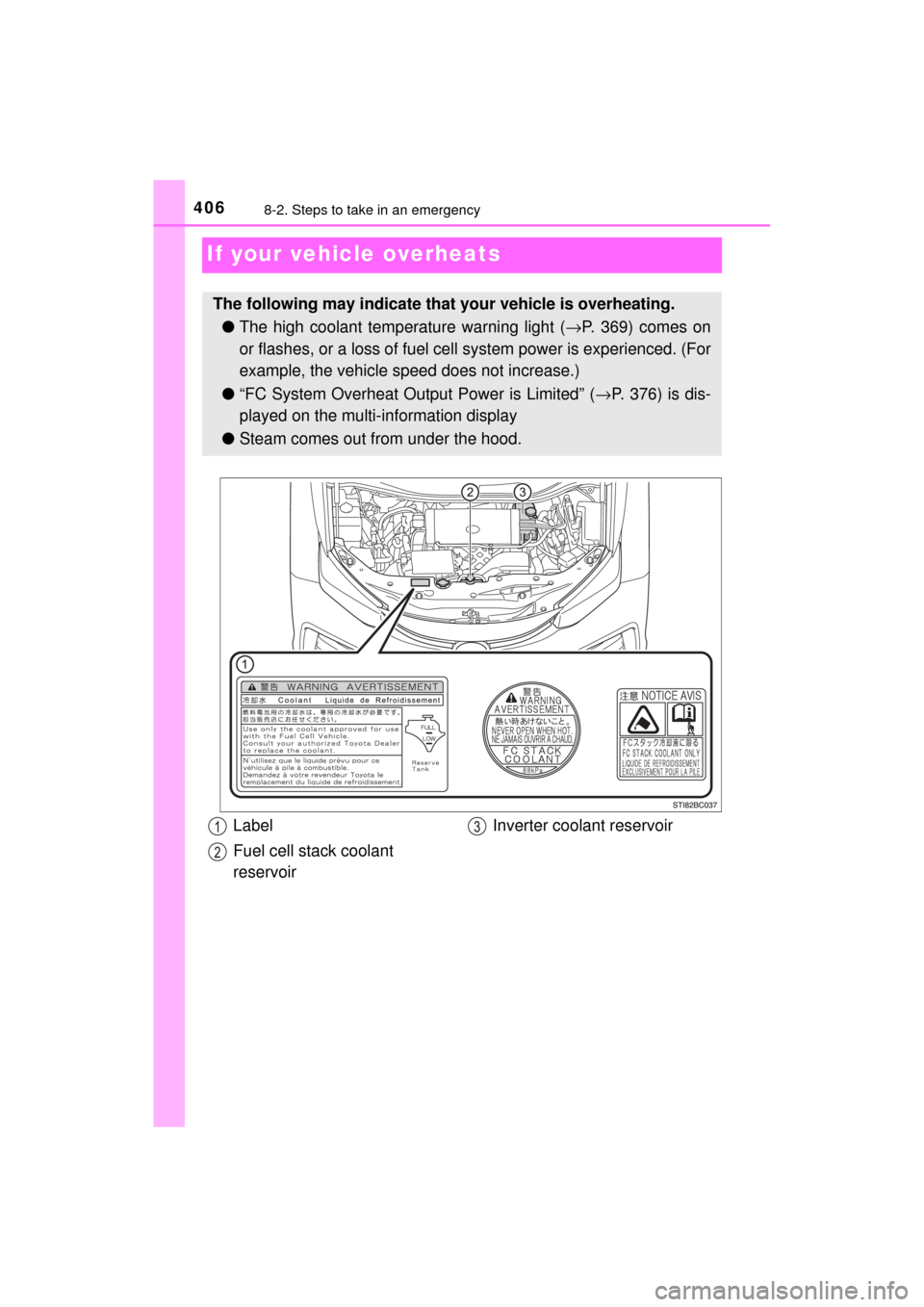
Label
Fuel cell stack coolant
reservoir Inverter coolant reservoir
Page 407 of 464
4078-2. Steps to take in an emergency
MIRAI_OM_USA_OM62023U
8
When trouble arises
■If the high coolant temperature warning light comes on or
flashes
Stop the vehicle in a safe place and turn off the air conditioning sys-
tem, and then stop the fuel cell system.
If you see steam or coolant leaks:
Carefully lift the hood after the steam subsides.
If you do not see steam or coolant leaks:
Carefully lift the hood.
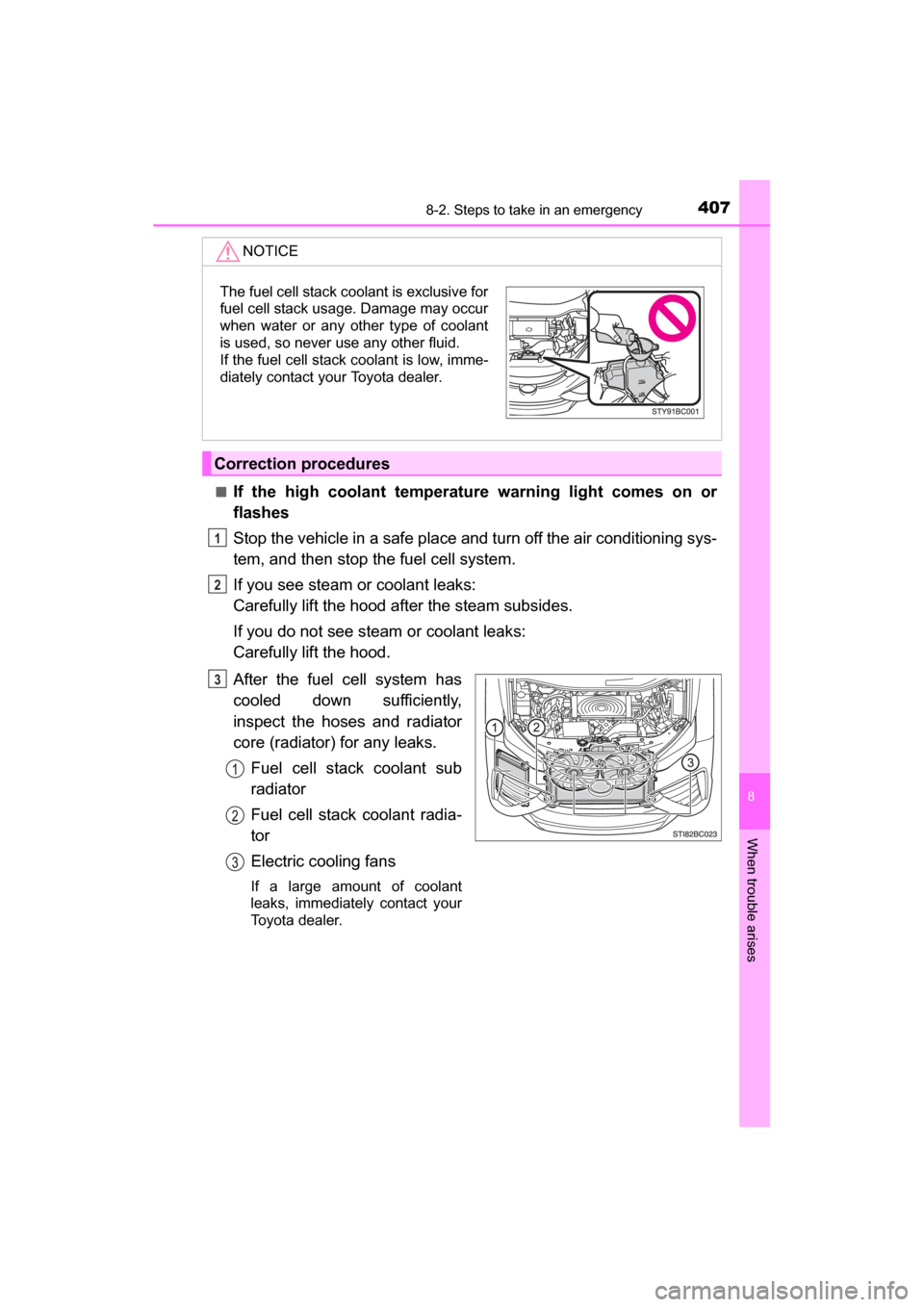
After the fuel cell system has
cooled down sufficiently,
inspect the hoses and radiator
core (radiator) for any leaks.
Fuel cell stack coolant sub
radiator
Fuel cell stack coolant radia-
tor
Electric cooling fans
If a large amount of coolant
leaks, immediately contact your
Toyota dealer.
NOTICE
Correction procedures
The fuel cell stack coolant is exclusive for
fuel cell stack usage. Damage may occur
when water or any other type of coolant
is used, so never use any other fluid.
If the fuel cell stack coolant is low, imme-
diately contact your Toyota dealer.
1
2
3
Page 448 of 464
448What to do if... (Troubleshooting)
MIRAI_OM_USA_OM62023U
●The seat belt reminder light is flashing
Are the driver and the front passenger wearing the seat belts? (→P. 371)
●The brake system warning light is on
Is the parking brake released? (→P. 186)
Depending on the situation, other types of warning buzzer may also sound.
( →P. 369, 376)
●Did anyone inside the vehicle open a door during setting the alarm?
The sensor detects it and the alarm sounds. ( →P. 74)
To stop the alarm, turn the power switch to ON mode or start the fuel cell sys-
tem.
●Is the electronic key left inside the vehicle?
Check the message on the multi-information display. ( →P. 376)
●When a warning light turns on or a warning message or indicator is dis-
played, refer to P. 369, 376.
●Stop the vehicle in a safe place and replace the flat tire with the spare
tire. ( →P. 381)
●Try the procedure for when the vehicle becomes stuck in mud, dirt, or
snow. ( →P. 412)
A warning buzzer sounds during driving
A warning buzzer sounds when leaving the vehicle
An alarm is activated and the horn sounds
A warning light turns on or a warning message or indicator
is displayed
When a problem has occurred
If you have a flat tire
The vehicle becomes stuck
Page 449 of 464
449Alphabetical index
MIRAI_OM_USA_OM62023U
Alphabetical index
A/C ............................................ 258Air conditioning filter ............. 351
Automatic air conditioning
system ......... ....................... 258
ABS
(Anti-lock Brake System)...... 232 Function ................................ 232
Warning light ......................... 370
Air conditioning filter .............. 351
Air conditioning system .................................... 258
Air conditioning filter ............. 351
Airbags ....................................... 36 Airbag operating conditions .... 44
Airbag precautions for
your child .............................. 39
Airbag warning light .............. 370
Correct driving posture ........... 28
Curtain shield airbag operating conditions ............. 45
Curtain shield airbag precautions ........................... 42
Front passenger occupant
classification syst em............. 49
General airbag precautions .... 39
Locations of airbags................ 36
Modification and disposal of airbags ............... 43
Seat cushion airbag ................ 36
Side airbag operating conditions ............................. 45
Side airbag precautions .......... 41
Side and curtain shield airbags operating conditions ............. 45
Side and curtain shield airbags precautions ........................... 42
SRS airbags............................ 36 Alarm .......................................... 74
Anchor brackets ........................ 69
Antennas
(smart key system) ............... 131
Anti-lock Brake System
(ABS) ...................................... 232 Function ................................ 232
Warning light......................... 370
Armrest..................................... 281
Assist grips .............................. 282
Audio input
*
Audio system*
Steering wheel audio switch*
Automatic air conditioning system.................................... 258 Air conditioning filter ............. 351
Automatic headlight leveling
system.................................... 189
Automatic High Beam ............. 190
Automatic light control system.................................... 187
AUX port
*
Auxiliary box ............................ 276
A
*: Refer to the “NAVIGATION SYSTEM OWNER’S MANUAL”.
Page 450 of 464

450Alphabetical index
MIRAI_OM_USA_OM62023U
Back-up lightsReplacing light bulb .............. 358
Battery (12-volt battery) .......... 328 Battery checking ................... 328
If the 12-volt battery is discharged .......................... 401
Preparing and checking before winter....................... 253
Warning message ................. 376
Battery (traction battery)..... 78, 83 Air intake vent ......................... 85
Charging ................................. 81
Location ............................ 78, 83
Warning message ................. 376
Blind Spot Monitor (BSM) ....... 245 Blind Spot Monitor function ... 247
Rear Crossing Traffic Alert function ............................... 251
Bluetooth
®*
Audio system*
Hands-free system (for cellular phone)
*
Navigation system*
Bottle holders .......................... 276
Brake Fluid ...................................... 420
Parking brake........................ 186
Regenerative braking.............. 81
Warning light ......................... 369
Brake assist ............................. 232
Break-in tips ............................ 160
Brightness control Instrument panel light
control................................. 104
BSM (Blind Spot Monitor) ....... 245 Blind Spot Monitor function ... 247
Rear Cross Traffic Alert
function ............................... 250 Care .................................. 306, 310
Aluminum wheels ................. 307
Exterior ................................. 306
Interior .................................. 310
Seat belts.............................. 311
Cargo capacity......................... 169
CD player
*
Chains ...................................... 254
Child restraint system............... 56 Booster seats installation........ 64
Convertible seats installation ............................ 63
Front passenger occupant classification syst em ............ 49
Infant seats definition.............. 58
Infant seats installation ........... 62
Installing a CRS to the passenger seat..................... 59
Installing CRS with LATCH anchors ................................ 67
Installing CRS with seat belts...................................... 62
Installing CRS with top tether
strap ..................................... 69
Child safety ................................ 55 12-volt battery precautions................. 330, 404
Airbag precautions.................. 39
Child restraint system ............. 56
How your child should wear the seat belt.......................... 32
Power window lock switch .... 154
Power window precautions ... 156
Rear door child-protectors .... 123
Removed electronic key battery precautions............. 354
Seat belt extender precautions........................... 35
Seat belt precautions .............. 34
Seat heater precautions ....... 267
Trunk precautions ................. 129
BC