lock TOYOTA MIRAI 2017 1.G Manual Online
[x] Cancel search | Manufacturer: TOYOTA, Model Year: 2017, Model line: MIRAI, Model: TOYOTA MIRAI 2017 1.GPages: 464, PDF Size: 12.09 MB
Page 379 of 464
![TOYOTA MIRAI 2017 1.G Manual Online 3798-2. Steps to take in an emergency
MIRAI_OM_USA_OM62023U
8
When trouble arises
■If “[P] Switch Malfunction When Parking, Apply Parking Brake Securely
then See Owner’s Manual” is displayed](/img/14/6553/w960_6553-378.png "TOYOTA MIRAI 2017 1.G Manual Online 3798-2. Steps to take in an emergency
MIRAI_OM_USA_OM62023U
8
When trouble arises
■If “[P] Switch Malfunction When Parking, Apply Parking Brake Securely
then See Owner’s Manual” is displayed")
3798-2. Steps to take in an emergency
MIRAI_OM_USA_OM62023U
8
When trouble arises
■If “[P] Switch Malfunction When Parking, Apply Parking Brake Securely
then See Owner’s Manual” is displayed
The shift position may not switch to P even though the P position switch is
pressed.
When parking, choose a flat surface and be sure to engage the parking
brake.
Have the vehicle inspected by your Toyota dealer immediately.
■ If “Shift System Malfunction See Owner’s Manual” is displayed
If left as is, the system may not operate properly and an unexpected hazard
or damage may occur.
Have the vehicle inspected by your Toyota dealer immediately.
■ If “Insufficient Aux Battery Charge When Parking, Apply Parking Brake
Securely then See Owner’s Manual” is displayed
●The parking lock mechanism may not operate.
● The power switch may not turn off. In that case, engage the parking brake
and the switch can be turned to off.
● Even after charging the 12-volt battery, the warning message may continue
to be displayed until the shift position is shifted from P to a position other
than P.
● The fuel cell system may not be able to be started.
When parking, choose a flat surface and be sure to engage the parking
brake.
Have the 12-volt battery charged or replaced.
■ If “Insufficient Aux Battery Charge Shift is Unavailable See Owner’s
Manual” is displayed
Due to the voltage of the 12-volt battery being in a declined condition, when
trying to shift the shift position the warning message is displayed.
Have the 12-volt battery charged or replaced.
■ If “Shifting Temporarily Unavailable Wait a Moment and Try Again” is
displayed
A warning message is displayed when the shift lever and P position switch
are repeatedly operated over a short period of time.
Shift the shift position after waiting for short amount of time.
■ If “Shifting to [Br] Mode Unavailable Shift to [D] once, then Shift to [Br]”
is displayed
When the shift position is in P or N, a warning message is displayed when try-
ing to shift to Br mode.
Shift to Br mode after the shift position had been set to D.
■ If “Shifted to [N] Position Shift to [D] once, then Shift to [Br]” is dis-
played
When the shift position is in R, a warning message is displayed when trying to
shift to Br mode.
The shift position is changed to N.
Shift to Br Mode after the shift position has been set to D.
Page 385 of 464
3858-2. Steps to take in an emergency
MIRAI_OM_USA_OM62023U
8
When trouble arises
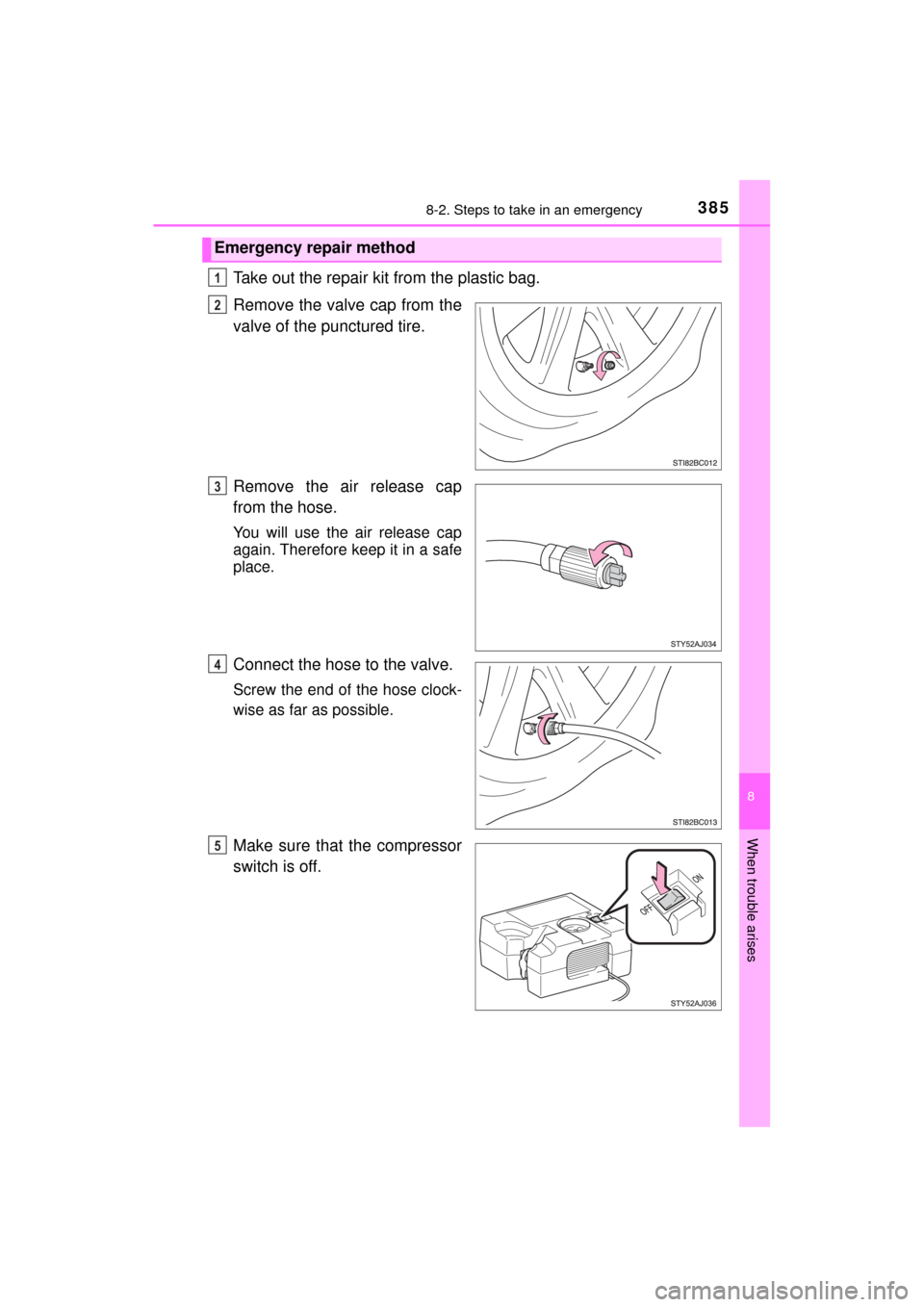
Take out the repair kit from the plastic bag.
Remove the valve cap from the
valve of the punctured tire.
Remove the air release cap
from the hose.
You will use the air release cap
again. Therefore keep it in a safe
place.
Connect the hose to the valve.
Screw the end of the hose clock-
wise as far as possible.
Make sure that the compressor
switch is off.
Emergency repair method
1
2
3
4
5
Page 398 of 464
3988-2. Steps to take in an emergency
MIRAI_OM_USA_OM62023U
If the electronic key does not operate
properly
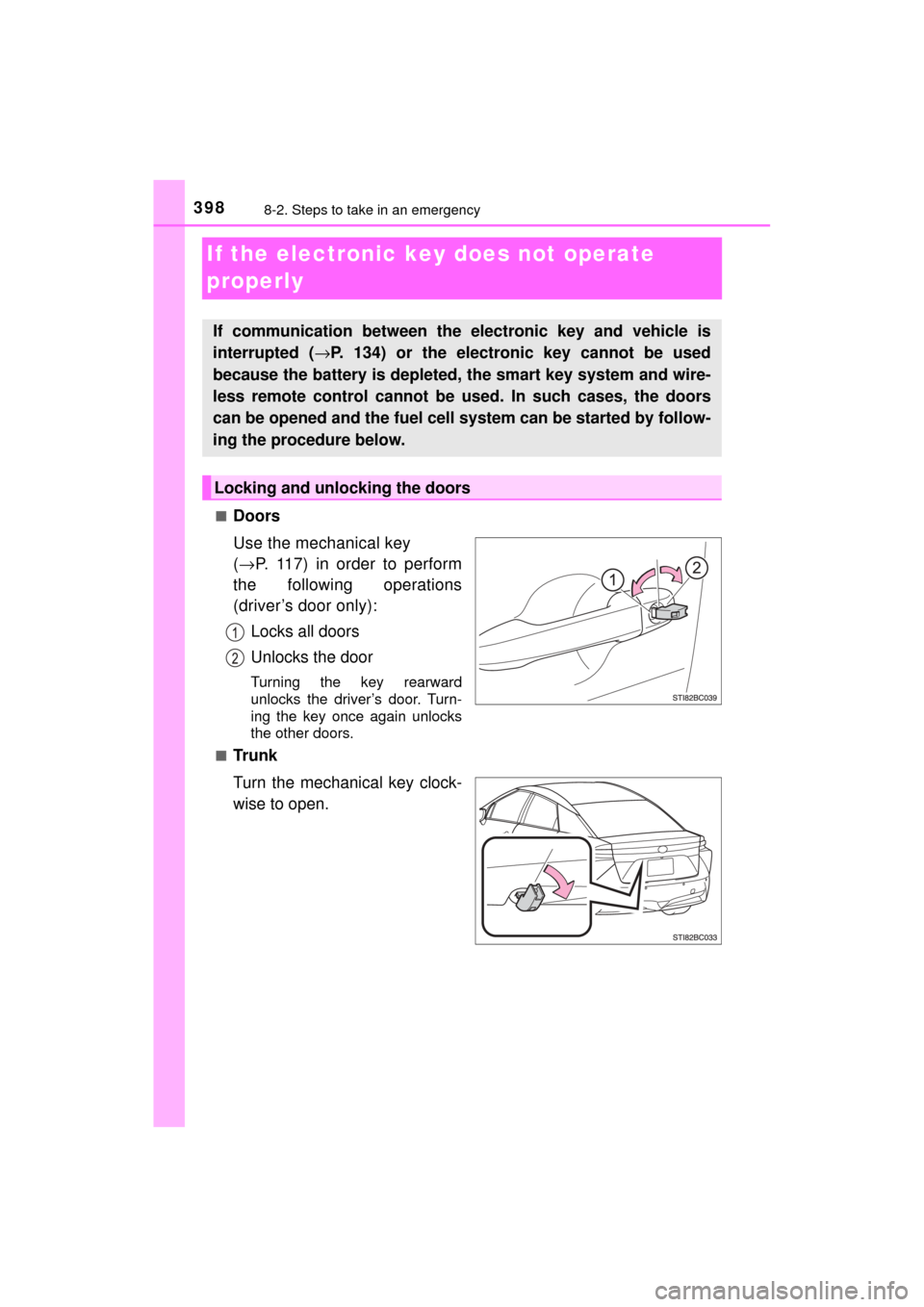
■Doors
Use the mechanical key
(→ P. 117) in order to perform
the following operations
(driver’s door only):
Locks all doors
Unlocks the door
Turning the key rearward
unlocks the driver’s door. Turn-
ing the key once again unlocks
the other doors.
■
Tr u n k
Turn the mechanical key clock-
wise to open.
If communication between the electronic key and vehicle is
interrupted ( →P. 134) or the electronic key cannot be used
because the battery is depleted, the smart key system and wire-
less remote control cannot be used. In such cases, the doors
can be opened and the fuel cell system can be started by follow-
ing the procedure below.
Locking and unlocking the doors
Page 400 of 464

4008-2. Steps to take in an emergency
MIRAI_OM_USA_OM62023U
■Stopping the fuel cell system
Shift the shift position to P and press the power switch as you normally do
when stopping the fuel cell system.
■ Replacing the key battery
As the above procedure is a temporary measure, it is recommended that the
electronic key battery be replaced immediately when the battery is depleted.
(→P. 353)
■ Alarm
Using the mechanical key to lock the doors will not set the alarm system.
If a door is unlocked using the mechanical key when the alarm system is set,
the alarm may be triggered. ( →P. 75)
■ When the electronic key does not work properly
●Make sure that the smart key system has not been deactivated in the cus-
tomization setting. If it is off, turn the function on.
(Customizable features →P. 436)
● Check if battery-saving mode is set. If it is set, cancel the function.
(→P. 133)
■ Changing power switch modes
Release the brake pedal and press the power switch in step above.
The fuel cell system does not start and modes will be changed each time the
switch is pressed. (→P. 174)
WARNING
■ When using the mechanical key and operating the power windows
Operate the power window after checking to make sure that there is no pos-
sibility of any passenger having any of their body parts caught in the win-
dow.
Also, do not allow children to operate the mechanical key. It is possible for
children and other passengers to get caught in the power window.
3
Page 403 of 464

4038-2. Steps to take in an emergency
MIRAI_OM_USA_OM62023U
8
When trouble arises
Close the exclusive jump starting terminal cover, reinstall the motor
cover and the fuse box cover to its original position.
Once the fuel cell system starts, have the vehicle inspected at your
Toyota dealer as soon as possible.
■ Starting the fuel cell system when the 12-volt battery is discharged
The fuel cell system cannot be started by push-starting.
■ To prevent 12-volt battery discharge
●Turn off the headlights and the audio system while the fuel cell system is off.
● Turn off any unnecessary electrical components when the vehicle is running
at a low speed for an extended period, such as in heavy traffic.
■ Charging the 12-volt battery
The electricity stored in the 12-volt battery will discharge gradually even when
the vehicle is not in use, due to natural discharge and the draining effects of
certain electrical appliances. If the vehicle is left for a long time, the 12-volt
battery may discharge, and the fuel cell system may be unable to start. \
(The
12-volt battery recharges automatically while the fuel cell system is operat-
ing.)
■ When the 12-volt battery is removed or discharged
●In some cases, it may not be possible to unlock the doors using the smart
key system when the 12-volt battery is discharged. Use the wireless remote
control or the mechanical key to lock or unlock the doors.
● The fuel cell system may not start on the first attempt after the 12-volt bat-
tery has recharged but will start normally after the second attempt. This is
not a malfunction.
● The power switch mode is memorized by the vehicle. When the 12-volt bat-
tery is reconnected, the system will return to the mode it was in before the
12-volt battery was discharged. Before disconnecting the 12-volt battery,
turn the power switch off.
If you are unsure what mode the power switch was in before the 12-volt bat-
tery discharged, be especially careful when reconnecting the 12-volt battery.
● If the 12-volt battery is depleted with the shift position in P, it will not be pos-
sible to shift the shift position other than P. In this case, the vehicle cannot
be towed without lifting both front wheels because the front wheels are
locked by the parking lock. ( →P. 363)
● When the 12-volt battery is reconnected, start the fuel cell system, depress
the brake pedal, and confirm that it is possible to shift into each shift posi-
tion.
● Make sure that the key is not inside the vehicle when recharging or replac-
ing the 12-volt battery. The key may be locked in the vehicle if the alarm is
activated. ( →P. 75)
9
Page 435 of 464
4359-2. Customization
MIRAI_OM_USA_OM62023U
9
Vehicle specifications
Press or of the meter control switches, select the desired
setting, and then press .
To go back to the previous screen or exit the customize mode,
press .
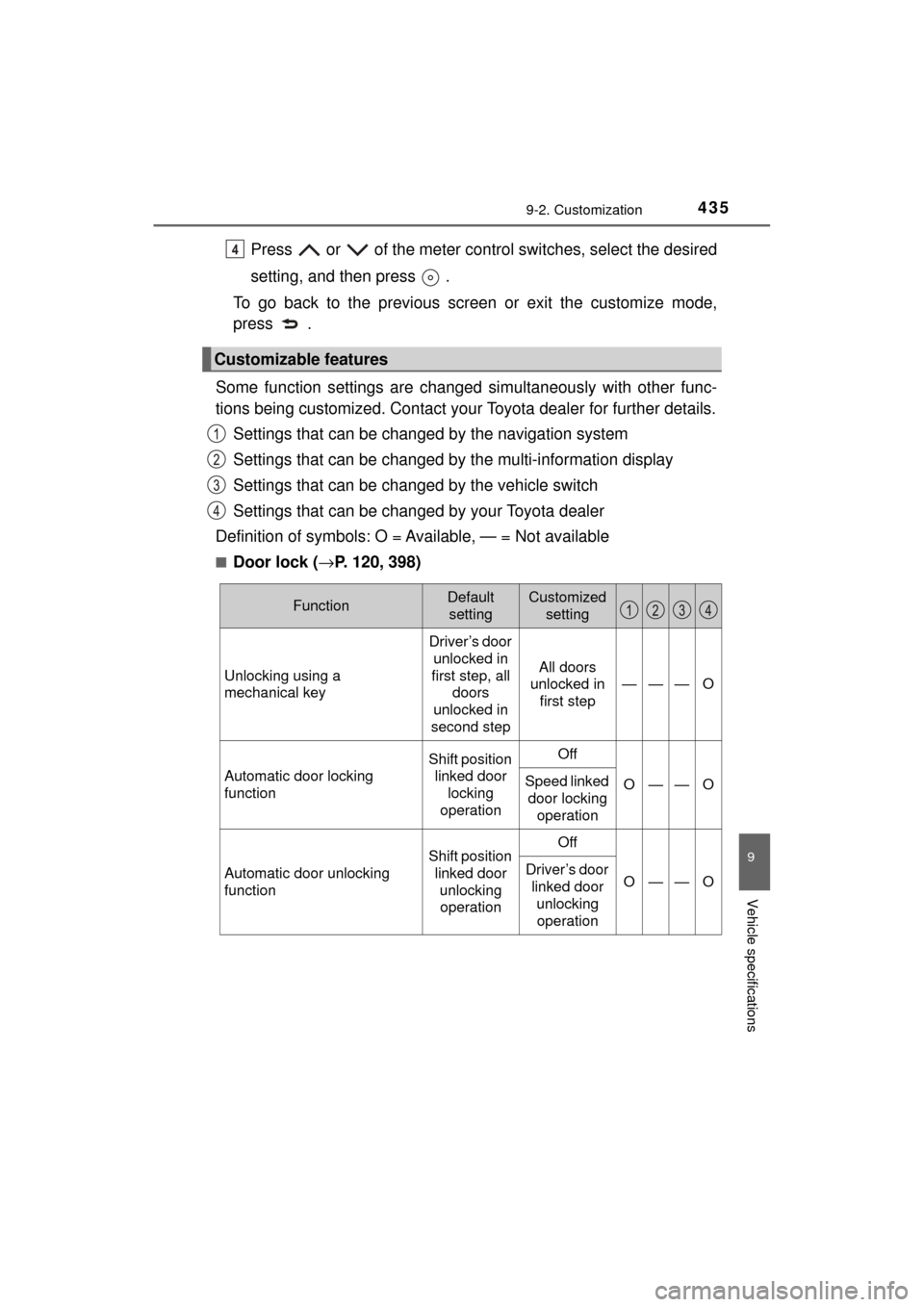
Some function settings are changed simultaneously with other func-
tions being customized. Contact your Toyota dealer for further details.
Settings that can be chan ged by the navigation system
Settings that can be changed by the multi-information display
Settings that can be changed by the vehicle switch
Settings that can be changed by your Toyota dealer
Definition of symbols: O = Av ailable, — = Not available
■Door lock (→P. 120, 398)
Customizable features
4
FunctionDefault
settingCustomized setting
Unlocking using a
mechanical key
Driver’s door unlocked in
first step, all doors
unlocked in
second step
All doors
unlocked in
first step
———O
Automatic door locking
function
Shift position linked door locking
operationOff
O——OSpeed linked door locking
operation
Automatic door unlocking
function
Shift position linked door unlocking operationOff
O——ODriver’s door linked door
unlocking operation
Page 436 of 464
4369-2. Customization
MIRAI_OM_USA_OM62023U■
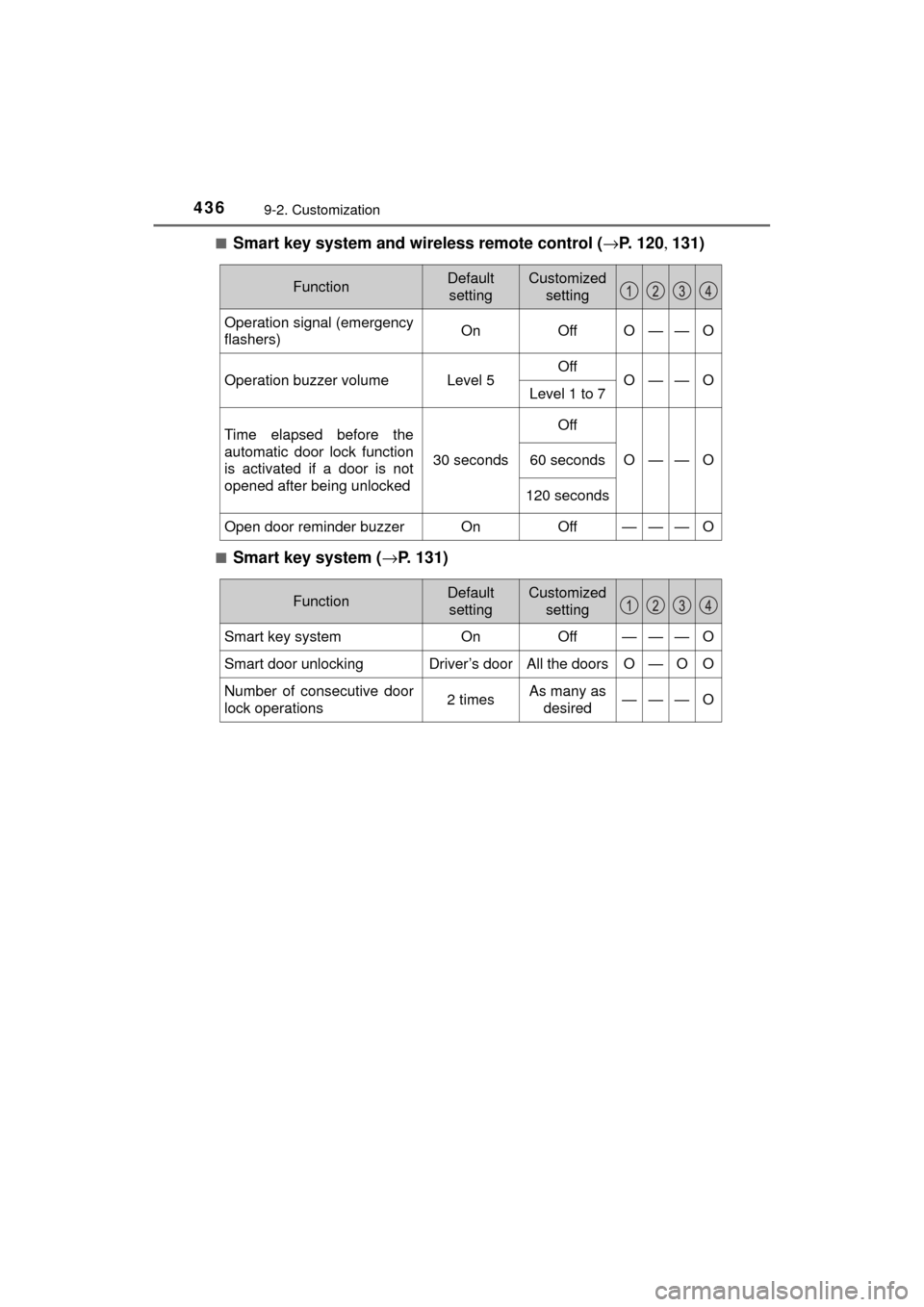
Smart key system and wireless remote control (
→P. 120 , 131)
■Smart key system (→ P. 131)
FunctionDefault
settingCustomized setting
Operation signal (emergency
flashers)OnOffO——O
Operation buzzer volumeLevel 5OffO——OLevel 1 to 7
Time elapsed before the
automatic door lock function
is activated if a door is not
opened after being unlocked
30 seconds
Off
O——O60 seconds
120 seconds
Open door reminder buzzerOnOff———O
FunctionDefault
settingCustomized setting
Smart key systemOnOff———O
Smart door unlockingDriver’s doorAll the doorsO—OO
Number of consecutive door
lock operations2 timesAs many as desired———O
Page 437 of 464
4379-2. Customization
MIRAI_OM_USA_OM62023U
9
Vehicle specifications
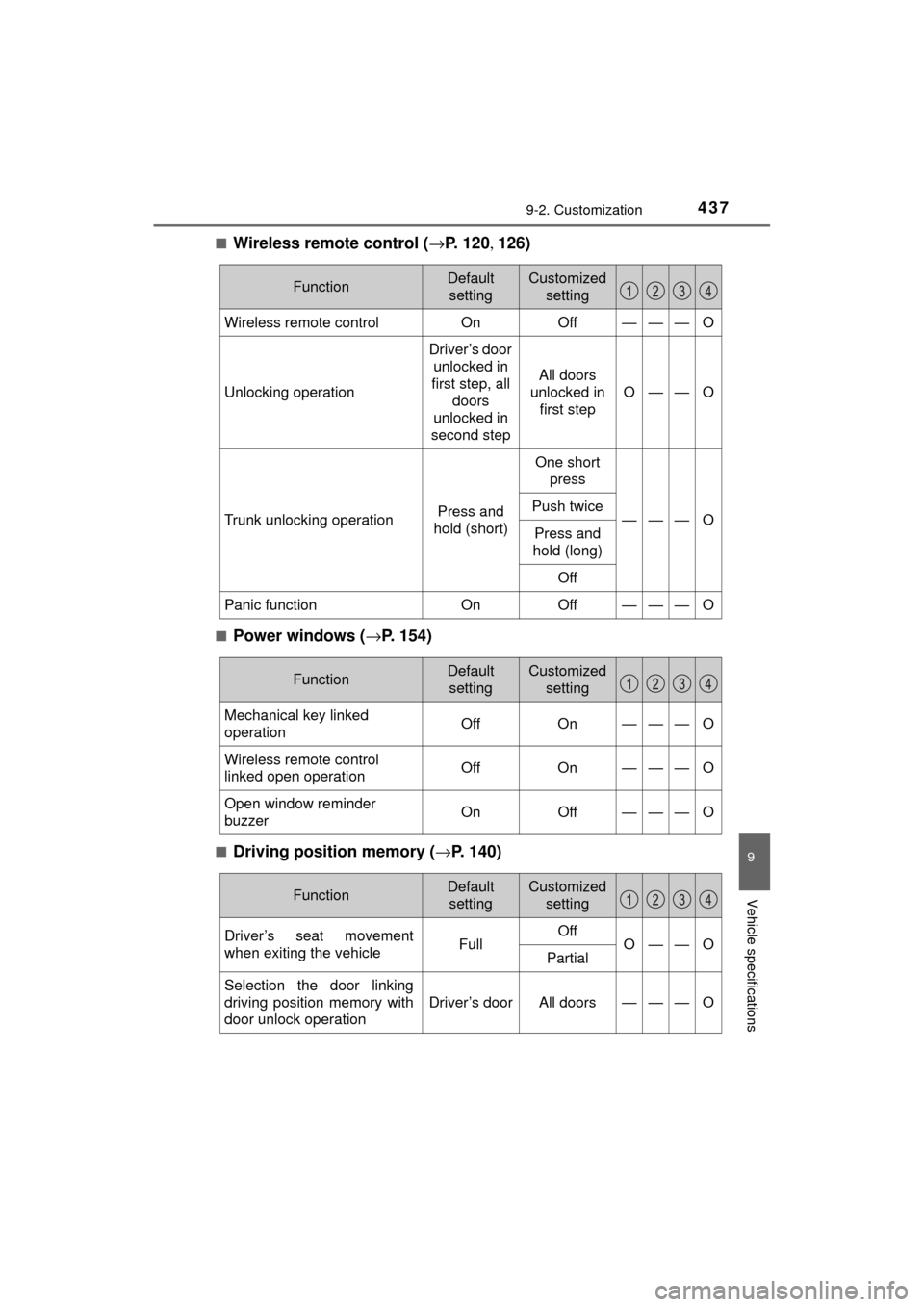
■Wireless remote control (→P. 1 2 0 , 126)
■Power windows ( →P. 154)
■Driving position memory ( →P. 140)
FunctionDefault
settingCustomized setting
Wireless remote controlOnOff———O
Unlocking operation
Driver’s door
unlocked in
first step, all doors
unlocked in
second step
All doors
unlocked in first step
O——O
Trunk unlocking operationPress and
hold (short)
One short press
———OPush twice
Press and
hold (long)
Off
Panic functionOnOff———O
FunctionDefault settingCustomized setting
Mechanical key linked
operationOffOn———O
Wireless remote control
linked open operationOffOn———O
Open window reminder
buzzerOnOff———O
FunctionDefault settingCustomized setting
Driver’s seat movement
when exiting the vehicleFullOffO——OPartial
Selection the door linking
driving position memory with
door unlock operation
Driver’s doorAll doors———O
Page 438 of 464
4389-2. Customization
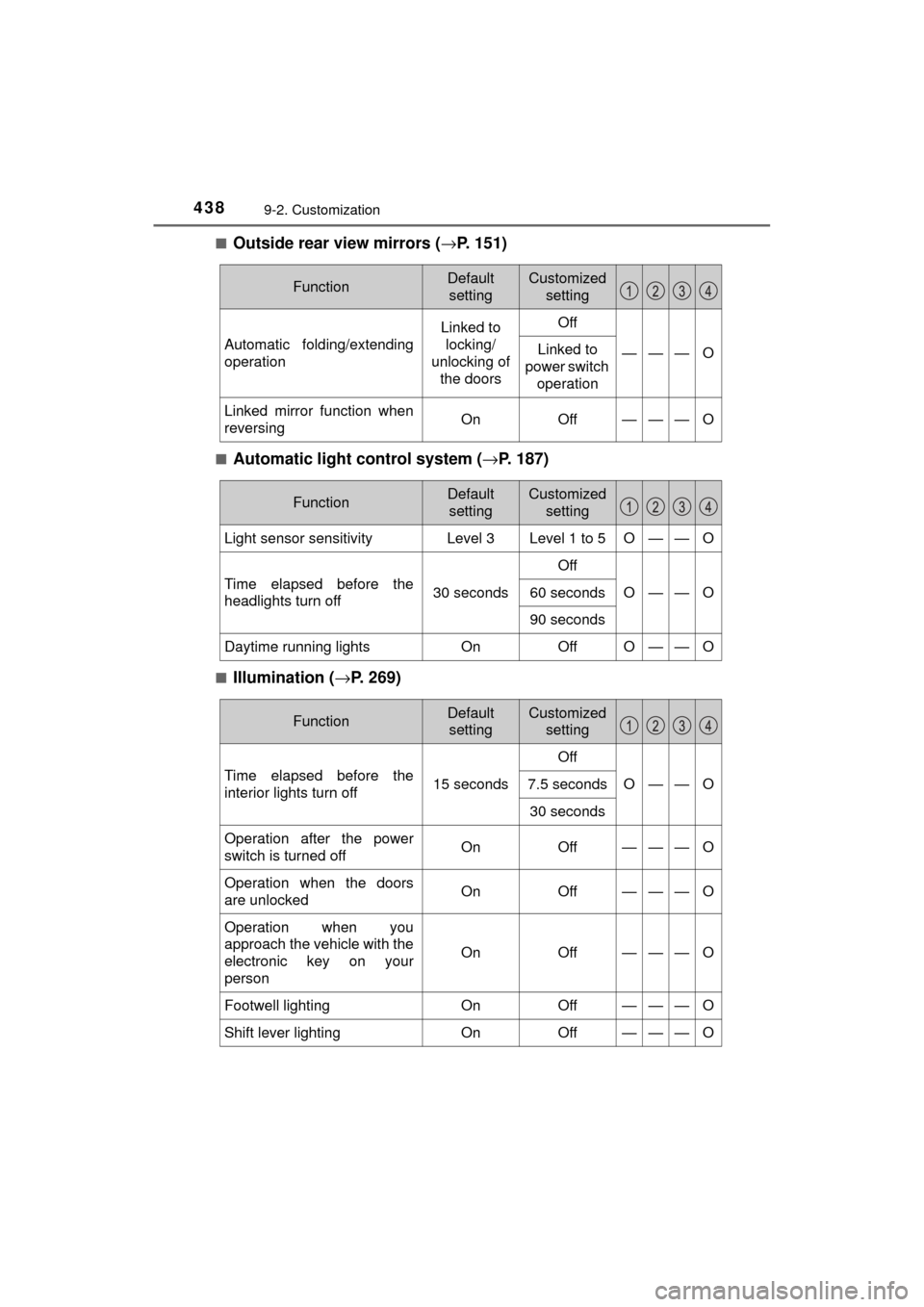
MIRAI_OM_USA_OM62023U■
Outside rear view mirrors (
→P. 151)
■Automatic light control system ( →P. 187)
■Illumination ( →P. 269)
FunctionDefault
settingCustomized setting
Automatic folding/extending
operation
Linked to locking/
unlocking of the doorsOff
———OLinked to
power switch operation
Linked mirror function when
reversingOnOff———O
FunctionDefault
settingCustomized setting
Light sensor sensitivityLevel 3Level 1 to 5O——O
Time elapsed before the
headlights turn off30 seconds
Off
O——O60 seconds
90 seconds
Daytime running lightsOnOffO——O
FunctionDefault settingCustomized setting
Time elapsed before the
interior lights turn off15 seconds
Off
O——O7.5 seconds
30 seconds
Operation after the power
switch is turned offOnOff———O
Operation when the doors
are unlockedOnOff———O
Operation when you
approach the vehicle with the
electronic key on your
person
OnOff———O
Footwell lightingOnOff———O
Shift lever lightingOnOff———O
Page 441 of 464
4419-2. Customization
MIRAI_OM_USA_OM62023U
9
Vehicle specifications
■Vehicle customization
●When the speed linked door locking function and shift position linked door
locking function are both on, the door lock operates as follows.
• When shifting the shift position to any position other than P, all the doors
will be locked.
• If the vehicle is started with all the doors locked, the speed linked door locking function would not operate.
• If the vehicle is started with any door unlocked, the speed linked door locking function will operate.
● When the smart key system is off, smart door unlocking cannot be custom-
ized.
● When the doors remain closed after unlocking the doors and the automatic
door lock function is activated, the signals will be generated in accordance
with the operation signal (buzzer) and the operation signal (emergency
flashers) settings.
■ In the following situations, customize mode in which the settings can be
changed through the mu lti-information display will automatically be
turned off.
● A warning message appears after the customize mode screen is displayed.
● The vehicle begins to move while the customize mode screen is displayed.
NOTICE
■During customization
To prevent 12-volt battery discharge, ensure that the fuel cell system is
operating while customizing features.