air filter TOYOTA MIRAI 2018 Owners Manual (in English)
[x] Cancel search | Manufacturer: TOYOTA, Model Year: 2018, Model line: MIRAI, Model: TOYOTA MIRAI 2018Pages: 464, PDF Size: 8.61 MB
Page 4 of 464

TABLE OF CONTENTS4
MIRAI_OM_USA_OM62025U6-1. Using the air conditioning
system and defogger
Automatic air conditioning system............................. 256
Heated steering wheel/ seat heaters .................... 265
6-2. Using the interior lights Interior lights list ................ 267• Interior lights ................. 268
• Personal lights .............. 268
6-3. Using the storage features List of storage features...... 270• Glove box...................... 271
• Console box .................. 271
• Cup holders .................. 272
• Bottle holders ................ 274
• Auxiliary box ................. 274
Trunk features ................... 275
6-4. Other interior features Other interior features ....... 277• Sun visors ..................... 277
• Vanity mirrors................ 277
• Clock ............................. 278
• Armrest ......................... 279
• Coat hooks.................... 279
• Assist grips ................... 280
• Power outlet .................. 281
• USB charging ports....... 282
• Wireless charger ........... 284
Garage door opener .......... 292
Safety Connect.................. 299 7-1. Maintenance and care
Cleaning and protecting the vehicle exterior .......... 306
Cleaning and protecting the vehicle interior ........... 310
7-2. Maintenance Maintenance requirements ................... 313
General maintenance ........ 315
7-3. Do-it-yourself maintenance
Do-it-yourself service precautions ...................... 318
Hood .................................. 320
Positioning a floor jack....... 321
Motor compartment ........... 323
12-volt battery .................... 328
Tires................................... 332
Replacing the tire............... 339
Tire inflation pressure ........ 346
Wheels............................... 349
Air conditioning filter .......... 351
Electronic key battery ........ 353
Checking and replacing fuses ................................ 355
Light bulbs ......................... 358
6Interior features7Maintenance and care
Page 86 of 464

862. Fuel cell vehicle
MIRAI_OM_USA_OM62025U■
Fuel cell stack
●Depending on the usage environment, the fuel cell power output may
decline over the life of the vehicle. However, this will have almost no effect
on driving performance.
● In the following situations, the fuel cell power output may dec line faster than
normal driving:
• Extended use in areas with high amounts of dust
• Extended use in areas with high levels of sulfur (such as volc anoes or hot
springs).
• Extended use in areas with high concentrations of the following substances:
-Organic solvents, such as paint and thinner
-Amine-related materials such as ammonia
-Chlorinated substances such as salt air and snow-melting agent
However, upon returning to normal environment, the fuel cell po wer output
will recover over time.
• Salt water gets into the air cleaner filter It is recommended to replace the air cleaner filter and clean t he surround-
ing components. Have the vehicle inspected at your Toyota deale r
• The number of times the fuel cell system is started and stoppe d is exces-
sively high
• Extended use in freezing temperatures
■ Hydrogen tanks
●The hydrogen tanks are the high-pressure storage containers that are filled
with compressed hydrogen gas. The vehicle can be refueled at hy drogen
stations.
● The hydrogen tanks have an expiration date. Vehicles with expir ed hydro-
gen tanks must not be driven or refueled until the hydrogen tanks are
replaced. The expiration date is written on the inside of the fuel door. Con-
sult your Toyota dealer.
● When disposing of the hydrogen tanks or the hydrogen tank valve s, consult
your Toyota dealer for details.
Page 262 of 464
2626-1. Using the air conditioning system and defogger
MIRAI_OM_USA_OM62025U■
When the outside t emperature is low
The dehumidification function may not operate even when is pre ssed.
■ Ventilation and air conditioning odors
●To let fresh air in, set the air conditioning system to the out side air mode.
● During use, various odors from inside and outside the vehicle m ay enter into
and accumulate in the air conditioning system. This may then ca use odor to
be emitted from the vents.
● To reduce potential odors from occurring:
• It is recommended that the air conditioning system be set to o utside air
mode prior to turning the vehicle off.
• The start timing of the blower may be delayed for a short peri od of time
immediately after the air conditioning system is started in aut omatic
mode.
■ Air conditioning filter
P. 351
■ Changing the response of the swit ch for the air conditioning operation
panel
The reaction time, from when the switch is touched, can be changed by the
following operations.
The air conditioning cannot be operated during following operat ion.
Touch (decrease) and for about 3 seconds.
“01” ~ “05” is displayed in the monitor of the passenger side t empera-
ture.
Each time is touched, the reaction time switches over as follo ws.
01 (about 0.06 sec.) 02 (about 0.08 sec.) 03 (about 0.10 sec.)
04 (about 0.12 sec.) 05 (about 0.14 sec.)
With the desired setting displayed, without switching over the screen by
performing touch operations for about 5 seconds, when the power
switch is turned off the configuration is complete.
Page 305 of 464
305
7Maintenance and care
MIRAI_OM_USA_OM62025U7-1. Maintenance and care
Cleaning and protecting the vehicle exterior .......... 306
Cleaning and protecting the vehicle interior ........... 310
7-2. Maintenance Maintenance requirements ................... 313
General maintenance........ 315
7-3. Do-it-yourself maintenance
Do-it-yourself service precautions ..................... 318
Hood ................................. 320
Positioning a floor jack ...... 321
Motor compartment ........... 323
12-volt battery ................... 328
Tires .................................. 332
Replacing the tire .............. 339
Tire inflation pressure ....... 346
Wheels .............................. 349
Air conditioning filter.......... 351
Electronic key battery........ 353
Checking and replacing fuses ............................... 355
Light bulbs......................... 358
Page 319 of 464
3197-3. Do-it-yourself maintenance
MIRAI_OM_USA_OM62025U
7
Maintenance and care
WARNING
The motor compartment contains many mechanisms and fluids that may
move suddenly, become hot, or become electrically energized. To avoid death
or serious injury, observe the following precautions.
■ When working on the motor compartment
● Be careful not to touch the high-voltage parts or hydrogen-rela ted parts.
● Make sure that the “READY” indicator is off.
● Keep hands, clothing and tools away from the moving fans.
● Be careful not to touch the motor, inverter, radiator, etc., ri ght after driving
as they may be hot. Coolant and other fluids may also be hot.
● Do not leave anything that may burn easily, such as paper and r ags, in the
motor compartment.
● Do not smoke, cause sparks or expose an open flame to the 12-volt bat-
tery. 12-volt battery fumes are flammable.
● Be extremely cautious when working on the 12-volt battery. It c ontains poi-
sonous and corrosive sulfuric acid.
● Take care because brake fluid can harm your hands or eyes and d amage
painted surfaces. If fluid gets on your hands or in your eyes, flush the
affected area with clean water immediately.
If you still experience discomfort, consult a doctor.
● Never touch, disassemble, remove or replace the high-voltage parts,
cables and their connectors. It can cause severe burns or electric shock
that may result in death or serious injury.
■ When working near the electric cooling fans or radiator grille
Be sure the power switch is off.
With the power switch in ON mode, the electric cooling fans may automati-
cally start to run if the air conditioning is on and/or the coolant temperature
is high. ( P. 325)
■ Safety glasses
Wear safety glasses to prevent flying or falling material, flui d spray, etc.,
from getting in your eyes.
NOTICE
■ If you remove the air cleaner filter
Driving with the air cleaner filter removed may cause excessive motor wear
due to dirt in the air.
Page 351 of 464
3517-3. Do-it-yourself maintenance
MIRAI_OM_USA_OM62025U
7
Maintenance and care
Air conditioning filter
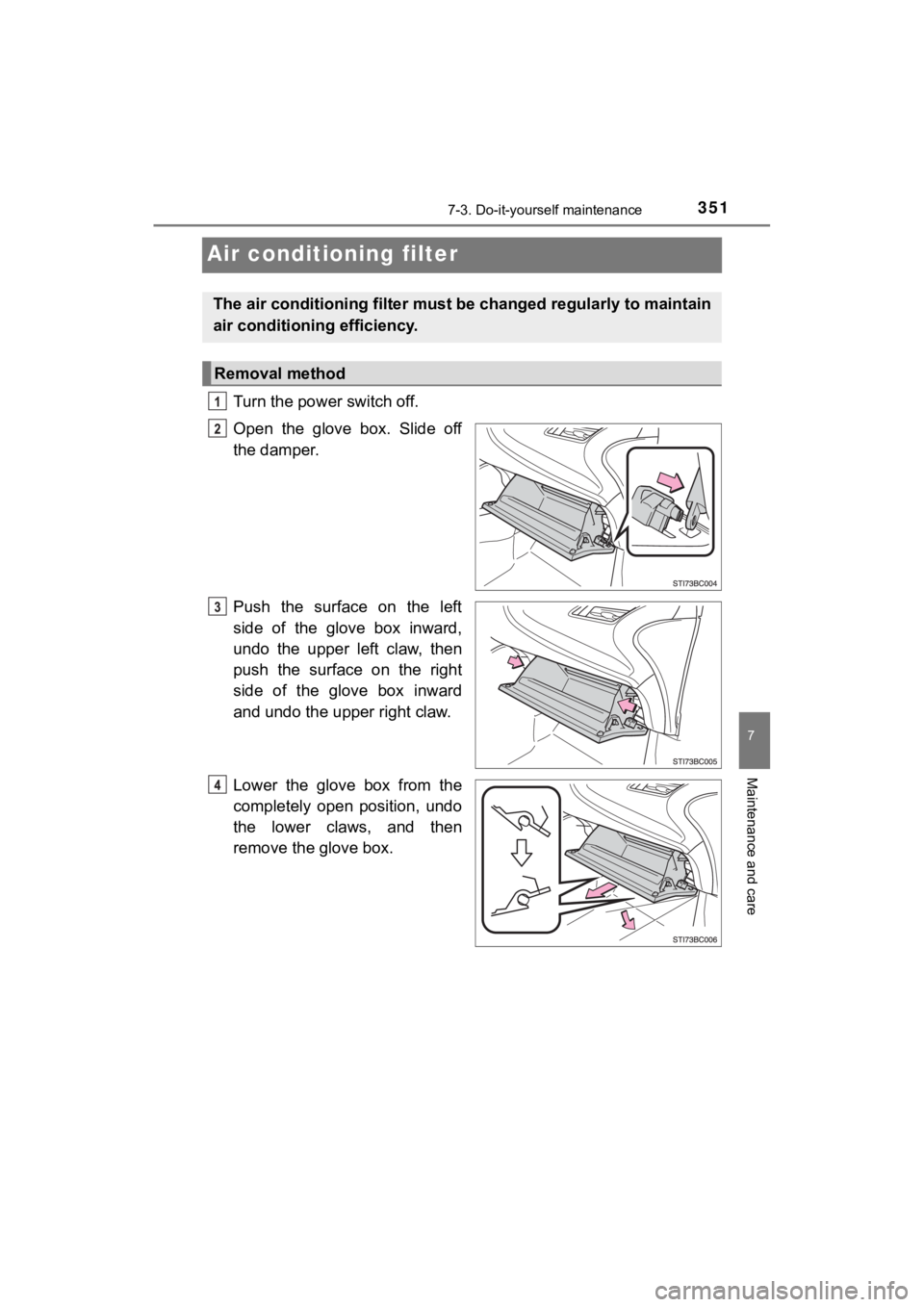
Turn the power switch off.
Open the glove box. Slide off
the damper.
Push the surface on the left
side of the glove box inward,
undo the upper left claw, then
push the surface on the right
side of the glove box inward
and undo the upper right claw.
Lower the glove box from the
completely open position, undo
the lower claws, and then
remove the glove box.
The air conditioning filter must be changed regularly to maintain
air conditioning efficiency.
Removal method
Page 352 of 464
3527-3. Do-it-yourself maintenance
MIRAI_OM_USA_OM62025U
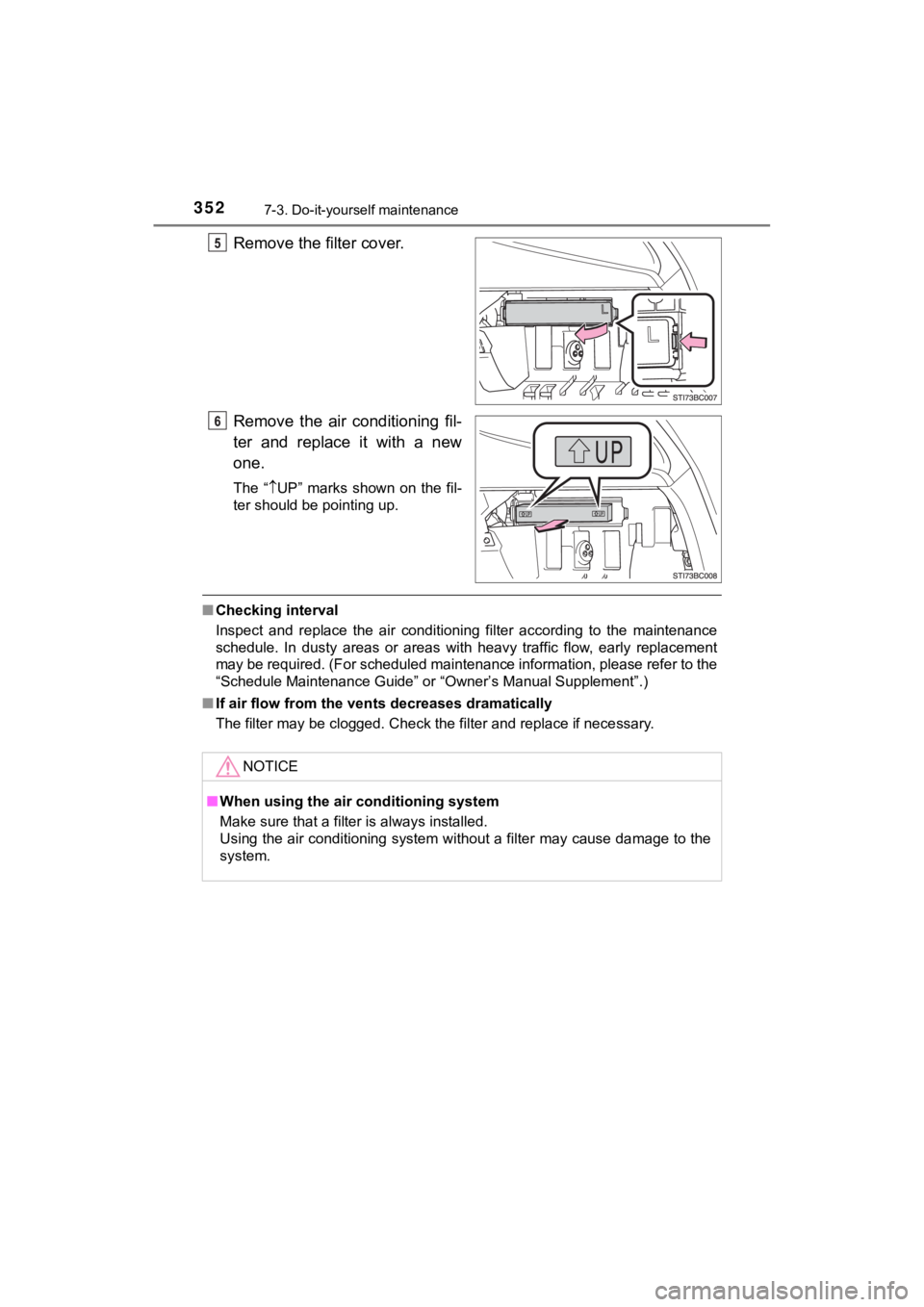
Remove the filter cover.
Remove the air conditioning fil-
ter and replace it with a new
one.
The “UP” marks shown on the fil-
ter should be pointing up.
■ Checking interval
Inspect and replace the air conditioning filter according to th e maintenance
schedule. In dusty areas or areas with heavy traffic flow, earl y replacement
may be required. (For scheduled maintenance information, please refer to the
“Schedule Maintenance Guide” or “Owner’s Manual Supplement”.)
■ If air flow from the ven ts decreases dramatically
The filter may be clogged. Check the filter and replace if nece ssary.
NOTICE
■When using the air conditioning system
Make sure that a filter is always installed.
Using the air conditioning system without a filter may cause da mage to the
system.
Page 377 of 464
3778-2. Steps to take in an emergency
MIRAI_OM_USA_OM62025U
8
When trouble arises
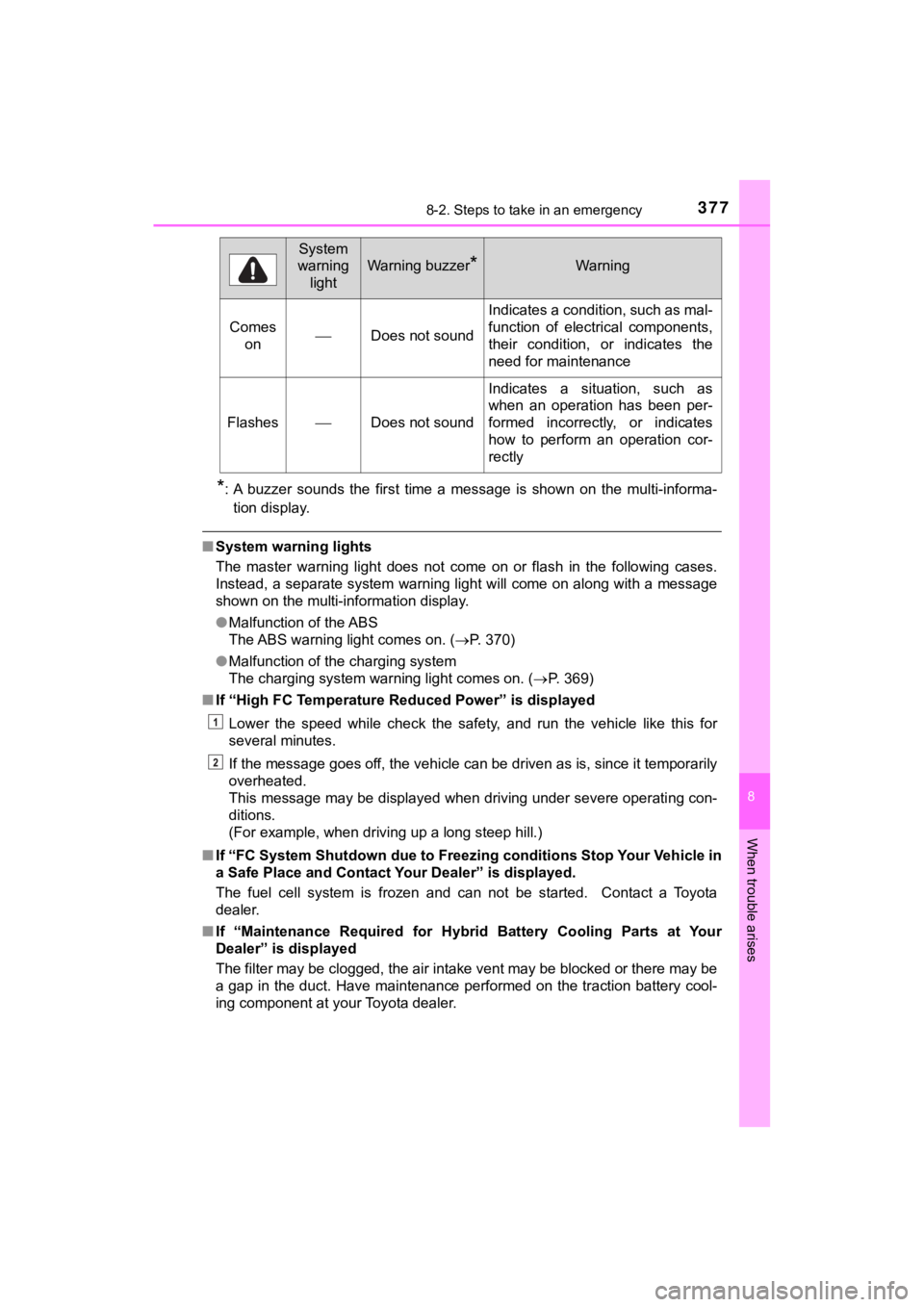
*: A buzzer sounds the first time a message is shown on the multi-informa-
tion display.
■ System warning lights
The master warning light does not come on or flash in the following cases.
Instead, a separate system warning light will come on along wit h a message
shown on the multi-information display.
● Malfunction of the ABS
The ABS warning light comes on. ( P. 370)
● Malfunction of the charging system
The charging system warning light comes on. ( P. 3 6 9 )
■ If “High FC Temperature Reduced Power” is displayed
Lower the speed while check the safety, and run the vehicle like this for
several minutes.
If the message goes off, the vehicle can be driven as is, since it temporarily
overheated.
This message may be displayed when driving under severe operati ng con-
ditions.
(For example, when driving up a long steep hill.)
■ If “FC System Shutdown due to F reezing conditions Stop Your Veh icle in
a Safe Place and Contact Your Dealer” is displayed.
The fuel cell system is frozen and can not be started. Contact a Toyota
dealer.
■ If “Maintenance Required for Hybrid Battery Cooling Parts at Yo ur
Dealer” is displayed
The filter may be clogged, the air intake vent may be blocked or there may be
a gap in the duct. Have maintenance performed on the traction b attery cool-
ing component at your Toyota dealer.
Comes onDoes not sound
Indicates a condition, such as mal-
function of electrical components,
their condition, or indicates the
need for maintenance
FlashesDoes not sound
Indicates a situation, such as
when an operation has been per-
formed incorrectly, or indicates
how to perform an operation cor-
rectly
System
warning
light
Warning buzzer*Warning
Page 439 of 464
4399-2. Customization
MIRAI_OM_USA_OM62025U
9
Vehicle specifications
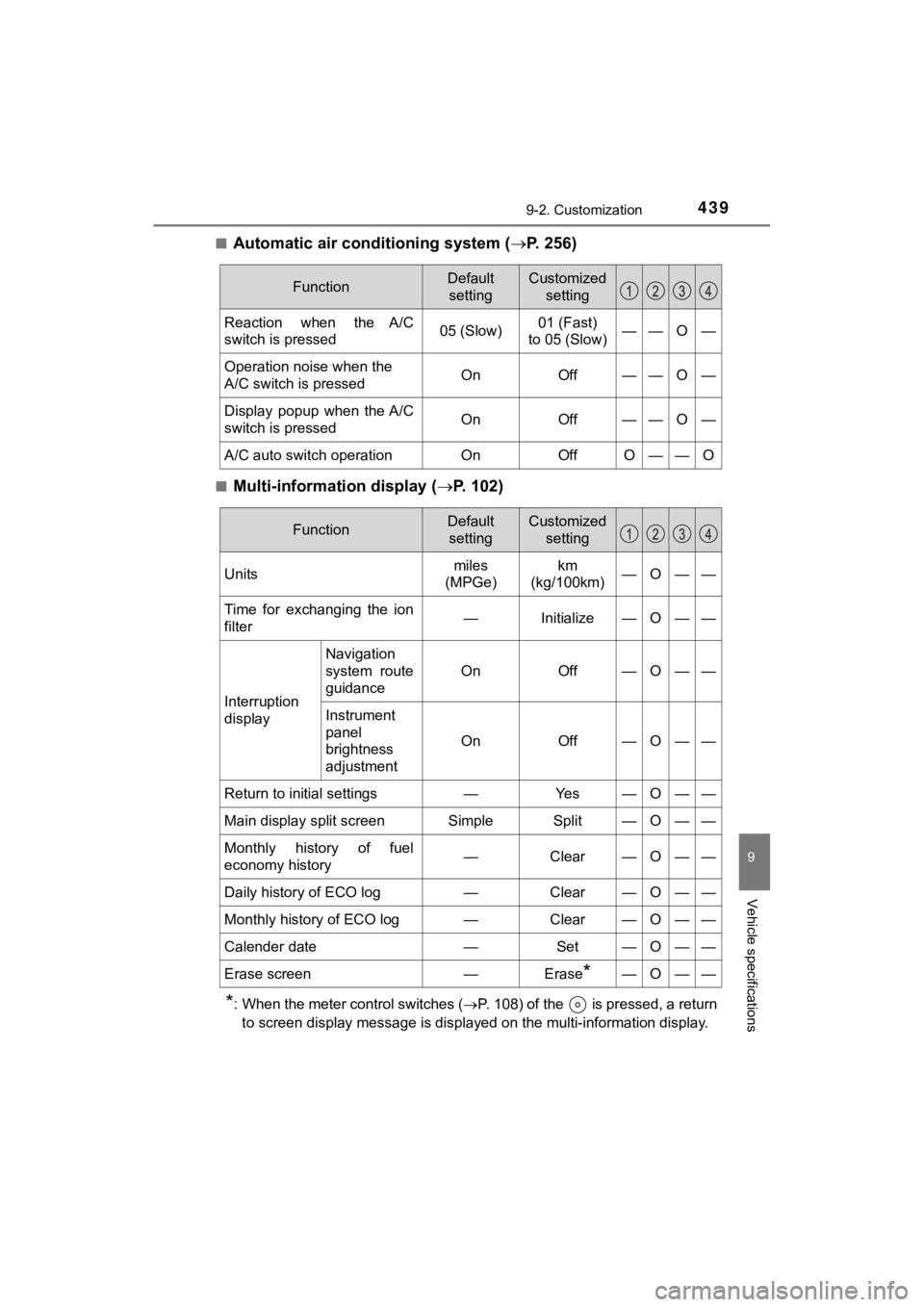
■Automatic air conditioning system ( P. 256)
■Multi-information display ( P. 102)
*: When the meter control switches ( P. 108) of the is pressed, a return
to screen display message is displayed on the multi-information display.
FunctionDefault
settingCustomized setting
Reaction when the A/C
switch is pressed05 (Slow)01 (Fast)
to 05 (Slow)——O—
Operation noise when the
A/C switch is pressedOnOff——O—
Display popup when the A/C
switch is pressedOnOff——O—
A/C auto switch operationOnOffO——O
FunctionDefault settingCustomized setting
Unitsmiles
(MPGe)km
(kg/100km)—O——
Time for exchanging the ion
filter—Initialize—O——
Interruption
display
Navigation
system route
guidance
OnOff—O——
Instrument
panel
brightness
adjustment
OnOff—O——
Return to initial settings—Ye s—O——
Main display split screenSimpleSplit—O——
Monthly history of fuel
economy history—Clear—O——
Daily history of ECO log—Clear—O——
Monthly history of ECO log—Clear—O——
Calender date—Set—O——
Erase screen—Erase*—O——
Page 449 of 464
449Alphabetical index
MIRAI_OM_USA_OM62025U
Alphabetical index
A/C ............................................ 256Air conditioning filter ............. 351
Automatic air conditioning
system ......... ....................... 256
ABS
(Anti-lock Brake System)...... 231
Function ................................ 231
Warning light ......................... 370
Air conditioning filter .............. 351
Air conditioning system .................................... 256
Air conditioning filter ............. 351
Airbags ....................................... 36 Airbag operating conditions .... 44
Airbag preca utions for
your child .............................. 39
Airbag warning light .............. 370
Correct driving posture ........... 28
Curtain shield airbag operating conditions ............. 45
Curtain shield airbag precautions ........................... 42
Front passenger occupant
classification syst em............. 49
General airbag precautions .... 39
Locations of airbags................ 36
Modification and disposal of airbags ............... 43
Seat cushion airbag ................ 36
Side airbag operating conditions ............................. 45
Side airbag precautions .......... 41
Side and curtain shield airbags operating conditions ............. 45
Side and curtain shield airbags precautions ........................... 42
SRS airbags............................ 36 Alarm .......................................... 74
Anchor brackets ........................ 69
Antennas
(smart key system) ............... 131
Anti-lock Brake System
(ABS) ...................................... 231 Function ................................ 231
Warning light......................... 370
Armrest..................................... 279
Assist grips .............................. 280
Audio input
*
Audio system*
Steering wheel audio switch*
Automatic air conditioning system.................................... 256 Air conditioning filter ............. 351
Automatic headli ght leveling
system.................................... 189
Automatic High Beam ............. 190
Automatic light control system.................................... 187
AUX port
*
Auxiliary box ............................ 274
A
*: Refer to the “NAVIGATION SYSTEM OWNER’S MANUAL”.