display TOYOTA MIRAI 2019 (in English) Owner's Manual
[x] Cancel search | Manufacturer: TOYOTA, Model Year: 2019, Model line: MIRAI, Model: TOYOTA MIRAI 2019Pages: 528, PDF Size: 11.84 MB
Page 117 of 528
1173. Instrument cluster
3
Instrument cluster
MIRAI_OM_USA_OM62054U(18MY)_O
M62048U(19MY)
Multi-infor mation display
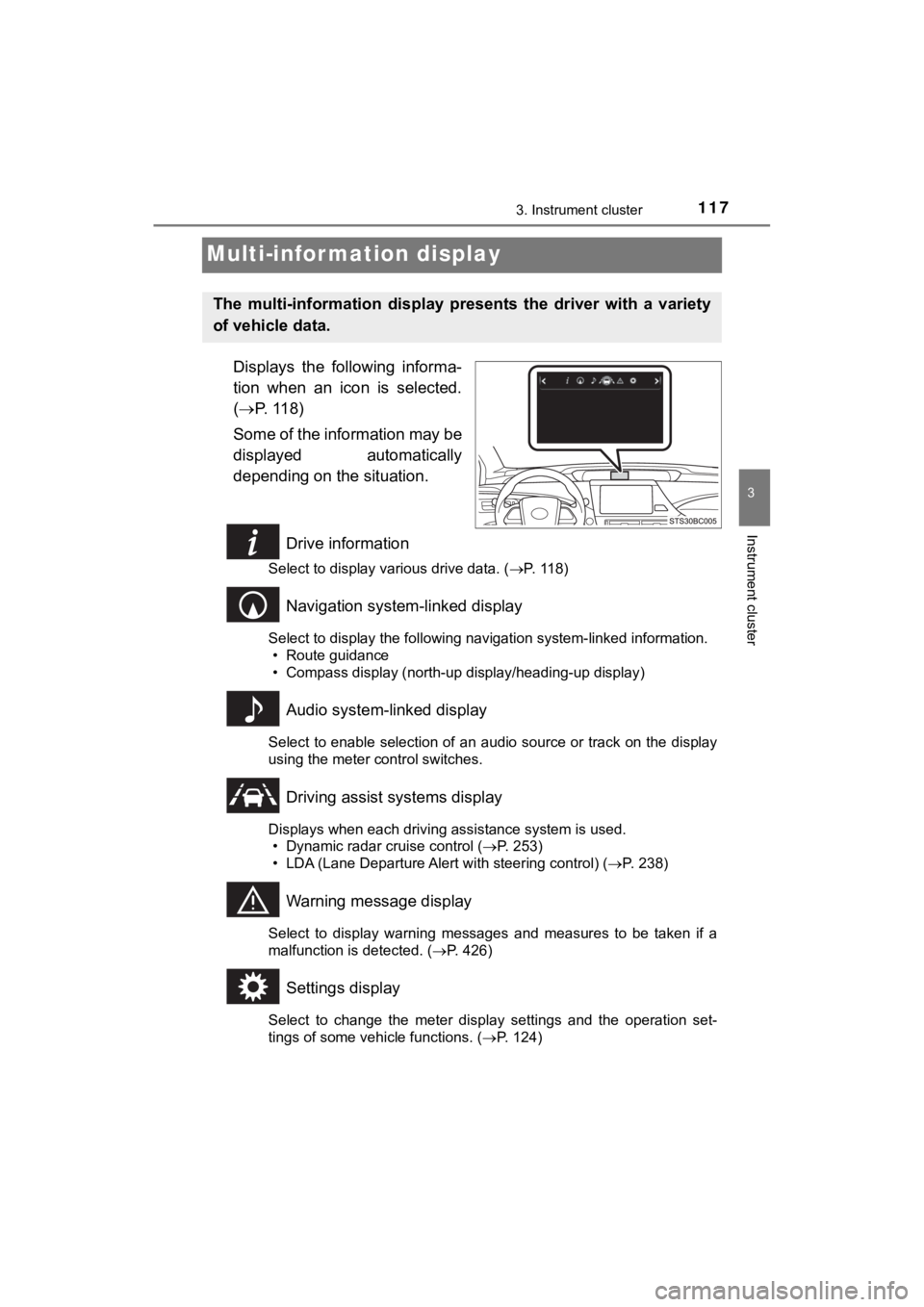
Displays the following informa-
tion when an icon is selected.
( P. 118)
Some of the information may be
displayed automatically
depending on the situation.
Drive information
Select to display various drive data. ( P. 118)
Navigation system-linked display
Select to display the following navigation system-linked information.
• Route guidance
• Compass display (north-up display/heading-up display)
Audio system-linked display
Select to enable selection of an audio source or track on the d isplay
using the meter control switches.
Driving assist systems display
Displays when each driving assistance system is used. • Dynamic radar cruise control ( P. 253)
• LDA (Lane Departure Alert with steering control) ( P. 238)
Warning message display
Select to display warning messages and measures to be taken if a
malfunction is detected. ( P. 426)
Settings display
Select to change the meter display settings and the operation set-
tings of some vehicle functions. ( P. 124)
The multi-information display pre sents the driver with a variety
of vehicle data.
Page 118 of 528
1183. Instrument cluster
MIRAI_OM_USA_OM62054U(18MY)_O
M62048U(19MY)
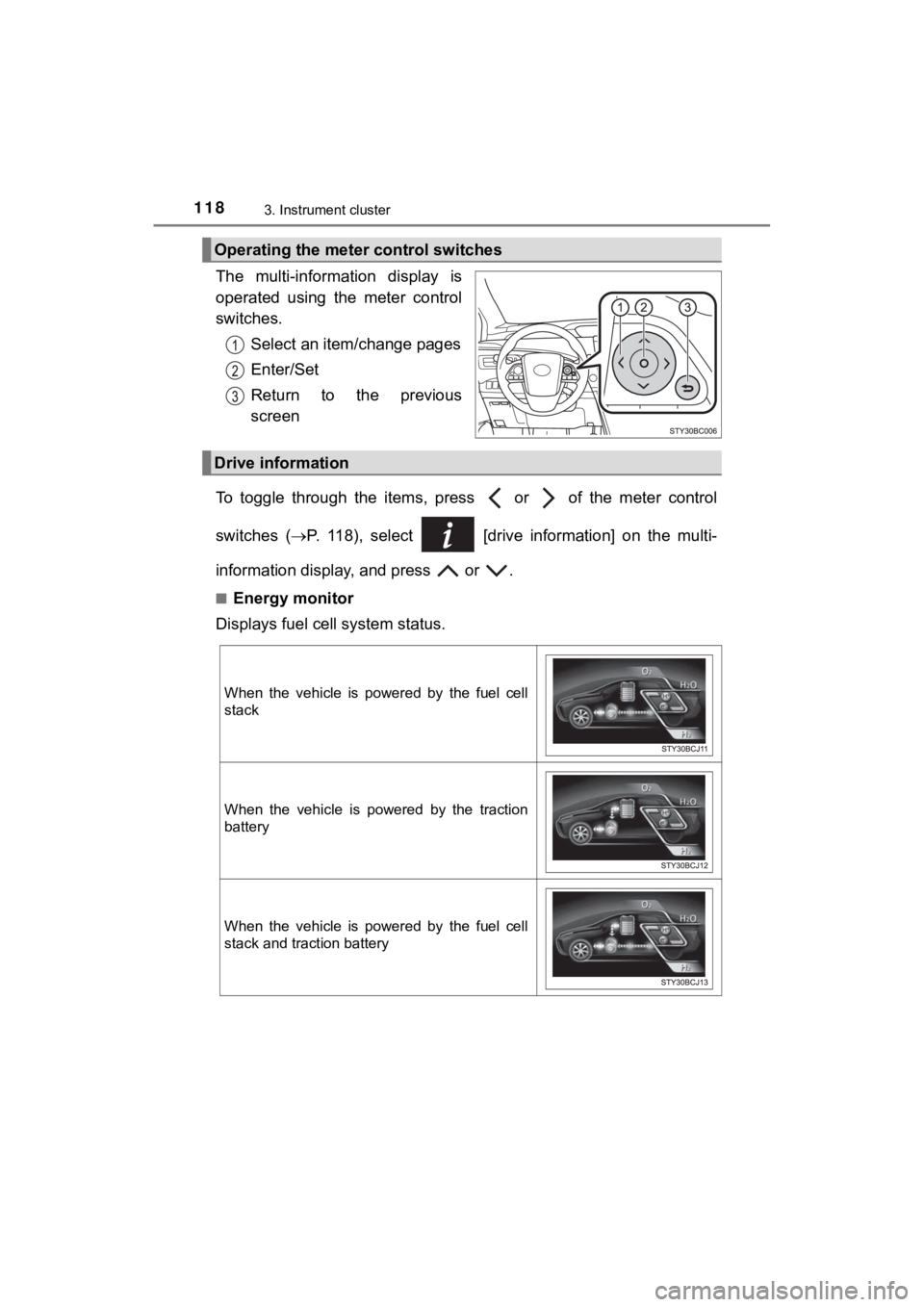
The multi-information display is
operated using the meter control
switches.Select an item/change pages
Enter/Set
Return to the previous
screen
To toggle through the items, press or of the meter control
switches ( P. 118), select [drive information] on the multi-
information display, and press or .
■Energy monitor
Displays fuel cell system status.
Operating the meter control switches
Drive information
When the vehicle is powered by the fuel cell
stack
When the vehicle is powered by the traction
battery
When the vehicle is powered by the fuel cell
stack and traction battery
Page 120 of 528
1203. Instrument cluster
MIRAI_OM_USA_OM62054U(18MY)_O
M62048U(19MY)■
Fuel cell system indicator and ECO Score
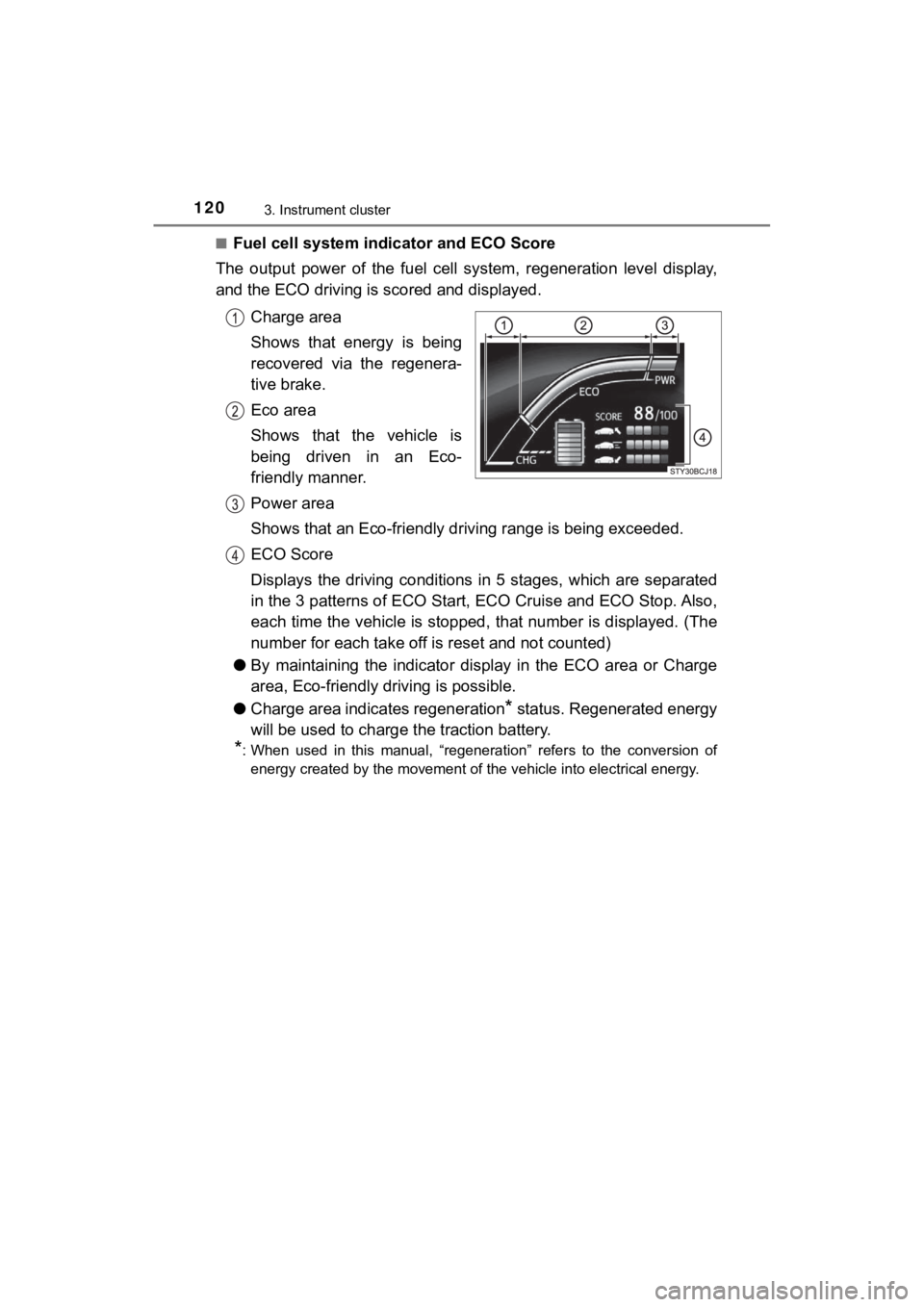
The output power of the fuel cell system, regeneration level di splay,
and the ECO driving is scored and displayed.
Charge area
Shows that energy is being
recovered via the regenera-
tive brake.
Eco area
Shows that the vehicle is
being driven in an Eco-
friendly manner.
Power area
Shows that an Eco-friendly d riving range is being exceeded.
ECO Score
Displays the driving conditions in 5 stages, which are separate d
in the 3 patterns of ECO Start, ECO Cruise and ECO Stop. Also,
each time the vehicle is stopped , that number is displayed. (The
number for each take off is reset and not counted)
● By maintaining the indicator display in the ECO area or Charge
area, Eco-friendly dr iving is possible.
● Charge area indicates regeneration
* status. Regenerated energy
will be used to charge t he traction battery.
*: When used in this manual, “regeneration” refers to the conversion of
energy created by the movement of the vehicle into electrical e nergy.
Page 121 of 528
1213. Instrument cluster
3
Instrument cluster
MIRAI_OM_USA_OM62054U(18MY)_O
M62048U(19MY)■
Fuel consumption record
To toggle through the items, press on the meter control switch es
( P. 118) to select the tab and then press either or .
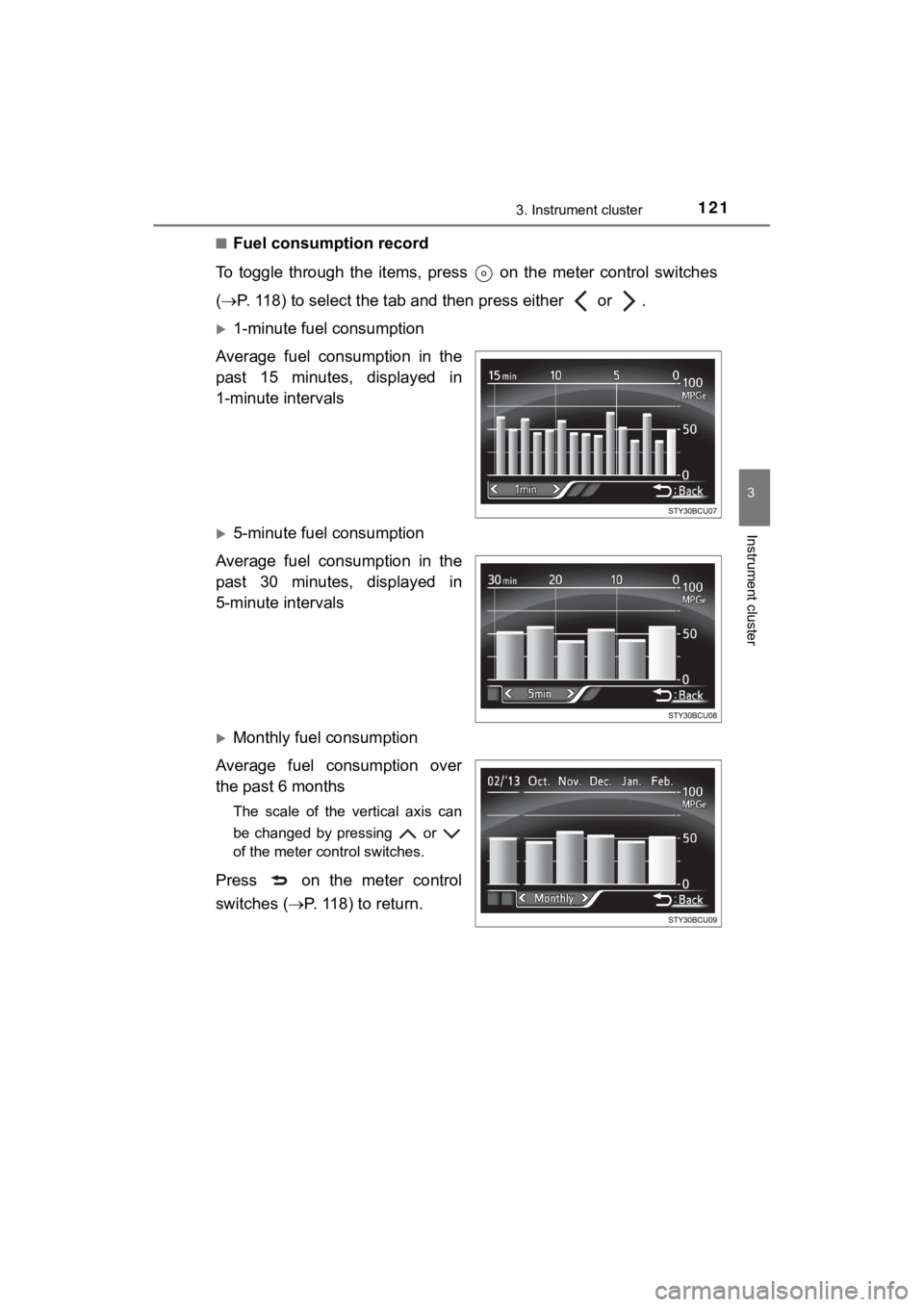
1-minute fuel consumption
Average fuel consumption in the
past 15 minutes, displayed in
1-minute intervals
5-minute fuel consumption
Average fuel consumption in the
past 30 minutes, displayed in
5-minute intervals
Monthly fuel consumption
Average fuel consumption over
the past 6 months
The scale of the vertical axis can
be changed by pressing or
of the meter control switches.
Press on the meter control
switches ( P. 118) to return.
Page 122 of 528
1223. Instrument cluster
MIRAI_OM_USA_OM62054U(18MY)_O
M62048U(19MY)■
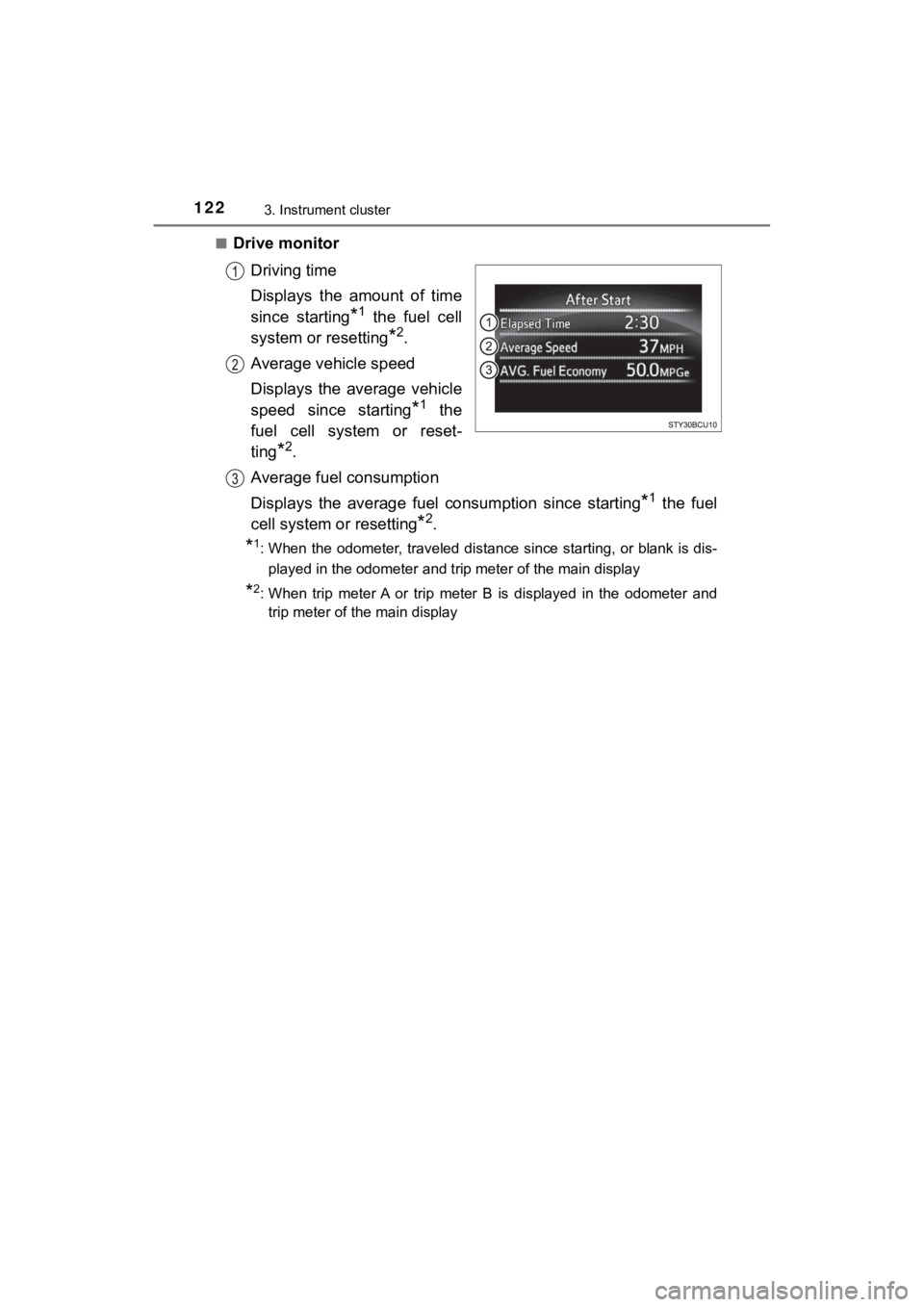
Drive monitor
Driving time
Displays the amount of time
since starting
*1 the fuel cell
system or resetting
*2.
Average vehicle speed
Displays the average vehicle
speed since starting
*1 the
fuel cell system or reset-
ting
*2.
Average fuel consumption
Displays the average fuel consumption since starting
*1 the fuel
cell system or resetting
*2.
*1: When the odometer, traveled distance since starting, or blank is dis-
played in the odometer and trip meter of the main display
*2: When trip meter A or trip meter B is displayed in the odometer and
trip meter of the main display
Page 123 of 528
1233. Instrument cluster
3
Instrument cluster
MIRAI_OM_USA_OM62054U(18MY)_O
M62048U(19MY)■
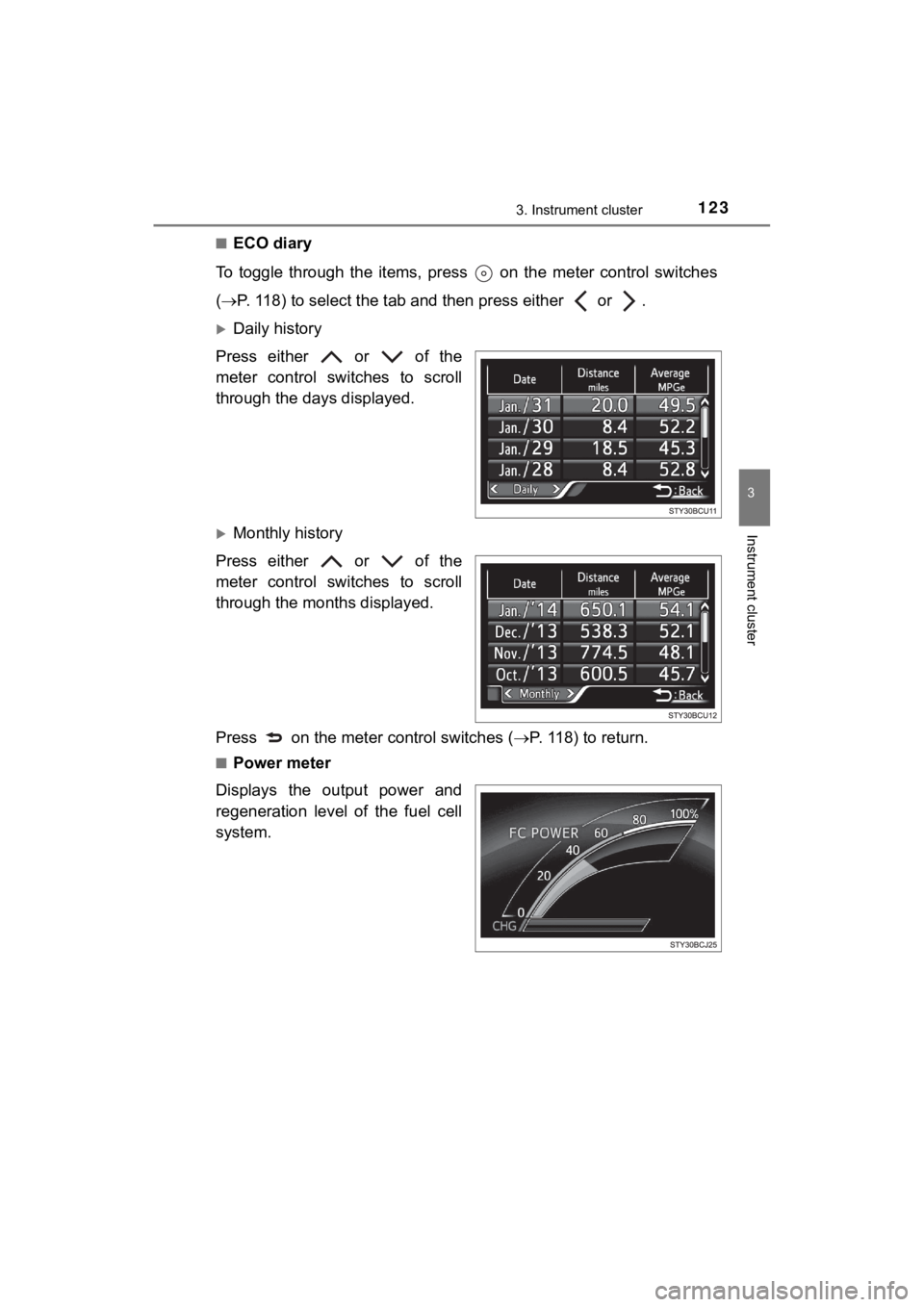
ECO diary
To toggle through the items, press on the meter control switch es
( P. 118) to select the tab and then press either or .
Daily history
Press either or of the
meter control switches to scroll
through the da ys displayed.
Monthly history
Press either or of the
meter control switches to scroll
through the months displayed.
Press on the meter control switches ( P. 118) to return.
■Power meter
Displays the output power and
regeneration level of the fuel cell
system.
Page 124 of 528
1243. Instrument cluster
MIRAI_OM_USA_OM62054U(18MY)_O
M62048U(19MY)
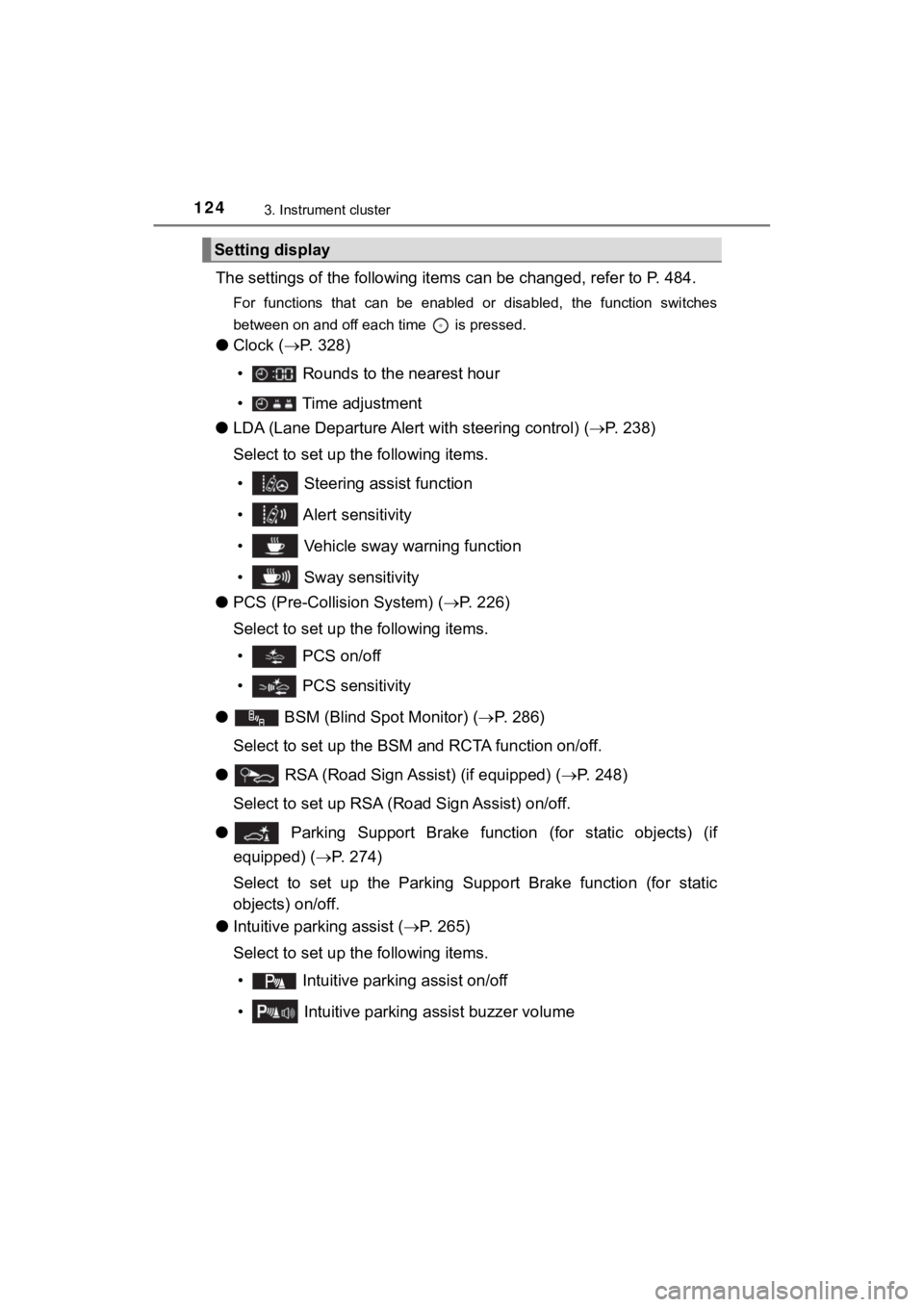
The settings of the following items can be changed, refer to P. 484.
For functions that can be enabled or disabled, the function swi tches
between on and off each time is pressed.
● Clock ( P. 328)
• Rounds to the nearest hour
• Time adjustment
● LDA (Lane Departure Alert with steering control) (P. 2 3 8 )
Select to set up the following items.
• Steering assist function
• Alert sensitivity
• Vehicle sway warning function
• Sway sensitivity
● PCS (Pre-Collis ion System) (P. 226)
Select to set up the following items.
• PCS on/off
• PCS sensitivity
●
BSM (Blind Spot Monitor) ( P. 286)
Select to set up the BSM and RCTA function on/off.
● RSA (Road Sign Assist) (if equipped) ( P. 248)
Select to set up RSA (Ro ad Sign Assist) on/off.
●
Parking Support Brake function (for static objects) (if
equipped) ( P. 274)
Select to set up the Parking Supp ort Brake function (for static
objects) on/off.
● Intuitive parking assist ( P. 265)
Select to set up the following items.
• Intuitive parkin g assist on/off
• Intuitive parking assist buzzer volume
Setting display
Page 125 of 528

1253. Instrument cluster
3
Instrument cluster
MIRAI_OM_USA_OM62054U(18MY)_O
M62048U(19MY)
● Units
Select to change the unit.
●
Meter settings
Select the menu to set up the following items ( P. 490)
• RSA notification method (if equipped)
Select to change the RSA notification method.
• RSA notification level (if equipped)
Select to change the RSA notification level.
• Time for exchanging the ion filter
Select to initialize the time for exchanging the ion filter.
• Language
Select to change the language on the display.
• Interruption display
Select to set the Interruption displays (navigation system rout e guid-
ance, Instrument panel brightness adjustment), which may appear in
some situations, on/off.
• Return to initial settings
Registered or changed meter settings will be deleted or returne d to
their default setting.
• Main display split screen (if equipped)
Select to change the main display to split screen.
• Monthly history of fuel economy history
Select to clear the history.
• Daily history of ECO log
Select to clear the log.
• Monthly history of ECO log
Select to clear the log.
• Calendar date
Select to set the date.
• Erase screen
Select to display a blank screen.
Page 126 of 528
![TOYOTA MIRAI 2019 (in English) Owners Manual 1263. Instrument cluster
MIRAI_OM_USA_OM62054U(18MY)_O
M62048U(19MY)
■Setting items
● [Meter settings] items are not selectable while driving and cannot be
operated.
Also, the settings screen i](/img/14/42622/w960_42622-125.png "TOYOTA MIRAI 2019 (in English) Owners Manual 1263. Instrument cluster
MIRAI_OM_USA_OM62054U(18MY)_O
M62048U(19MY)
■Setting items
● [Meter settings] items are not selectable while driving and cannot be
operated.
Also, the settings screen i")
1263. Instrument cluster
MIRAI_OM_USA_OM62054U(18MY)_O
M62048U(19MY)
■Setting items
● [Meter settings] items are not selectable while driving and cannot be
operated.
Also, the settings screen is temporarily canceled in the follow ing situations.
• A warning message is displayed.
• The vehicle starts off.
● Settings for functions not equipped to the vehicle are not disp layed.
● When a function is turned off, the related settings for that fu nction are not
selectable.
■ When the 12-volt battery terminal is disconnected and reconnect ed
The following data is reset when the 12-volt battery terminal i s disconnected
and reconnected.
● 1-minute fuel consumption
● 5-minute fuel consumption
● Driving time
● Average vehicle speed
● Average fuel consumption
■ Liquid crystal display
P. 115
NOTICE
■During setting up the display
To prevent 12-volt battery discharge, ensure that the fuel cell system is
operating while setting up the display features.
Page 136 of 528
1364-2. Opening, closing and locking the doors
MIRAI_OM_USA_OM62054U(18MY)_O
M62048U(19MY)
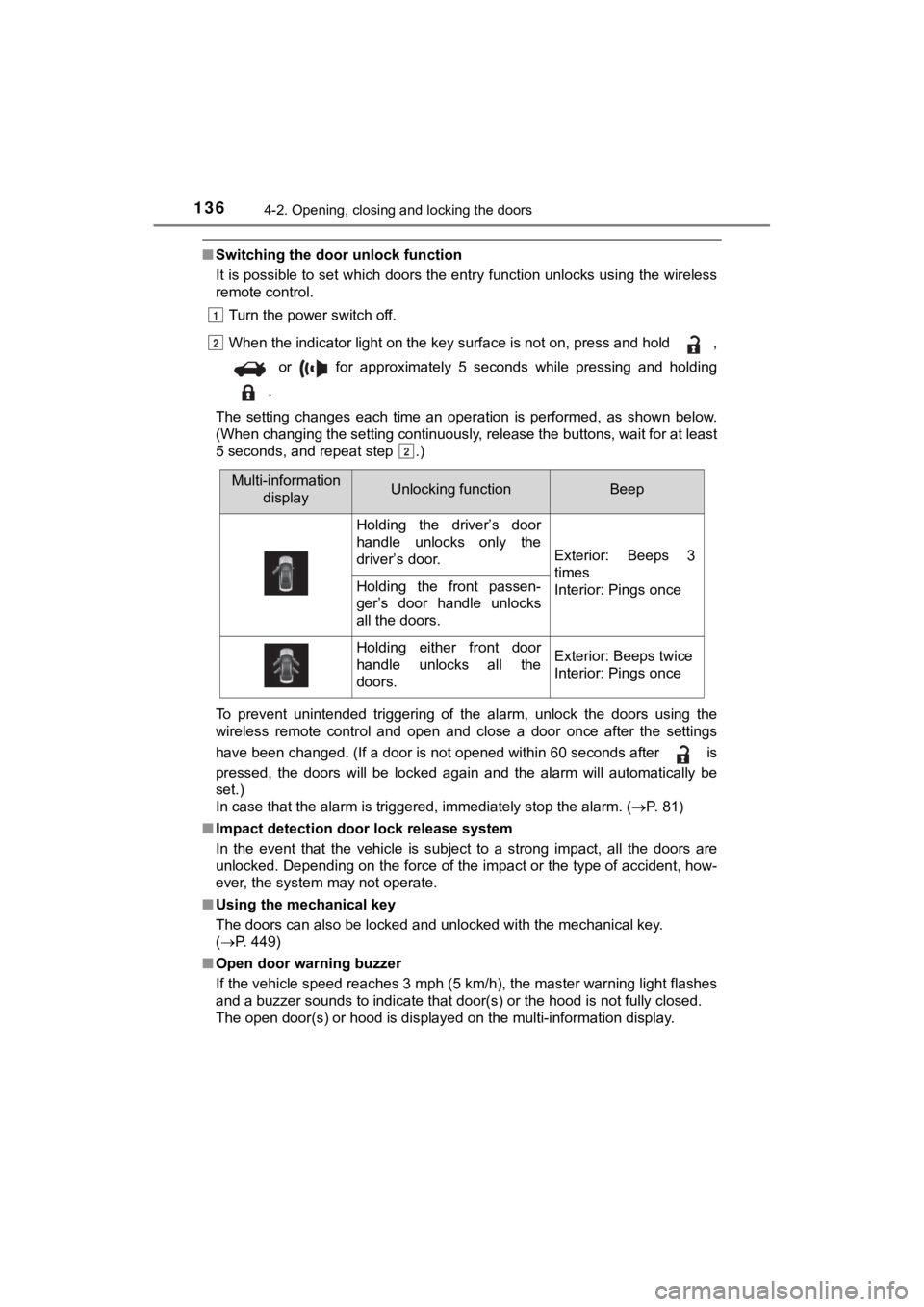
■Switching the door unlock function
It is possible to set which doors the entry function unlocks using the wireless
remote control.
Turn the power switch off.
When the indicator light on the key surface is not on, press and hold ,
or for approximately 5 seconds while pressing and holding
.
The setting changes each time an operation is performed, as sho wn below.
(When changing the setting continuously, release the buttons, w ait for at least
5 seconds, and repeat step .)
To prevent unintended triggering of the alarm, unlock the doors using the
wireless remote control and open and close a door once after th e settings
have been changed. (If a door is not opened within 60 seconds a fter is
pressed, the doors will be locked again and the alarm will auto matically be
set.)
In case that the alarm is triggered, immediately stop the alarm . ( P. 81)
■ Impact detection door lock release system
In the event that the vehicle is subject to a strong impact, all the doors are
unlocked. Depending on the force of the impact or the type of a ccident, how-
ever, the system may not operate.
■ Using the mechanical key
The doors can also be locked and unlocked with the mechanical k ey.
( P. 449)
■ Open door warning buzzer
If the vehicle speed reaches 3 mph (5 km/h), the master warning light flashes
and a buzzer sounds to indicate that door(s) or the hood is not fully closed.
The open door(s) or hood is displayed on the multi-information display.
1
2
2
Multi-information
displayUnlocking functionBeep
Holding the driver’s door
handle unlocks only the
driver’s door.
Exterior: Beeps 3
times
Interior: Pings once
Holding the front passen-
ger’s door handle unlocks
all the doors.
Holding either front door
handle unlocks all the
doors.Exterior: Beeps twice
Interior: Pings once