warning light TOYOTA MIRAI 2019 (in English) Owner's Guide
[x] Cancel search | Manufacturer: TOYOTA, Model Year: 2019, Model line: MIRAI, Model: TOYOTA MIRAI 2019Pages: 528, PDF Size: 11.84 MB
Page 176 of 528

1765-1. Before driving
MIRAI_OM_USA_OM62054U(18MY)_O
M62048U(19MY)
WARNING
Observe the following precautions.
Failure to do so may result in death or serious injury.
■When driving the vehicle
● Do not drive in excess of the speed limit. Even if the legal sp eed limit per-
mits it, do not drive over 85 mph (140 km/h) unless your vehicl e has high-
speed capability tires. Driving over 85 mph (140 km/h) may resu lt in tire
failure, loss of control and possible injury. Be sure to consult a tire dealer
to determine whether the tires on your vehicle are high-speed c apability
tires or not before driving at such speeds.
■ When driving on slippery road surfaces
● Sudden braking, acceleration and steering may cause tire slippa ge and
reduce your ability to control the vehicle.
● Sudden acceleration or regenerative braking due to shifting cou ld cause
the vehicle to skid.
● After driving through a puddle, lightly depress the brake pedal to make
sure that the brakes are functioning properly. Wet brake pads m ay prevent
the brakes from functioning properly. If the brakes on only one side are wet
and not functioning properly, steering control may be affected.
■ When changing the shift position
● Do not let the vehicle roll backward while a forward driving position is
selected, or roll forward while the shift position is in R.
Doing so may result in an accident or damage to the vehicle.
● Do not shift the shift position to P while the vehicle is movin g.
Doing so can damage the transmission and may result in a loss o f vehicle
control.
● Do not shift the shift position to R while the vehicle is movin g forward.
Doing so can damage the transmission and may result in a loss o f vehicle
control.
● Do not shift the shift position to a driving position while the vehicle is mov-
ing backward.
Doing so can damage the transmission and may result in a loss o f vehicle
control.
● Shifting the shift position to N while the vehicle is moving wi ll disengage
the fuel cell system. Regenerative braking is not available with the fuel cell
system disengaged.
● Be careful not to shift the shift position with the accelerator pedal
depressed. Shifting the shift position to any position other th an P or N may
lead to unexpected rapid acceleration of the vehicle that may c ause an
accident and result in death or serious injury.
After shifting the shift position, make sure to check the current shift posi-
tion using the shift position indicator. ( P. 193)
Page 177 of 528

1775-1. Before driving
5
Driving
MIRAI_OM_USA_OM62054U(18MY)_O
M62048U(19MY)
WARNING
Observe the following precautions.
Failure to do so may result in death or serious injury.
■If you hear a squealing or scrap ing noise (brake pad wear limit indica-
tors)
Have the brake pads checked and replaced by your Toyota dealer as soon
as possible.
Rotor damage may result if the pads are not replaced when needed.
It is dangerous to drive the vehicle when the wear limits of the brake pads
and/or those of the brake discs are exceeded.
■ When the vehicle is stopped
● Do not depress the accelerator pedal unnecessarily.
If the shift position is in any position other than P or N, the vehicle may
accelerate suddenly and unexpectedly, causing an accident.
● In order to prevent accidents due to the vehicle rolling away, always keep
depressing the brake pedal while stopped with the “READY” indic ator is
illuminated, and apply the parking brake as necessary.
● If the vehicle is stopped on an incline, in order to prevent ac cidents caused
by the vehicle rolling forward or backward, always depress the brake pedal
and securely apply the parking brake as needed.
■ When the vehicle is parked
● Do not leave glasses, cigarette lighters, spray cans, or soft d rink cans in
the vehicle when it is in the sun.
Doing so may result in the following:
• Gas may leak from a cigarette lighter or spray can, and may le ad to a
fire.
• The temperature inside the vehicle may cause the plastic lenses and
plastic material of glasses to deform or crack.
• Soft drink cans may rupture, causing the contents to spray ove r the
interior of the vehicle, and may also cause a short circuit in the vehicle’s
electrical components.
● Do not leave cigarette lighters in the vehicle. If a cigarette lighter is in a
place such as the glove box or on the floor, it may be lit acci dentally when
luggage is loaded or the seat is adjusted, causing a fire.
● Do not attach adhesive discs to the windshield or windows. Do n ot place
containers such as air fresheners on the instrument panel or da shboard.
Adhesive discs or containers may act as lenses, causing a fire in the vehi-
cle.
Page 192 of 528

1925-2. Driving procedures
MIRAI_OM_USA_OM62054U(18MY)_O
M62048U(19MY)
WARNING
■When starting the fuel cell system
Always start the fuel cell system while sitting in the driver’s seat. Do not
depress the accelerator pedal while starting the fuel cell syst em under any
circumstances.
Doing so may cause an accident resulting in death or serious in jury.
■ Stopping the fuel cell system in an emergency
If you want to stop the fuel cell system in an emergency while driving the
vehicle, press and hold the power switch for more than 2 second s, or press
it briefly 3 times or more in succession. ( P. 409)
However, do not touch the power switch while driving except in an emer-
gency. Turning the fuel cell system off while driving will not cause loss of
steering or braking control, however, power assist to the steer ing will be
lost. This will make it more difficult to steer smoothly, so yo u should pull over
and stop the vehicle as soon as it is safe to do so.
NOTICE
■ To prevent 12-volt b attery discharge
Do not leave the power switch in ACCESSORY or ON mode for long peri-
ods if the fuel cell system is off.
■ When starting the fuel cell system
If the fuel cell system becomes difficult to start, have your vehicle checked
by your Toyota dealer immediately.
■ Symptoms indicating a malfunction with the power switch
If the power switch seems to be operating somewhat differently than usual,
such as the switch sticking slightly, there may be a malfunctio n. Contact
your Toyota dealer immediately.
Page 196 of 528

1965-2. Driving procedures
MIRAI_OM_USA_OM62054U(18MY)_O
M62048U(19MY)
■For the shift positions
●When the power switch is off, the shift position cannot be chan ged.
● When the power switch is in ON mode (the fuel cell system is not operating),
the shift position can only be changed to N. The shift position will be
changed to N even if the shift position is shifted to D or R and held in that
position.
● When the “READY” indicator is on, the shift position can be cha nged from P
to D, N or R.
● When the “READY” indicator is flashing, the shift position cann ot be
changed from P to another position even if the shift lever is o perated.
Wait until the “READY” indicator changes from a flashing to a s olid light, and
then operate the shift lever again.
In addition, if an attempt is made to change the shift position by moving the
shift lever or by pressing the P position switch in any of the following situa-
tions, a buzzer will sound and the shifting operation will be disabled or the
shift position will automatically change to N. When this happen s, select an
appropriate shift position.
● When attempting to change the shift position from P without dep ressing the
brake pedal, the shift position change is invalidated.
● Situations where the shift position will automatically change t o N:
• When the P position switch is pressed while the vehicle is running.
*1
• When an attempt is made to select the R position by moving the shift
lever when the vehicle is moving forward.
*2
• When an attempt is made to select the D position by moving the shift
lever when the vehicle is moving in reverse.
*3
• When an attempt is made to change the shift position from R to Br mode
by moving the shift lever.
*1: Shift position may be changed to P when driving at extremely l ow speeds.
*2: Shift position may be changed to R when driving at low speeds.
*3: Shift position may be changed to D when driving at low speeds.
■ Br mode
Depending on the condition of the traction battery, Br mode may not be avail-
able.
In that case, a message is displayed on the multi-information d isplay.
■ Sounds when in Br mode
P. 88
■ Restraining sudden start (Drive-Start Control)
P. 173
■ Reverse warning buzzer
When shifting into R, a buzzer will sound to inform the driver that the shift
position is in R.
Page 200 of 528
2005-2. Driving procedures
MIRAI_OM_USA_OM62054U(18MY)_O
M62048U(19MY)
Parking brake
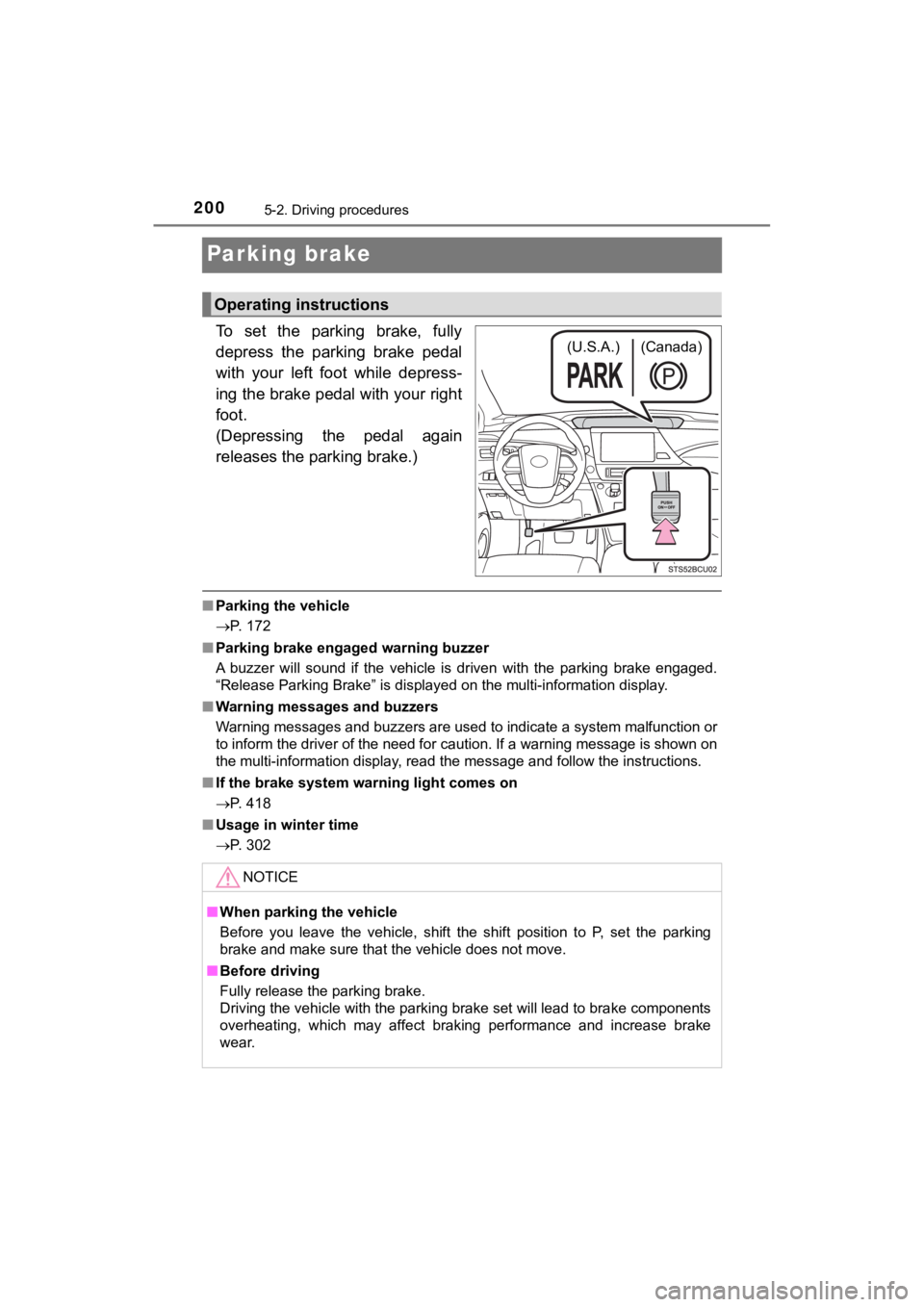
To set the parking brake, fully
depress the parking brake pedal
with your left foot while depress-
ing the brake pedal with your right
foot.
(Depressing the pedal again
releases the parking brake.)
■Parking the vehicle
P. 172
■ Parking brake engaged warning buzzer
A buzzer will sound if the vehicle is driven with the parking b rake engaged.
“Release Parking Brake” is displayed on the multi-information d isplay.
■ Warning messages and buzzers
Warning messages and buzzers are used to indicate a system malfunction or
to inform the driver of the need for caution. If a warning message is shown on
the multi-information display, read the message and follow the instructions.
■ If the brake system warning light comes on
P. 418
■ Usage in winter time
P. 302
Operating instructions
(U.S.A.) (Canada)
NOTICE
■When parking the vehicle
Before you leave the vehicle, shift the shift position to P, se t the parking
brake and make sure that the vehicle does not move.
■ Before driving
Fully release the parking brake.
Driving the vehicle with the parking brake set will lead to bra ke components
overheating, which may affect braking performance and increase brake
wear.
Page 208 of 528

2085-3. Operating the lights and wipers
MIRAI_OM_USA_OM62054U(18MY)_O
M62048U(19MY)●
In the situations below, the system may not be able to correctl y detect the
surrounding brightness levels, and may flash or expose nearby p edestrians
to the high beam. Therefore, you should consider turning the hi gh beams on
or off manually rather than relying on the Automatic High Beam system.
• In bad weather (rain, snow, fog, sandstorms, etc.).
• The windshield is obscured by fog, mist, ice, dirt, etc.
• The windshield is cracked or damaged.
• The camera sensor is deformed or dirty.
• The camera sensor temperature is extremely high.
• Surrounding brightness levels are equal to those of headlights , tail lights
or fog lights.
• Vehicles ahead have headlights that are either switched off, d irty, are
changing color, or are not aimed properly.
• When driving through an area of intermittently changing brightness and darkness.
• When frequently and repeatedly driving ascending/descending roads, or
roads with rough, bumpy or uneven surfaces (such as stone-paved
roads, gravel tracks, etc.).
• When frequently and repeatedly taking curves or driving on a w inding
road.
• There is a highly reflective object ahead of the vehicle, such as a sign or a mirror.
• The back of a vehicle ahead is highly reflective, such as a co ntainer on a
truck.
• The vehicle’s headlights are damaged or dirty.
• The vehicle is listing or tilting, due to a flat tire, a trailer being towed, etc.
• The driver believes that the high beam may be causing problems or dis-
tress to other drivers or pedestrians nearby.
WARNING
■ Limitations of the Automatic High Beam
Do not rely on the Automatic High Beam. Always drive safely, ta king care to
observe your surroundings and turning high beam on or off manua lly if nec-
essary.
Page 211 of 528
2115-3. Operating the lights and wipers
5
Driving
MIRAI_OM_USA_OM62054U(18MY)_O
M62048U(19MY)
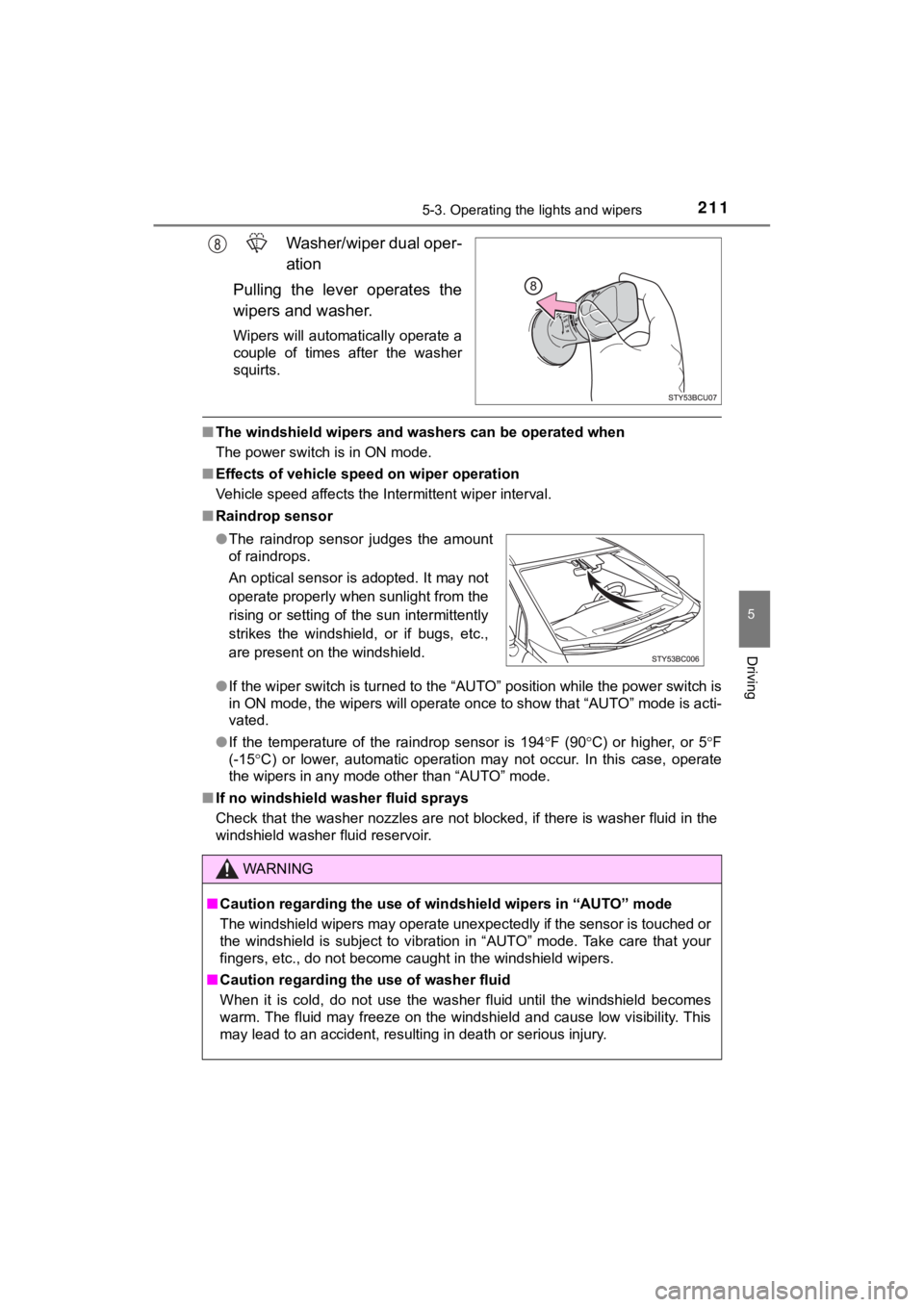
Washer/wiper dual oper-
ation
Pulling the lever operates the
wipers and washer.
Wipers will automatically operate a
couple of times after the washer
squirts.
■ The windshield wipers and washers can be operated when
The power switch is in ON mode.
■ Effects of vehicle speed on wiper operation
Vehicle speed affects the Intermittent wiper interval.
■ Raindrop sensor
●If the wiper switch is turned to the “AUTO” position while the power switch is
in ON mode, the wipers will operate once to show that “AUTO” mo de is acti-
vated.
● If the temperature of the raindrop sensor is 194 F (90 C) or higher, or 5 F
(-15 C) or lower, automatic operation may not occur. In this case, o perate
the wipers in any mode other than “AUTO” mode.
■ If no windshield washer fluid sprays
Check that the washer nozzles are not blocked, if there is wash er fluid in the
windshield washer fluid reservoir.
● The raindrop sensor judges the amount
of raindrops.
An optical sensor is adopted. It may not
operate properly when sunlight from the
rising or setting of the sun intermittently
strikes the windshield, or if bugs, etc.,
are present on the windshield.
WARNING
■Caution regarding the use of windshield wipers in “AUTO” mode
The windshield wipers may operate unexpectedly if the sensor is touched or
the windshield is subject to vibration in “AUTO” mode. Take car e that your
fingers, etc., do not become caught in the windshield wipers.
■ Caution regarding the use of washer fluid
When it is cold, do not use the washer fluid until the windshie ld becomes
warm. The fluid may freeze on the windshield and cause low visi bility. This
may lead to an accident, resulting in death or serious injury.
Page 221 of 528

2215-5. Using the driving support systems
5
Driving
MIRAI_OM_USA_OM62054U(18MY)_O
M62048U(19MY)
WARNING
●If the part of the windshield in front of the front camera is f ogged up or cov-
ered with condensation or ice, use the windshield defogger to remove the
fog, condensation or ice. ( P. 309)
● If water droplets cannot be properly removed from the area of t he wind-
shield in front of the front camera by the windshield wipers, replace the
wiper insert or wiper blade.
If the wiper inserts or wiper blades need to be replaced, contact your
Toyota dealer.
● Do not attach window tint to the windshield.
● Replace the windshield if it is damaged or cracked.
If the windshield needs to be replaced, contact your Toyota dea ler.
● Do not allow liquids to contact the front camera.
● Do not allow bright lights to shine into the front camera.
● Do not dirty or damage the front camera.
When cleaning the inside of the windshield, do not allow glass cleaner to
contact the lens of the front camera. Also, do not touch the lens.
If the lens is dirty or damaged, contact your Toyota dealer.
● Do not subject the front camera to a strong impact.
● Do not change the installation position or direction of the fro nt camera or
remove it.
● Do not disassemble the front camera.
● Do not modify any components of the vehicle around the front ca mera
(inside rear view mirror, etc.) or ceiling.
● Do not attach any accessories to the hood, front grille or fron t bumper that
may obstruct the front camera. Contact your Toyota dealer for d etails.
● If a surfboard or other long object is to be mounted on the roo f, make sure
that it will not obstruct the front camera.
● Do not modify the headlights or other lights.
Page 224 of 528
2245-5. Using the driving support systems
MIRAI_OM_USA_OM62054U(18MY)_O
M62048U(19MY)■
If a warning message is displayed on the multi-information disp lay
A system may be temporarily unavailable or there may be a malfu nction in
the system.
● In the following situations, perform the actions specified in t he table. When
the normal operating conditions are detected, the message will disappear
and the system will become operational.
If the message does not disappear, contact your Toyota dealer.
SituationActions
When the area around a sensor is
covered with dirt, moisture (fogged
up, covered with condensation, ice,
etc.), or other foreign matterTo clean the part of the windshield in
front of the front camera, use the
windshield wipers or the windshield
defogger of the air conditioning sys-
tem ( P. 309)
When the temperature around the
front camera is outside of the opera-
tional range, such as when the vehi-
cle is in the sun or in an extremely
cold environment
If the front camera is hot, such as
after the vehicle had been parked in
the sun, use the air conditioning sys-
tem to decrease the temperature
around the front camera.
If a sunshade was used when the
vehicle was parked, depending on its
type, the sunlight reflected from the
surface of the sunshade may cause
the temperature of the front camera
to become excessively high.
If the front camera is cold, such after
the vehicle is parked in an extremely
cold environment, use the air condi-
tioning system to increase the tem-
perature around the front camera.
The area in front of the front camera
is obstructed, such as when the hood
is open or a sticker is attached to the
part of the windshield in front of the
front camera.
Close the hood, remove the sticker,
etc. to clear the obstruction.
Page 230 of 528
2305-5. Using the driving support systems
MIRAI_OM_USA_OM62054U(18MY)_O
M62048U(19MY)■
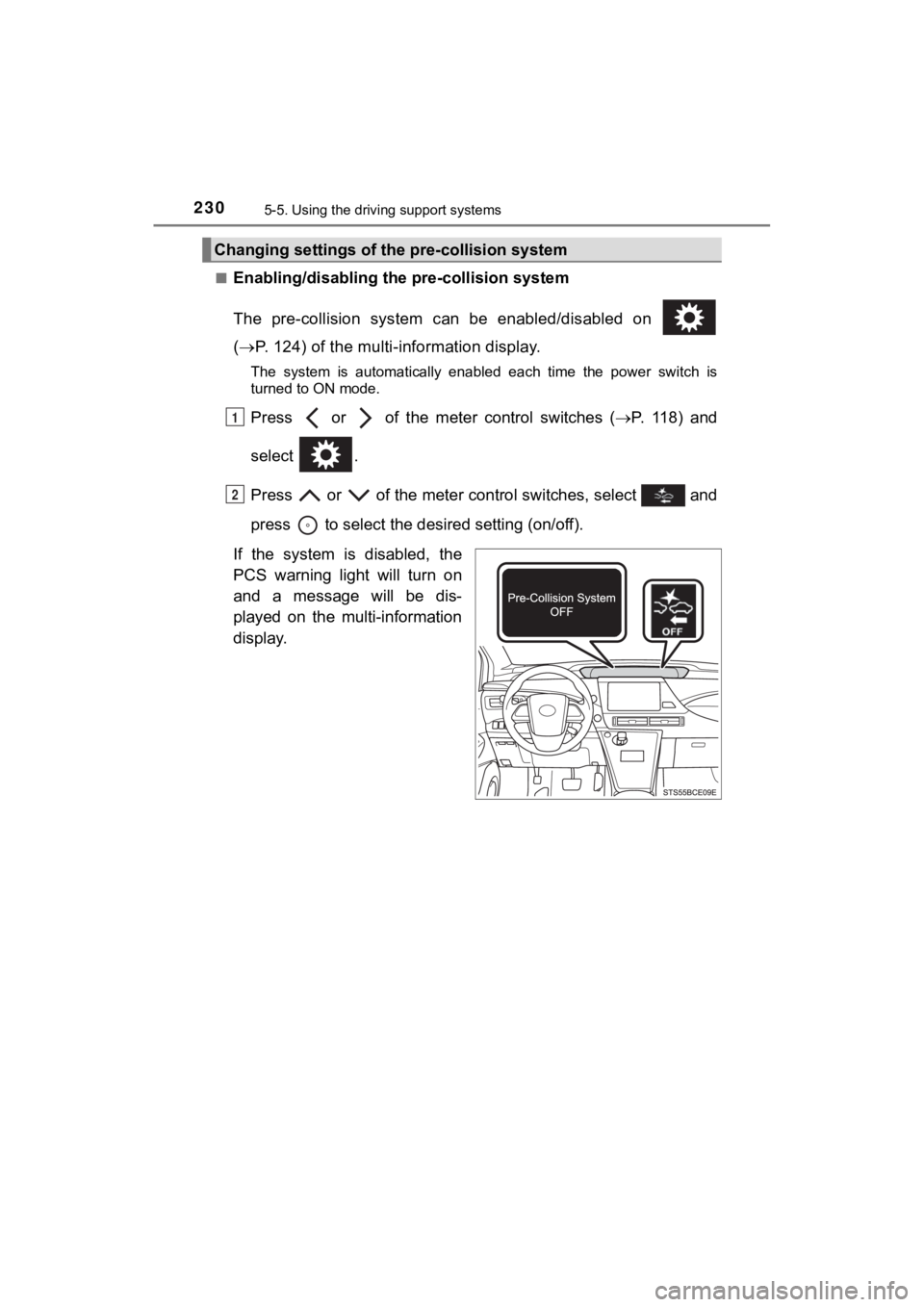
Enabling/disabling th
e pre-collision system
The pre-collision system can be enabled/disabled on
( P. 124) of the multi-information display.
The system is automatically enabled each time the power switch is
turned to ON mode.
Press or of the mete r control switches (P. 1 1 8 ) a n d
select .
Press or of the meter control switches, select and
press to select the desired setting (on/off).
If the system is disabled, the
PCS warning light will turn on
and a message will be dis-
played on the multi-information
display.
Changing settings of the pre-collision system
1
2