ad blue TOYOTA MIRAI 2019 Owners Manual (in English)
[x] Cancel search | Manufacturer: TOYOTA, Model Year: 2019, Model line: MIRAI, Model: TOYOTA MIRAI 2019Pages: 528, PDF Size: 11.84 MB
Page 74 of 528
741-2. Emergency assistance
MIRAI_OM_USA_OM62054U(18MY)_O
M62048U(19MY)
■Safety Connect Services Information
●Phone calls using the vehicle’s Bluetooth® technology will not be possible
during Safety Connect.
● Safety Connect is available beginning Fall 2009 on select Toyot a models (in
the contiguous United States only). Contact with the Safety Con nect
response center is dependent upon the telematics device being i n operative
condition, cellular connection availability, and GPS satellite signal reception,
which can limit the ability to reach the response center or rec eive emer-
gency service support. Enrollment and Telematics Subscription S ervice
Agreement are required. A variety of subscription terms are ava ilable;
charges vary by subscription term selected and location.
● Automatic Collision Notification, Emergency Assistance and Stolen Vehicle
Location are available in the United States, including Hawaii a nd Alaska,
Puerto Rico and Canada, and Enhanced Roadside Assistance are av ailable
in the United States, Puerto Rico and Canada.
● Automatic Collision Notification, Emergency Assistance, Stolen Vehicle and
Enhanced Road Assistance are not available in the U.S. Virgin I slands.
For vehicles first sold in the U.S. Virgin Islands, no Safety C onnect services
will function in or outside the U.S. Virgin Islands.
● Safety Connect services are not subject to section 255 of the T elecommuni-
cations Act and the device is not TTY compatible.
■ Languages
The Safety Connect response center will offer support in multip le languages.
The Safety Connect system will offer voice prompts in English, Spanish, and
French. Please indicate your language of choice when enrolling.
■ When contacting the response center
You may be unable to contact the response center if the network is busy.
When the power switch is turned to ON mode, the red indicator l ight
comes on for 2 seconds then turns off. Afterward, the green ind icator
light comes on, indicating t hat the service is active.
The following indicator light patterns indicate specific system usage
conditions:
● Green indicator light on = Active service
● Green indicator light flashing = Safety Connect call in process
● Red indicator light (except at vehicle start-up) = System malfunction
(contact your Toyota dealer)
● No indicator light (off) = Saf ety Connect service not active
Safety Connect LED light Indicators
Page 108 of 528
1083. Instrument cluster
MIRAI_OM_USA_OM62054U(18MY)_O
M62048U(19MY)
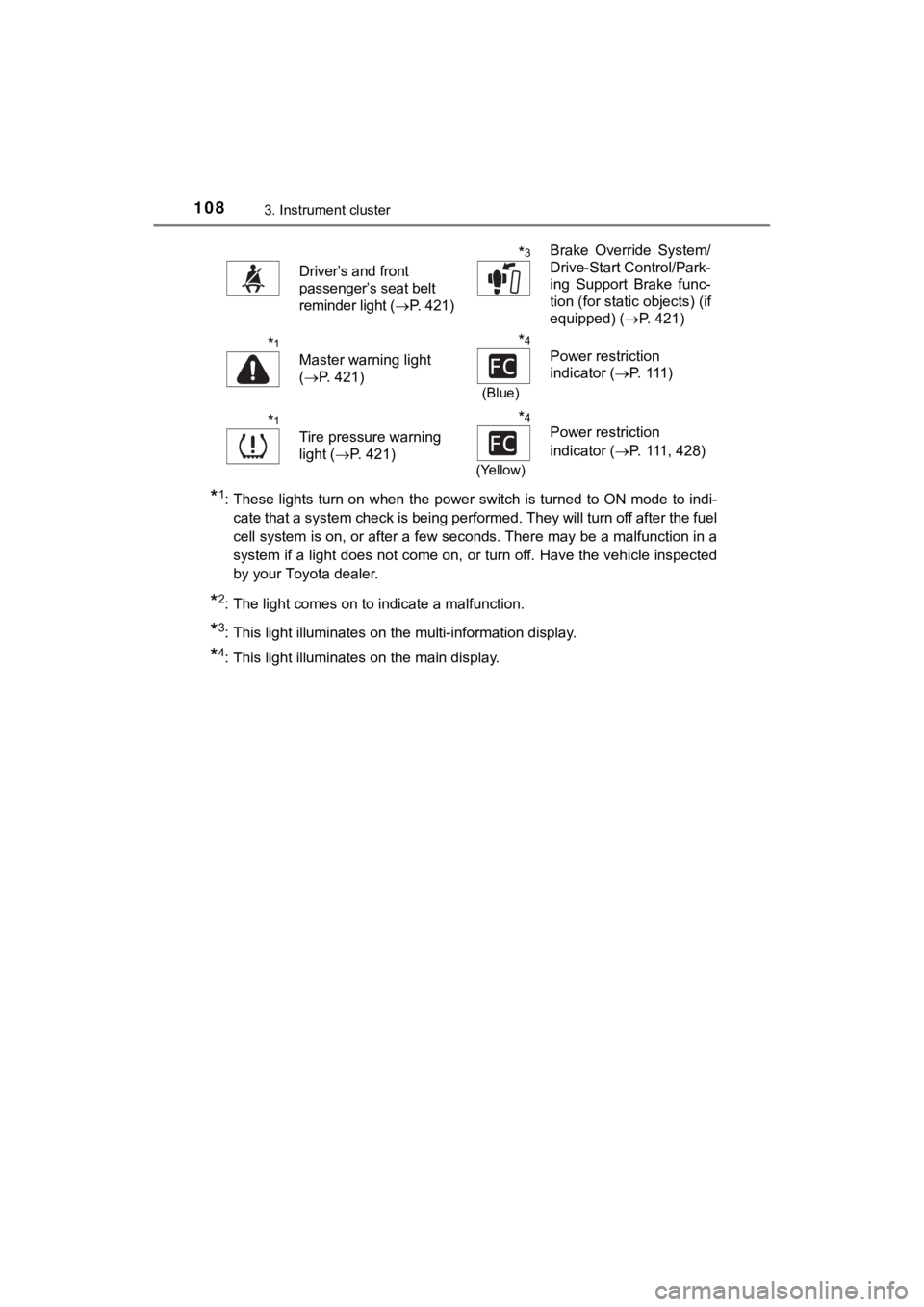
*1: These lights turn on when the power switch is turned to ON mode to indi-
cate that a system check is being performed. They will turn off after the fuel
cell system is on, or after a few seconds. There may be a malfu nction in a
system if a light does not come on, or turn off. Have the vehic le inspected
by your Toyota dealer.
*2: The light comes on to indicate a malfunction.
*3: This light illuminates on the multi-information display.
*4: This light illuminates on the main display.
Driver’s and front
passenger’s seat belt
reminder light ( P. 421)
*3Brake Override System/
Drive-Start Control/Park-
ing Support Brake func-
tion (for static objects) (if
equipped) ( P. 421)
*1
Master warning light
(P. 421)
*4
(Blue)
Power restriction
indicator ( P. 111 )
*1
Tire pressure warning
light ( P. 421)
*4
(Yellow)
Power restriction
indicator ( P. 111, 428)
Page 112 of 528

1123. Instrument cluster
MIRAI_OM_USA_OM62054U(18MY)_O
M62048U(19MY)
Power restriction indicator
Blue: The fuel cell system output power is restricted, because the
coolant temperature is low.
Amber: The fuel cell system output power is restricted, because the
coolant temperature is high.
Outside temperature
Displays the outside temperature within the range of -40°F (-40 °C)
to 122°F (50°C).
Low outside temperature indicator flashes when the ambient tem-
perature is 37°F (3°C) or lower.
Driving range distance
Displays the estimated maximum distance that can be driven with
the quantity of fuel remaining. • Displays the possible driving d istance computed from the fuel
consumption studied f rom the driving history and the current
remaining amount of fuel. The ac tual possible driving distance
may differ as fuel consumpti on changes, depending on driving
environment (weather, traffic, etc.) and conditions (sudden acc el-
eration, air conditioning, etc.).
• When only a small amount of fuel is added to the hydrogen tanks, the display may not be updated.
Speedometer
Displays the vehicle speed.
Odometer and trip meter
Odometer:
Displays the total distance the vehicle has been driven.
Trip meter:
Displays the distance the vehicl e has been driven since the met er
was last reset.
Trip meters “A” and “B” can be used to record and display diffe rent
distances independently.
Distance after start:
Displays the distance driven afte r the fuel cell system was started.
Blank:
A blank is displayed.
Page 514 of 528

514Alphabetical index
MIRAI_OM_USA_OM62054U(18MY)_O
M62048U(19MY)
Back-up lightsReplacing light bulb .............. 405
Battery (12-volt battery) .......... 374 Battery checking ................... 374
If the 12-volt battery is discharged .......................... 452
Preparing and checking before winter....................... 301
Warning message ................. 426
Battery (traction battery)..... 86, 91 Air intake vent ......................... 93
Charging ................................. 89
Location ............................ 86, 91
Warning message ................. 426
Blind Spot Monitor (BSM) ....... 300 Blind Spot Monitor function ... 289
Rear Crossing Traffic Alert function ............................... 292
Bluetooth
®*
Audio system*
Hands-free system (for cellular phone)
*
Navigation system*
Bottle holders .......................... 324
Brake Fluid ...................................... 470
Parking brake........................ 200
Regenerative braking.............. 89
Warning light ......................... 418
Brake assist ............................. 295
Break-in tips ............................ 174
Brightness control Instrument panel light
control................................. 113
BSM (Blind Spot Monitor) ....... 300 Blind Spot Monitor function ... 289
Rear Cross Traffic Alert
function ............................... 292 Care .................................. 352, 356
Aluminum wheels ................. 353
Exterior ................................. 352
Interior .................................. 356
Seat belts.............................. 357
Cargo capacity......................... 183
CD player
*
Chains ...................................... 302
Child restraint system............... 56 Booster seats installation........ 64
Convertible seats installation ............................ 63
Front passenger occupant classification syst em ............ 49
Infant seats definition.............. 58
Infant seats installation ........... 62
Installing a CRS to the passenger seat..................... 59
Installing CRS with LATCH anchors ................................ 67
Installing CRS with seat belts...................................... 62
Installing CRS with top tether
strap ..................................... 69
Child safety ................................ 55 12-volt battery precautions................. 376, 456
Airbag precautions.................. 39
Child restraint system ............. 56
How your child should wear the seat belt.......................... 32
Power window lock switch .... 167
Power window precautions ... 169
Rear door child-protectors .... 135
Removed electronic key battery precautions............. 401
Seat belt extender precautions........................... 35
Seat belt precautions .............. 34
Seat heater precautions ....... 315
Trunk precautions ................. 141
BC