instrument panel TOYOTA MIRAI 2019 Owners Manual (in English)
[x] Cancel search | Manufacturer: TOYOTA, Model Year: 2019, Model line: MIRAI, Model: TOYOTA MIRAI 2019Pages: 528, PDF Size: 11.84 MB
Page 16 of 528
16Pictorial index
MIRAI_OM_USA_OM62054U(18MY)_O
M62048U(19MY)
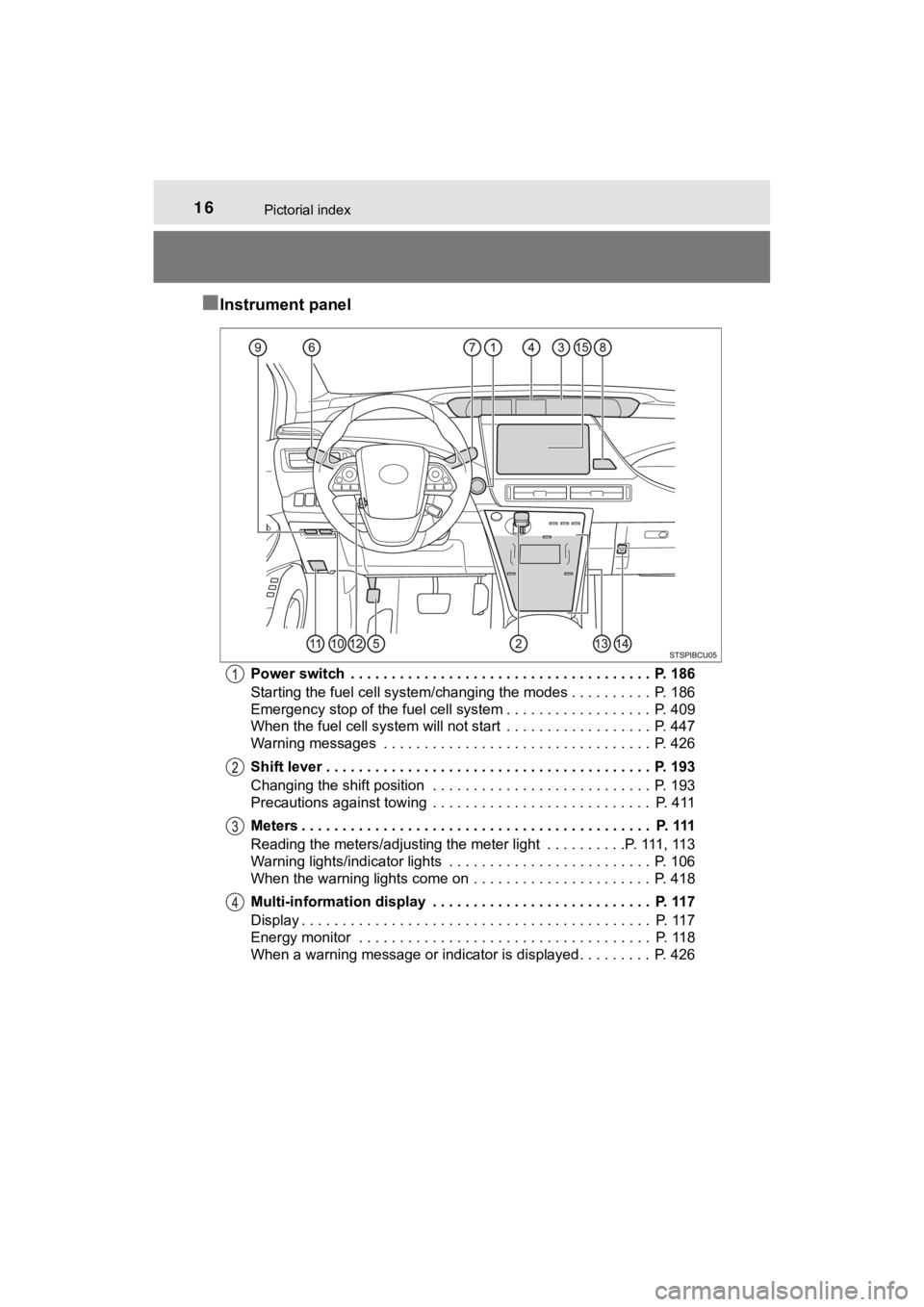
■Instrument panel
Power switch . . . . . . . . . . . . . . . . . . . . . . . . . . . . . . . . . . . . . P. 186
Starting the fuel cell system/changing the modes . . . . . . . . . . P. 186
Emergency stop of the fuel cell system . . . . . . . . . . . . . . . . . . P. 409
When the fuel cell system will not start . . . . . . . . . . . . . . . . . . P. 447
Warning messages . . . . . . . . . . . . . . . . . . . . . . . . . . . . . . . . . P. 426
Shift lever . . . . . . . . . . . . . . . . . . . . . . . . . . . . . . . . . . . . . . . . P. 193
Changing the shift position . . . . . . . . . . . . . . . . . . . . . . . . . . . P. 193
Precautions against towing . . . . . . . . . . . . . . . . . . . . . . . . . . . P. 411
Meters . . . . . . . . . . . . . . . . . . . . . . . . . . . . . . . . . . . . . . . . . . . P. 111
Reading the meters/adjusting the meter light . . . . . . . . . .P. 111, 113
Warning lights/indicator lights . . . . . . . . . . . . . . . . . . . . . . . . . P. 106
When the warning lights come on . . . . . . . . . . . . . . . . . . . . . . P. 418
Multi-information display . . . . . . . . . . . . . . . . . . . . . . . . . . . P. 117
Display . . . . . . . . . . . . . . . . . . . . . . . . . . . . . . . . . . . . . . . . . . . P. 117
Energy monitor . . . . . . . . . . . . . . . . . . . . . . . . . . . . . . . . . . . . P. 118
When a warning message or indicator is displayed . . . . . . . . . P. 426
Page 18 of 528
18Pictorial index
MIRAI_OM_USA_OM62054U(18MY)_O
M62048U(19MY)
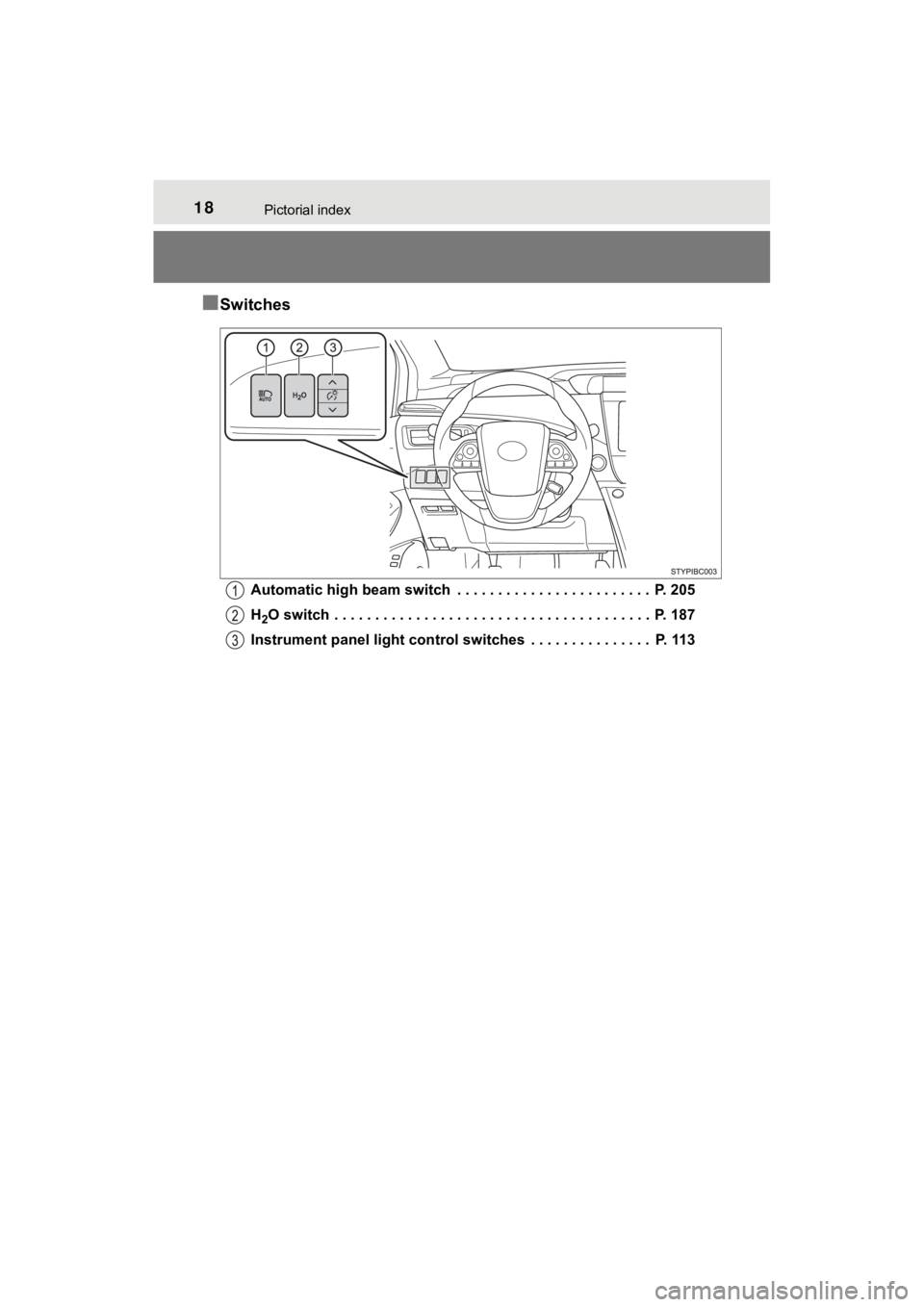
■Switches
Automatic high beam switch . . . . . . . . . . . . . . . . . . . . . . . . P. 205
H
2O switch . . . . . . . . . . . . . . . . . . . . . . . . . . . . . . . . . . . . . . . P. 187
Instrument panel light control switches . . . . . . . . . . . . . . . P. 113
Page 39 of 528

391-1. For safe use
1
For safety and security
MIRAI_OM_USA_OM62054U(18MY)_O
M62048U(19MY)
Your vehicle is equipped with ADVANCED AIRBAGS designed based
on the US motor vehicle safety standards (FMVSS208). The airbag
sensor assembly (ECU) controls airbag deployment based on infor-
mation obtained from the sensors etc. shown in the system compo -
nents diagram above. This informat ion includes crash severity and
occupant information. As the airbags deploy, a chemical reactio n in
the inflators quickly fills the airbags with non-toxic gas to h elp restrain
the motion of t he occupants.
WARNING
■SRS airbag precautions
Observe the following precautions regarding the SRS airbags.
Failure to do so may cause death or serious injury.
● The driver and all passengers in the vehicle must wear their se at belts
properly.
The SRS airbags are supplemental devices to be used with the se at belts.
● The SRS driver airbag deploys with considerable force, and can cause
death or serious injury especially if the driver is very close to the airbag.
The National Highway Traffic Safety Administration (NHTSA) advi ses:
Since the risk zone for the driver’s airbag is the first 2 - 3 in. (50 - 75 mm)
of inflation, placing yourself 10 in. (250 mm) from your driver airbag pro-
vides you with a clear margin of safety. This distance is measured from
the center of the steering wheel to your breastbone. If you sit less than
10 in. (250 mm) away now, you can change your driving position in sev-
eral ways:
• Move your seat to the rear as far as you can while still reach ing the ped-
als comfortably.
• Slightly recline the back of the seat.
Although vehicle designs vary, many drivers can achieve the 10 in.
(250 mm) distance, even with the driver seat all the way forward , simply
by reclining the back of the seat somewhat. If reclining the ba ck of your
seat makes it hard to see the road, raise yourself by using a f irm, non-
slippery cushion, or raise the seat if your vehicle has that feature.
• If your steering wheel is adjustable, tilt it downward. This p oints the
airbag toward your chest instead of your head and neck.
The seat should be adjusted as recommended by NHTSA above, whil e
still maintaining control of the foot pedals, steering wheel, and your view
of the instrument panel controls.
Page 42 of 528
421-1. For safe use
MIRAI_OM_USA_OM62054U(18MY)_O
M62048U(19MY)
WARNING
■SRS airbag precautions
● Do not hang coat hangers or other hard objects on the coat hook s. All of
these items could become projectiles and may cause death or ser ious
injury, should the SRS curtain shield airbags deploy.
● If a vinyl cover is put on the area where the SRS knee airbag w ill deploy,
be sure to remove it.
● Do not use seat accessories which cover the parts where the SRS side
airbags and SRS seat cushion airbag inflate as they may interfe re with
inflation of the SRS airbags. Such accessories may prevent the side
airbags and SRS seat cushion airbag from activating correctly, disable the
system or cause the side airbags and SRS seat cushion airbag to inflate
accidentally, resulting in death or serious injury.
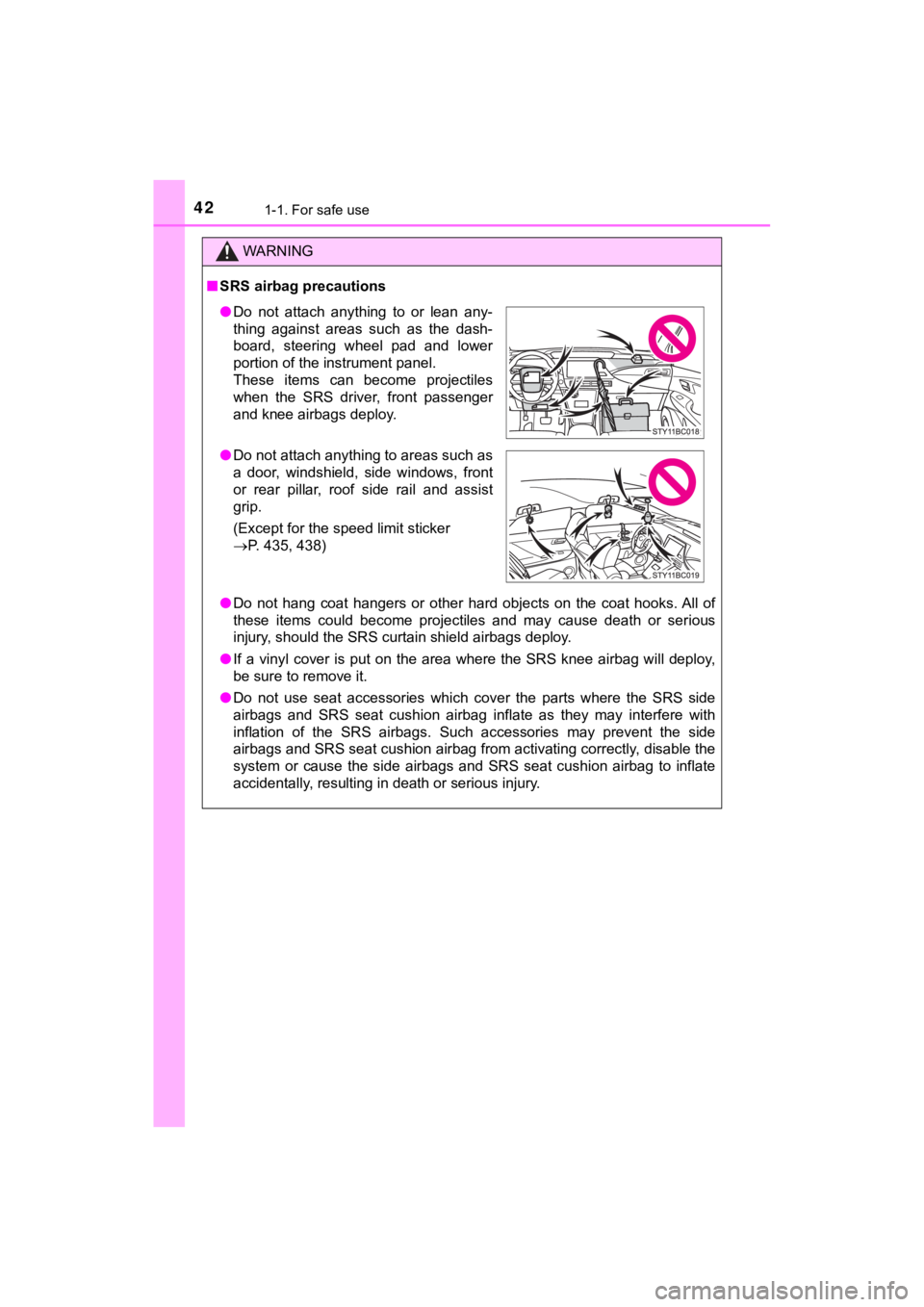
● Do not attach anything to or lean any-
thing against areas such as the dash-
board, steering wheel pad and lower
portion of the instrument panel.
These items can become projectiles
when the SRS driver, front passenger
and knee airbags deploy.
● Do not attach anything to areas such as
a door, windshield, side windows, front
or rear pillar, roof side rail and assist
grip.
(Except for the speed limit sticker
P. 435, 438)
Page 43 of 528

431-1. For safe use
1
For safety and security
MIRAI_OM_USA_OM62054U(18MY)_O
M62048U(19MY)
WARNING
■SRS airbag precautions
● Do not strike or apply significant levels of force to the area of the SRS
airbag components.
Doing so can cause the SRS airbags to malfunction.
● Do not touch any of the component parts immediately after the SRS
airbags have deployed (inflated) as they may be hot.
● If breathing becomes difficult after the SRS airbags have deplo yed, open a
door or window to allow fresh air in, or leave the vehicle if i t is safe to do
so. Wash off any residue as soon as possible to prevent skin ir ritation.
● If the areas where the SRS airbags are stored, such as the steering wheel
pad and front and rear pillars garnishes, are damaged or cracke d, have
them replaced by your Toyota dealer.
● Do not place anything, such as a cushion, on the front passenger’s seat.
Doing so will disperse the passenger’s weight, which prevents t he sensor
from detecting the passenger’s weight properly. As a result, th e SRS front
airbags for the front passenger may not deploy in the event of a collision.
■ Modification and disposal of SRS airbag system components
Do not dispose of your vehicle or perform any of the following modifications
without consulting your Toyota dealer. The SRS airbags may malfunction or
deploy (inflate) accidentally, causing death or serious injury.
● Installation, removal, disassembly and repair of the SRS airbag s
● Repairs, modifications, removal or replacement of the steering wheel,
instrument panel, dashboard, seats or seat upholstery, front, s ide and rear
pillars or roof side rails
● Repairs or modifications of the front fender, front bumper, or side of the
occupant compartment
● Installation of a grille guard (bull bars, kangaroo bar, etc.), snow plows,
winches, or roof luggage carrier
● Modifications to the vehicle’s suspension system
● Installation of electronic devices such as mobile two-way radio s and CD
players
● Modifications to your vehicle for a person with a physical disa bility
Page 47 of 528
471-1. For safe use
1
For safety and security
MIRAI_OM_USA_OM62054U(18MY)_O
M62048U(19MY)The SRS curtain shield airbags do not generally inflate if the
vehicle is
involved in a rear collision, if it pitches end over end, or if it is involved in a
low-speed side or low-speed frontal collision.
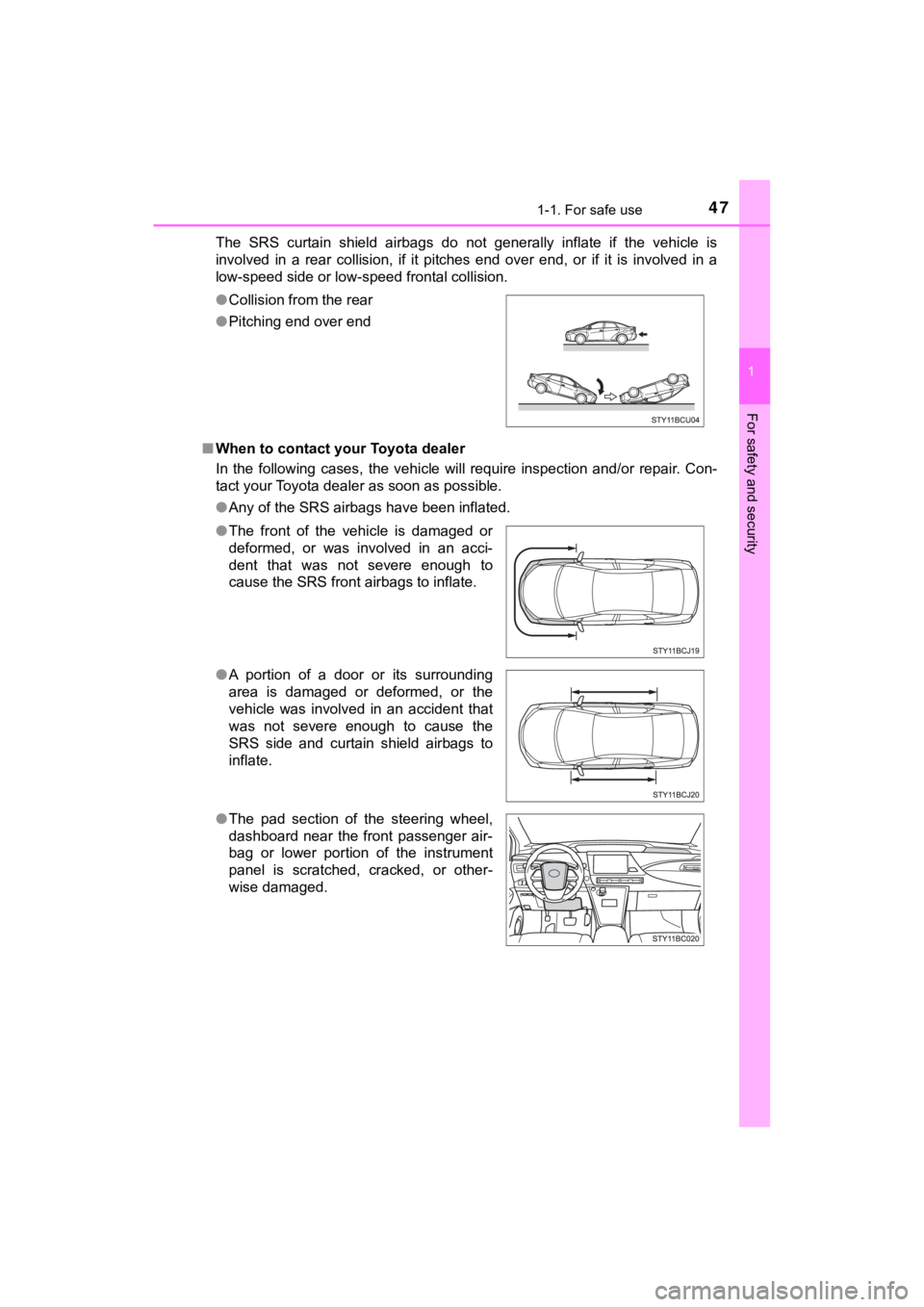
■ When to contact your Toyota dealer
In the following cases, the vehicle will require inspection and/or repair. Con-
tact your Toyota dealer as soon as possible.
●Any of the SRS airbags have been inflated.
●
Collision from the rear
● Pitching end over end
● The front of the vehicle is damaged or
deformed, or was involved in an acci-
dent that was not severe enough to
cause the SRS front airbags to inflate.
● A portion of a door or its surrounding
area is damaged or deformed, or the
vehicle was involved in an accident that
was not severe enough to cause the
SRS side and curtain shield airbags to
inflate.
● The pad section of the steering wheel,
dashboard near the front passenger air-
bag or lower portion of the instrument
panel is scratched, cracked, or other-
wise damaged.
Page 113 of 528
1133. Instrument cluster
3
Instrument cluster
MIRAI_OM_USA_OM62054U(18MY)_O
M62048U(19MY)
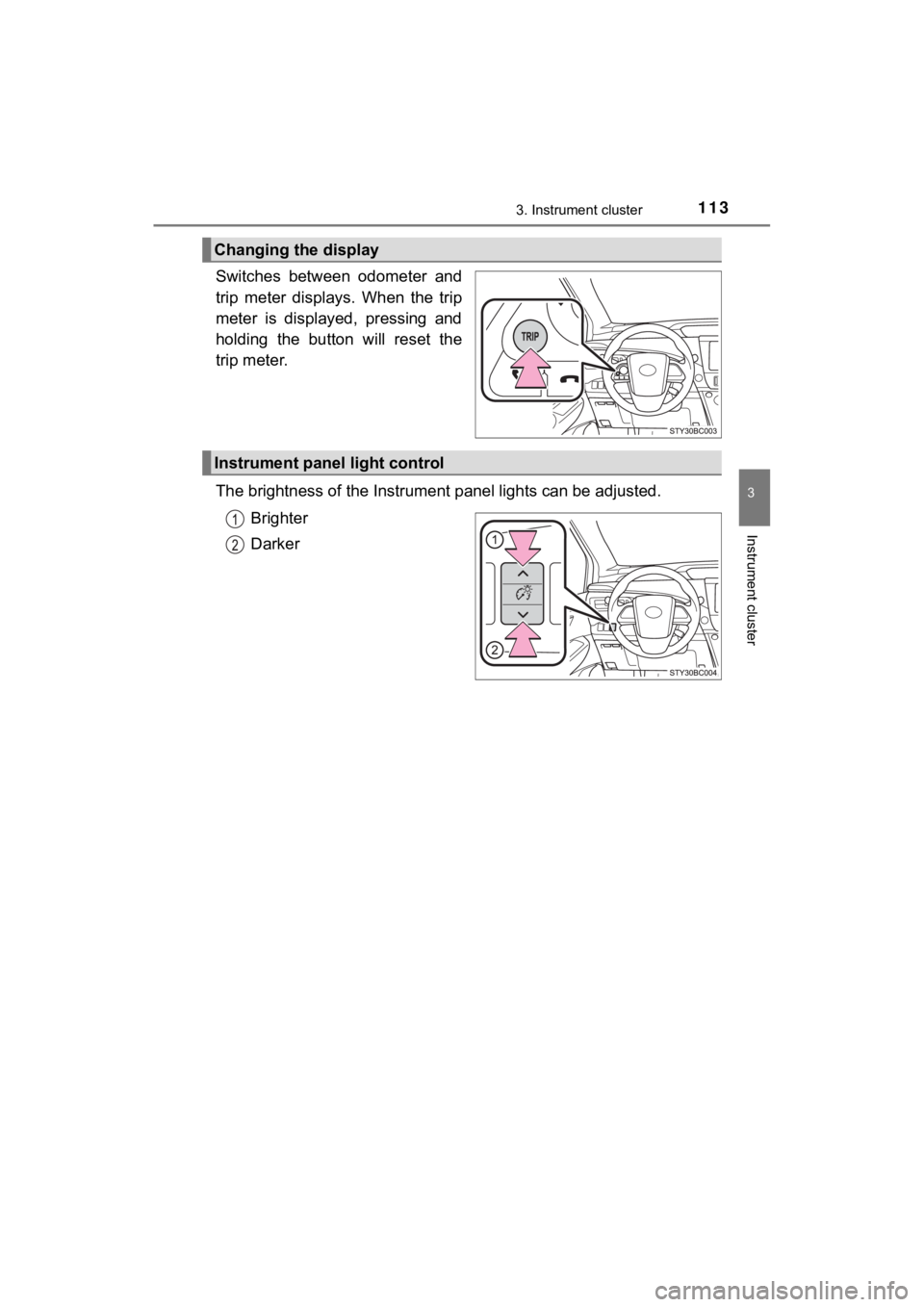
Switches between odometer and
trip meter displays. When the trip
meter is displayed, pressing and
holding the button will reset the
trip meter.
The brightness of the Instrumen t panel lights can be adjusted.
Brighter
Darker
Changing the display
Instrument panel light control
Page 115 of 528
1153. Instrument cluster
3
Instrument cluster
MIRAI_OM_USA_OM62054U(18MY)_O
M62048U(19MY)
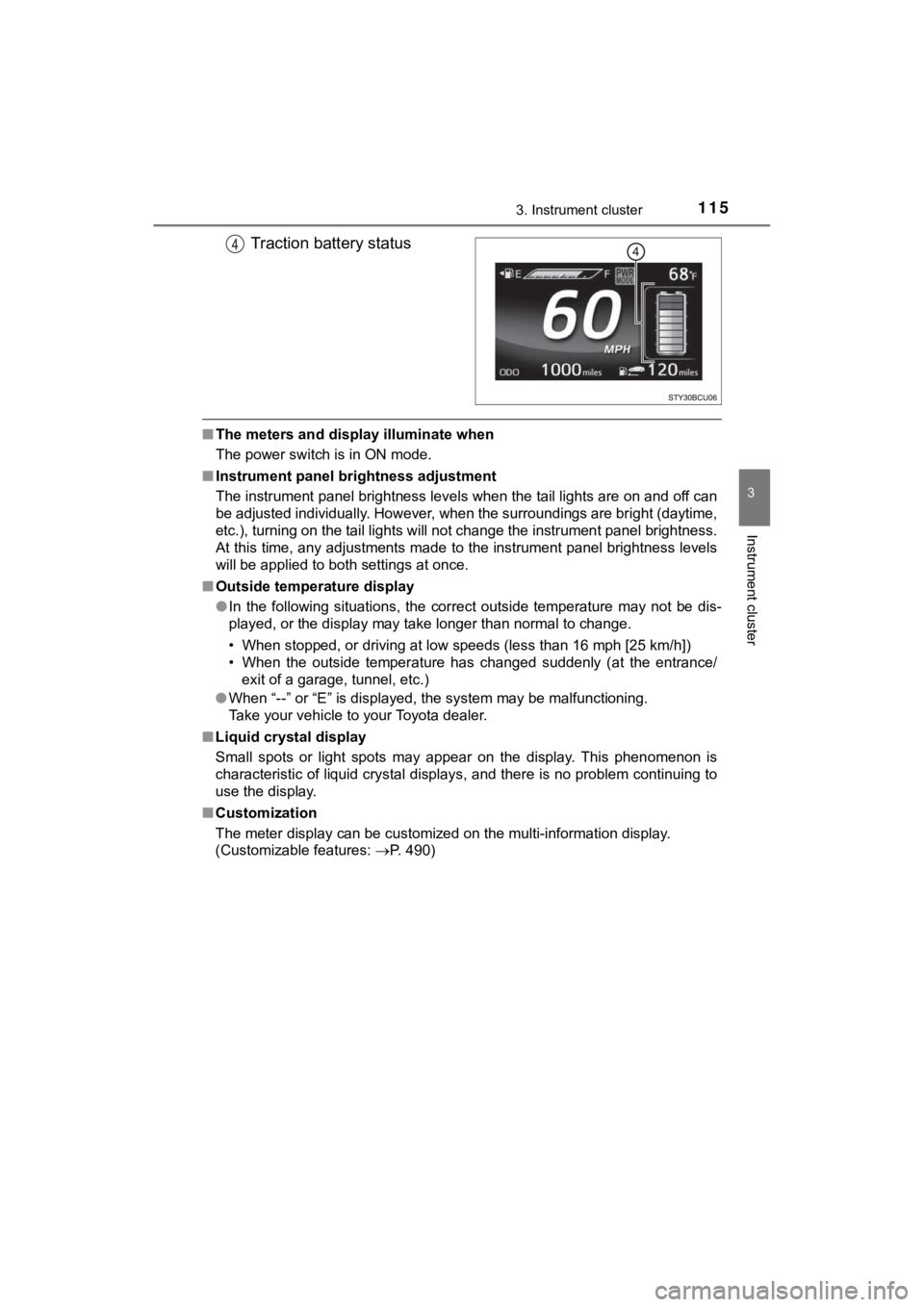
Traction battery status
■The meters and display illuminate when
The power switch is in ON mode.
■ Instrument panel bri ghtness adjustment
The instrument panel brightness levels when the tail lights are on and off can
be adjusted individually. However, when the surroundings are br ight (daytime,
etc.), turning on the tail lights will not change the instrumen t panel brightness.
At this time, any adjustments made to the instrument panel brig htness levels
will be applied to both settings at once.
■ Outside temperature display
●In the following situations, the correct outside temperature ma y not be dis-
played, or the display may take longer than normal to change.
• When stopped, or driving at low speeds (less than 16 mph [25 k m/h])
• When the outside temperature has changed suddenly (at the entr ance/
exit of a garage, tunnel, etc.)
● When “--” or “E” is displayed, the system may be malfunctioning .
Take your vehicle to your Toyota dealer.
■ Liquid crystal display
Small spots or light spots may appear on the display. This phen omenon is
characteristic of liquid crystal displays, and there is no prob lem continuing to
use the display.
■ Customization
The meter display can be customized on the multi-information di splay.
(Customizable features: P. 490)
Page 125 of 528

1253. Instrument cluster
3
Instrument cluster
MIRAI_OM_USA_OM62054U(18MY)_O
M62048U(19MY)
● Units
Select to change the unit.
●
Meter settings
Select the menu to set up the following items ( P. 490)
• RSA notification method (if equipped)
Select to change the RSA notification method.
• RSA notification level (if equipped)
Select to change the RSA notification level.
• Time for exchanging the ion filter
Select to initialize the time for exchanging the ion filter.
• Language
Select to change the language on the display.
• Interruption display
Select to set the Interruption displays (navigation system rout e guid-
ance, Instrument panel brightness adjustment), which may appear in
some situations, on/off.
• Return to initial settings
Registered or changed meter settings will be deleted or returne d to
their default setting.
• Main display split screen (if equipped)
Select to change the main display to split screen.
• Monthly history of fuel economy history
Select to clear the history.
• Daily history of ECO log
Select to clear the log.
• Monthly history of ECO log
Select to clear the log.
• Calendar date
Select to set the date.
• Erase screen
Select to display a blank screen.
Page 147 of 528

1474-2. Opening, closing and locking the doors
4
Operation of each component
MIRAI_OM_USA_OM62054U(18MY)_O
M62048U(19MY)■
Note for the entry function
●Even when the electronic key is within the effective range (det ection areas),
the system may not operate properly in the following cases:
• The electronic key is too close to the window or outside door handle, near
the ground, or in a high place when the doors are locked or unl ocked.
• The electronic key is near the ground or in a high place, or t oo close to
the rear bumper center when the trunk is opened.
• The electronic key is on the instrument panel, rear package tr ay or floor,
or in the door pockets or glove box when the fuel cell system i s started or
power switch modes are changed.
● Do not leave the electronic key on top of the instrument panel or near the
door pockets when exiting the vehicle. Depending on the radio w ave recep-
tion conditions, it may be detected by the antenna outside the cabin and the
door will become lockable from the outside, possibly trapping the electronic
key inside the vehicle.
● As long as the electronic key is within the effective range, th e doors may be
locked or unlocked by anyone. However, only the doors detecting the elec-
tronic key can be used to unlock the vehicle.
● Even if the electronic key is not inside the vehicle, it may be possible to start
the fuel cell system if the electronic key is near the window.
● The doors may unlock or lock if a large amount of water splashe s on the
door handle, such as in the rain or in a car wash when the elec tronic key is
within the effective range. (The doors will automatically be lo cked after
approximately 60 seconds if the doors are not opened and closed.)
● If the wireless remote control is used to lock the doors when t he electronic
key is near the vehicle, there is a possibility that the door m ay not be
unlocked by the entry function. (Use the wireless remote contro l to unlock
the doors.)
● Touching the door lock or unlock sensor while wearing gloves ma y prevent
lock or unlock operation.
● When the lock operation is performed using the lock sensor, rec ognition sig-
nals will be shown up to two consecutive times. After this, no recognition
signals will be given.
● If the door handle becomes wet while the electronic key is with in the effec-
tive range, the door may lock and unlock repeatedly. In this ca se, follow the
following correction procedures to wash the vehicle:
• Place the electronic key in a location 6 ft. (2 m) or more awa y from the
vehicle. (Take care to ensure that the key is not stolen.)
• Set the electronic key to battery-saving mode to disable the s mart key
system. ( P. 145)
● If the electronic key is inside the vehicle and a door handle b ecomes wet
during a car wash, a message may be shown on the multi-informat ion dis-
play and a buzzer will sound outside the vehicle. To turn off t he alarm, lock
all the doors.