interior lights TOYOTA MIRAI 2019 Owners Manual (in English)
[x] Cancel search | Manufacturer: TOYOTA, Model Year: 2019, Model line: MIRAI, Model: TOYOTA MIRAI 2019Pages: 528, PDF Size: 11.84 MB
Page 1 of 528
MIRAI_OM_USA_OM62054U(18MY)_O
M62048U(19MY)
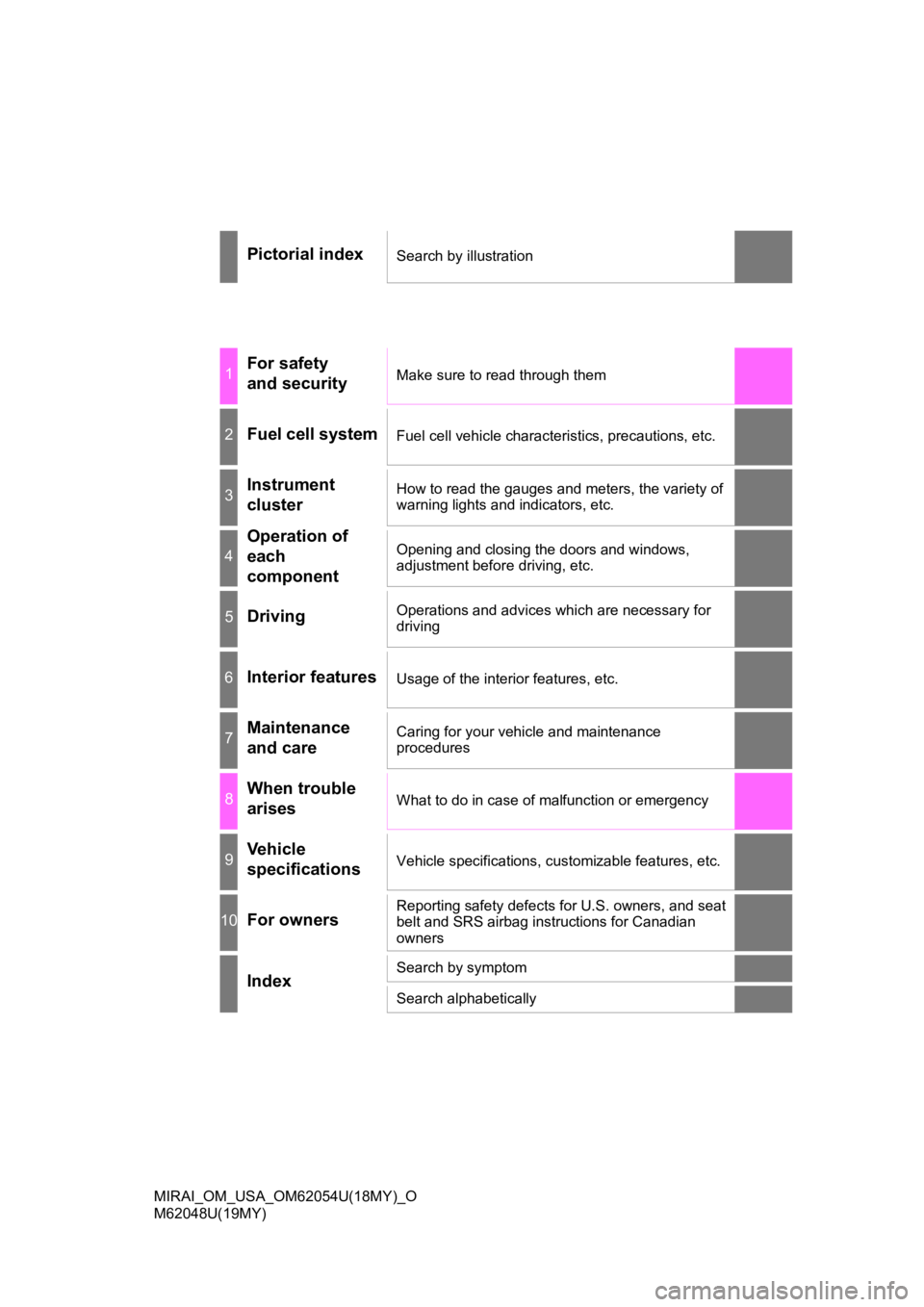
Pictorial indexSearch by illustration
1For safety
and securityMake sure to read through them
2Fuel cell systemFuel cell vehicle characteristics, precautions, etc.
3Instrument
clusterHow to read the gauges and meters, the variety of
warning lights and indicators, etc.
4
Operation of
each
componentOpening and closing the doors and windows,
adjustment before driving, etc.
5DrivingOperations and advices which are necessary for
driving
6Interior featuresUsage of the interior features, etc.
7Maintenance
and careCaring for your vehicle and maintenance
procedures
8When trouble
arisesWhat to do in case of malfunction or emergency
9Vehicle
specificationsVehicle specifications, customizable features, etc.
10For ownersReporting safety defects for U.S. owners, and seat
belt and SRS airbag instructions for Canadian
owners
IndexSearch by symptom
Search alphabetically
Page 4 of 528

TABLE OF CONTENTS4
MIRAI_OM_USA_OM62054U(18MY)_O
M62048U(19MY)6-1. Using the air conditioning
system and defogger
Automatic air conditioning system............................. 306
Heated steering wheel/ seat heaters .................... 315
6-2. Using the interior lights Interior lights list ................ 317• Interior lights ................. 318
• Personal lights .............. 318
6-3. Using the storage features List of storage features...... 320• Glove box...................... 321
• Console box .................. 321
• Cup holders .................. 322
• Bottle holders ................ 324
• Auxiliary box ................. 324
Trunk features ................... 325
6-4. Other interior features Other interior features ....... 327• Sun visors ..................... 327
• Vanity mirrors................ 327
• Clock ............................. 328
• Armrest ......................... 329
• Coat hooks.................... 329
• Assist grips ................... 330
• Power outlet .................. 331
• USB charging ports....... 332
• Wireless charger ........... 334
Garage door opener .......... 343 7-1. Maintenance and care
Cleaning and protecting the vehicle exterior .......... 352
Cleaning and protecting the vehicle interior ........... 356
7-2. Maintenance Maintenance requirements ................... 359
General maintenance ........ 361
7-3. Do-it-yourself maintenance
Do-it-yourself service precautions ...................... 364
Hood .................................. 366
Positioning a floor jack....... 367
Motor compartment ........... 369
12-volt battery .................... 374
Tires................................... 378
Replacing the tire............... 386
Tire inflation pressure ........ 393
Wheels............................... 396
Air conditioning filter .......... 398
Electronic key battery ........ 400
Checking and replacing fuses ................................ 402
Light bulbs ......................... 405
6Interior features7Maintenance and care
Page 23 of 528
23Pictorial index
MIRAI_OM_USA_OM62054U(18MY)_O
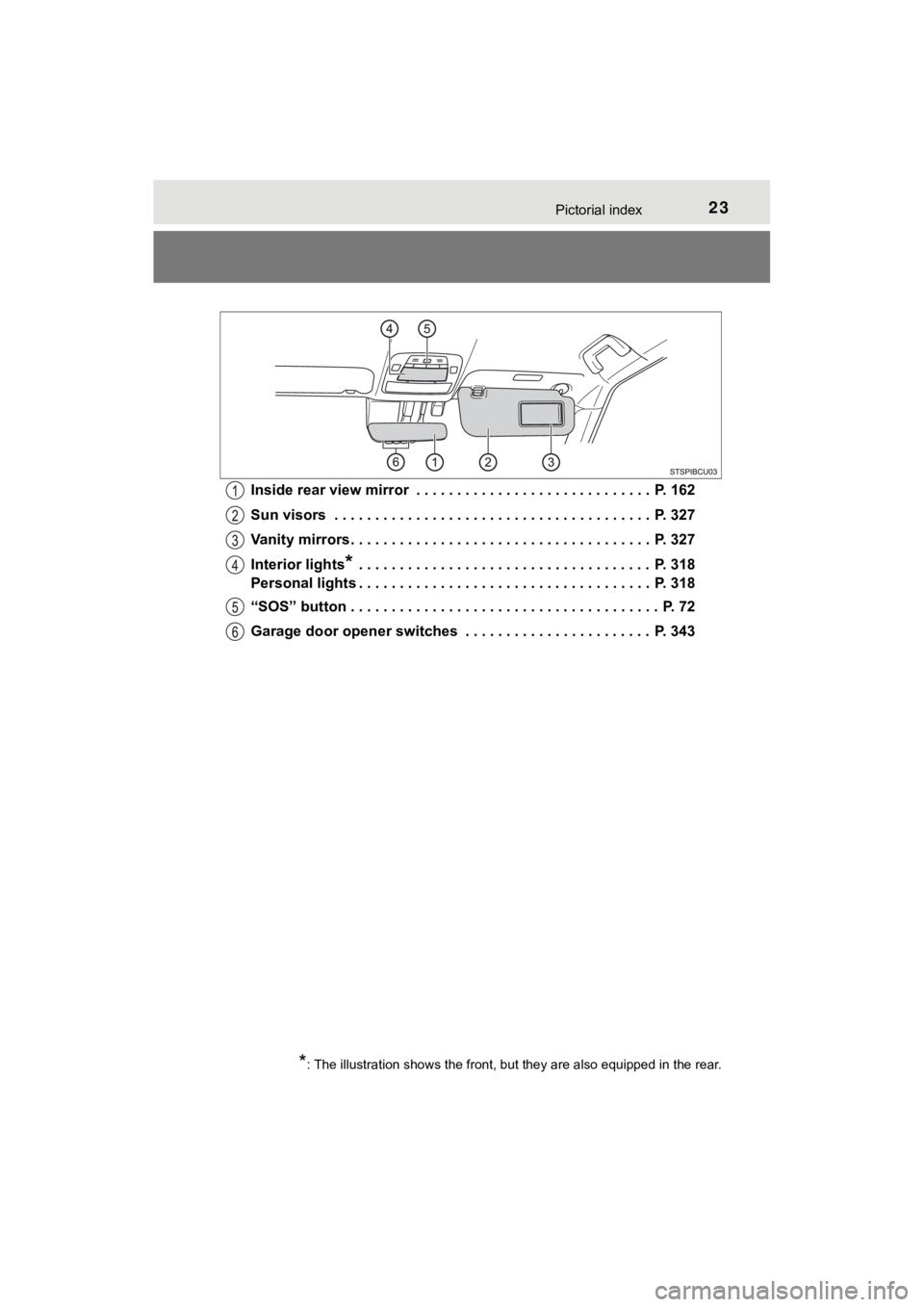
M62048U(19MY)Inside rear view mirror . . . . . . . . . . . . . . . . . . . . . . . . . . . . . P. 162
Sun visors . . . . . . . . . . . . . . . . . . . . . . . . . . . . . . . . . . . . . . . P. 327
Vanity mirrors . . . . . . . . . . . . . . . . . . . . . . . . . . . . . . . . . . . . . P. 327
Interior lights
* . . . . . . . . . . . . . . . . . . . . . . . . . . . . . . . . . . . . P. 318
Personal lights . . . . . . . . . . . . . . . . . . . . . . . . . . . . . . . . . . . . P. 318
“SOS” button . . . . . . . . . . . . . . . . . . . . . . . . . . . . . . . . . . . . . . P. 72
Garage door opener switches . . . . . . . . . . . . . . . . . . . . . . . P. 343
*: The illustration shows the front, but they are also equipped in the rear.
Page 305 of 528

305
6Interior features
MIRAI_OM_USA_OM62054U(18MY)_O
M62048U(19MY)6-1. Using the air
conditioning system
and defogger
Automatic air conditioning system............................. 306
Heated steering wheel/ seat heaters .................... 315
6-2. Using the interior lights
Interior lights list ................ 317 • Interior lights ................. 318
• Personal lights .............. 318 6-3. Using the storage
features
List of storage features ..... 320 • Glove box...................... 321
• Console box .................. 321
• Cup holders .................. 322
• Bottle holders ................ 324
• Auxiliary box ................. 324
Trunk features ................... 325
6-4. Other interior features Other interior features ....... 327• Sun visors ..................... 327
• Vanity mirrors................ 327
• Clock ............................. 328
• Armrest ......................... 329
• Coat hooks.................... 329
• Assist grips ................... 330
• Power outlet .................. 331
• USB charging ports....... 332
• Wireless charger ........... 334
Garage door opener.......... 343
Page 317 of 528
3176-2. Using the interior lights
6
Interior features
MIRAI_OM_USA_OM62054U(18MY)_O
M62048U(19MY)
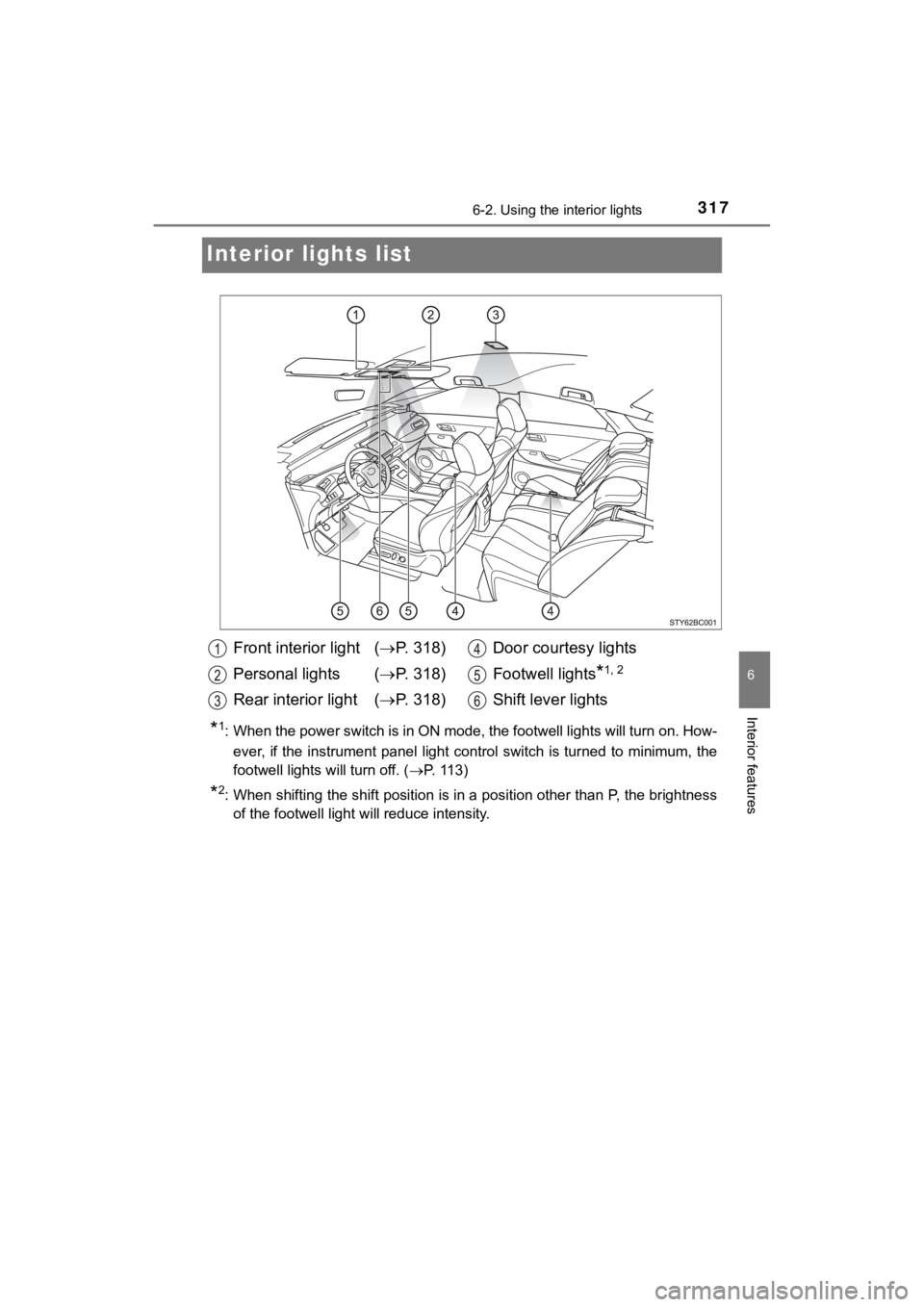
Interior lights list
*1: When the power switch is in ON mode, the footwell lights will turn on. How-
ever, if the instrument panel light control switch is turned to minimum, the
footwell lights will turn off. ( P. 113)
*2: When shifting the shift position is in a position other than P, the brightness
of the footwell light will reduce intensity.
Front interior light ( P. 318)
Personal lights ( P. 318)
Rear interior light ( P. 318)Door courtesy lights
Footwell lights
*1, 2
Shift lever lights
Page 318 of 528
3186-2. Using the interior lights
MIRAI_OM_USA_OM62054U(18MY)_O
M62048U(19MY)■
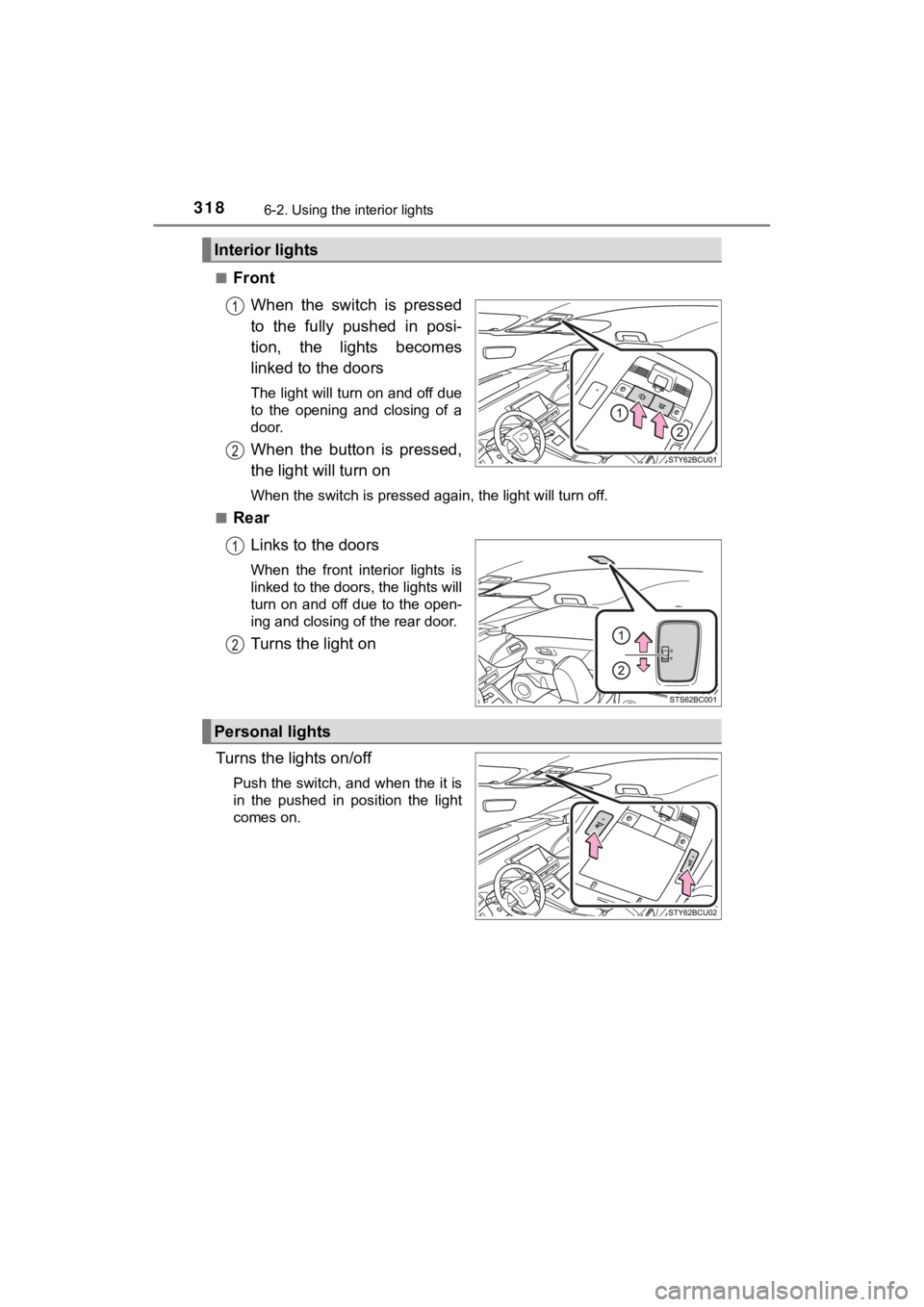
Front
When the switch is pressed
to the fully pushed in posi-
tion, the lights becomes
linked to the doors
The light will turn on and off due
to the opening and closing of a
door.
When the button is pressed,
the light will turn on
When the switch is pressed again, the light will turn off.
■
Rear
Links to the doors
When the front interior lights is
linked to the doors, the lights will
turn on and off due to the open-
ing and closing of the rear door.
Turns the light on
Turns the lights on/off
Push the switch, and when the it is
in the pushed in position the light
comes on.
Interior lights
Personal lights
Page 319 of 528
3196-2. Using the interior lights
6
Interior features
MIRAI_OM_USA_OM62054U(18MY)_O
M62048U(19MY)
■Illuminated entry system
The lights automatically turn on/off according to power switch mode, the pres-
ence of the electronic key, whether the doors are locked/unlocked, and
whether the doors are opened/closed.
■ To prevent 12-volt battery discharge
If the following lights remain on when the power switch is turned off, the lights
will go off automatically after 20 minutes:
●Front interior lights
● Rear interior lights
● Personal lights
● Door courtesy lights
● Vanity lights
● Trunk light
■ Customization
Setting (e.g. the time elapsed before lights turn off) can be c hanged.
(Customizable features: P. 489)
NOTICE
■To prevent 12-volt b attery discharge
Do not leave the lights on longer than necessary when the fuel cell system
is off.
Page 336 of 528
3366-4. Other interior features
MIRAI_OM_USA_OM62054U(18MY)_O
M62048U(19MY)■
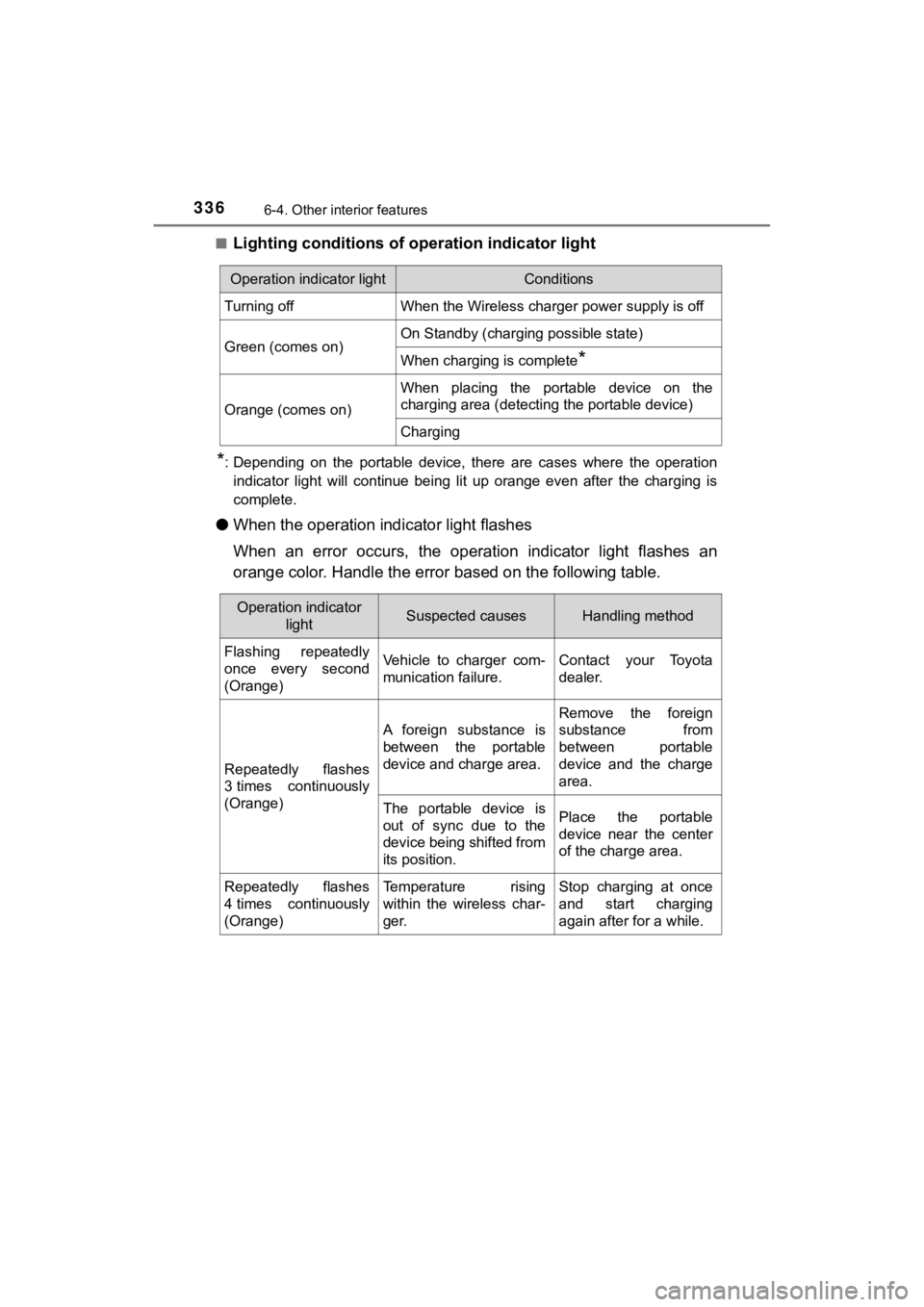
Lighting conditions of ope
ration indicator light
*: Depending on the portable device, there are cases where the op eration
indicator light will continue being lit up orange even after the charging is
complete.
● When the operation indi cator light flashes
When an error occurs, the operat ion indicator light flashes an
orange color. Handle the error based on the following table.
Operation indicator lightConditions
Turning offWhen the Wireless charger power supply is off
Green (comes on)On Standby (charging possible state)
When charging is complete*
Orange (comes on)
When placing the portable device on the
charging area (detecting the portable device)
Charging
Operation indicator
lightSuspected causesHandling method
Flashing repeatedly
once every second
(Orange)Vehicle to charger com-
munication failure.Contact your Toyota
dealer.
Repeatedly flashes
3 times continuously
(Orange)
A foreign substance is
between the portable
device and charge area.
Remove the foreign
substance from
between portable
device and the charge
area.
The portable device is
out of sync due to the
device being shifted from
its position.Place the portable
device near the center
of the charge area.
Repeatedly flashes
4 times continuously
(Orange)Temperature rising
within the wireless char-
ger.Stop charging at once
and start charging
again after for a while.
Page 362 of 528
3627-2. Maintenance
MIRAI_OM_USA_OM62054U(18MY)_O
M62048U(19MY)
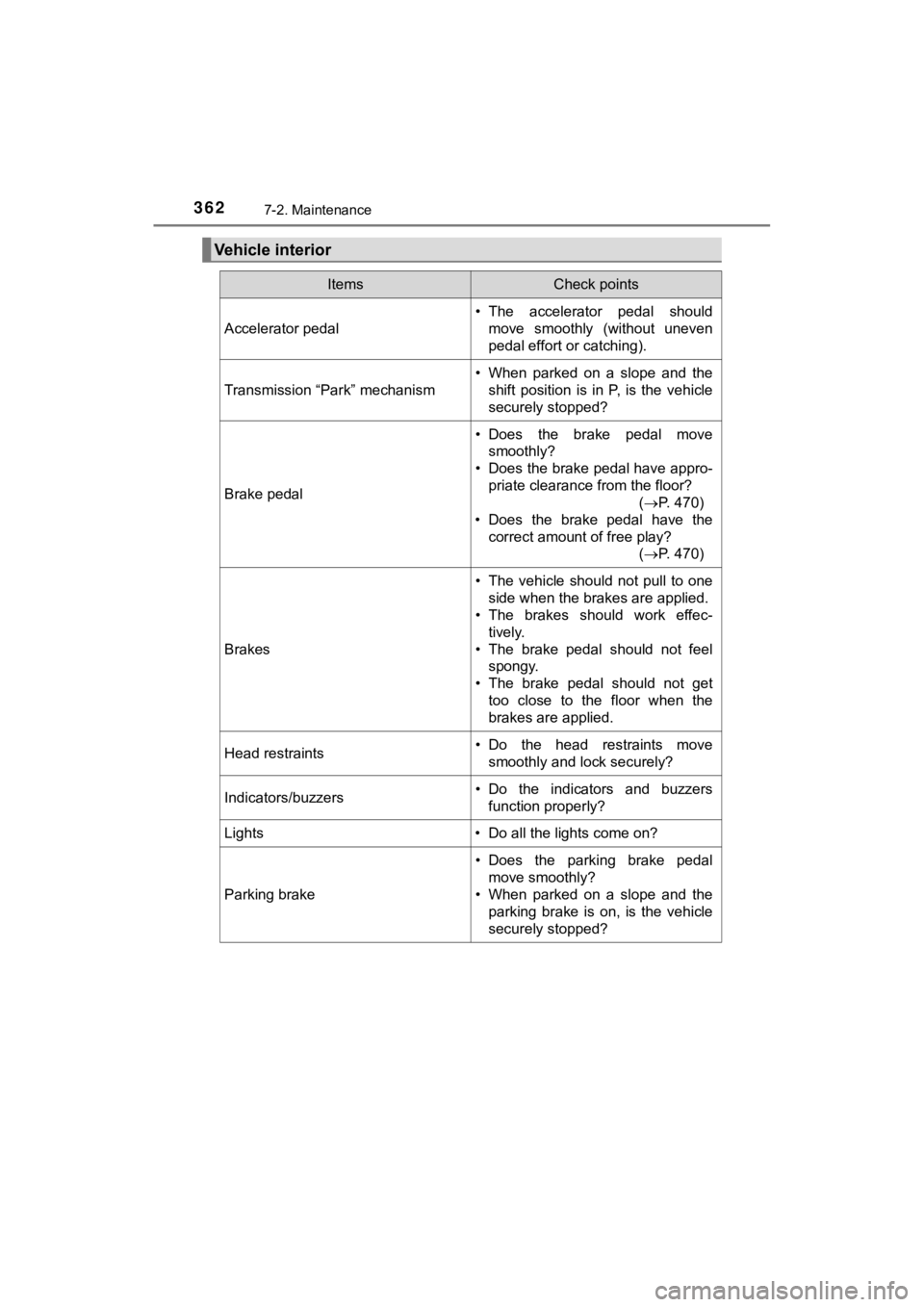
Vehicle interior
ItemsCheck points
Accelerator pedal
• The accelerator pedal shouldmove smoothly (without uneven
pedal effort or catching).
Transmission “Park” mechanism
• When parked on a slope and the
shift position is in P, is the vehicle
securely stopped?
Brake pedal
• Does the brake pedal movesmoothly?
• Does the brake pedal have appro-
priate clearance from the floor? (P. 470)
• Does the brake pedal have the
correct amount of free play? (P. 470)
Brakes
• The vehicle should not pull to one
side when the brakes are applied.
• The brakes should work effec-
tively.
• The brake pedal should not feel spongy.
• The brake pedal should not get too close to the floor when the
brakes are applied.
Head restraints• Do the head restraints move
smoothly and lock securely?
Indicators/buzzers• Do the indicators and buzzersfunction properly?
Lights • Do all the lights come on?
Parking brake
• Does the parking brake pedal move smoothly?
• When parked on a slope and the parking brake is on, is the vehicle
securely stopped?
Page 447 of 528
4478-2. Steps to take in an emergency
MIRAI_OM_USA_OM62054U(18MY)_O
M62048U(19MY)
8
When trouble arises
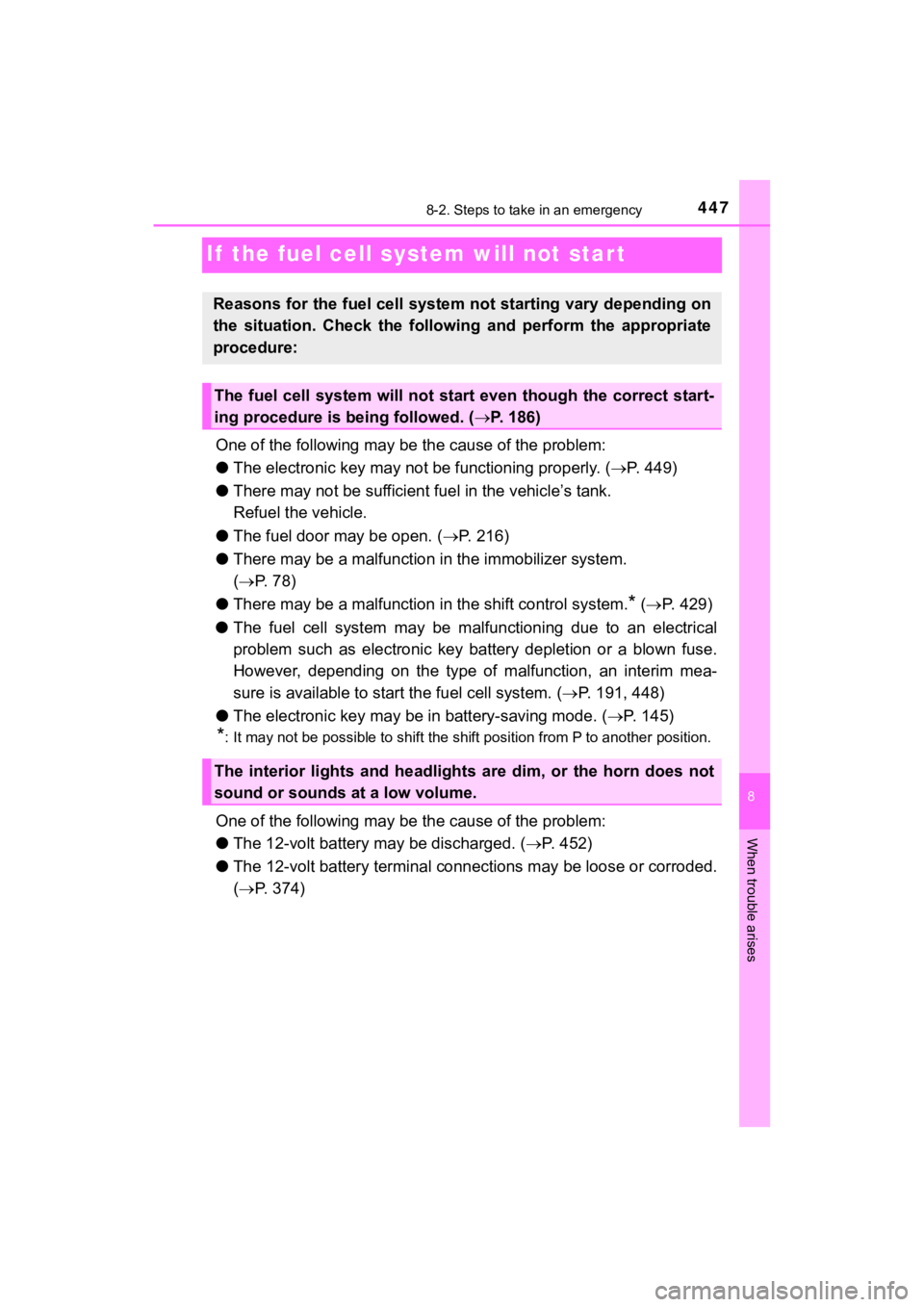
If the fuel cell system will not start
One of the following may be the cause of the problem:
● The electronic key may not be functioning properly. (P. 449)
● There may not be sufficient f uel in the vehicle’s tank.
Refuel the vehicle.
● The fuel door may be open. ( P. 2 1 6 )
● There may be a mal function in the immobilizer system.
( P. 78)
● There may be a malfunction i n the shift control system.
* ( P. 429)
● The fuel cell system may be malf unctioning due to an electrical
problem such as electronic key battery depletion or a blown fus e.
However, depending on the type of malfunction, an interim mea-
sure is available to star t the fuel cell system. (P. 191, 448)
● The electronic key may be in battery-saving mode. ( P. 145)
*: It may not be possible to shift the shift position from P to a nother position.
One of the following may be the cause of the problem:
● The 12-volt battery may be discharged. ( P. 452)
● The 12-volt battery terminal conn ections may be loose or corroded.
( P. 374)
Reasons for the fuel cell system not starting vary depending on
the situation. Check the followi ng and perform the appropriate
procedure:
The fuel cell system will not start even though the correct sta rt-
ing procedure is being followed. ( P. 186)
The interior lights and headlights are dim, or the horn does no t
sound or sounds at a low volume.