steering TOYOTA MIRAI 2021 Owners Manual (in English)
[x] Cancel search | Manufacturer: TOYOTA, Model Year: 2021, Model line: MIRAI, Model: TOYOTA MIRAI 2021Pages: 72, PDF Size: 7.71 MB
Page 3 of 72
1
OVERVIEW
HYDROGEN FUEL CELL SYSTEM
& SAFETY FEATURES
FEATURES & OPERATIONS
TOYOTA SAFETY SENSE
SAFETY & EMERGENCY FEATURES
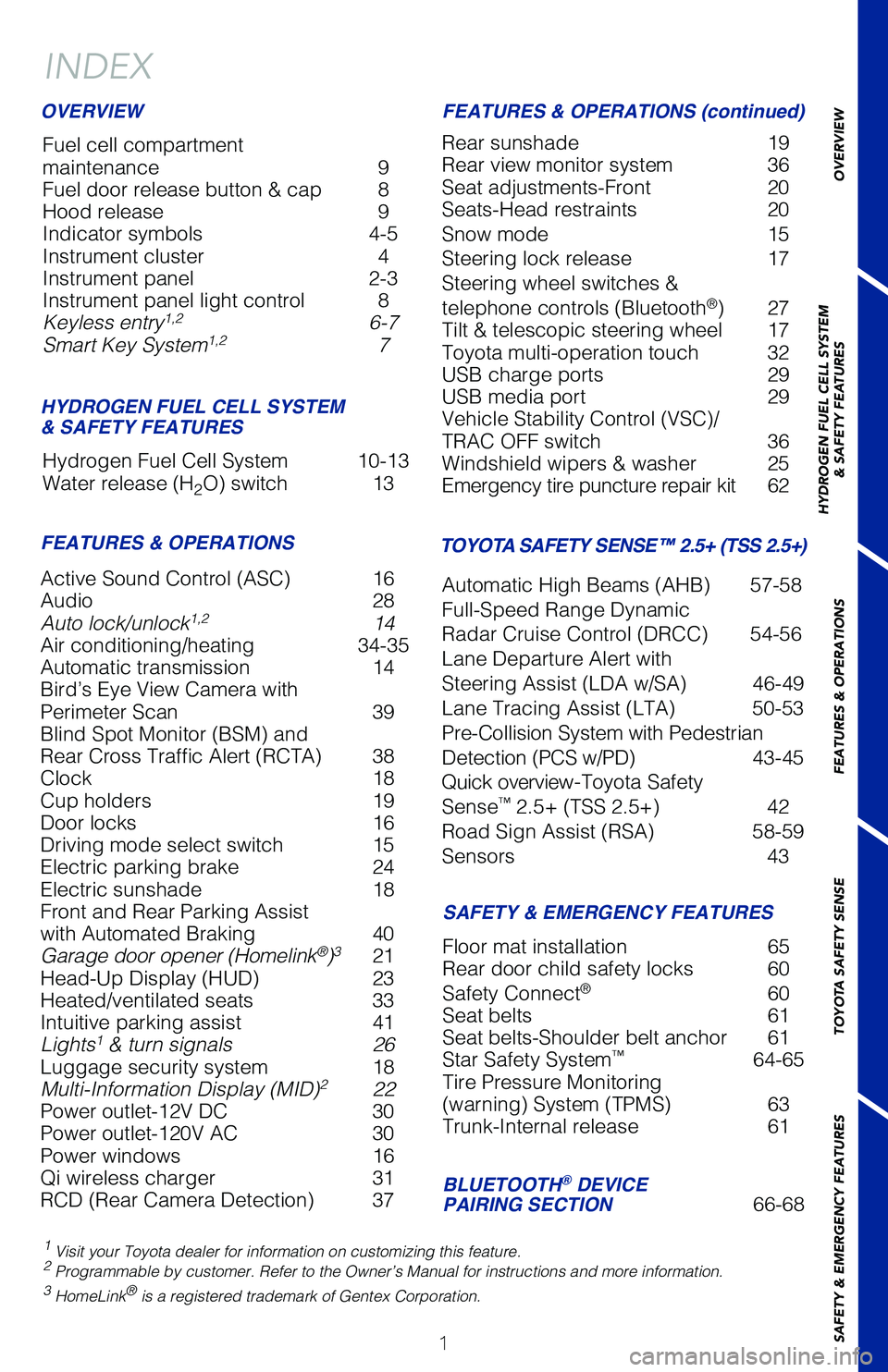
Active Sound Control (ASC) 16
Audio 28
Auto lock/unlock
1,2 14
Air conditioning/heating 34-35
Automatic transmission 14
Bird’s Eye View Camera with
Perimeter Scan 39
Blind Spot Monitor (BSM) and
Rear Cross Traffic Alert (RCTA) 38
Clock 18
Cup holders 19
Door locks 16
Driving mode select switch 15
Electric parking brake 24
Electric sunshade 18
Front and Rear Parking Assist
with Automated Braking 40
Garage door opener (Homelink
®)3 21
Head-Up Display (HUD) 23
Heated/ventilated seats 33
Intuitive parking assist 41
Lights
1 & turn signals 26
Luggage security system 18
Multi-Information Display (MID)
2 22
Power outlet-12V DC 30
Power outlet-120V AC 30
Power windows 16
Qi wireless charger 31
RCD (Rear Camera Detection) 37
INDEX
Fuel cell compartment
maintenance 9
Fuel door release button & cap 8
Hood release 9
Indicator symbols 4-5
Instrument cluster 4
Instrument panel 2-3
Instrument panel light control 8
Keyless entry
1,2 6-7
Smart Key System1,2 7
Hydrogen Fuel Cell System 10-13
Water release (H
2O) switch 13
1 Visit your Toyota dealer for information on customizing this feature.2 Programmable by customer. Refer to the Owner’s Manual for instructio\
ns and more information.3 HomeLink® is a registered trademark of Gentex Corporation.
OVERVIEW
HYDROGEN FUEL CELL SYSTEM
& SAFETY FEATURES
FEATURES & OPERATIONS FEATURES & OPERATIONS (continued)
SAFETY & EMERGENCY FEATURES
Rear sunshade 19
Rear view monitor system 36
Seat adjustments-Front 20
Seats-Head restraints 20
Snow mode 15
Steering lock release 17
Steering wheel switches &
telephone controls (Bluetooth
®) 27
Tilt & telescopic steering wheel 17
Toyota multi-operation touch 32
USB charge ports 29
USB media port 29
Vehicle Stability Control (VSC)/
TRAC OFF switch 36
Windshield wipers & washer 25
Emergency tire puncture repair kit 62
Floor mat installation 65
Rear door child safety locks 60
Safety Connect
® 60
Seat belts 61
Seat belts-Shoulder belt anchor 61
Star Safety System
™ 64-65
Tire Pressure Monitoring
(warning) System (TPMS) 63
Trunk-Internal release 61
TOYOTA SAFETY SENSE™ 2.5+ (TSS 2.5+)
Automatic High Beams (AHB) 57-58
Full-Speed Range Dynamic
Radar Cruise Control (DRCC) 54-56
Lane Departure Alert with
Steering Assist (LDA w/SA) 46-49
Lane Tracing Assist (LTA) 50-53
Pre-Collision System with Pedestrian
Detection (PCS w/PD) 43-45
Quick overview-Toyota Safety
Sense
™ 2.5+ (TSS 2.5+) 42
Road Sign Assist (RSA) 58-59
Sensors 43
BLUETOOTH® DEVICE
PAIRING SECTION 66-68
Page 4 of 72
2
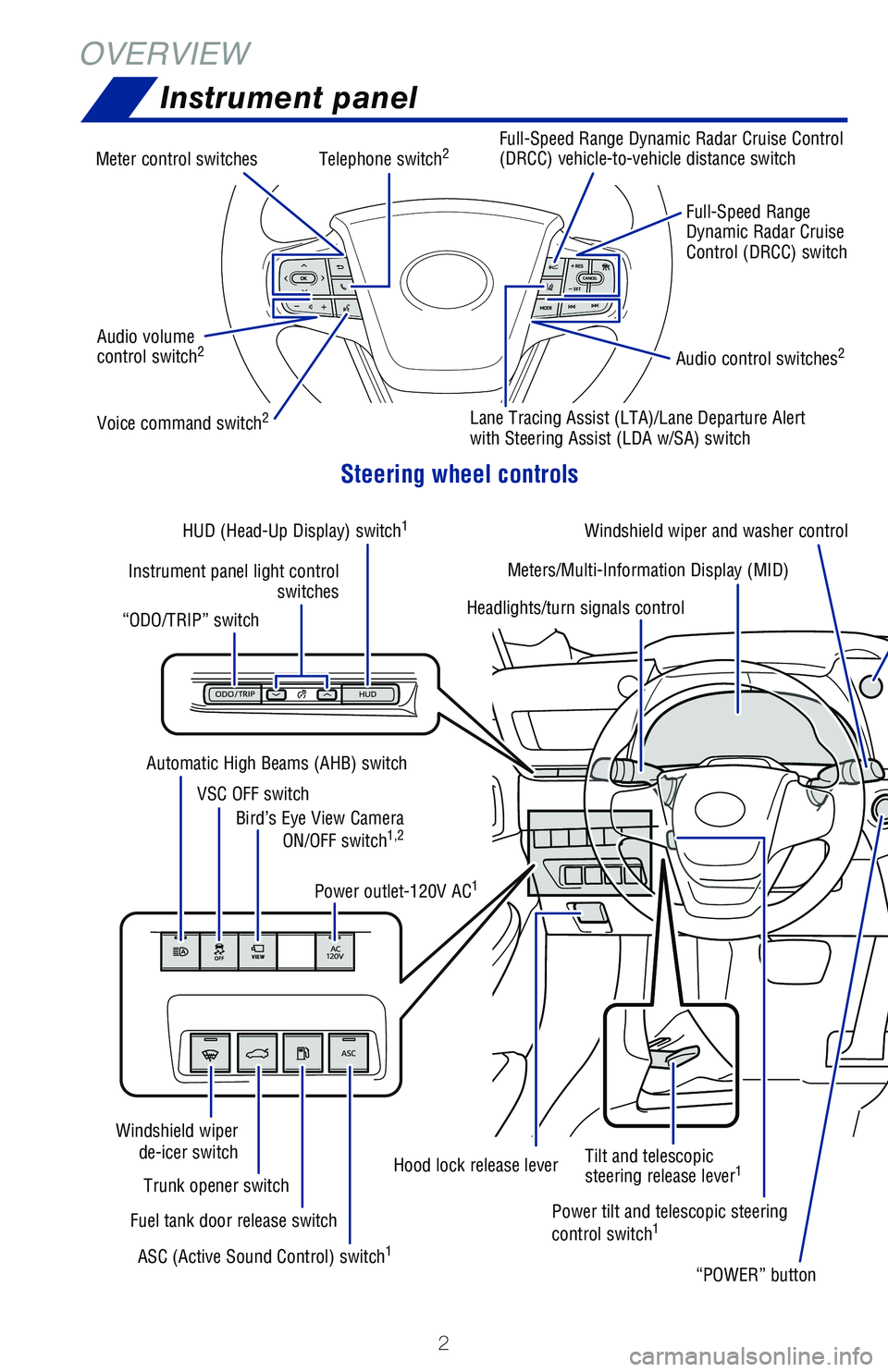
OVERVIEWInstrument panel
Steering wheel controls
Telephone switch2
Voice command switch2
Audio control switches2Audio volume
control switch2
Full-Speed Range
Dynamic Radar Cruise
Control (DRCC) switch
“POWER” button
Meters/Multi-Information Display (MID)
VSC OFF switch Power outlet-120V AC
1
Hood lock release lever
Trunk opener switch
Fuel tank door release switch
Windshield wiper
de-icer switch
ASC (Active Sound Control) switch
1
Bird’s Eye View Camera ON/OFF switch1,2
“ODO/TRIP” switch
Automatic High Beams (AHB) switch
Power tilt and telescopic steering
control switch
1
Tilt and telescopic
steering release lever1
Instrument panel light control switches
HUD (Head-Up Display) switch
1
Meter control switches
Full-Speed Range Dynamic Radar Cruise Control
(DRCC) vehicle-to-vehicle distance switch
Lane Tracing Assist (LTA)/Lane Departure Alert
with Steering Assist (LDA w/SA) switch
Headlights/turn signals control Windshield wiper and washer control
Page 7 of 72
![TOYOTA MIRAI 2021 Owners Manual (in English) 5
Hydrogen leak warning
1
High coolant temperature warning1 [red]/
Low coolant temperature indicator [blue]
Smart key system indicator
Slip indicator1,3
Snow mode indicator
Sport mode indicator
Pop U](/img/14/42632/w960_42632-6.png "TOYOTA MIRAI 2021 Owners Manual (in English) 5
Hydrogen leak warning
1
High coolant temperature warning1 [red]/
Low coolant temperature indicator [blue]
Smart key system indicator
Slip indicator1,3
Snow mode indicator
Sport mode indicator
Pop U")
5
Hydrogen leak warning
1
High coolant temperature warning1 [red]/
Low coolant temperature indicator [blue]
Smart key system indicator
Slip indicator1,3
Snow mode indicator
Sport mode indicator
Pop Up Hood warning1
Vehicle Stability Control (VSC) OFF
indicator1
Low tire pressure warning1
Security indicator
Low fuel level warning
READY indicator
Rear passengers’ seatbelt reminder
Headlight low/high beam indicator
Turn signal indicator
Low outside temperature indicator
Open door warning
Driver’s and front passenger’s seat belt
reminder (alarm will sound when the
vehicle is on)
Charging system warning
Eco drive mode indicator
Fuel cell system overheat warning
Pre-Collision System (PCS) warning1,2
Intuitive parking assist OFF indicator2,4
Constant speed cruise control/
Full-Speed Range Dynamic Radar
Cruise Control (DRCC) indicator
Electric power steering system warning1
[red/yellow]
RCD (Rear Camera Detection) OFF
indicator1,2
Rear Cross Traffic Alert (RCTA) OFF
indicator1,2
Lane Tracing Assist (LTA)/Lane Departure
Alert with Steering Assist indicator (LDA
w/SA) [white/green/orange
3]
Parking brake indicator2
Front and Rear Parking Assist with
Automated Braking OFF indicator1,2,4,5
1 If the indicator does not turn off within a few seconds of starting the \
fuel cell system, there may
be a malfunction. Have the vehicle inspected by your Toyota dealer.
2 If the indicator flashes, there may be a malfunction. Refer to the Owner\
’s Manual.3 If the indicator flashes, it indicates that the system is operating.4 If equipped.5 Refer to section PKSB (Parking Support Braking function) in the Owner\
’s Manual.
OVERVIEW
HYDROGEN FUEL CELL SYSTEM
& SAFETY FEATURES
FEATURES & OPERATIONS
TOYOTA SAFETY SENSE
SAFETY & EMERGENCY FEATURES
Constant speed cruise control/Full-Speed
Range DRCC SET indicator
Page 19 of 72
17
OVERVIEW
HYDROGEN FUEL CELL SYSTEM
& SAFETY FEATURES
FEATURES & OPERATIONS
TOYOTA SAFETY SENSE
SAFETY & EMERGENCY FEATURES
Turn
Push
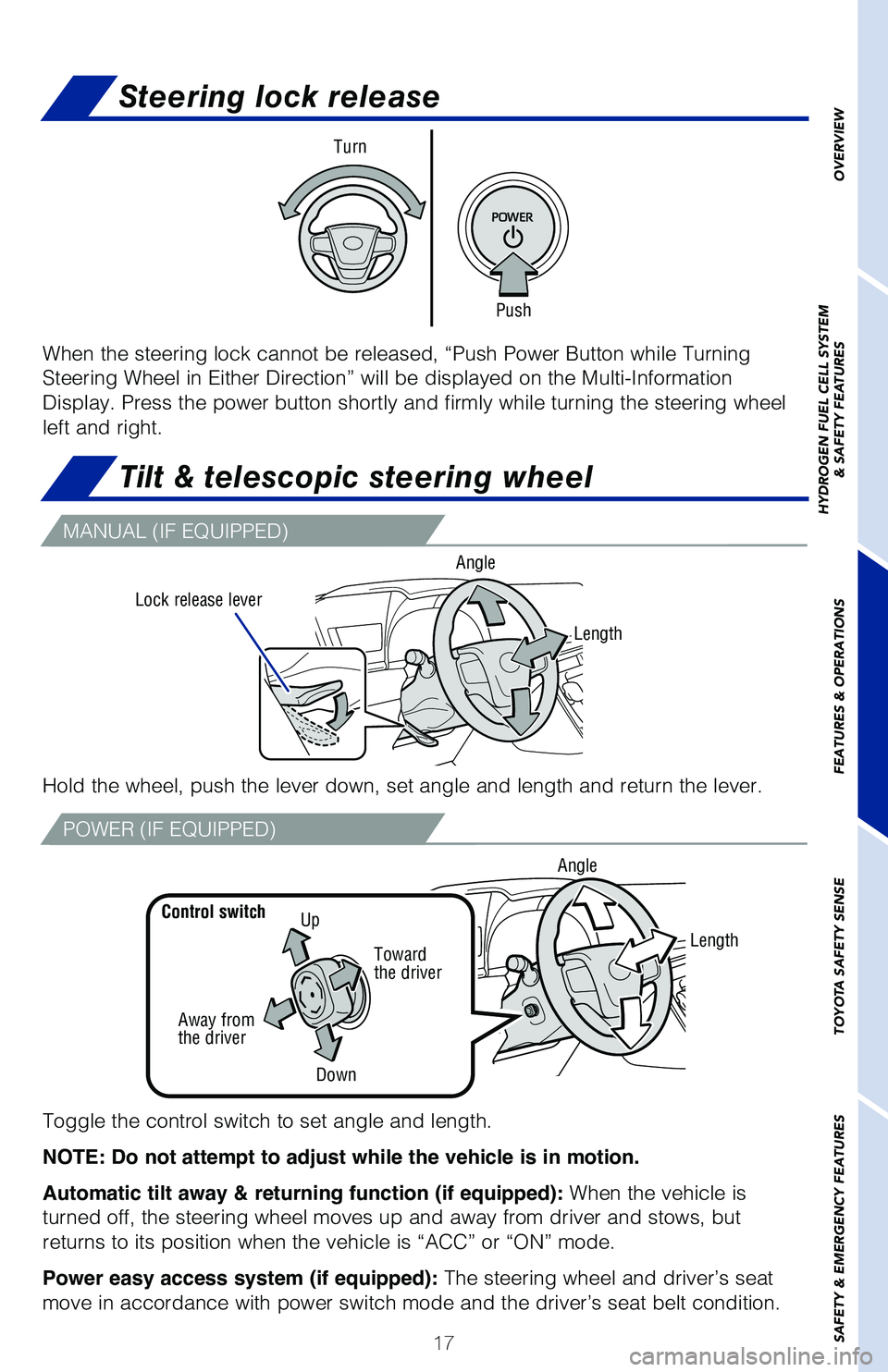
Steering lock release
When the steering lock cannot be released, “Push Power Button while T\
urning
Steering Wheel in Either Direction” will be displayed on the Multi-In\
formation
Display. Press the power button shortly and firmly while turning the ste\
ering wheel
left and right.
MANUAL (IF EQUIPPED)
POWER (IF EQUIPPED)
Hold the wheel, push the lever down, set angle and length and return the\
lever.
Lock release lever Angle
Toggle the control switch to set angle and length.
NOTE: Do not attempt to adjust while the vehicle is in motion.
Automatic tilt away & returning function (if equipped):
When the vehicle is
turned off, the steering wheel moves up and away from driver and stows, \
but
returns to its position when the vehicle is “ACC” or “ON” mo\
de.
Power easy access system (if equipped): The steering wheel and driver’s seat
move in accordance with power switch mode and the driver’s seat belt \
condition.
UpControl switch
Away from
the driver
Length
Toward
the driver
Down Angle
Length
Tilt & telescopic steering wheel
Page 22 of 72
20
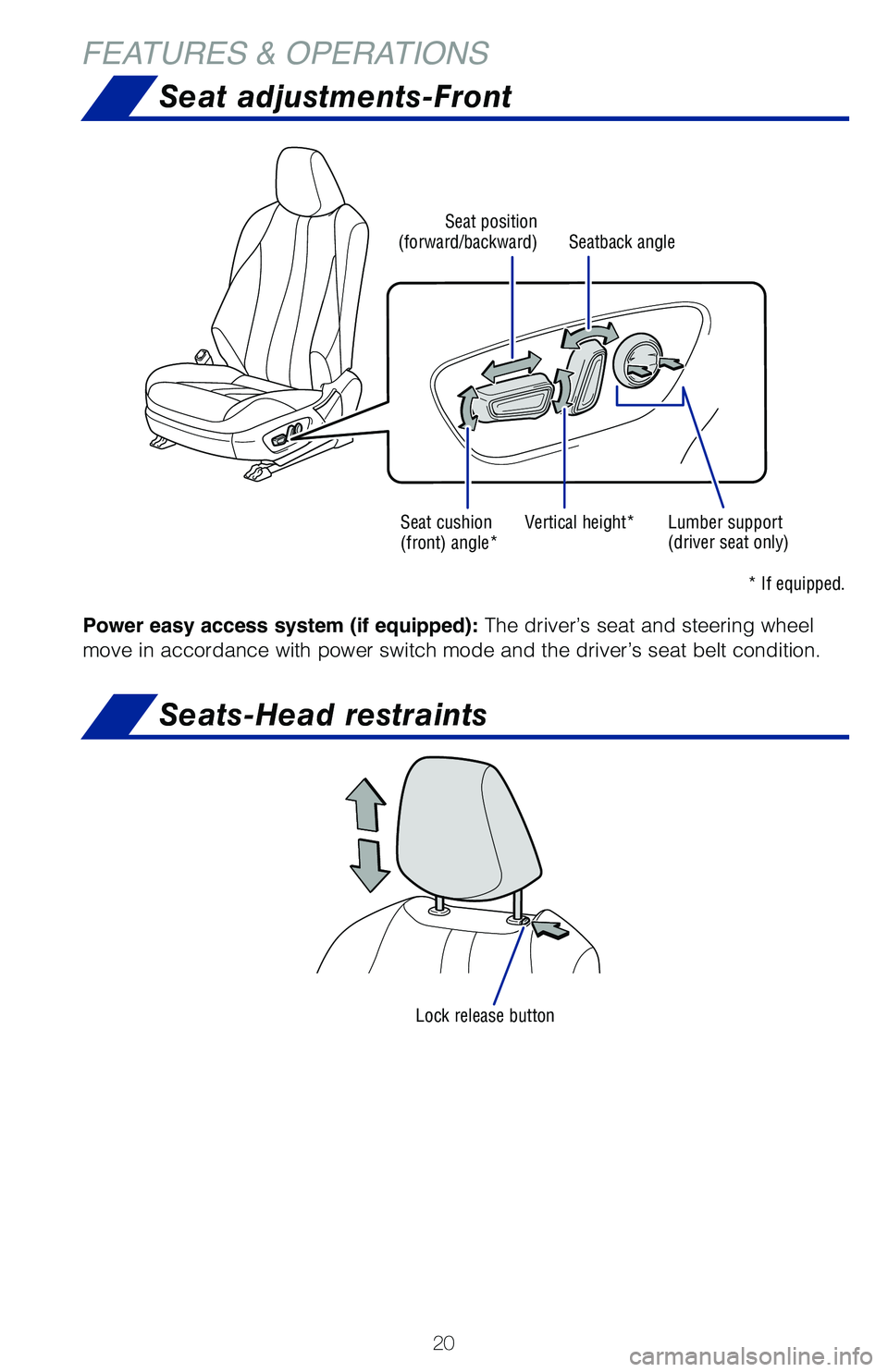
FEATURES & OPERATIONSSeat adjustments-Front
Seats-Head restraints
Lock release button
Seat position
(forward/backward)
Seat cushion
(front) angle* Vertical height*
* If equipped.
Lumber support
(driver seat only)
Seatback angle
Power easy access system (if equipped):
The driver’s seat and steering wheel
move in accordance with power switch mode and the driver’s seat belt \
condition.
Page 29 of 72
27
OVERVIEW
HYDROGEN FUEL CELL SYSTEM
& SAFETY FEATURES
FEATURES & OPERATIONS
TOYOTA SAFETY SENSE
SAFETY & EMERGENCY FEATURES
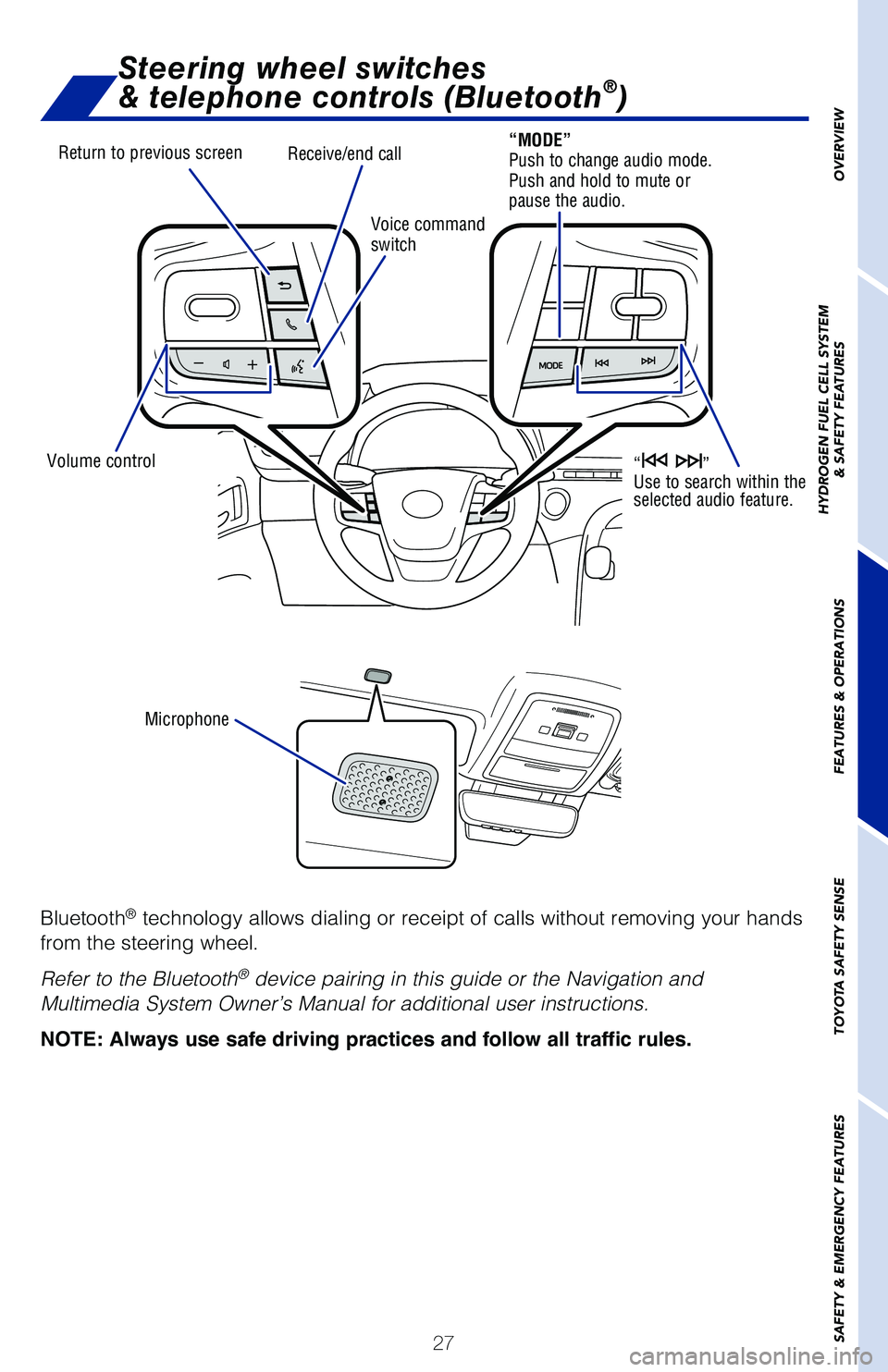
Steering wheel switches
& telephone controls (Bluetooth®)
Bluetooth® technology allows dialing or receipt of calls without removing your han\
ds
from the steering wheel.
Refer to the Bluetooth
® device pairing in this guide or the Navigation and
Multimedia System Owner’s Manual for additional user instructions.
NOTE: Always use safe driving practices and follow all traffic rules.
Return to previous screen
Volume control Microphone Voice command
switch
Receive/end call“MODE”
Push to change audio mode.
Push and hold to mute or
pause the audio.
“ ”
Use to search within the
selected audio feature.
Page 34 of 72
 32
FEATURES & OPERATIONS
Toyota multi-operation touch*
** Refer to the “Navigation and Multimedia System Owner’s Manual.
The 12.3-in touchscreen allows air conditioning and navigation settings \
t")
32
FEATURES & OPERATIONS
Toyota multi-operation touch*
** Refer to the “Navigation and Multimedia System Owner’s Manual.
The 12.3-in touchscreen allows air conditioning and navigation settings \
to be
controlled simultaneously.
Moving screens:
Select “
” to change its displayed position of the side display to the left or\
right side of on the Toyota multi-operation touch. The screen position c\
an also be
changed by performing a left or right flick operation on a screen.
Full screen display/split screen display:
Select “
” on the energy monitor/consumption screen or vehicle information
screen will display that screen in full screen.
Select “
” to return to the split-screen display.
Select “
” on the side display to display the setting screen.
Select to display the air conditioning control screen.
Select to change the interior illumination light color.
(if equipped)
Select to turn flick operation on the side display on/off.
Display the software information.
Select to display the seat/steering climate
control screen, etc. (if equipped)
Select to display the audio control screen.**
Select to display the energy monitor/fuel consumption screen, etc.
Select to display the settings screen and software information.
* © 1982-2013, QNX Software Systems Limited. All rights reserved.
Refer to the Owner’s Manual or “Navigation and Multimedia System O\
wner’s
Manual” for more details.
OPERATION
SETTINGS
Page 35 of 72
33
OVERVIEW
HYDROGEN FUEL CELL SYSTEM
& SAFETY FEATURES
FEATURES & OPERATIONS
TOYOTA SAFETY SENSE
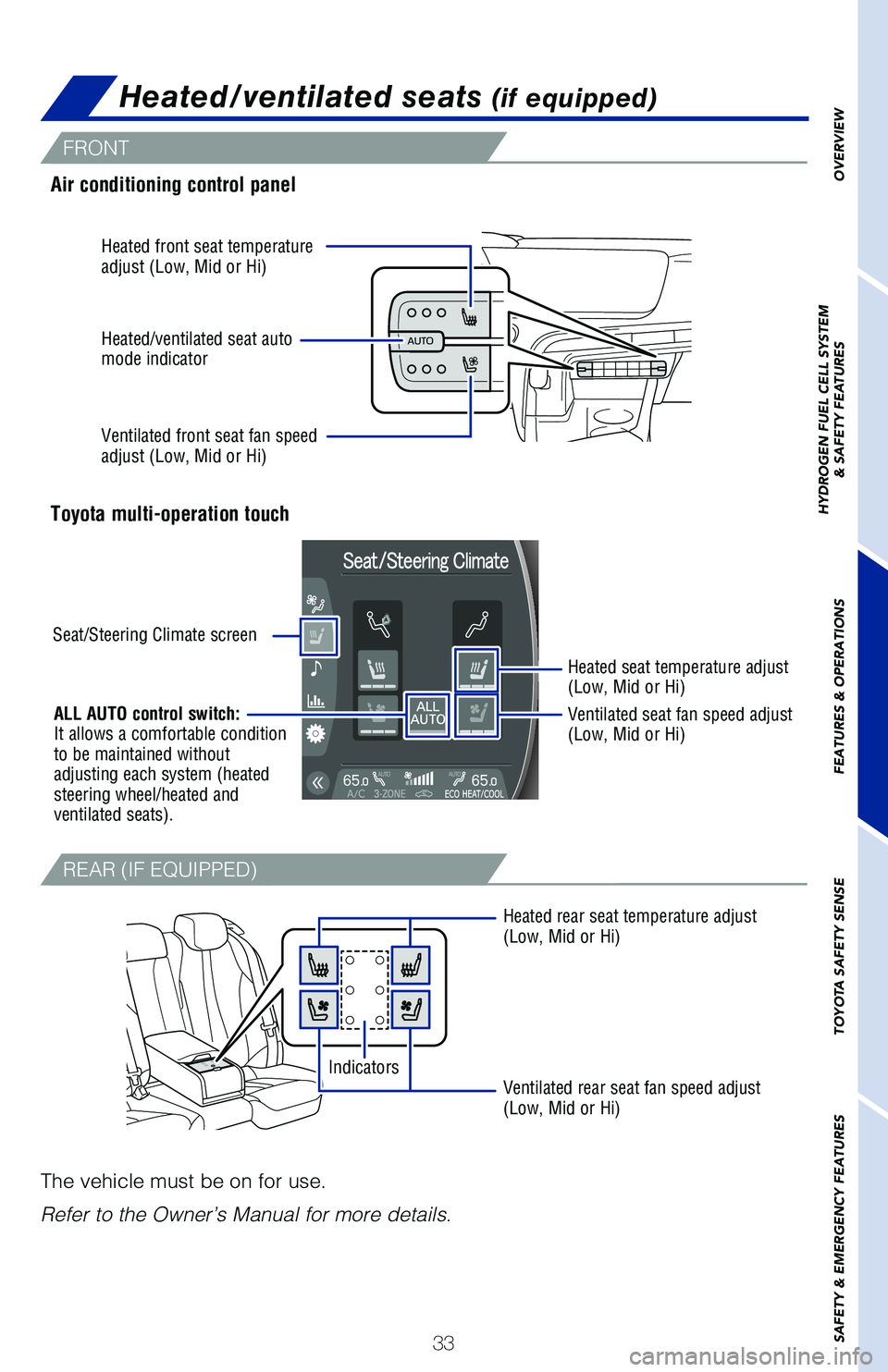
SAFETY & EMERGENCY FEATURESAir conditioning control panel
Toyota multi-operation touch
Heated rear seat temperature adjust
(Low, Mid or Hi)
Ventilated rear seat fan speed adjust
(Low, Mid or Hi)
Indicators
Heated/ventilated seats (if equipped)
The vehicle must be on for use.
Refer to the Owner’s Manual for more details.
Seat/Steering Climate screen
Heated seat temperature adjust
(Low, Mid or Hi)
Ventilated seat fan speed adjust
(Low, Mid or Hi)
Heated front seat temperature
adjust (Low, Mid or Hi)
Ventilated front seat fan speed
adjust (Low, Mid or Hi) Heated/ventilated seat auto
mode indicator
ALL AUTO control switch:
It allows a comfortable condition
to be maintained without
adjusting each system (heated
steering wheel/heated and
ventilated seats).
FRONT
REAR (IF EQUIPPED)
Page 44 of 72
 42
TOYOTA SAFETY SENSE™
Toyota Safety Sense™ 2.5+ (TSS 2.5+) is a set of active safety technologies
designed to help mitigate or prevent collisions across a wide range of t\
raffic
situations, i")
42
TOYOTA SAFETY SENSE™
Toyota Safety Sense™ 2.5+ (TSS 2.5+) is a set of active safety technologies
designed to help mitigate or prevent collisions across a wide range of t\
raffic
situations, in certain conditions. TSS 2.5+ is designed to help support \
the driver’s
awareness, decision making and vehicle operation contributing to a safe \
driving
experience.
Refer to the Owner’s Manual for operation, setting adjustments, limitations and
more details to understand these functions and complete safety precautions. For
more information, please go to www.toyota.com/safety-sense.
Quick overview-Toyota Safety Sense™ 2.5+
Lane Departure Alert with Steering Assist (LDA w/SA)
LDA w/SA is designed to provide notification when the system detects
an unintended lane departure.
The Steering Assist function is designed to provide small corrective
steering inputs to the steering wheel for a short period of time to help\
keep the vehicle in its lane.
The Sway Warning function is designed to detect vehicle swaying
(based on the vehicle location and steering wheel operation) and alert\
drivers with an audio and visual alert, urging them to take a break.
Pre-Collision System with Pedestrian Detection (PCS w/PD)
PCS w/PD is designed to provide alert, mitigation, and/or avoidance
support in certain conditions, when the system detects a potential
collision with a preceding vehicle is likely to occur.
The advanced grille-mounted radar sensor system is designed to
work with the forward-facing camera to help recognize a preceding
pedestrian or bicyclist, and provide an alert, mitigation and/or
avoidance support in certain conditions.
Automatic High Beams (AHB)
AHB is designed to detect the headlights of oncoming vehicles and
the tail lights of preceding vehicles and switch between high beams
and low beams as appropriate.
Road Sign Assist (RSA)
RSA is designed to recognize specific road signs using the forward-
facing camera to provide information to the driver via the display.
Full-Speed Range Dynamic Radar Cruise Control (DRCC)
Full-Speed Range DRCC is designed to help maintain a pre-set
distance to a preceding vehicle when the preceding vehicle is traveling \
at a lower speed. The minimum set speed is approximately 20 MPH,
but once activated, the operating speed range is 0-110 MPH.
Lane Tracing Assist (LTA)
LTA is designed to help keep the vehicle in the center of a lane by
assisting the driver in steering control when using Full-Speed Range
DRCC.
Page 48 of 72
 46
TOYOTA SAFETY SENSE™
By detecting visible white/yellow lane markings or the road’s edge at\
speeds above
32 mph, Lane Departure Alert with Steering Assist (LDA w/SA) is design\
ed to issue
a")
46
TOYOTA SAFETY SENSE™
By detecting visible white/yellow lane markings or the road’s edge at\
speeds above
32 mph, Lane Departure Alert with Steering Assist (LDA w/SA) is design\
ed to issue
a visual alert and audio or steering vibration alert if an inadvertent l\
ane departure is
detected. If the driver does not take corrective action, the Steering As\
sist function is
designed to provide gentle corrective steering.*
* See www.toyota.com/safety-sense for more information.
Refer to the Toyota Owner’s Manual for a list of additional situation\
s in which the
system operation may be limited.
Lane Departure Alert with Steering Assist
(LDA w/SA)
TURNING THE LDA SYSTEM ON/OFF
Press the LDA switch to turn the LDA system on. Depress again to turn it\
off.
Note: Operation of the LDA system and setting adjustments continues in the
same condition regardless of Ignition cycle until changed by the driver or the
system is reset.
Refer to the Toyota Owner’s Manual for additional information on LDA \
operation,
settings adjustments, limitations, and precautions before attempting to \
use it.
- “LDA Turned ON Steering Assist Active”