warning TOYOTA MIRAI 2022 Owners Manual
[x] Cancel search | Manufacturer: TOYOTA, Model Year: 2022, Model line: MIRAI, Model: TOYOTA MIRAI 2022Pages: 556, PDF Size: 17.34 MB
Page 478 of 556
4788-2. Steps to take in an emergency
Owners Manual_USA_M62084_en
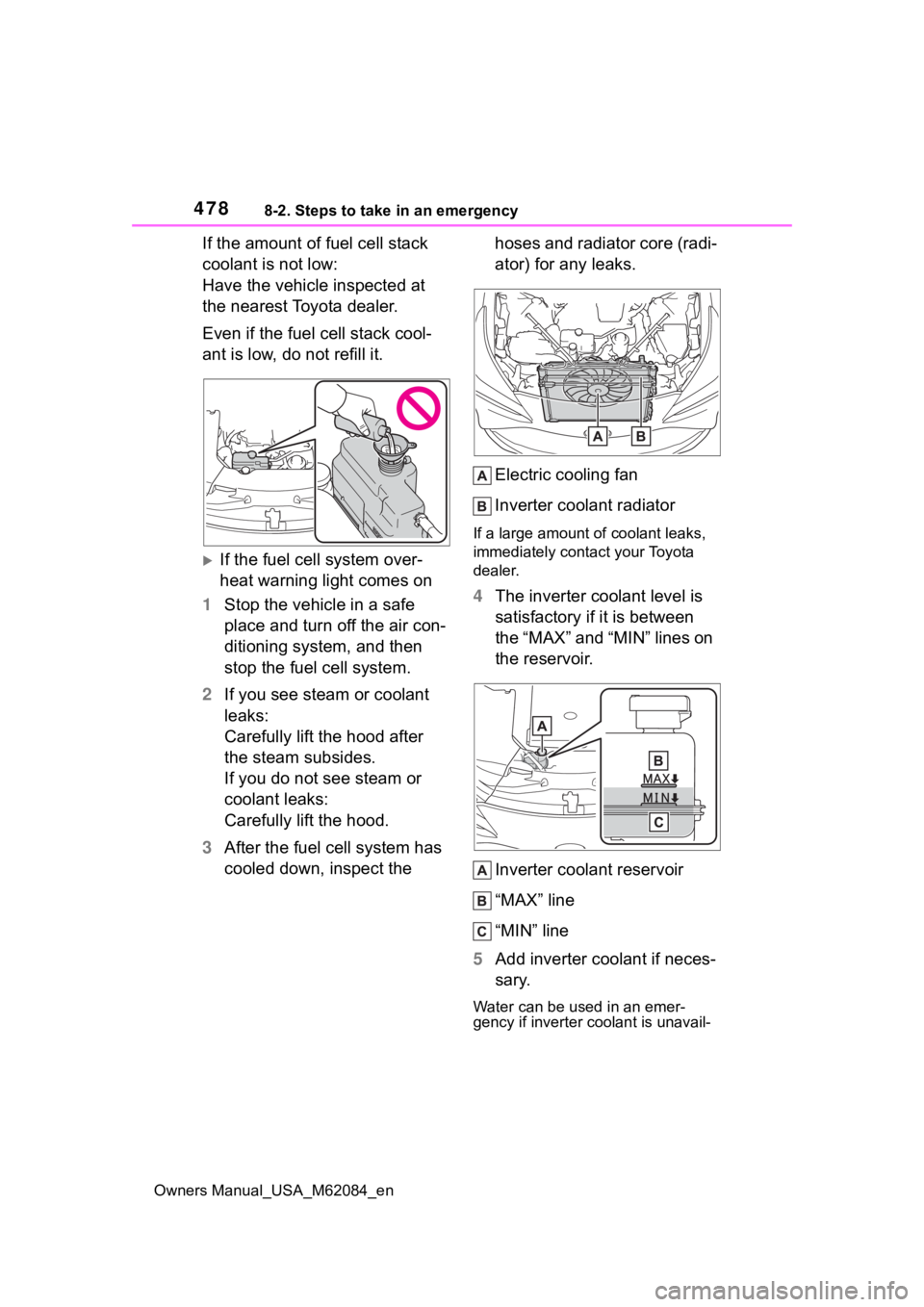
If the amount of fuel cell stack
coolant is not low:
Have the vehicle inspected at
the nearest Toyota dealer.
Even if the fuel cell stack cool-
ant is low, do not refill it.
If the fuel cell system over-
heat warning light comes on
1 Stop the vehicle in a safe
place and turn off the air con-
ditioning system, and then
stop the fuel cell system.
2 If you see steam or coolant
leaks:
Carefully lift the hood after
the steam subsides.
If you do not see steam or
coolant leaks:
Carefully lift the hood.
3 After the fuel cell system has
cooled down, inspect the hoses and radiator core (radi-
ator) for any leaks.
Electric cooling fan
Inverter coolant radiator
If a large amount of coolant leaks,
immediately contact your Toyota
dealer.
4
The inverter coolant level is
satisfactory if it is between
the “MAX” and “MIN” lines on
the reservoir.
Inverter coolant reservoir
“MAX” line
“MIN” line
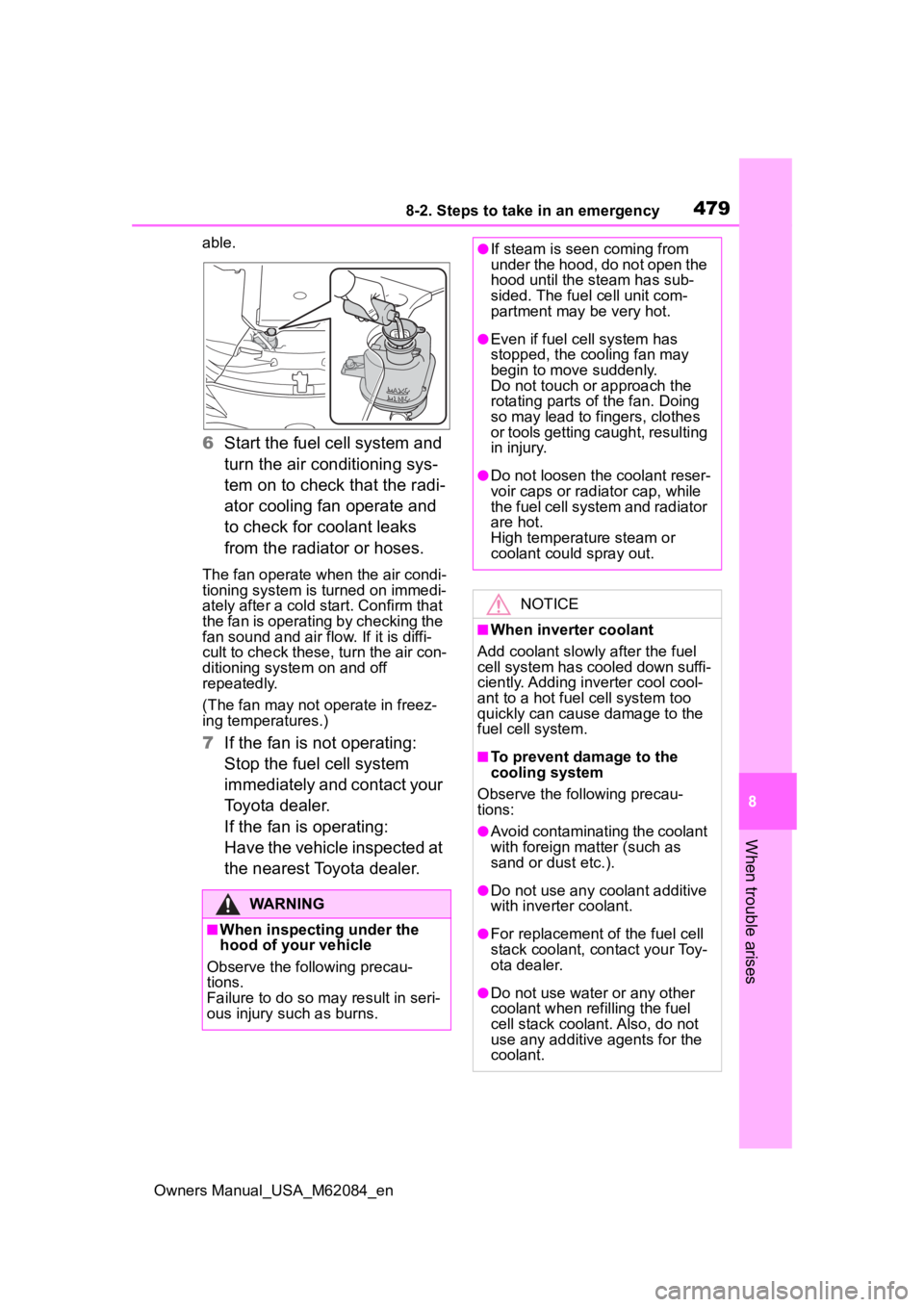
5 Add inverter coolant if neces-
sary.
Water can be used in an emer-
gency if inverter coolant is unavail-
Page 479 of 556
4798-2. Steps to take in an emergency
Owners Manual_USA_M62084_en
8
When trouble arises
able.
6 Start the fuel cell system and
turn the air conditioning sys-
tem on to check that the radi-
ator cooling fan operate and
to check for coolant leaks
from the radiator or hoses.
The fan operate when the air condi-
tioning system is turned on immedi-
ately after a cold s tart. Confirm that
the fan is operating by checking the
fan sound and air flow. If it is diffi-
cult to check these, turn the air con-
ditioning system on and off
repeatedly.
(The fan may not o perate in freez-
ing temperatures.)
7 If the fan is not operating:
Stop the fuel cell system
immediately and contact your
Toyota dealer.
If the fan is operating:
Have the vehicle inspected at
the nearest Toyota dealer.
WARNING
■When inspecting under the
hood of your vehicle
Observe the following precau-
tions.
Failure to do so may result in seri-
ous injury such as burns.
●If steam is seen coming from
under the hood, do not open the
hood until the steam has sub-
sided. The fuel cell unit com-
partment may be very hot.
●Even if fuel cell system has
stopped, the cooling fan may
begin to move suddenly.
Do not touch or approach the
rotating parts of the fan. Doing
so may lead to fingers, clothes
or tools getting caught, resulting
in injury.
●Do not loosen the coolant reser-
voir caps or radia tor cap, while
the fuel cell system and radiator
are hot.
High temperature steam or
coolant could spray out.
NOTICE
■When inverter coolant
Add coolant slowly after the fuel
cell system has cooled down suffi-
ciently. Adding inverter cool cool-
ant to a hot fuel cell system too
quickly can cause damage to the
fuel cell system.
■To prevent damage to the
cooling system
Observe the following precau-
tions:
●Avoid contaminating the coolant
with foreign matter (such as
sand or dust etc.).
●Do not use any coolant additive
with inverter coolant.
●For replacement of the fuel cell
stack coolant, contact your Toy-
ota dealer.
●Do not use water or any other
coolant when refilling the fuel
cell stack coolant. Also, do not
use any additive agents for the
coolant.
Page 480 of 556
4808-2. Steps to take in an emergency
Owners Manual_USA_M62084_en
1Set the parking brake and
stop the fuel cell system.
2 Remove the mud, snow or
sand from around the rear
wheels.
3 Place wood, stones or some
other material under the rear
wheels to help provide trac-
tion.
4 Restart the fuel cell system.
5 Shift the shift position to D or
R and release the parking
brake. Then, while exercising
caution, depress the acceler-
ator pedal.
■When it is difficult to free the
vehicle
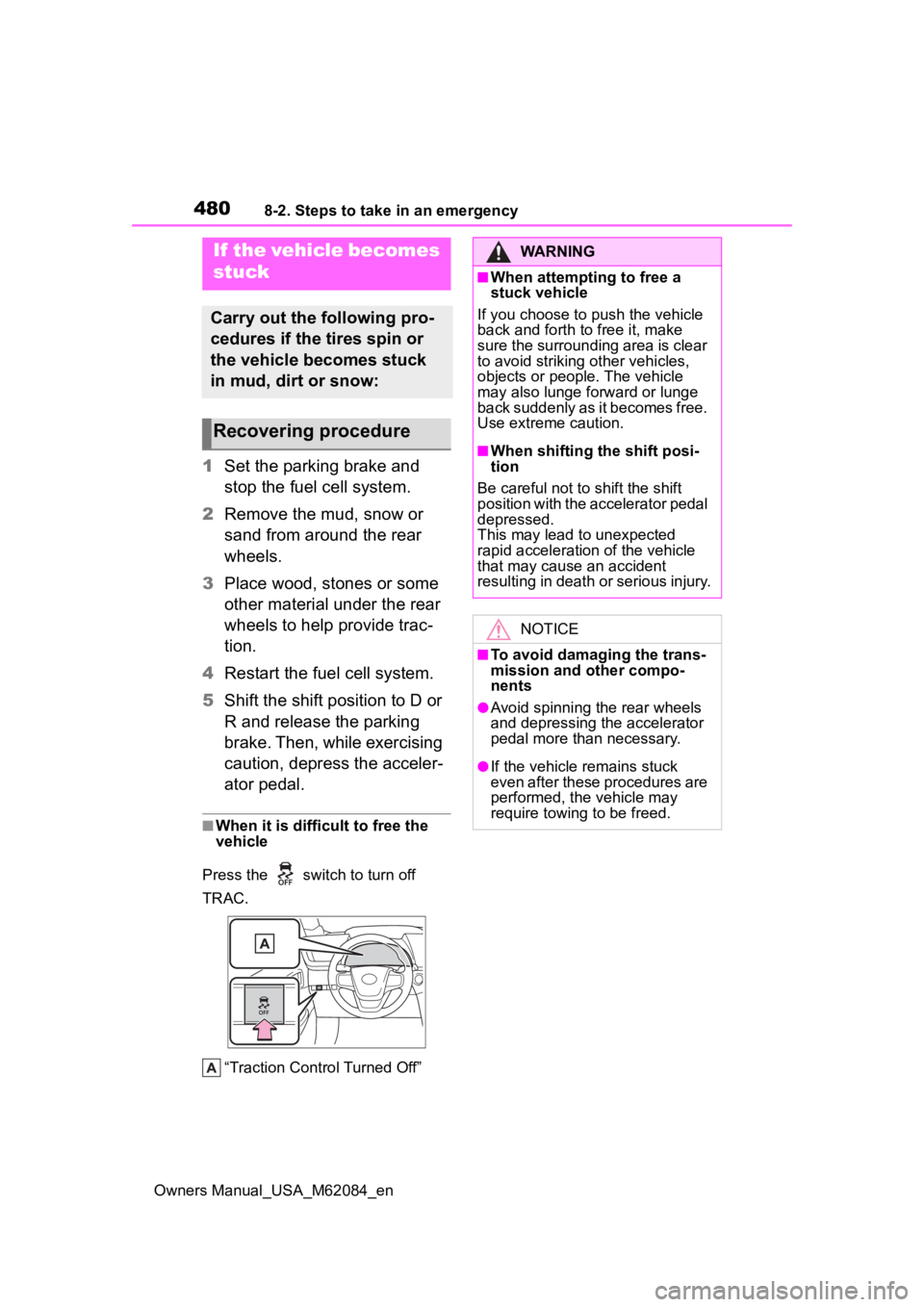
Press the switch to turn off
TRAC.
“Traction Control Turned Off”
If the vehicle becomes
stuck
Carry out the following pro-
cedures if the tires spin or
the vehicle becomes stuck
in mud, dirt or snow:
Recovering procedure
WARNING
■When attempting to free a
stuck vehicle
If you choose to push the vehicle
back and forth to free it, make
sure the surrounding area is clear
to avoid striking other vehicles,
objects or people. The vehicle
may also lunge forward or lunge
back suddenly as it becomes free.
Use extreme caution.
■When shifting the shift posi-
tion
Be careful not to shift the shift
position with the accelerator pedal
depressed.
This may lead to unexpected
rapid acceleration of the vehicle
that may cause an accident
resulting in death o r serious injury.
NOTICE
■To avoid damaging the trans-
mission and other compo-
nents
●Avoid spinning the rear wheels
and depressing the accelerator
pedal more than necessary.
●If the vehicle remains stuck
even after these procedures are
performed, the vehicle may
require towing to be freed.
Page 487 of 556
4879-1. Specifications
Owners Manual_USA_M62084_en
9
Vehicle specifications
the brake system warning light is not illuminated when the fuel cell sys-
tem is operating. (If the brake system warning light is illuminated, refer to
P.441.)
*2: Make sure to confirm that the brake warning light (yellow) doe s not illumi-
nate. (If the brake warning light illuminates, refer to P.441.)
19-inch tires
20-inch tires
Steering
Free playLess than 1.2 in. (30 mm)
Tires and wheels
Tire size235/55R19 101V
Tire inflation pressure
(Recommended cold tire
inflation pressure)Front: 33 psi (230 kPa, 2.3 kgf/cm2 or bar)
Rear: 33 psi (230 kPa, 2.3 kgf/cm
2 or bar)
Wheel size19 8J
Wheel nut torque103 ft•lbf (140 N•m, 14.3 kgf•m)
Tire size245/45ZR20 103Y
Tire inflation pressure
(Recommended cold tire
inflation pressure)Front: 33 psi (230 kPa, 2.3 kgf/cm2 or bar)
Rear: 33 psi (230 kPa, 2.3 kgf/cm
2 or bar)
Wheel size20 8 1/2J
Wheel nut torque103 ft•lbf (140 N•m, 14.3 kgf•m)
Page 491 of 556

4919-1. Specifications
Owners Manual_USA_M62084_en
9
Vehicle specifications
tion on uniform tire quality grad-
ing.
Your Toyota dealer will help answer
any questions you may have as you
read this information.
■DOT quality grades
All passenger vehicle tires must
conform to Federal Safety
Requirements in addition to
these grades. Quality grades
can be found where applicable
on the tire sidewall between
tread shoulder and maximum
section width.
For example: Treadwear 200 Trac-
tion AA Temperature A
■Treadwear
The treadwear grade is a com-
parative rating based on the
wear rate of the tire when tested
under controlled conditions on a
specified government test
course.
For example, a tire graded 150
would wear one and a half (1 - 1/2)
times as well on the government
course as a tire graded 100.
The relative perfo rmance of tires
depends upon the actual conditions
of their use. Performance may differ
significantly from the norm due to
variations in driving habits, service
practices and differences in road
characteristics and climate.
■Traction AA, A, B, C
The traction grades, from high-
est to lowest, are AA, A, B and
C, and they represent the tire’s
ability to stop on wet pavement as measured under controlled
conditions on specified govern-
ment test surfaces of asphalt
and concrete.
A tire marked C may have poor
traction performance.
Warning: The traction grade
assigned to this tire is based on
braking (straight ahead) traction
tests and does not include corner-
ing (turning) traction.
■Temperature A, B, C
The temperature grades are A
(the highest), B, and C, repre-
senting the tire’s resistance to
the generation of heat and its
ability to dissipate heat when
tested under controlled condi-
tions on a specified indoor labo-
ratory test wheel.
Sustained high temperature can
cause the material of the tire to
degenerate and reduce tire life, and
excessive temperature can lead to
sudden tire failure.
Grade C corresponds to a level of
performance which all passenger
car tires must meet under the Fed-
eral Motor Vehicle Safety Standard
No. 109.
Grades B and A represent higher
levels of performance on the labo-
ratory test wheel than the minimum
required by law.
Warning: The temperature grades
of a tire assume tha t it is properly
inflated and not overloaded.
Excessive speed, underinflation, or
excessive loading, either sepa-
rately or in combination, can cause
Page 501 of 556
5019-2. Customization
Owners Manual_USA_M62084_en
9
Vehicle specifications
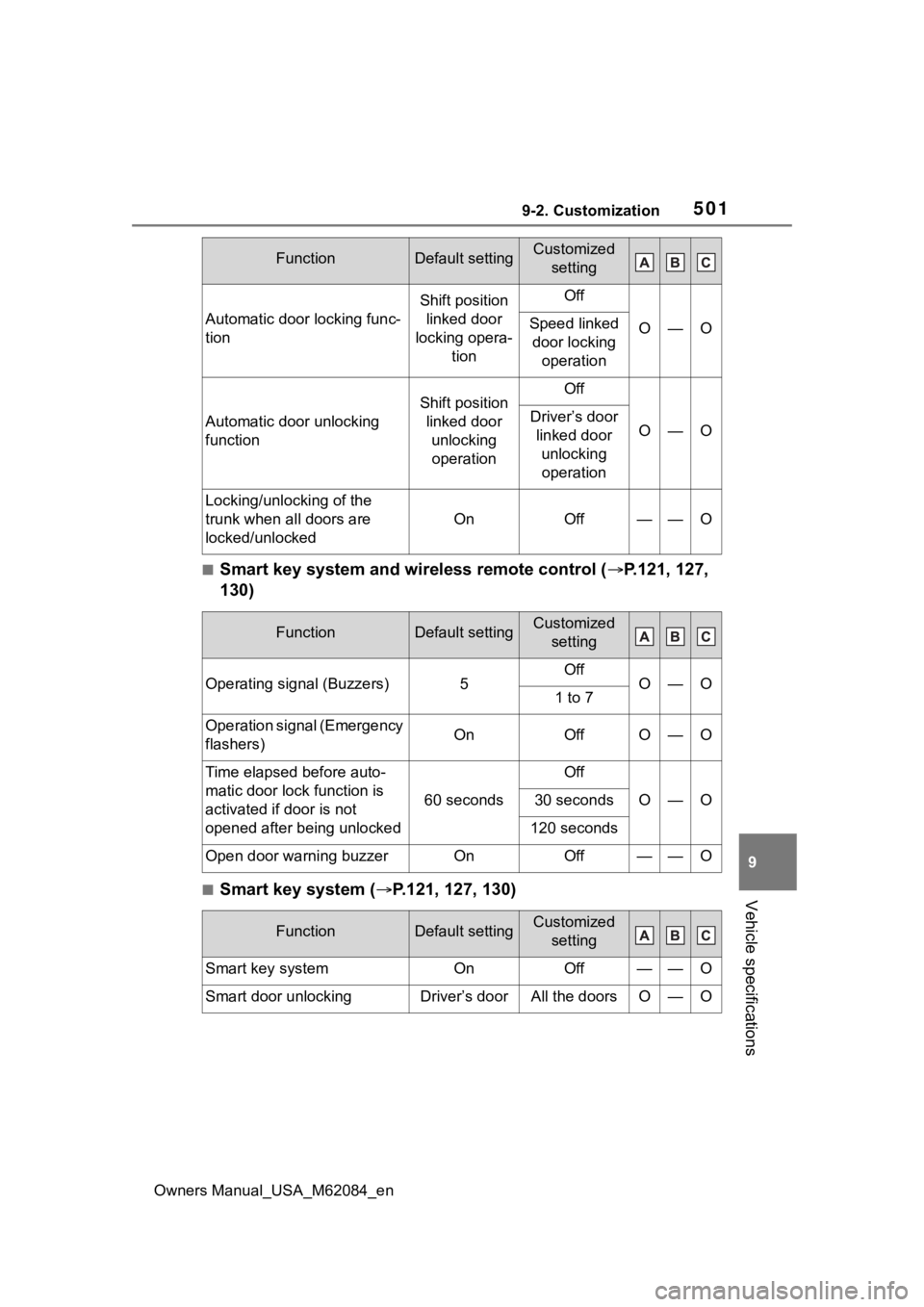
■Smart key system and wireless remote control ( P.121, 127,
130)
■Smart key system ( P.121, 127, 130)
Automatic door locking func-
tion
Shift position
linked door
locking opera- tionOff
O—OSpeed linked door locking operation
Automatic door unlocking
function
Shift position linked door unlocking operationOff
O—ODriver’s door linked door unlocking operation
Locking/unlocking of the
trunk when all doors are
locked/unlocked
OnOff——O
FunctionDefault settingCustomized setting
Operating signal (Buzzers)5OffO—O1 to 7
Operation signal (Emergency
flashers)OnOffO—O
Time elapsed before auto-
matic door lock function is
activated if door is not
opened after being unlocked
60 seconds
Off
O—O30 seconds
120 seconds
Open door warning buzzerOnOff——O
FunctionDefault settingCustomized setting
Smart key systemOnOff——O
Smart door unlockingDriver’s doorAll the doorsO—O
FunctionDefault settingCustomized setting
Page 504 of 556
5049-2. Customization
Owners Manual_USA_M62084_en
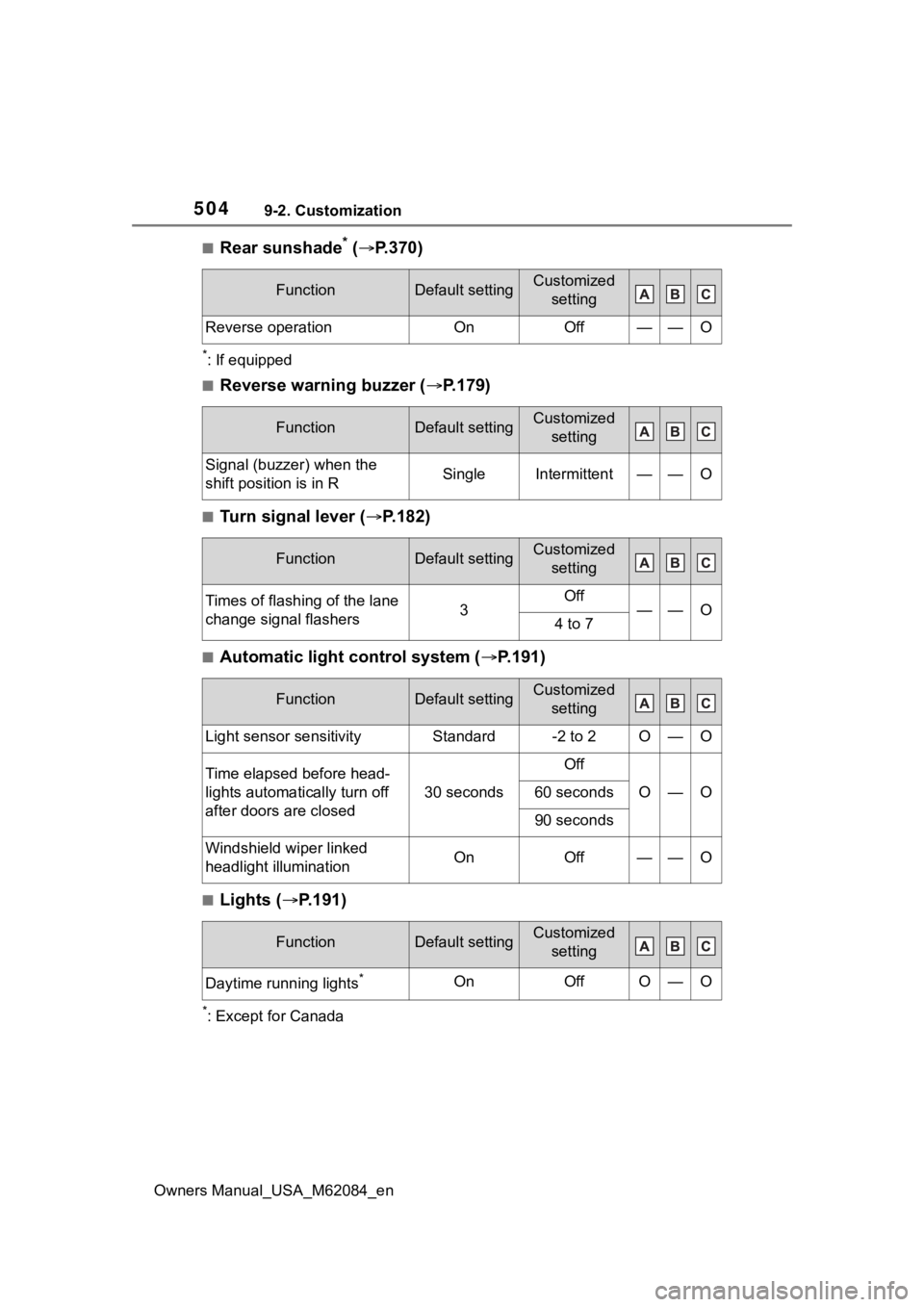
■Rear sunshade* ( P.370)
*: If equipped
■Reverse warning buzzer ( P.179)
■Turn signal lever ( P.182)
■Automatic light control system ( P.191)
■Lights ( P.191)
*: Except for Canada
FunctionDefault settingCustomized
setting
Reverse operationOnOff——O
FunctionDefault settingCustomized setting
Signal (buzzer) when the
shift position is in RSingleIntermittent——O
FunctionDefault settingCustomized setting
Times of flashing of the lane
change signal flashers3Off——O4 to 7
FunctionDefault settingCustomized setting
Light sensor sensitivityStandard-2 to 2O—O
Time elapsed before head-
lights automatically turn off
after doors are closed
30 seconds
Off
O—O60 seconds
90 seconds
Windshield wiper linked
headlight illuminationOnOff——O
FunctionDefault settingCustomized setting
Daytime running lights*OnOffO—O
Page 505 of 556
5059-2. Customization
Owners Manual_USA_M62084_en
9
Vehicle specifications
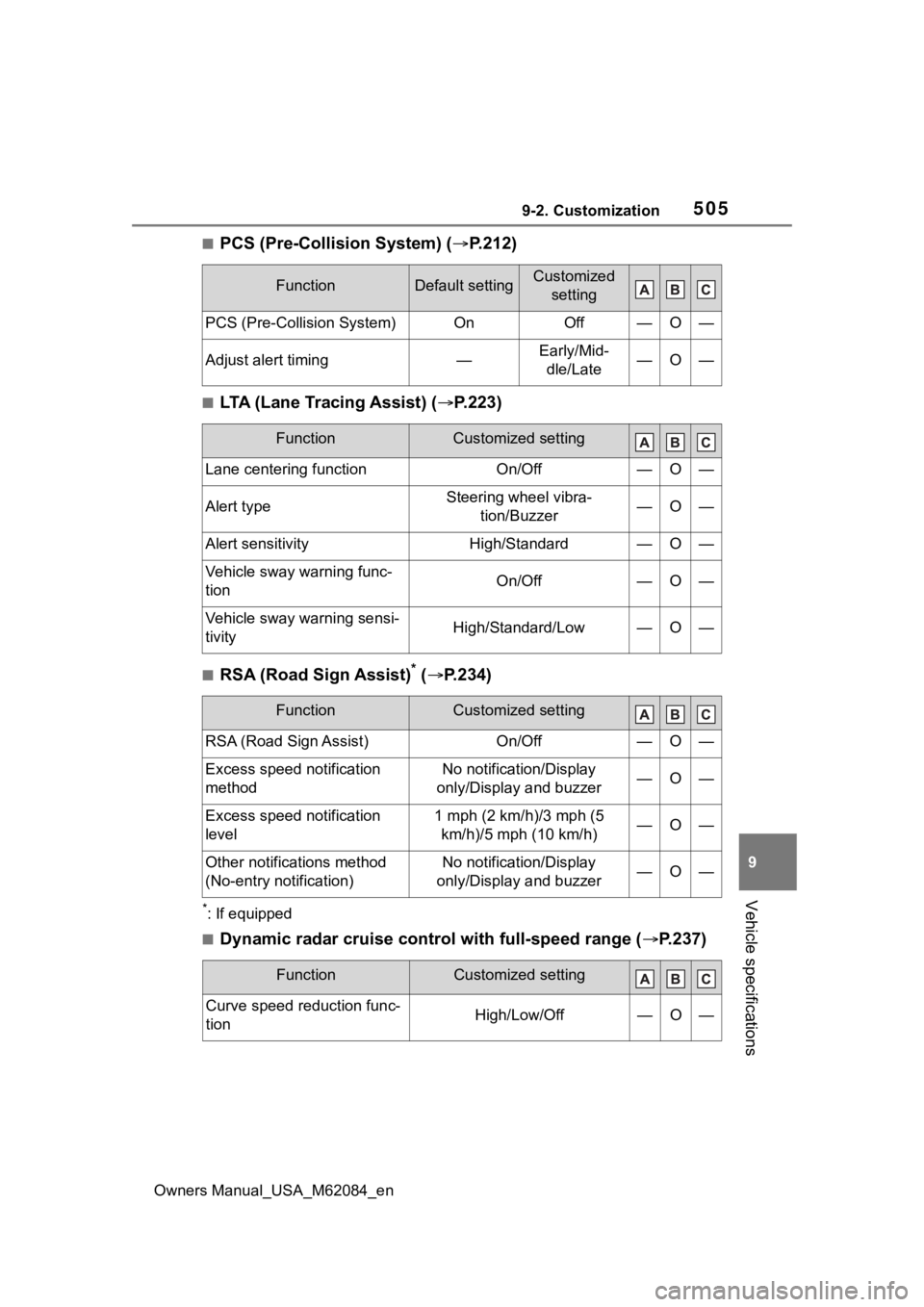
■PCS (Pre-Collision System) ( P.212)
■LTA (Lane Tracing Assist) (P.223)
■RSA (Road Sign Assist)* ( P.234)
*: If equipped
■Dynamic radar cruise control with full-speed range ( P.237)
FunctionDefault settingCustomized
setting
PCS (Pre-Collision System)OnOff—O—
Adjust alert timing—Early/Mid-dle/Late—O—
FunctionCustomized setting
Lane centering functionOn/Off—O—
Alert typeSteering wheel vibra- tion/Buzzer—O—
Alert sensitivityHigh/Standard—O—
Vehicle sway warning func-
tionOn/Off—O—
Vehicle sway warning sensi-
tivityHigh/Standard/Low—O—
FunctionCustomized setting
RSA (Road Sign Assist)On/Off—O—
Excess speed notification
methodNo notification/Display
only/Display and buzzer—O—
Excess speed notification
level1 mph (2 km/h)/3 mph (5 km/h)/5 mph (10 km/h)—O—
Other notifications method
(No-entry notification)No notification/Display
only/Display and buzzer—O—
FunctionCustomized setting
Curve speed reduction func-
tionHigh/Low/Off—O—
Page 525 of 556
Owners Manual_USA_M62084_en
525What to do if... (Troubleshooting)
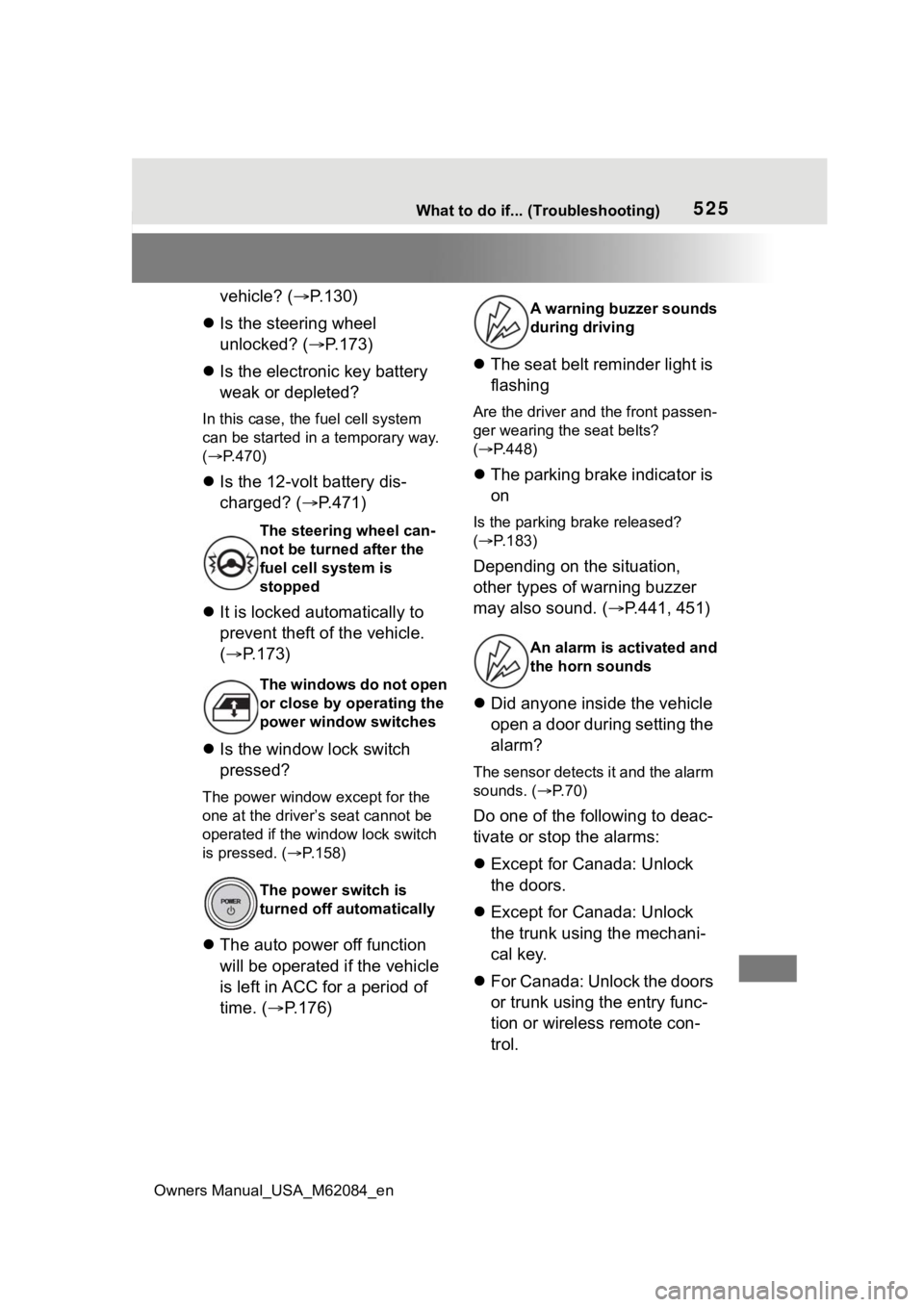
vehicle? (P.130)
Is the steering wheel
unlocked? ( P.173)
Is the electronic key battery
weak or depleted?
In this case, the fuel cell system
can be started in a temporary way.
( P.470)
Is the 12-volt battery dis-
charged? ( P.471)
It is locked automatically to
prevent theft of the vehicle.
( P.173)
Is the window lock switch
pressed?
The power window except for the
one at the driver’s seat cannot be
operated if the win dow lock switch
is pressed. ( P.158)
The auto power off function
will be operated if the vehicle
is left in ACC for a period of
time. ( P.176)
The seat belt reminder light is
flashing
Are the driver and the front passen-
ger wearing the seat belts?
( P.448)
The parking brake indicator is
on
Is the parking br ake released?
( P.183)
Depending on the situation,
other types of warning buzzer
may also sound. ( P.441, 451)
Did anyone inside the vehicle
open a door during setting the
alarm?
The sensor detects it and the alarm
sounds. ( P. 7 0 )
Do one of the following to deac-
tivate or stop the alarms:
Except for Canada: Unlock
the doors.
Except for Canada: Unlock
the trunk using the mechani-
cal key.
For Canada: Unlock the doors
or trunk using the entry func-
tion or wireless remote con-
trol.
The steering wheel can-
not be turned after the
fuel cell system is
stopped
The windows do not open
or close by operating the
power window switches
The power switch is
turned off automatically
A warning buzzer sounds
during driving
An alarm is a ctivated and
the horn sounds
Page 526 of 556
526What to do if... (Troubleshooting)
Owners Manual_USA_M62084_en
Turn the power switch to ACC
or ON, or start the fuel cell
system. (The alarm will be
deactivated or stopped after a
few seconds.)
Is the message displayed on
the multi-information display?
Check the message on the multi-
information display. ( P.451)
When a warning light turns on
or a warning message is dis-
played, refer to P.441, 451.
Stop the vehicle in a safe
place and repair the flat tire
temporarily with the emer-
gency tire puncture repair kit.
( P.455)
Try the procedure for when
the vehicle becomes stuck in
mud, dirt, or snow. ( P.480)
A warning buzzer sounds
when leaving the vehicle
A warning light turns on
or a warning message is
displayed
When a problem has
occurred
If you have a flat tire
The vehicle becomes
stuck