CD player TOYOTA PRIUS 2009 2.G Owner's Manual
[x] Cancel search | Manufacturer: TOYOTA, Model Year: 2009, Model line: PRIUS, Model: TOYOTA PRIUS 2009 2.GPages: 508, PDF Size: 6.84 MB
Page 251 of 508
251
3-3. Using the audio system
3
Interior features
PRIUS_U_(OM47614U)
Loading, ejecting and sele
cting MP3 and WMA discs
Refer to the section entitled “Using the CD player” for details.
( P. 235)
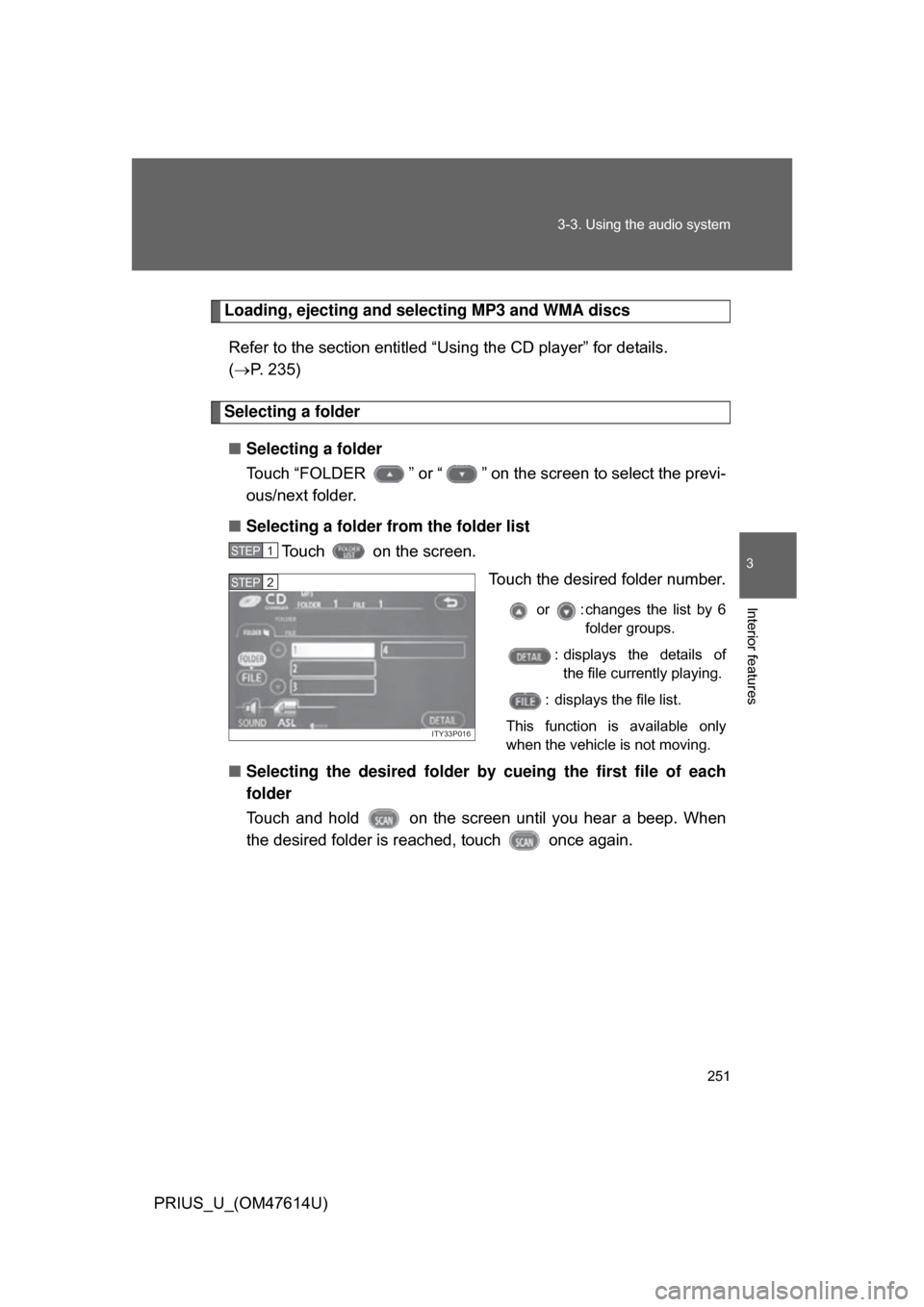
Selecting a folder
■ Selecting a folder
Touch “FOLDER ” or “ ” on the screen to select the previ-
ous/next folder.
■ Selecting a folder from the folder list
Touch on the screen.
Touch the desired folder number.
or : changes the list by 6folder groups.
: displays the details of the file currently playing.
: displays the file list.
This function is available only
when the vehicle is not moving.
■ Selecting the desired folder by cueing the first file of each
folder
Touch and hold on the screen until you hear a beep. When
the desired folder is r eached, touch once again.
STEP1
ITY33P016
STEP2
Page 254 of 508

254 3-3. Using the audio system
PRIUS_U_(OM47614U)
■CD player protection feature
To protect the internal components, playback is automatically stopped when
a problem is detected while the CD player is being used.
■ If CDs are left inside the CD player or in the ejected position for
extended periods
CDs may be damaged and may not play properly.
■ Lens cleaners
Do not use lens cleaners. Doing so may damage the CD player.
■ MP3 and WMA files
MP3 (MPEG Audio LAYER 3) is a standard audio compression format.
Files can be compressed to approximately 1/10 of their original size by using
MP3 compression.
WMA (Windows Media
TMAudio) is a Microsoft audio compression format.
This format compresses audio data to a size smaller than that of the MP3
format.
There is a limit to the MP3 and WMA file standards and to the media/formats
recorded by them that can be used.
● MP3 file compatibility
• Compatible standards
MP3 (MPEG1 LAYER3, MPEG2 LSF LAYER3)
• Compatible sampling frequencies MPEG1 LAYER3: 32, 44.1, 48 (kHz)
MPEG2 LSF LAYER3: 16, 22.05, 24 (kHz)
• Compatible bit rates MPEG1 LAYER3: 64, 80, 96, 112, 128, 160, 192, 224, 256, 320 (kbps)
• MPEG2 LSF LAYER3: 64, 80, 96, 112, 128, 144, 160 (kbps)
*: Compatible with VBR
• Compatible channel modes: stereo, joint stereo, dual channel and monaural
Page 257 of 508

257
3-3. Using the audio system
3
Interior features
PRIUS_U_(OM47614U)
●
Extensions
If the file extensions .mp3 and .wma are used for files other than MP3 and
WMA files, they will be mistakenly recognized and played as MP3 and
WMA files. This may result in large amounts of interference and damage
to the speakers.
● Playback
• To play MP3 files with steady sound quality, we recommend a fixed bit
rate of 128 kbps and a sampling frequency of 44.1 kHz.
• CD-R or CD-RW playback may not be possible in some instances, depending on the characteristics of the disc.
• There is a wide variety of freeware and other encoding software for MP3 and WMA files on the market, and depending on the status of the encod-
ing and the file format, poor sound quality or noise at the start of playback
may result. In some cases, playback may not be possible at all.
• When files other than MP3 or WMA files are recorded on a disc, it may take more time to recognize the disc and in some cases, playback may
not be possible at all.
• Microsoft, Windows, and Windows Media are the registered trademarks of Microsoft Corporation in the U.S. and other countries.
■ CD-R and CD-RW discs
● CD-R/CD-RW discs that have not been subject to the “finalizing process”
(a process that allows discs to be played on a conventional CD player)
cannot be played.
● It may not be possible to play CD-R/CD-RW discs recorded on a music
CD recorder or a personal computer because of disc characteristics,
scratches or dirt on the disc, or dirt, condensation, etc. on the lens of the
unit.
● It may not be possible to play discs recorded on a personal computer
depending on the application settings and the environment. Record with
the correct format. (For details, contact the appropriate application manu-
facturers of the applications.)
Page 258 of 508

258 3-3. Using the audio system
PRIUS_U_(OM47614U)
●CD-R/CD-RW discs may be damaged by direct exposure to sunlight,
high temperatures or other storage conditions. The unit may be unable to
play damaged discs.
● If you insert a CD-RW disc into the MP3/WMA player, playback will begin
more slowly than with a conventional CD or CD-R disc.
● Recordings on CD-R/CD-RW cannot be played using the DDCD (Double
Density CD) system.
■ Unsuitable discs, and player precautions
P. 241
Page 259 of 508
259
3-3. Using the audio system
3
Interior features
PRIUS_U_(OM47614U)
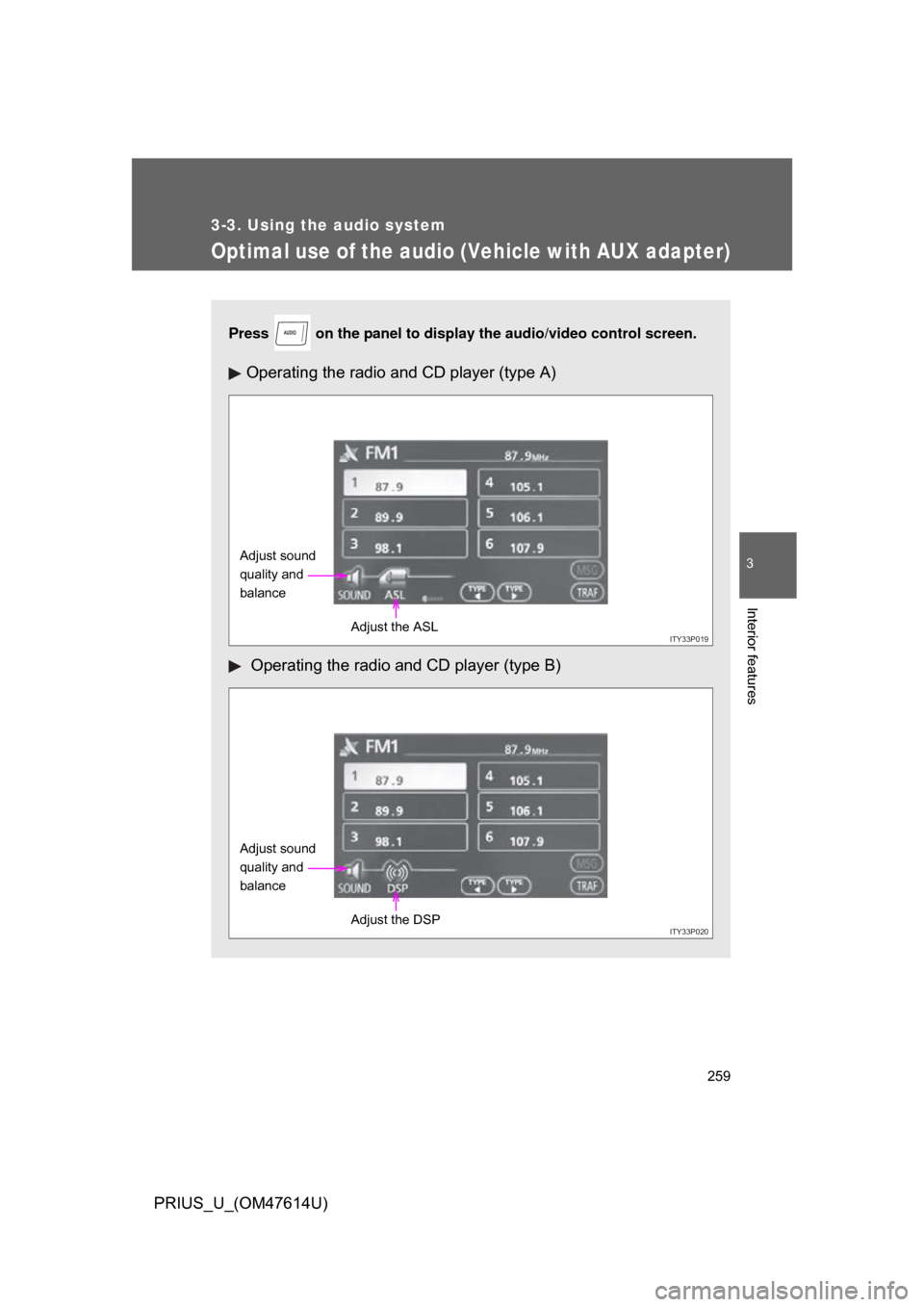
Optimal use of the audio (Vehicle with AUX adapter)
Press on the panel to display the audio/video control screen.
Operating the radio and CD player (type A)
Operating the radio and CD player (type B)
AUDIO
ITY33P019
Adjust sound
quality and
balance
Adjust the ASL
ITY33P020
Adjust sound
quality and
balanceAdjust the DSP
Page 263 of 508
263
3-3. Using the audio system
3
Interior features
PRIUS_U_(OM47614U)
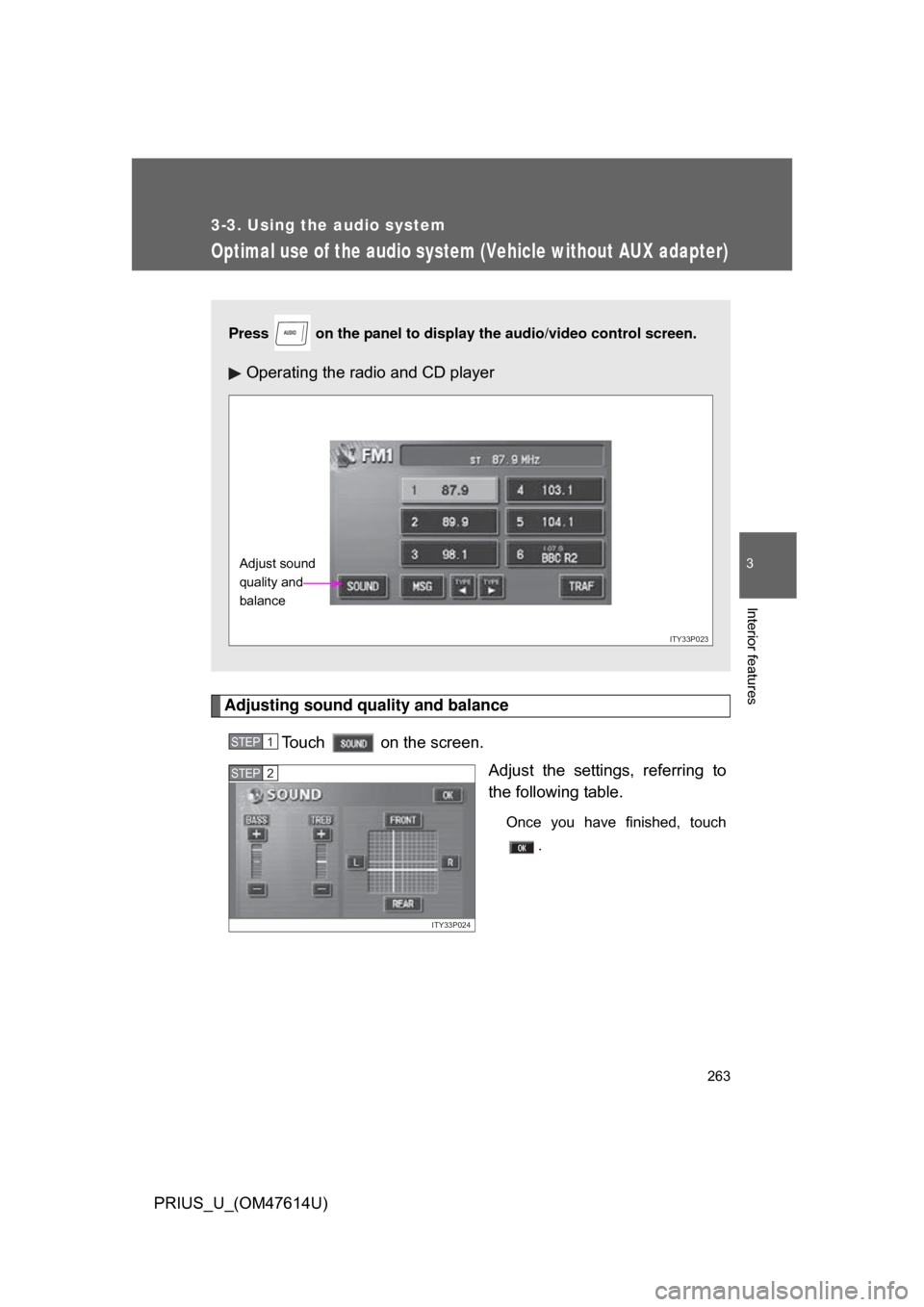
Optimal use of the audio system (Vehicle without AUX adapter)
Adjusting sound quality and balanceTouch on the screen. Adjust the settings, referring to
the following table.
Once you have finished, touch.
Press on the panel to display the audio/video control screen.
Operating the radio and CD player
AUDIO
ITY33P023
Adjust sound
quality and
balance
STEP1
ITY33P024
STEP2
Page 266 of 508
266
3-3. Using the audio system
PRIUS_U_(OM47614U)
Using the steering switches
Turning on the powerPress when the audio system is turned OFF.
The audio system can be turned OFF by holding the switch down for 1
second or more.
Changing the audio sourcePress when the audio system is turned ON. The audio source
changes as follows each time the bu tton is pressed. If a CD is not
inserted, that mode will be skipped.
FM (1, 2) CD player AM SAT (1, 2, 3)
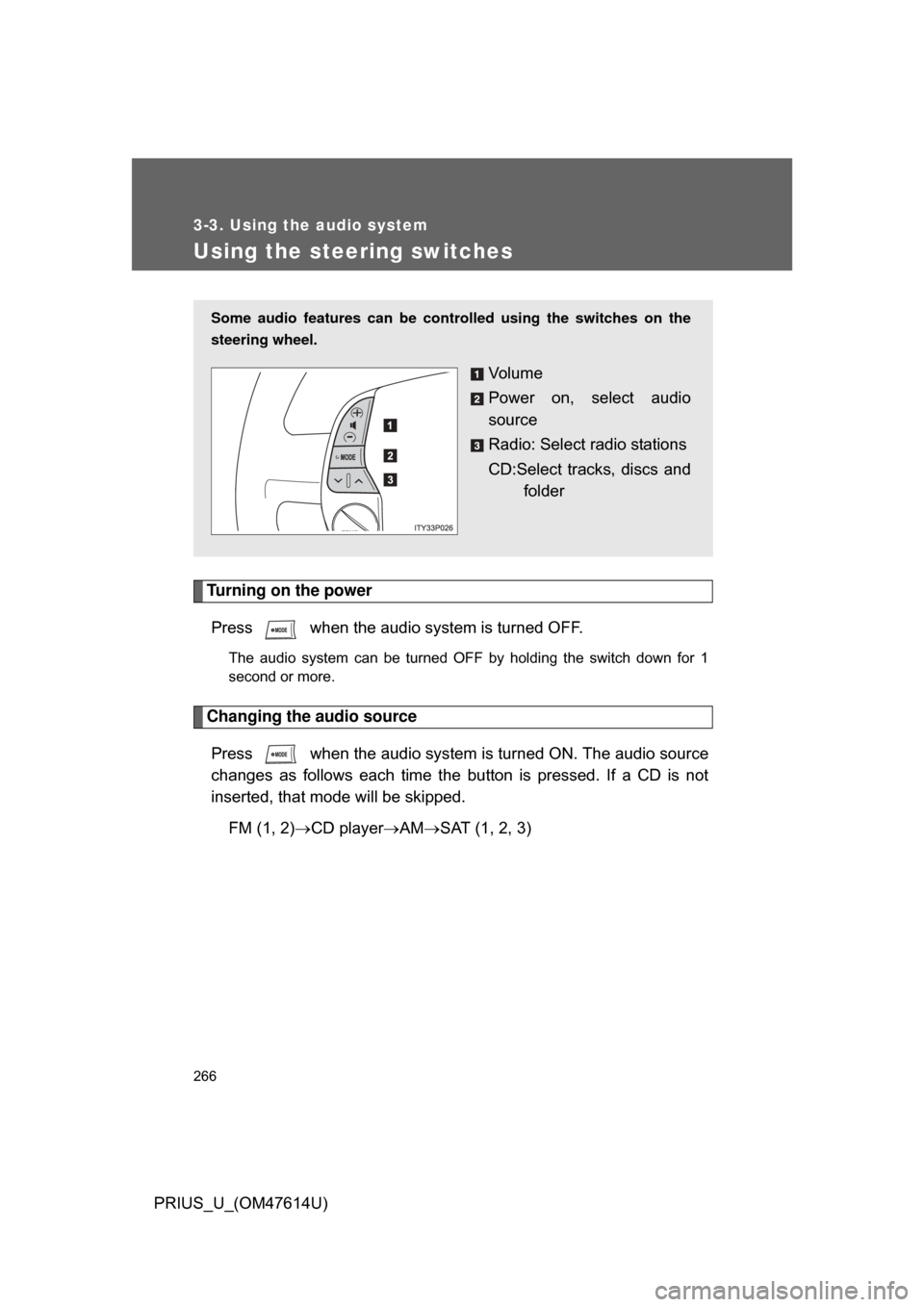
Some audio features can be controlled using the switches on the
steering wheel.
Vo l u m e
Power on, select audio
source
Radio: Select radio stations
CD:Select tracks, discs and
folder
Page 267 of 508
267
3-3. Using the audio system
3
Interior features
PRIUS_U_(OM47614U)
Adjusting the volume
Press “+” on to increase the vo lume and “-” to decrease the
volume.
Hold down the button to continue increasing or decreasing the volume.
Selecting a radio station
Press to select the radio mode.
Press or on to select a radio station.
To scan for receivable stations, press and hold the switch until you
hear a beep.
Selecting a track
Press to select the CD mode.
Press or on to select the desired track.
Selecting a disc or folder in th e CD player (Folder selection is
available only when MP3/WMA disc is in use.)
Press to select the CD player.
Press and hold or on until you hear a beep.
STEP1
STEP2
STEP1
STEP2
STEP1
STEP2
Page 498 of 508

498
PRIUS_U_(OM47614U)
Alphabetical index
Alphabetical index
A/C .............................................197
ABS ...........................................166
Air conditioning systemAir conditioning filter ..............390
Automatic air conditioning system ................................197
Steering wheel climate remote control switches ......211
Airbags Airbag operating conditions.....92
Airbag precautions for your child ...................................... 96
Airbag warning light............... 424
Curtain shield airbag precautions ...........................96
Front passenger occupant classification system ...........101
General airbag precautions .....96
Locations of airbags ................89
Modification and disposal of airbags ................................100
Side airbag precautions .......... 96
Side and curtain shield airbags operating conditions..............92
SRS airbags ............................ 89
Alarm ........................................... 84
Antenna.....................................227
Armrest .....................................331
Audio input ............................... 265
Audio system Antenna .................................227
CD player/changer ................235
MP3/WMA disc......................250
Optimal use ...........................259
Portable music player............265
Radio .....................................221
Steering switches .................. 266
Automatic headlight leveling system .................................... 152
Automatic light control system .................................... 152
AUX adapter ............................. 265
Auxiliary boxes ........................324 Back-up lights
Wattage................................. 469
Back door Back door ................................ 54
Wireless remote control .......... 49
Smart key system .. ................. 36
Battery Checking ............................... 371
Hybrid battery
(traction battery) ................... 26
If the vehicle 12 volt battery is discharged .......................... 449
Preparing and checking before winter ....................... 173
Bluetooth
®................................ 269
Brake Fluid ...................................... 369
Parking brake ........................ 143
Brake assist.............................. 166
Break-in tips ............................. 123
Care Exterior.................................. 342
Interior ................................... 344
Seat belts .............................. 345
Cargo capacity ......................... 169
Cargo hooks ............................. 333
CD player/changer ................... 235
Chains ....................................... 175
Child-protectors ......................... 52
Child restraint system Definition ............................... 107
Installation ............................. 111
Installing CRS with lower anchorages ......................... 112
Installing CRS with seatbelts ............................. 114
Installing CRS with top
straps .................................. 117
Child safety Airbag precautions .................. 96
Child restraint system ........... 107
Child-protectors....................... 52
AB
C