TOYOTA PRIUS 2009 2.G Owner's Guide
PRIUS 2009 2.G
TOYOTA
TOYOTA
https://www.carmanualsonline.info/img/14/6586/w960_6586-0.png
TOYOTA PRIUS 2009 2.G Owner's Guide
Page 194 of 508
194 3-1. Using the touch screen
PRIUS_U_(OM47614U)
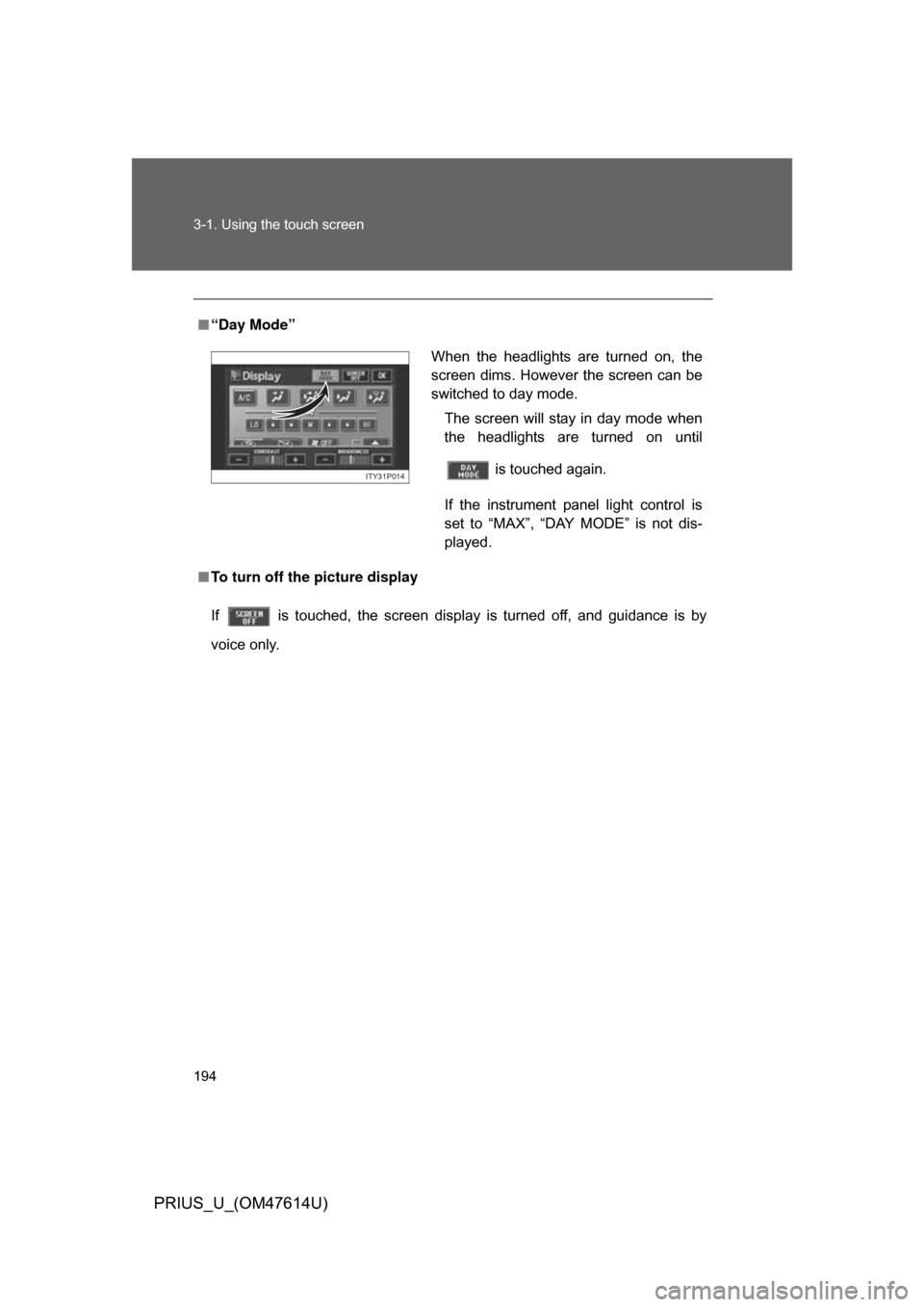
■“Day Mode”
■ To turn off the picture display
If is touched, the screen display is turned off, and guidance is by
voice only.
When the headlights are turned on, the
screen dims. However the screen can be
switched to day mode.
The screen will stay in day mode when
the headlights are turned on until
is touched again.
If the instrument panel light control is
set to “MAX”, “DAY MODE” is not dis-
played.
ITY31P014
Page 315 of 508
315
3
Interior features
PRIUS_U_(OM47614U)
3-5. Using the interior lights
Interior lights list
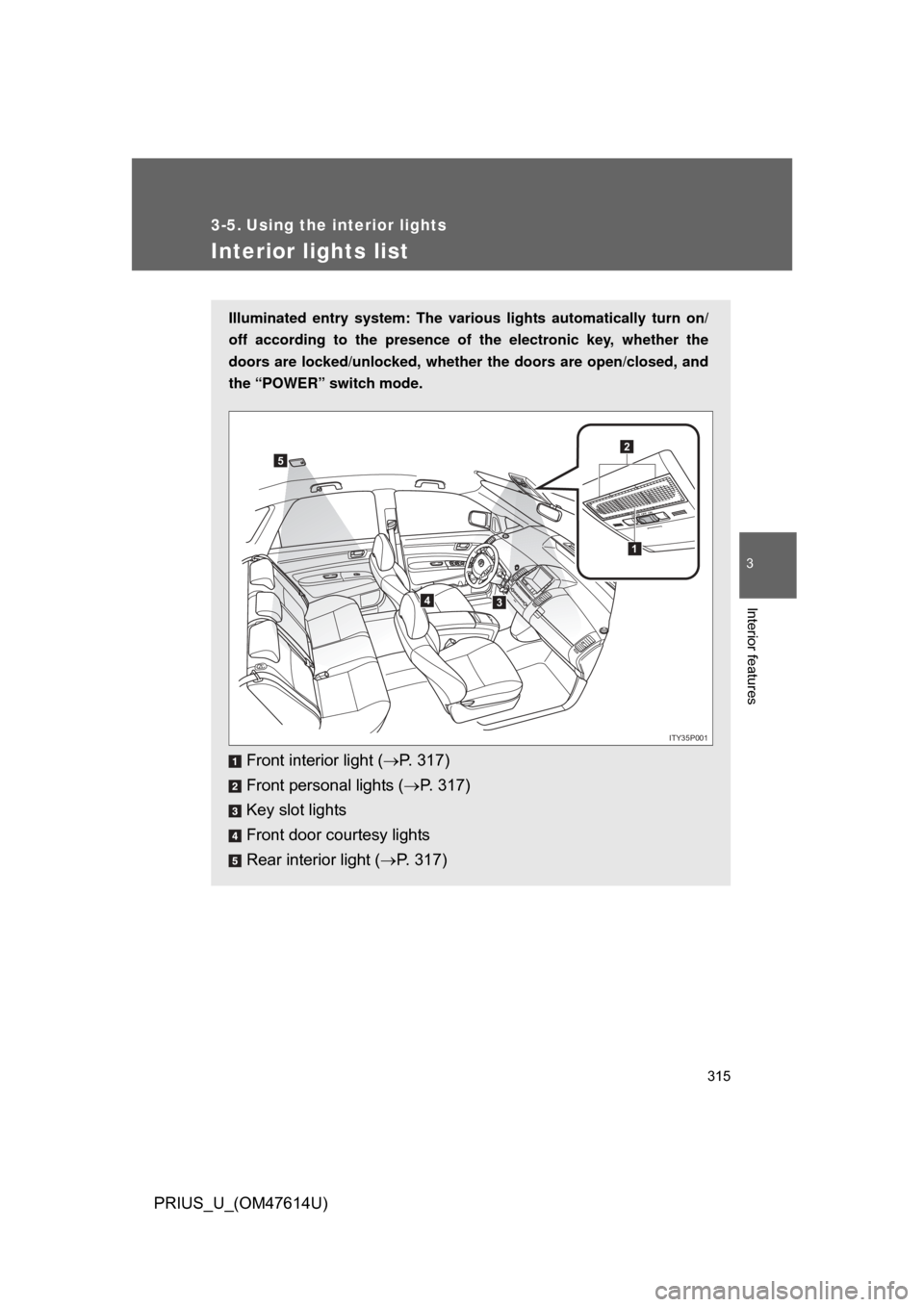
Illuminated entry system: The various lights automatically turn on/
off according to the presence of the electronic key, whether the
doors are locked/unlocked , whether the doors are open/closed, and
the “POWER” switch mode.
Front interior light ( P. 317)
Front personal lights ( P. 317)
Key slot lights
Front door courtesy lights
Rear interior light ( P. 317)
1
2
34
5
ITY35P001
Page 316 of 508
316 3-5. Using the interior lights
PRIUS_U_(OM47614U)
■To prevent 12 volt battery discharge
If the interior lights and personal lights ON when the door is not fully closed
or the interior light switch in “DOOR” position, the lights will go off automati-
cally after 20 minutes.
■ Customization that can be co nfigured at Toyota dealer
Setting (e.g. The time elapsed before lights turn off) can be changed.
(
Customizable features P. 486)
Page 317 of 508
317
3-5. Using the interior lights
3
Interior features
PRIUS_U_(OM47614U)
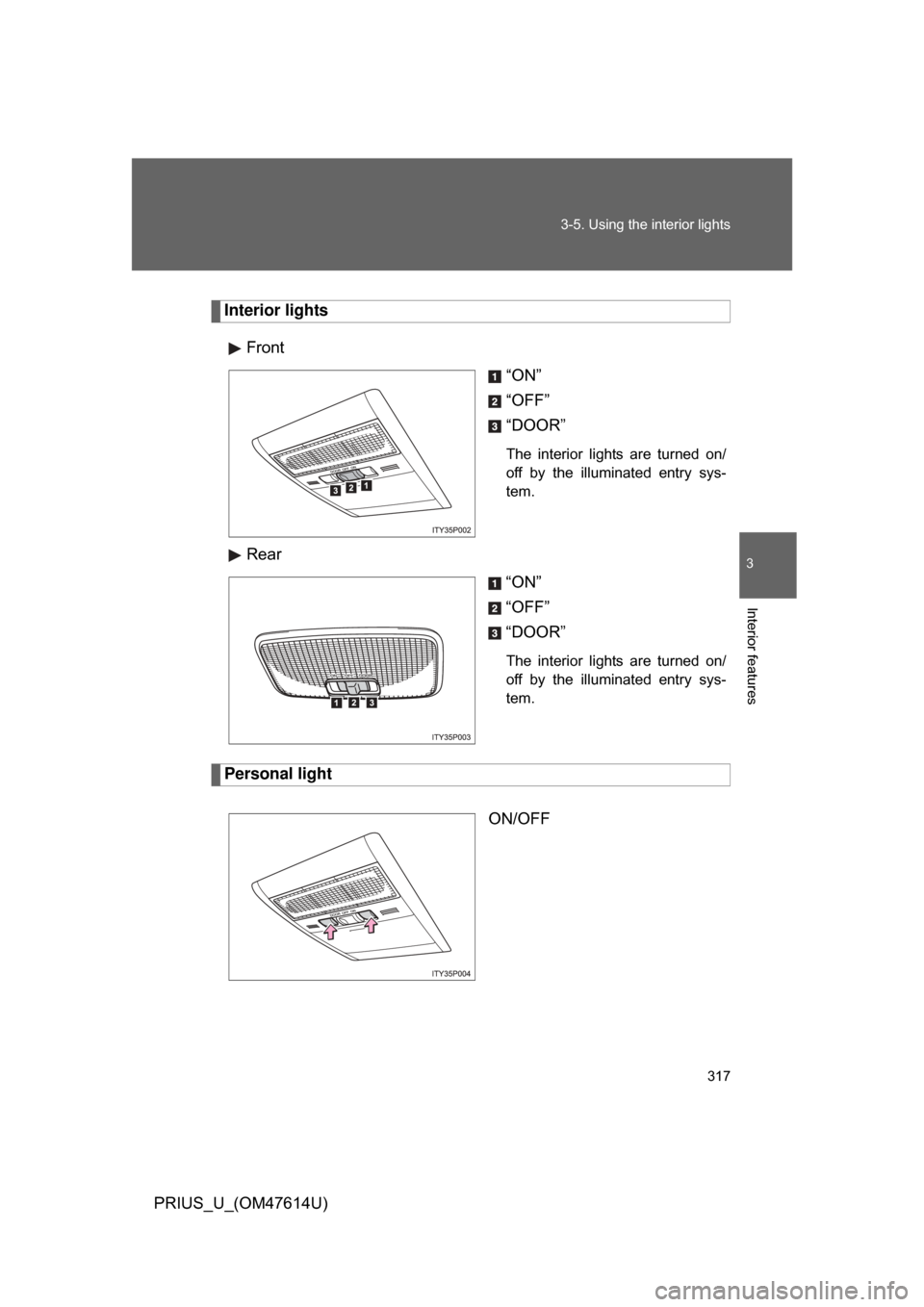
Interior lights
Front “ON”
“OFF”
“DOOR”
The interior lights are turned on/
off by the illuminated entry sys-
tem.
Rear“ON”
“OFF”
“DOOR”
The interior lights are turned on/
off by the illuminated entry sys-
tem.
Personal light
ON/OFF
Page 318 of 508
318 3-5. Using the interior lights
PRIUS_U_(OM47614U)
■Customization that can be co nfigured at Toyota dealer.
Settings can be changed. (Customizable features P. 486)
Page 328 of 508
328
3-7. Other interior features
PRIUS_U_(OM47614U)
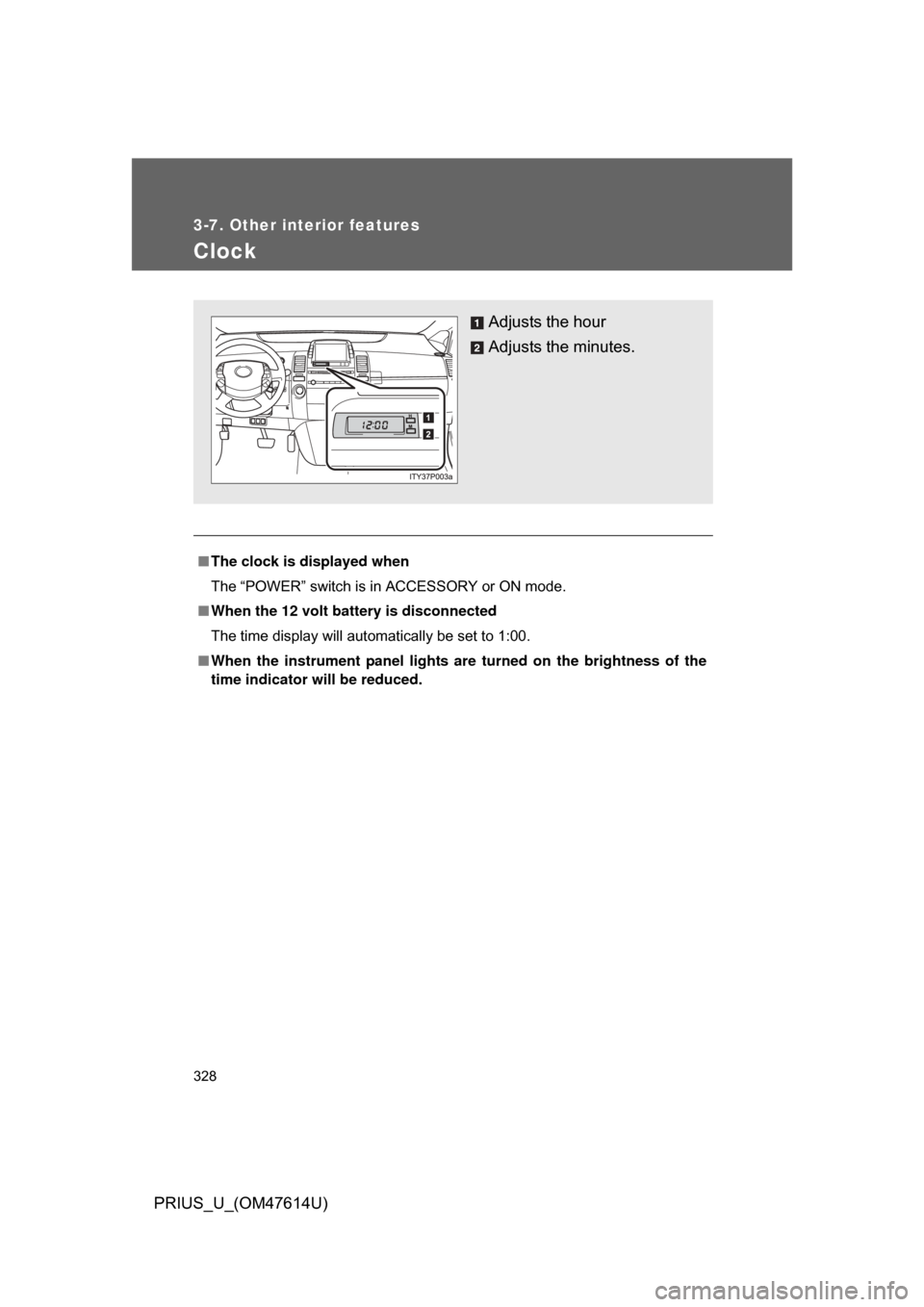
Clock
■The clock is displayed when
The “POWER” switch is in ACCESSORY or ON mode.
■ When the 12 volt battery is disconnected
The time display will automatically be set to 1:00.
■ When the instrument panel lights ar e turned on the brightness of the
time indicator will be reduced.
Adjusts the hour
Adjusts the minutes.
Page 343 of 508
343
4-1. Maintenance and care
4
Maintenance and care
PRIUS_U_(OM47614U)
■
To prevent paint deterioratio n and corrosion on the body
● Wash the vehicle immediately in the following cases:
• After driving near the sea coast
• After driving on salted roads
• If you see coal tar or tree sap on the paint surface
• If you see dead insects or insect droppings on the paint
• After driving in an area contaminated with soot, oily smoke, mine dust,
iron powder or chemical substances
• If the vehicle becomes heavily soiled in dust or mud
• If liquids such as benzine and gasoline are spilled on the paint surface
● If the paint is chipped or scratched, have it repaired immediately.
CAUTION
■Caution about the exhaust pipe
Exhaust gasses cause the exhaust pipe to become quite hot.
When washing the vehicle, be careful not to touch the pipe until it has cooled
sufficiently, as touching a hot exhaust pipe can cause burns.
NOTICE
■To protect your vehicle’s painted surfaces
Do not use organic cleaners such as benzine or gasoline.
■ Cleaning the exterior lights
● Wash carefully. Do not use organic substances or scrub with a hard brush.
This may damage the surfaces of the lights.
● Do not apply wax on the surface of the lights. Wax may cause damage to
the lenses.
Page 350 of 508
350 4-2. Maintenance
PRIUS_U_(OM47614U)
Vehicle interior
ItemsCheck points
Accelerator pedal • Moves smoothly (without uneven pedal
effort or catching)?
Automatic transmission
“Park” mechanism • Can the vehicle be hold securely on an
incline with the shift lever in “P”?
Brake pedal • Moves smoothly?
• Does it have appropriate clearance and
correct amount of free play?
Brakes • Pulls to one side when applied?
• Loss of brake effectiveness?
• Spongy feeling brake pedal?
• Pedal almost touches floor?
Head restraints • Move smoothly and lock securely?
Indicators/buzzers • Function properly?
Lights • Do all the lights come on?
Parking brake • Moves smoothly?
• Can hold the vehicle securely on an
incline?
Seat belts • Does the seat belt system operate
smoothly?
• Are the belts undamaged?
Seats • Do the seat controls operate properly?
Steering wheel • Moves smoothly?
• Has correct free play?
• No strange noises?
Page 397 of 508
397
4-3. Do-it-yourself maintenance
4
Maintenance and care
PRIUS_U_(OM47614U)
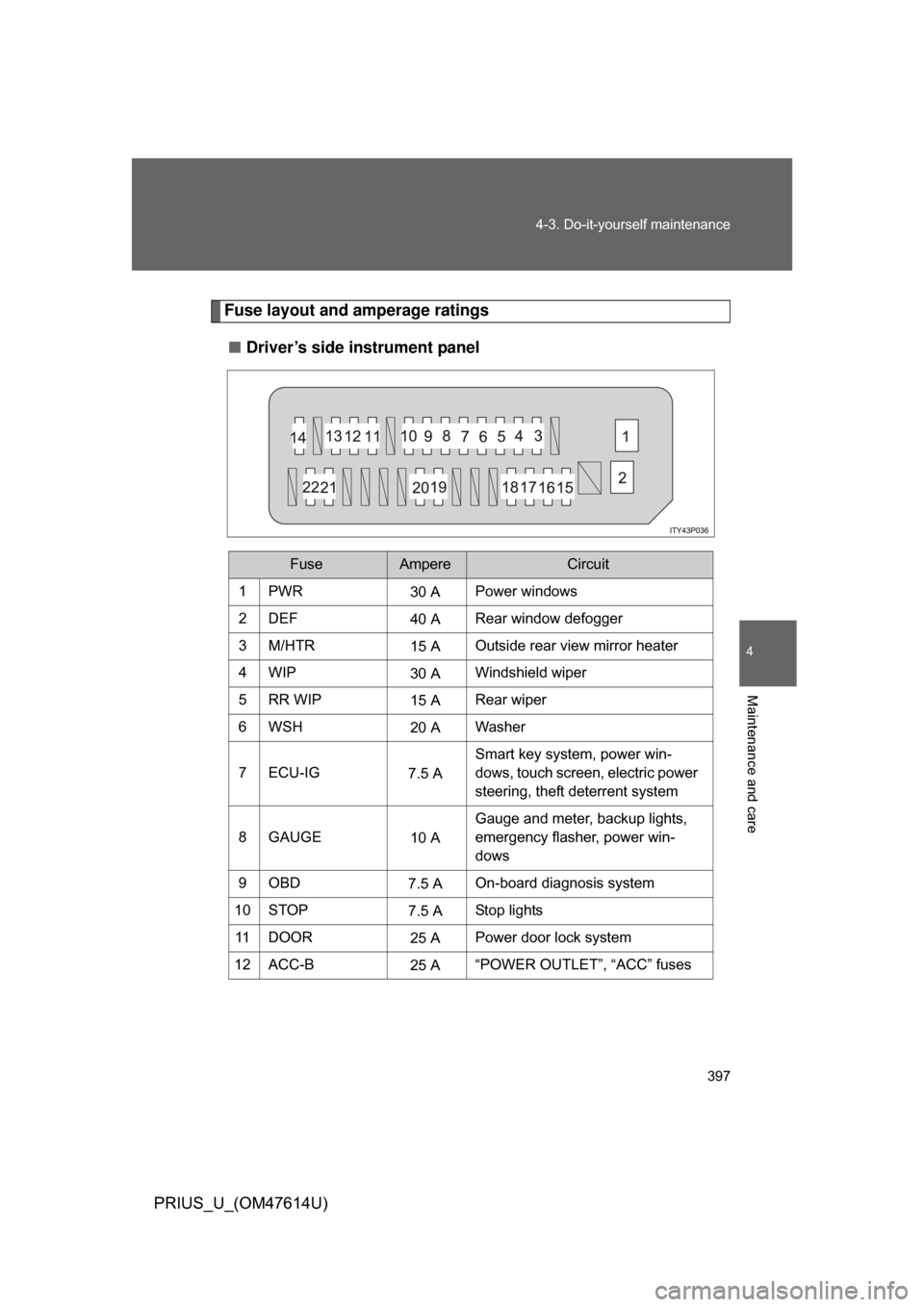
Fuse layout and amperage ratings
■ Driver’s side instrument panel
FuseAmpereCircuit
1PWR30 APower windows
2DEF 40 ARear window defogger
3M/HTR 15 AOutside rear view mirror heater
4WIP 30 AWindshield wiper
5RR WIP 15 ARear wiper
6WSH 20 AWasher
7 ECU-IG 7.5 ASmart key system, power win-
dows, touch screen, electric power
steering, theft deterrent system
8GAUGE 10 AGauge and meter, backup lights,
emergency flasher, power win-
dows
9OBD 7.5 AOn-board diagnosis system
10 STOP 7.5 AStop lights
11 D O O R 25 APower door lock system
12 ACC-B 25 A“POWER OUTLET”, “ACC” fuses
Page 398 of 508
398 4-3. Do-it-yourself maintenance
PRIUS_U_(OM47614U)
13 ECU-B15 ATouch screen, power windows, air
conditioning system
14 AM1 7.5 AHybrid system
15 TAIL 10 ATail lights, license plates light,
parking lights
16 PANEL 7.5 ATouch screen, clock, audio sys-
tem, instrument panel lights
17 A/C (HTR) 10 AAir conditioning system
18 FR DOOR 20 APower windows
19 PWR OUTLET 15 APower outlet
20 ACC 7.5 AAudio system, touch screen, clock
21 PWR OUTLET
FR
15 A
Power outlet
22 IGN 7.5 AHybrid system, hybrid vehicle
immobilizer system, SRS airbags
FuseAmpereCircuit