audio TOYOTA PRIUS 2009 2.G Repair Manual
[x] Cancel search | Manufacturer: TOYOTA, Model Year: 2009, Model line: PRIUS, Model: TOYOTA PRIUS 2009 2.GPages: 508, PDF Size: 6.84 MB
Page 263 of 508
263
3-3. Using the audio system
3
Interior features
PRIUS_U_(OM47614U)
Optimal use of the audio system (Vehicle without AUX adapter)
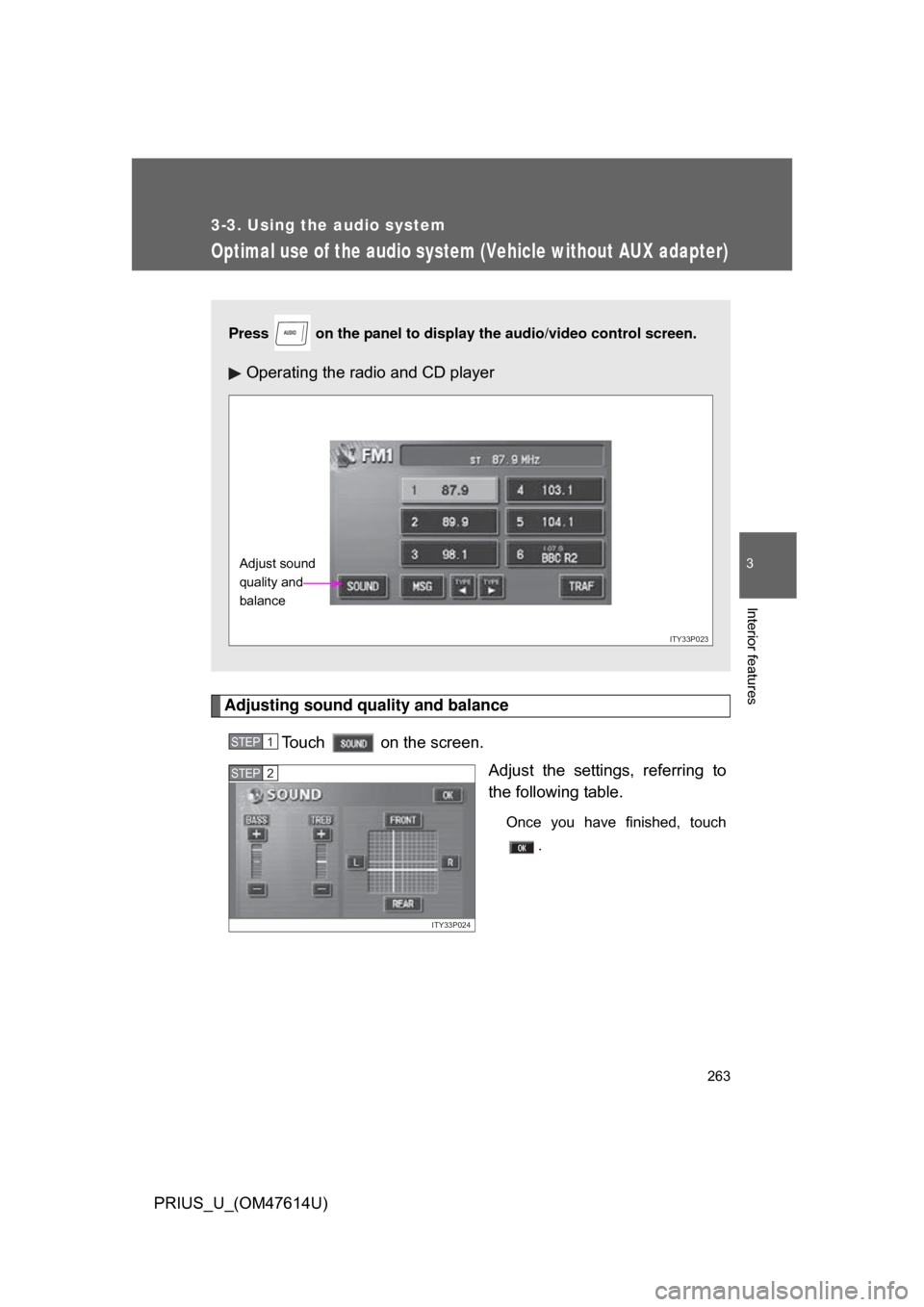
Adjusting sound quality and balanceTouch on the screen. Adjust the settings, referring to
the following table.
Once you have finished, touch.
Press on the panel to display the audio/video control screen.
Operating the radio and CD player
AUDIO
ITY33P023
Adjust sound
quality and
balance
STEP1
ITY33P024
STEP2
Page 264 of 508
264 3-3. Using the audio system
PRIUS_U_(OM47614U)
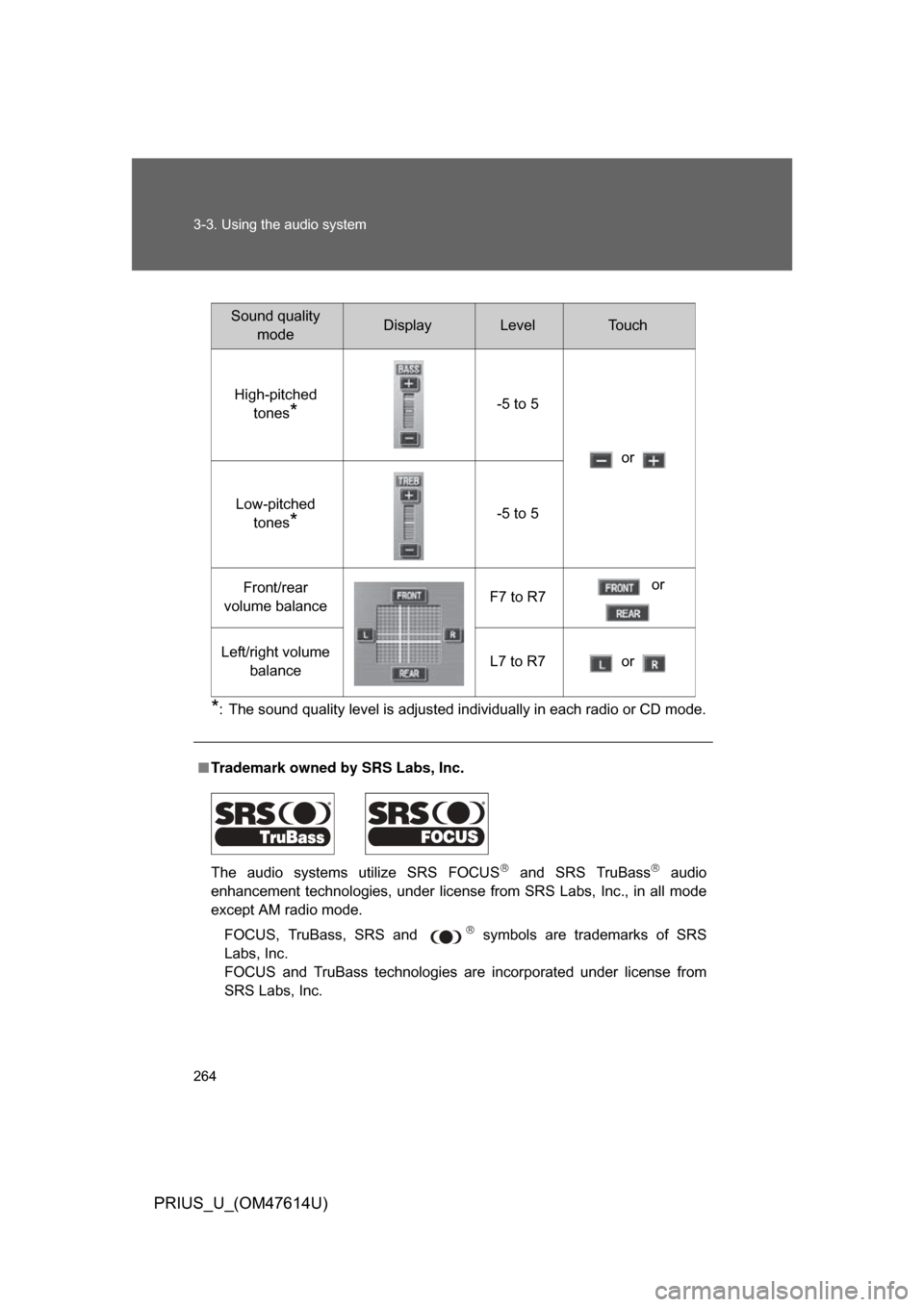
*: The sound quality level is adjusted individually in each radio or CD mode.
■Trademark owned by SRS Labs, Inc.
The audio systems utilize SRS FOCUS
and SRS TruBass audio
enhancement technologies, under license from SRS Labs, Inc., in all mode
except AM radio mode.
FOCUS, TruBass, SRS and
symbols are trademarks of SRS
Labs, Inc.
FOCUS and TruBass technologies are incorporated under license from
SRS Labs, Inc.
Sound quality modeDisplayLevelTo u c h
High-pitched tones
*-5 to 5
or
Low-pitched tones
*-5 to 5
Front/rear
volume balance F7 to R7 or
Left/right volume balance L7 to R7 or
Page 265 of 508
265
3-3. Using the audio system
3
Interior features
PRIUS_U_(OM47614U)
Using the AUX adapter
: If equipped
■Operating portable audio devices connected to the audio system
The volume can be adjusted using the vehicle’s audio controls. All other
adjustments must be made on the portable audio device itself.
■ When using a portable audio devi ce connected to the power outlet
Noise may occur during playback. Use the power source of the portable
audio device.
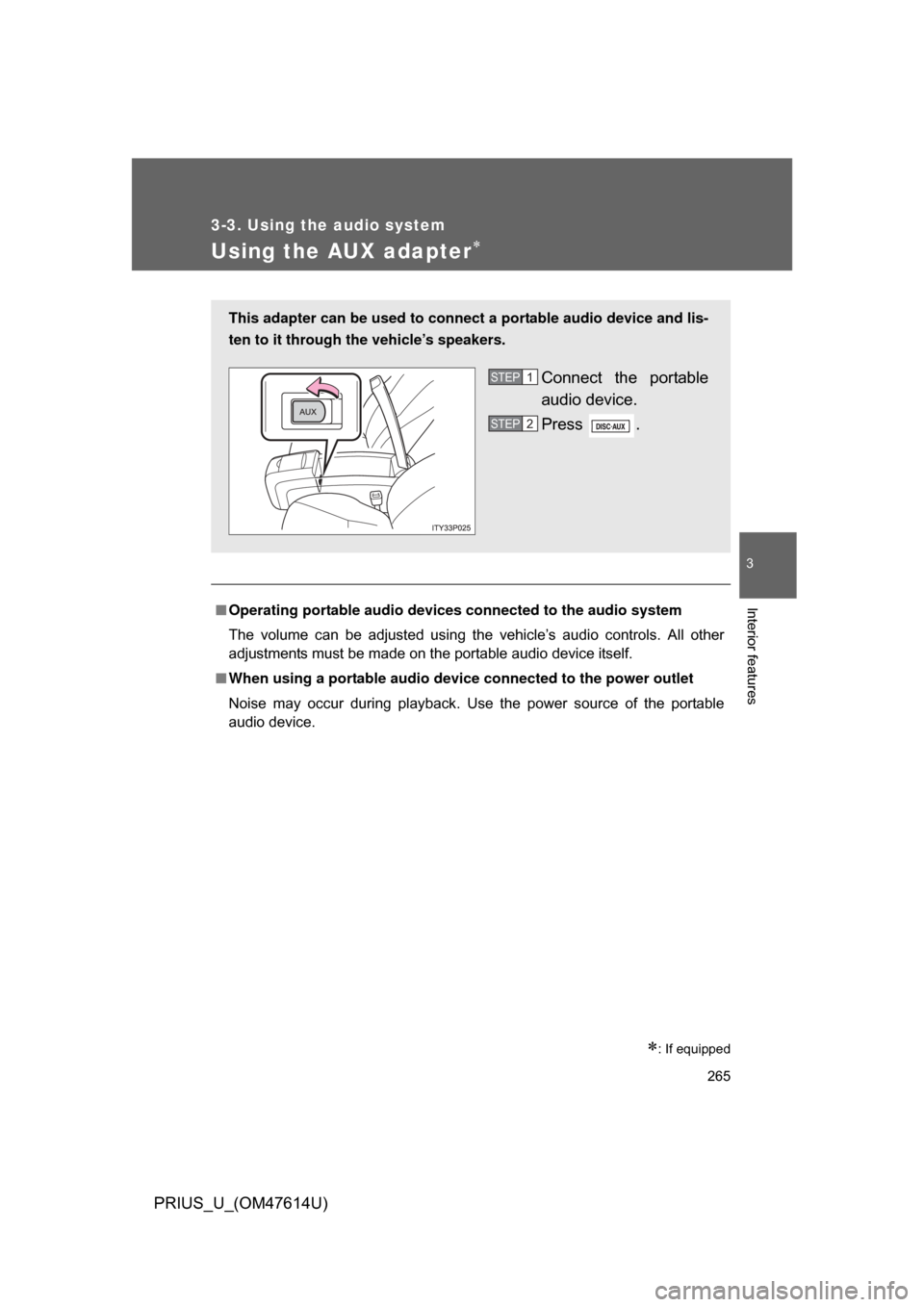
This adapter can be used to connect a portable audio device and lis-
ten to it through the vehicle’s speakers.
Connect the portable
audio device.
Press .STEP1
STEP2
Page 266 of 508
266
3-3. Using the audio system
PRIUS_U_(OM47614U)
Using the steering switches
Turning on the powerPress when the audio system is turned OFF.
The audio system can be turned OFF by holding the switch down for 1
second or more.
Changing the audio sourcePress when the audio system is turned ON. The audio source
changes as follows each time the bu tton is pressed. If a CD is not
inserted, that mode will be skipped.
FM (1, 2) CD player AM SAT (1, 2, 3)
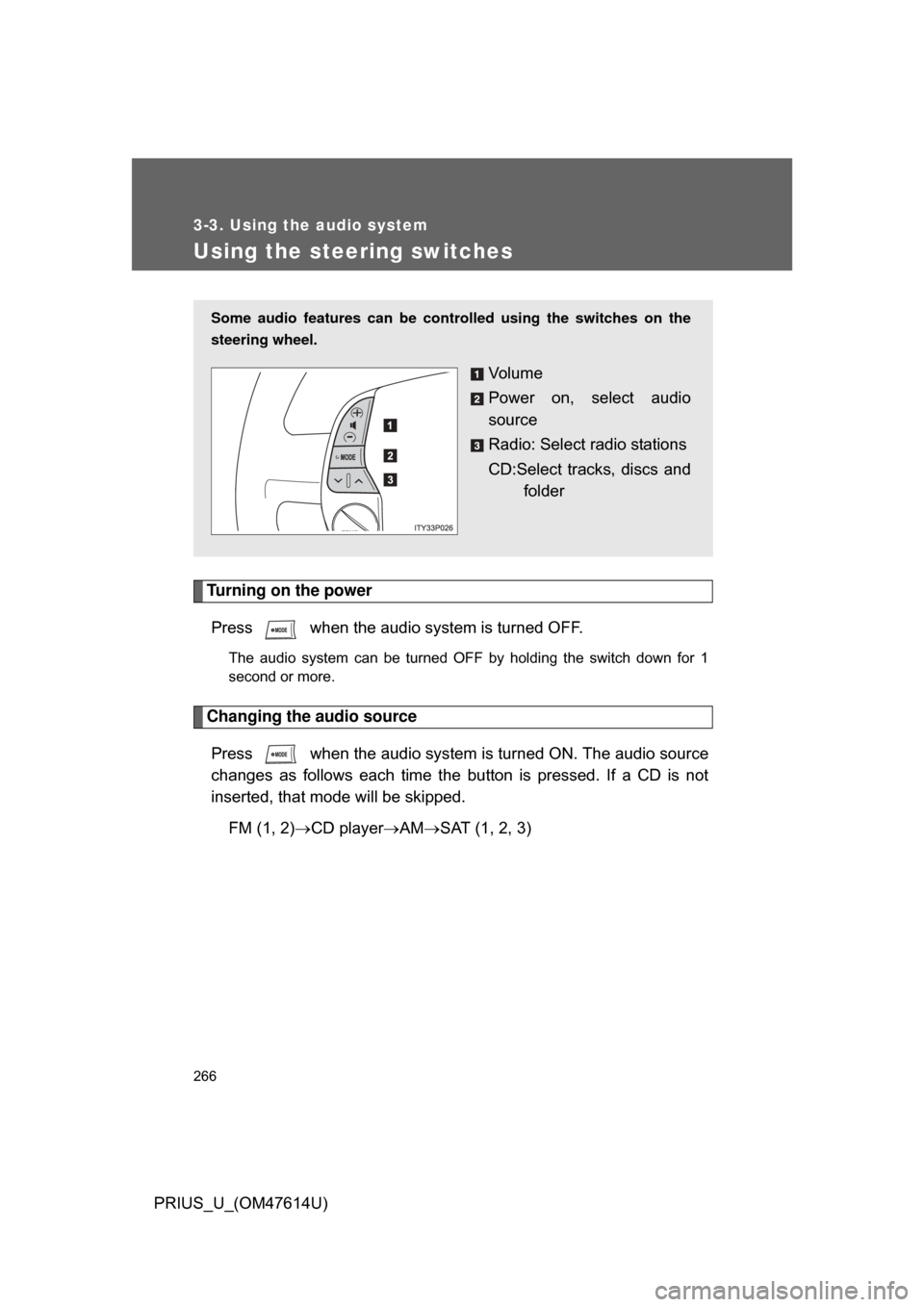
Some audio features can be controlled using the switches on the
steering wheel.
Vo l u m e
Power on, select audio
source
Radio: Select radio stations
CD:Select tracks, discs and
folder
Page 267 of 508
267
3-3. Using the audio system
3
Interior features
PRIUS_U_(OM47614U)
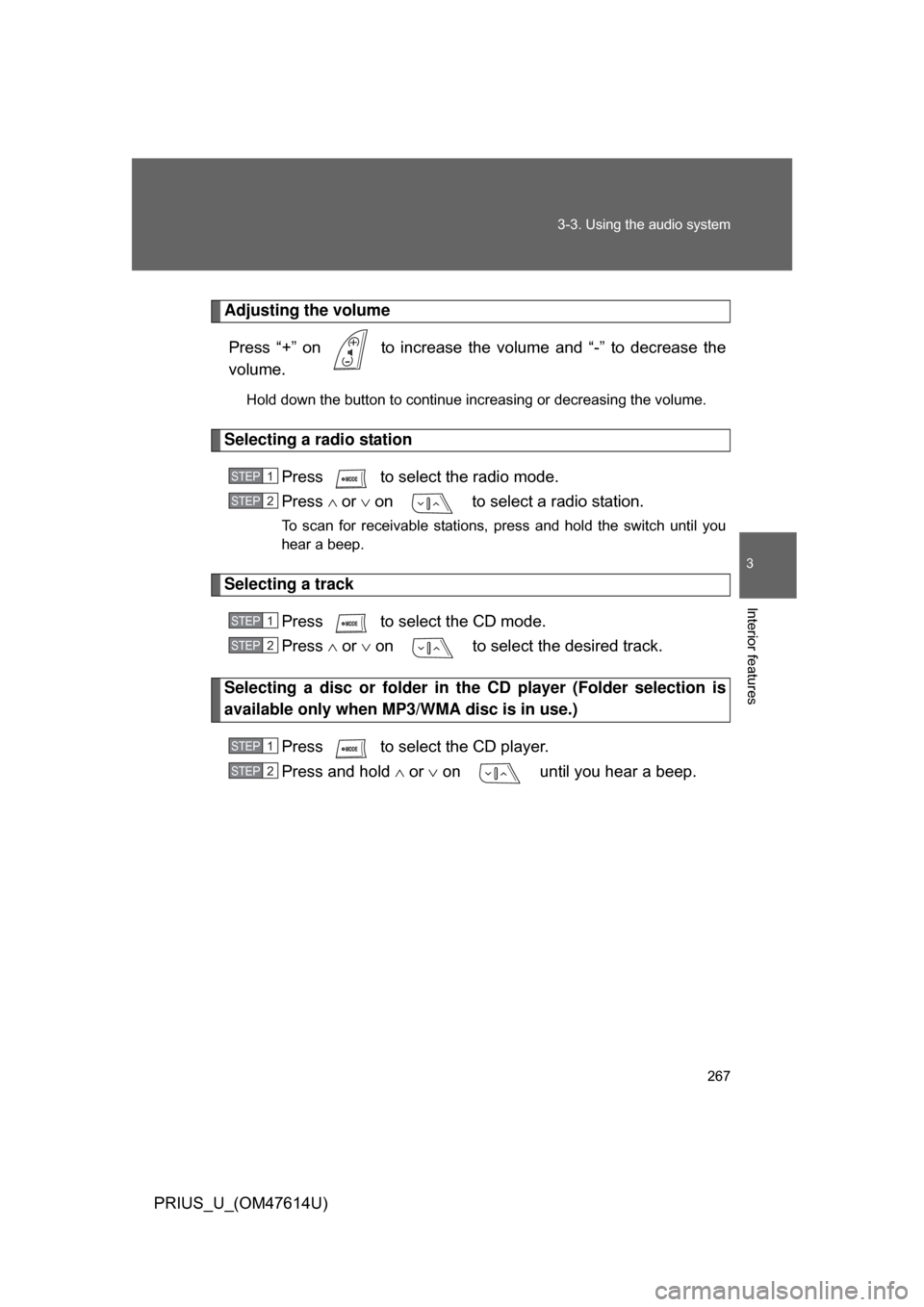
Adjusting the volume
Press “+” on to increase the vo lume and “-” to decrease the
volume.
Hold down the button to continue increasing or decreasing the volume.
Selecting a radio station
Press to select the radio mode.
Press or on to select a radio station.
To scan for receivable stations, press and hold the switch until you
hear a beep.
Selecting a track
Press to select the CD mode.
Press or on to select the desired track.
Selecting a disc or folder in th e CD player (Folder selection is
available only when MP3/WMA disc is in use.)
Press to select the CD player.
Press and hold or on until you hear a beep.
STEP1
STEP2
STEP1
STEP2
STEP1
STEP2
Page 268 of 508

268 3-3. Using the audio system
PRIUS_U_(OM47614U)
■Canceling automatic selection of a radio station
Push the same switch.
CAUTION
■To reduce the risk of an accident
Exercise care when operating the audio switches on the steering wheel.
Page 271 of 508
271
3-4. Using the hands-free
system (for cellular phone)
3
Interior features
PRIUS_U_(OM47614U)
■When using the hands-free system
● The audio system and voice guidance are muted when making a call.
● If both parties speak at the same time it may be difficult to hear.
● If the received call volume is overly loud, an echo may be heard.
● Try to face the microphone as much as possible when speaking.
● In the following circumstances it may be difficult to hear the other party.
• When driving on unsealed roads
• When driving at high speeds
• If the window is open
• If the air-conditioning is blowing directly on the microphone
• If the air-conditioning is set to high
■ Conditions under which th e system will not operate
● If using a mobile phone that does not support Bluetooth
®.
● If the mobile phone is switched off.
● If you are outside service range.
● If the mobile phone is not connected.
● If the mobile phone’s battery is low.
■ Bluetooth
® antenna
The antenna is built into the display. If the mobile phone is behind the seat or
in the console box, or touching or covered by metal objects, connection sta-
tus may deteriorate.
■ Battery charge/Signal status
This display may not correspond exactly with the mobile phone itself.
Page 346 of 508

346 4-1. Maintenance and care
PRIUS_U_(OM47614U)
NOTICE
■Cleaning detergents
Do not use the following types of detergent, as they may discolor the vehicle
interior or cause streaks or damage to painted surfaces.
● Non-seat portions: Organic substances such as benzine or gasoline, alka-
line or acidic solutions, dye, or bleach.
● Seats: Acidic solutions, such as thinner, benzine, or alcohol.
■ Preventing damage to leather surfaces
Observe the following precautions to avoid damage to and deterioration of
leather surfaces.
● Remove any dust or dirt on leather surfaces immediately.
● Do not expose the vehicle to direct sunlight for extended periods of time.
Park the vehicle in the shade, especially during summer.
● Do not place items made of vinyl, plastic, or that contain wax on the uphol-
stery, as they may stick to the leather surface if the vehicle interior heats
up significantly.
■ Water on the floor
Do not wash the vehicle floor with water.
Vehicle systems such as the audio system may be damaged if water comes
into contact with electrical components under the floor of the vehicle, and
may also cause the body to rust.
■ Cleaning the inside of the rear window
● Do not use glass cleaner to clean the rear window, as this may cause
damage to the rear window defogger heater wires. Use a cloth dampened
with lukewarm water to gently wipe the window clean. Wipe the window in
strokes running parallel to the heater wires.
● Be careful not to scratch or damage the heater wires or antenna.
Page 398 of 508

398 4-3. Do-it-yourself maintenance
PRIUS_U_(OM47614U)
13 ECU-B15 ATouch screen, power windows, air
conditioning system
14 AM1 7.5 AHybrid system
15 TAIL 10 ATail lights, license plates light,
parking lights
16 PANEL 7.5 ATouch screen, clock, audio sys-
tem, instrument panel lights
17 A/C (HTR) 10 AAir conditioning system
18 FR DOOR 20 APower windows
19 PWR OUTLET 15 APower outlet
20 ACC 7.5 AAudio system, touch screen, clock
21 PWR OUTLET
FR
15 A
Power outlet
22 IGN 7.5 AHybrid system, hybrid vehicle
immobilizer system, SRS airbags
FuseAmpereCircuit
Page 400 of 508

400 4-3. Do-it-yourself maintenance
PRIUS_U_(OM47614U)
*1: Vehicles with halogen headlights (low beam)
*2: Vehicles with discharge headlights (low beam)35 ABS-1 25 A Anti-lock brake system
36 ETCS 10 A Electronic throttle control system
37 BATT FAN 10 A Battery cooling fan
38 HAZ 10 A
Turn signal lights, emergency
flasher
39 DOME 15 A Audio system, interior lights, smart
key system, gauge and meter, turn
signal lights, luggage room light,
clock
40 ABS MAIN3 15 A Anti-lock brake system
41 ABS MAIN2 10 A Anti-lock brake system
42 ABS MAIN1 10 A Anti-lock brake system
43 FR FOG 15 A Fog lights
44 CHS W/P 10 A CHS W/P
45 AMP 30 A Audio system
46 PTC HTR2 30 A PTC heater
47 PTC HTR1 30 A PTC heater
48 CDS FAN 30 A Electric cooling fan
FuseAmpereCircuit