light TOYOTA PRIUS 2010 3.G Workshop Manual
[x] Cancel search | Manufacturer: TOYOTA, Model Year: 2010, Model line: PRIUS, Model: TOYOTA PRIUS 2010 3.GPages: 616, PDF Size: 10.45 MB
Page 182 of 616
182 2-2. Instrument cluster
PRIUS_U (OM47668U) U.S.A.
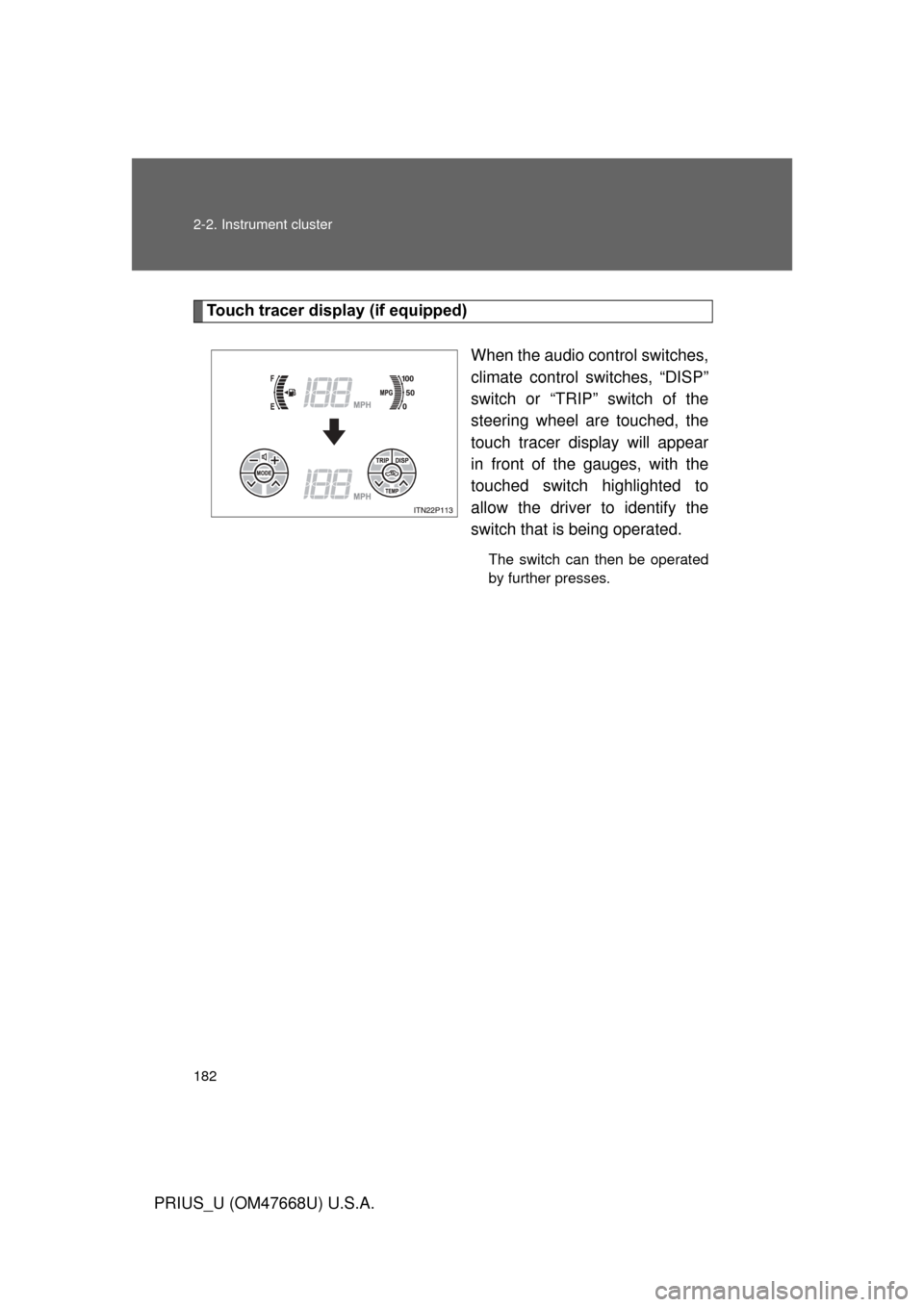
Touch tracer display (if equipped)When the audio control switches,
climate control switches, “DISP”
switch or “TRIP” switch of the
steering wheel are touched, the
touch tracer display will appear
in front of the gauges, with the
touched switch highlighted to
allow the driver to identify the
switch that is being operated.
The switch can then be operated
by further presses.
Page 184 of 616
184 2-2. Instrument cluster
PRIUS_U (OM47668U) U.S.A.
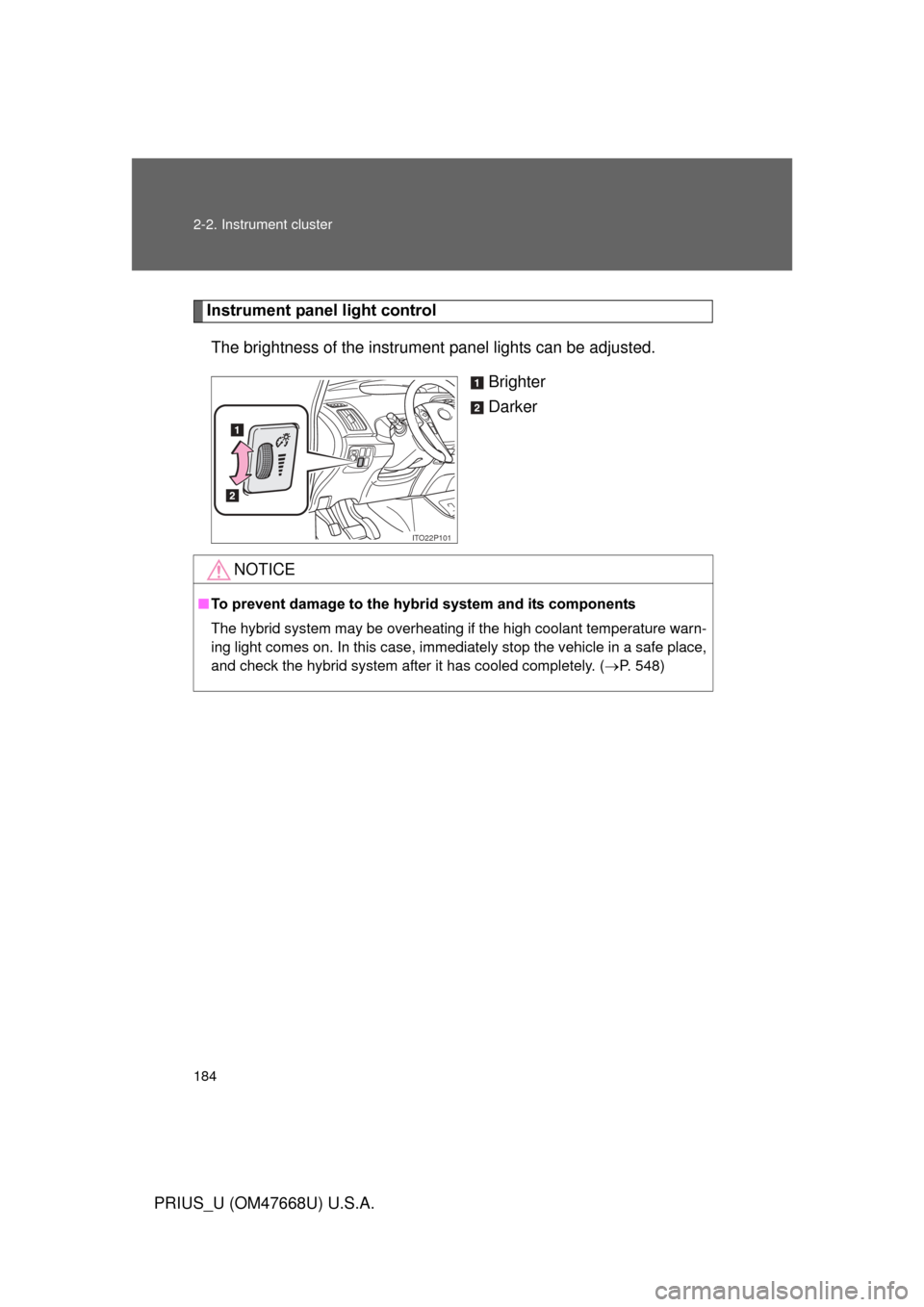
Instrument panel light controlThe brightness of the instrument panel lights can be adjusted.
Brighter
Darker
ITO22P101
NOTICE
■To prevent damage to the hybr id system and its components
The hybrid system may be overheating if the high coolant temperature warn-
ing light comes on. In this case, immediately stop the vehicle in a safe place,
and check the hybrid system after it has cooled completely. ( P. 548)
Page 185 of 616
185
2-2. Instrument cluster
2
When driving
PRIUS_U (OM47668U) U.S.A.
Indicators and warning lights
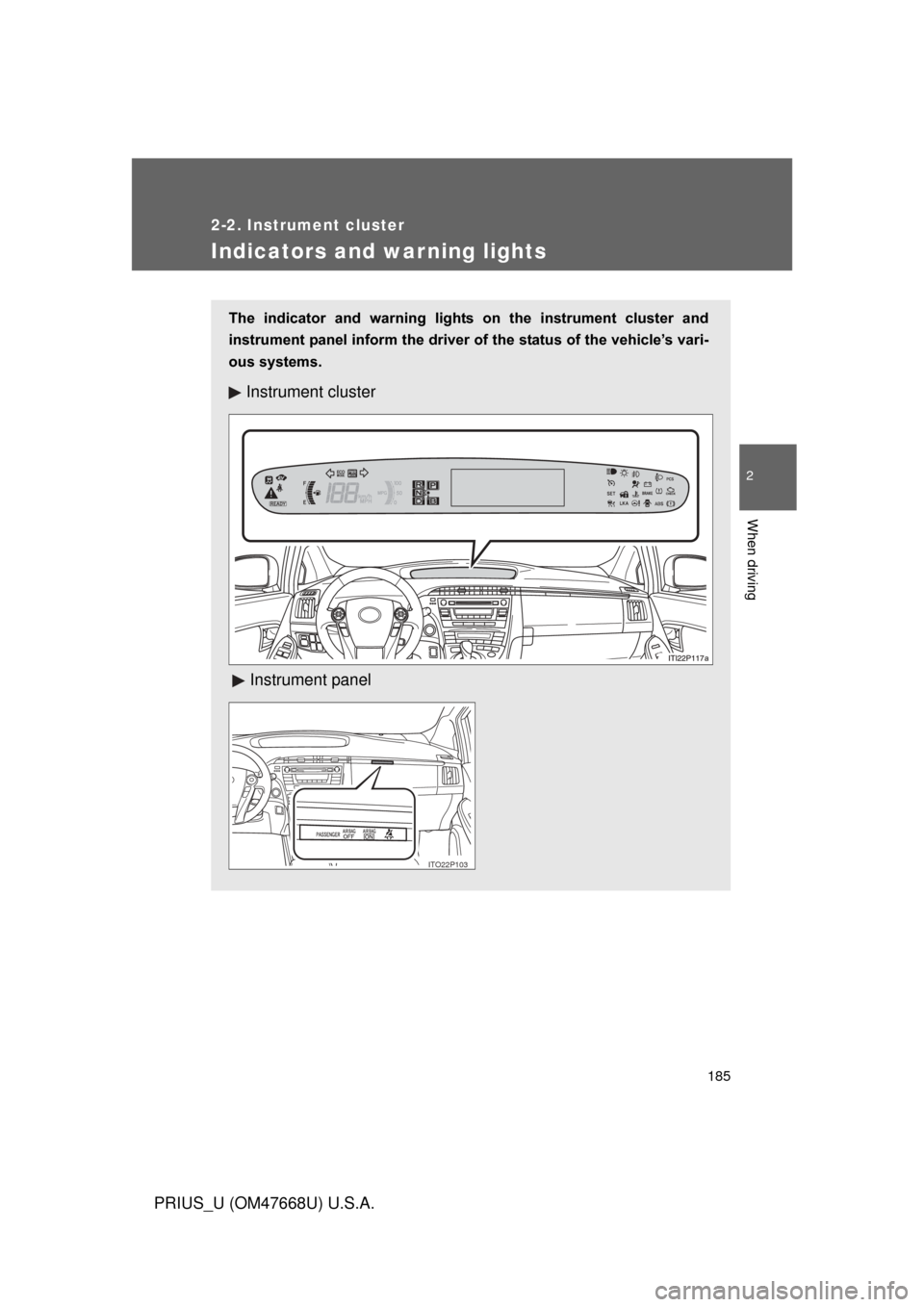
The indicator and warning lights on the instrument cluster and
instrument panel inform the driver of the status of the vehicle’s vari-
ous systems.
Instrument cluster
Instrument panel
ITO22P103
Page 186 of 616
186 2-2. Instrument cluster
PRIUS_U (OM47668U) U.S.A.
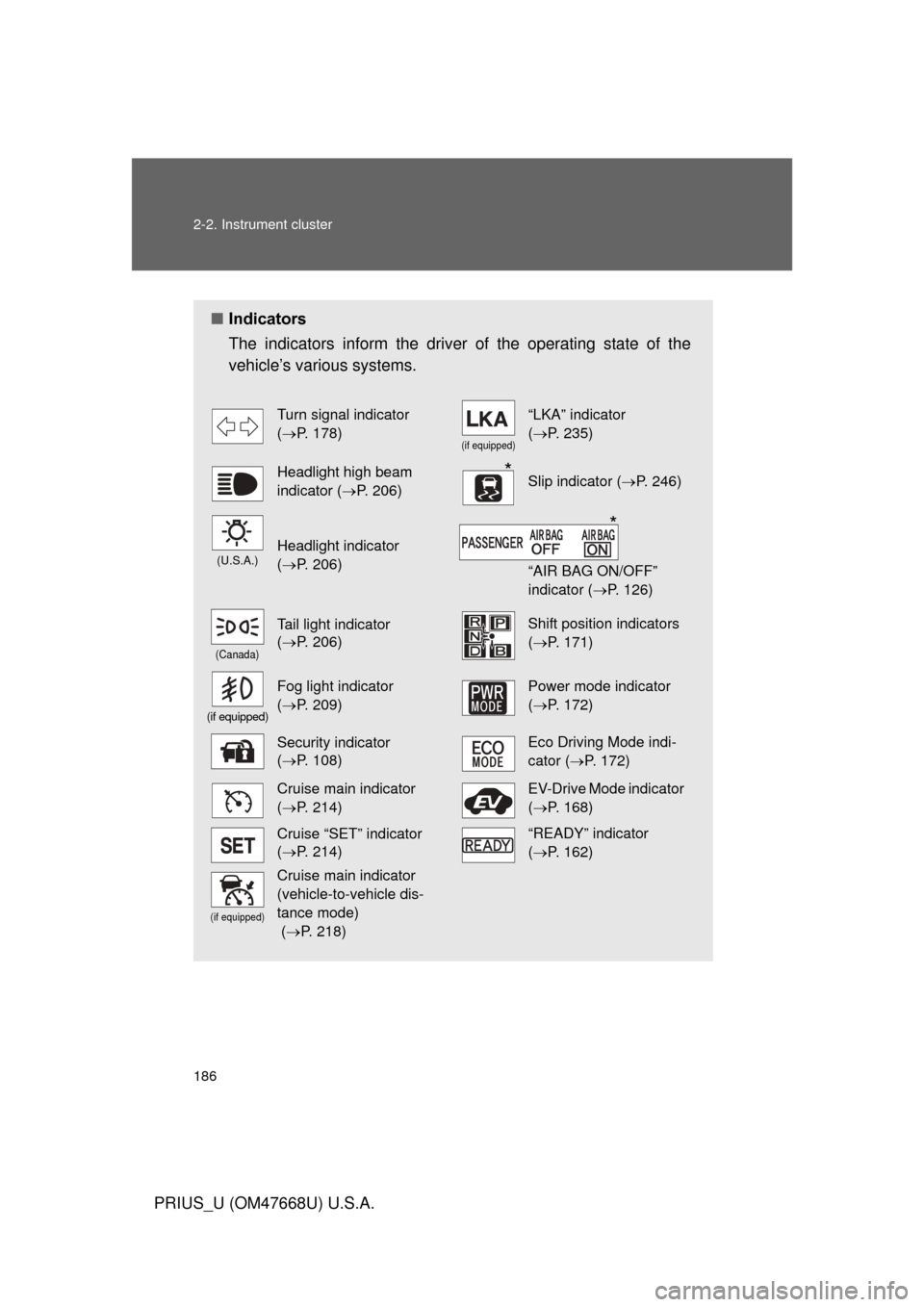
■Indicators
The indicators inform the driver of the operating state of the
vehicle’s various systems.
Turn signal indicator
( P. 178)
(if equipped)
“LKA” indicator
( P. 235)
Headlight high beam
indicator ( P. 206)Slip indicator ( P. 246)
(U.S.A.)Headlight indicator
( P. 206)
“AIR BAG ON/OFF”
indicator ( P. 126)
(Canada)
Tail light indicator
( P. 206) Shift position indicators
( P. 171)
(if equipped)
Fog light indicator
( P. 209) Power mode indicator
(P. 172)
Security indicator
( P. 108)Eco Driving Mode indi-
cator ( P. 172)
Cruise main indicator
( P. 214)EV-Drive Mode indicator
(P. 168)
Cruise “SET” indicator
( P. 214)“READY” indicator
( P. 162)
(if equipped)
Cruise main indicator
(vehicle-to-vehicle dis-
tance mode)
( P. 218)
*
*
Page 187 of 616
187
2-2. Instrument cluster
2
When driving
PRIUS_U (OM47668U) U.S.A.
CAUTION
■
If a safety system warning light does not come on
Should a safety system light such as the ABS and the SRS airbag warning
lights not come on when you start the hybrid system, this could mean that
these systems are not available to help protect you in an accident, which
could result in death or serious injury. Have the vehicle inspected by your
Toyota dealer immediately if this occurs.
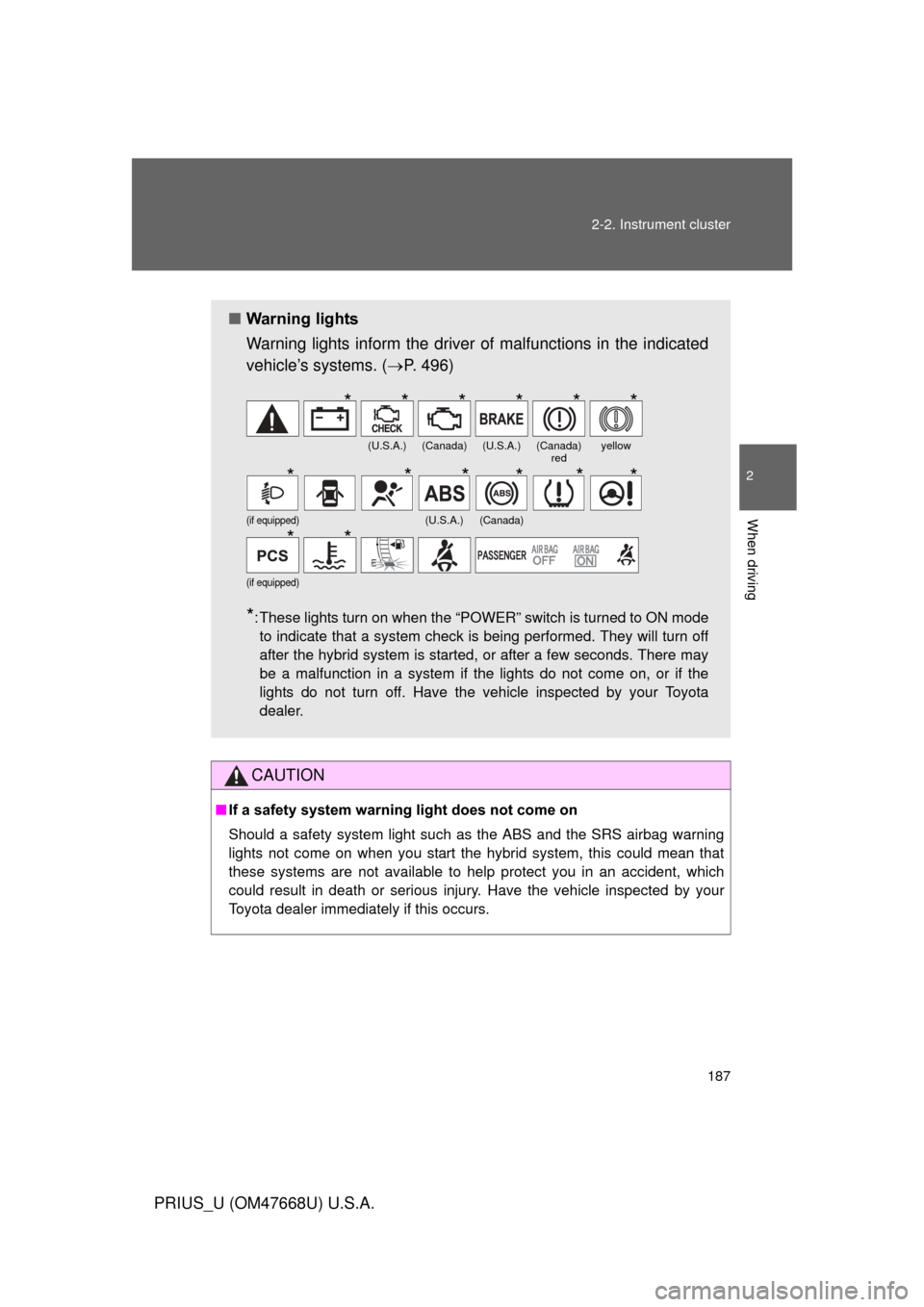
■ Warning lights
Warning lights inform the driver of malfunctions in the indicated
vehicle’s systems. ( P. 496)
*: These lights turn on when the “POWER” switch is turned to ON mode
to indicate that a system check is being performed. They will turn off
after the hybrid system is started, or after a few seconds. There may
be a malfunction in a system if the lights do not come on, or if the
lights do not turn off. Have the vehicle inspected by your Toyota
dealer.
(U.S.A.)(Canada)(U.S.A.)(Canada) redyellow
(if equipped)(U.S.A.)(Canada)
(if equipped)
******
******
**
Page 191 of 616
191
2-2. Instrument cluster
2
When driving
PRIUS_U (OM47668U) U.S.A.
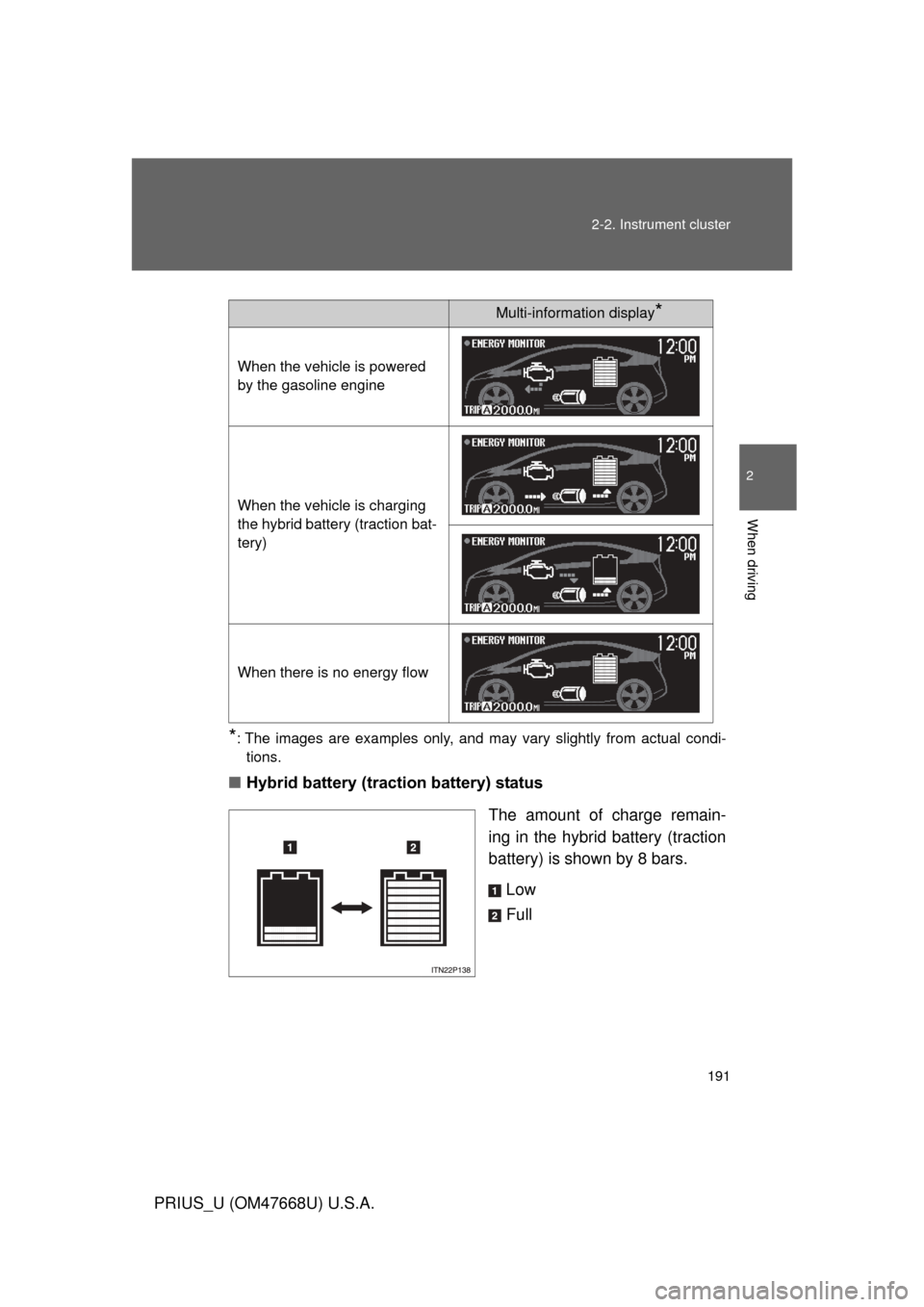
*: The images are examples only, and may vary slightly from actual condi-
tions.
■ Hybrid battery (traction battery) status
The amount of charge remain-
ing in the hybrid battery (traction
battery) is shown by 8 bars.Low
Full
Multi-information display*
When the vehicle is powered
by the gasoline engine
When the vehicle is charging
the hybrid battery (traction bat-
tery)
When there is no energy flow
Page 192 of 616
192 2-2. Instrument cluster
PRIUS_U (OM47668U) U.S.A.
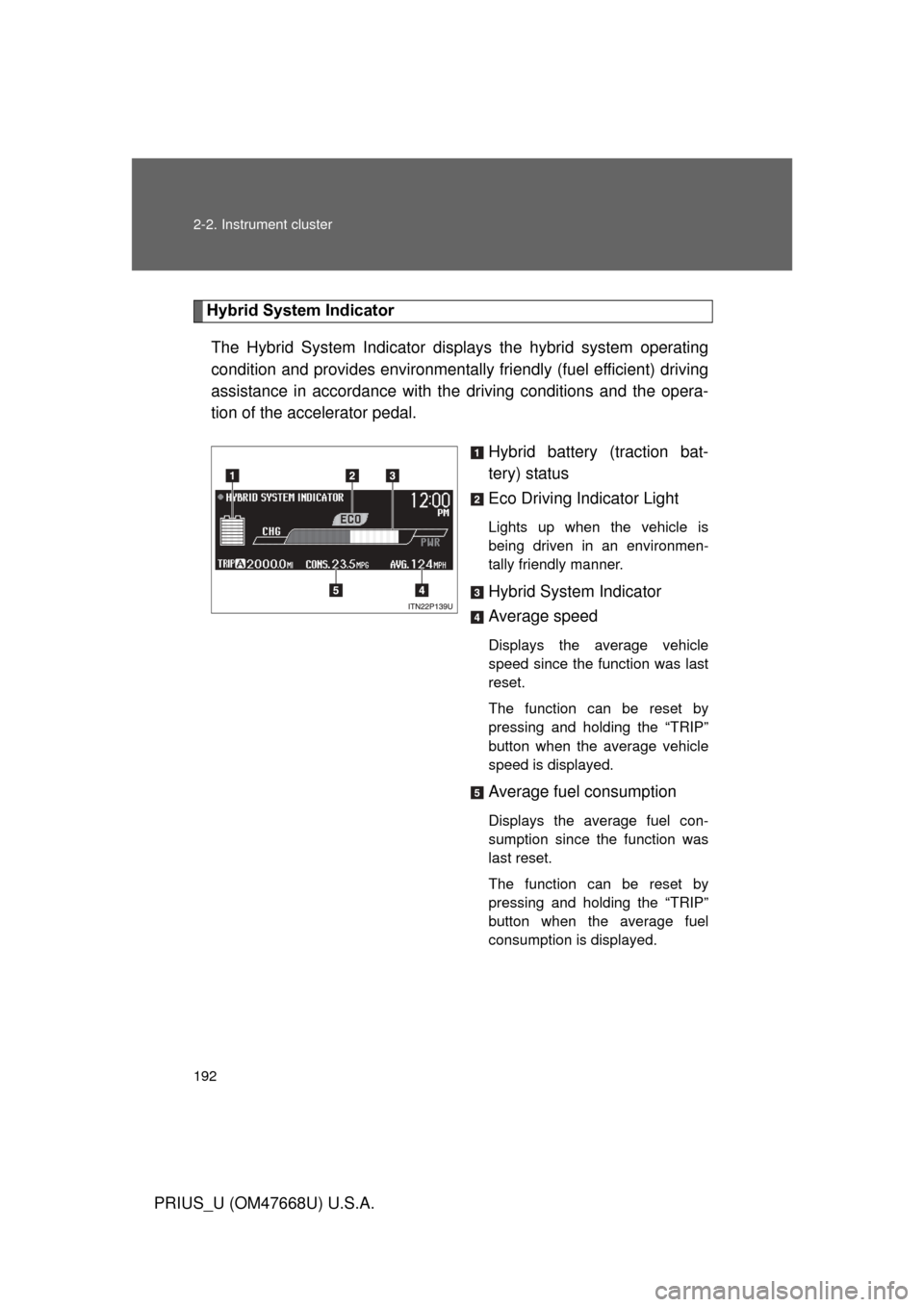
Hybrid System IndicatorThe Hybrid System Indicator displa ys the hybrid system operating
condition and provides environmentally friendly (fuel efficient) driving
assistance in accordance with the driving conditions and the opera-
tion of the accelerator pedal.
Hybrid battery (traction bat-
tery) status
Eco Driving Indicator Light
Lights up when the vehicle is
being driven in an environmen-
tally friendly manner.
Hybrid System Indicator
Average speed
Displays the average vehicle
speed since the function was last
reset.
The function can be reset by
pressing and holding the “TRIP”
button when the average vehicle
speed is displayed.
Average fuel consumption
Displays the average fuel con-
sumption since the function was
last reset.
The function can be reset by
pressing and holding the “TRIP”
button when the average fuel
consumption is displayed.
Page 193 of 616
193
2-2. Instrument cluster
2
When driving
PRIUS_U (OM47668U) U.S.A.
■
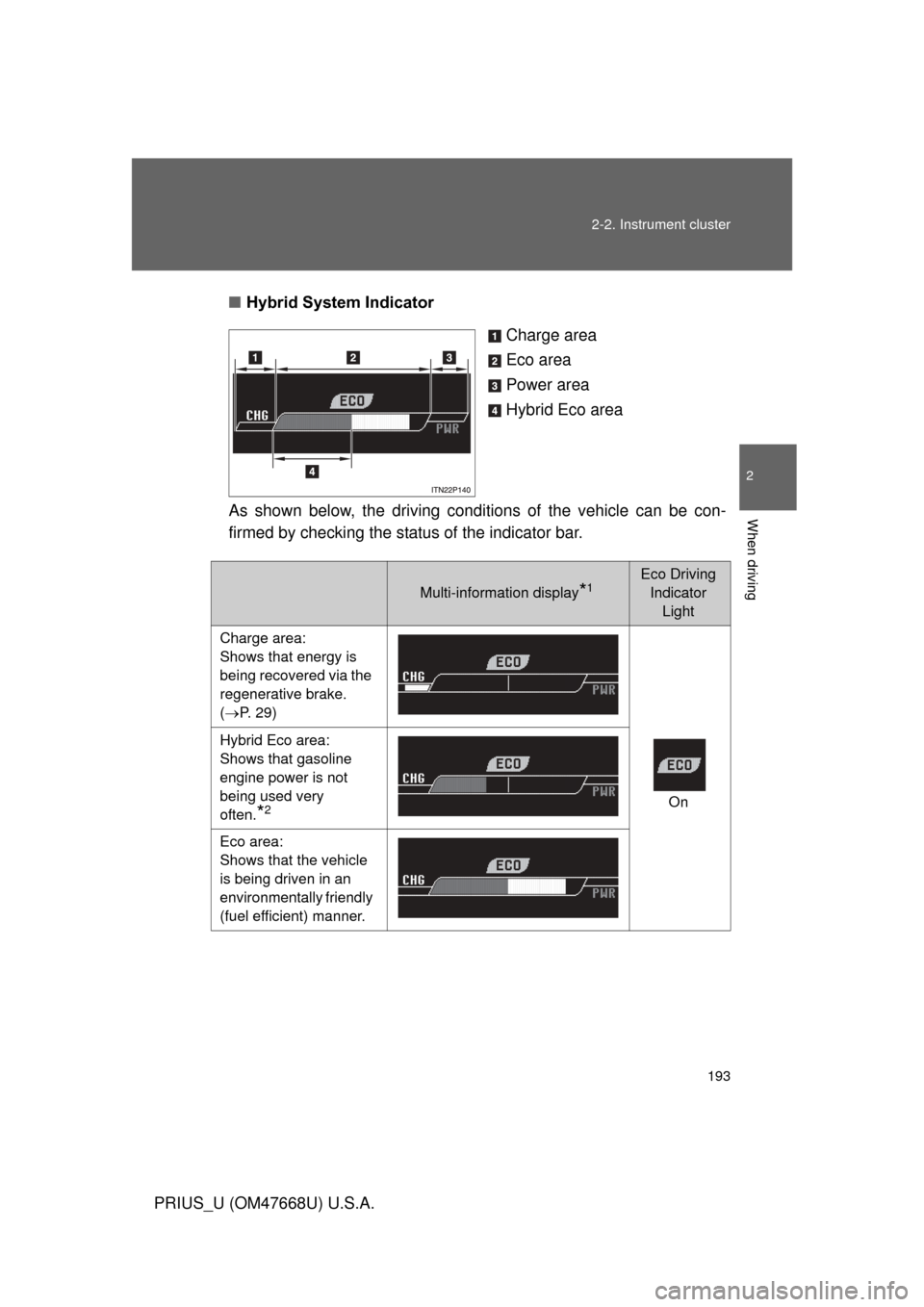
Hybrid System Indicator
Charge area
Eco area
Power area
Hybrid Eco area
As shown below, the driving condit ions of the vehicle can be con-
firmed by checking the status of the indicator bar.
Multi-information display*1Eco Driving Indicator Light
Charge area:
Shows that energy is
being recovered via the
regenerative brake.
( P. 29)
On
Hybrid Eco area:
Shows that gasoline
engine power is not
being used very
often.
*2
Eco area:
Shows that the vehicle
is being driven in an
environmentally friendly
(fuel efficient) manner.
Page 194 of 616
194 2-2. Instrument cluster
PRIUS_U (OM47668U) U.S.A.
*1: The images are examples only, and may vary slightly from actual condi-tions.
*2: The gasoline engine will automatically stop and restart under various conditions.
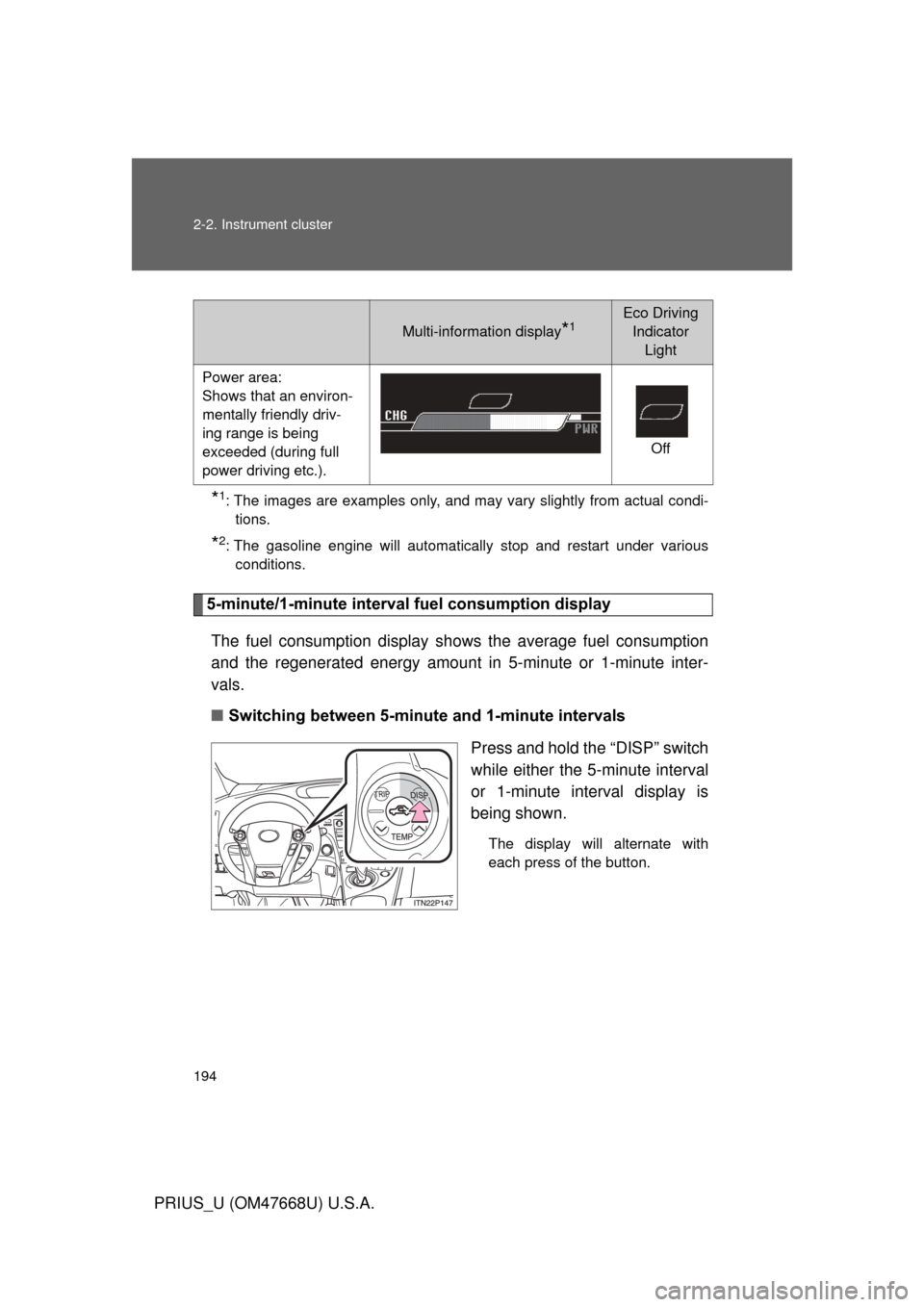
5-minute/1-minute interval fuel consumption display
The fuel consumption display shows the average fuel consumption
and the regenerated energy amount in 5-minute or 1-minute inter-
vals.
■ Switching between 5-minut e and 1-minute intervals
Press and hold the “DISP” switch
while either the 5-minute interval
or 1-minute interval display is
being shown.
The display will alternate with
each press of the button.
Multi-information display*1Eco Driving Indicator Light
Power area:
Shows that an environ-
mentally friendly driv-
ing range is being
exceeded (during full
power driving etc.). Off
Page 195 of 616
195
2-2. Instrument cluster
2
When driving
PRIUS_U (OM47668U) U.S.A.
■
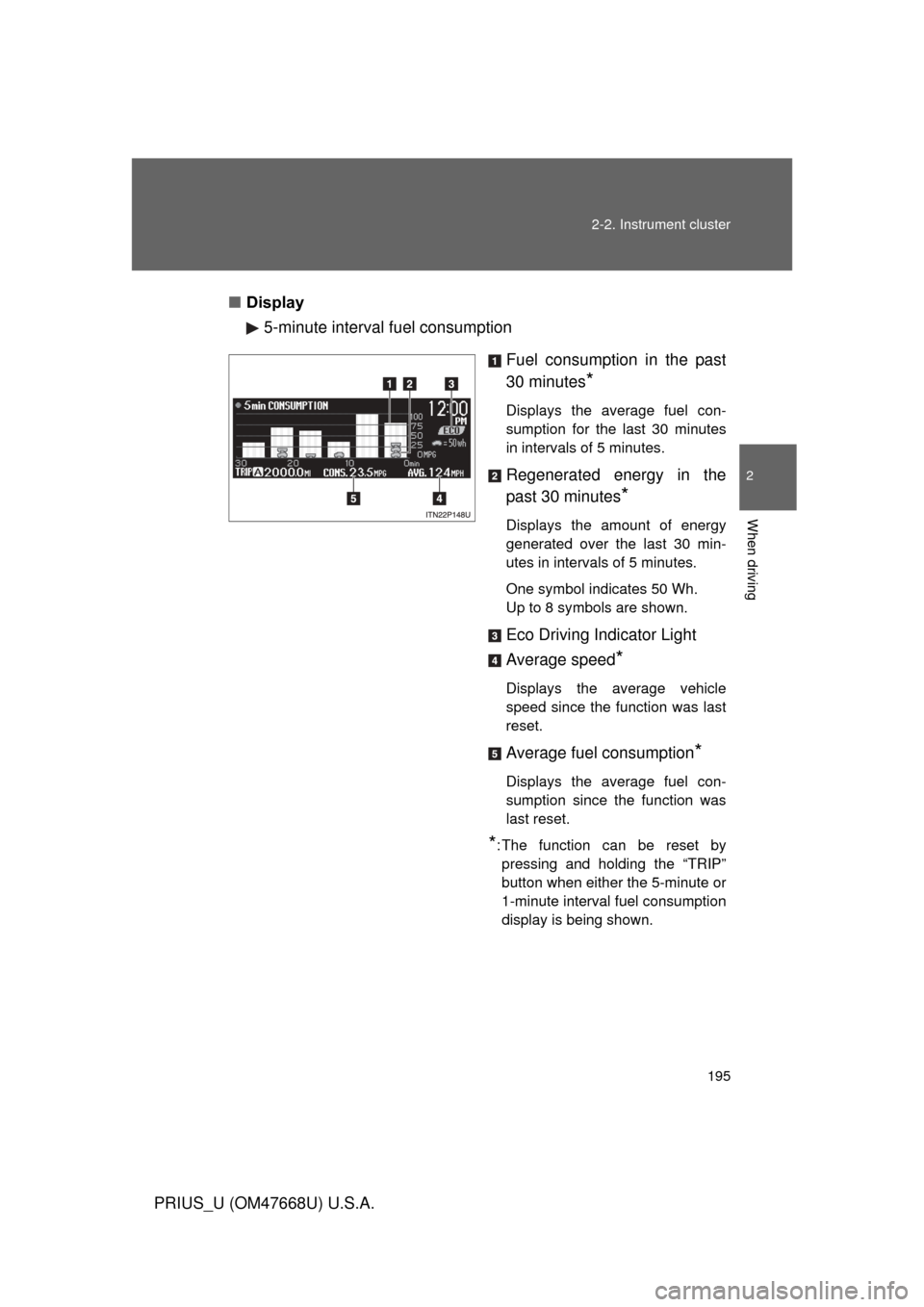
Display
5-minute interval fuel consumption
Fuel consumption in the past
30 minutes
*
Displays the average fuel con-
sumption for the last 30 minutes
in intervals of 5 minutes.
Regenerated energy in the
past 30 minutes
*
Displays the amount of energy
generated over the last 30 min-
utes in intervals of 5 minutes.
One symbol indicates 50 Wh.
Up to 8 symbols are shown.
Eco Driving Indicator Light
Average speed
*
Displays the average vehicle
speed since the function was last
reset.
Average fuel consumption*
Displays the average fuel con-
sumption since the function was
last reset.
*: The function can be reset by pressing and holding the “TRIP”
button when either the 5-minute or
1-minute interval fuel consumption
display is being shown.