light TOYOTA PRIUS 2010 3.G Repair Manual
[x] Cancel search | Manufacturer: TOYOTA, Model Year: 2010, Model line: PRIUS, Model: TOYOTA PRIUS 2010 3.GPages: 616, PDF Size: 10.45 MB
Page 200 of 616
200 2-2. Instrument cluster
PRIUS_U (OM47668U) U.S.A.
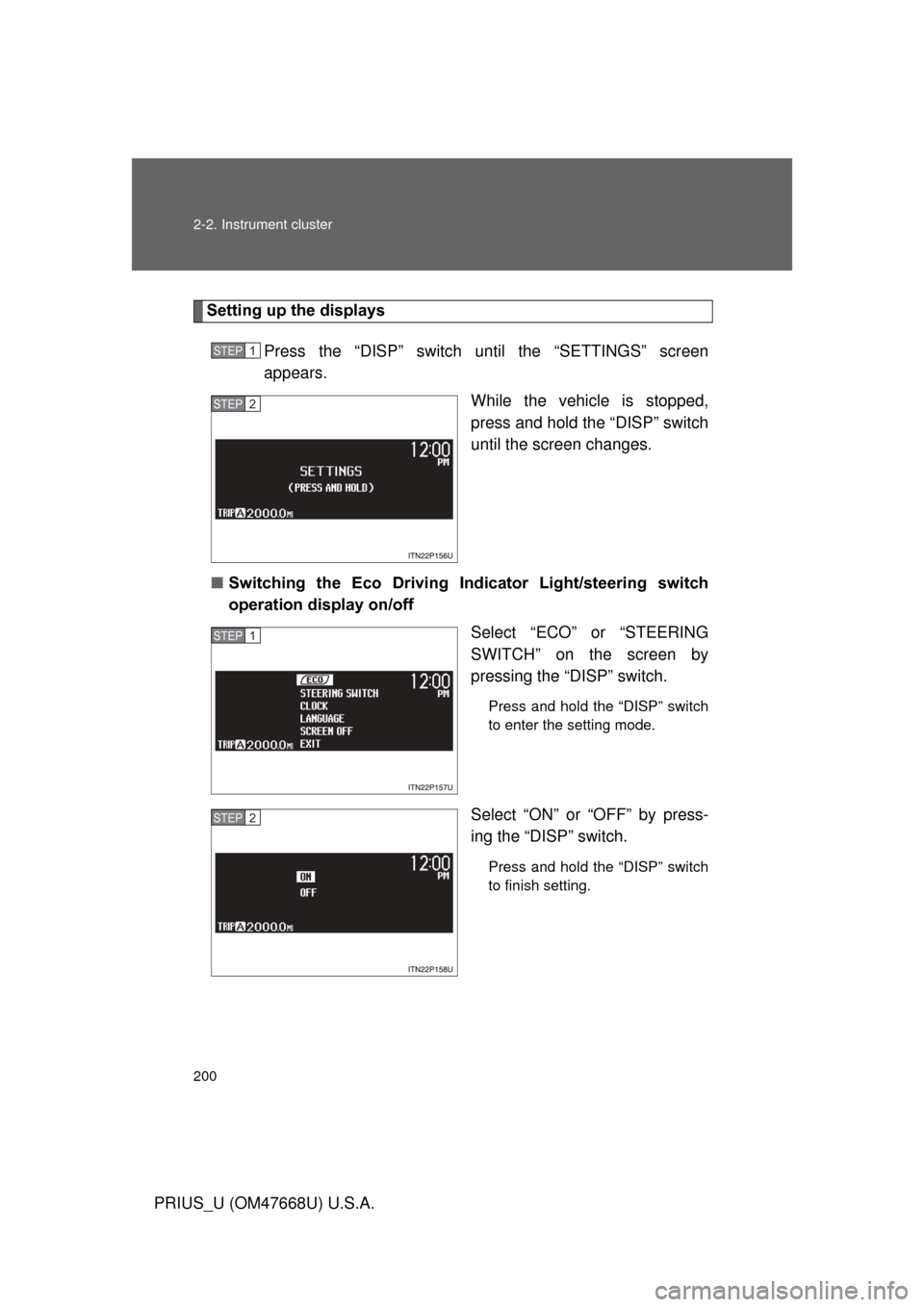
Setting up the displaysPress the “DISP” switch unt il the “SETTINGS” screen
appears.
While the vehicle is stopped,
press and hold the “DISP” switch
until the screen changes.
■ Switching the Eco Driving Indi cator Light/steering switch
operation display on/off
Select “ECO” or “STEERING
SWITCH” on the screen by
pressing the “DISP” switch.
Press and hold the “DISP” switch
to enter the setting mode.
Select “ON” or “OFF” by press-
ing the “DISP” switch.
Press and hold the “DISP” switch
to finish setting.
STEP1
STEP2
STEP1
STEP2
Page 204 of 616
204 2-2. Instrument cluster
PRIUS_U (OM47668U) U.S.A.■
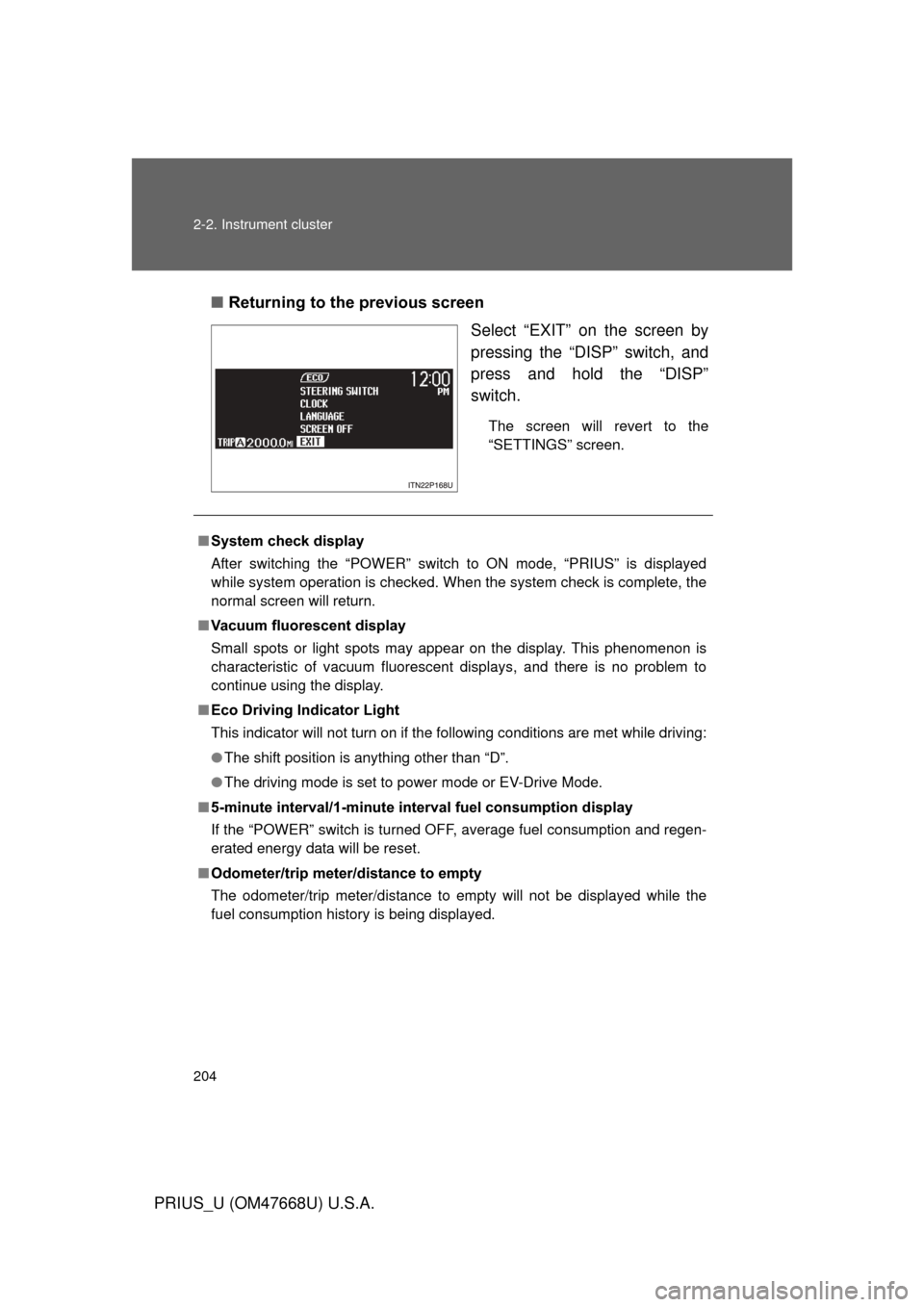
Returning to the previous screen
Select “EXIT” on the screen by
pressing the “DISP” switch, and
press and hold the “DISP”
switch.
The screen will revert to the
“SETTINGS” screen.
■System check display
After switching the “POWER” switch to ON mode, “PRIUS” is displayed
while system operation is checked. When the system check is complete, the
normal screen will return.
■ Vacuum fluorescent display
Small spots or light spots may appear on the display. This phenomenon is
characteristic of vacuum fluorescent displays, and there is no problem to
continue using the display.
■ Eco Driving Indicator Light
This indicator will not turn on if the following conditions are met while driving:
● The shift position is anything other than “D”.
● The driving mode is set to power mode or EV-Drive Mode.
■ 5-minute interval/1-minute inte rval fuel consumption display
If the “POWER” switch is turned OF F, average fuel consumption and regen-
erated energy data will be reset.
■ Odometer/trip meter/distance to empty
The odometer/trip meter/distance to empty will not be displayed while the
fuel consumption history is being displayed.
Page 206 of 616
206
PRIUS_U (OM47668U) U.S.A.
2-3. Operating the lights and windshield wipers
Headlight switch
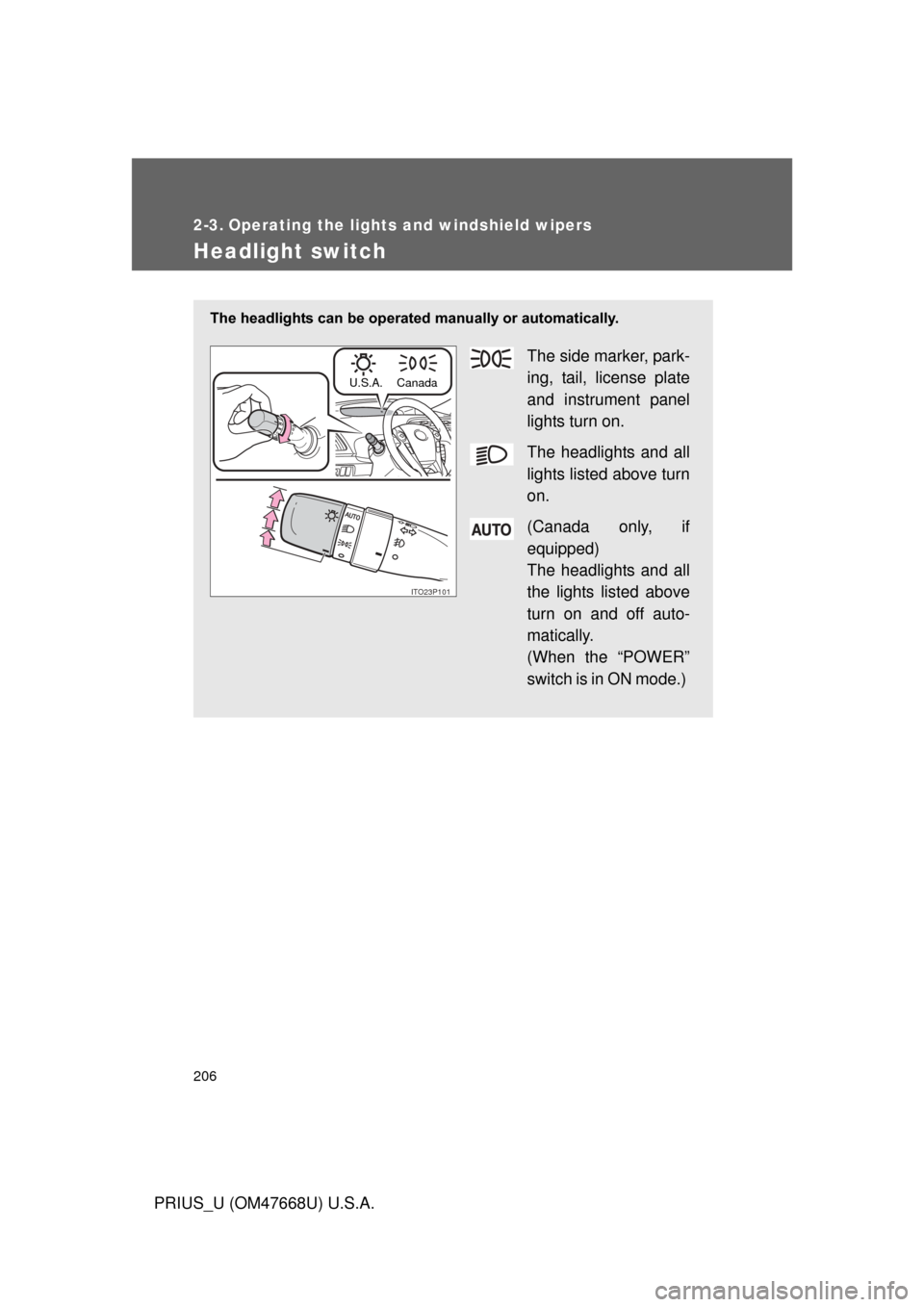
The headlights can be operated manually or automatically.
The side marker, park-
ing, tail, license plate
and instrument panel
lights turn on.
The headlights and all
lights listed above turn
on.
(Canada only, if
equipped)
The headlights and all
the lights listed above
turn on and off auto-
matically.
(When the “POWER”
switch is in ON mode.)
ITO23P101
U.S.A. Canada
Page 207 of 616
207
2-3. Operating the lights and windshield wipers
2
When driving
PRIUS_U (OM47668U) U.S.A.
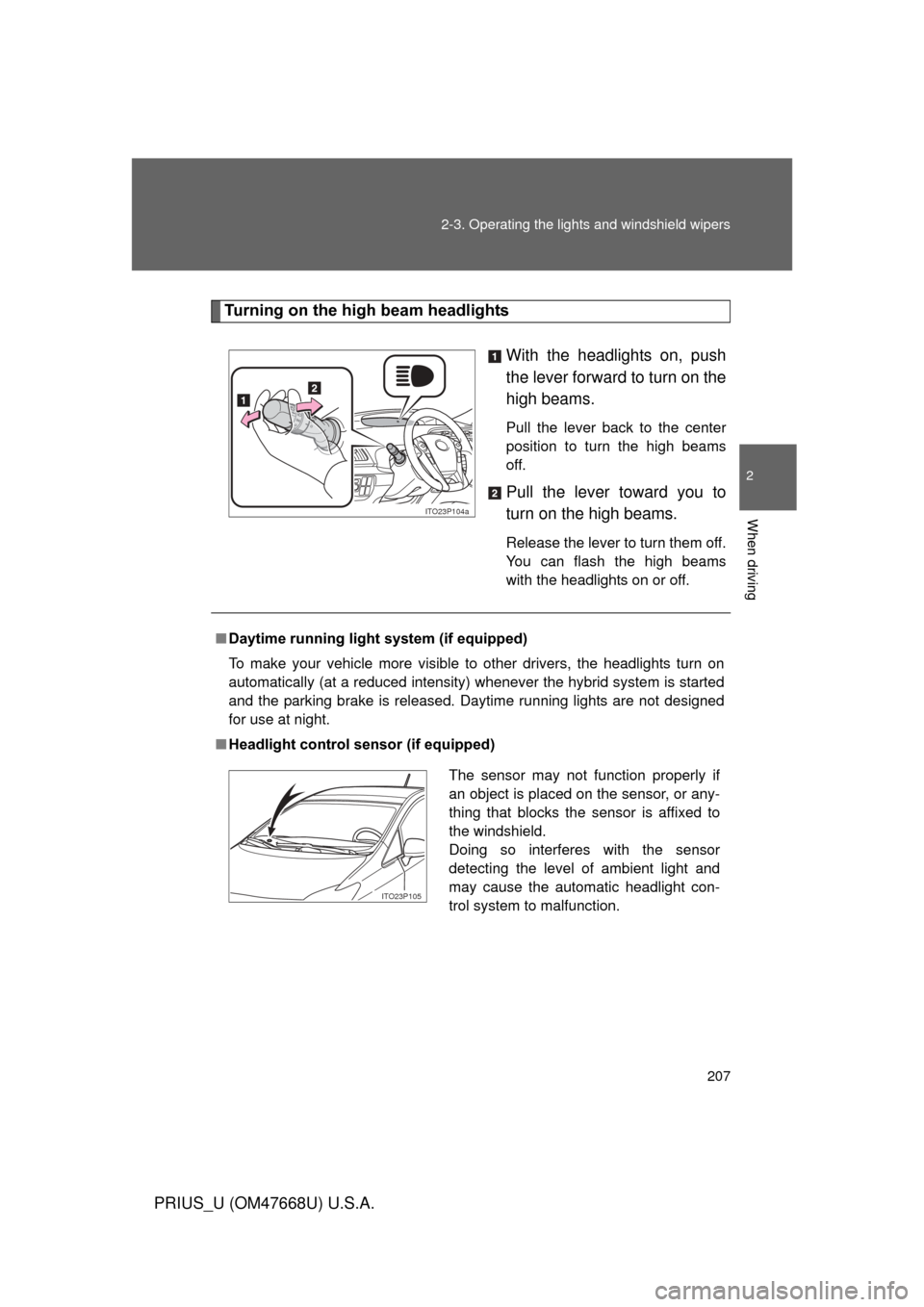
Turning on the high beam headlights
With the headlights on, push
the lever forward to turn on the
high beams.
Pull the lever back to the center
position to turn the high beams
off.
Pull the lever toward you to
turn on the high beams.
Release the lever to turn them off.
You can flash the high beams
with the headlights on or off.
ITO23P104a
■Daytime running light system (if equipped)
To make your vehicle more visible to other drivers, the headlights turn on
automatically (at a reduced intensity) whenever the hybrid system is started
and the parking brake is released. Daytime running lights are not designed
for use at night.
■ Headlight control sensor (if equipped)
The sensor may not function properly if
an object is placed on the sensor, or any-
thing that blocks the sensor is affixed to
the windshield.
Doing so interferes with the sensor
detecting the level of ambient light and
may cause the automatic headlight con-
trol system to malfunction.
ITO23P105
Page 208 of 616
208 2-3. Operating the lights and windshield wipers
PRIUS_U (OM47668U) U.S.A.
■Automatic light off system
● When the headlights are on: The headlights and tail lights turn off 30 sec-
onds after a door is opened and closed if the “POWER” switch has been
switched to ACCESSORY mode or OFF.
● When only the tail lights are on: The tail lights turn off automatically if the
“POWER” switch is switched to ACCESSORY mode or OFF and driver’s
door is opened.
To turn the lights on again, turn the “POWER” switch to ON mode, or turn the
light switch off once and then back to the
or position.
■ Automatic headlight leveling system (vehicles with LED headlights)
The level of the headlights is automatically adjusted according to the number
of passengers and the loading condition of the vehicle to ensure that the
headlights do not interfere with other road users.
■ If the indicator flashes... (vehicles with LED headlights)
It may indicate a malfunction in the system. Contact your Toyota dealer.
■ Customization that can be co nfigured at Toyota dealer
Settings (e.g. light sensor sensitivity) can be changed.
(Customizable features P. 587)
NOTICE
■To prevent 12 volt battery discharge
Do not leave the lights on longer than necessary if the hybrid system is not
operating.
Page 209 of 616
209
2-3. Operating the lights and windshield wipers
2
When driving
PRIUS_U (OM47668U) U.S.A.
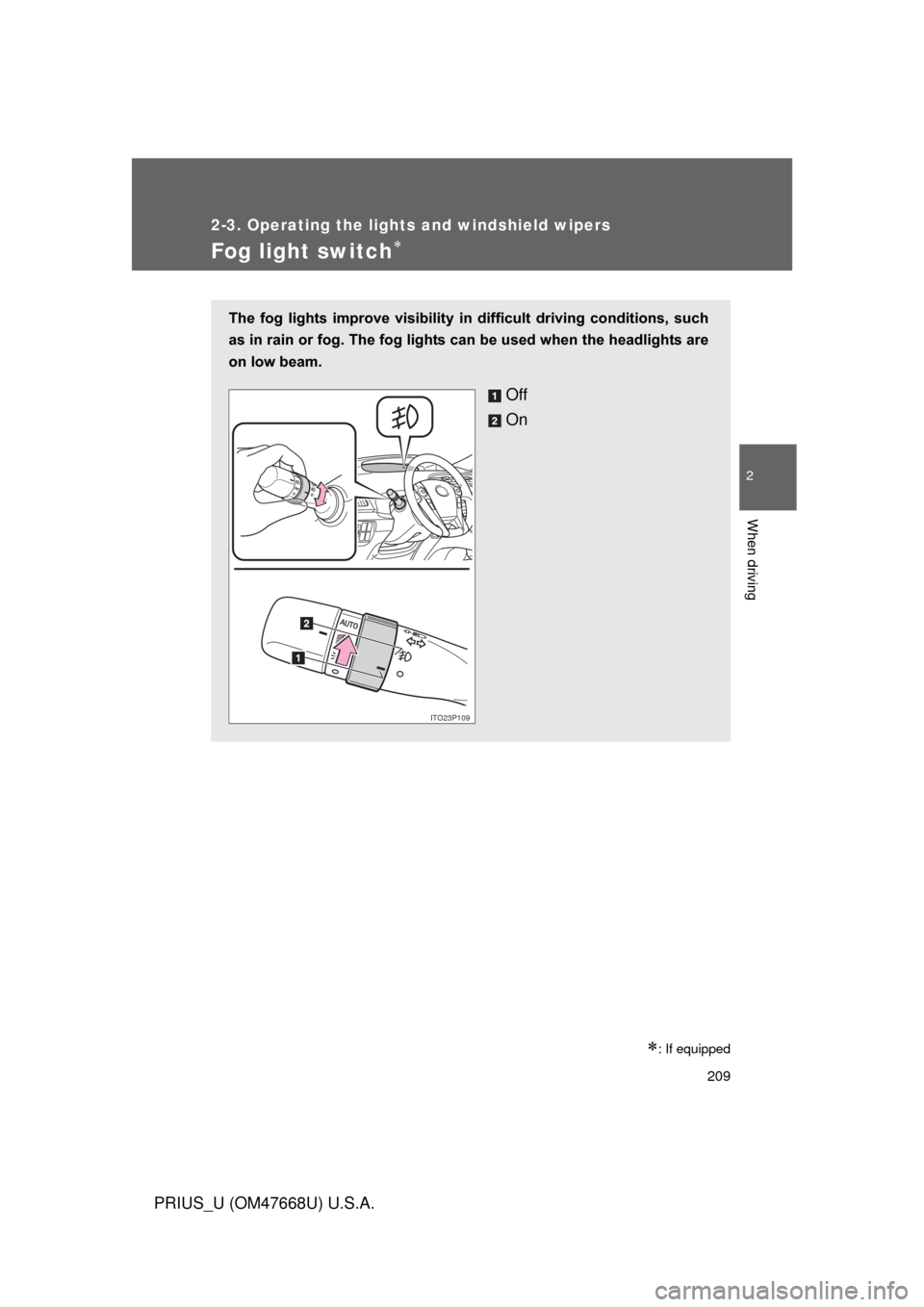
Fog light switch
: If equipped
The fog lights improve visibility in difficult driving conditions, such
as in rain or fog. The fog lights can be used when the headlights are
on low beam.
Off
On
ITO23P109
Page 210 of 616
210
2-3. Operating the lights and windshield wipers
PRIUS_U (OM47668U) U.S.A.
Windshield wipers and washer
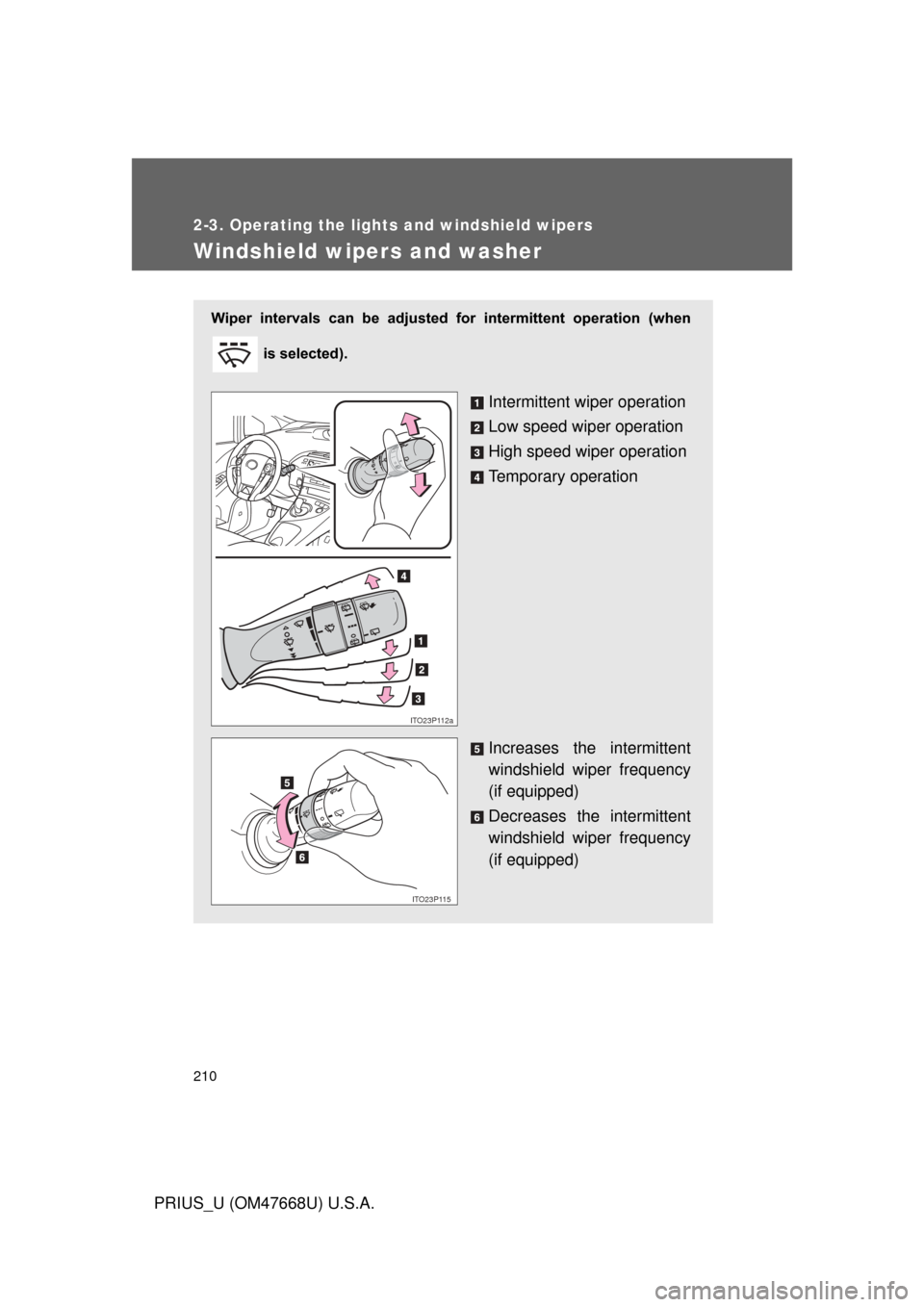
Wiper intervals can be adjusted for intermittent operation (when
is selected).
Intermittent wiper operation
Low speed wiper operation
High speed wiper operation
Temporary operation
Increases the intermittent
windshield wiper frequency
(if equipped)
Decreases the intermittent
windshield wiper frequency
(if equipped)
ITO23P112a
ITO23P115
Page 211 of 616
211
2-3. Operating the lights and windshield wipers
2
When driving
PRIUS_U (OM47668U) U.S.A.
■
The windshield wipers and washer can be operated when
The “POWER” switch is in ON mode.
■ If no windshield washer fluid sprays
Check that the washer nozzles are not blocked if there is washer fluid in the
windshield washer fluid reservoir.
NOTICE
■When the windshield is dry
Do not use the wipers, as they may damage the windshield.
■ When there is no washer fluid spray from the nozzle
Damage to the washer fluid pump may be caused if the lever is pulled
toward you and held continually.
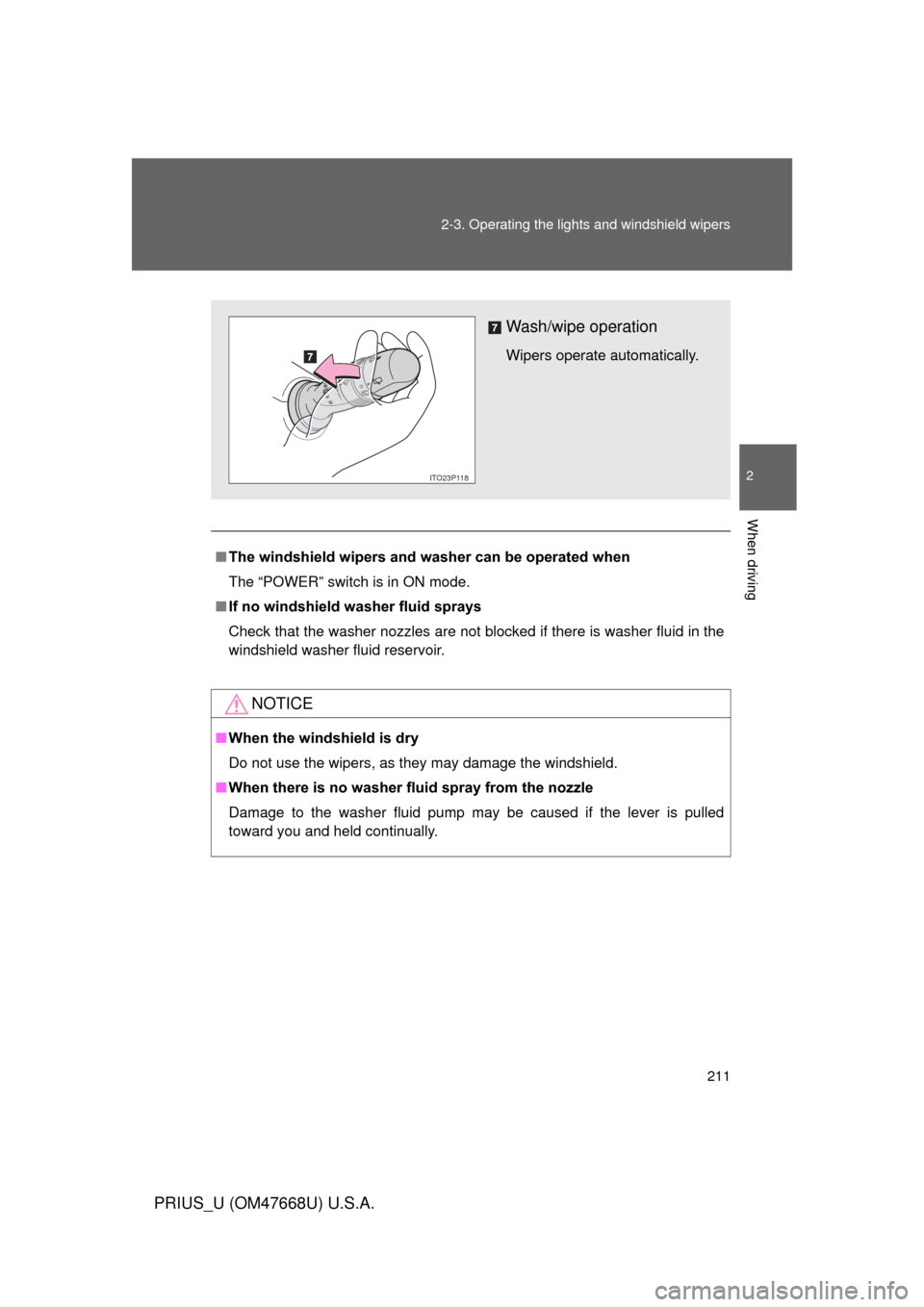
Wash/wipe operation
Wipers operate automatically.
ITO23P118
Page 212 of 616
212
2-3. Operating the lights and windshield wipers
PRIUS_U (OM47668U) U.S.A.
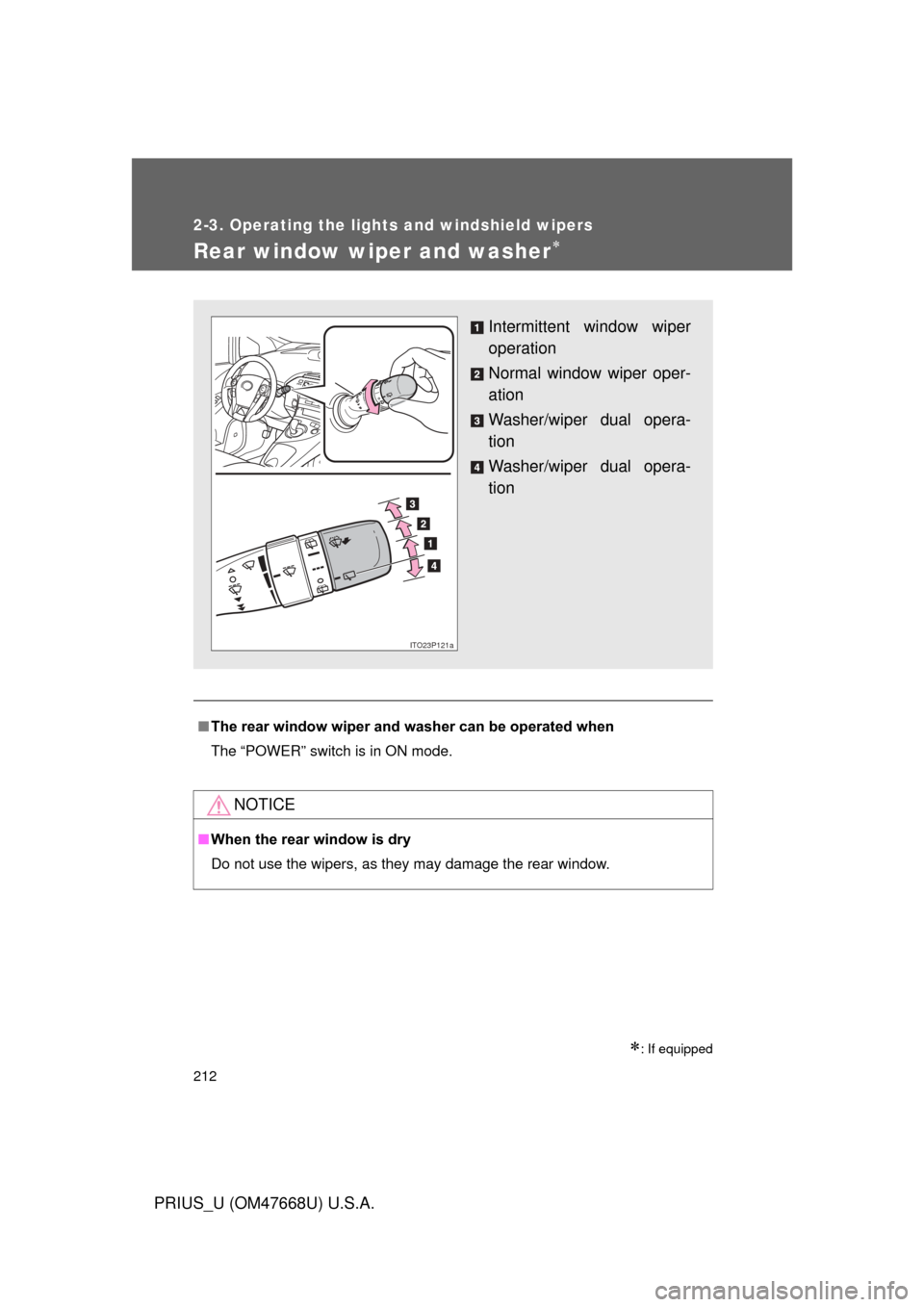
Rear window wiper and washer
: If equipped
■The rear window wiper and w asher can be operated when
The “POWER” switch is in ON mode.
NOTICE
■ When the rear window is dry
Do not use the wipers, as they may damage the rear window.
Intermittent window wiper
operation
Normal window wiper oper-
ation
Washer/wiper dual opera-
tion
Washer/wiper dual opera-
tion
ITO23P121a
Page 213 of 616
213
2-3. Operating the lights and windshield wipers
2
When driving
PRIUS_U (OM47668U) U.S.A.
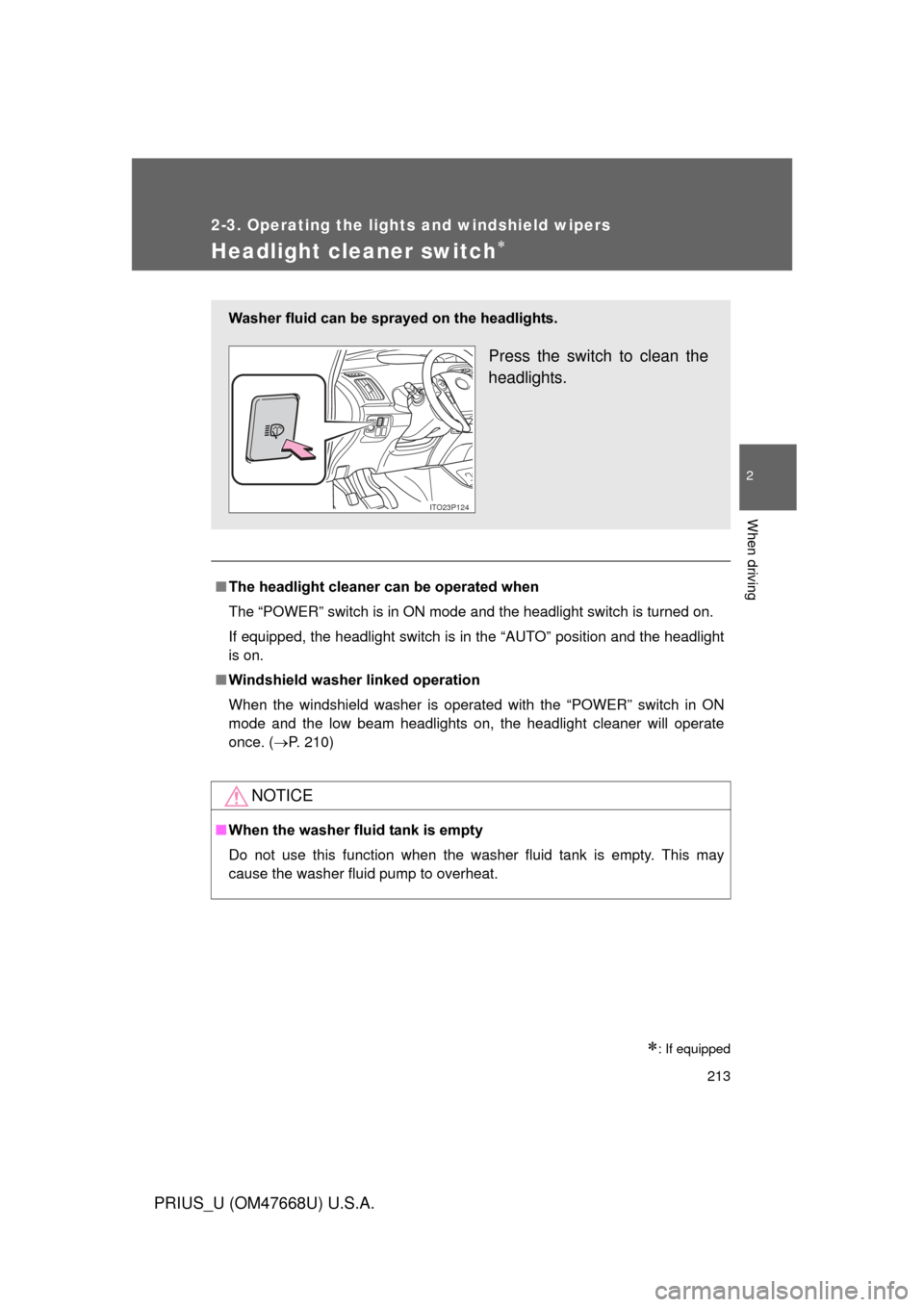
Headlight cleaner switch
: If equipped
■The headlight cleaner can be operated when
The “POWER” switch is in ON mode and the headlight switch is turned on.
If equipped, the headlight switch is in the “AUTO” position and the headlight
is on.
■ Windshield washer linked operation
When the windshield washer is operated with the “POWER” switch in ON
mode and the low beam headlights on, the headlight cleaner will operate
once. ( P. 210)
NOTICE
■When the washer fluid tank is empty
Do not use this function when the washer fluid tank is empty. This may
cause the washer fluid pump to overheat.
Washer fluid can be sprayed on the headlights.
Press the switch to clean the
headlights.
ITO23P124