reset TOYOTA PRIUS 2010 3.G Owners Manual
[x] Cancel search | Manufacturer: TOYOTA, Model Year: 2010, Model line: PRIUS, Model: TOYOTA PRIUS 2010 3.GPages: 616, PDF Size: 10.45 MB
Page 36 of 616
36 1-1. Hybrid system
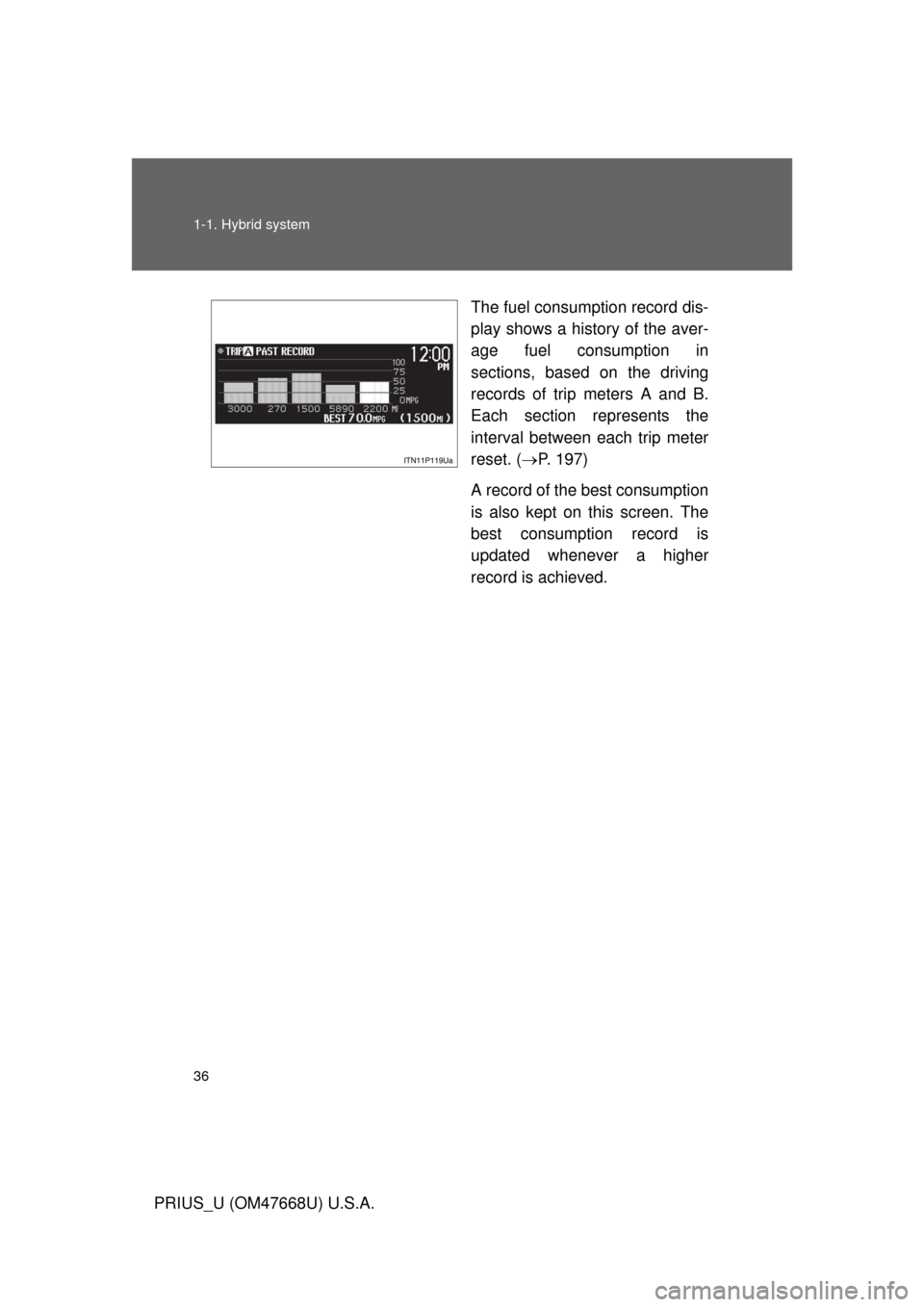
PRIUS_U (OM47668U) U.S.A.The fuel consumption record dis-
play shows a history of the aver-
age fuel consumption in
sections, based on the driving
records of trip meters A and B.
Each section represents the
interval between each trip meter
reset. (
P. 197)
A record of the best consumption
is also kept on this screen. The
best consumption record is
updated whenever a higher
record is achieved.
Page 192 of 616
192 2-2. Instrument cluster
PRIUS_U (OM47668U) U.S.A.
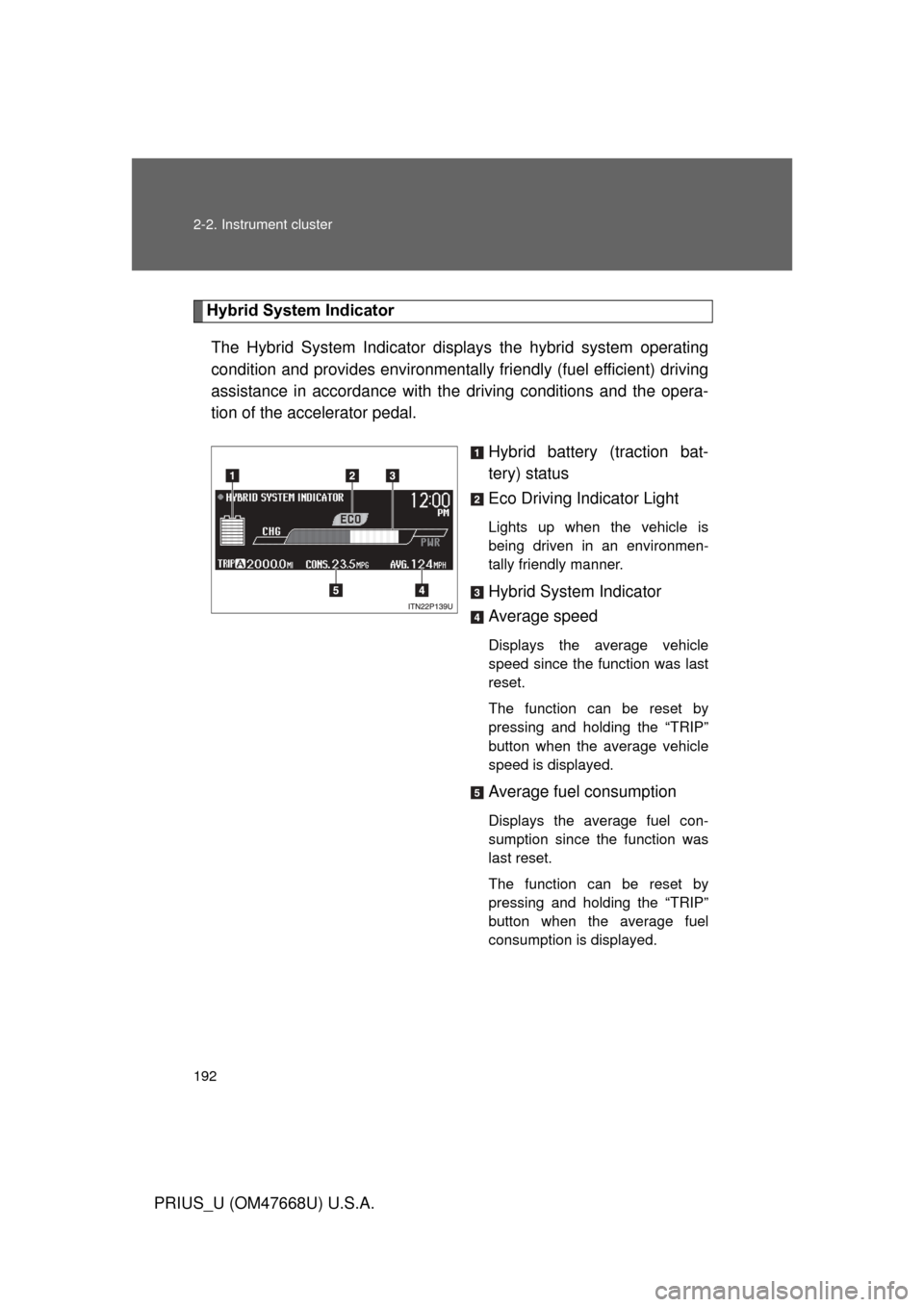
Hybrid System IndicatorThe Hybrid System Indicator displa ys the hybrid system operating
condition and provides environmentally friendly (fuel efficient) driving
assistance in accordance with the driving conditions and the opera-
tion of the accelerator pedal.
Hybrid battery (traction bat-
tery) status
Eco Driving Indicator Light
Lights up when the vehicle is
being driven in an environmen-
tally friendly manner.
Hybrid System Indicator
Average speed
Displays the average vehicle
speed since the function was last
reset.
The function can be reset by
pressing and holding the “TRIP”
button when the average vehicle
speed is displayed.
Average fuel consumption
Displays the average fuel con-
sumption since the function was
last reset.
The function can be reset by
pressing and holding the “TRIP”
button when the average fuel
consumption is displayed.
Page 195 of 616
195
2-2. Instrument cluster
2
When driving
PRIUS_U (OM47668U) U.S.A.
■
Display
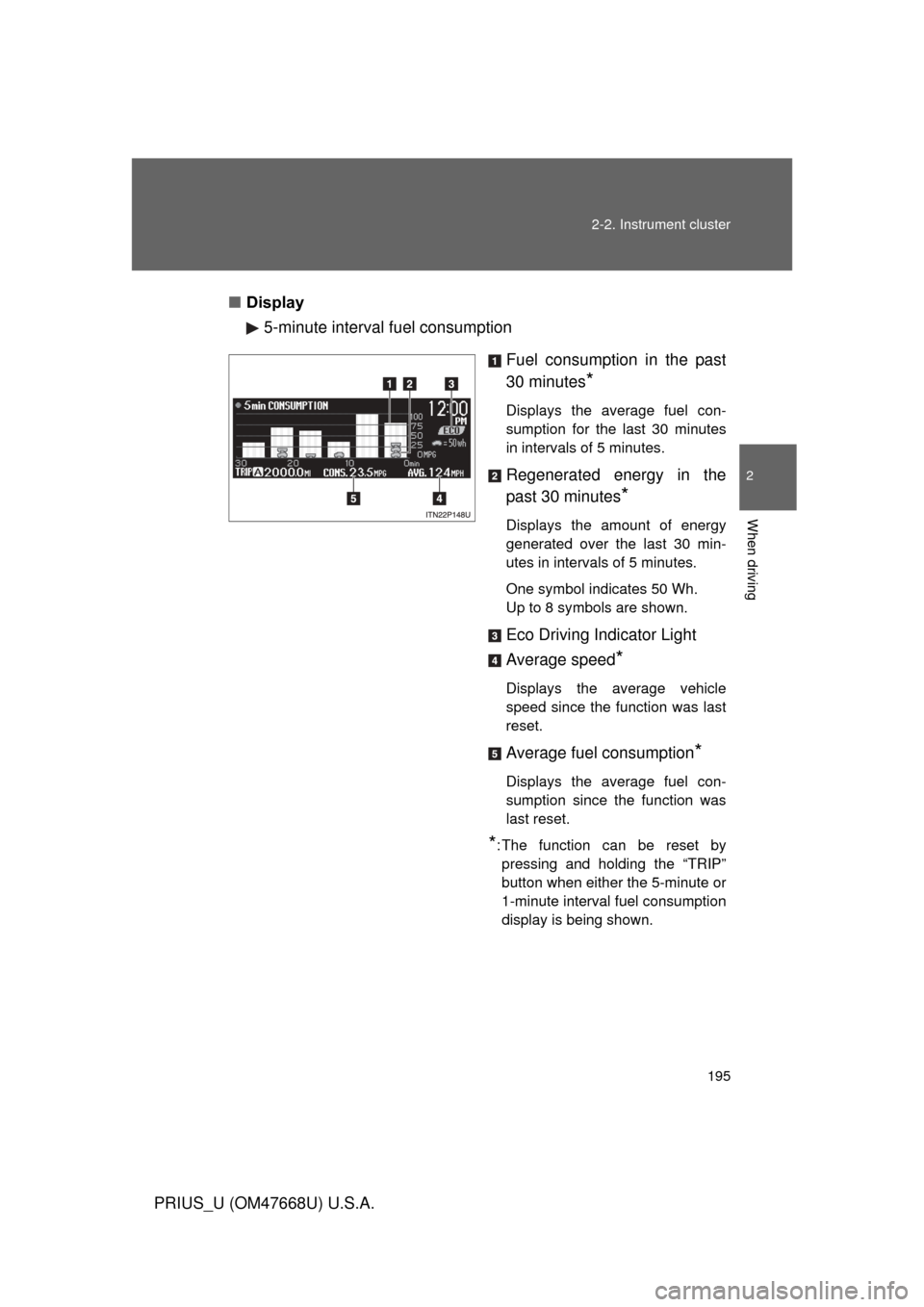
5-minute interval fuel consumption
Fuel consumption in the past
30 minutes
*
Displays the average fuel con-
sumption for the last 30 minutes
in intervals of 5 minutes.
Regenerated energy in the
past 30 minutes
*
Displays the amount of energy
generated over the last 30 min-
utes in intervals of 5 minutes.
One symbol indicates 50 Wh.
Up to 8 symbols are shown.
Eco Driving Indicator Light
Average speed
*
Displays the average vehicle
speed since the function was last
reset.
Average fuel consumption*
Displays the average fuel con-
sumption since the function was
last reset.
*: The function can be reset by pressing and holding the “TRIP”
button when either the 5-minute or
1-minute interval fuel consumption
display is being shown.
Page 197 of 616
197
2-2. Instrument cluster
2
When driving
PRIUS_U (OM47668U) U.S.A.
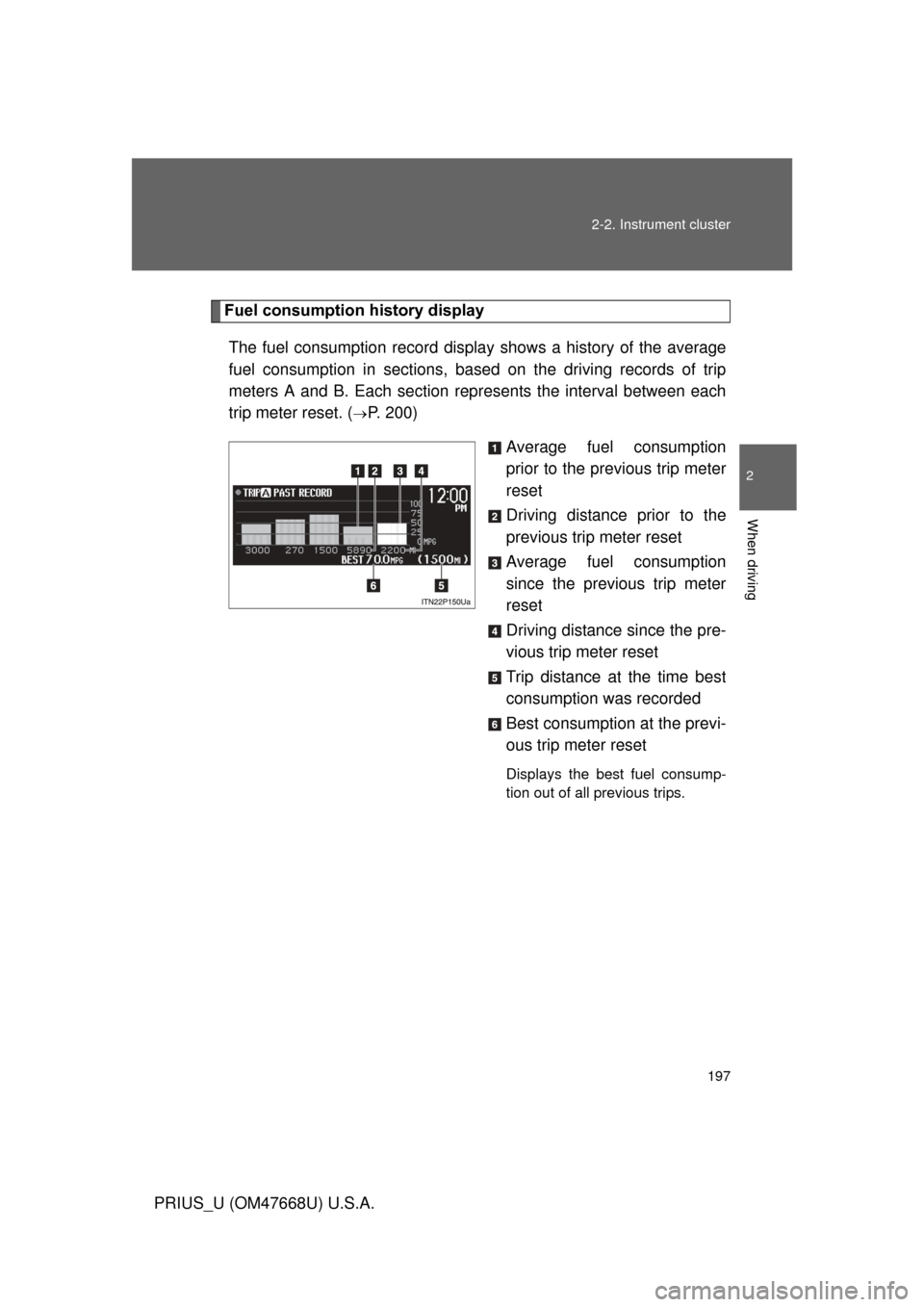
Fuel consumption history display
The fuel consumption re cord display shows a history of the average
fuel consumption in sections, based on the driving records of trip
meters A and B. Each section repr esents the interval between each
trip meter reset. (
P. 200)
Average fuel consumption
prior to the previous trip meter
reset
Driving distance prior to the
previous trip meter reset
Average fuel consumption
since the previous trip meter
reset
Driving distance since the pre-
vious trip meter reset
Trip distance at the time best
consumption was recorded
Best consumption at the previ-
ous trip meter reset
Displays the best fuel consump-
tion out of all previous trips.
Page 198 of 616
198 2-2. Instrument cluster
PRIUS_U (OM47668U) U.S.A.■
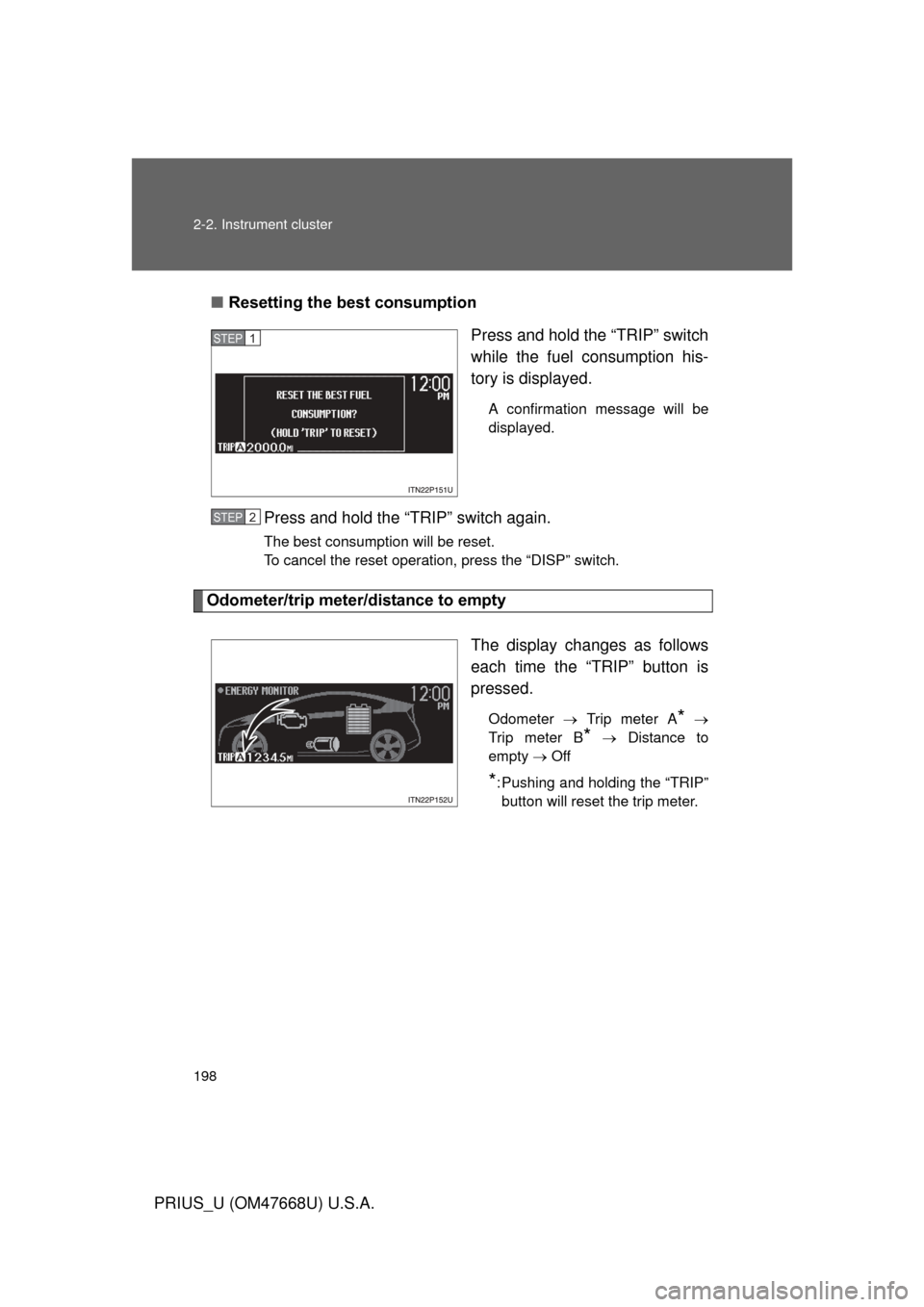
Resetting the best consumption
Press and hold the “TRIP” switch
while the fuel consumption his-
tory is displayed.
A confirmation message will be
displayed.
Press and hold the “TRIP” switch again.
The best consumption will be reset.
To cancel the reset operation, press the “DISP” switch.
Odometer/trip meter/distance to empty
The display changes as follows
each time the “TRIP” button is
pressed.
Odometer Trip meter A*
Trip meter B
* Distance to
empty Off
*: Pushing and holding the “TRIP” button will reset the trip meter.
STEP1
STEP2
Page 199 of 616
199
2-2. Instrument cluster
2
When driving
PRIUS_U (OM47668U) U.S.A.
●
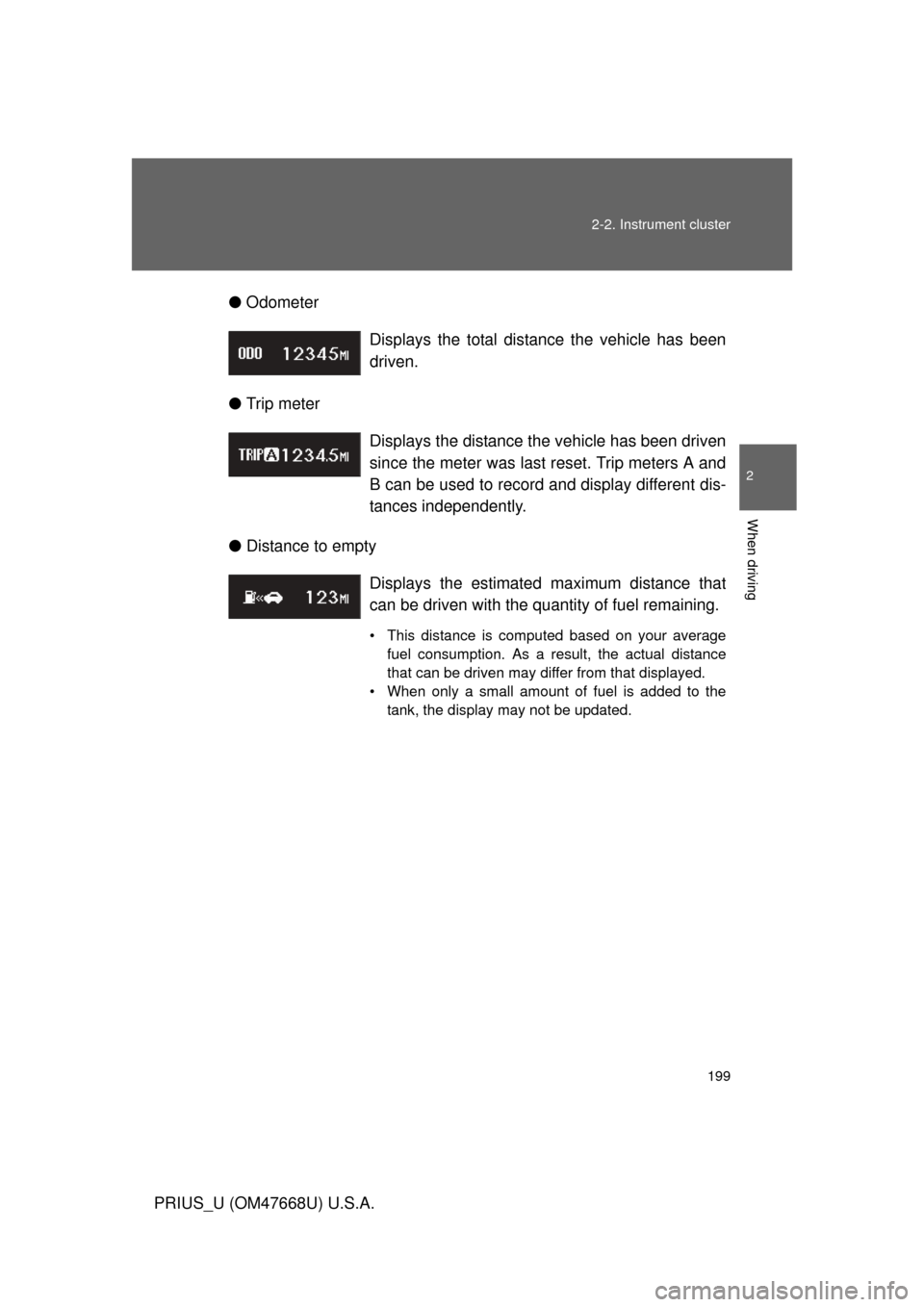
Odometer
● Trip meter
● Distance to empty Displays the total distance the vehicle has been
driven.
Displays the distance the vehicle has been driven
since the meter was last reset. Trip meters A and
B can be used to record and display different dis-
tances independently.
Displays the estimated
maximum distance that
can be driven with the quantity of fuel remaining.
• This distance is computed based on your average fuel consumption. As a result, the actual distance
that can be driven may differ from that displayed.
• When only a small amount of fuel is added to the tank, the display may not be updated.
Page 204 of 616
204 2-2. Instrument cluster
PRIUS_U (OM47668U) U.S.A.■
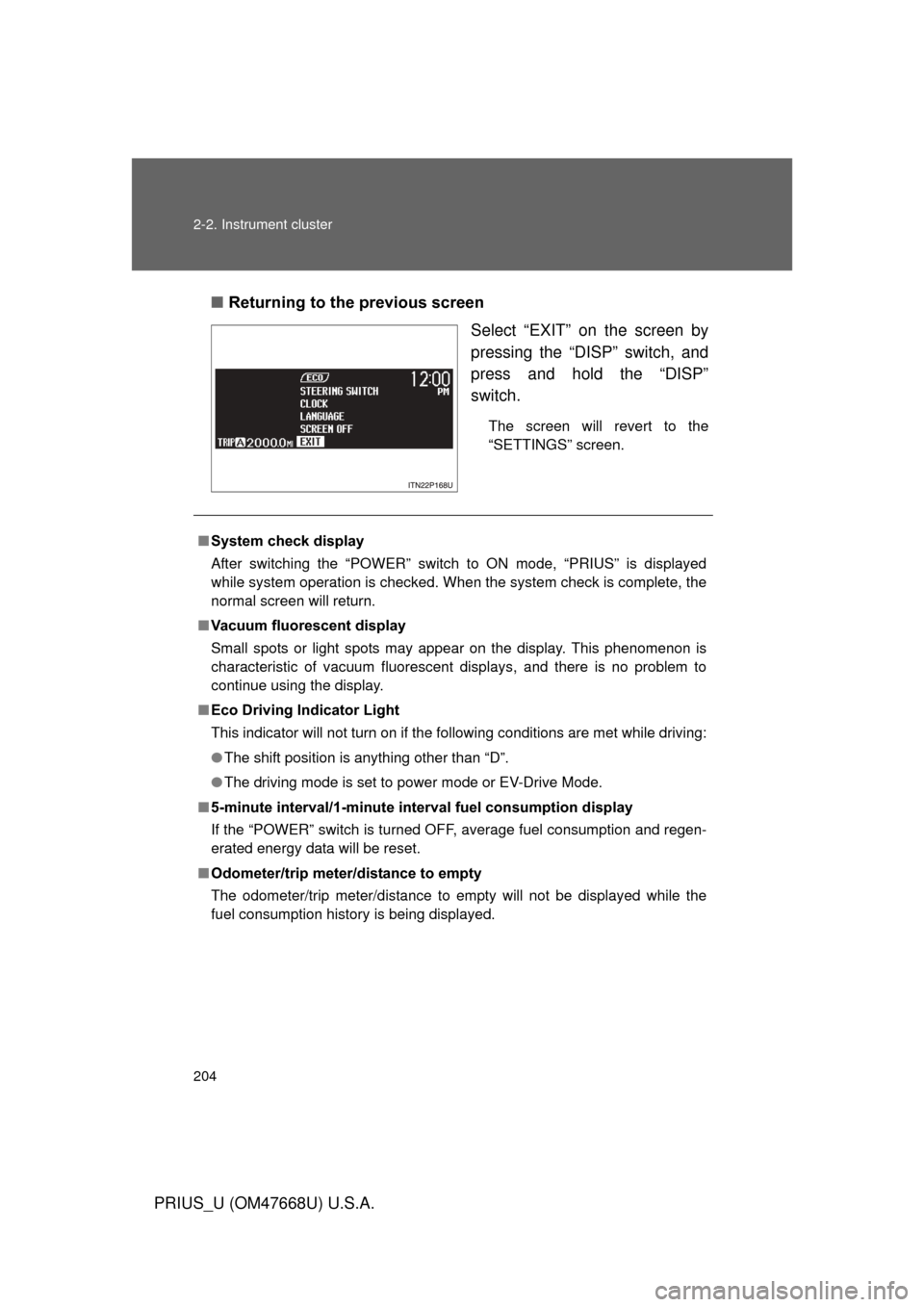
Returning to the previous screen
Select “EXIT” on the screen by
pressing the “DISP” switch, and
press and hold the “DISP”
switch.
The screen will revert to the
“SETTINGS” screen.
■System check display
After switching the “POWER” switch to ON mode, “PRIUS” is displayed
while system operation is checked. When the system check is complete, the
normal screen will return.
■ Vacuum fluorescent display
Small spots or light spots may appear on the display. This phenomenon is
characteristic of vacuum fluorescent displays, and there is no problem to
continue using the display.
■ Eco Driving Indicator Light
This indicator will not turn on if the following conditions are met while driving:
● The shift position is anything other than “D”.
● The driving mode is set to power mode or EV-Drive Mode.
■ 5-minute interval/1-minute inte rval fuel consumption display
If the “POWER” switch is turned OF F, average fuel consumption and regen-
erated energy data will be reset.
■ Odometer/trip meter/distance to empty
The odometer/trip meter/distance to empty will not be displayed while the
fuel consumption history is being displayed.
Page 205 of 616
205
2-2. Instrument cluster
2
When driving
PRIUS_U (OM47668U) U.S.A.
■
Fuel consumption history display
● Each time a trip meter is reset, the old data will move to the left by 1 col-
umn.
● A maximum of 5 history items can be displayed (including the current his-
tory). If the history exceeds 5 items, the oldest item will be deleted.
■ Driving in Eco Driving Mode
The multi-information display will automatically switch the display to the
Hybrid System Indicator, regardless of which display is currently being
shown. ( P. 172)
■ Display settings can be changed when
The vehicle speed is less than approximately 5 mph (8 km/h).
■ When the 12 volt battery is disconnected
The following data will be reset.
● Average fuel consumption
● Distance to empty
● Average vehicle speed
● Clock
● Display settings
Page 216 of 616

216 2-4. Using other driving systems
PRIUS_U (OM47668U) U.S.A.
■Cruise control can be set when
● The shift lever is in “D”.
● Vehicle speed is more than approximately 25 mph (40 km/h).
■ Accelerating
The vehicle can be accelerated normally. After acceleration, the set speed
resumes.
■ Automatic cruise control cancelation
The set speed is automatically canceled in any of the following situations.
● Actual vehicle speed falls more than 10 mph (16 km/h) below the preset
vehicle speed
● Actual vehicle speed is below 25 mph (40 km/h)
● Enhanced VSC is activated
■ If the cruise main indicator light flashes
Press the “ON-OFF” button once, and then press the button again to reacti-
vate the system.
If the cruise control speed cannot be set or if the cruise control cancels
immediately after being activated, there may be a malfunction in the cruise
control system. Contact your Toyota dealer, and have your Toyota inspected.
Page 278 of 616
278 3-1. Using the air conditioning system and defogger
PRIUS_U (OM47668U) U.S.A.
■Micro dust and pollen filter
● In order to prevent the windows from fogging up when the outside air is
cold, the following may occur.
• Outside air mode does not switch to recirculated air mode.
• The air conditioning system operates automatically.
• The operation cancels after 1 minute.
● In rainy weather, the windows may fog up. Press .
■ When Eco Driving mode is on
● If the outside temperature exceeds a preset temperature, the system will
switch to recirculated air mode.
● The effectiveness of the air conditioning will be lower than normal.
● The fan speed level drops below the normal rate.
■ Plasmacluster™
* (if equipped)
Plasmacluster will operate in conjunction with the air conditioning fan motor
when it is turned on.
This air conditioning system adopts plasmacluster technology, which helps
to keep good air quality in the cabin by emitting positive and negative ions
through the driver’s side vent.
A slight noise may be heard during operation. This is not a malfunction. Also,
static electricity may be discharged near the driver’s side vent due to the
high voltage used to operate the system.
To clean the driver’s side vent, turn the system off and wipe the vent using a
soft cloth.
*: Plasmacluster technology is manufactured under license from the SHARP
Corporation.
“Plasmacluster™” is a trademark of the SHARP Corporation.
■ Air conditioning odors
● During use, various odors from inside and outside the vehicle may enter
into and accumulate in the air conditioning system. This may then cause
odor to be emitted from the vents.
● To reduce potential odors from occurring:
• It is recommended that the air conditioning system be set to outside air
mode prior to turning the vehicle off.