phone TOYOTA PRIUS 2012 3.G Navigation Manual
[x] Cancel search | Manufacturer: TOYOTA, Model Year: 2012, Model line: PRIUS, Model: TOYOTA PRIUS 2012 3.GPages: 357, PDF Size: 5.71 MB
Page 63 of 357
63
1. DESTINATION SEARCH
3
NAVIGATION SYSTEM
PRIUS (US) NAVI 47719U
11.10.26 15:37
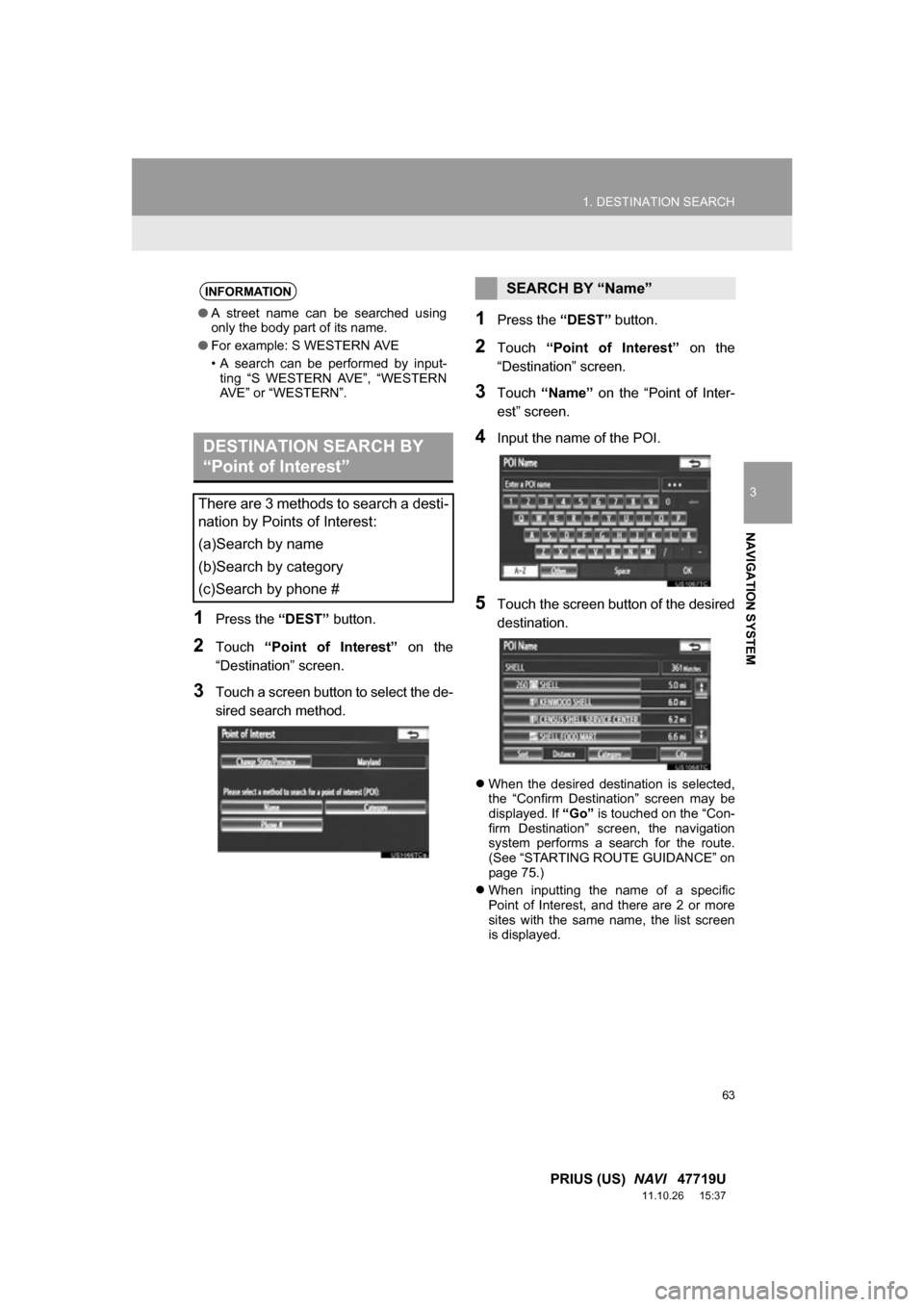
1Press the “DEST” button.
2Touch “Point of Interest” on the
“Destination” screen.
3Touch a screen button to select the de-
sired search method.
1Press the “DEST” button.
2Touch “Point of Interest” on the
“Destination” screen.
3Touch “Name” on the “Point of Inter-
est” screen.
4Input the name of the POI.
5Touch the screen button of the desired
destination.
When the desired destination is selected,
the “Confirm Destination” screen may be
displayed. If “Go” is touched on the “Con-
firm Destination” screen, the navigation
system performs a search for the route.
(See “STARTING ROUTE GUIDANCE” on
page 75.)
When inputting the name of a specific
Point of Interest, and there are 2 or more
sites with the same name, the list screen
is displayed.
INFORMATION
●A street name can be searched using
only the body part of its name.
● For example: S WESTERN AVE
• A search can be performed by input-
ting “S WESTERN AVE”, “WESTERN
AVE” or “WESTERN”.
DESTINATION SEARCH BY
“Point of Interest”
There are 3 methods to search a desti-
nation by Points of Interest:
(a)Search by name
(b)Search by category
(c)Search by phone #
SEARCH BY “Name”
Page 68 of 357
68
1. DESTINATION SEARCH
PRIUS (US) NAVI 47719U
11.10.26 15:37
3Touch the screen button of the desired
item.
When the desired item is selected, the
“Confirm Destination” screen may be dis-
played. If “Go” is touched on the “Confirm
Destination” screen, the navigation sys-
tem performs a search for the route. (See
“STARTING ROUTE GUIDANCE” on
page 75.)
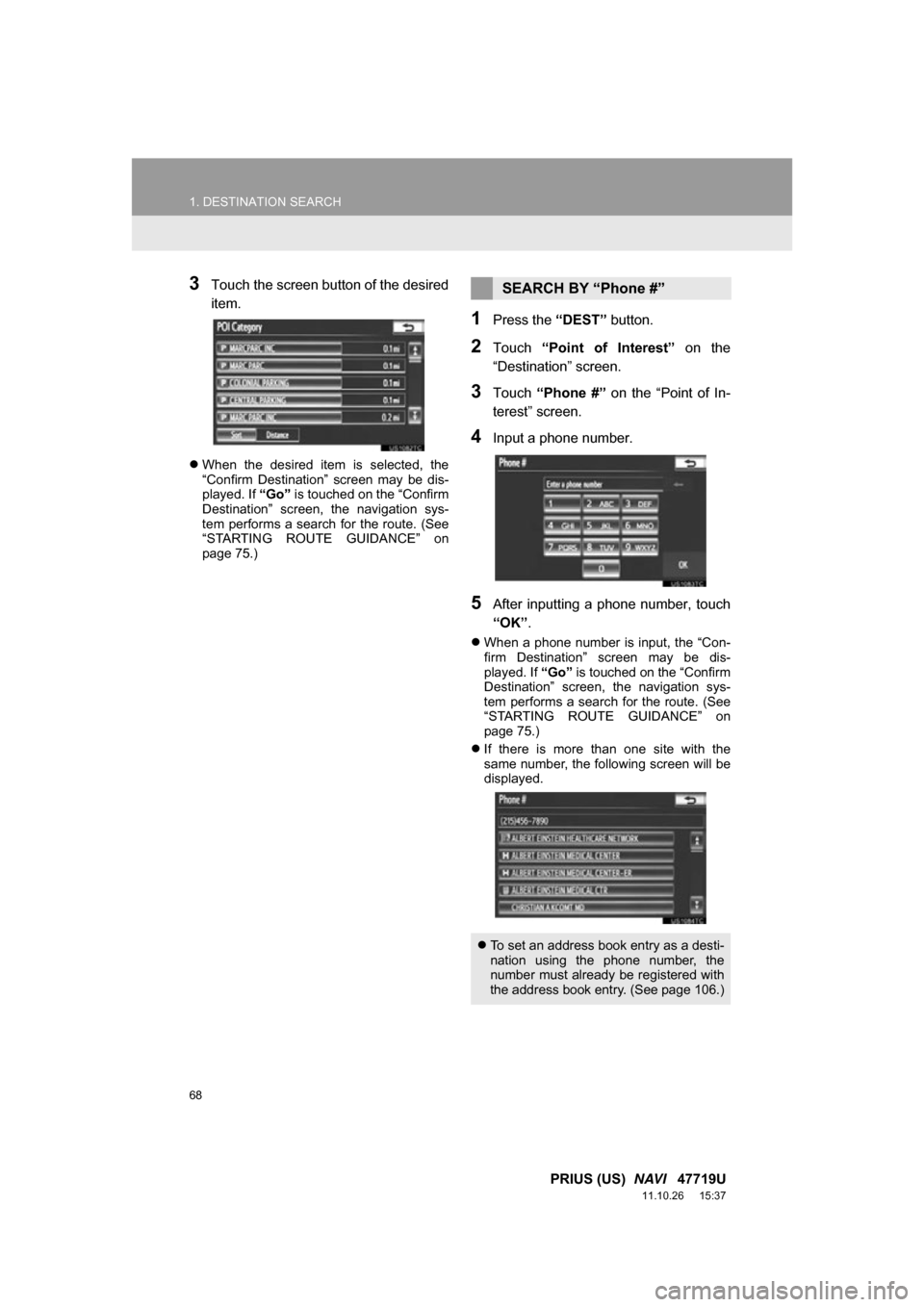
1Press the “DEST” button.
2Touch “Point of Interest” on the
“Destination” screen.
3Touch “Phone #” on the “Point of In-
terest” screen.
4Input a phone number.
5After inputting a phone number, touch
“OK” .
When a phone number is input, the “Con-
firm Destination” screen may be dis-
played. If “Go” is touched on the “Confirm
Destination” screen, the navigation sys-
tem performs a search for the route. (See
“STARTING ROUTE GUIDANCE” on
page 75.)
If there is more than one site with the
same number, the following screen will be
displayed.
SEARCH BY “Phone #”
To set an address book entry as a desti-
nation using the phone number, the
number must already be registered with
the address book entry. (See page 106.)
Page 69 of 357
69
1. DESTINATION SEARCH
3
NAVIGATION SYSTEM
PRIUS (US) NAVI 47719U
11.10.26 15:37
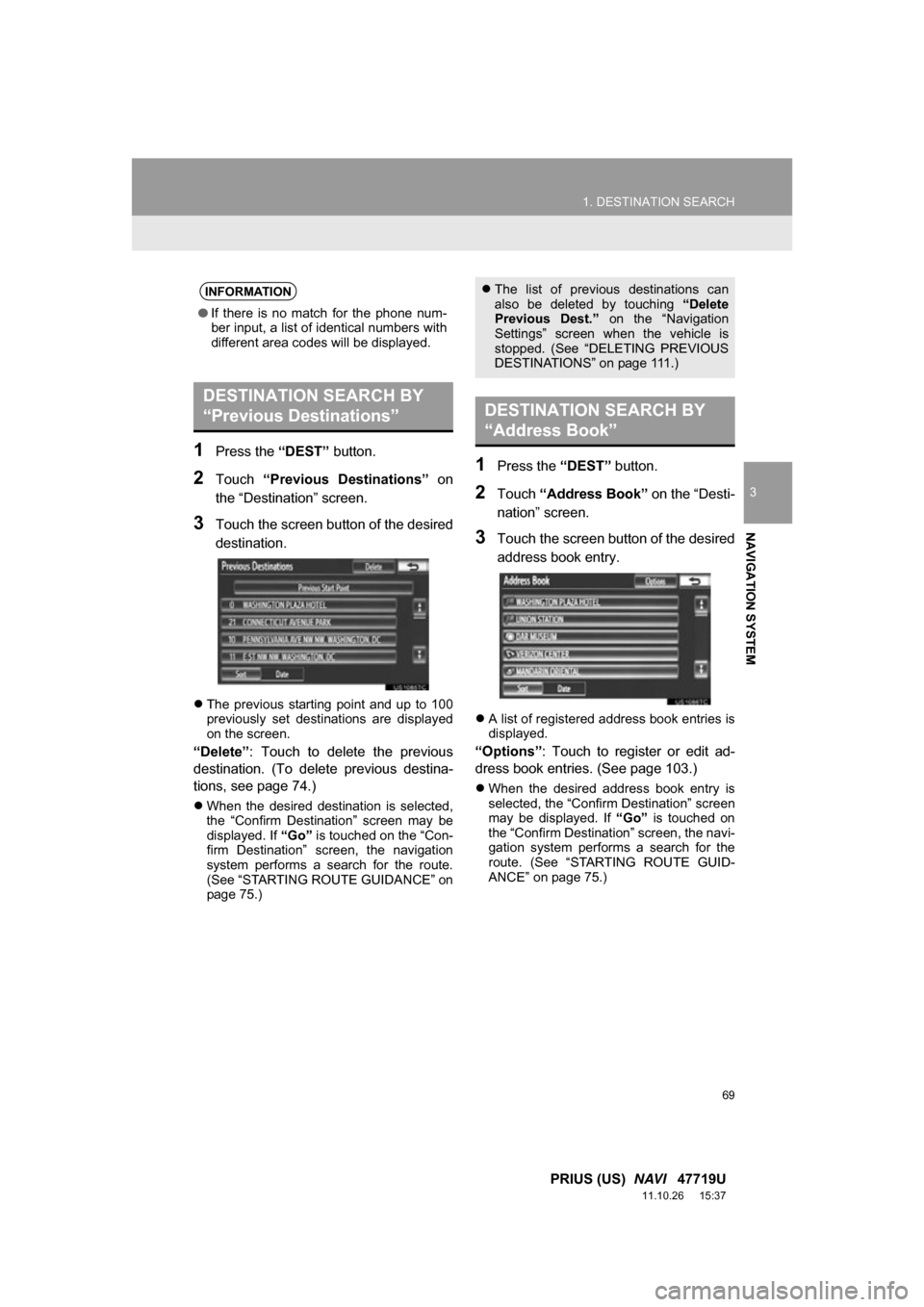
1Press the “DEST” button.
2Touch “Previous Destinations” on
the “Destination” screen.
3Touch the screen button of the desired
destination.
The previous starting point and up to 100
previously set destinations are displayed
on the screen.
“Delete” : Touch to delete the previous
destination. (To delete previous destina-
tions, see page 74.)
When the desired destination is selected,
the “Confirm Destination” screen may be
displayed. If “Go” is touched on the “Con-
firm Destination” screen, the navigation
system performs a search for the route.
(See “STARTING ROUTE GUIDANCE” on
page 75.)
1Press the “DEST” button.
2Touch “Address Book” on the “Desti-
nation” screen.
3Touch the screen button of the desired
address book entry.
A list of registered address book entries is
displayed.
“Options”: Touch to register or edit ad-
dress book entries. (See page 103.)
When the desired address book entry is
selected, the “Confirm Destination” screen
may be displayed. If “Go” is touched on
the “Confirm Destination” screen, the navi-
gation system performs a search for the
route. (See “STARTING ROUTE GUID-
ANCE” on page 75.)
INFORMATION
● If there is no match for the phone num-
ber input, a list of identical numbers with
different area codes will be displayed.
DESTINATION SEARCH BY
“Previous Destinations”
The list of previous destinations can
also be deleted by touching “Delete
Previous Dest.” on the “Navigation
Settings” screen when the vehicle is
stopped. (See “DELETING PREVIOUS
DESTINATIONS” on page 111.)
DESTINATION SEARCH BY
“Address Book”
Page 75 of 357
75
1. DESTINATION SEARCH
3
NAVIGATION SYSTEM
PRIUS (US) NAVI 47719U
11.10.26 15:37
2. STARTING ROUTE GUIDANCE
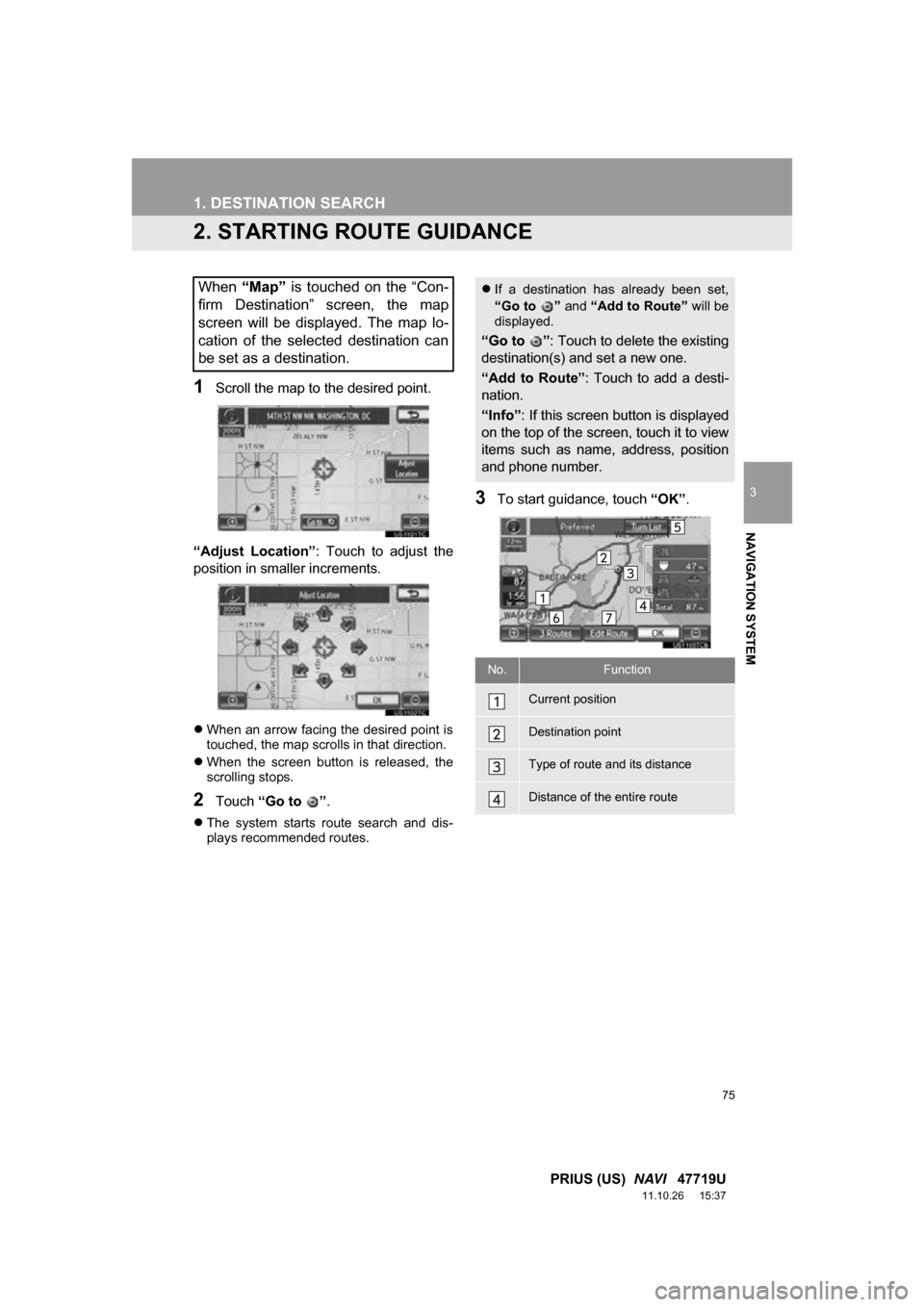
1Scroll the map to the desired point.
“Adjust Location” : Touch to adjust the
position in smaller increments.
When an arrow facing the desired point is
touched, the map scrolls in that direction.
When the screen button is released, the
scrolling stops.
2Touch “Go to ” .
The system starts route search and dis-
plays recommended routes.
3To start guidance, touch “OK”.
When “Map” is touched on the “Con-
firm Destination” screen, the map
screen will be displayed. The map lo-
cation of the selected destination can
be set as a destination. If a destination has already been set,
“Go to ” and “Add to Route” will be
displayed.
“Go to ” : Touch to delete the existing
destination(s) and set a new one.
“Add to Route” : Touch to add a desti-
nation.
“Info” : If this screen button is displayed
on the top of the screen, touch it to view
items such as name, address, position
and phone number.
No.Function
Current position
Destination point
Type of route and its distance
Distance of the entire route
Page 99 of 357
99
3. ADDRESS BOOK
3
NAVIGATION SYSTEM
PRIUS (US) NAVI 47719U
11.10.26 15:37
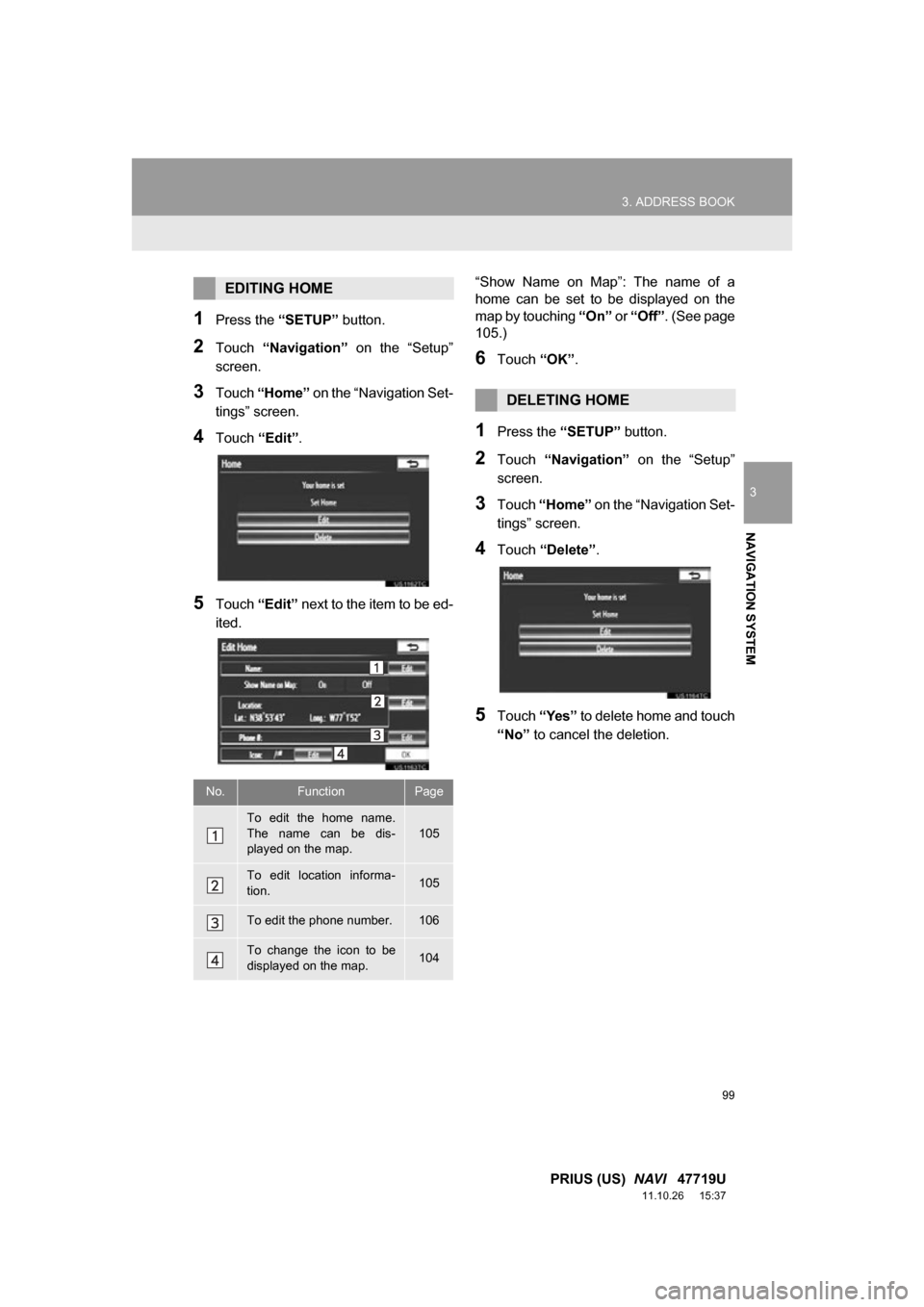
1Press the “SETUP” button.
2Touch “Navigation” on the “Setup”
screen.
3Touch “Home” on the “Navigation Set-
tings” screen.
4Touch “Edit”.
5Touch “Edit” next to the item to be ed-
ited. “Show Name on Map”: The name of a
home can be set to be displayed on the
map by touching
“On” or “Off” . (See page
105.)
6Touch “OK”.
1Press the “SETUP” button.
2Touch “Navigation” on the “Setup”
screen.
3Touch “Home” on the “Navigation Set-
tings” screen.
4Touch “Delete” .
5Touch “Yes” to delete home and touch
“No” to cancel the deletion.
EDITING HOME
No.FunctionPage
To edit the home name.
The name can be dis-
played on the map.105
To edit location informa-
tion.105
To edit the phone number.106
To change the icon to be
displayed on the map.104
DELETING HOME
Page 101 of 357
101
3. ADDRESS BOOK
3
NAVIGATION SYSTEM
PRIUS (US) NAVI 47719U
11.10.26 15:37
6Touch a position for this preset desti-
nation.
When registration of a preset destination
is completed, the “Edit Preset Destination”
screen will be displayed.
7Touch “OK”.
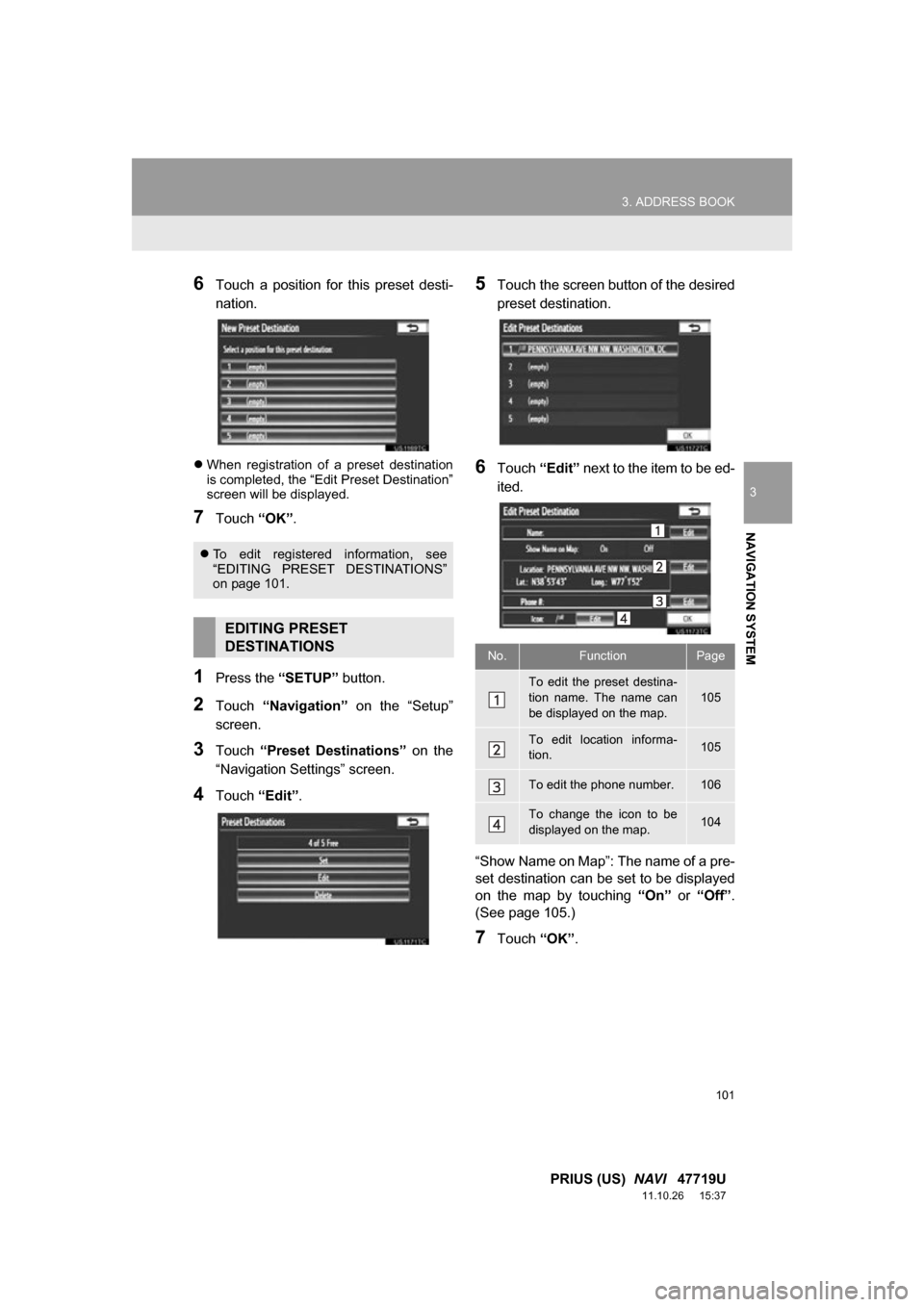
1Press the “SETUP” button.
2Touch “Navigation” on the “Setup”
screen.
3Touch “Preset Destinations” on the
“Navigation Settings” screen.
4Touch “Edit”.
5Touch the screen button of the desired
preset destination.
6Touch “Edit” next to the item to be ed-
ited.
“Show Name on Map”: The name of a pre-
set destination can be set to be displayed
on the map by touching “On” or “Off” .
(See page 105.)
7Touch “OK”.
To edit registered information, see
“EDITING PRESET DESTINATIONS”
on page 101.
EDITING PRESET
DESTINATIONS
No.FunctionPage
To edit the preset destina-
tion name. The name can
be displayed on the map.
105
To edit location informa-
tion.105
To edit the phone number.106
To change the icon to be
displayed on the map.104
Page 103 of 357
103
3. ADDRESS BOOK
3
NAVIGATION SYSTEM
PRIUS (US) NAVI 47719U
11.10.26 15:37
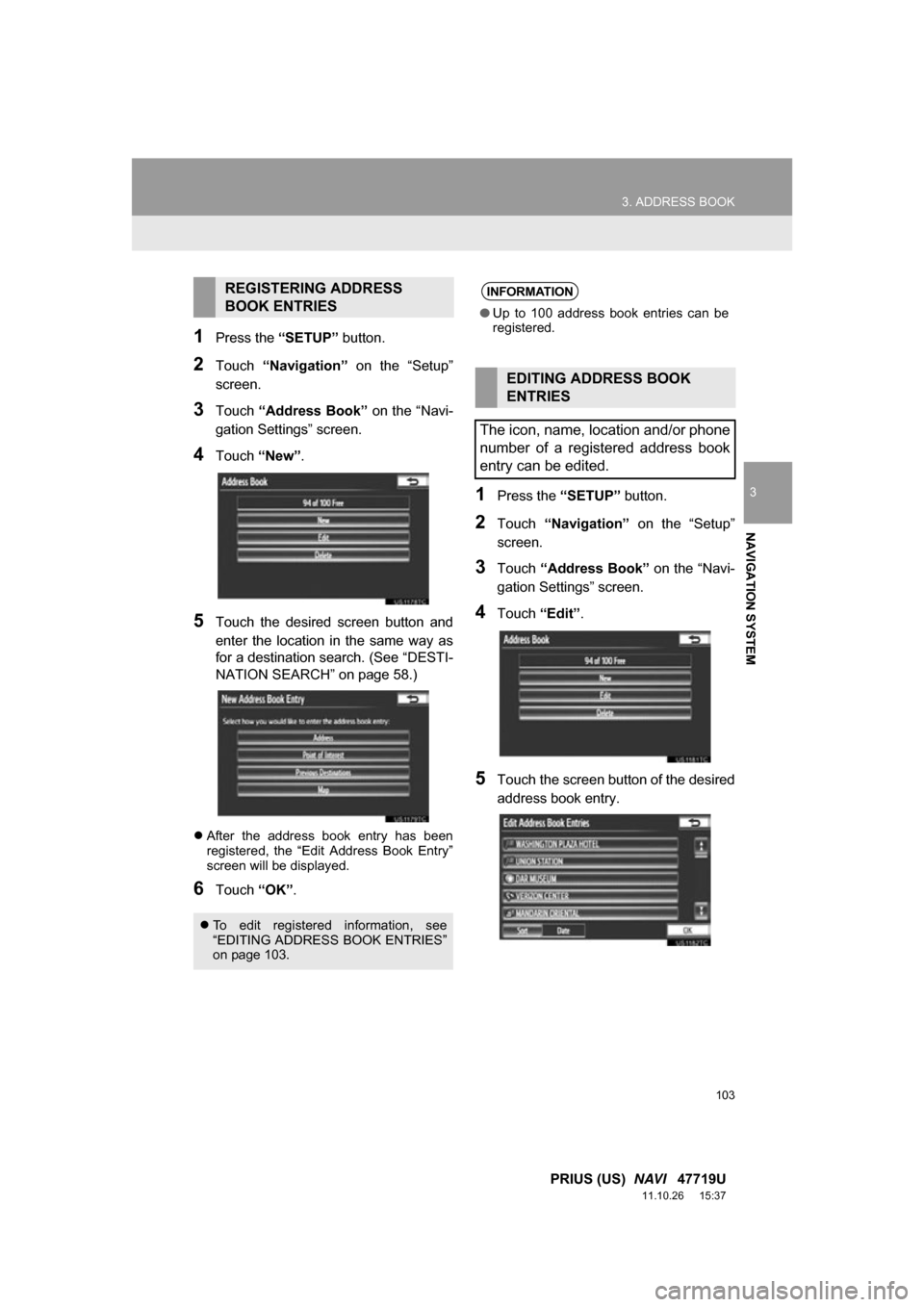
1Press the “SETUP” button.
2Touch “Navigation” on the “Setup”
screen.
3Touch “Address Book” on the “Navi-
gation Settings” screen.
4Touch “New”.
5Touch the desired screen button and
enter the location in the same way as
for a destination search. (See “DESTI-
NATION SEARCH” on page 58.)
After the address book entry has been
registered, the “Edit Address Book Entry”
screen will be displayed.
6Touch “OK”.
1Press the “SETUP” button.
2Touch “Navigation” on the “Setup”
screen.
3Touch “Address Book” on the “Navi-
gation Settings” screen.
4Touch “Edit”.
5Touch the screen button of the desired
address book entry.
REGISTERING ADDRESS
BOOK ENTRIES
To edit registered information, see
“EDITING ADDRESS BOOK ENTRIES”
on page 103.
INFORMATION
●Up to 100 address book entries can be
registered.
EDITING ADDRESS BOOK
ENTRIES
The icon, name, location and/or phone
number of a registered address book
entry can be edited.
Page 104 of 357
104
3. ADDRESS BOOK
PRIUS (US) NAVI 47719U
11.10.26 15:37
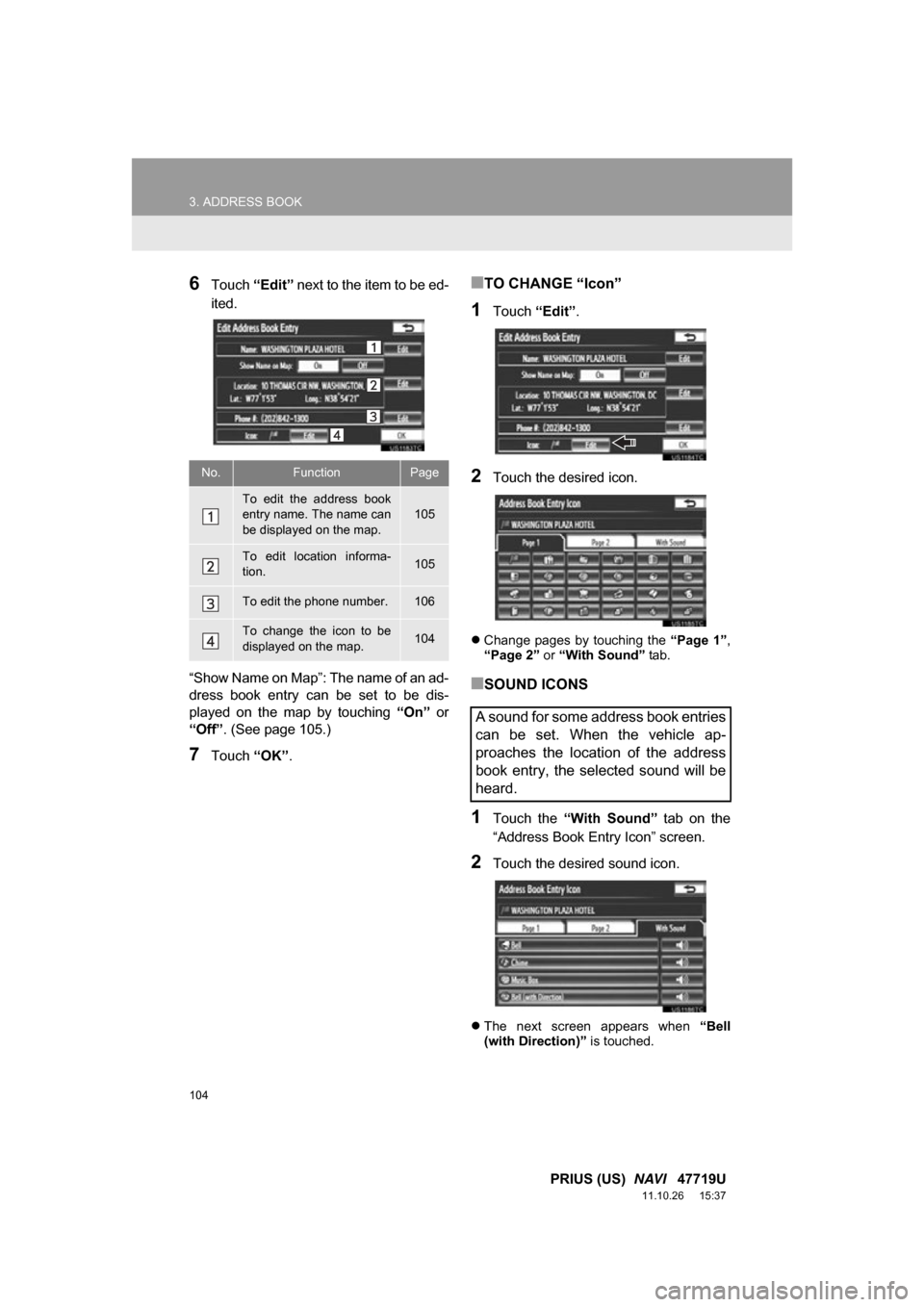
6Touch “Edit” next to the item to be ed-
ited.
“Show Name on Map”: The name of an ad-
dress book entry can be set to be dis-
played on the map by touching “On” or
“Off” . (See page 105.)
7Touch “OK”.
■TO CHANGE “Icon”
1Touch “Edit”.
2Touch the desired icon.
Change pages by touching the “Page 1”,
“Page 2” or “With Sound” tab.
■SOUND ICONS
1Touch the “With Sound” tab on the
“Address Book En try Icon” screen.
2Touch the desired sound icon.
The next screen appears when “Bell
(with Direction)” is touched.
No.FunctionPage
To edit the address book
entry name. The name can
be displayed on the map.
105
To edit location informa-
tion.105
To edit the phone number.106
To change the icon to be
displayed on the map.104
A sound for some address book entries
can be set. When the vehicle ap-
proaches the location of the address
book entry, the selected sound will be
heard.
Page 106 of 357
106
3. ADDRESS BOOK
PRIUS (US) NAVI 47719U
11.10.26 15:37
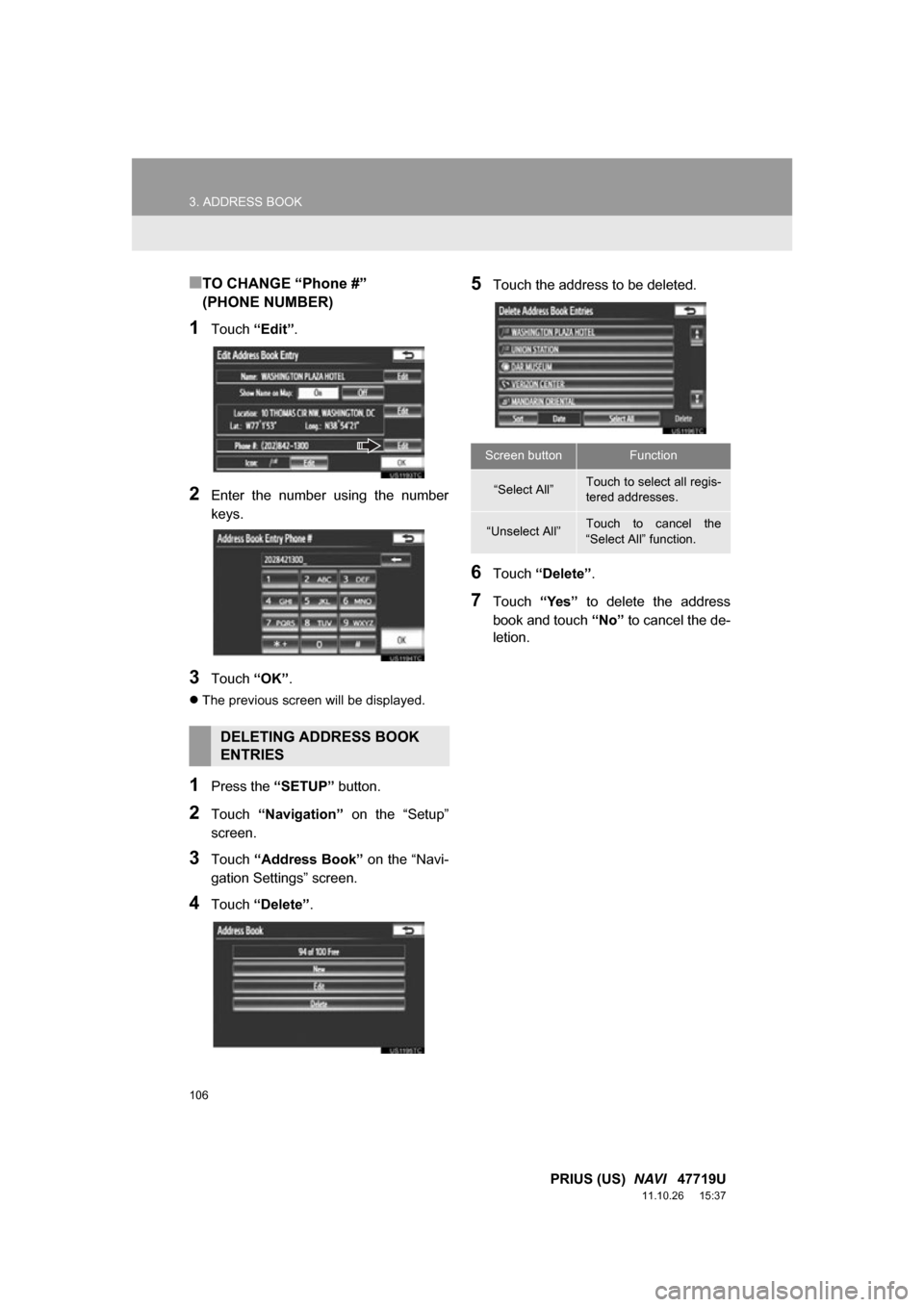
■TO CHANGE “Phone #”
(PHONE NUMBER)
1Touch “Edit”.
2Enter the number using the number
keys.
3Touch “OK”.
The previous screen will be displayed.
1Press the “SETUP” button.
2Touch “Navigation” on the “Setup”
screen.
3Touch “Address Book” on the “Navi-
gation Settings” screen.
4Touch “Delete” .
5Touch the address to be deleted.
6Touch “Delete” .
7Touch “Yes” to delete the address
book and touch “No” to cancel the de-
letion.
DELETING ADDRESS BOOK
ENTRIES
Screen buttonFunction
“Select All”Touch to select all regis-
tered addresses.
“Unselect All”Touch to cancel the
“Select All” function.
Page 124 of 357
124
4. SETUP
PRIUS (US) NAVI 47719U
11.10.26 15:37
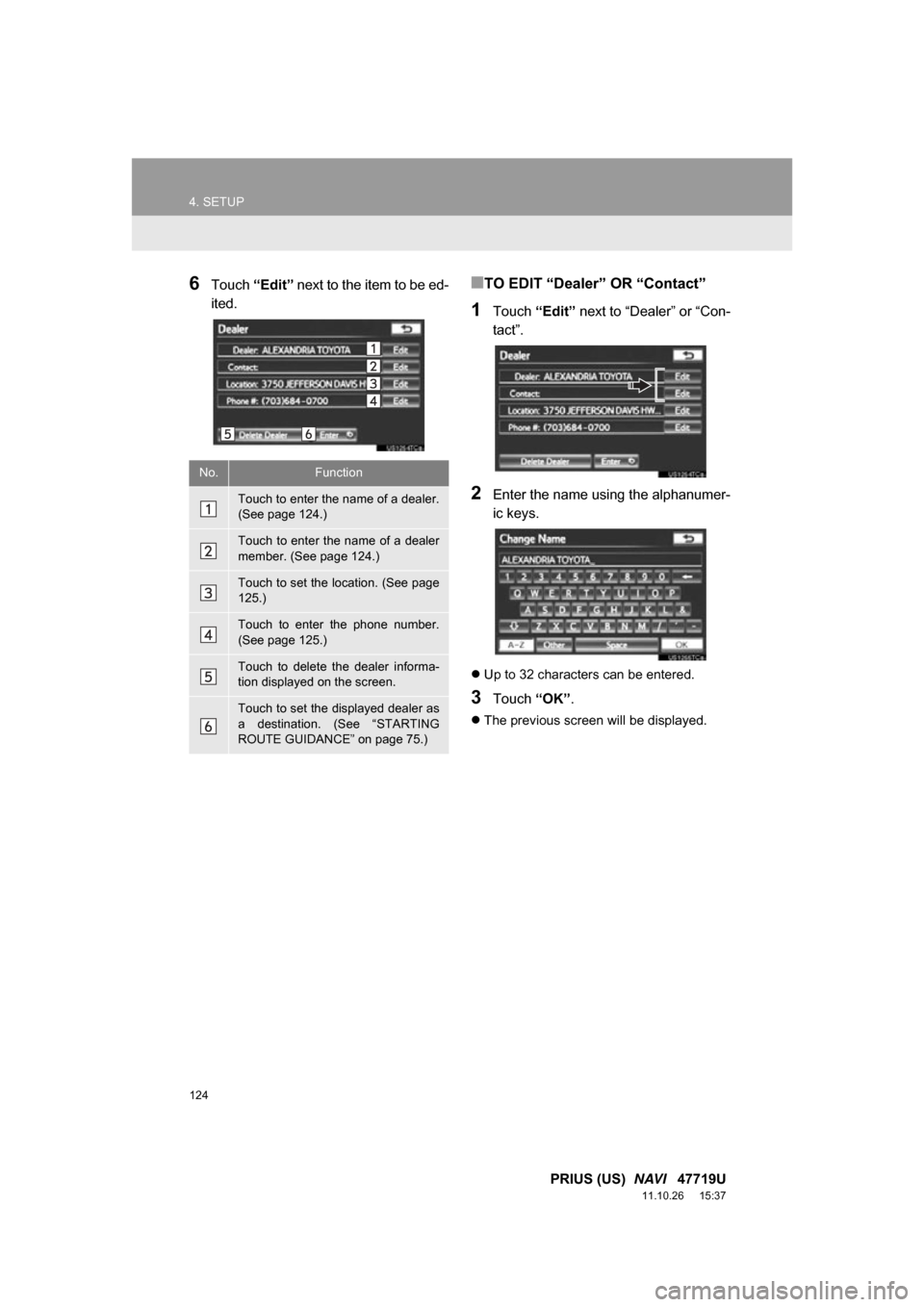
6Touch “Edit” next to the item to be ed-
ited.■TO EDIT “Dealer” OR “Contact”
1Touch “Edit” next to “Dealer” or “Con-
tact”.
2Enter the name using the alphanumer-
ic keys.
Up to 32 characters can be entered.
3Touch “OK”.
The previous screen will be displayed.
No.Function
Touch to enter the name of a dealer.
(See page 124.)
Touch to enter the name of a dealer
member. (See page 124.)
Touch to set the location. (See page
125.)
Touch to enter the phone number.
(See page 125.)
Touch to delete the dealer informa-
tion displayed on the screen.
Touch to set the displayed dealer as
a destination. (See “STARTING
ROUTE GUIDANCE” on page 75.)