battery TOYOTA PRIUS 2012 3.G User Guide
[x] Cancel search | Manufacturer: TOYOTA, Model Year: 2012, Model line: PRIUS, Model: TOYOTA PRIUS 2012 3.GPages: 636, PDF Size: 11.02 MB
Page 41 of 636

41
1-1. Hybrid system
1
Before driving
NOTICE
■
Hybrid battery (traction battery) air vent
●Do not put foreign objects near the air vent. The hybrid battery (traction
battery) may overheat and be damaged.
● Clean the air vent regularly to prevent the hybrid battery (traction battery)
from overheating.
● Do not wet or allow foreign substances to enter the air vent as this may
cause a short circuit and damage the hybrid battery (traction battery).
● Do not carry large amounts of water such as water cooler bottles in the
vehicle. If water spills onto the hybrid battery (traction battery), the battery
may be damaged. Have the vehicle inspected by your Toyota dealer.
● If the rear seat belt becomes separated from the guide ( P. 103), it could
obstruct the hybrid battery (traction battery) air vent. Set the rear seat belt
into the guide to use.
Page 44 of 636
44 1-1. Hybrid system
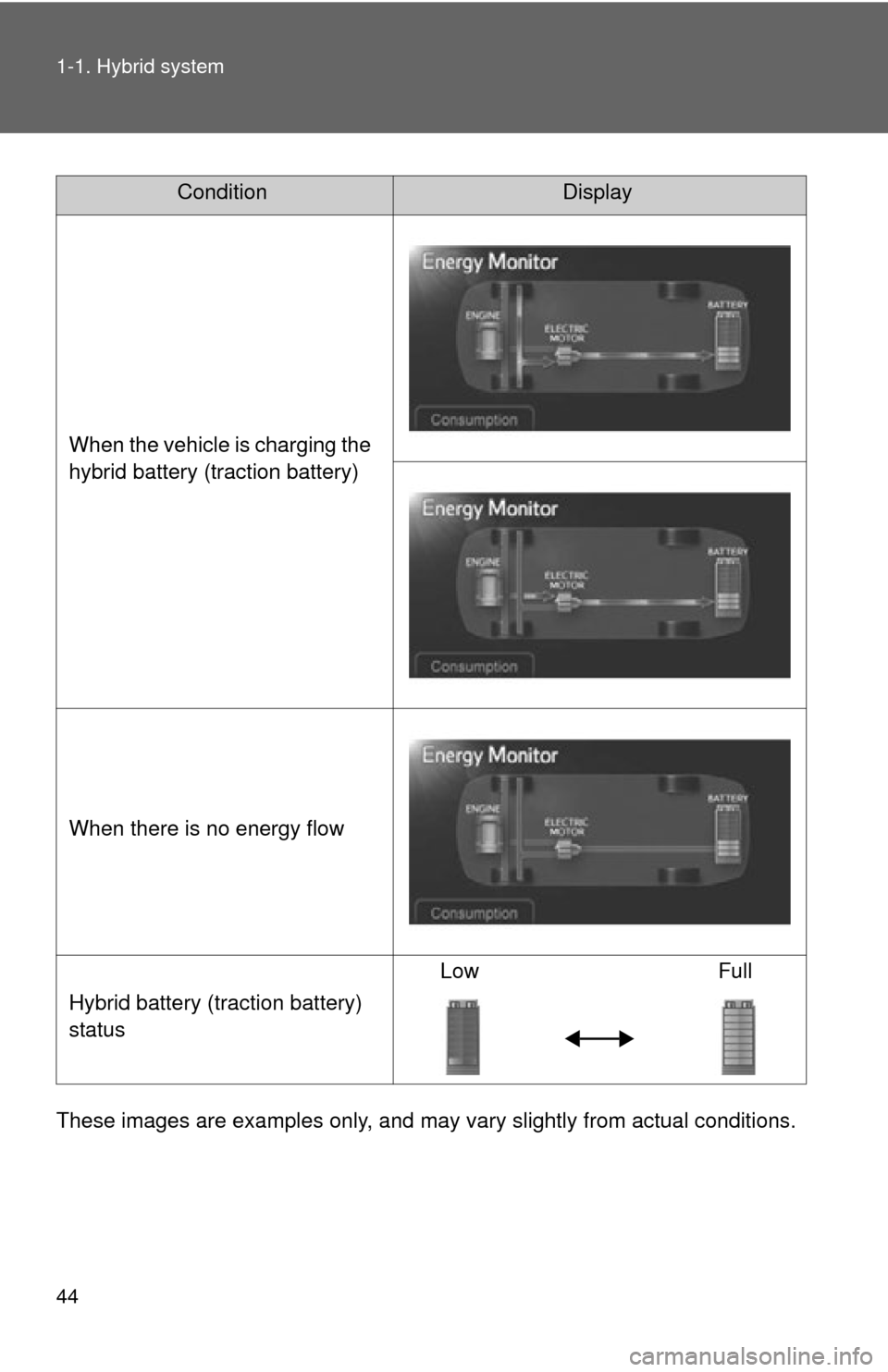
These images are examples only, and may vary slightly from actual conditions.
ConditionDisplay
When the vehicle is charging the
hybrid battery (traction battery)
When there is no energy flow
Hybrid battery (traction battery)
status Low Full
Page 47 of 636
47
1-1. Hybrid system
1
Before driving
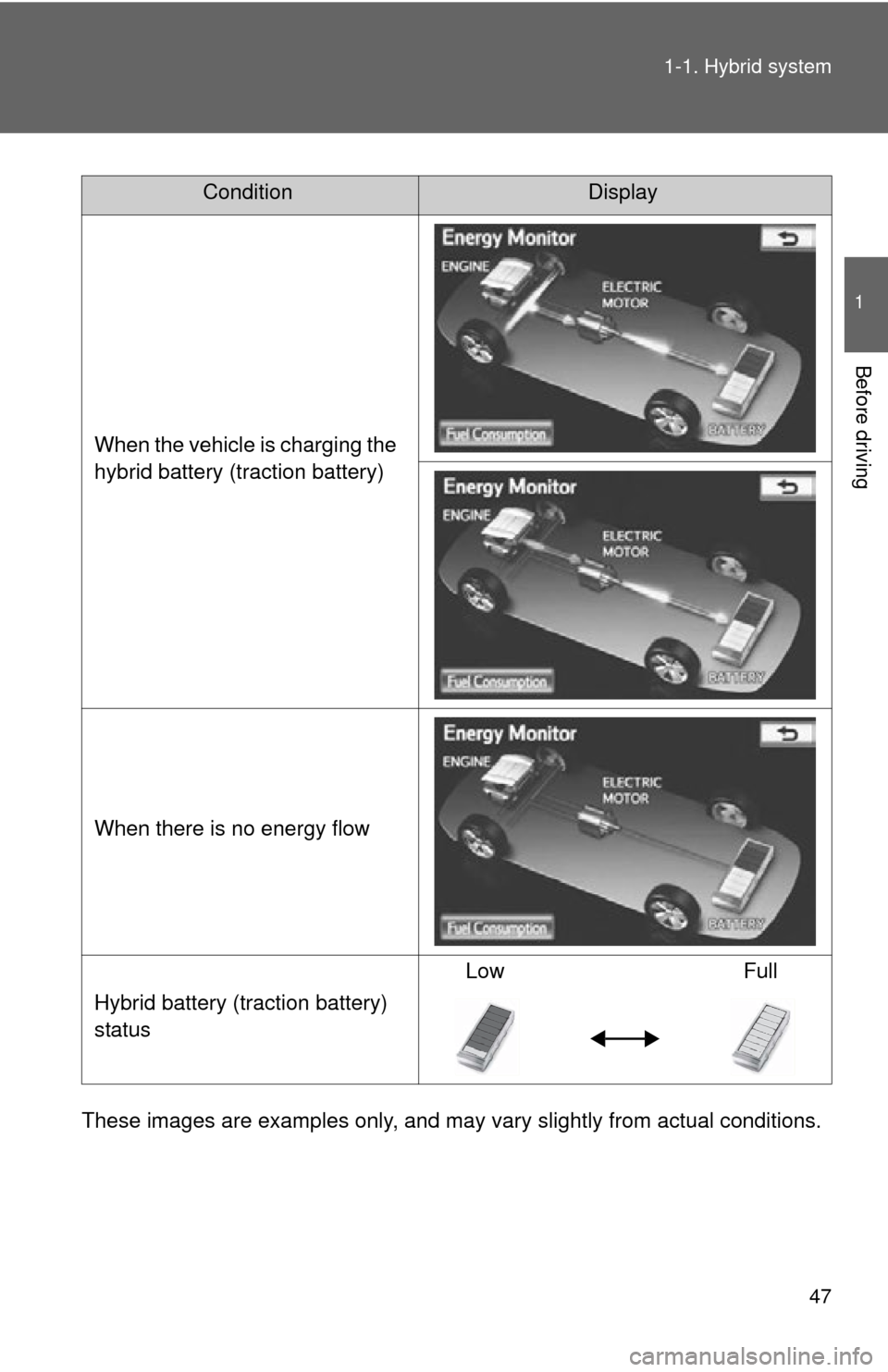
These images are examples only, and may va
ry slightly from actual conditions.
ConditionDisplay
When the vehicle is charging the
hybrid battery (traction battery)
When there is no energy flow
Hybrid battery (traction battery)
status Low Full
Page 48 of 636
48 1-1. Hybrid system
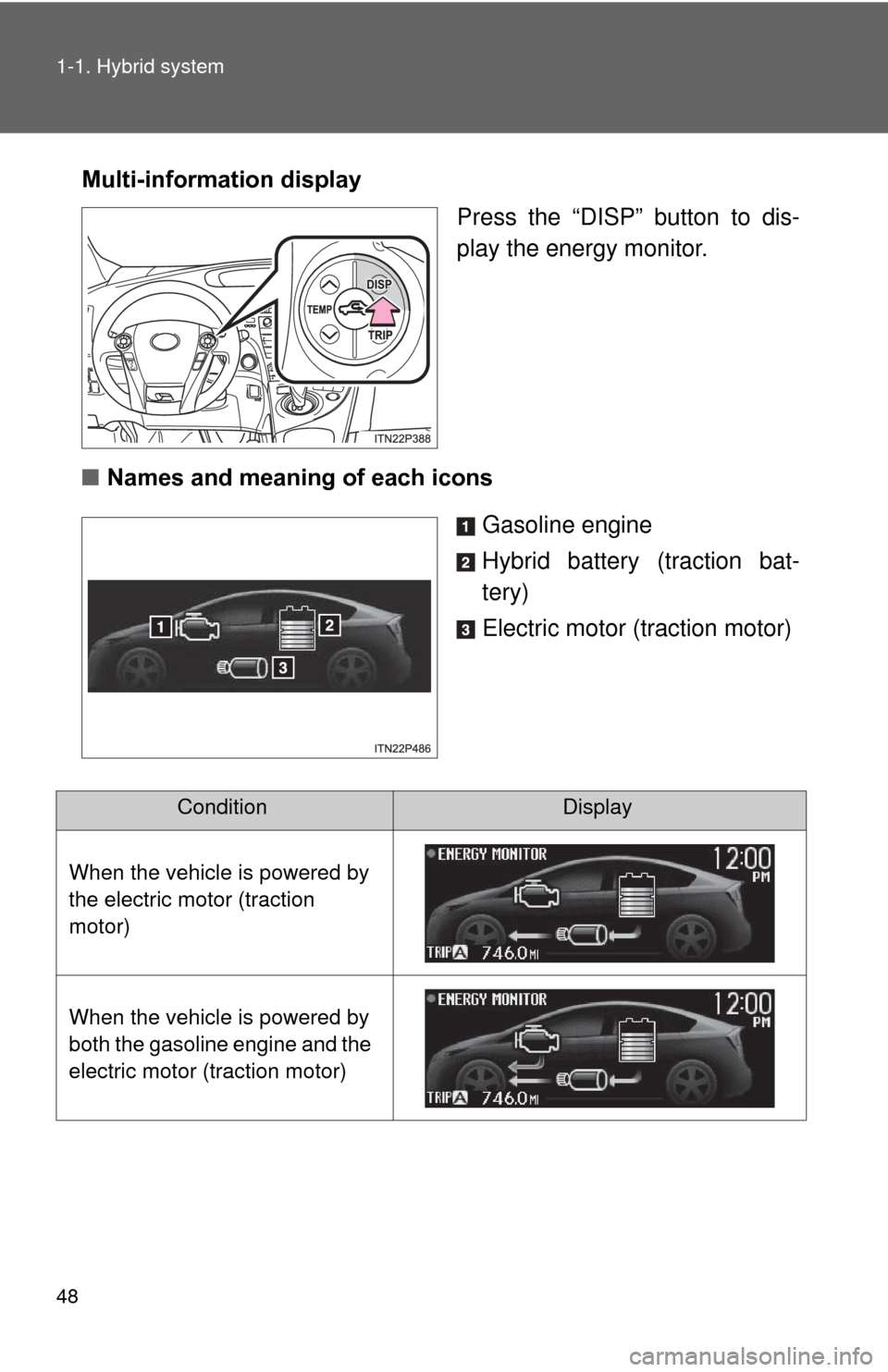
Multi-information displayPress the “DISP” button to dis-
play the energy monitor.
■ Names and meaning of each icons
Gasoline engine
Hybrid battery (traction bat-
tery)
Electric motor (traction motor)
ConditionDisplay
When the vehicle is powered by
the electric motor (traction
motor)
When the vehicle is powered by
both the gasoline engine and the
electric motor (traction motor)
Page 49 of 636
49
1-1. Hybrid system
1
Before driving
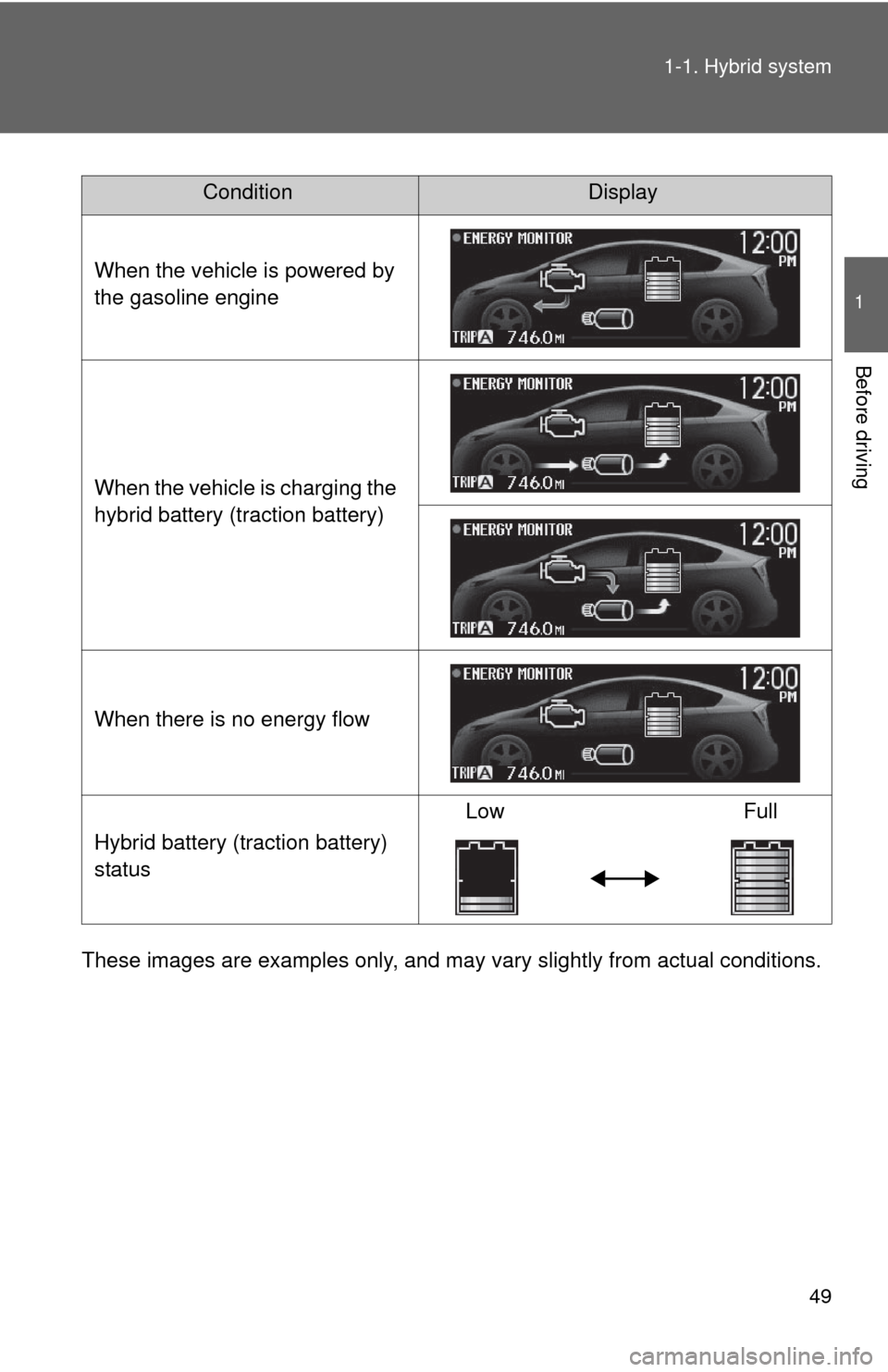
These images are examples only, and may va
ry slightly from actual conditions.
ConditionDisplay
When the vehicle is powered by
the gasoline engine
When the vehicle is charging the
hybrid battery (traction battery)
When there is no energy flow
Hybrid battery (traction battery)
status Low
Full
Page 54 of 636
54 1-1. Hybrid system
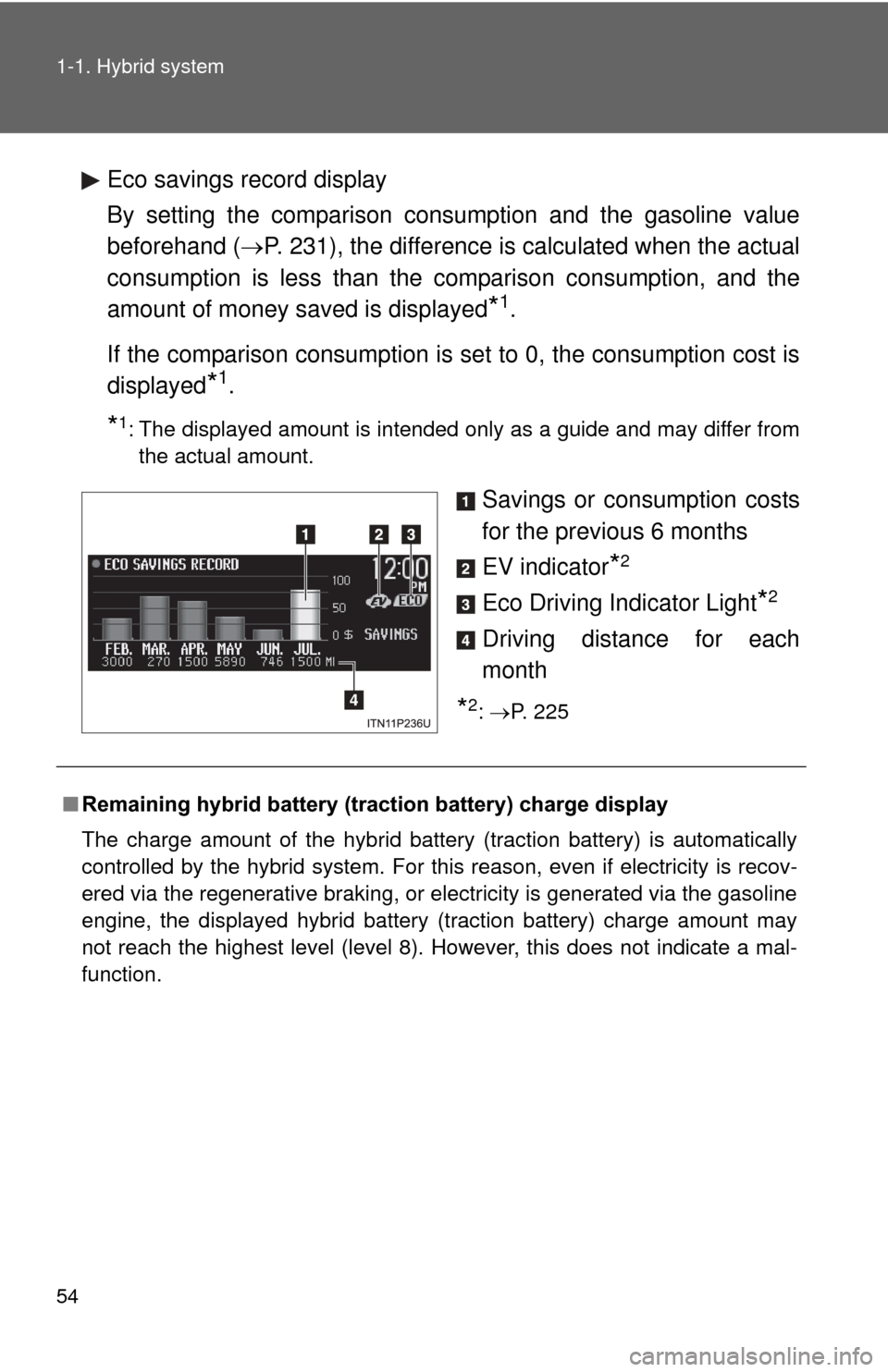
Eco savings record display
By setting the comparison consumption and the gasoline value
beforehand (P. 231), the difference is calculated when the actual
consumption is less than the comparison consumption, and the
amount of money saved is displayed
*1.
If the comparison consumption is set to 0, the consumption cost is
displayed
*1.
*1: The displayed amount is intended only as a guide and may differ from the actual amount.
Savings or consumption costs
for the previous 6 months
EV indicator
*2
Eco Driving Indicator Light*2
Driving distance for each
month
*2: P. 225
■ Remaining hybrid battery (traction battery) charge display
The charge amount of the hybrid battery (traction battery) is automatically
controlled by the hybrid system. For this reason, even if electricity is recov-
ered via the regenerative braking, or electricity is generated via the gasoline
engine, the displayed hybrid battery (traction battery) charge amount may
not reach the highest level (level 8). However, this does not indicate a mal-
function.
Page 58 of 636
58
1-2. Key information
Keys
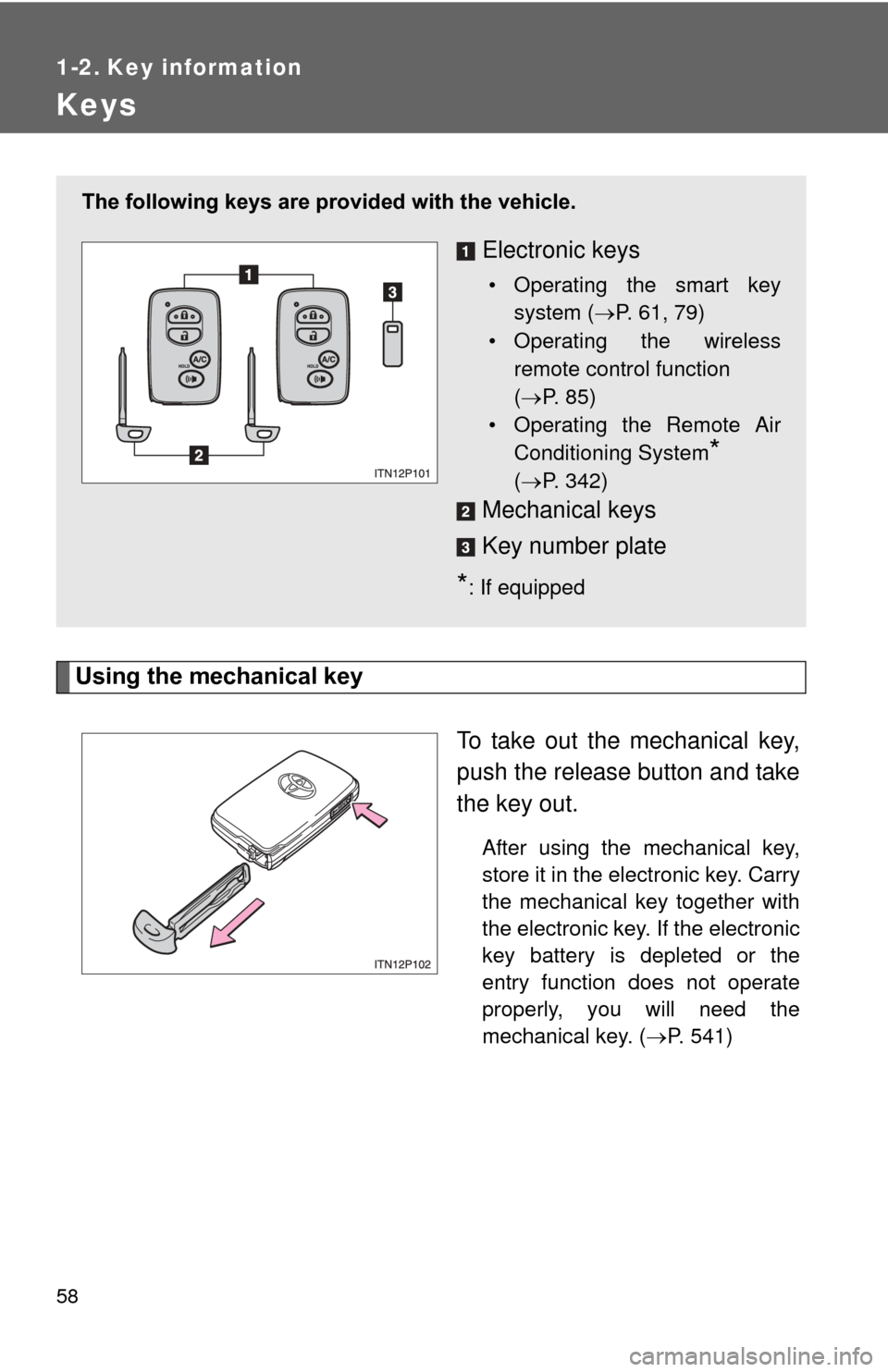
Using the mechanical keyTo take out the mechanical key,
push the release button and take
the key out.
After using the mechanical key,
store it in the electronic key. Carry
the mechanical key together with
the electronic key. If the electronic
key battery is depleted or the
entry function does not operate
properly, you will need the
mechanical key. (P. 541)
The following keys are provid ed with the vehicle.
Electronic keys
• Operating the smart key
system ( P. 61, 79)
• Operating the wireless remote control function
( P. 85)
• Operating the Remote Air Conditioning System
*
( P. 342)
Mechanical keys
Key number plate
*: If equipped
Page 69 of 636

69
1-3. Opening, closing and locking the doors
1
Before driving
*1: A message will be shown on the multi-information display in the instru-
ment cluster.
*2: If the hybrid system does not start when the electronic key is inside thevehicle, the electronic key battery may be depleted or there may be dif-
ficulties receiving signal from the key. ( P. 541)
AlarmSituationCorrection procedure
Interior alarm
pings once
*1
The electronic key has a
low battery Replace the electronic
key battery
An attempt was made to
start the hybrid system
without the electronic key
being present, or the elec-
tronic key was not func-
tioning normally Start the hybrid sys-
tem with the elec-
tronic key present
*2
Interior alarm
pings once and
exterior alarm
sounds 3 times
*1
The driver’s door was
closed after the key was
carried outside the vehicle,
and the “POWER” switch
was not turned OFF
Turn the “POWER”
switch off and close
the driver’s door again
An occupant carried the
electronic key outside the
vehicle and closed the
door while the “POWER”
switch was not OFF Bring the electronic
key back into the vehi-
cle
Page 71 of 636

71
1-3. Opening, closing and locking the doors
1
Before driving
■
Battery-saving function
The battery-saving function will be activated in order to prevent the elec-
tronic key battery and the 12-volt battery from being discharged while the
vehicle is not in operation for a long time.
●In the following situations, the smart key system may take some time to
unlock the doors.
• The electronic key has been left in an area of approximately 6 ft. (2 m)
of the outside of the vehicle for 10 minutes or longer.
• The smart key system has not been used for 5 days or longer.
● If the smart key system has not been used for 14 days or longer, the
doors cannot be unlocked at any doors except the driver’s door. In this
case, take hold of the driver’s door handle, or use the wireless remote
control or the mechanical key, to unlock the doors.
Page 72 of 636

72 1-3. Opening, closing and locking the doors
■Conditions affecting operation
The smart key system, wireless remote control and immobilizer system use
weak radio waves. In the following situations, the communication between
the electronic key and the vehicle may be affected, preventing the smart key
system, wireless remote control and immobilizer system from operating
properly. (Ways of coping: P. 541)
● When the electronic key battery is depleted
● Near a TV tower, electric power plant, gas station, radio station, large dis-
play, airport or other facility that generates strong radio waves or electri-
cal noise
● When carrying a portable radio, ce llular phone, cordless phone or other
wireless communication devices
● When the electronic key is in contact with, or is covered by the following
metallic objects
• Cards to which aluminum foil is attached
• Cigarette boxes that have aluminum foil inside
• Metallic wallets or bags
• Coins
• Hand warmers made of metal
• Media such as CDs and DVDs
● When other wireless key (that emit radio waves) is being used nearby
● When carrying the electronic key together with the following devices that
emit radio waves
• Another vehicle’s electronic key or a wireless key that emits radio
waves
• Personal computers or personal digital assistants (PDAs)
• Digital audio players
• Portable game systems
● If window tint with a metallic content or metallic objects are attached to
the rear window