display TOYOTA PRIUS 2014 3.G Owners Manual
[x] Cancel search | Manufacturer: TOYOTA, Model Year: 2014, Model line: PRIUS, Model: TOYOTA PRIUS 2014 3.GPages: 640, PDF Size: 11.68 MB
Page 526 of 640
526 5-2. Steps to take in an emergency
PRIUS_OM_OM47857U_DVD_(U)
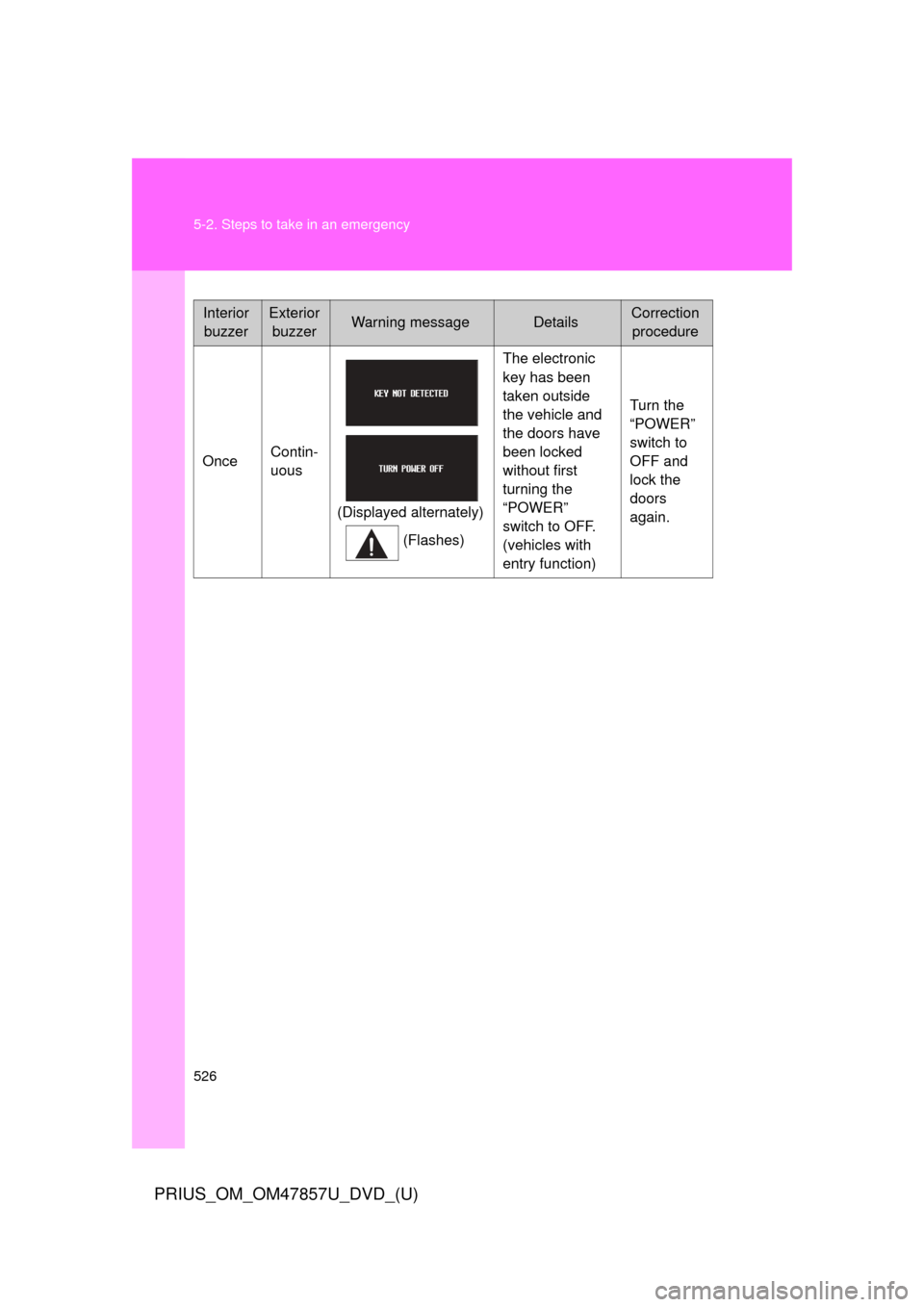
InteriorbuzzerExterior buzzerWarning messageDetailsCorrection procedure
Once Contin-
uous
(Displayed alternately)(Flashes) The electronic
key has been
taken outside
the vehicle and
the doors have
been locked
without first
turning the
“POWER”
switch to OFF.
(vehicles with
entry function)
Turn the
“POWER”
switch to
OFF and
lock the
doors
again.
Page 528 of 640
528 5-2. Steps to take in an emergency
PRIUS_OM_OM47857U_DVD_(U)
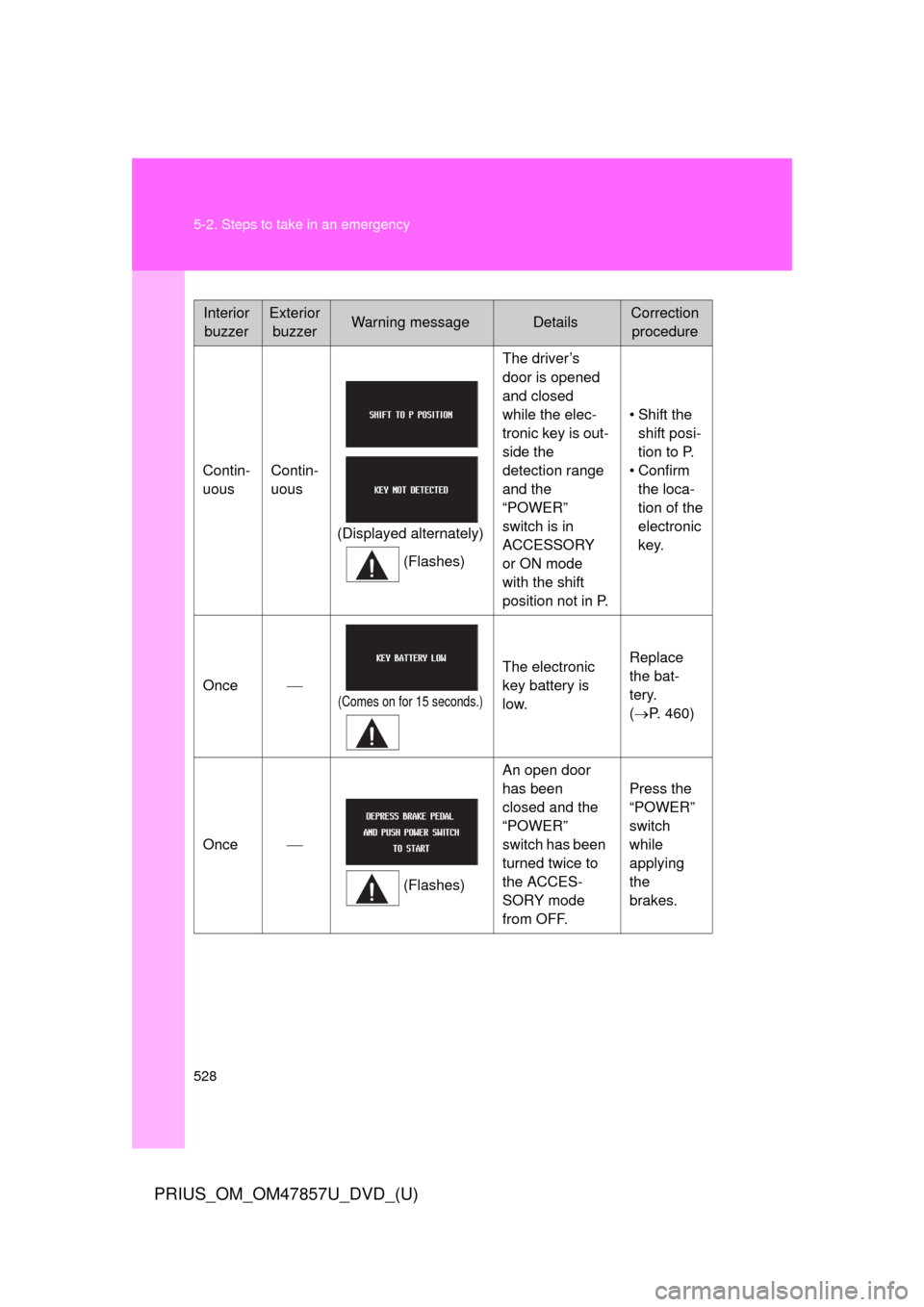
InteriorbuzzerExterior buzzerWarning messageDetailsCorrection procedure
Contin-
uous Contin-
uous
(Displayed alternately)(Flashes) The driver’s
door is opened
and closed
while the elec-
tronic key is out-
side the
detection range
and the
“POWER”
switch is in
ACCESSORY
or ON mode
with the shift
position not in P.
• Shift the
shift posi-
tion to P.
• Confirm the loca-
tion of the
electronic
key.
Once
(Comes on for 15 seconds.)
The electronic
key battery is
low. Replace
the bat-
tery.
(
P. 460)
Once
(Flashes)An open door
has been
closed and the
“POWER”
switch has been
turned twice to
the ACCES-
SORY mode
from OFF. Press the
“POWER”
switch
while
applying
the
brakes.
Page 529 of 640
5
When trouble arises
529
5-2. Steps to take in an emergency
PRIUS_OM_OM47857U_DVD_(U)
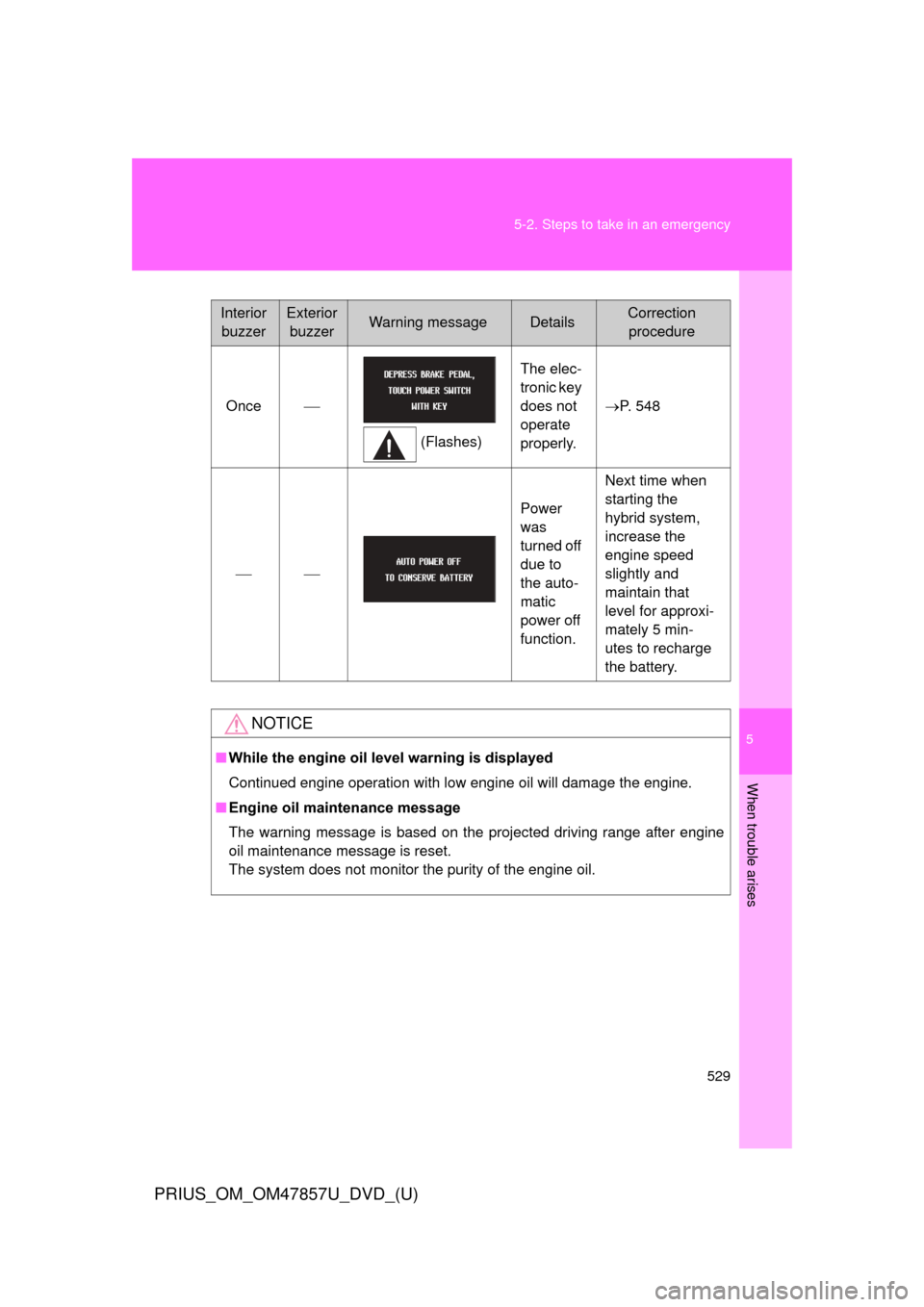
Interior
buzzerExterior buzzerWarning messageDetailsCorrection procedure
Once
(Flashes)The elec-
tronic key
does not
operate
properly.
P. 548
Power
was
turned off
due to
the auto-
matic
power off
function.Next time when
starting the
hybrid system,
increase the
engine speed
slightly and
maintain that
level for approxi-
mately 5 min-
utes to recharge
the battery.
NOTICE
■
While the engine oil level warning is displayed
Continued engine operation with low engine oil will damage the engine.
■ Engine oil maintenance message
The warning message is based on the projected driving range after engine
oil maintenance message is reset.
The system does not monitor the purity of the engine oil.
Page 556 of 640
556
5-2. Steps to take in an emergency
PRIUS_OM_OM47857U_DVD_(U)
If your vehicle overheats
Correction procedures■ If the high coolant temperatur e warning light comes on or
flashes
Stop the vehicle in a safe place and turn off the air condition-
ing system, and then stop the hybrid system.
If you see steam: Carefully lift the hood after the steam subsides.
If you do not see steam: Carefully lift the hood.
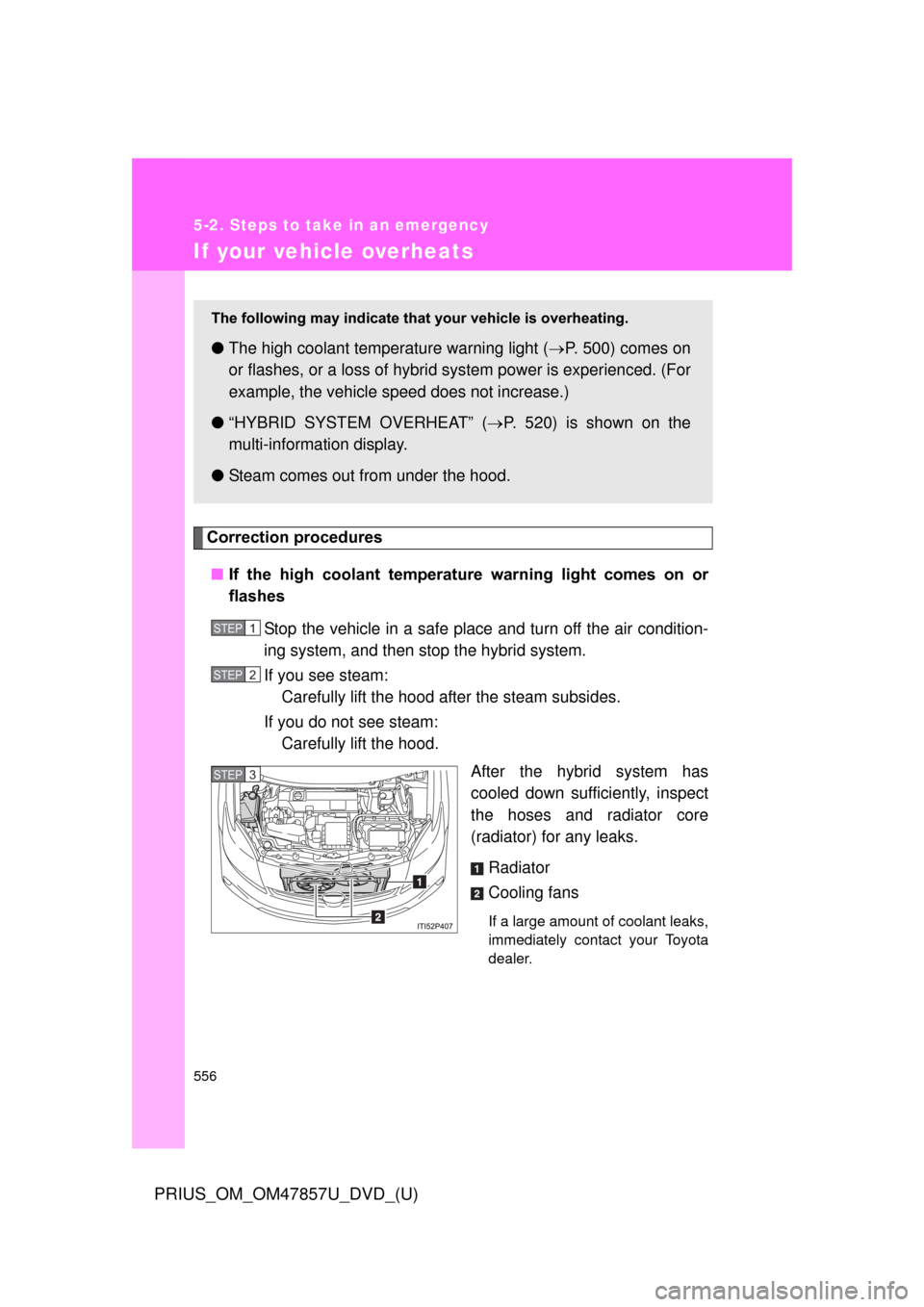
After the hybrid system has
cooled down sufficiently, inspect
the hoses and radiator core
(radiator) for any leaks.
Radiator
Cooling fans
If a large amount of coolant leaks,
immediately contact your Toyota
dealer.
The following may indicate that your vehicle is overheating.
●The high coolant temperature warning light ( P. 500) comes on
or flashes, or a loss of hybrid system power is experienced. (For
example, the vehicle s peed does not increase.)
● “HYBRID SYSTEM OVERHEAT” ( P. 520) is shown on the
multi-informat ion display.
● Steam comes out from under the hood.
STEP 1
STEP 2
STEP 3
Page 558 of 640
558 5-2. Steps to take in an emergency
PRIUS_OM_OM47857U_DVD_(U)
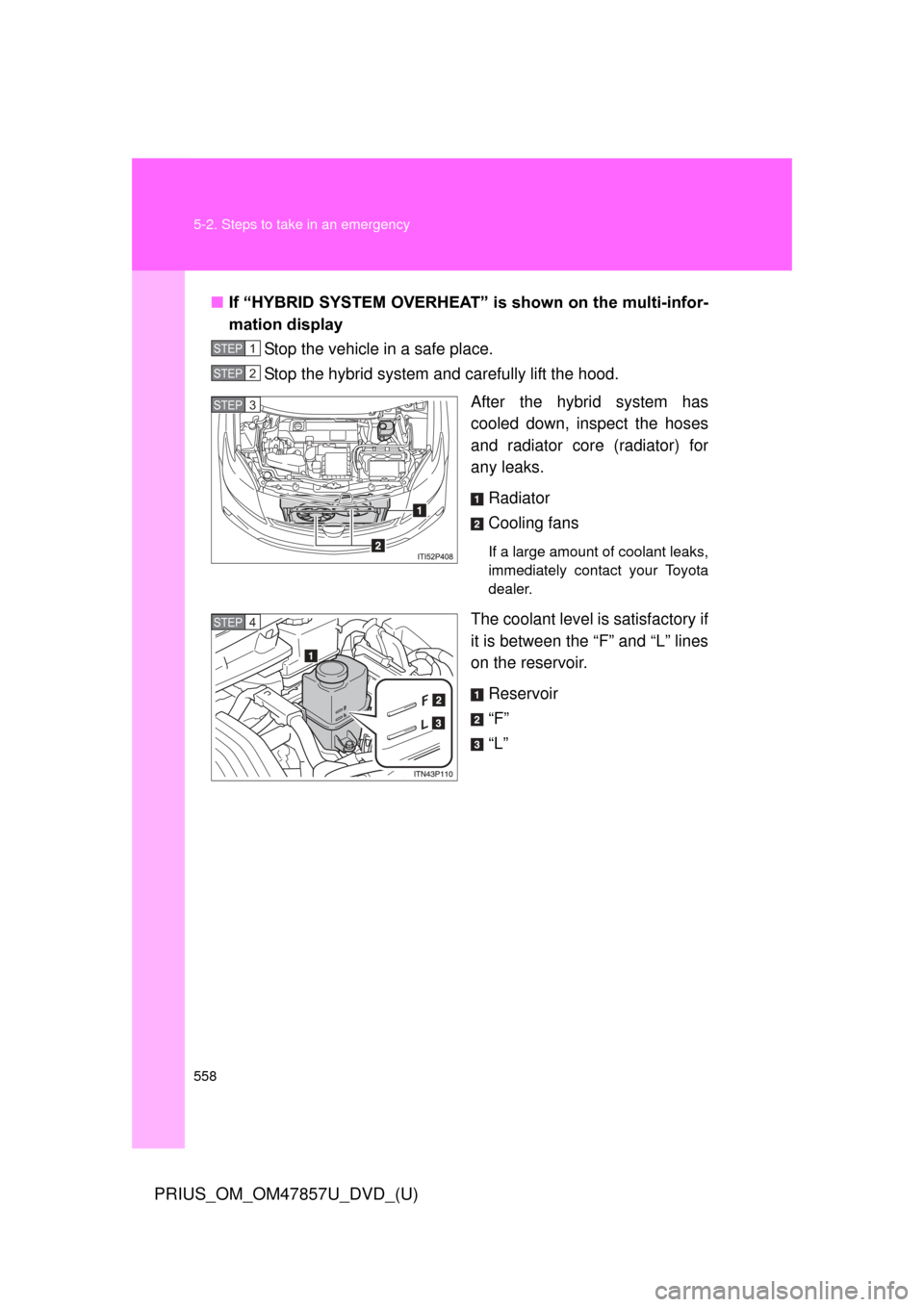
■If “HYBRID SYSTEM OVERHEAT” is shown on the multi-infor-
mation display
Stop the vehicle in a safe place.
Stop the hybrid system and carefully lift the hood.
After the hybrid system has
cooled down, inspect the hoses
and radiator core (radiator) for
any leaks.
Radiator
Cooling fans
If a large amount of coolant leaks,
immediately contact your Toyota
dealer.
The coolant level is satisfactory if
it is between the “F” and “L” lines
on the reservoir.Reservoir
“F”
“L”
STEP 1
STEP 2
STEP 3
STEP 4
Page 559 of 640
5
When trouble arises
559
5-2. Steps to take in an emergency
PRIUS_OM_OM47857U_DVD_(U)
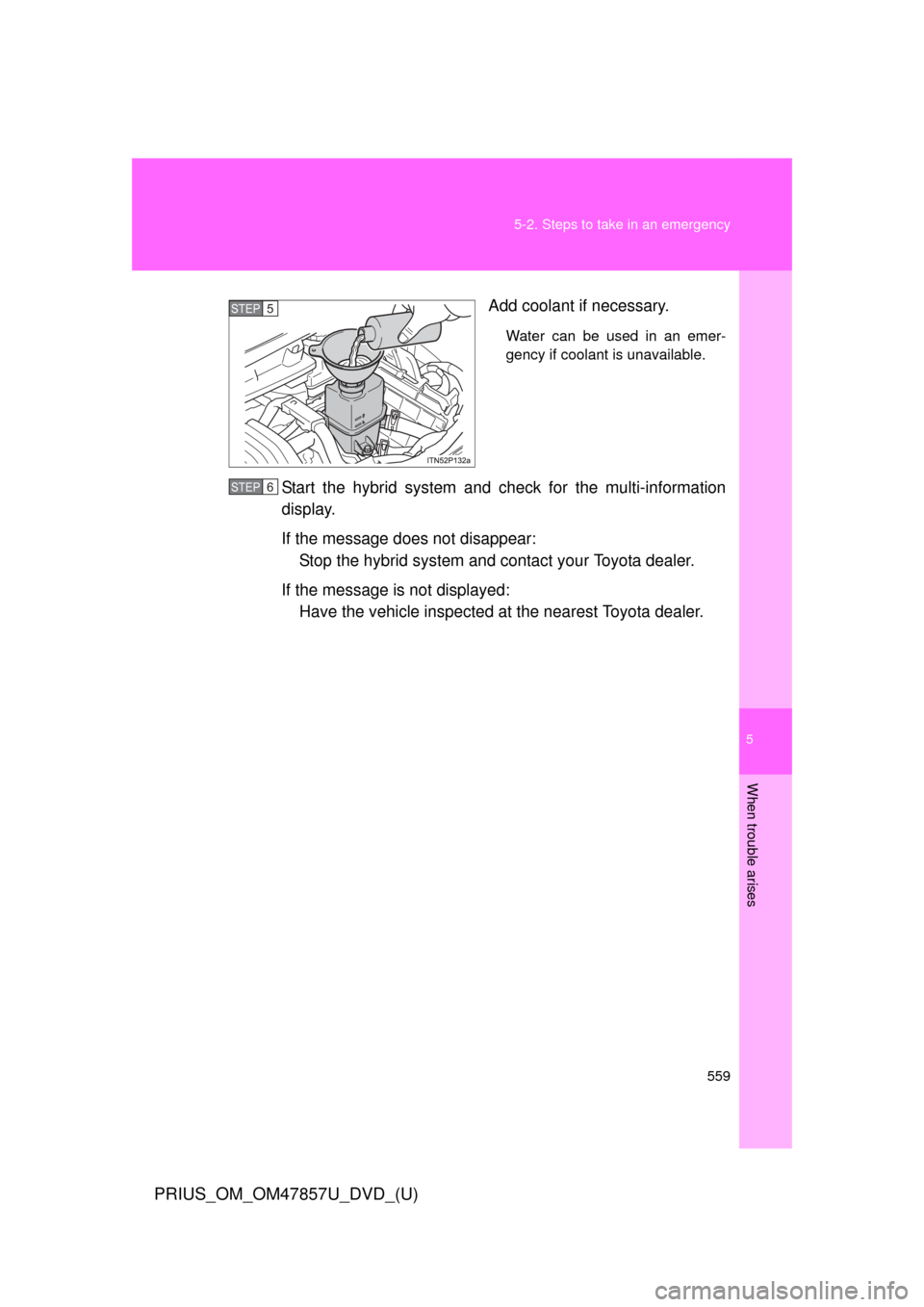
Add coolant if necessary.
Water can be used in an emer-
gency if coolant is unavailable.
Start the hybrid system and check for the multi-information
display.
If the message does not disappear:
Stop the hybrid system and c ontact your Toyota dealer.
If the message is not displayed: Have the vehicle inspected at the nearest Toyota dealer.
STEP 5
STEP 6
Page 596 of 640
596
PRIUS_OM_OM47857U_DVD_(U)
6-2. Customization
Customizable features
Customizable featuresVehicles with a Display Audio system: Settings that can be
changed using the Display Audio system
(For further information on custom izing settings using the Display
Audio system, refer to the “D ISPLAY AUDIO SYSTEM OWNER’S
MANUAL”.)
Vehicles with a navigation syst em: Settings that can be changed
using the navi gation system
(For further information on cust omizing settings using the naviga-
tion system, refer to the “N AVIGATION SYSTEM OWNER’S MAN-
UAL”.)
Settings that can be chan ged by your Toyota dealer
Definition of symbols: O = Available, — = Not available
Your vehicle includes a variety of electronic features that can be per-
sonalized to suit your prefer ences. Programming these preferences
requires specialized equipment and may be performed by your
Toyota dealer.
Some function settings are changed simultaneously with other functions
being customized. Contact your Toyota dealer for further details.
Page 602 of 640
602 6-2. Customization
PRIUS_OM_OM47857U_DVD_(U)
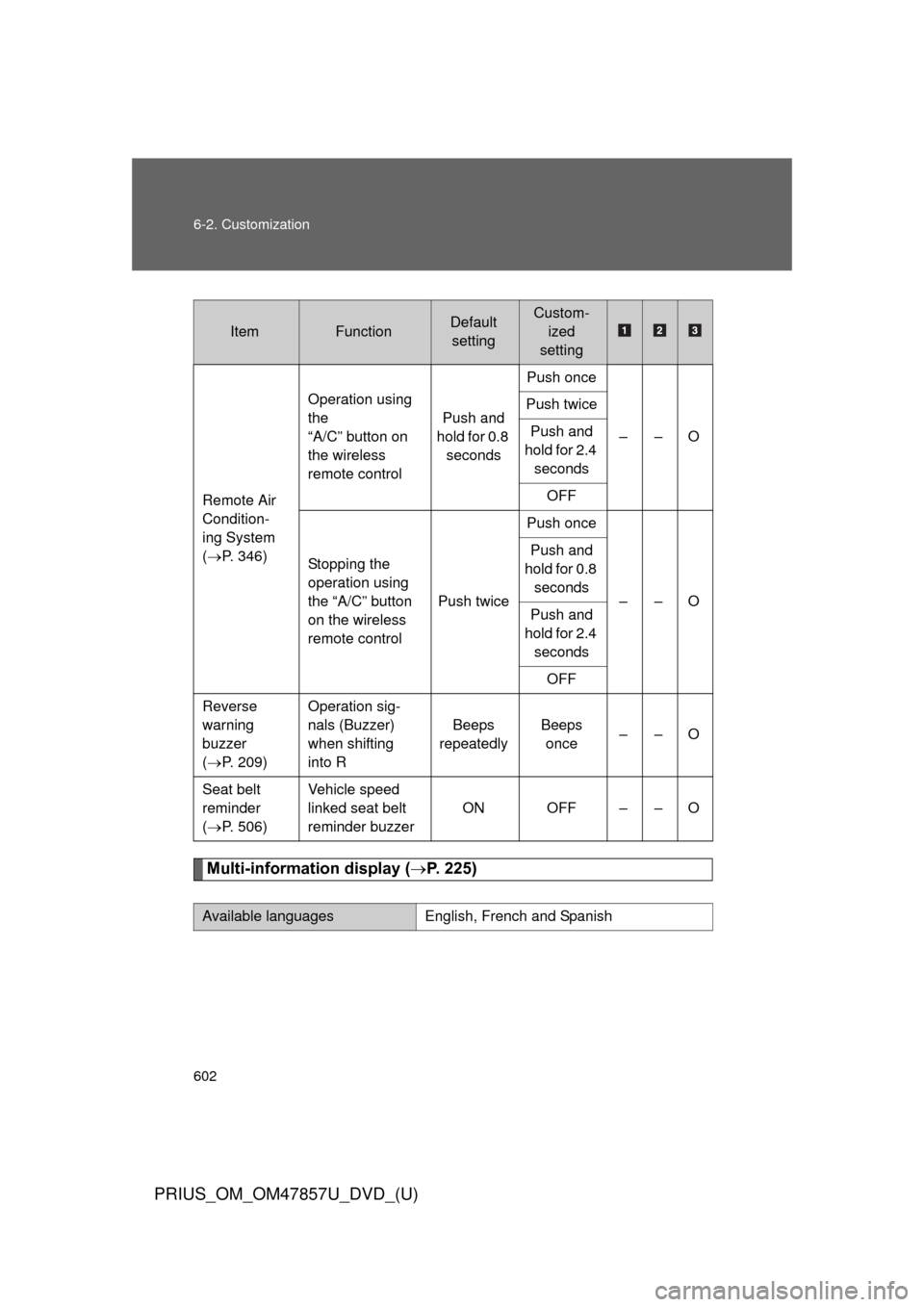
Multi-information display (P. 225)
ItemFunctionDefault
settingCustom- ized
setting
Remote Air
Condition-
ing System
( P. 346) Operation using
the
“A/C” button on
the wireless
remote control
Push and
hold for 0.8 seconds Push once
––O
Push twice
Push and
hold for 2.4 seconds
OFF
Stopping the
operation using
the “A/C” button
on the wireless
remote control Push twicePush once
––O
Push and
hold for 0.8 seconds
Push and
hold for 2.4 seconds
OFF
Reverse
warning
buzzer
( P. 209) Operation sig-
nals (Buzzer)
when shifting
into R
Beeps
repeatedly Beeps
once ––O
Seat belt
reminder
( P. 506) Vehicle speed
linked seat belt
reminder buzzer
ON OFF – – O
Available languagesEnglish, French and Spanish
Page 621 of 640
Index
621
PRIUS_OM_OM47857U_DVD_(U)
Abbreviation list ..................... 622
Alphabetical index .................. 624
What to do if... ........................ 635
Vehicles with a Display Audio system:
For details of equipment related to the Display Audio
system, such as the audio system, refer to the
“DISPLAY AUDIO SYSTEM OWNER’S MANUAL”.
Vehicles with a navigation system:
For details of equipment related to the navigation sys-
tem and touch screen, such as the audio systems, refer
to the “NAVIGATION SYSTEM OWNER’S MANUAL”.
Page 622 of 640
622
PRIUS_OM_OM47857U_DVD_(U)
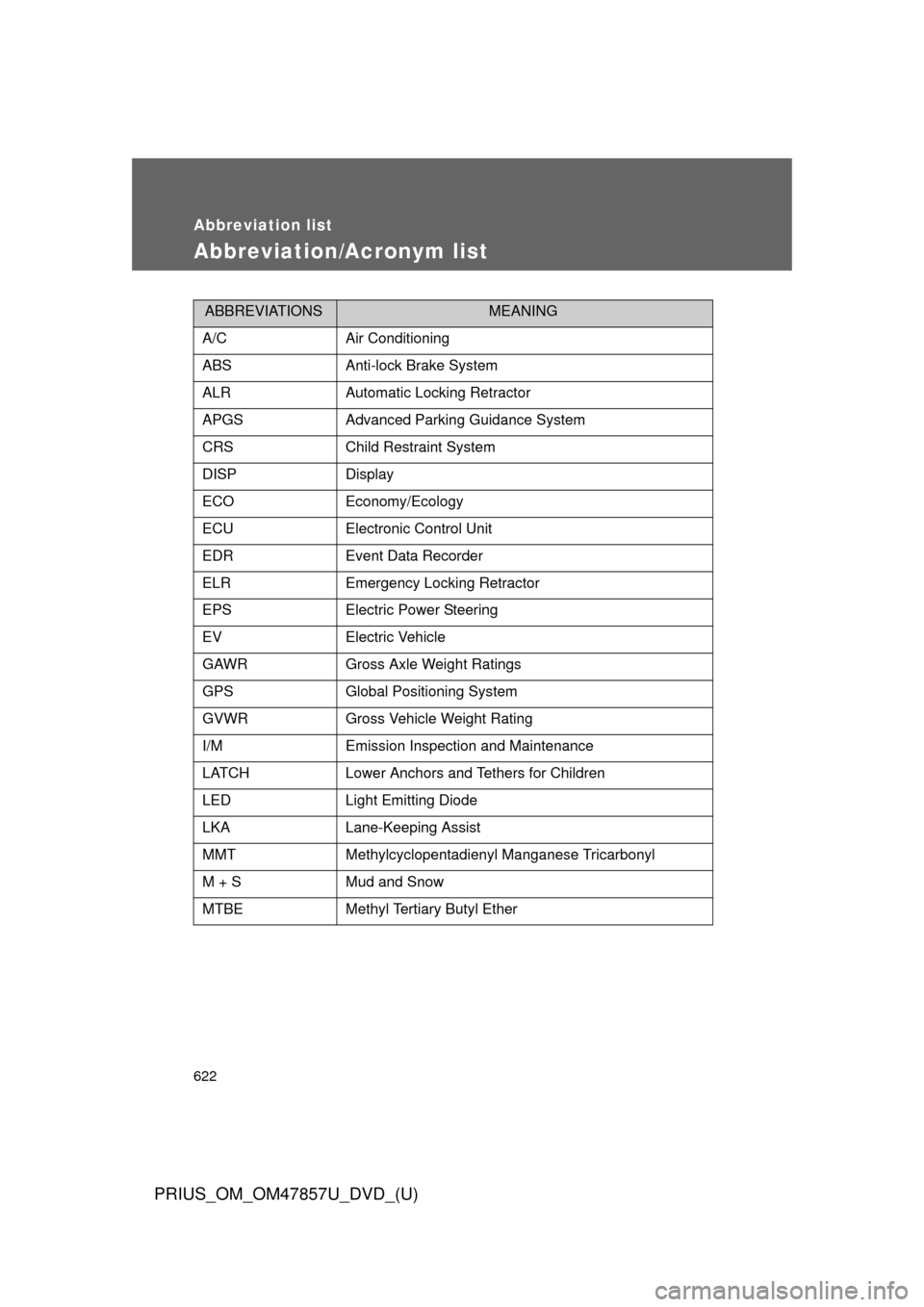
Abbreviation list
Abbreviation/Acronym list
ABBREVIATIONSMEANING
A/CAir Conditioning
ABSAnti-lock Brake System
ALRAutomatic Locking Retractor
APGSAdvanced Parking Guidance System
CRSChild Restraint System
DISPDisplay
ECOEconomy/Ecology
ECUElectronic Control Unit
EDREvent Data Recorder
ELREmergency Locking Retractor
EPSElectric Power Steering
EVElectric Vehicle
GAWRGross Axle Weight Ratings
GPSGlobal Positioning System
GVWRGross Vehicle Weight Rating
I/MEmission Inspection and Maintenance
LATCHLower Anchors and Tethers for Children
LEDLight Emitting Diode
LKALane-Keeping Assist
MMTMethylcyclopentadienyl Manganese Tricarbonyl
M + SMud and Snow
MTBEMethyl Tertiary Butyl Ether