headlights TOYOTA PRIUS 2014 3.G User Guide
[x] Cancel search | Manufacturer: TOYOTA, Model Year: 2014, Model line: PRIUS, Model: TOYOTA PRIUS 2014 3.GPages: 640, PDF Size: 11.68 MB
Page 261 of 640
261
2-3. Operating the lights and windshield wipers
PRIUS_OM_OM47857U_DVD_(U)
2
When driving
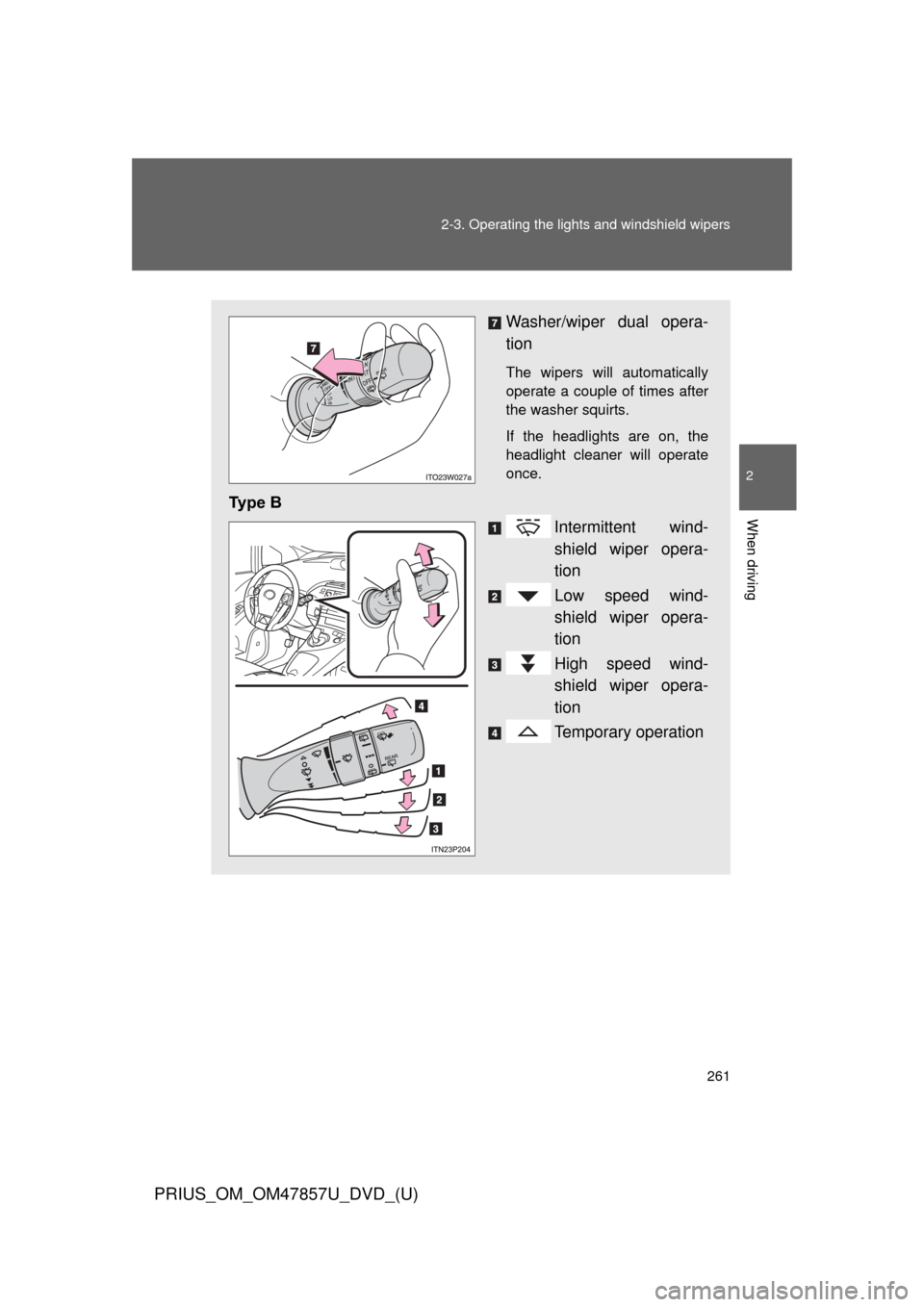
Washer/wiper dual opera-
tion
The wipers will automatically
operate a couple of times after
the washer squirts.
If the headlights are on, the
headlight cleaner will operate
once.
Ty p e B
Intermittent wind-
shield wiper opera-
tion
Low speed wind-
shield wiper opera-
tion
High speed wind-
shield wiper opera-
tion
Temporary operation
Page 262 of 640
262 2-3. Operating the lights and windshield wipers
PRIUS_OM_OM47857U_DVD_(U)
■The windshield wipers and washer can be operated when
The “POWER” switch is in ON mode.
■ If no windshield washer fluid sprays
Check that the washer nozzle is not blocked if there is washer fluid in the
washer fluid tank.
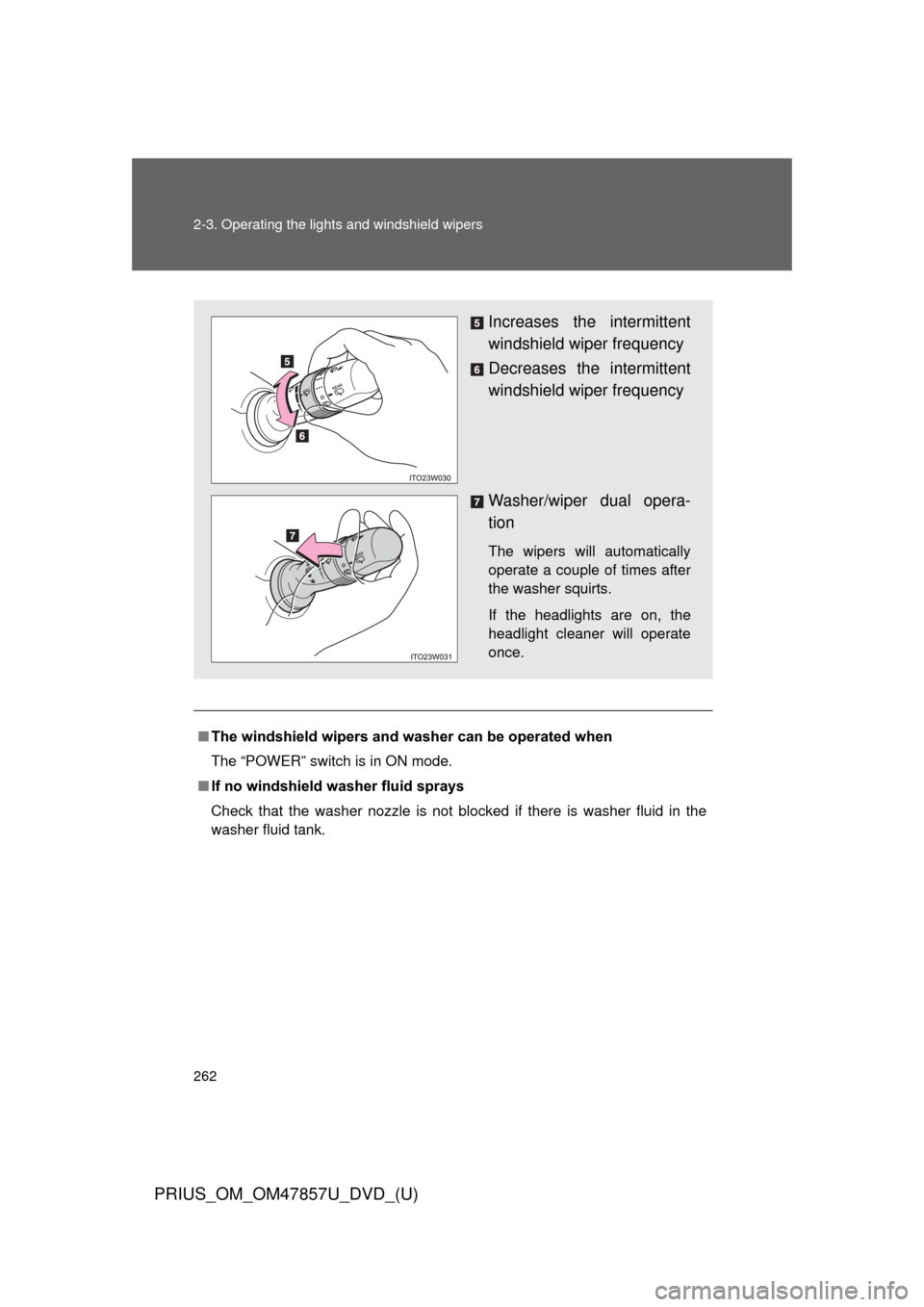
Increases the intermittent
windshield wiper frequency
Decreases the intermittent
windshield wiper frequency
Washer/wiper dual opera-
tion
The wipers will automatically
operate a couple of times after
the washer squirts.
If the headlights are on, the
headlight cleaner will operate
once.
Page 267 of 640
267
2-3. Operating the lights and windshield wipers
PRIUS_OM_OM47857U_DVD_(U)
2
When driving
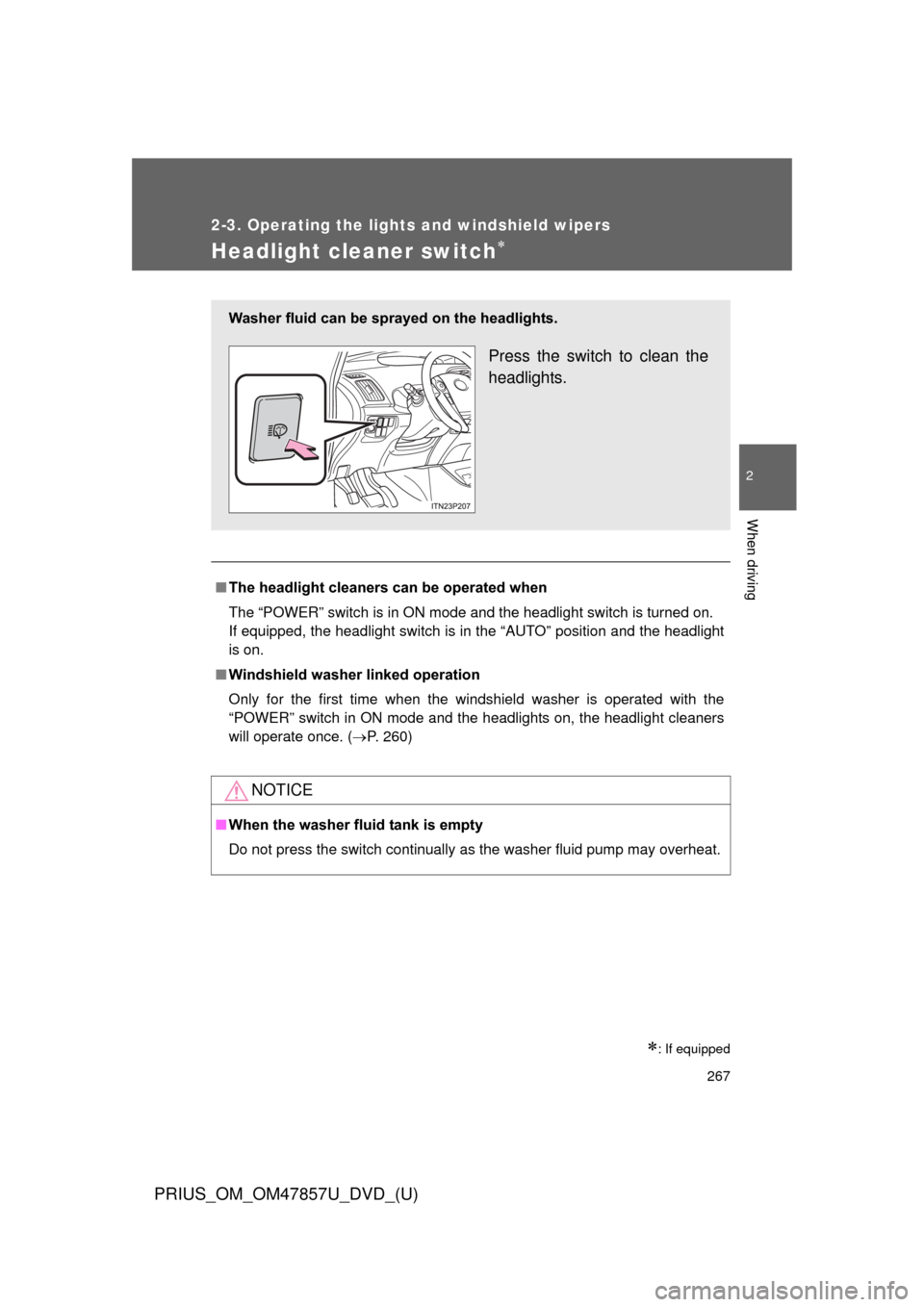
Headlight cleaner switch
: If equipped
■The headlight cleaners can be operated when
The “POWER” switch is in ON mode and the headlight switch is turned on.
If equipped, the headlight switch is in the “AUTO” position and the headlight
is on.
■ Windshield washer linked operation
Only for the first time when the windshield washer is operated with the
“POWER” switch in ON mode and the headlights on, the headlight cleaners
will operate once. ( P. 260)
NOTICE
■When the washer fluid tank is empty
Do not press the switch continually as the washer fluid pump may overhea\
t.
Washer fluid can be sprayed on the headlights.
Press the switch to clean the
headlights.
Page 296 of 640
296 2-4. Using other driving systems
PRIUS_OM_OM47857U_DVD_(U)
●When the lane markers are yellow (These may be more difficult for the
system to recognize compared to white markers.)
● When the lane markers are broken, “Botts’ dots”, “Raised pavement
marker” or stones
● When lane markers are obscured or partially obscured by sand, dirt, etc.
● When there are shadows on the road running parallel with lane markers,
or if a shadow covers the lane markers
● When driving on a particularly bright road surface, such as concrete
● When driving on a road surface that is bright due to reflected light
● When driving in a location where the light level changes rapidly, such as
the entrance to or exit from a tunnel
● When sunlight or the headlights of oncoming vehicles are shining directly
into the camera lens
● When driving on roads that are branching or merging
● When driving on a road surface that is wet due to rain, previous rainfall,
standing water, etc.
● When the vehicle experiences strong up-and-down motion such as when
driving on an extremely rough road or on a seam in the pavement
● When headlight brightness at nighttime is reduced due to dirt on the
lenses, or when the headlights are misaligned
● When driving with a strong crosswind
● When driving on winding roads or roads that are uneven
● When driving on rough or unpaved roads
■ When changing the tires
Depending on the tires used, sufficient performance may not be maintain-
able.
■ Warning messages for LKA
Warning messages are used to indicate a system malfunction or to inform
the driver of the need for caution while driving. (P. 516, 520)
Page 298 of 640
298 2-4. Using other driving systems
PRIUS_OM_OM47857U_DVD_(U)
NOTICE
■To prevent damage to or incorr ect operation of the LKA system
● Do not modify the headlights or attach stickers to the surface of the lights.
● Do not modify the suspension or sun visor, or replace them with non-genu-
ine parts.
● Do not install or place anything on the hood or the grille. Also, do not install
a grille guard (bull bars, kangaroo bar etc.).
● Do not modify the sun visor or replace it with anything other than a genu-
ine Toyota product.
● If your windshield needs repairs, contact your Toyota dealer.
■ Camera sensor (P. 289)
Observe the following to ensure that the LKA system functions correctly.
●Keep the windshield clean at all times.
Performance could be affected if the windshield is dirty, or if raindrops,
condensation or ice are adhering to the windshield.
● When adjusting the rear view mirror, make sure that it does not block the
camera lens.
● Do not attach window tinting to the windshield.
● Do not install an antenna in front of the camera lens.
● If the windshield is fogged up, use the windshield defogger to remove fog
from the windshield.
When it is cold, using the heater with air blowing to the feet may allow the
upper part of the windshield to fog up. This will have a negative effect on
the images.
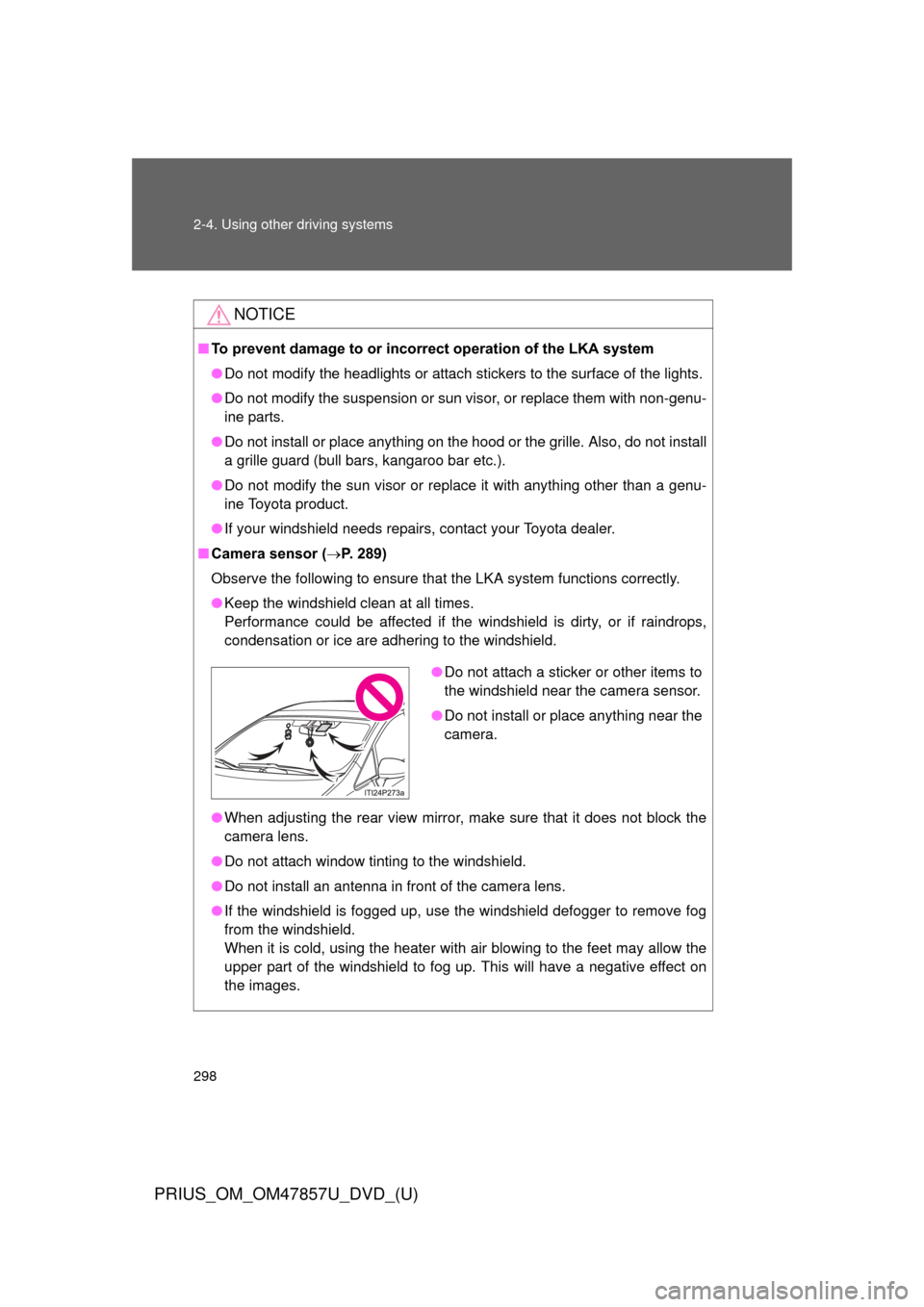
●Do not attach a sticker or other items to
the windshield near the camera sensor.
● Do not install or place anything near the
camera.
Page 347 of 640
347
3-1. Using the air conditioning system
and defogger
PRIUS_OM_OM47857U_DVD_(U)
3
Interior features
■Using the Remote Air Conditioning System effectively
Efficiency can be increased by using the system in conjunction with the
Solar Ventilation System. ( P. 343)
■ When leaving the vehicle
●Check that the headlights are switched to either off or “AUTO”.
● Check that the wiper switch is turned off.
● Check that all windows are closed.
■ Remote Air Conditioning System automatic shut-off
The system will automatically shut off under the following conditions:
●About 3 minutes have passed since operation began
● Any one of the operating conditions is not met
The system may also shut off if the charge level of the hybrid battery (trac-
tion battery) drops to low. ( P. 44)
■ Conditions aff ecting operation
The system may not start in the following situations:
● The charge level of the hybrid battery (traction battery) is low ( P. 44)
● The air conditioning temperature is set at a high level or outside tempera-
ture is low
● When the vehicle has been left parked for a number of days
● When the hybrid system is cool (for example, after being left for a long
time in low temperatures)
Page 473 of 640
473
4-3. Do-it-yourself maintenance
PRIUS_OM_OM47857U_DVD_(U)
4
Maintenance and care
Light bulbs
You may replace the following bulbs by yourself. The difficulty level
of replacement varies depending on the bulb. As there is a danger
that components may be damaged, we recommend that replacement
is carried out by your Toyota dealer.
■Preparing for light bulb replacement
Check the wattage of the light bulb to be replaced. ( P. 576)
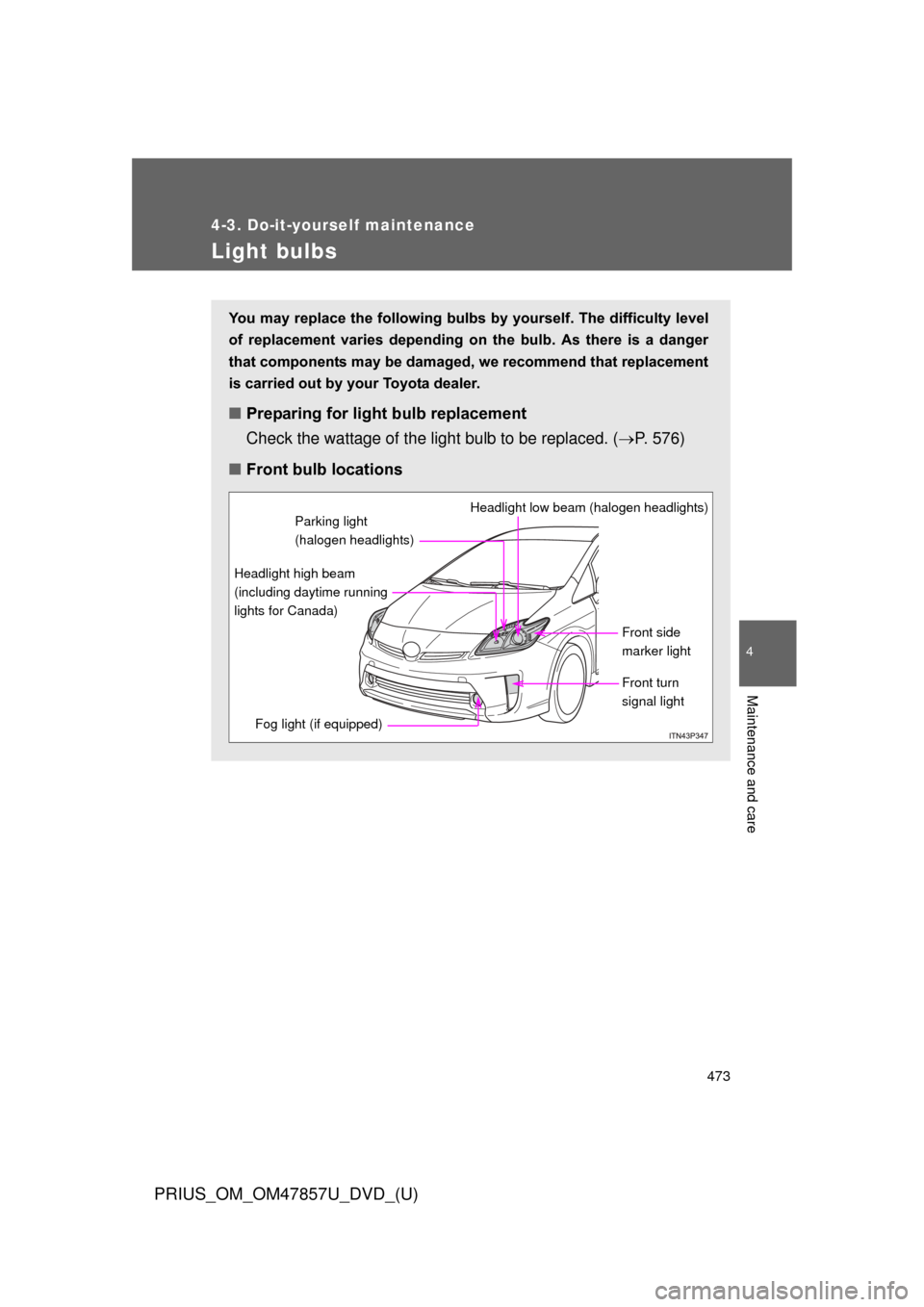
■ Front bulb locations
Front side
marker light
Headlight low beam (halogen headlights)
Headlight high beam
(including daytime running
lights for Canada)
Fog light (if equipped)
Front turn
signal light
Parking light
(halogen headlights)
Page 474 of 640
474 4-3. Do-it-yourself maintenance
PRIUS_OM_OM47857U_DVD_(U)
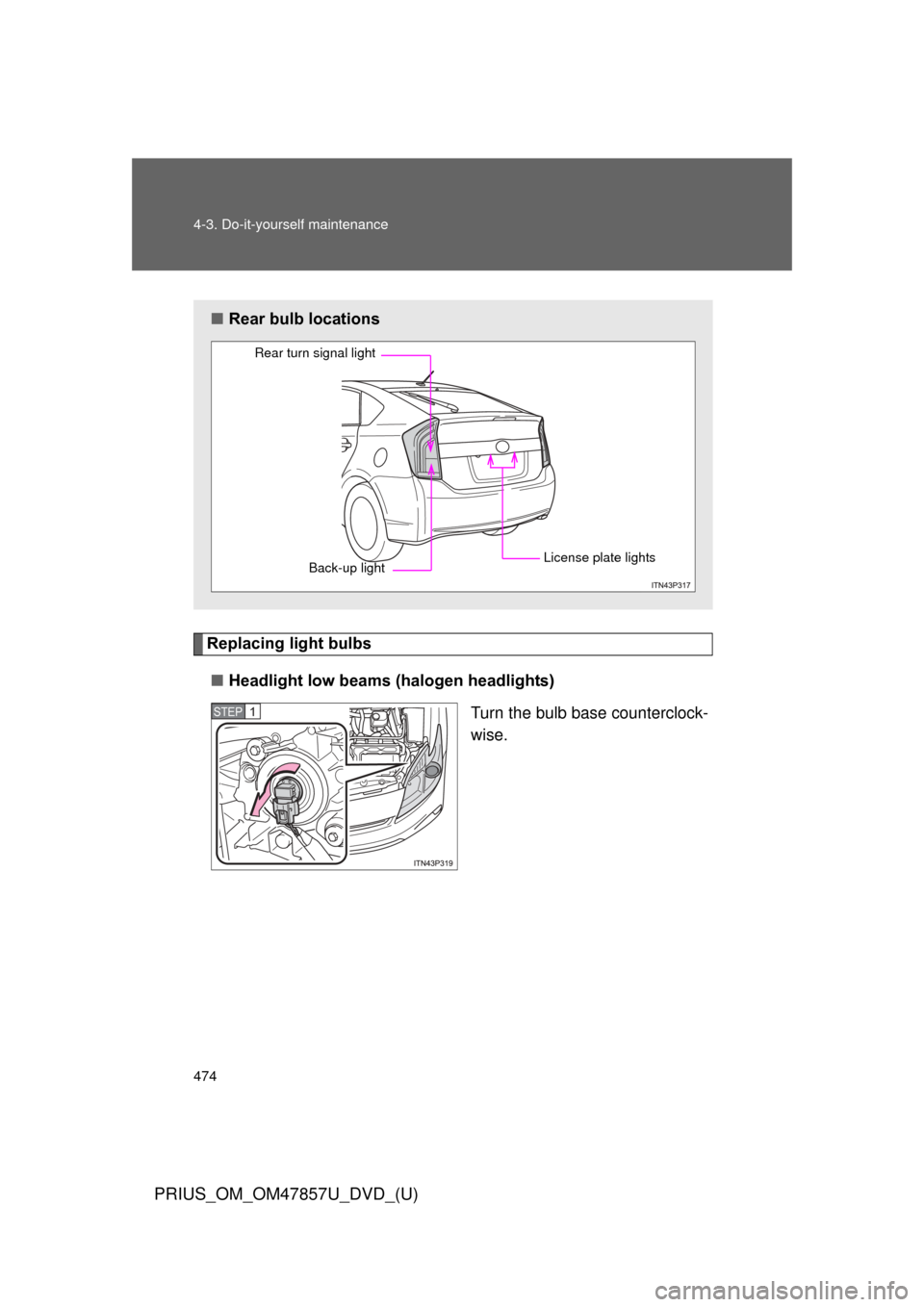
Replacing light bulbs■ Headlight low beams (halogen headlights)
Turn the bulb base counterclock-
wise.
■Rear bulb locations
Rear turn signal light
Back-up light License plate lights
STEP 1
Page 475 of 640
475
4-3. Do-it-yourself maintenance
PRIUS_OM_OM47857U_DVD_(U)
4
Maintenance and care
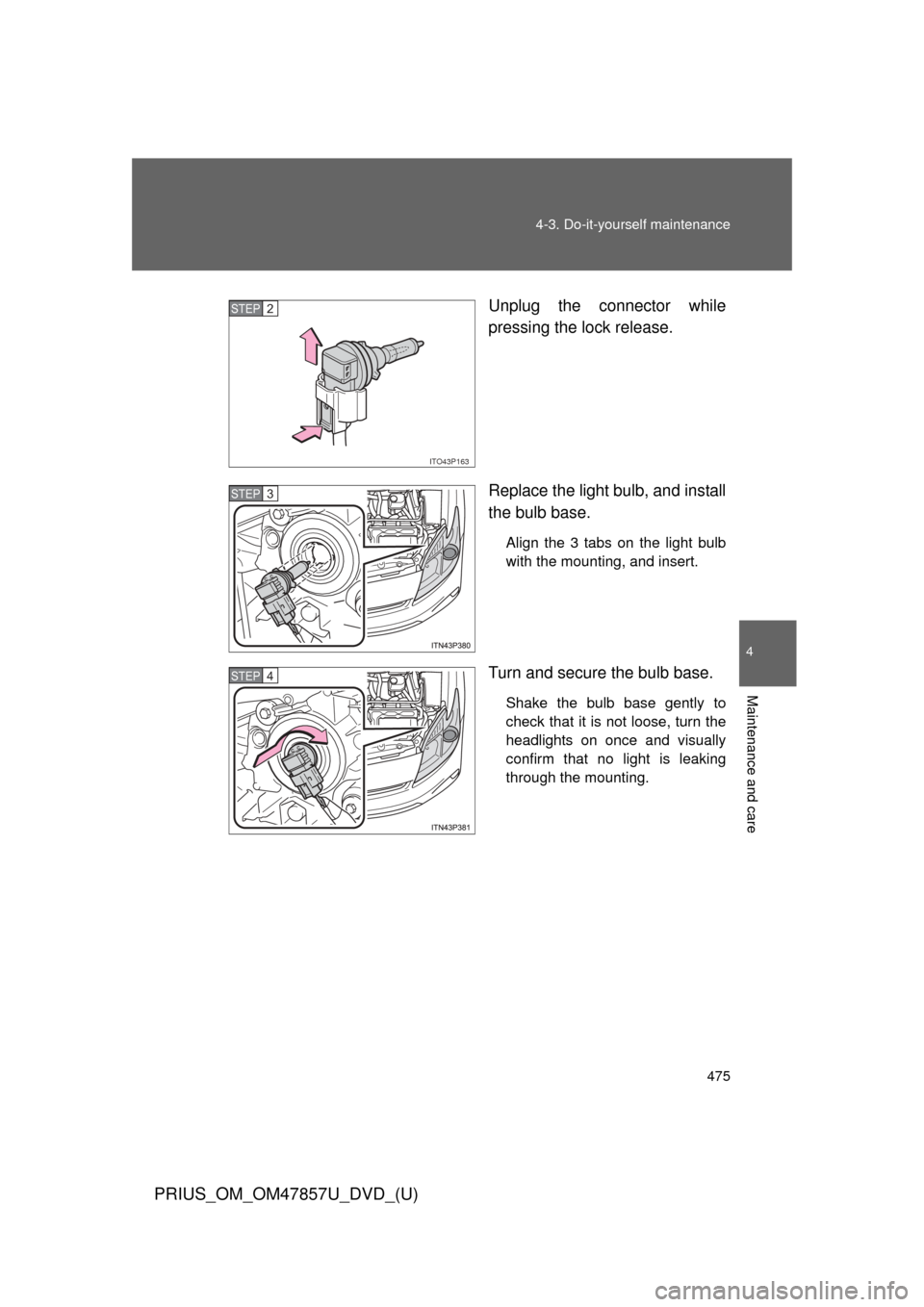
Unplug the connector while
pressing the lock release.
Replace the light bulb, and install
the bulb base.
Align the 3 tabs on the light bulb
with the mounting, and insert.
Turn and secure the bulb base.
Shake the bulb base gently to
check that it is not loose, turn the
headlights on once and visually
confirm that no light is leaking
through the mounting.
ITO43P163
STEP 2
STEP 3
STEP 4
Page 476 of 640
476 4-3. Do-it-yourself maintenance
PRIUS_OM_OM47857U_DVD_(U)
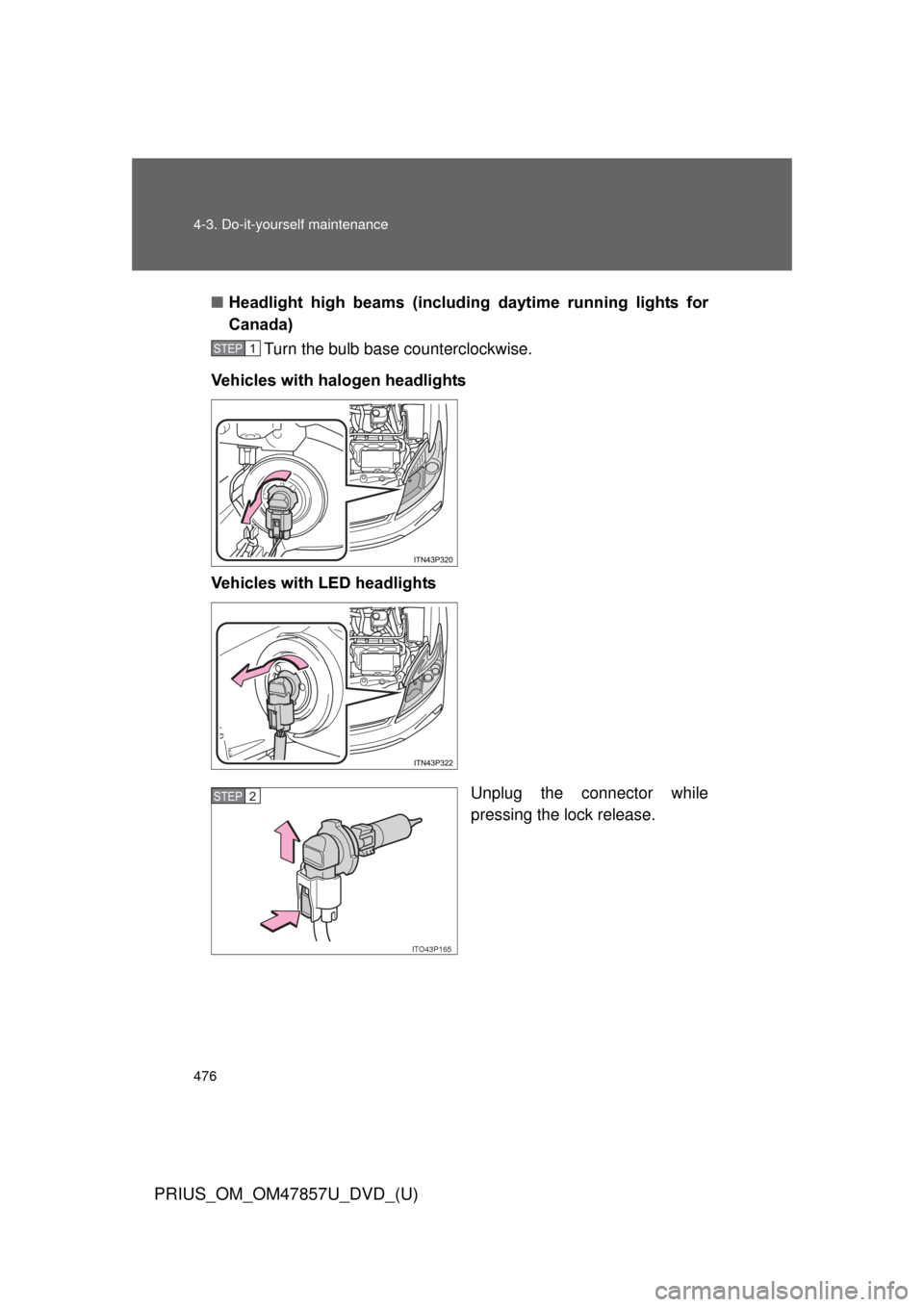
■Headlight high beams (includi ng daytime running lights for
Canada)
Turn the bulb base counterclockwise.
Vehicles with halogen headlights
Vehicles with LED headlights
Unplug the connector while
pressing the lock release.
STEP 1
ITO43P165
STEP 2