Heat TOYOTA PRIUS 2014 3.G Owner's Manual
[x] Cancel search | Manufacturer: TOYOTA, Model Year: 2014, Model line: PRIUS, Model: TOYOTA PRIUS 2014 3.GPages: 640, PDF Size: 11.68 MB
Page 298 of 640
298 2-4. Using other driving systems
PRIUS_OM_OM47857U_DVD_(U)
NOTICE
■To prevent damage to or incorr ect operation of the LKA system
● Do not modify the headlights or attach stickers to the surface of the lights.
● Do not modify the suspension or sun visor, or replace them with non-genu-
ine parts.
● Do not install or place anything on the hood or the grille. Also, do not install
a grille guard (bull bars, kangaroo bar etc.).
● Do not modify the sun visor or replace it with anything other than a genu-
ine Toyota product.
● If your windshield needs repairs, contact your Toyota dealer.
■ Camera sensor (P. 289)
Observe the following to ensure that the LKA system functions correctly.
●Keep the windshield clean at all times.
Performance could be affected if the windshield is dirty, or if raindrops,
condensation or ice are adhering to the windshield.
● When adjusting the rear view mirror, make sure that it does not block the
camera lens.
● Do not attach window tinting to the windshield.
● Do not install an antenna in front of the camera lens.
● If the windshield is fogged up, use the windshield defogger to remove fog
from the windshield.
When it is cold, using the heater with air blowing to the feet may allow the
upper part of the windshield to fog up. This will have a negative effect on
the images.
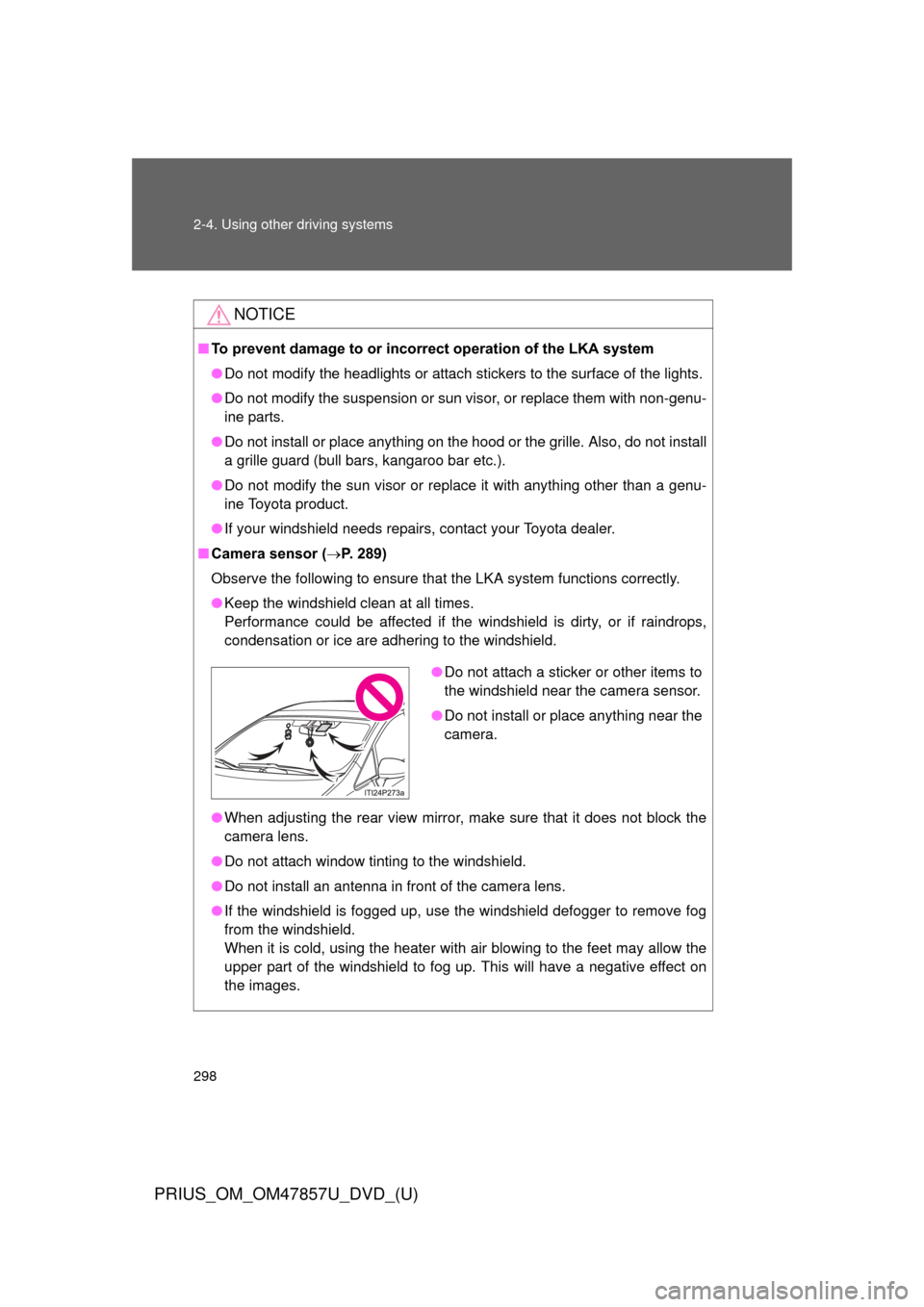
●Do not attach a sticker or other items to
the windshield near the camera sensor.
● Do not install or place anything near the
camera.
Page 302 of 640

302 2-4. Using other driving systems
PRIUS_OM_OM47857U_DVD_(U)
■Sounds and vibrati ons caused by the ABS, brake assist, VSC and
TRAC
● A sound may be heard from the engine compartment when the hybrid
system is started, just after the vehicle begins to move, if the brake pedal
is depressed forcefully or repeatedly, or 1-2 minutes after the hybrid sys-
tem is stopped. This sound does not indicate that a malfunction has
occurred in any of these systems.
● Any of the following conditions may occur when the above systems are
operating. None of these indicates that a malfunction has occurred.
• Vibrations may be felt through the vehicle body and steering.
• A motor sound may be heard after the vehicle comes to a stop.
• The brake pedal may pulsate slightly after the ABS is activated.
• The brake pedal may move down slightly after the ABS is activated.
■ EPS operation sound
When the steering wheel is operated, a motor sound (whirring sound) may
be heard. This does not indicate a malfunction.
■ Reduced effectiveness of the EPS system
The effectiveness of the EPS system is reduced to prevent the system from
overheating when there is frequent steering input over an extended period of
time. The steering wheel may feel heavy as a result.
* Should this occur,
refrain from excessive steering input or stop the vehicle and turn the hybrid
system off. The EPS system should return to normal within 10 minutes.
*: If the LKA (Lane-Keeping Assist) system (if equipped) cannot operate in this case, a warning message will be shown on the multi-information dis-
play.
■ Electric power steering system wa rning light (warning buzzer)
P. 507
Page 329 of 640
Interior features3
329
PRIUS_OM_OM47857U_DVD_(U)
3-1. Using the air conditioning system and defogger
Air conditioning system .... 330
Using the steering wheel climate remote control
switches ......................... 341
Solar Ventilation System ........................... 343
Remote Air Conditioning System ........................... 346
Rear window and outside rear view mirror
defoggers switch ............ 350 3-2. Using the audio system
Audio system types .......... 351
Using the AUX port/USB port ................................. 356
3-3. Using the interior lights Interior lights list ............... 357
• Front interior lights ......... 358
• Personal lights ............... 359
• Rear interior light ........... 359
3-4. Using the storage features List of storage features .... 361
• Glove boxes ................... 362
• Console box ................... 363
• Cup holders ................... 364
• Bottle holders ................. 366
• Auxiliary boxes ............... 367
3-5. Other interior features Sun visors ........................ 368
Vanity mirrors ................... 369
Outside temperature display............................ 370
Power outlets ................... 371
Seat heaters..................... 373
Armrest ............................ 375
Assist grips....................... 376
Floor mats ........................ 377
Luggage compartment features .......................... 379
Garage door opener......... 385
Safety Connect ................ 393
Page 337 of 640
337
3-1. Using the air conditioning system
and defogger
PRIUS_OM_OM47857U_DVD_(U)
3
Interior features
■Using the automatic mode
Fan speed is adjusted automatically in accordance with the temperature set-
ting and ambient conditions. As a result, the following may occur.
●Immediately after
is pressed, the fan may stop for a while until
warm or cool air is ready to flow.
● Cool air may flow to the area around the upper body when the heater is
on.
■ Switching between outside air and recirculated air modes
Recirculated air mode or outside air mode may be automatically switched in
accordance with under these condition, such as temperature setting and
inside temperature.
Also, outside air mode may be automatically switched to when the outside
temperature is low.
■ When the outside temperature exceeds 75
F (24C) and the air condi-
tioning system is on
● In order to reduce the air conditioning power consumption, the air condi-
tioning system may switch to recirculated air mode automatically. This
may also reduce fuel consumption.
● Recirculated air mode is selected as a default mode when the “POWER”
switch is turned to ON mode.
● It is possible to switch to outside air mode at any time by pressing
.
■ Using the system in recirculated air mode
The windows will fog up more easily if the recirculated air mode is used.
■ Window defogger feature
●Recirculated air mode may automatically switch to outside air mode in
situations where the windows need to be defogged.
● When the outside air temperature is low, it may take a while for the con-
densation to clear from the windshield.
Page 339 of 640
339
3-1. Using the air conditioning system
and defogger
PRIUS_OM_OM47857U_DVD_(U)
3
Interior features
■If air flow from the vents decreases dramatically
The filter may be clogged. Contact your Toyota dealer.
■ Operation of the air conditio ning system in Eco drive mode
In the Eco drive mode, the air conditioning system is controlled as follows to
prioritize fuel efficiency:
● Engine speed and compressor operation controlled to restrict heating/
cooling capacity
● Fan speed restricted when automatic mode is selected
To improve air conditioning performance, perform the following operations:
● Adjust the fan speed
● Turn off Eco drive mode ( P. 206)
● Customize the air conditioning control of Eco drive mode. ( P. 596)
■ When outside air temperature is below 32 °F (0 °C)
The cooling and dehumidification function may not operate even when
is pressed.
■ Air conditioning odors
●During use, various odors from inside and outside the vehicle may enter
into and accumulate in the air conditioning system. This may then cause
odor to be emitted from the vents.
● To reduce potential odors from occurring:
• It is recommended that the air conditioning system be set to outside air
mode prior to turning the vehicle off.
• The start timing of the blower may be delayed for a short period of time immediately after the air conditioning system is started in automatic
mode.
■ Customization
Settings (e.g. enable/disable automatic operation of the air conditioning
compressor when the “AUTO” switch ON) can be changed.
(Customizable features P. 596)
Page 344 of 640

344 3-1. Using the air conditioning system and defogger
PRIUS_OM_OM47857U_DVD_(U)
■Operating conditions
The Solar Ventilation System may not operate under the following circum-
stances due to a lack of power from the solar panel:
●Low amount of sunlight
● Ever when a part of the solar panel is cast by a shadow.
● Ever when a part of the solar panel is covered by fallen leaves or dirt.
● The solar panel is not at a high temperature.
■ Before using the Solar Ventilation System
Remove dirt or fallen leaves from the solar panel in order to ensure sufficient
electrical output.
■ Efficient use of the So lar Ventilation System
Efficient control of temperature increase can be achieved by using the sys-
tem in conjunction with the Remote Air Conditioning System. ( P. 346)
■ When using the Sola r Ventilation System
● Make sure that the “POWER” switch is in ON mode when turning the
ventilation switch on. If the ventilation switch is turned on while the
“POWER” switch is OFF, the air mode and the status of the air vents will
remain unchanged.
● If the Solar Ventilation System is not needed, be sure to turn the ventila-
tion switch off.
Dirty air and exhaust fumes from other vehicles may be drawn from out-
side. Also, use in winter may cause heated interior air to leave the vehi-
cle, thus leading to a drop in temperature.
■ Sounds when using the Solar Ventilation System
If the amount of sunlight is insufficient, you may hear a sound coming from
the air conditioning system. This is the sound of a control function to pre-
serve the fan and does not indicate a malfunction.
Page 345 of 640
345
3-1. Using the air conditioning system
and defogger
PRIUS_OM_OM47857U_DVD_(U)
3
Interior features
CAUTION
■Solar Ventilation System precautions
●Do not use the system if people are inside the vehicle.
The Solar Ventilation System is not intended to ensure the performance of
the air conditioning system. Do not leave children or pets in the vehicle.
The temperature of the interior will remain high, possibly resulting in heat-
stroke, dehydration, or even death.
● This system should be used only for the relief of discomfort when entering
the vehicle, and should not be used for other purposes.
■ Precautions for moon roof with Solar Panel
P. 132
Page 349 of 640
349
3-1. Using the air conditioning system
and defogger
PRIUS_OM_OM47857U_DVD_(U)
3
Interior features
CAUTION
■Precautions for the Remote Air Conditioning System
●Do not use the system if people are in the vehicle.
• Even when the system is in use, the internal temperature may still
reach a high level due to features such as the automatic shut-off. Chil-
dren and pets left inside the vehicle may suffer heatstroke or dehydra-
tion, or could result in death or serious injury.
• The wipers can be operated during system operation. Children or pets left inside the vehicle may mistakenly operate these and cause an acci-
dent.
● Depending on the surrounding environment, signals from the wireless
switch may transmit further than expected. Pay appropriate attention to
the vehicle’s surroundings and use the switch only when necessary.
● Turn the wipers off. If the Remote Air Conditioning System operates while
the wiper switch is in the on position, the wipers may operate and objects
may get caught in the wiper blades.
● Do not operate the if the hood is open. The air conditioning may
operate unintentionally and objects may be drawn into the electrical cool-
ing fan.
NOTICE
■ To prevent the hybrid battery (tractio n battery) from being discharged
through incorrect operation
Use the only when necessary.
Page 361 of 640
361
PRIUS_OM_OM47857U_DVD_(U)
3
Interior features
3-4. Using the storage features
List of storage features
CAUTION
■Items that should not be left in the storage spaces
Do not leave glasses, lighters or spray cans in the storage spaces, as this
may cause the following when cabin temperature becomes high:
● Glasses may be deformed by heat or cracked if they come into contact
with other stored items.
● Lighters or spray cans may explode. If they come into contact with other
stored items, the lighter may catch fire or the spray can may release gas,
causing a fire hazard.
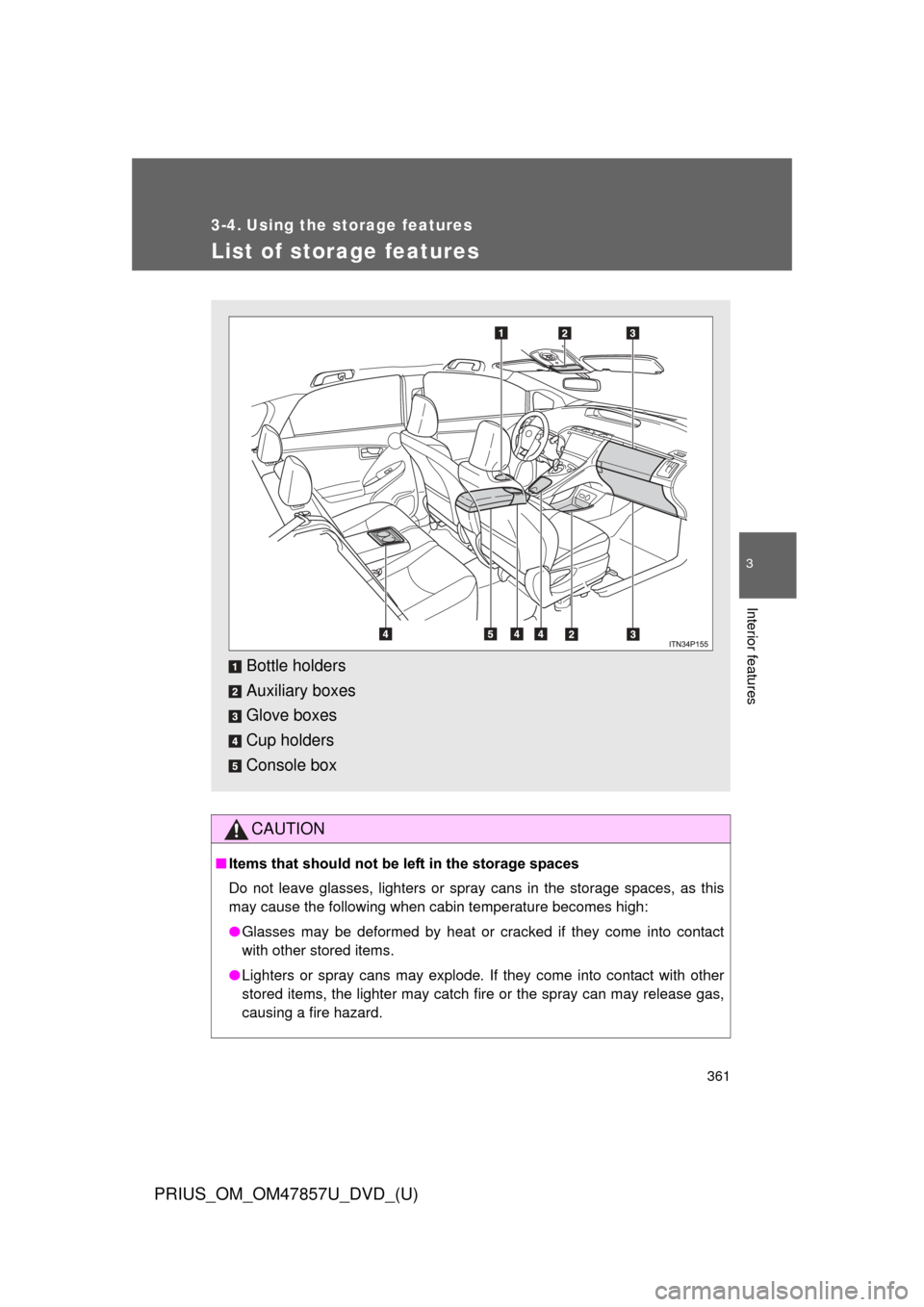
Bottle holders
Auxiliary boxes
Glove boxes
Cup holders
Console box
Page 373 of 640
373
3-5. Other interior features
PRIUS_OM_OM47857U_DVD_(U)
3
Interior features
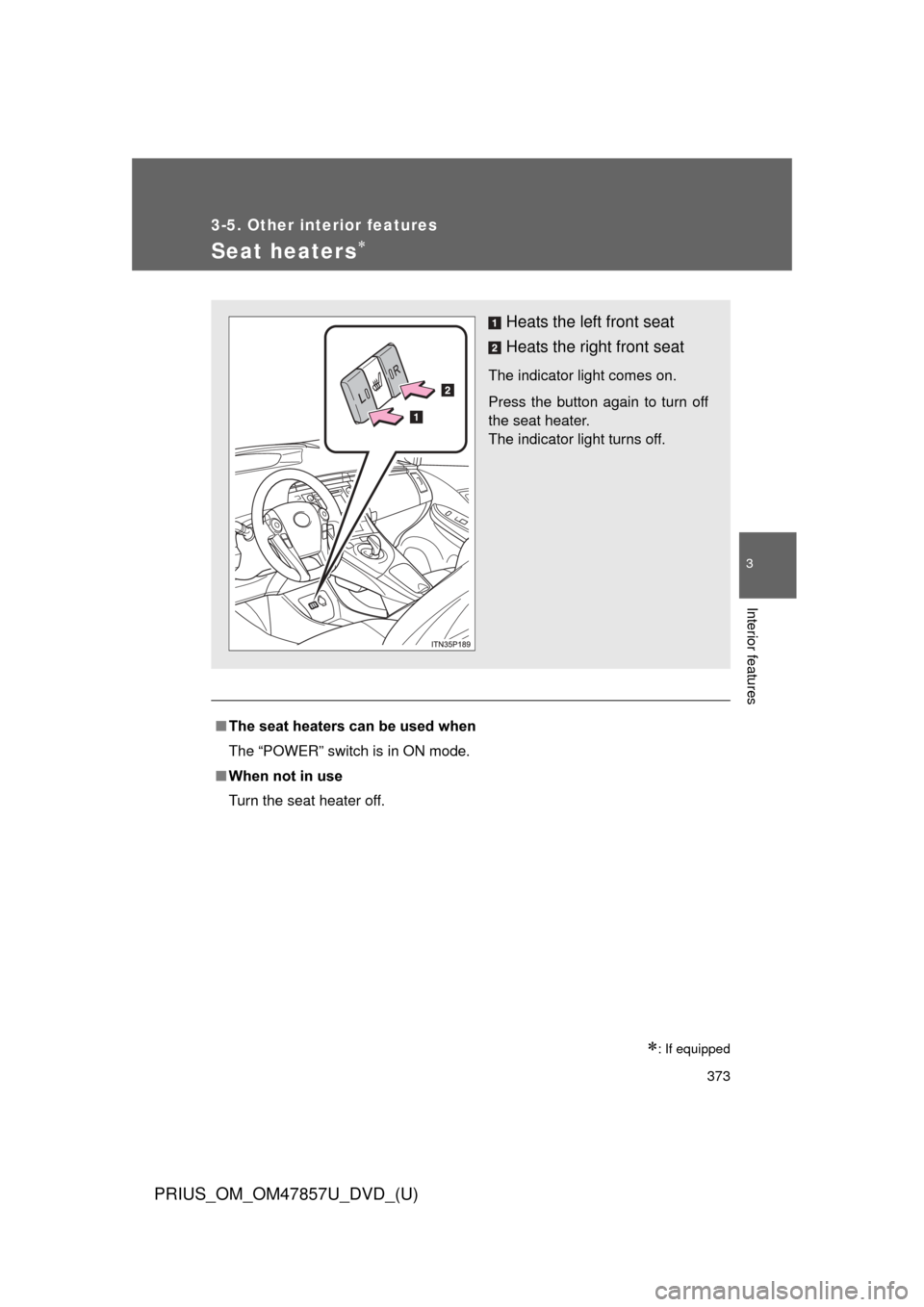
Seat heaters
: If equipped
■The seat heaters can be used when
The “POWER” switch is in ON mode.
■ When not in use
Turn the seat heater off.
Heats the left front seat
Heats the right front seat
The indicator light comes on.
Press the button again to turn off
the seat heater.
The indicator light turns off.