engine TOYOTA PRIUS 2014 3.G Owner's Manual
[x] Cancel search | Manufacturer: TOYOTA, Model Year: 2014, Model line: PRIUS, Model: TOYOTA PRIUS 2014 3.GPages: 640, PDF Size: 11.68 MB
Page 201 of 640
201
2-1. Driving procedures
PRIUS_OM_OM47857U_DVD_(U)
2
When driving
EV drive mode
In EV drive mode, the electric motor (traction motor), powered by the
hybrid battery (traction battery), is used to drive the vehicle.
This mode allows you to drive in residential areas late at night, or in
indoor parking lots etc. without concern for noises and exhaust gas
emissions.
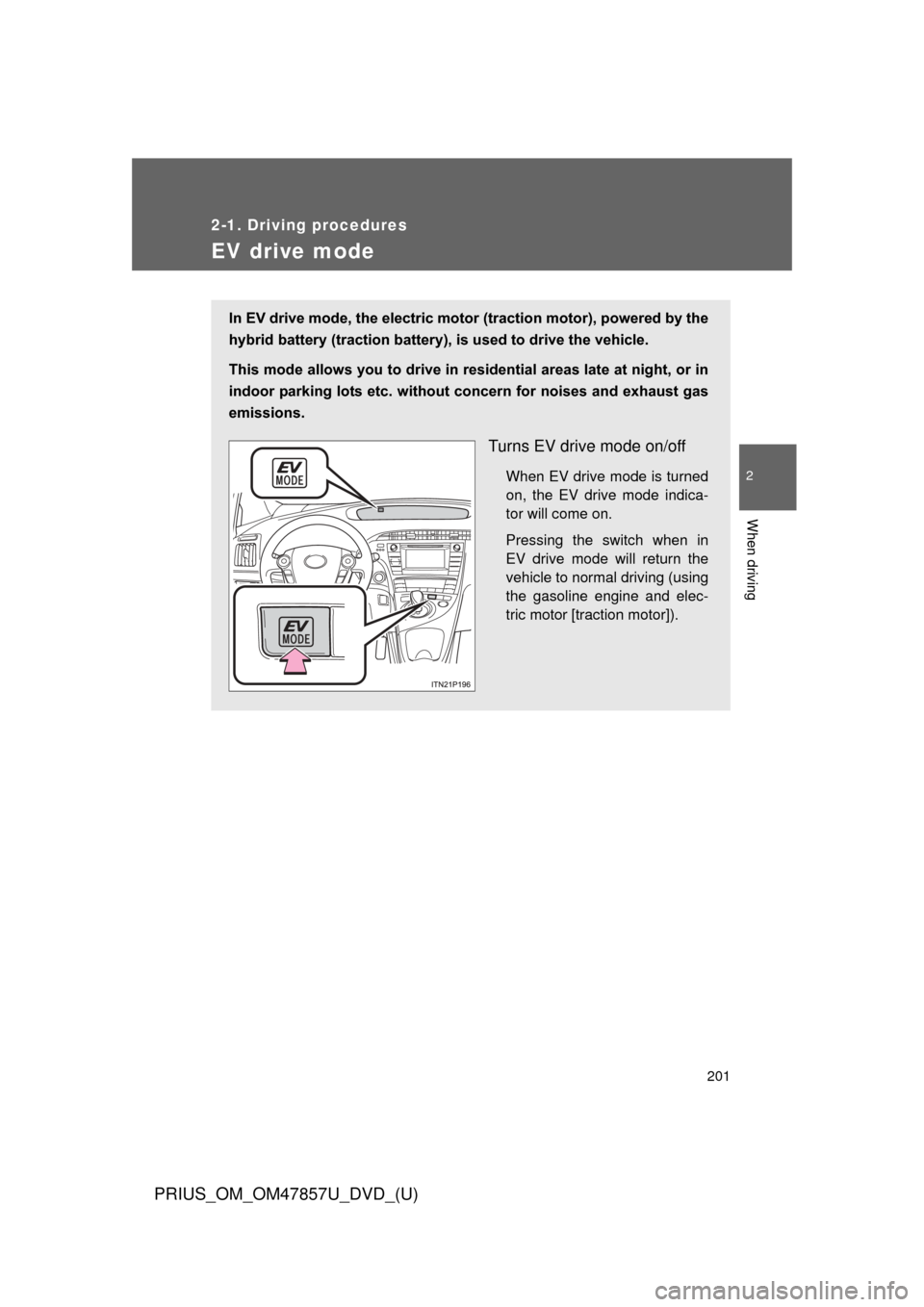
Turns EV drive mode on/off
When EV drive mode is turned
on, the EV drive mode indica-
tor will come on.
Pressing the switch when in
EV drive mode will return the
vehicle to normal driving (using
the gasoline engine and elec-
tric motor [traction motor]).
Page 202 of 640

202 2-1. Driving procedures
PRIUS_OM_OM47857U_DVD_(U)
■Situations in which EV drive mode cannot be turned on
It may not be possible to turn EV drive mode on in the following situations.
*
If it cannot be turned on, a buzzer will sound and a message will be shown
on the multi-information display.
●The temperature of the hybrid system is high.
The vehicle has been left in the sun, driven on a hill, driven at high
speeds, etc.
● The temperature of the hybrid system is low.
The vehicle has been left in temperatures lower than about 32
F (0C)
for a long period of time etc.
● The gasoline engine is warming up.
● The hybrid battery (traction battery) is low.
When the amount of remaining hybrid battery (traction battery) charge
displayed on the meter is low. ( P. 44)
● Vehicle speed is high.
● The accelerator pedal is depressed firmly or the vehicle is on a hill etc.
● The windshield defogger is in use.
*: Depending on the circumstances, EV drive mode may also not be
switched to in situations other than those above.
■ Switching to EV drive mode when the gasoline engine is cold
If the hybrid system is started while the gasoline engine is cold, the gasoline
engine will start automatically after a short period of time in order to warm
up. In this case, you will become unable to switch to EV drive mode.
After the hybrid system has started and the “READY” indicator has illumi-
nated, press the EV drive mode switch before the gasoline engine starts to
switch to EV drive mode.
Page 203 of 640
203
2-1. Driving procedures
PRIUS_OM_OM47857U_DVD_(U)
2
When driving
■
Automatic cancelation of EV drive mode
When driving in EV drive mode, the gasoline engine may automatically
restart in the following situations. When EV drive mode is canceled, a buzzer
will sound and the EV drive mode indicator will flash and go off.
●The hybrid battery (traction battery) becomes low.
● Vehicle speed becomes high.
● The accelerator pedal is depressed firmly or the vehicle is on a hill etc.
■ Possible driving distance when driving in EV drive mode
In EV drive mode, it is possible to drive up to about 1.3 mile (2 km) if driving
at a speed of about 25 mph (40 km/h) or less. (The distance that is possible
depends on the hybrid battery [traction battery] level and driving conditions.)
■ Changing a driving mode when in EV drive mode
EV drive mode can be used in conjunction with Eco drive mode and power
mode.
However, EV drive mode may be automatically canceled when used in con-
junction with power mode.
■ Fuel economy
PRIUS is designed to achieve the best possible fuel economy during normal
driving (using the gasoline engine and electric motor [traction motor]). Driv-
ing in EV drive mode more than necessary may lower fuel economy.
CAUTION
■While driving
When driving in EV drive mode, pay special attention to the area around the
vehicle. Because there is no engine noise, pedestrians, people riding bicy-
cles or other people and vehicles in the area may not be aware of the vehicle
starting off or approaching them, so take extra care while driving.
Page 205 of 640
205
2-1. Driving procedures
PRIUS_OM_OM47857U_DVD_(U)
2
When driving
Shift position indicator
The position of the frame on the shift position indicator changes in
accordance with the current shift position.
When any shift position other than D or B is selected, the arrow toward
B and B position indicator disappear from the shift position indicator.
When selecting the shift position, make sure that the shift position has
been changed to the desired position by checking the shift position indica-
tor provided on the instrument cluster.
■ Shift position purpose
*: For good fuel economy and noise reduction, the D position should usu-
ally be used.
Shift positionFunction
PParking the vehicle/starting the hybrid system
RReversing
NNeutral
DNormal driving*
BApplying moderate engine braking when driving down hills or on steep slopes
Page 210 of 640

210 2-1. Driving procedures
PRIUS_OM_OM47857U_DVD_(U)
■About engine braking
When shift position B is selected, releasing the accelerator pedal will apply
engine braking.
●When the vehicle is driven at high speeds, compared to ordinary gaso-
line-fueled vehicles, the engine braking deceleration is felt less than that
of other vehicles.
● The vehicle can be accelerated even when shift position B is selected.
If the vehicle is driven continuously in the B position, fuel efficiency will
become low. Usually, shift the shift position to D.
■ When driving with cruise control or radar cruise control activated
Even if switching the driving mode to power mode with the intent of enabling
engine braking, engine braking will not activate because cruise control or
radar cruise control will not be canceled.
■ When canceling Eco drive mode/power mode
●Press the switch again. Also, power mode will be canceled automatically
when the “POWER” switch is turned off. However, Eco drive mode will
not be canceled automatically until the switch is pressed, even if the
“POWER” switch is turned off.
● When in Eco drive mode, if the power mode switch is pressed or the
operation is reversed, the mode will switch to that of the last switch to be
pressed.
■ Switching the drive mode when in EV drive mode
P. 203
■ After recharging/reconnecting the 12-volt battery
P. 439
Page 211 of 640

211
2-1. Driving procedures
PRIUS_OM_OM47857U_DVD_(U)
2
When driving
■
Customization
Settings (e.g. Reverse warning buzzer) can be changed.
(Customizable features P. 596)
CAUTION
■When driving on slippery road surfaces
Do not accelerate or shift the shift position suddenly.
Sudden changes in engine braking may cause the vehicle to spin or skid,
resulting in an accident.
■ For the shift lever
Do not remove the shift lever knob or use anything but a genuine Toyota shift
lever knob. Also, do not hang anything on the shift lever.
Doing so could prevent the shift lever from returning to position, causing
unexpected accidents to occur when the vehicle is in motion.
■ P position switch
Do not press the P position switch while the vehicle is moving.
If the P position switch is pressed when driving at very low speeds (for
example, directly before stopping the vehicle), the vehicle may stop sud-
denly when the shift position switches to P, which could lead to an accident.
Page 220 of 640
220 2-2. Instrument cluster
PRIUS_OM_OM47857U_DVD_(U)
CAUTION
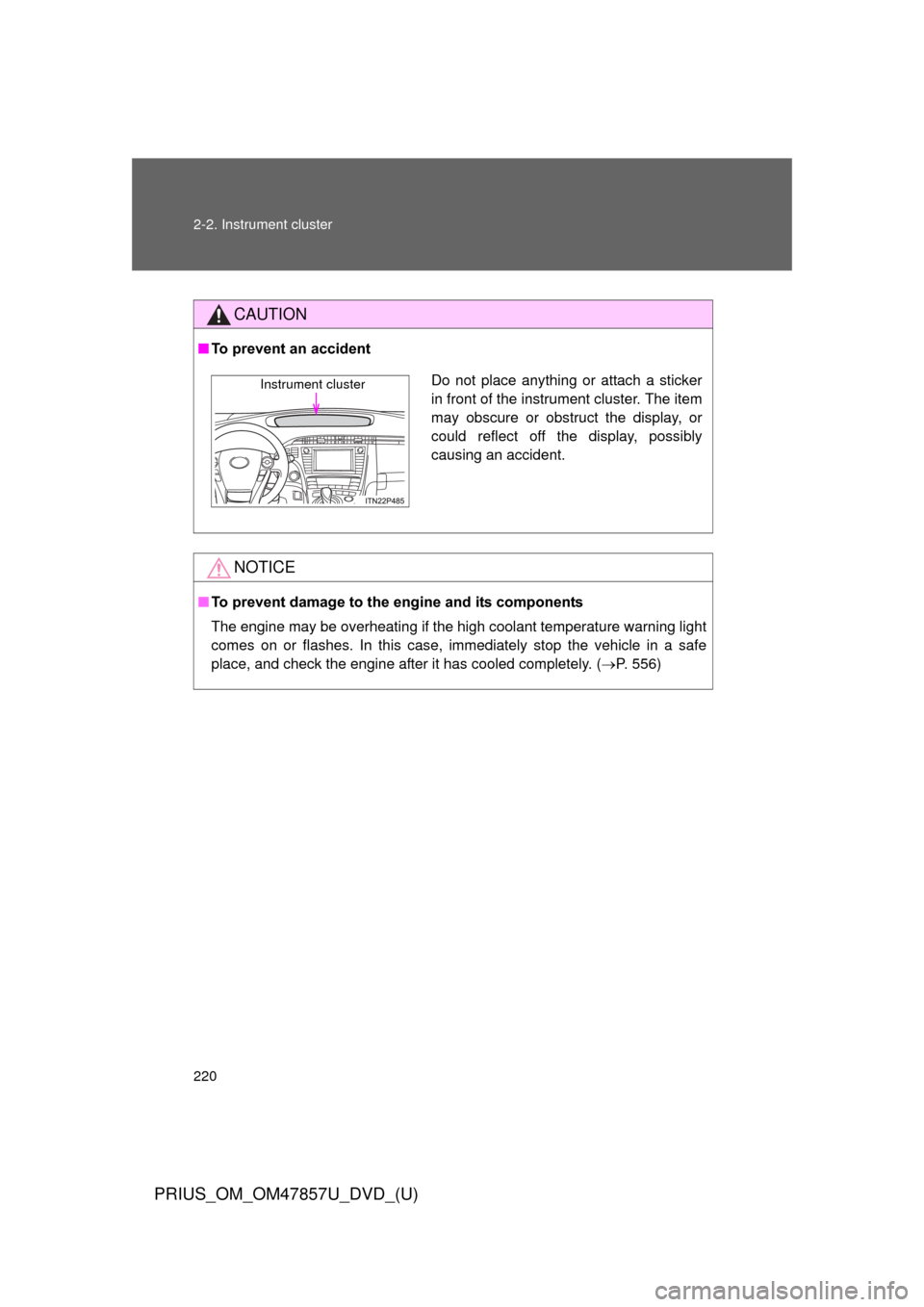
■To prevent an accident
NOTICE
■To prevent damage to the engine and its components
The engine may be overheating if the high coolant temperature warning light
comes on or flashes. In this case, immediately stop the vehicle in a safe
place, and check the engine after it has cooled completely. ( P. 556)
Do not place anything or attach a sticker
in front of the instrument cluster. The item
may obscure or obstruct the display, or
could reflect off the display, possibly
causing an accident.Instrument cluster
Page 227 of 640
227
2-2. Instrument cluster
PRIUS_OM_OM47857U_DVD_(U)
2
When driving
■
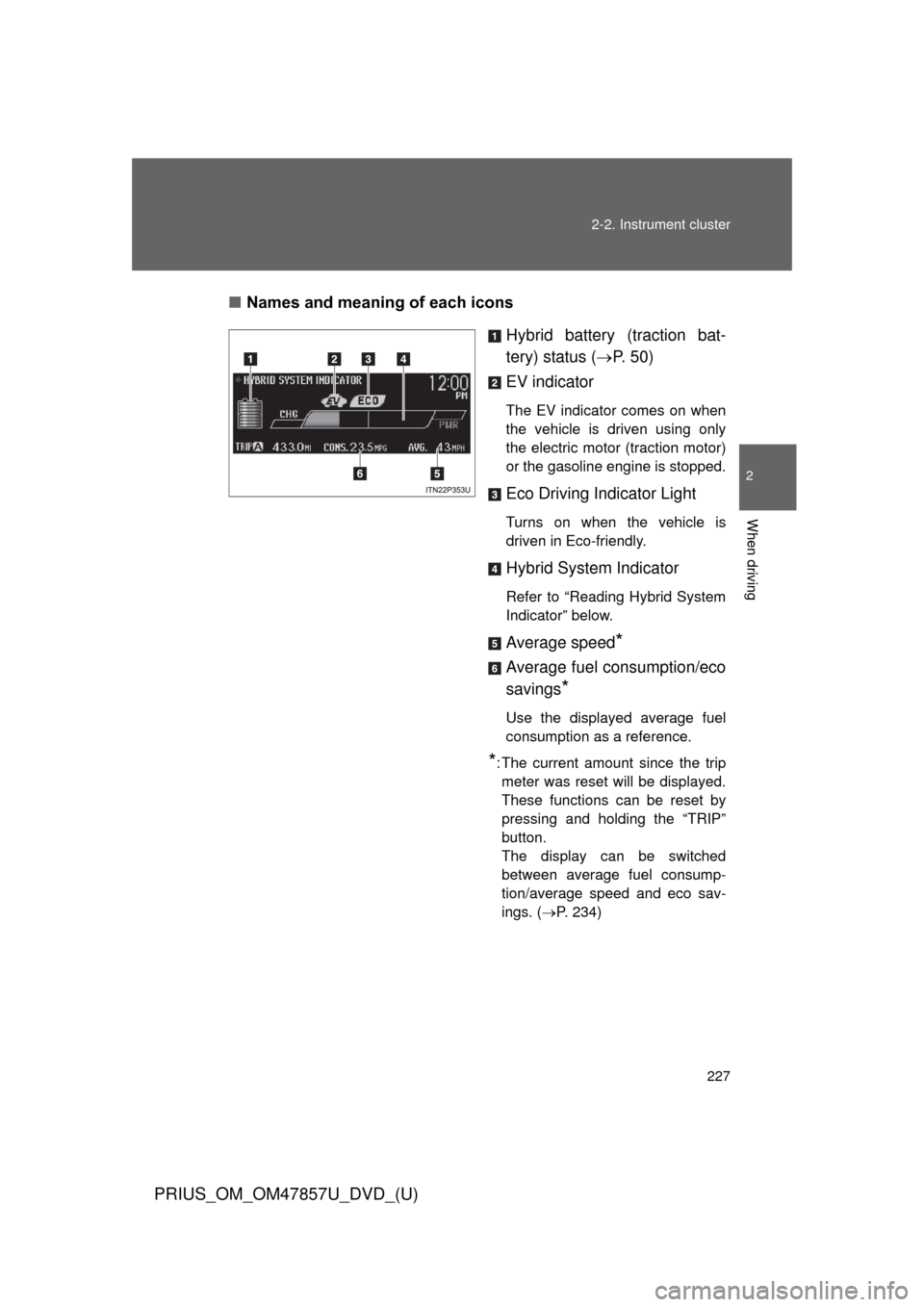
Names and meaning of each icons
Hybrid battery (traction bat-
tery) status (P. 5 0 )
EV indicator
The EV indicator comes on when
the vehicle is driven using only
the electric motor (traction motor)
or the gasoline engine is stopped.
Eco Driving Indicator Light
Turns on when the vehicle is
driven in Eco-friendly.
Hybrid System Indicator
Refer to “Reading Hybrid System
Indicator” below.
Average speed*
Average fuel consumption/eco
savings
*
Use the displayed average fuel
consumption as a reference.
*: The current amount since the trip meter was reset will be displayed.
These functions can be reset by
pressing and holding the “TRIP”
button.
The display can be switched
between average fuel consump-
tion/average speed and eco sav-
ings. ( P. 234)
Page 229 of 640
229
2-2. Instrument cluster
PRIUS_OM_OM47857U_DVD_(U)
2
When driving
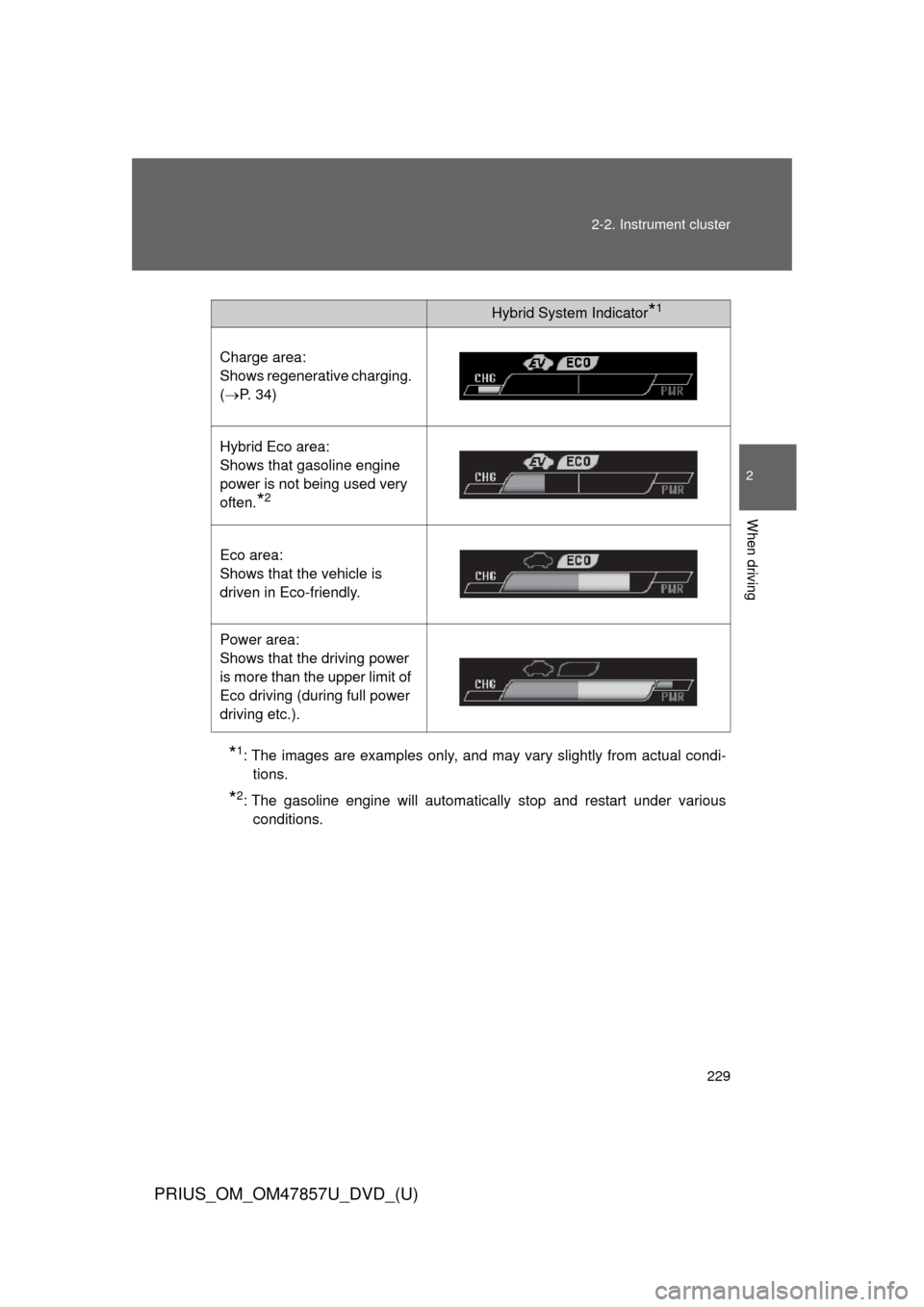
*1: The images are examples only, and may vary slightly from actual condi-
tions.
*2: The gasoline engine will automatically stop and restart under variousconditions.
Hybrid System Indicator*1
Charge area:
Shows regenerative charging.
(P. 34)
Hybrid Eco area:
Shows that gasoline engine
power is not being used very
often.
*2
Eco area:
Shows that the vehicle is
driven in Eco-friendly.
Power area:
Shows that the driving power
is more than the upper limit of
Eco driving (during full power
driving etc.).
Page 243 of 640

243
2-2. Instrument cluster
PRIUS_OM_OM47857U_DVD_(U)
2
When driving
■
Driving in Eco drive mode
The multi-information display will automatically switch the display to Hybrid
System Indicator, regardless of which display is currently being shown.
(P. 226)
■ Touch tracer display (if equipped)
●The touch tracer display can be set to not display even if the steering
switches are touched.
● Only the circular, rubber-covered switches have a built-in touch sensor.
Touching any of the other switches will not display the touch tracer dis-
play.
■ Display settings can be changed when
The vehicle speed is less than approximately 5 mph (8 km/h).
■ Engine speed
On hybrid vehicles, engine speed is precisely controlled in order to help
improve fuel efficiency and reduce exhaust emissions etc. There are times
when the engine speed that is displayed may differ even when vehicle oper-
ation and driving conditions are the same.
■ When the 12-volt battery is disconnected
The following data will be reset.
●Average fuel consumption
● Distance to empty
● Average vehicle speed
● Clock
● Display settings
● Trip meter