brake switch TOYOTA PRIUS 2014 3.G Owners Manual
[x] Cancel search | Manufacturer: TOYOTA, Model Year: 2014, Model line: PRIUS, Model: TOYOTA PRIUS 2014 3.GPages: 640, PDF Size: 11.68 MB
Page 3 of 640

1
2
3
4
5
6
7
3
PRIUS_OM_OM47857U_DVD_(U)
2-1. Driving proceduresDriving the vehicle............... 182
Power (ignition) switch ........ 194
EV drive mode .................... 201
Hybrid transmission ............ 204
Turn signal lever ................. 213
Parking brake ...................... 214
Horn .................................... 215
2-2. Instrument cluster Gauges and meters ............ 216
Indicators and warning lights ................................. 221
Multi-information display ..... 225
Head-up display .................. 245
2-3. Operating the lights and windshield wipers
Headlight switch .................. 252
Fog light switch ................... 258
Windshield wipers and washer ....................... 260
Rear window wiper and washer ....................... 264
Headlight cleaner switch ..... 267 2-4. Using other driving systems
Cruise control ..................... 268
Dynamic radar cruise control .............................. 272
LKA (Lane-Keeping Assist) .............................. 289
Driving assist systems ........ 300
Hill-start assist control ........ 305
PCS (Pre-Collision System) ............................ 307
2-5. Driving information Cargo and luggage ............. 315
Vehicle load limits............... 320
Winter driving tips ............... 321
Trailer towing ...................... 326
Dinghy towing ..................... 327
2When driving
Page 15 of 640
15
PRIUS_OM_OM47857U_DVD_(U)
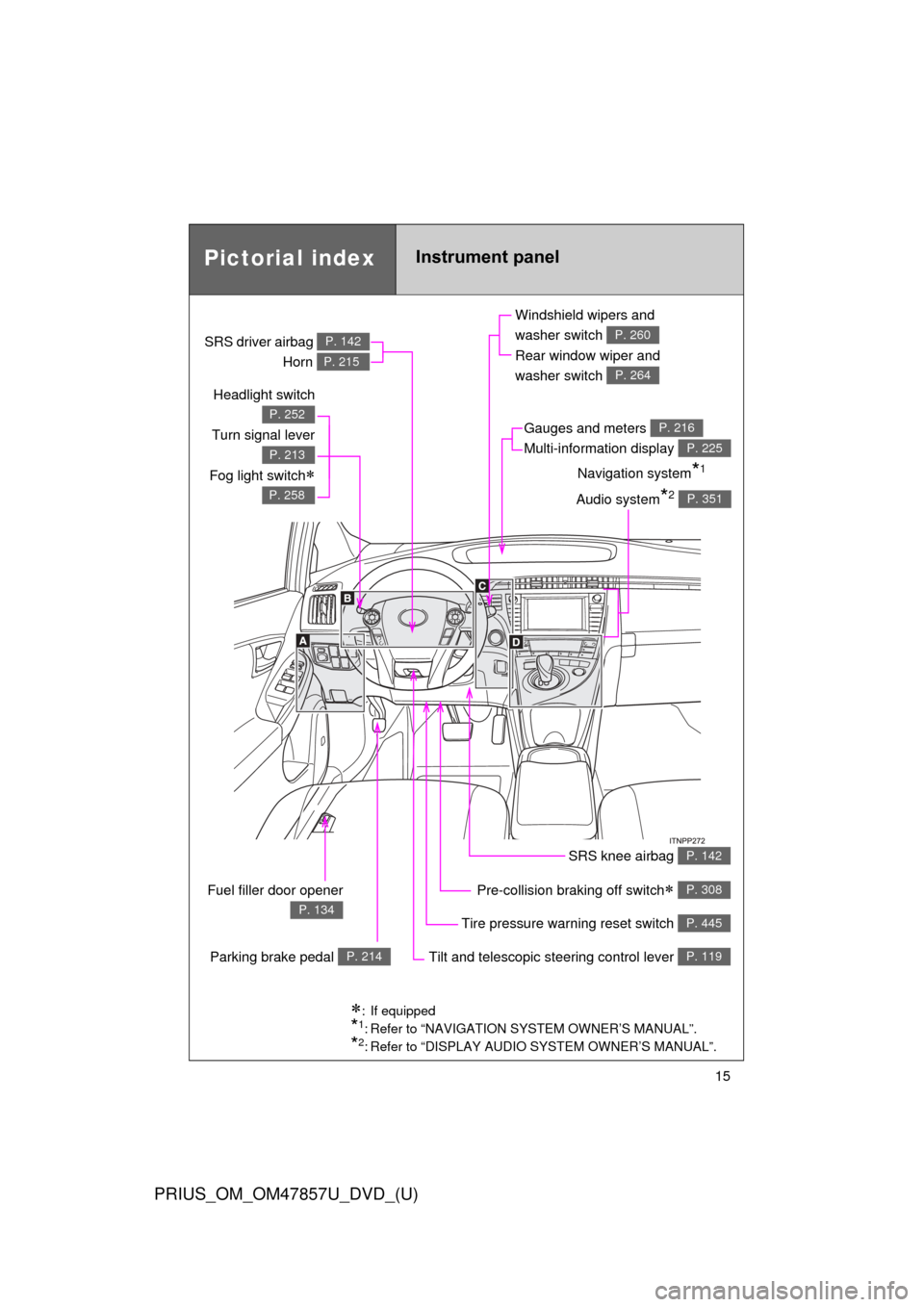
Pictorial indexInstrument panel
Headlight switch
Turn signal lever
Fog light switch
P. 252
P. 213
P. 258
Pre-collision braking off switch P. 308
Parking brake pedal P. 214
Fuel filler door opener
P. 134Tire pressure warning reset switch P. 445
Windshield wipers and
washer switch
Rear window wiper and
washer switch
P. 260
P. 264
Gauges and meters
Multi-information display P. 216
P. 225
Audio system*2 P. 351
Navigation system*1
SRS driver airbag
Horn
P. 142
P. 215
SRS knee airbag P. 142
Tilt and telescopic steering control lever P. 119
: If equipped
*1: Refer to “NAVIGATION SYSTEM OWNER’S MANUAL”.
*2: Refer to “DISPLAY AUDIO SYSTEM OWNER’S MANUAL”.
Page 181 of 640
When driving2
181
PRIUS_OM_OM47857U_DVD_(U)
2-1. Driving proceduresDriving the vehicle............ 182
Power (ignition) switch ..... 194
EV drive mode ................. 201
Hybrid transmission ......... 204
Turn signal lever .............. 213
Parking brake ................... 214
Horn ................................. 215
2-2. Instrument cluster Gauges and meters ......... 216
Indicators and warning lights .............................. 221
Multi-information display............................ 225
Head-up display ............... 245 2-3. Operating the lights and
windshield wipers
Headlight switch ............... 252
Fog light switch ................ 258
Windshield wipers and washer .................... 260
Rear window wiper and washer .................... 264
Headlight cleaner switch ............................. 267
2-4. Using other driving systems Cruise control ................... 268
Dynamic radar cruise control ............................ 272
LKA (Lane-Keeping Assist) ............................ 289
Driving assist systems ..... 300
Hill-start assist control ...... 305
PCS (Pre-Collision System).......................... 307
2-5. Driving information Cargo and luggage .......... 315
Vehicle load limits ............ 320
Winter driving tips ............ 321
Trailer towing ................... 326
Dinghy towing .................. 327
Page 182 of 640
182
PRIUS_OM_OM47857U_DVD_(U)
2-1. Driving procedures
Driving the vehicle
The following procedures should be observed to ensure safe driv-
ing:
■ Starting the hybrid system
P. 194
■ Driving
With the brake pedal depressed, shift the shift position to D.
( P. 204)
Check that the shift position indicator shows D. ( P. 216)
Release the parking brake. (P. 214)
Gradually release the brake pedal and gently depress the
accelerator pedal to accelerate the vehicle.
■ Stopping
With the shift position in D, depress the brake pedal.
If necessary, set the parking brake.
When the vehicle will be stopped for an extended period of time,
shift the shift position to P. ( P. 207)
■Parking the vehicle
Stop the vehicle completely.
Set the parking brake. ( P. 214)
Shift the shift position to P. ( P. 207)
Check that the shift position indicator shows P. ( P. 204)
Press the “POWER” switch to stop the hybrid system.
Slowly release the brake pedal.
Lock the door, making sure that you have the electronic key
on your person.
When parking on a hill, block the wheels as needed.
STEP 1
STEP 2
STEP 3
STEP 1
STEP 2
STEP 1
STEP 2
STEP 3
STEP 4
STEP 5
STEP 6
Page 194 of 640
194
2-1. Driving procedures
PRIUS_OM_OM47857U_DVD_(U)
Power (ignition) switch
Performing the following operations when carrying the electronic
key on your person starts the hybr id system or changes “POWER”
switch modes.
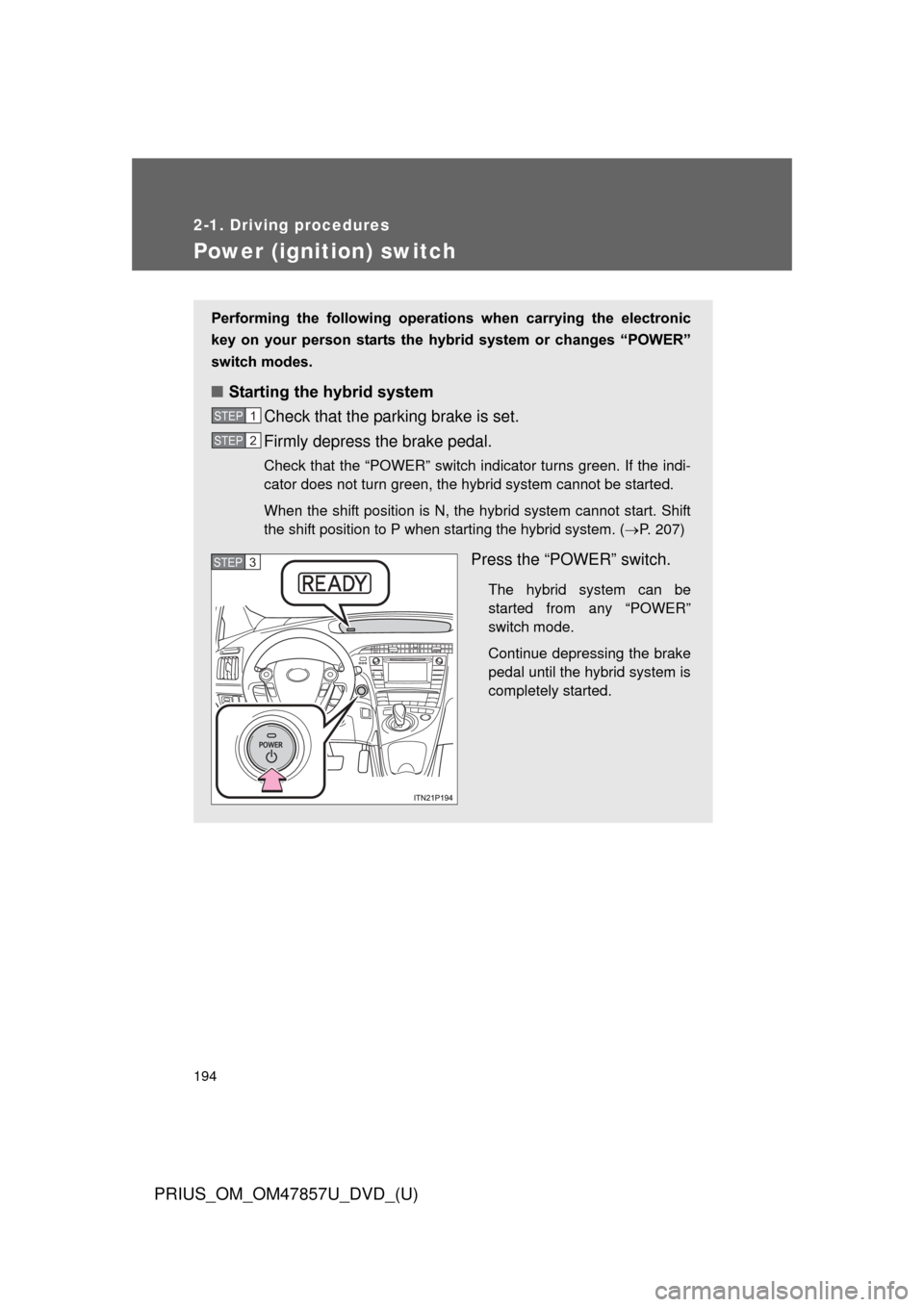
■ Starting the hybrid system
Check that the parking brake is set.
Firmly depress the brake pedal.
Check that the “POWER” switch indicator turns green. If the indi-
cator does not turn green, the hybrid system cannot be started.
When the shift position is N, the hybrid system cannot start. Shift
the shift position to P when starting the hybrid system. ( P. 207)
Press the “POWER” switch.
The hybrid system can be
started from any “POWER”
switch mode.
Continue depressing the brake
pedal until the hybrid system is
completely started.
STEP 1
STEP 2
STEP 3
Page 195 of 640
195
2-1. Driving procedures
PRIUS_OM_OM47857U_DVD_(U)
2
When driving
Check that the “READY” indicator is on.
If the “READY” indicator changes from a flashing light to a solid
light and the buzzer sounds, the hybrid system is starting nor-
mally.
The vehicle will not move when
the “READY” indicator is off.
The vehicle can move when the “READY” indicator is on even if
the engine is stopped. (The gasoline engine starts or stops auto-
matically in accordance with the state of the vehicle.)
■ Stopping the hybrid system
Stop the vehicle completely.
Set the parking brake. ( P. 214)
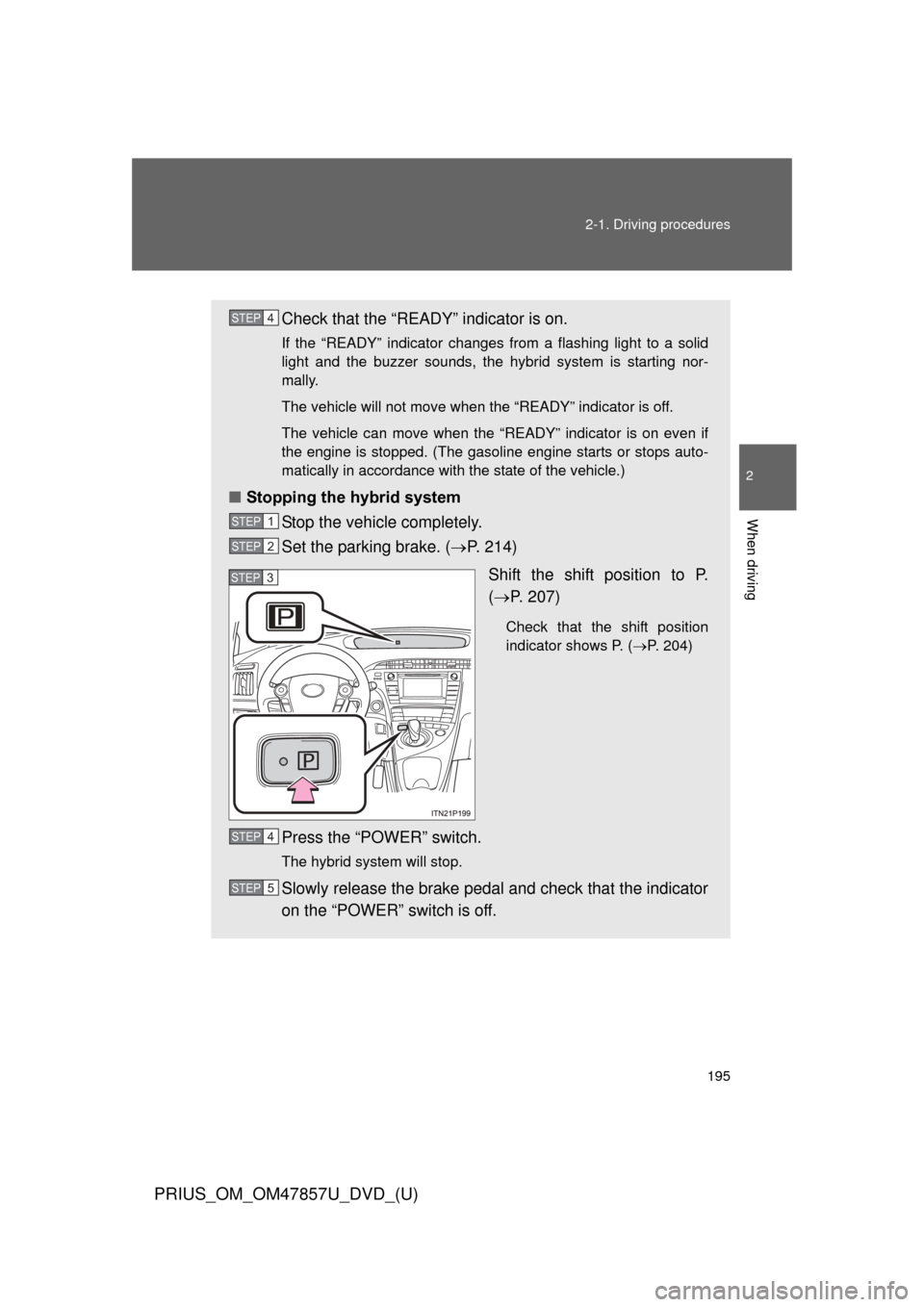
Shift the shift position to P.
( P. 207)
Check that the shift position
indicator shows P. ( P. 204)
Press the “POWER” switch.
The hybrid system will stop.
Slowly release the brake pedal and check that the indicator
on the “POWER” switch is off.
STEP 4
STEP 1
STEP 2
STEP 3
STEP 4
STEP 5
Page 196 of 640
196 2-1. Driving procedures
PRIUS_OM_OM47857U_DVD_(U)
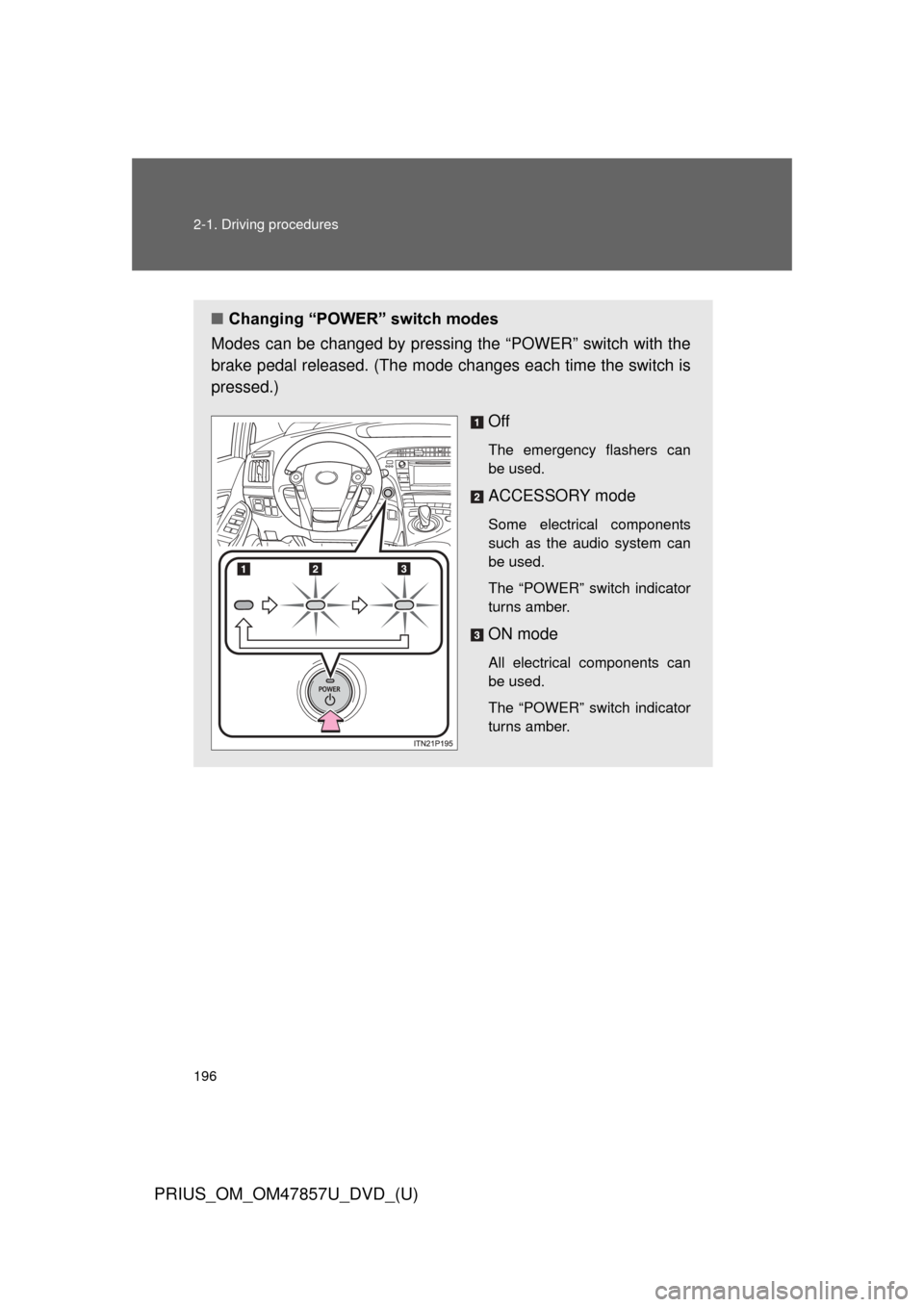
■Changing “POWER” switch modes
Modes can be changed by pressing the “POWER” switch with the
brake pedal released. (The mode changes each time the switch is
pressed.)
Off
The emergency flashers can
be used.
ACCESSORY mode
Some electrical components
such as the audio system can
be used.
The “POWER” switch indicator
turns amber.
ON mode
All electrical components can
be used.
The “POWER” switch indicator
turns amber.
Page 198 of 640

198 2-1. Driving procedures
PRIUS_OM_OM47857U_DVD_(U)
■When the “POWER” switch in dicator flashes in amber
The system may be malfunctioning. Have the vehicle inspected by your
Toyota dealer immediately.
■ If the “READY” indicator does not come on
If the “READY” indicator does not come on when you press the “POWER”
switch with the shift position in P and the brake pedal depressed, contact
your Toyota dealer immediately.
■ If the hybrid system is malfunctioning
P. 501
■ If the electronic key battery is depleted
P. 460
■ Operation of the “POWER” switch
●When operating the “POWER” switch, one short, firm press is enough. If
the switch is pressed improperly, the hybrid system may not start or the
“POWER” switch mode may not change. It is not necessary to press and
hold the switch.
● If attempting to restart the hybrid system immediately after turning the
“POWER” switch off, the hybrid system may not start in some cases.
After turning the “POWER” switch off, please wait a few seconds before
restarting the hybrid system.
■ Automatically P position selection function
P. 209
Page 199 of 640

199
2-1. Driving procedures
PRIUS_OM_OM47857U_DVD_(U)
2
When driving
■
When the P position cont rol system malfunctions
The “POWER” switch will not be able to be turned off. In such a case, the
switch can be turned off after applying the parking brake.
Have the vehicle inspected by your Toyota dealer immediately.
■ Ending display
When the “POWER” switch is turned off, each of the following will be dis-
played on the multi-information display, and will extinguish after approxi-
mately 30 seconds.
●The driving distance, driving time, consumption and eco savings since
the hybrid system was started*
● The odometer
● The clock
*: The amount of money saved or spent, selected on the Eco savings record
display ( P. 56), is displayed.
CAUTION
■When starting the hybrid system
Always start the hybrid system while sitting in the driver’s seat. Do not
depress the accelerator pedal while starting the hybrid system under any cir-
cumstances.
Doing so may cause an accident resulting in death or serious injury.
■ Stopping the hybrid system in an emergency
If you want to stop the hybrid system in an emergency while driving the vehi-
cle, press and hold the “POWER” switch for more than 2 seconds, or press it
briefly 3 times or more in succession. ( P. 563)
However, do not touch the “POWER” switch while driving except in an emer-
gency. Turning the hybrid system off while driving will not cause loss of
steering or braking control, however, power assist to the steering will be lost.
This will make it more difficult to steer smoothly, so you should pull over and
stop the vehicle as soon as it is safe to do so.
Page 207 of 640
207
2-1. Driving procedures
PRIUS_OM_OM47857U_DVD_(U)
2
When driving
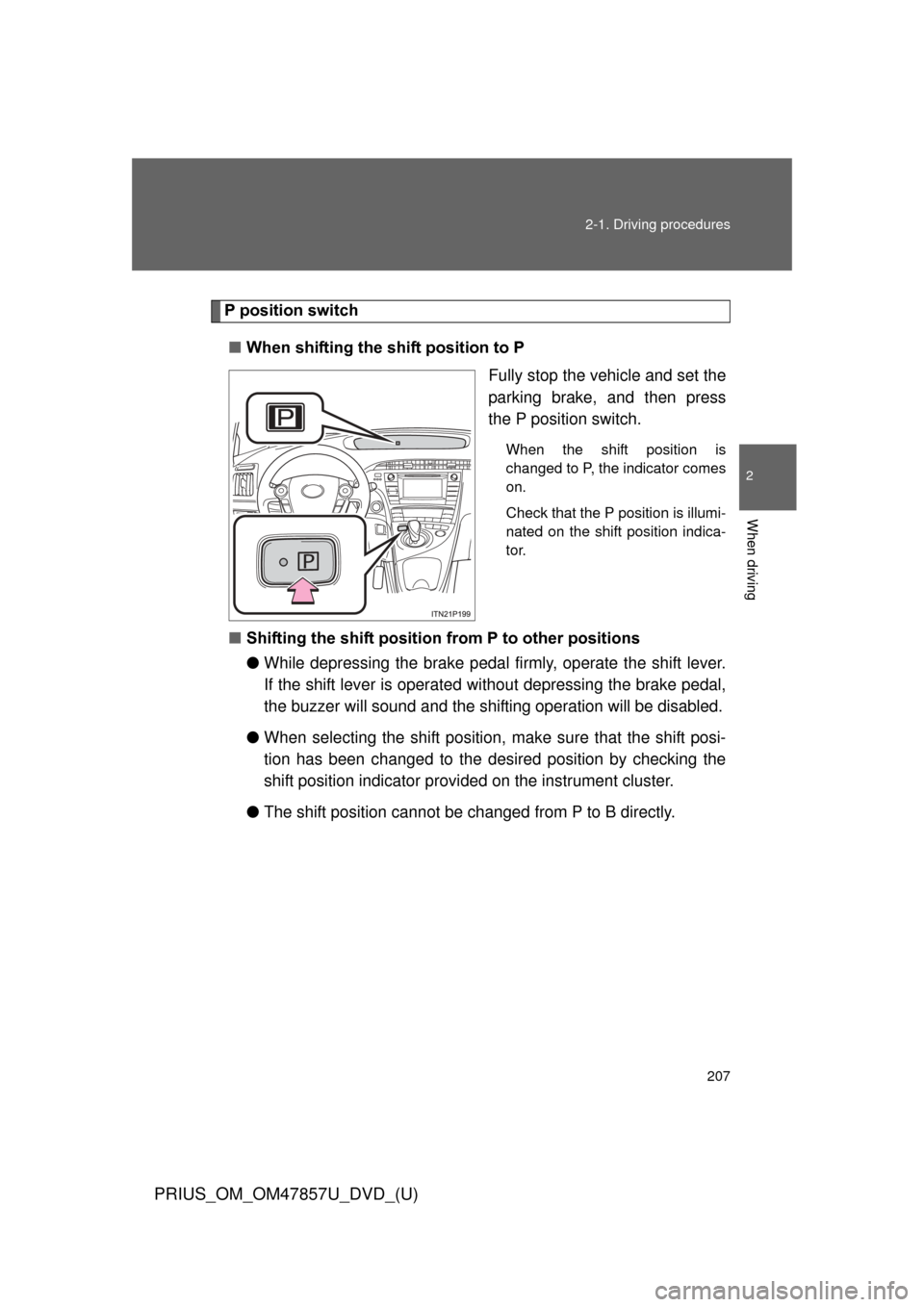
P position switch
■ When shifting the shift position to P
Fully stop the vehicle and set the
parking brake, and then press
the P position switch.
When the shift position is
changed to P, the indicator comes
on.
Check that the P position is illumi-
nated on the shift position indica-
tor.
■Shifting the shift position from P to other positions
●While depressing the brake pedal firmly, operate the shift lever.
If the shift lever is operated wi thout depressing the brake pedal,
the buzzer will sound and the shifting operation will be disabled.
● When selecting the shift position, make sure that the shift posi-
tion has been changed to the desired position by checking the
shift position indicator provi ded on the instrument cluster.
● The shift position cannot be changed from P to B directly.