fuel consumption TOYOTA PRIUS 2014 3.G Owners Manual
[x] Cancel search | Manufacturer: TOYOTA, Model Year: 2014, Model line: PRIUS, Model: TOYOTA PRIUS 2014 3.GPages: 640, PDF Size: 11.68 MB
Page 2 of 640

TABLE OF CONTENTSIndex
2
PRIUS_OM_OM47857U_DVD_(U)
1-1. Hybrid systemHybrid system features ........ 32
Hybrid system precautions ... 38
Energy monitor/consumption screen ........... 44
Hybrid vehicle driving tips .... 58
1-2. Key information Keys ..................................... 60
1-3. Opening, closing and locking the doors
Smart key system (with entry function) ............ 63
Smart key system (without entry function) ....... 81
Wireless remote control ....... 87
Side doors ............................ 89
Back door ............................. 95 1-4. Adjustable components
(seats, mirrors, steering
wheel)
Front seats.......................... 101
Rear seats .......................... 104
Head restraints ................... 107
Seat belts............................ 111
Steering wheel .................... 119
Inside rear view mirror ........ 120
Outside rear view mirrors ... 124
1-5. Opening and closing the windows and moon roof
Power windows................... 126
Moon roof with Solar Panel ................................ 129
1-6. Refueling Opening the fuel tank cap .................................... 134
1-7. Theft deterrent system Immobilizer system ............. 138
1-8. Safety information Correct driving posture ....... 140
SRS airbags ....................... 142
Front passenger occupant classification system ......... 156
Child restraint systems ....... 162
Installing child restraints ..... 167
1Before driving
Page 31 of 640
Before driving1
31
PRIUS_OM_OM47857U_DVD_(U)
1-1. Hybrid systemHybrid system features ...... 32
Hybrid system precautions ...................... 38
Energy monitor/ consumption screen......... 44
Hybrid vehicle driving tips ................................... 58
1-2. Key information Keys ................................... 60
1-3. Opening, closing and locking the doors
Smart key system (with entry function) ......... 63
Smart key system (without entry function) .... 81
Wireless remote control ..... 87
Side doors .......................... 89
Back door ........................... 95 1-4. Adjustable components
(seats, mirrors, steering
wheel)
Front seats ....................... 101
Rear seats........................ 104
Head restraints................. 107
Seat belts ......................... 111
Steering wheel ................. 119
Inside rear view mirror ..... 120
Outside rear view mirrors ............................ 124
1-5. Opening and closing the windows and moon roof
Power windows ................ 126
Moon roof with Solar Panel.............................. 129
1-6. Refueling Opening the fuel tank cap ................................. 134
1-7. Theft deterrent system Immobilizer system .......... 138
1-8. Safety information Correct driving posture..... 140
SRS airbags ..................... 142
Front passenger occupant classification system ...... 156
Child restraint systems..... 162
Installing child restraints... 167
Page 47 of 640
47
1-1. Hybrid system
1
Before driving
PRIUS_OM_OM47857U_DVD_(U)
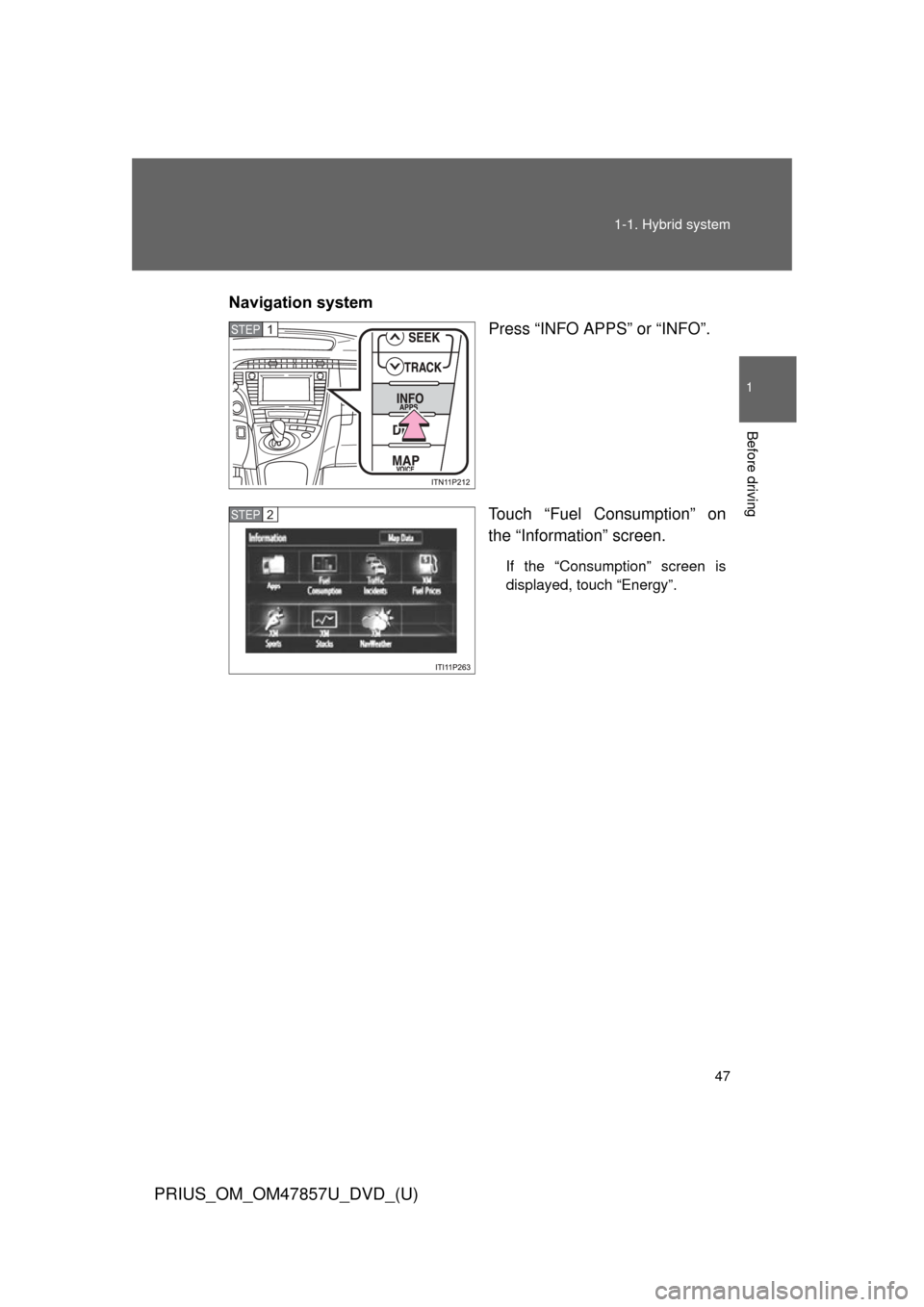
Navigation system
Press “INFO APPS” or “INFO”.
Touch “Fuel Consumption” on
the “Information” screen.
If the “Consumption” screen is
displayed, touch “Energy”.
STEP 1
STEP 2
Page 52 of 640
52 1-1. Hybrid system
PRIUS_OM_OM47857U_DVD_(U)
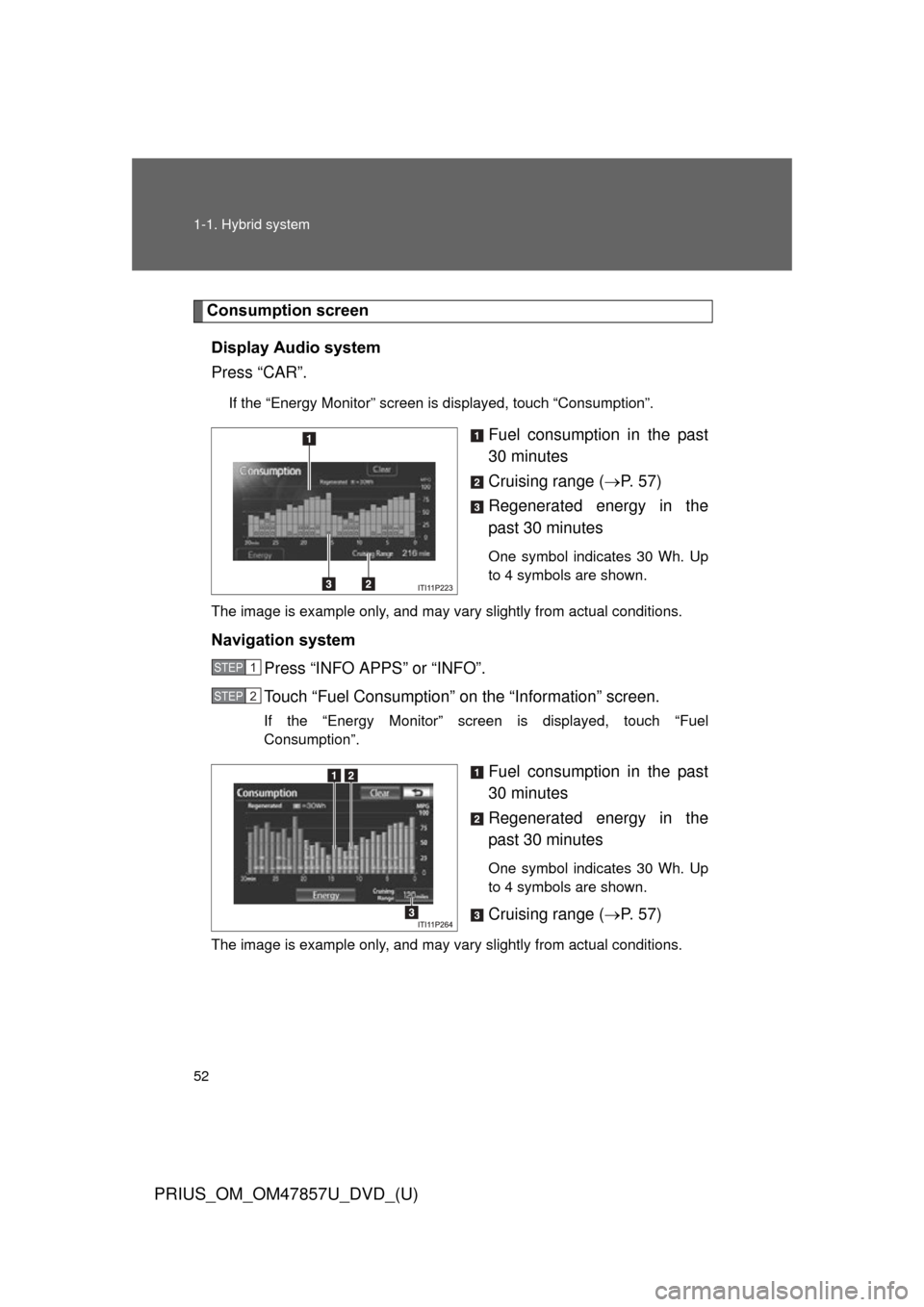
Consumption screenDisplay Audio system
Press “CAR”.
If the “Energy Monitor” screen is displayed, touch “Consumption”.
Fuel consumption in the past
30 minutes
Cruising range ( P. 5 7 )
Regenerated energy in the
past 30 minutes
One symbol indicates 30 Wh. Up
to 4 symbols are shown.
The image is example only, and may vary slightly from actual conditions.
Navigation system Press “INFO APPS” or “INFO”.
Touch “Fuel Consumption” on the “Information” screen.
If the “Energy Monitor” screen is displayed, touch “Fuel
Consumption”.
Fuel consumption in the past
30 minutes
Regenerated energy in the
past 30 minutes
One symbol indicates 30 Wh. Up
to 4 symbols are shown.
Cruising range ( P. 5 7 )
The image is example only, and may vary slightly from actual conditions.
STEP 1
STEP 2
Page 53 of 640
53
1-1. Hybrid system
1
Before driving
PRIUS_OM_OM47857U_DVD_(U)
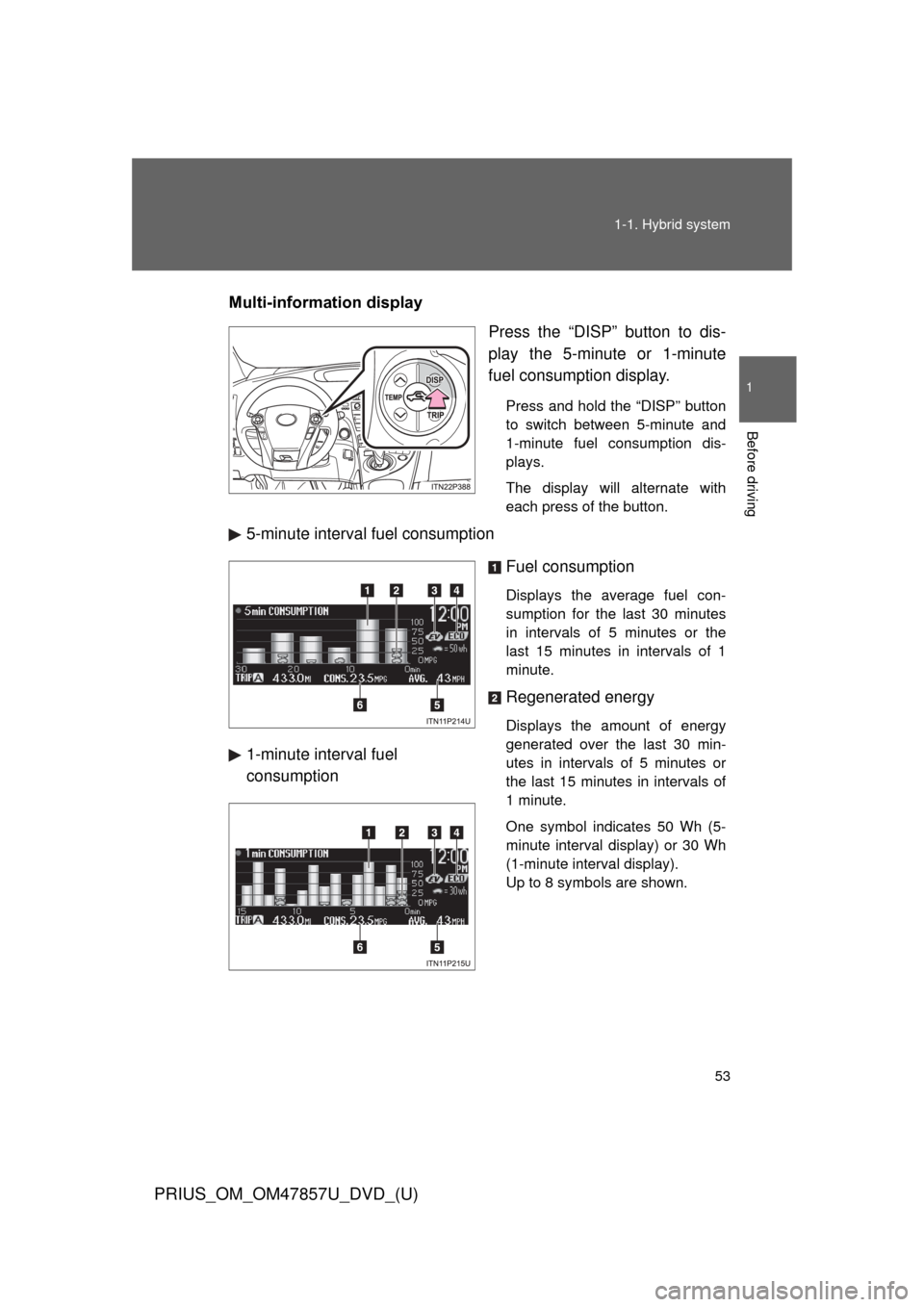
Multi-information display
Press the “DISP” button to dis-
play the 5-minute or 1-minute
fuel consumption display.
Press and hold the “DISP” button
to switch between 5-minute and
1-minute fuel consumption dis-
plays.
The display will alternate with
each press of the button.
5-minute interval fuel consumption
Fuel consumption
Displays the average fuel con-
sumption for the last 30 minutes
in intervals of 5 minutes or the
last 15 minutes in intervals of 1
minute.
Regenerated energy
Displays the amount of energy
generated over the last 30 min-
utes in intervals of 5 minutes or
the last 15 minutes in intervals of
1 minute.
One symbol indicates 50 Wh (5-
minute interval display) or 30 Wh
(1-minute interval display).
Up to 8 symbols are shown.
1-minute interval fuel
consumption
Page 54 of 640

54 1-1. Hybrid system
PRIUS_OM_OM47857U_DVD_(U)
EV indicator*1
Eco Driving Indicator Light*1
Average speed*2
Average fuel consumption/eco
savings
*2
Use the displayed average fuel
consumption as a reference.
*1: P. 226
*2:The current amount since the tripmeter was reset will be displayed.
These functions can be reset by
pressing and holding the “TRIP”
button when either the 5-minute
or 1-minute interval fuel con-
sumption display is being shown.
The display can be switched
between average fuel consump-
tion/average speed and eco sav-
ings. ( P. 234)
Page 55 of 640
55
1-1. Hybrid system
1
Before driving
PRIUS_OM_OM47857U_DVD_(U)
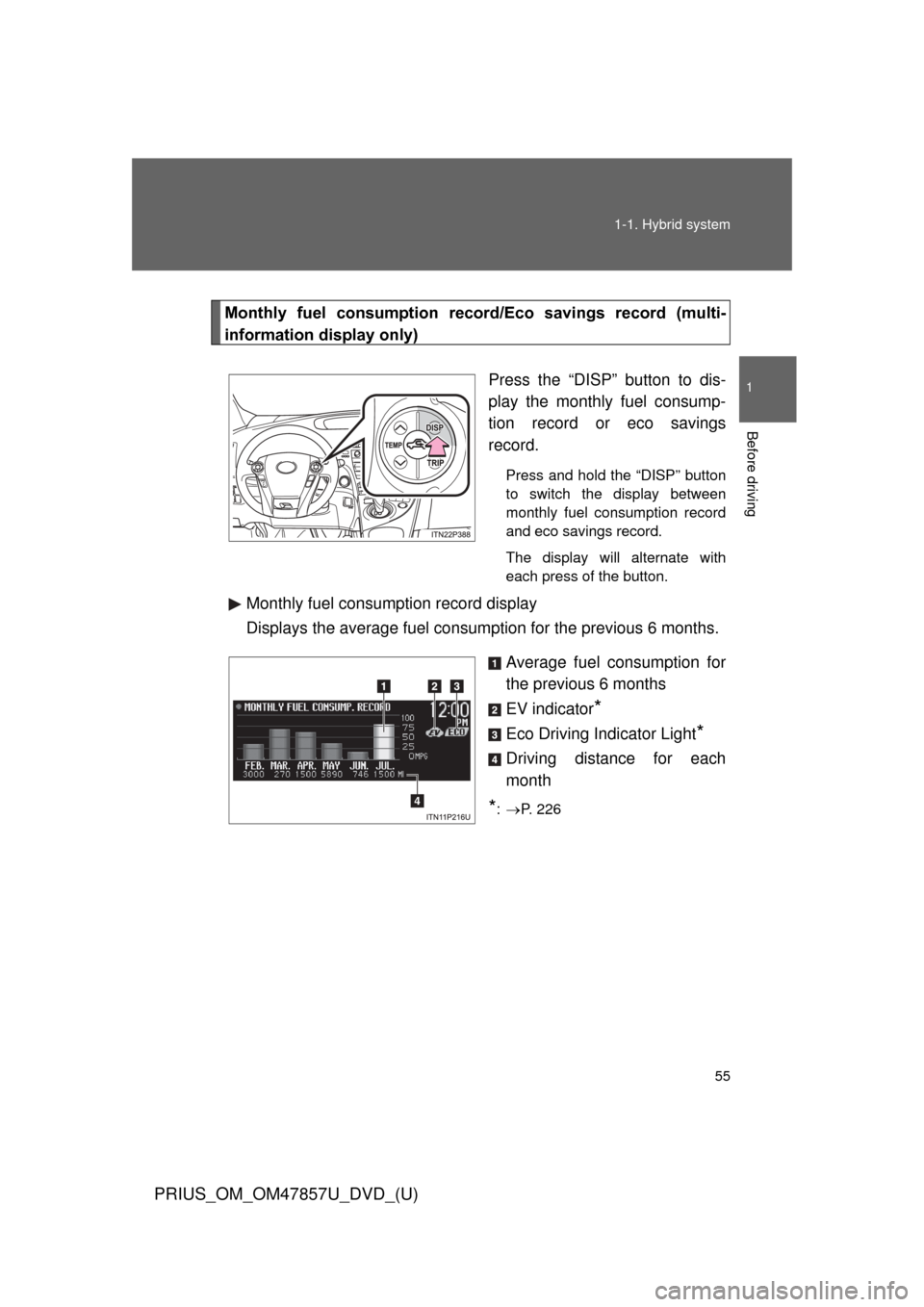
Monthly fuel consumption record
/Eco savings record (multi-
information display only)
Press the “DISP” button to dis-
play the monthly fuel consump-
tion record or eco savings
record.
Press and hold the “DISP” button
to switch the display between
monthly fuel consumption record
and eco savings record.
The display will alternate with
each press of the button.
Monthly fuel consumption record display
Displays the average fuel consumption for the previous 6 months.
Average fuel consumption for
the previous 6 months
EV indicator
*
Eco Driving Indicator Light*
Driving distance for each
month
*: P. 226
Page 56 of 640
56 1-1. Hybrid system
PRIUS_OM_OM47857U_DVD_(U)
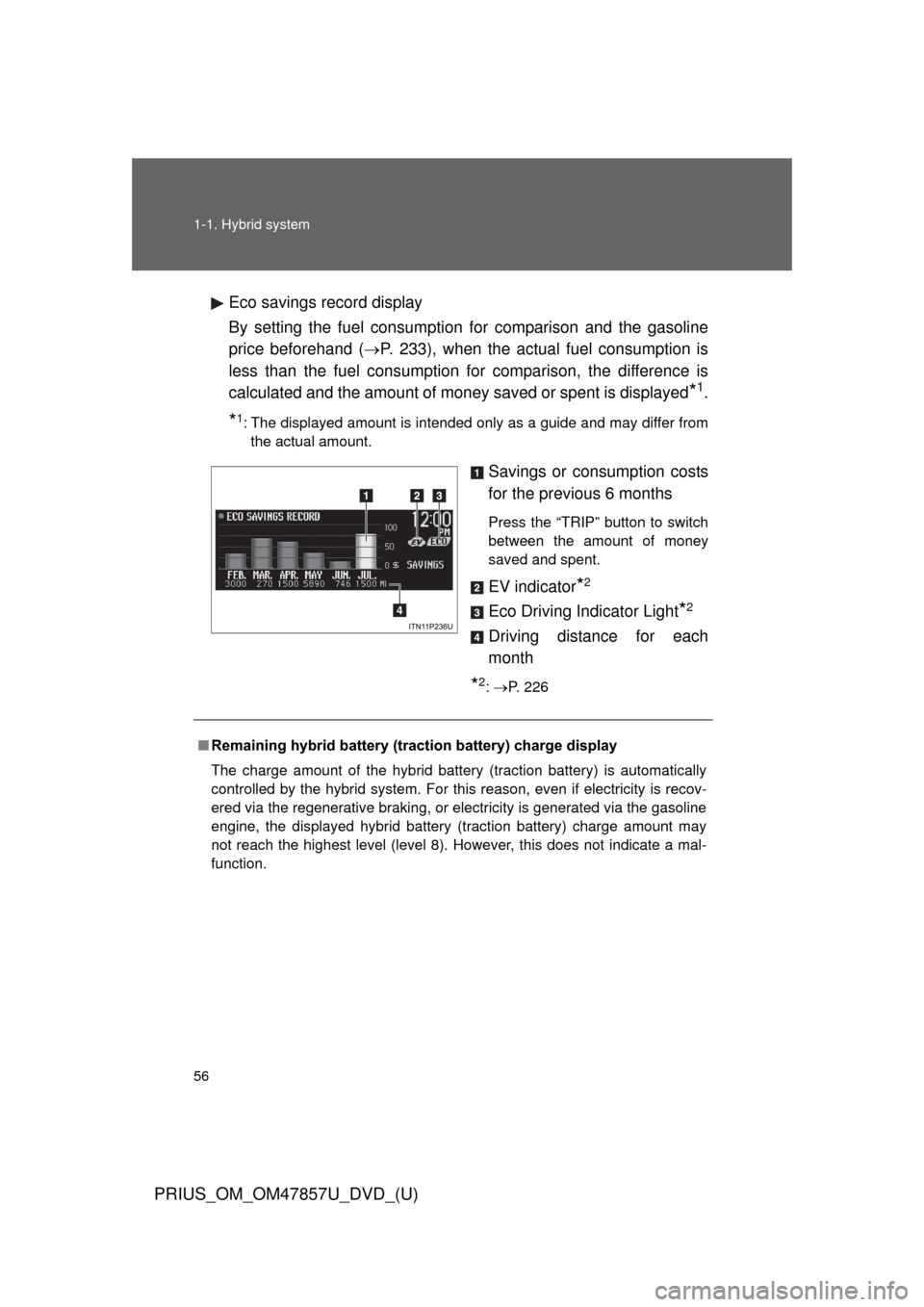
Eco savings record display
By setting the fuel consumption for comparison and the gasoline
price beforehand (P. 233), when the actual fuel consumption is
less than the fuel consumption for comparison, the difference is
calculated and the amount of money saved or spent is displayed
*1.
*1: The displayed amount is intended only as a guide and may differ from the actual amount.
Savings or consumption costs
for the previous 6 months
Press the “TRIP” button to switch
between the amount of money
saved and spent.
EV indicator*2
Eco Driving Indicator Light*2
Driving distance for each
month
*2: P. 226
■ Remaining hybrid battery (traction battery) charge display
The charge amount of the hybrid battery (traction battery) is automatically
controlled by the hybrid system. For this reason, even if electricity is recov-
ered via the regenerative braking, or electricity is generated via the gasoline
engine, the displayed hybrid battery (traction battery) charge amount may
not reach the highest level (level 8). However, this does not indicate a mal-
function.
Page 57 of 640
57
1-1. Hybrid system
1
Before driving
PRIUS_OM_OM47857U_DVD_(U)
■
Resetting the consumption data
Display Audio system
Selecting “Clear” on the “Consumption” screen will reset the fuel consump-
tion and the regenerated energy for the past 30 minutes.
Selecting “Yes” on the following screen will confirm resetting of all the data.
Navigation system
Selecting “Clear” on the “Consumption” screen will reset the fuel consump-
tion and the regenerated energy for the past 30 minutes.
Selecting “Yes” on the following screen will confirm resetting of all the data.
Multi-information display
If the “POWER” switch is turned OFF, average fuel consumption and regen-
erated energy data will be reset.
■ Resetting the monthly fuel consumption/eco savings record
Press and hold the “TRIP” button while the monthly fuel consumption/eco
savings record is displayed.
A confirmation message will be displayed.
Press and hold the “TRIP” button to reset the data.
Press the “DISP” button to cancel the reset operation. The screen will return
to the previous display if no buttons are pressed for approximately 10 sec-
onds.
■ Cruising range
Displays the estimated maximum distance that can be driven with the quan-
tity of fuel remaining.
This distance is computed based on your average fuel consumption.
As a result, the actual distance that can be driven may differ from that dis-
played.
■ Odometer/trip meter/distance to empty
The odometer/trip meter/distance to empty will not be displayed while the
monthly fuel consumption record or the eco savings record is being dis-
played.
Page 58 of 640
58
1-1. Hybrid system
PRIUS_OM_OM47857U_DVD_(U)
Hybrid vehicle driving tips
For economical and ecological driving, pay attention to the
following points:
■Using Eco drive mode
When using Eco drive mode, the torque corresponding to the
accelerator pedal depression amount can be generated more
smoothly than it is in normal conditions. In addition, the opera-
tion of the air conditioning system (heating/cooling) will be mini-
mized, improving th e fuel economy. (P. 206)
■ Use of Hybrid System Indicator
Eco-friendly driving is possible by keeping the Hybrid System
Indicator within Eco area. ( P. 226)
■ When braking the vehicle
Make sure to operate the brakes gently and in good time. A
greater amount of electrical energy can be retained when slow-
ing down.
■ Delays
Repeated acceleration and deceleration, as well as long waits at
traffic lights, will lead to bad fuel consumption. Check traffic
reports before leaving and avoid delays as much as possible.
When encountering a delay, gently release the brake pedal to
allow the vehicle to move forward slightly while avoiding overuse
of the accelerator pedal. Doing so can help control excessive
gasoline consumption.
■ Highway driving
Control your speed and keep at a constant speed. Also, before
stopping at a toll booth or similar, allow plenty of time to release
the accelerator and gently apply the brakes. A greater amount of
electrical energy can be reta ined when slowing down.