light TOYOTA PRIUS 2015 4.G Owners Manual
[x] Cancel search | Manufacturer: TOYOTA, Model Year: 2015, Model line: PRIUS, Model: TOYOTA PRIUS 2015 4.GPages: 644, PDF Size: 11.25 MB
Page 312 of 644

312 2-4. Using other driving systems
PRIUS_OM_OM47A17U_DVD_(U)
■Obstacles not detected
The sensor cannot detect plastic obstacles such as traffic cones. There may
also be occasions when the sensor cannot detect pedestrians, animals,
bicycles, motorcycles, trees, or snowdrifts.
■ Situations in which the pre-collis ion system does not function properly
The system may not function effectively in situations such as the following:
● On roads with sharp bends or uneven surfaces
● If a vehicle suddenly moves in front of your vehicle, such as at an inter-
section
● If a vehicle suddenly cuts in front of your vehicle, such as when overtak-
ing
● In inclement weather such as heavy rain, fog, snow or sand storms
● When your vehicle is skidding with the VSC system off
● When an extreme change in vehicle height occurs
● When the axis of the radar is out of adjustment
■ Automatic cancelation of the pre-collision system
When a malfunction occurs due to sensor contamination, etc. that results in
the sensors being unable to detect obstacles, the pre-collision system will be
automatically disabled. In this case, the system will not activate even if there
is a collision possibility.
■ When there is a malfunction in th e system, or if the system is tempo-
rarily unusable
Warning lights and/or warning messages will turn on or flash. ( P. 506, 520)
Page 316 of 644

316 2-4. Using other driving systems
PRIUS_OM_OM47A17U_DVD_(U)
CAUTION
■When the sensor may not be correctly detecting the vehicle ahead
Apply the brakes as necessary in any of the following situations.
●When water or snow thrown up by the surrounding vehicles hinders the
functioning of the sensor
● When your vehicle is pointing upwards (caused by a heavy load in the lug-
gage compartment etc.)
● Vehicles that cut in suddenly
● Vehicles with small rear ends (trailers with no load on board etc.)
● Motorcycles traveling in the same lane
■ Handling the radar sensor
Observe the following to ensure the pre-collision system can function effec-
tively:
●Keep the sensor and grille cover clean at all times.
Clean the sensor and grille cover with a soft cloth so you do not mark or
damage them.
● Do not subject the sensor or surrounding area to a strong impact.
If the sensor moves even slightly off position, the system may become
inaccurate or malfunction. If the sensor or surrounding area is subject to a
strong impact, always have the area inspected and adjusted by your
Toyota dealer.
● Do not disassemble the sensor.
● Do not attach accessories or stickers to the sensor, grille cover or sur-
rounding area.
● Do not modify or paint the sensor and grille cover.
Page 324 of 644
324 2-5. Driving information
PRIUS_OM_OM47A17U_DVD_(U)
■Before driving the vehicle
Perform the following according to the driving conditions:
●Do not try to forcibly open a window or move a wiper that is
frozen. Pour warm water over the frozen area to melt the ice.
Wipe away the water immediately to prevent it from freezing.
● To ensure proper operation of th e climate control system fan,
remove any snow that has accumulated on the air inlet vents
in front of the windshield.
● Check for and remove any excess ice or snow that may have
accumulated on the exterior lights, vehicle’s roof, chassis,
around the tires or on the brakes.
● Remove snow or mud from the bottom of your shoes before
getting in the vehicle.
■ When driving the vehicle
Accelerate the vehicle slowly, keep a safe distance between you
and the vehicle ahead, and drive at a reduced speed suitable to
road conditions.
■ When parking the vehicle
Park the vehicle and shift the shift position to P and block the
wheel under the vehicle without setting the parking brake. The
parking brake may freeze up, preventing it from being released.
If necessary, block the wheels to prevent inadvertent sliding or
creeping.
Page 331 of 644
Interior features3
331
PRIUS_OM_OM47A17U_DVD_(U)
3-1. Using the air conditioning system and defogger
Air conditioning system ........................... 332
Using the steering wheel climate remote control
switches ......................... 343
Solar Ventilation System ........................... 345
Remote Air Conditioning System ........................... 348
Rear window and outside rear view mirror
defoggers switch ............ 352
3-2. Using the audio system Audio system types .......... 353
Using the AUX port/USB port ........................ 358 3-3. Using the interior lights
Interior lights list ............... 359
• Front interior lights ......... 360
• Personal lights ............... 361
• Rear interior light ........... 361
3-4. Using the storage features List of storage features .......................... 363
• Glove boxes ................... 364
• Console box ................... 365
• Cup holders ................... 366
• Bottle holders ................. 368
• Auxiliary boxes ............... 369
3-5. Other interior features Sun visors ........................ 370
Vanity mirrors ................... 371
Outside temperature display............................ 372
Power outlets ................... 373
Seat heaters..................... 375
Armrest ............................ 377
Assist grips....................... 378
Floor mats ........................ 379
Luggage compartment features .......................... 381
Garage door opener......... 387
Safety Connect ................ 395
Page 345 of 644
345
3-1. Using the air conditioning system and defogger
PRIUS_OM_OM47A17U_DVD_(U)
3
Interior features
Solar Ventilation System
: If equipped
The Solar Ventilation System uses energy provided by solar panel
built into the roof to operate a fa n contained within the air condition-
ing system, allowing ventilation of the vehicle interior when the vehi-
cle is parked in direct sunlight.
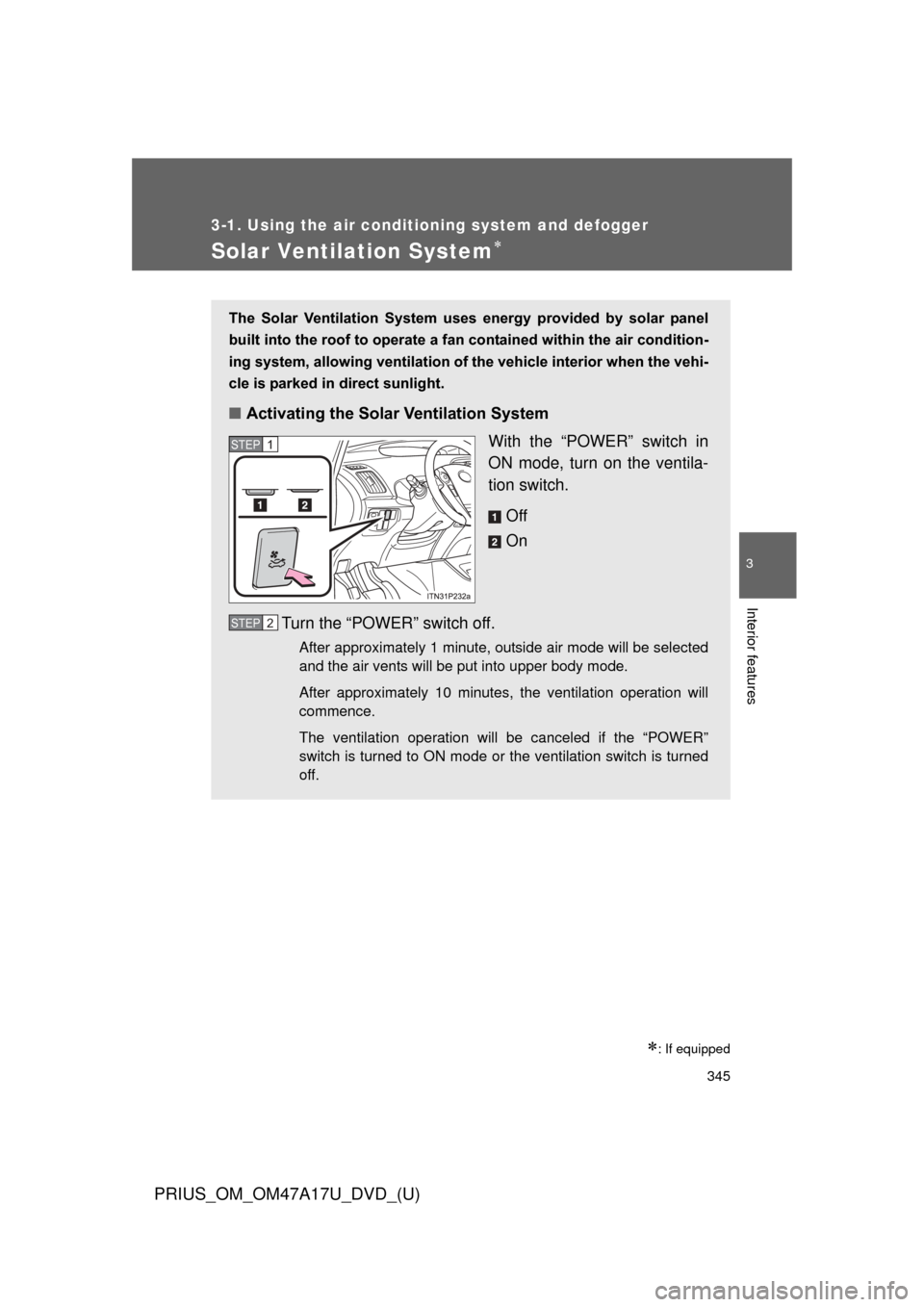
■ Activating the Solar Ventilation System
With the “POWER” switch in
ON mode, turn on the ventila-
tion switch.
Off
On
Turn the “POWER” switch off.
After approximately 1 minute, outside air mode will be selected
and the air vents will be put into upper body mode.
After approximately 10 minutes, the ventilation operation will
commence.
The ventilation operation will be canceled if the “POWER”
switch is turned to ON mode or the ventilation switch is turned
off.
STEP 1
STEP 2
Page 346 of 644

346 3-1. Using the air conditioning system and defogger
PRIUS_OM_OM47A17U_DVD_(U)
■Operating conditions
The Solar Ventilation System may not operate under the following circum-
stances due to a lack of power from the solar panel:
●Low amount of sunlight
● Ever when a part of the solar panel is cast by a shadow.
● Ever when a part of the solar panel is covered by fallen leaves or dirt.
● The solar panel is not at a high temperature.
■ Before using the Solar Ventilation System
Remove dirt or fallen leaves from the solar panel in order to ensure sufficient
electrical output.
■ Efficient use of the So lar Ventilation System
Efficient control of temperature increase can be achieved by using the sys-
tem in conjunction with the Remote Air Conditioning System. ( P. 348)
■ When using the Sola r Ventilation System
● Make sure that the “POWER” switch is in ON mode when turning the
ventilation switch on. If the ventilation switch is turned on while the
“POWER” switch is OFF, the air mode and the status of the air vents will
remain unchanged.
● If the Solar Ventilation System is not needed, be sure to turn the ventila-
tion switch off.
Dirty air and exhaust fumes from other vehicles may be drawn from out-
side. Also, use in winter may cause heated interior air to leave the vehi-
cle, thus leading to a drop in temperature.
■ Sounds when using the Solar Ventilation System
If the amount of sunlight is insufficient, you may hear a sound coming from
the air conditioning system. This is the sound of a control function to pre-
serve the fan and does not indicate a malfunction.
Page 349 of 644
349
3-1. Using the air conditioning system
and defogger
PRIUS_OM_OM47A17U_DVD_(U)
3
Interior features
■Using the Remote Air Conditioning System effectively
Efficiency can be increased by using the system in conjunction with the
Solar Ventilation System. ( P. 345)
■ When leaving the vehicle
●Check that the headlights are switched to either off or “AUTO”.
● Check that the wiper switch is turned off.
● Check that all windows are closed.
■ Remote Air Conditioning System automatic shut-off
The system will automatically shut off under the following conditions:
●About 3 minutes have passed since operation began
● Any one of the operating conditions is not met
The system may also shut off if the charge level of the hybrid battery (trac-
tion battery) drops to low. ( P. 44)
■ Conditions aff ecting operation
The system may not start in the following situations:
● The charge level of the hybrid battery (traction battery) is low ( P. 44)
● The air conditioning temperature is set at a high level or outside tempera-
ture is low
● When the vehicle has been left parked for a number of days
● When the hybrid system is cool (for example, after being left for a long
time in low temperatures)
Page 359 of 644
359
PRIUS_OM_OM47A17U_DVD_(U)
3
Interior features
3-3. Using the interior lights
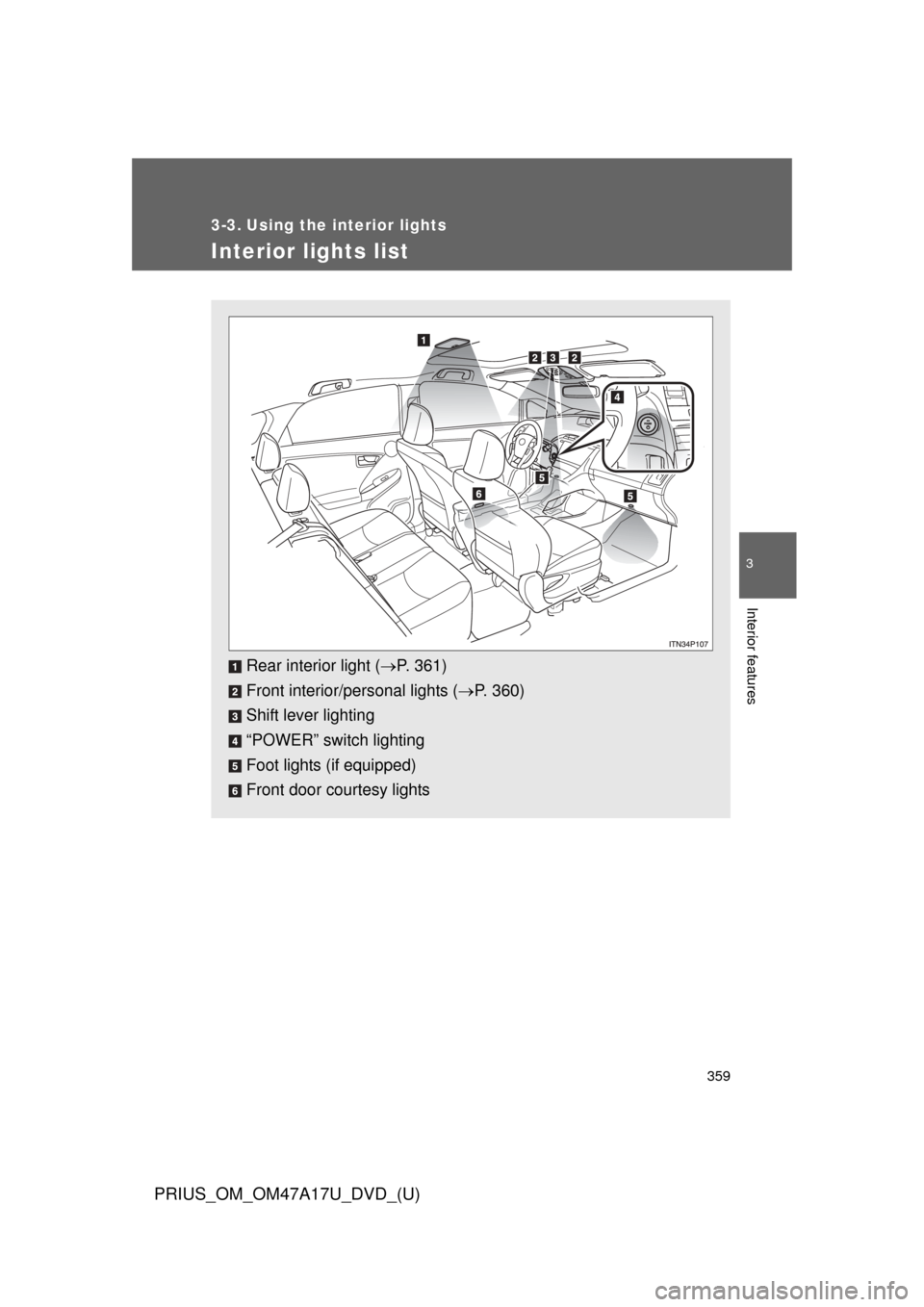
Interior lights list
Rear interior light (P. 361)
Front interior/personal lights ( P. 360)
Shift lever lighting
“POWER” switch lighting
Foot lights (if equipped)
Front door courtesy lights
Page 360 of 644
360 3-3. Using the interior lights
PRIUS_OM_OM47A17U_DVD_(U)
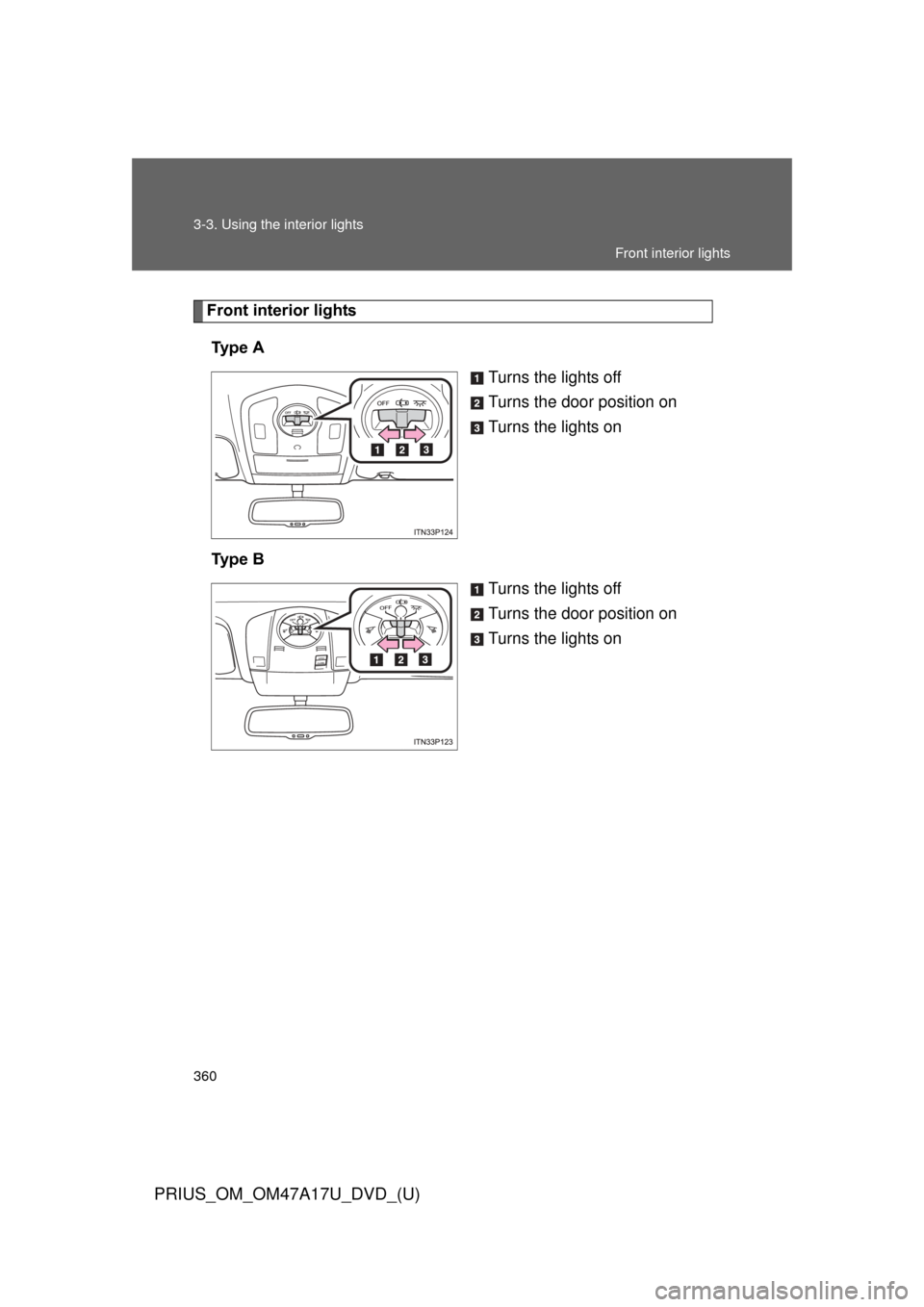
Front interior lightsTy p e A Turns the lights off
Turns the door position on
Turns the lights on
Ty p e B Turns the lights off
Turns the door position on
Turns the lights on
Front interior lights
Page 361 of 644
361
3-3. Using the interior lights
PRIUS_OM_OM47A17U_DVD_(U)
3
Interior features
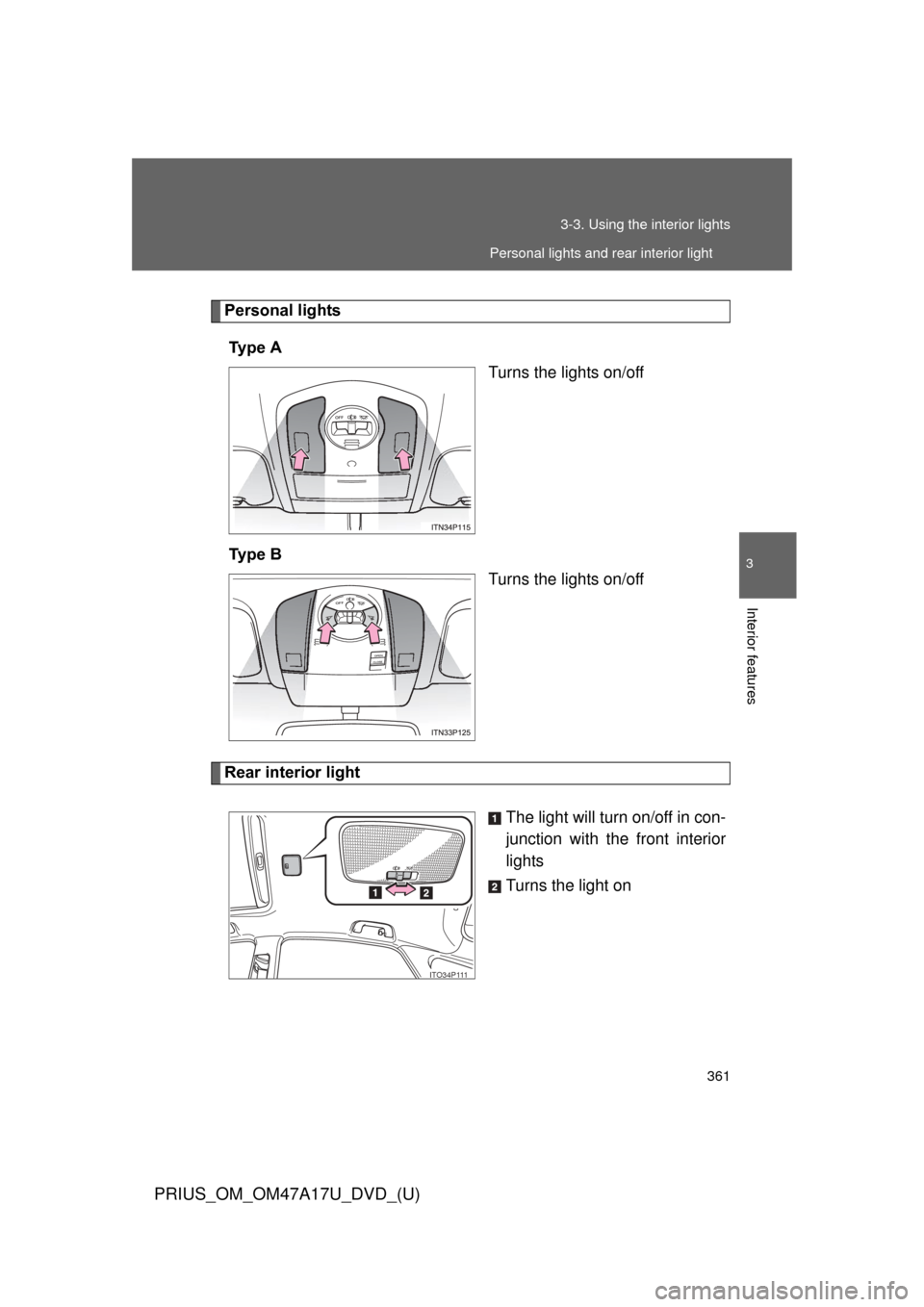
Personal lights
Ty p e A Turns the lights on/off
Ty p e B Turns the lights on/off
Rear interior light
The light will turn on/off in con-
junction with the front interior
lights
Turns the light on
ITO34P111
Personal lights and rear interior light