light TOYOTA PRIUS 2015 4.G Repair Manual
[x] Cancel search | Manufacturer: TOYOTA, Model Year: 2015, Model line: PRIUS, Model: TOYOTA PRIUS 2015 4.GPages: 644, PDF Size: 11.25 MB
Page 222 of 644
222
2-2. Instrument cluster
PRIUS_OM_OM47A17U_DVD_(U)
Indicators and warning lights
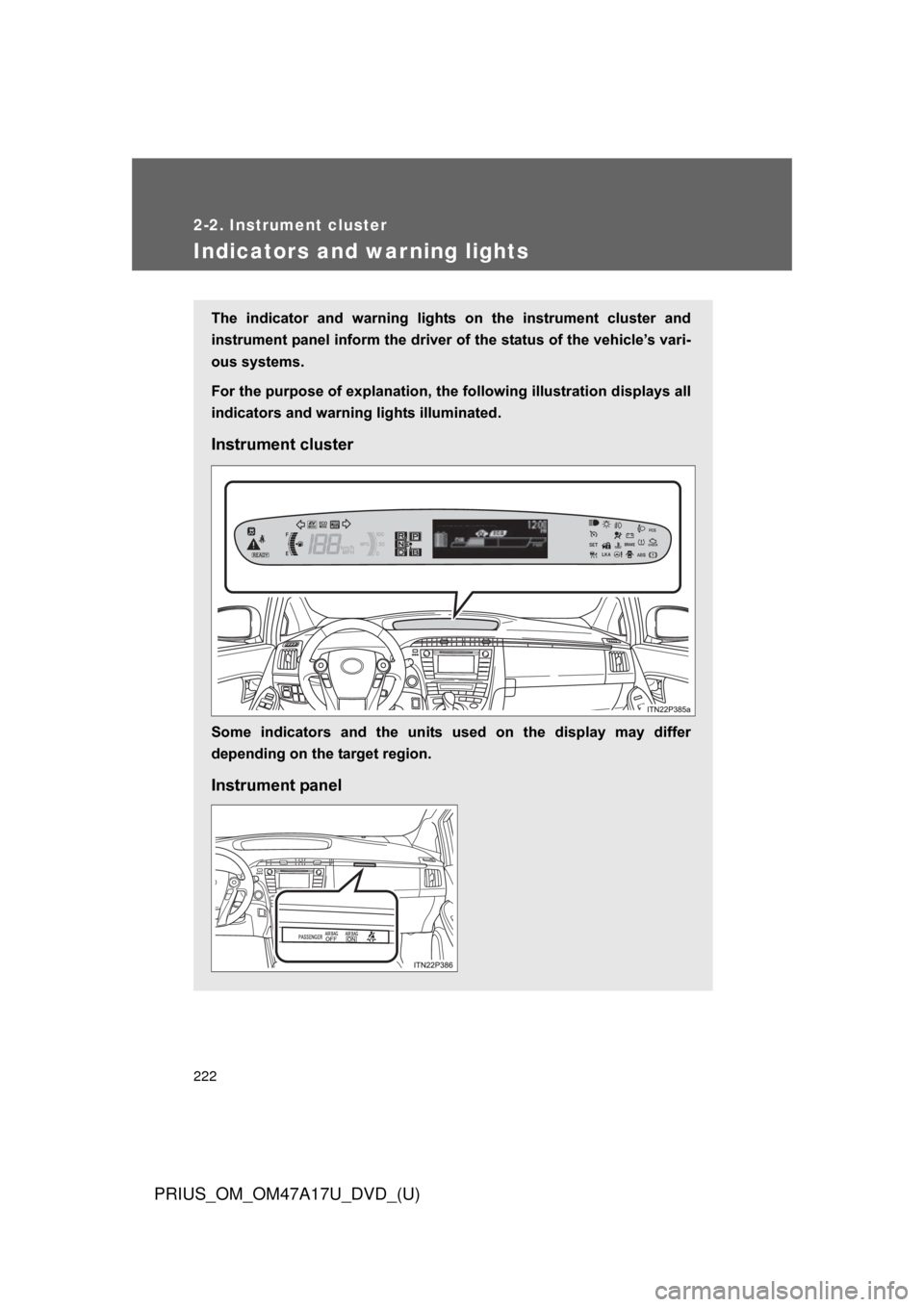
The indicator and warning lights on the instrument cluster and
instrument panel inform the driver of the status of the vehicle’s vari-
ous systems.
For the purpose of explanation, the fo llowing illustration displays all
indicators and warning lights illuminated.
Instrument cluster
Some indicators and the units used on the display may differ
depending on the target region.
Instrument panel
Page 223 of 644
223
2-2. Instrument cluster
PRIUS_OM_OM47A17U_DVD_(U)
2
When driving
■
Indicators
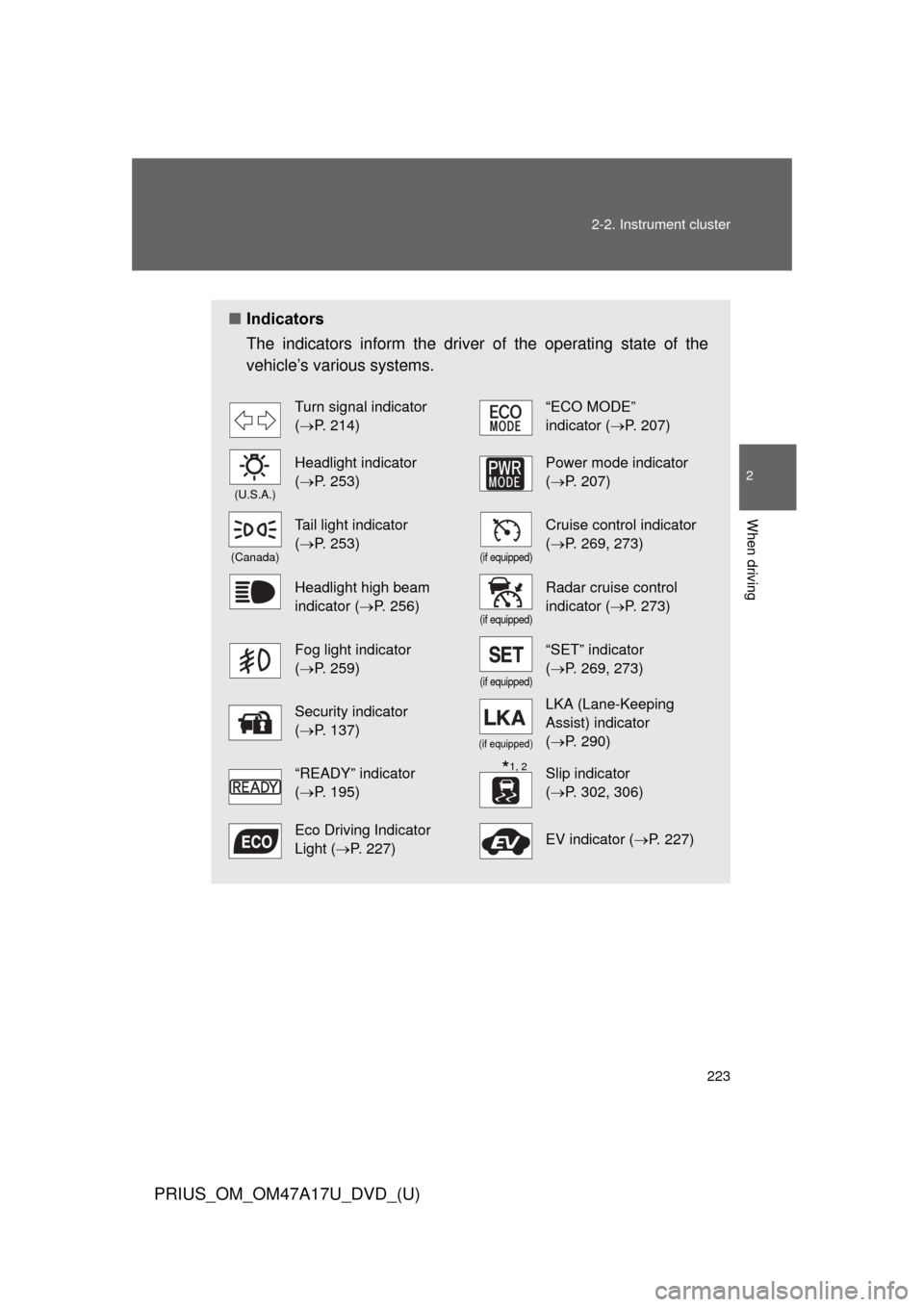
The indicators inform the driver of the operating state of the
vehicle’s various systems.
Turn signal indicator
(P. 214)“ECO MODE”
indicator (P. 207)
(U.S.A.)
Headlight indicator
(P. 253)Power mode indicator
(P. 207)
(Canada)
Tail light indicator
(P. 253)
(if equipped)
Cruise control indicator
(P. 269, 273)
Headlight high beam
indicator ( P. 256)
(if equipped)
Radar cruise control
indicator (P. 273)
Fog light indicator
(P. 259)
(if equipped)
“SET” indicator
(P. 269, 273)
Security indicator
(P. 137)
(if equipped)
LKA (Lane-Keeping
Assist) indicator
(P. 290)
“READY” indicator
(P. 195)Slip indicator
(P. 302, 306)
Eco Driving Indicator
Light ( P. 227)EV indicator ( P. 227)
*1, 2
Page 224 of 644
224 2-2. Instrument cluster
PRIUS_OM_OM47A17U_DVD_(U)
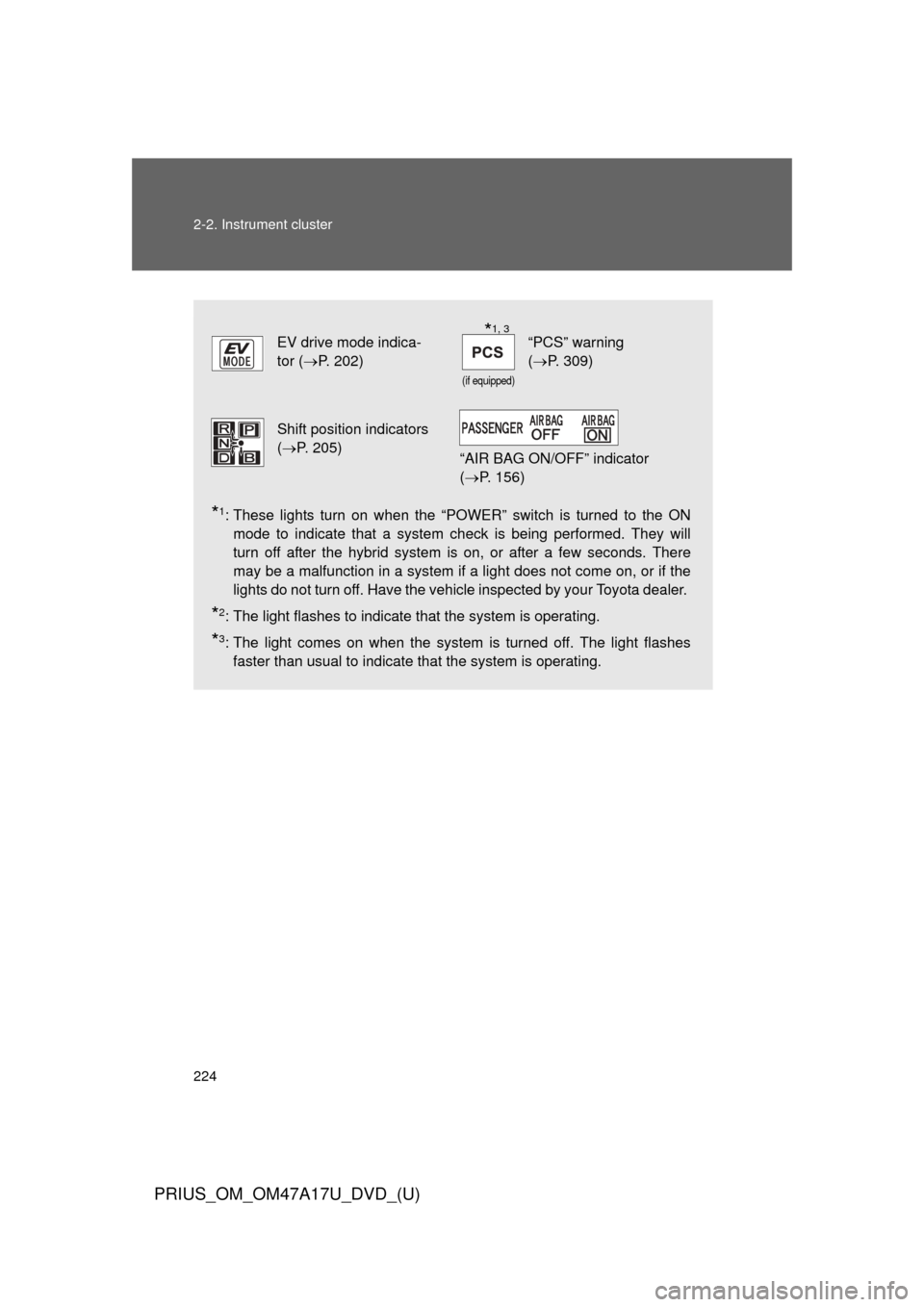
*1: These lights turn on when the “POWER” switch is turned to the ONmode to indicate that a system check is being performed. They will
turn off after the hybrid system is on, or after a few seconds. There
may be a malfunction in a system if a light does not come on, or if the
lights do not turn off. Have the vehicle inspected by your Toyota dealer.
*2: The light flashes to indicate that the system is operating.
*3: The light comes on when the system is turned off. The light flashesfaster than usual to indicate that the system is operating.
EV drive mode indica-
tor ( P. 202)
(if equipped)
“PCS” warning
(P. 309)
Shift position indicators
(P. 205)
“AIR BAG ON/OFF” indicator
( P. 156)
*1, 3
Page 225 of 644
225
2-2. Instrument cluster
PRIUS_OM_OM47A17U_DVD_(U)
2
When driving
CAUTION
■
If a safety system warning light does not come on
Should a safety system light such as the ABS and SRS airbag warning light
not come on when you start the hybrid system, this could mean that these
systems are not available to help protect you in an accident, which could
result in death or serious injury. Have the vehicle inspected by your Toyota
dealer immediately if this occurs.
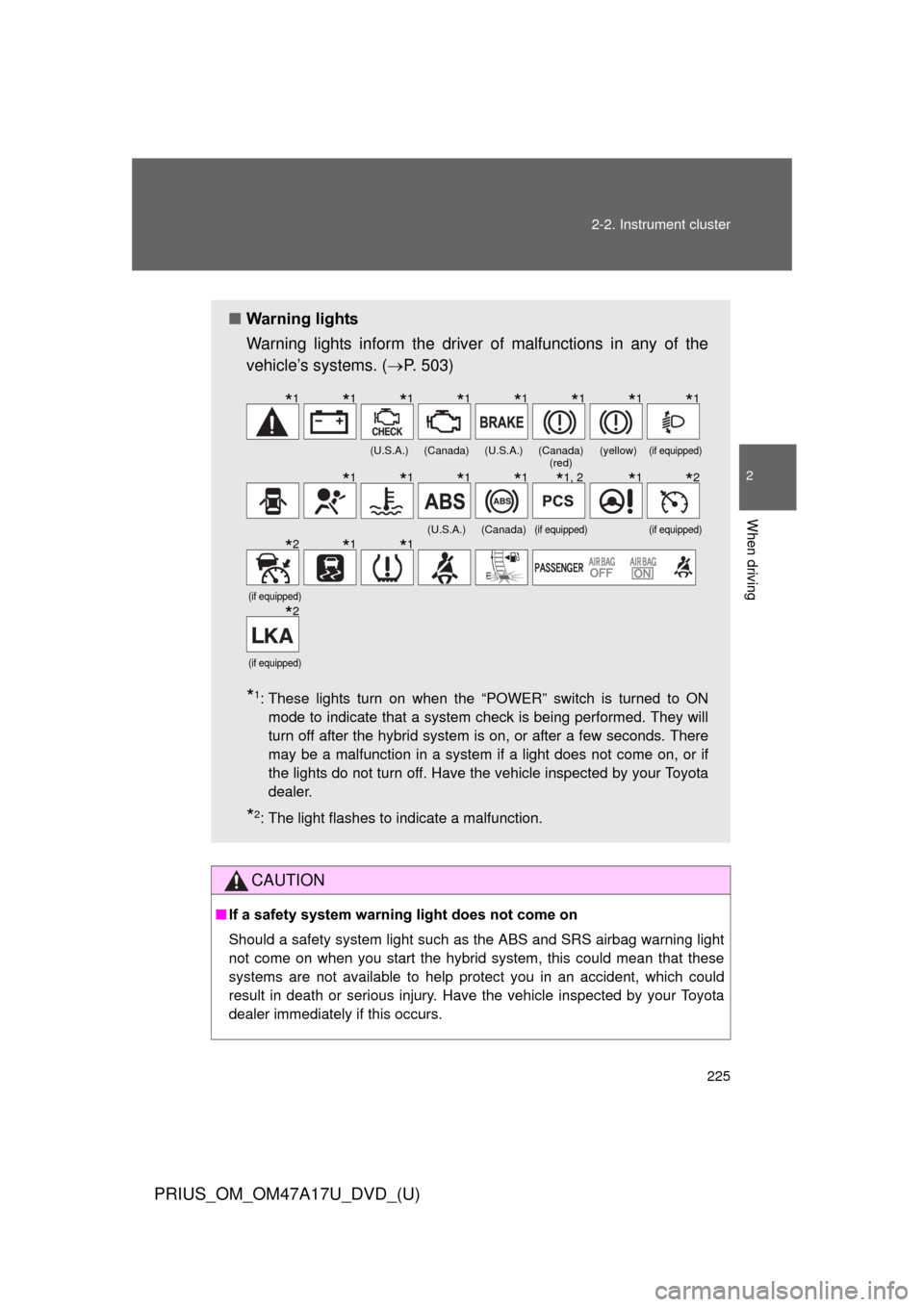
■ Warning lights
Warning lights inform the driver of malfunctions in any of the
vehicle’s systems. ( P. 503)
*1: These lights turn on when the “POWER” switch is turned to ON
mode to indicate that a system check is being performed. They will
turn off after the hybrid system is on, or after a few seconds. There
may be a malfunction in a system if a light does not come on, or if
the lights do not turn off. Have the vehicle inspected by your Toyota
dealer.
*2: The light flashes to indicate a malfunction.
(U.S.A.)(Canada)(U.S.A.)(Canada) (red)(yellow)(if equipped)
(U.S.A.)(Canada)(if equipped)(if equipped)
(if equipped)
(if equipped)
*1*1*1*1*1*1*1*1
*1*1*1*1*1, 2*1*2
*2*1*1
*2
Page 228 of 644
228 2-2. Instrument cluster
PRIUS_OM_OM47A17U_DVD_(U)
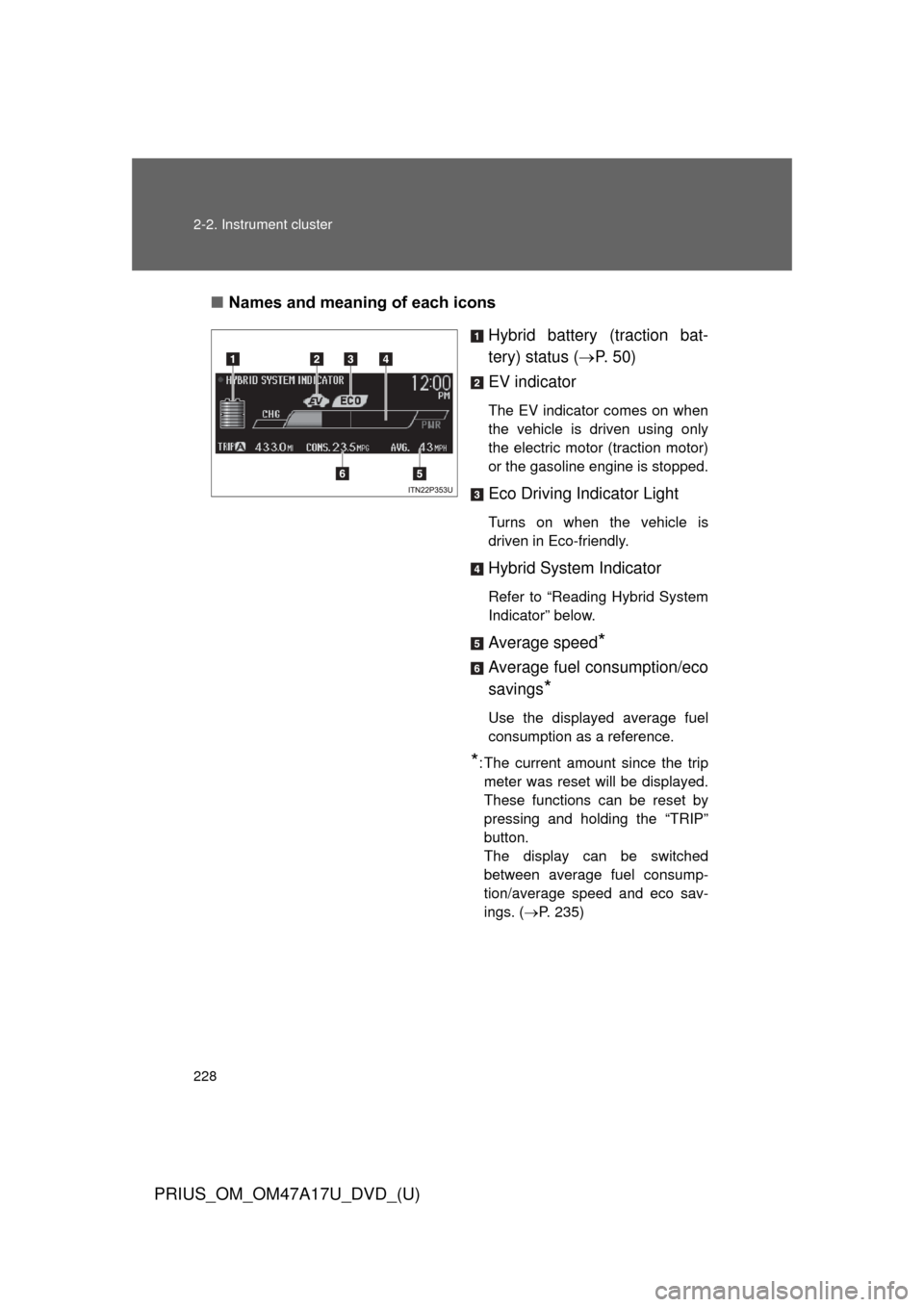
■Names and meaning of each icons
Hybrid battery (traction bat-
tery) status (P. 5 0 )
EV indicator
The EV indicator comes on when
the vehicle is driven using only
the electric motor (traction motor)
or the gasoline engine is stopped.
Eco Driving Indicator Light
Turns on when the vehicle is
driven in Eco-friendly.
Hybrid System Indicator
Refer to “Reading Hybrid System
Indicator” below.
Average speed*
Average fuel consumption/eco
savings
*
Use the displayed average fuel
consumption as a reference.
*: The current amount since the trip meter was reset will be displayed.
These functions can be reset by
pressing and holding the “TRIP”
button.
The display can be switched
between average fuel consump-
tion/average speed and eco sav-
ings. ( P. 235)
Page 230 of 644
230 2-2. Instrument cluster
PRIUS_OM_OM47A17U_DVD_(U)
*1: The images are examples only, and may vary slightly from actual condi-tions.
*2: The gasoline engine will automatically stop and restart under variousconditions.
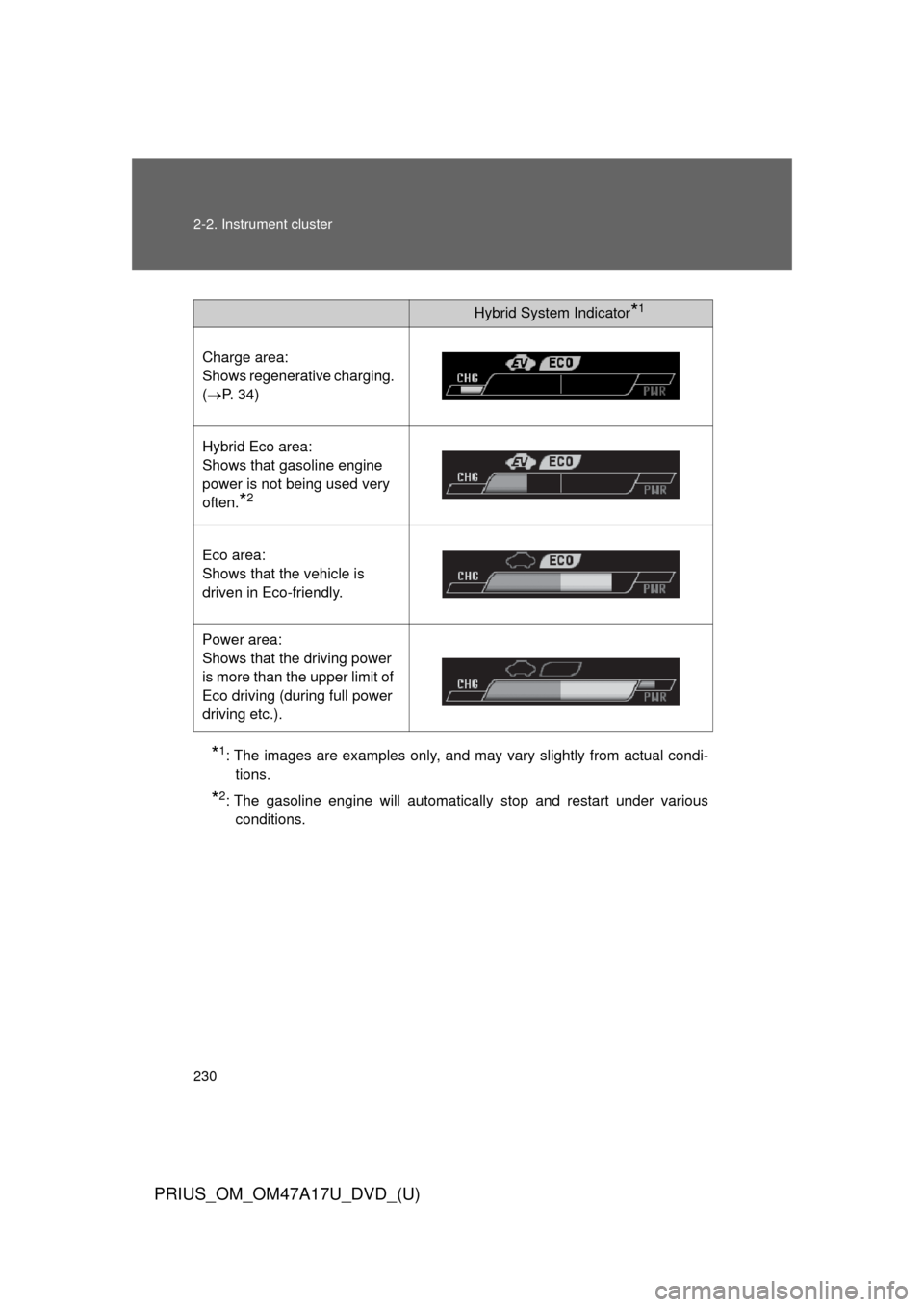
Hybrid System Indicator*1
Charge area:
Shows regenerative charging.
(P. 34)
Hybrid Eco area:
Shows that gasoline engine
power is not being used very
often.
*2
Eco area:
Shows that the vehicle is
driven in Eco-friendly.
Power area:
Shows that the driving power
is more than the upper limit of
Eco driving (during full power
driving etc.).
Page 238 of 644
238 2-2. Instrument cluster
PRIUS_OM_OM47A17U_DVD_(U)
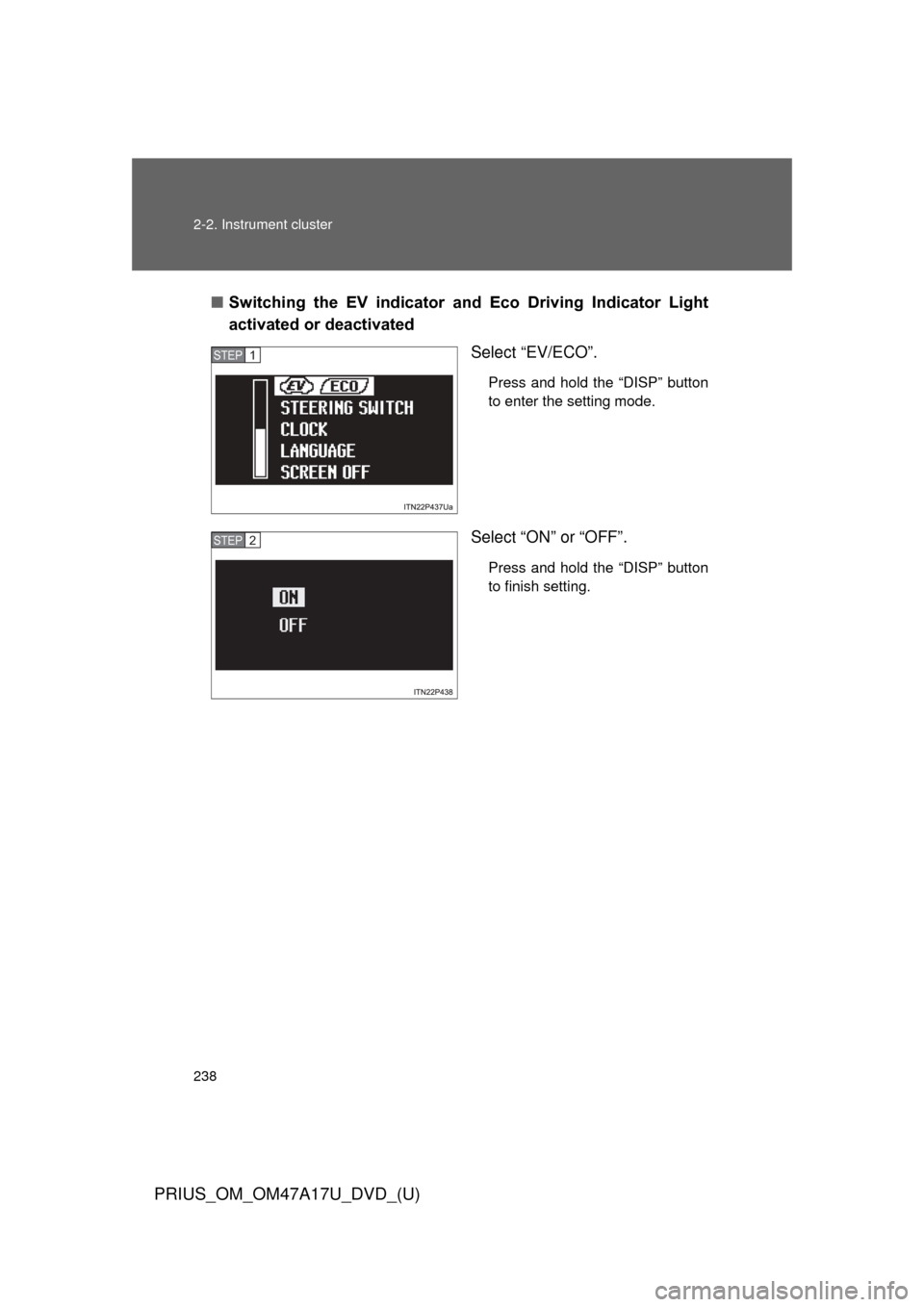
■Switching the EV indicator and Eco Driving Indicator Light
activated or deactivated
Select “EV/ECO”.
Press and hold the “DISP” button
to enter the setting mode.
Select “ON” or “OFF”.
Press and hold the “DISP” button
to finish setting.
STEP 1
STEP 2
Page 243 of 644
243
2-2. Instrument cluster
PRIUS_OM_OM47A17U_DVD_(U)
2
When driving
■
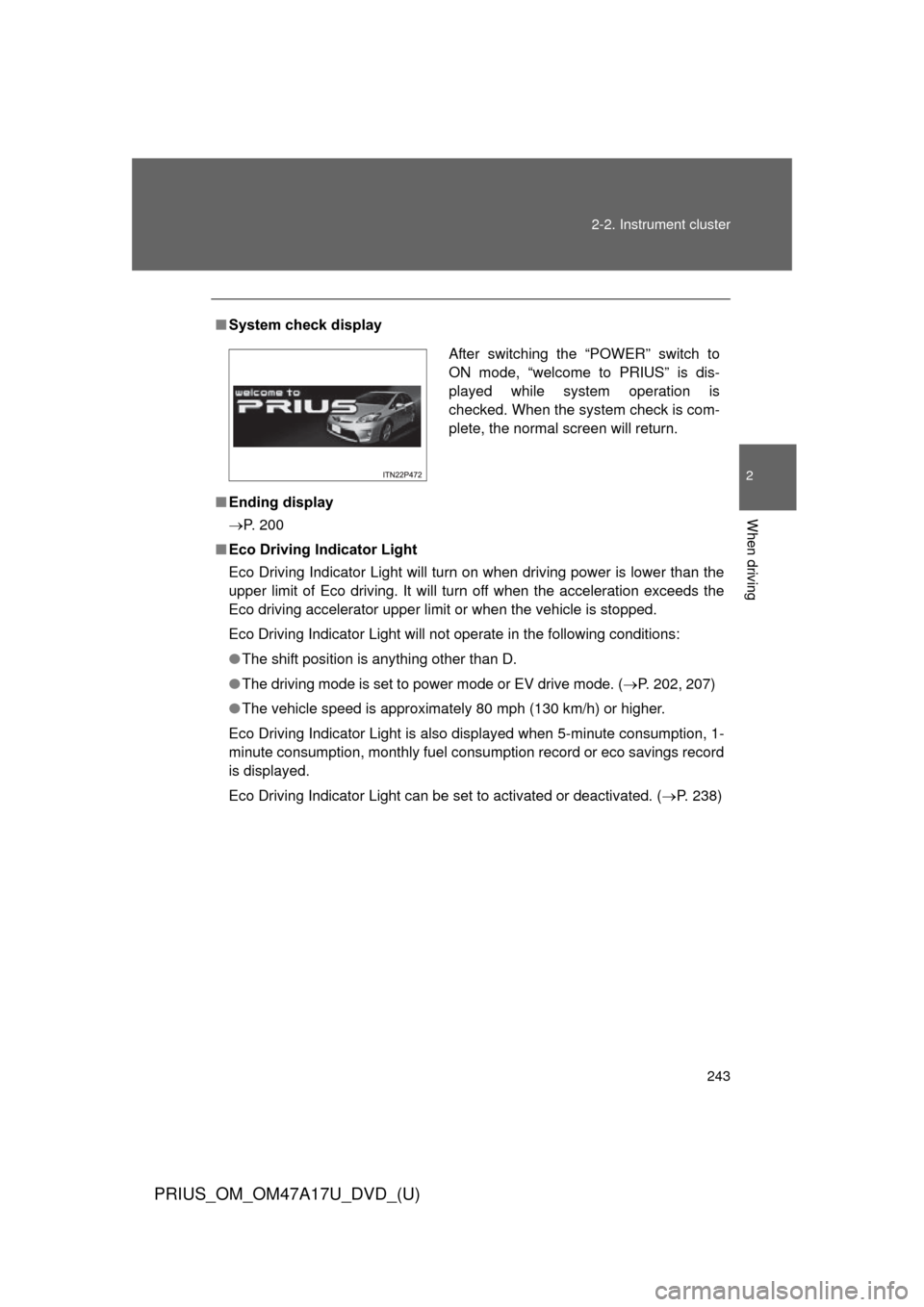
System check display
■ Ending display
P. 200
■ Eco Driving Indicator Light
Eco Driving Indicator Light will turn on when driving power is lower than the
upper limit of Eco driving. It will turn off when the acceleration exceeds the
Eco driving accelerator upper limit or when the vehicle is stopped.
Eco Driving Indicator Light will not operate in the following conditions:
●The shift position is anything other than D.
● The driving mode is set to power mode or EV drive mode. ( P. 202, 207)
● The vehicle speed is approximately 80 mph (130 km/h) or higher.
Eco Driving Indicator Light is also displayed when 5-minute consumption, 1-
minute consumption, monthly fuel cons umption record or eco savings record
is displayed.
Eco Driving Indicator Light can be set to activated or deactivated. ( P. 238)
After switching the “POWER” switch to
ON mode, “welcome to PRIUS” is dis-
played while system operation is
checked. When the system check is com-
plete, the normal screen will return.
Page 245 of 644
245
2-2. Instrument cluster
PRIUS_OM_OM47A17U_DVD_(U)
2
When driving
■
Vacuum fluorescent display
Small spots or light spots may appear on the display. This phenomenon is
characteristic of vacuum fluorescent displays, and there is no problem to
continue using the display.
NOTICE
■Steering switches
To prevent damage to the steering switches, observe the following precau-
tions.
●Do not touch the steering switches with wet hands
● Do not push hard or sharp objects into the steering switches
● Do not subject the steering switches to strong impacts
● Do not allow organic solvents containing thinner, benzene or gasoline, or
acidic/alkaline soap to adhere to the surfaces of the steering switches
Page 248 of 644
248 2-2. Instrument cluster
PRIUS_OM_OM47A17U_DVD_(U)
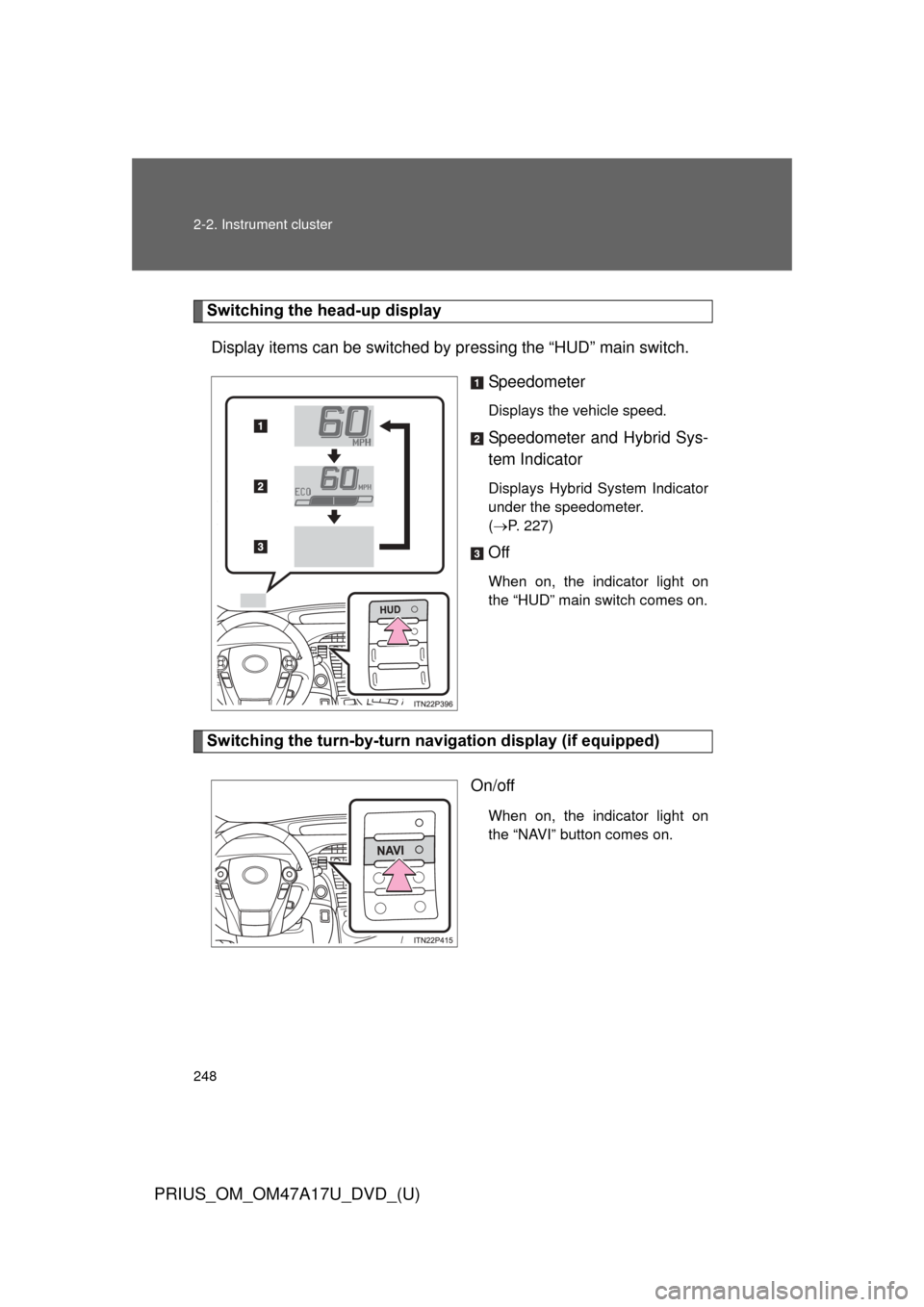
Switching the head-up displayDisplay items can be switched by pr essing the “HUD” main switch.
Speedometer
Displays the vehicle speed.
Speedometer and Hybrid Sys-
tem Indicator
Displays Hybrid System Indicator
under the speedometer.
(P. 227)
Off
When on, the indicator light on
the “HUD” main switch comes on.
Switching the turn-by-turn na vigation display (if equipped)
On/off
When on, the indicator light on
the “NAVI” button comes on.