Gas TOYOTA PRIUS 2016 4.G User Guide
[x] Cancel search | Manufacturer: TOYOTA, Model Year: 2016, Model line: PRIUS, Model: TOYOTA PRIUS 2016 4.GPages: 800, PDF Size: 16.69 MB
Page 84 of 800
841-3. Hybrid system
PRIUS_OM_OM47A29U_(U)
■If a warning light comes on, a wa rning message is displayed, or the
12-volt battery is disconnected
The hybrid system may not start. In this case, try to start the system again. If
the “READY” indicator does not come on, contact your Toyota dealer.
■ Running out of fuel
When the vehicle has run out of fuel and the hybrid system cannot be started,
refuel the vehicle with at least enough gasoline to make the low fuel le\
vel
warning light ( P. 657) go off. If there is only a small amount of fuel, the
hybrid system may not be able to start. (The standard amount of fuel is about
2.0 gal. [7.5 L, 1.7 Imp.gal.], when the vehicle is on a level surface. This value
may vary when the vehicle is on a slope. Add extra fuel when the vehicle is
inclined.)
■ Electromagnetic waves
●High voltage parts and cables on hybrid vehicles incorporate electromag-
netic shielding, and therefore emit approximately the same amount of elec-
tromagnetic waves as conventional gasoline powered vehicles or home
electronic appliances.
● Your vehicle may cause sound interference in some third party-produced
radio parts.
■ Hybrid battery (traction battery)
The hybrid battery (traction battery) has a limited service life. The lifespan of
the hybrid battery (traction battery) can change in accordance with driving
style and driving conditions.
■ Starting the hybrid system in an extremely cold environment
When the hybrid battery (traction battery) is extremely cold (below approxi-
mately -22°F [-30°C]) under the influence of the outside temperature, it may
not be possible to start the hybrid system. In this case, try to start the hybrid
system again after the temperature of the hybrid battery increases due to the
outside temperature increase etc.
Page 95 of 800
PRIUS_OM_OM47A29U_(U)
952. Instrument cluster
2
Instrument cluster
Some information will be displayed automatically according to power
switch operation, vehicle condition, etc.
■When starting the hybrid system
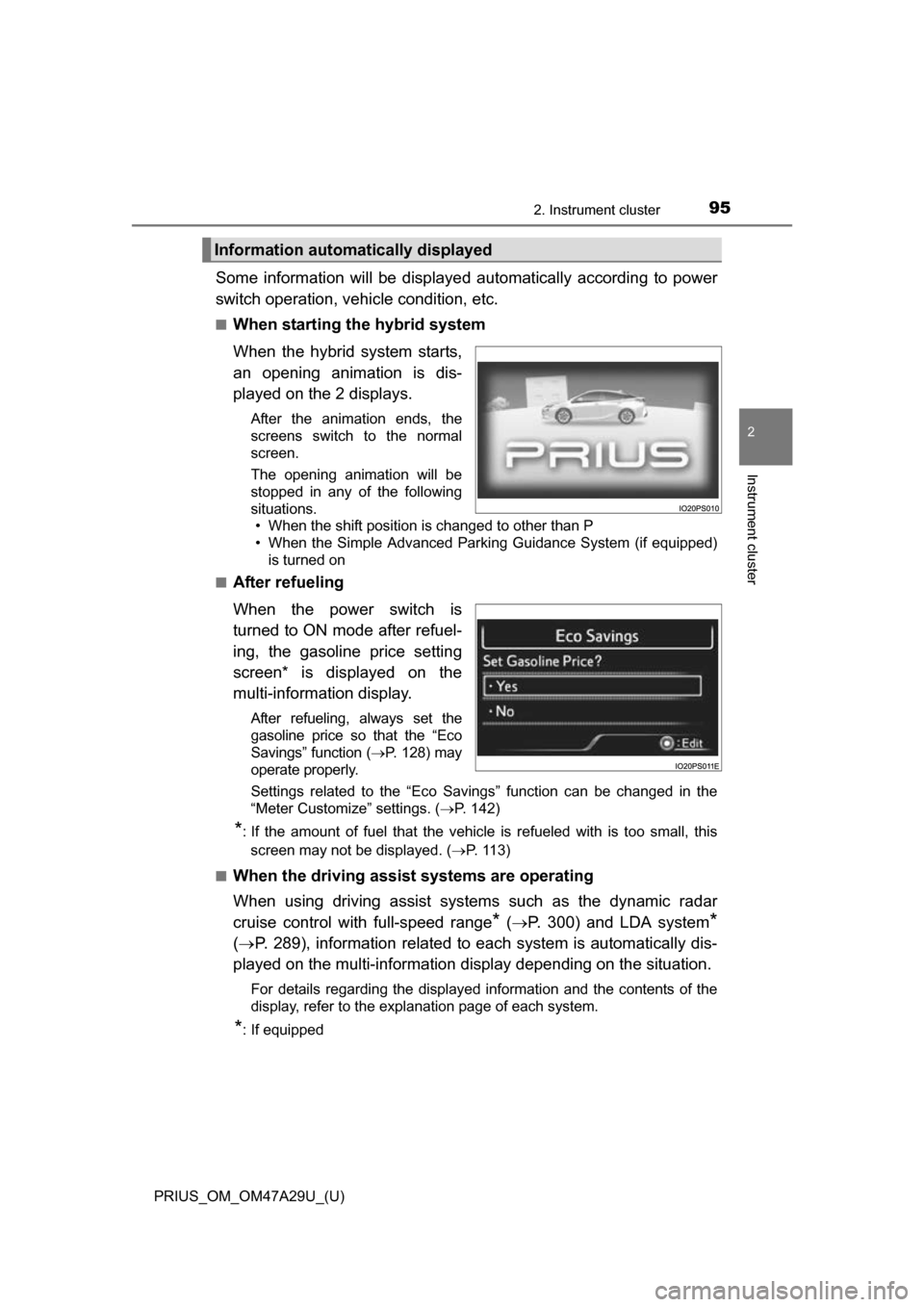
When the hybrid system starts,
an opening animation is dis-
played on the 2 displays.
After the animation ends, the
screens switch to the normal
screen.
The opening animation will be
stopped in any of the following
situations. • When the shift position is changed to other than P
• When the Simple Advanced Parking Guidance System (if equipped)
is turned on
■
After refueling
When the power switch is
turned to ON mode after refuel-
ing, the gasoline price setting
screen* is displayed on the
multi-information display.
After refueling, always set the
gasoline price so that the “Eco
Savings” function ( P. 128) may
operate properly.
Settings related to the “Eco Savings” function can be changed in the
“Meter Customize” settings. ( P. 142)
*: If the amount of fuel that the vehicle is refueled with is too small, this
screen may not be displayed. ( P. 113)
■
When the driving assist systems are operating
When using driving assist systems such as the dynamic radar
cruise control with full-speed range
* ( P. 300) and LDA system*
( P. 289), information related to each system is automatically dis-
played on the multi-information display depending on the situation.
For details regarding the displayed information and the contents of the
display, refer to the explanation page of each system.
*: If equipped
Information automatically displayed
Page 117 of 800
PRIUS_OM_OM47A29U_(U)
1172. Instrument cluster
2
Instrument cluster
◆Energy monitor
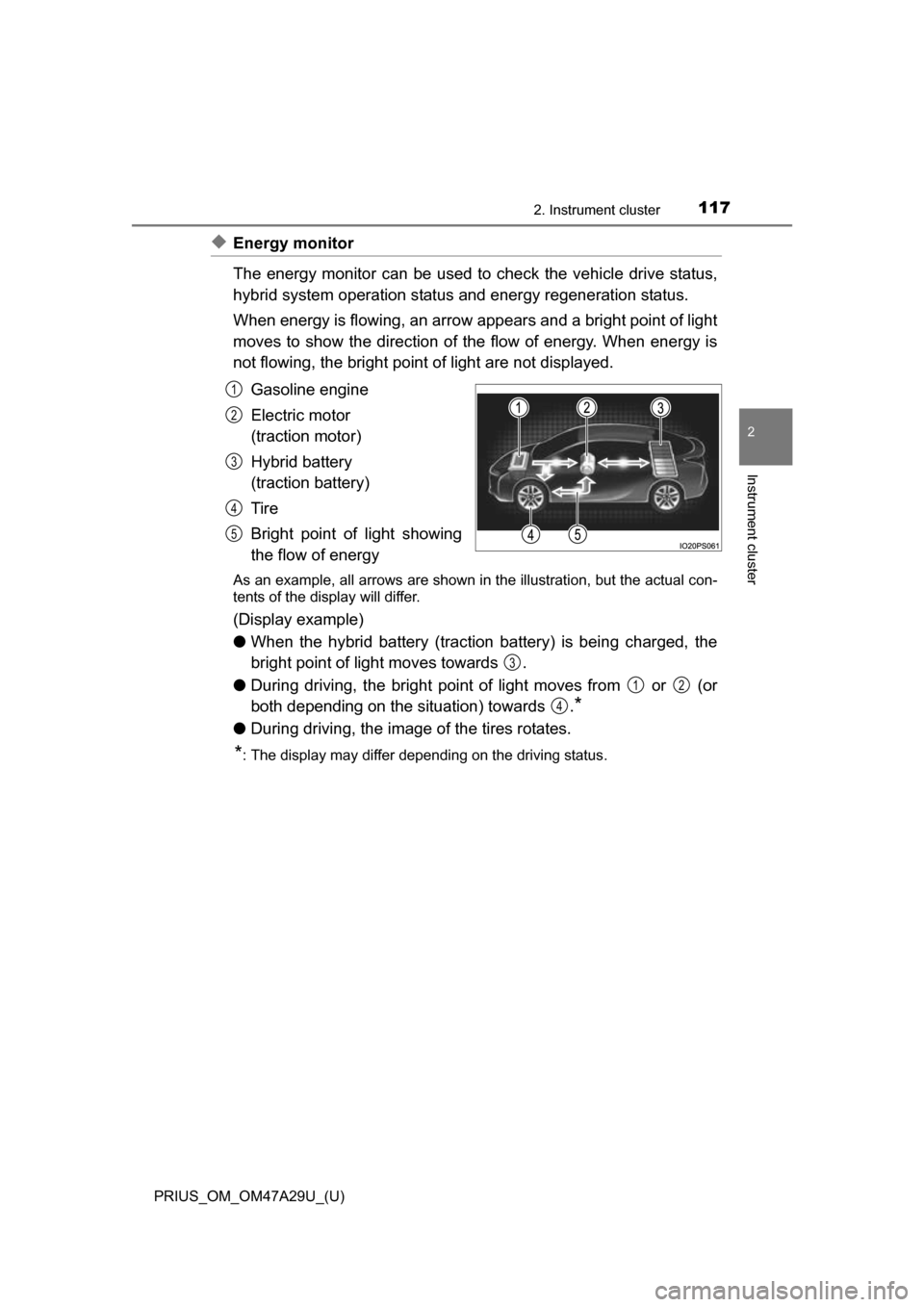
The energy monitor can be used to check the vehicle drive status,
hybrid system operation status and energy regeneration status.
When energy is flowing, an arrow appears and a bright point of light
moves to show the direction of the flow of energy. When energy is
not flowing, the bright point of light are not displayed.
Gasoline engine
Electric motor
(traction motor)
Hybrid battery
(traction battery)
Tire
Bright point of light showing
the flow of energy
As an example, all arrows are shown in the illustration, but the actual con-
tents of the display will differ.
(Display example)
●When the hybrid battery (traction battery) is being charged, the
bright point of light moves towards .
● During driving, the bright point of light moves from or (or
both depending on the situation) towards .
*
●During driving, the image of the tires rotates.
*: The display may differ depending on the driving status.
1
2
3
4
5
3
12
4
Page 118 of 800
118
PRIUS_OM_OM47A29U_(U)
2. Instrument cluster
■Hybrid battery (traction battery) status
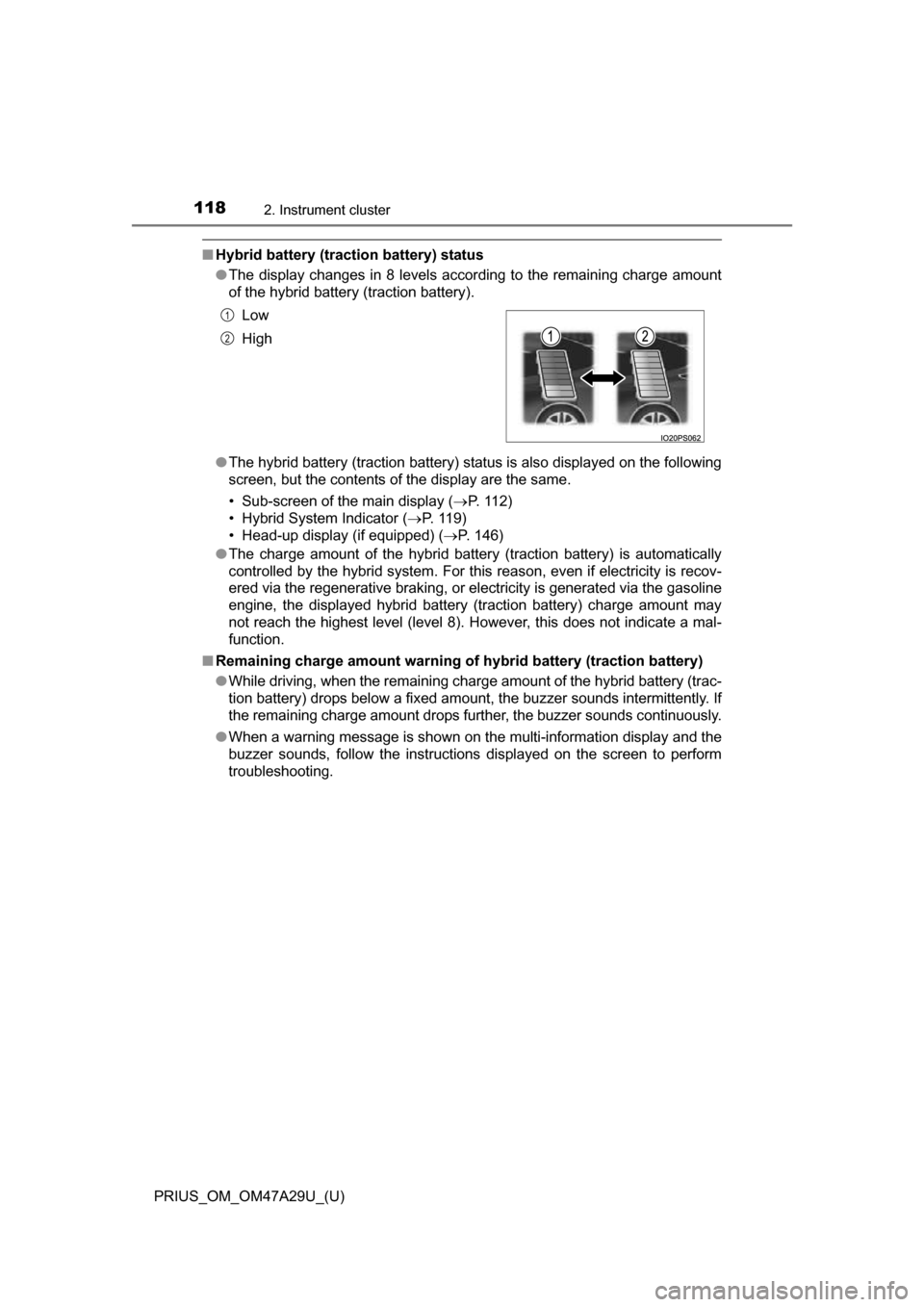
●The display changes in 8 levels according to the remaining charge amount
of the hybrid battery (traction battery).
● The hybrid battery (traction battery) status is also displayed on the following
screen, but the contents of the display are the same.
• Sub-screen of the main display ( P. 112)
• Hybrid System Indicator (P. 119)
• Head-up display (if equipped) ( P. 146)
● The charge amount of the hybrid battery (traction battery) is automatically
controlled by the hybrid system. For this reason, even if electricity is recov-
ered via the regenerative braking, or electricity is generated via the gasoline
engine, the displayed hybrid battery (traction battery) charge amount may
not reach the highest level (level 8). However, this does not indicate a mal-
function.
■ Remaining charge amount warning of hybrid battery (traction battery)
●While driving, when the remaining charge amount of the hybrid battery (trac-
tion battery) drops below a fixed amount, the buzzer sounds intermittently. If
the remaining charge amount drops further, the buzzer sounds continuously.
● When a warning message is shown on the multi-information display and the
buzzer sounds, follow the instructions displayed on the screen to perform
troubleshooting. Low
High
1
2
Page 119 of 800
PRIUS_OM_OM47A29U_(U)
1192. Instrument cluster
2
Instrument cluster
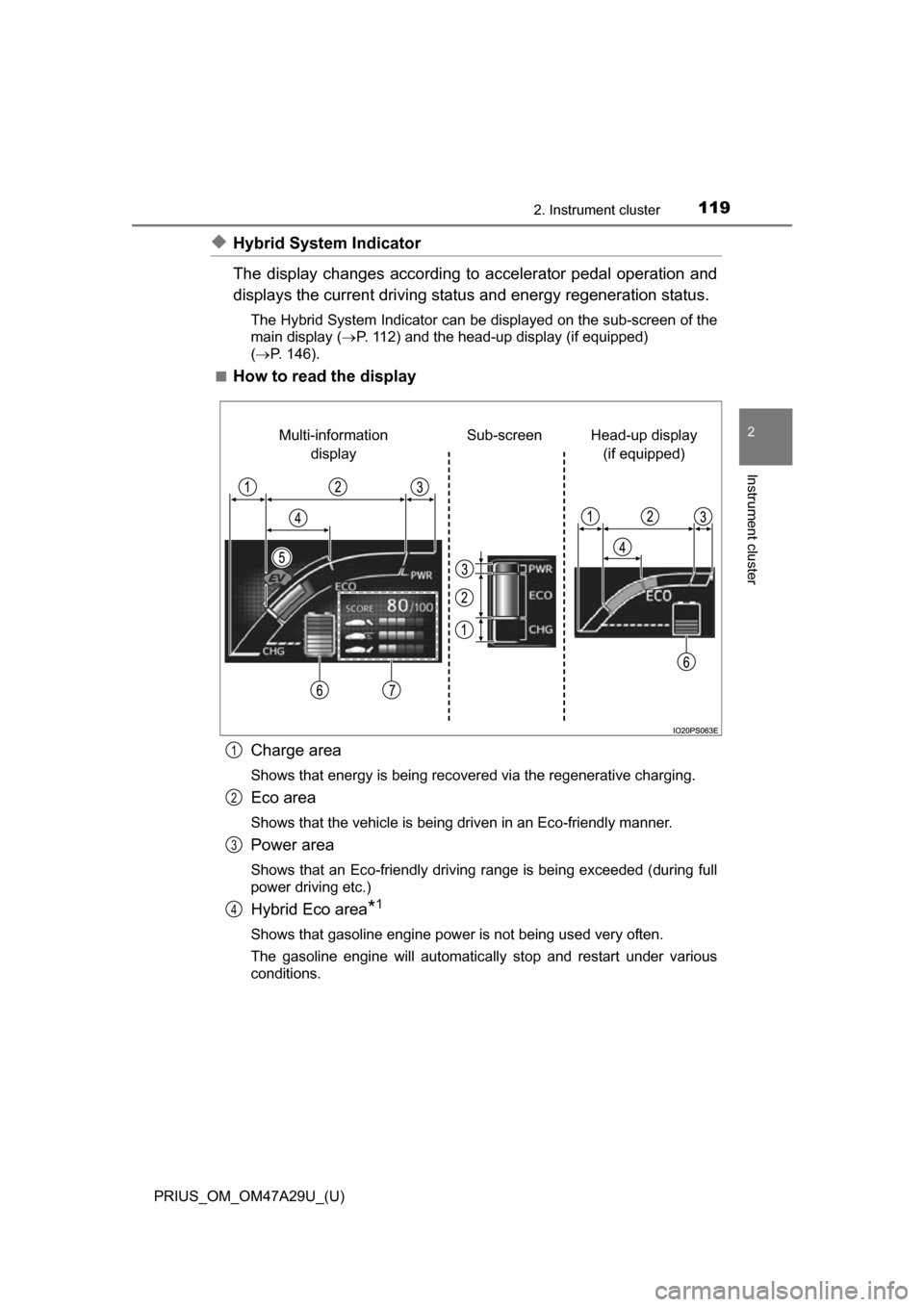
◆Hybrid System Indicator
The display changes according to accelerator pedal operation and
displays the current driving status and energy regeneration status.
The Hybrid System Indicator can be displayed on the sub-screen of the
main display (P. 112) and the head-up display (if equipped)
( P. 146).
■
How to read the display
Charge area
Shows that energy is being recovered via the regenerative charging.
Eco area
Shows that the vehicle is being driven in an Eco-friendly manner.
Power area
Shows that an Eco-friendly driving range is being exceeded (during full
power driving etc.)
Hybrid Eco area*1
Shows that gasoline engine power is not being used very often.
The gasoline engine will automatically stop and restart under various
conditions.
Head-up display (if equipped)
Sub-screen
Multi-information
display
1
2
3
4
Page 120 of 800
120
PRIUS_OM_OM47A29U_(U)
2. Instrument cluster
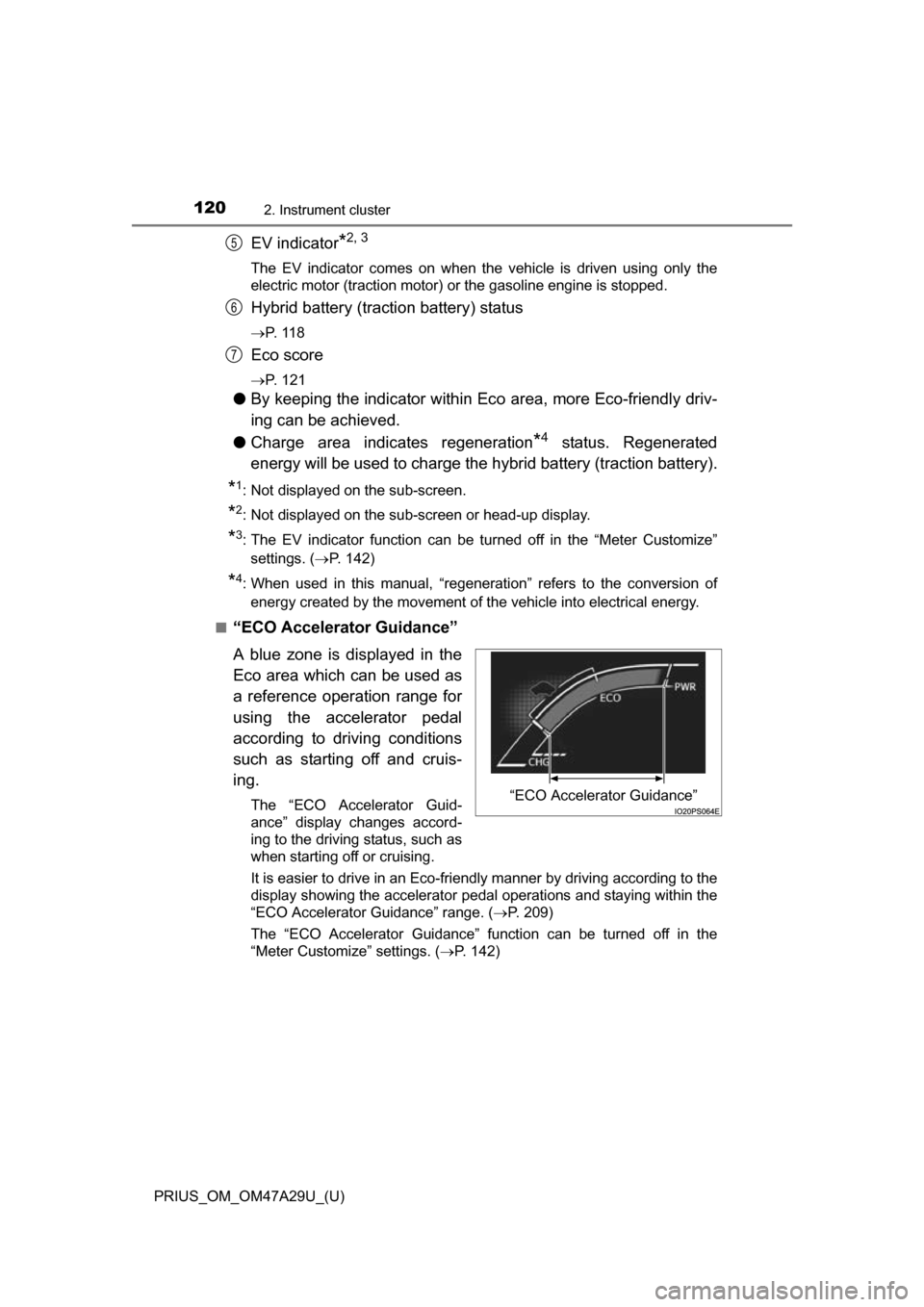
EV indicator*2, 3
The EV indicator comes on when the vehicle is driven using only the
electric motor (traction motor) or the gasoline engine is stopped.
Hybrid battery (traction battery) status
P. 1 1 8
Eco score
P. 121
●By keeping the indicator within Ec o area, more Eco-friendly driv-
ing can be achieved.
● Charge area indicates regeneration
*4 status. Regenerated
energy will be used to charge the hybrid battery (traction battery).
*1: Not displayed on the sub-screen.
*2: Not displayed on the sub-screen or head-up display.
*3: The EV indicator function can be turned off in the “Meter Customize”
settings. ( P. 142)
*4: When used in this manual, “regeneration” refers to the conversion of
energy created by the movement of the vehicle into electrical energy.
■
“ECO Accelerator Guidance”
A blue zone is displayed in the
Eco area which can be used as
a reference operation range for
using the accelerator pedal
according to driving conditions
such as starting off and cruis-
ing.
The “ECO Accelerator Guid-
ance” display changes accord-
ing to the driving status, such as
when starting off or cruising.
It is easier to drive in an Eco-friendly manner by driving according to the
display showing the accelerator pedal operations and staying within the
“ECO Accelerator Guidance” range. ( P. 209)
The “ECO Accelerator Guidance” function can be turned off in the
“Meter Customize” settings. ( P. 142)
5
6
7
“ECO Accelerator Guidance”
Page 128 of 800
128
PRIUS_OM_OM47A29U_(U)
2. Instrument cluster
◆“Eco Savings”
“Gasoline Price”
*1 and “COMP. Consumption” information is regis-
tered in the “Meter Customize” settings ( P. 142), making it possi-
ble to display 2 types of information related to gasoline fuel
consumption.
“SAVINGS”
If information about th e vehicle used to comp are fuel consumption
(“COMP. Consumption”) is entered, when the fuel consumption of
this vehicle according to the mileage of the trip meter
*2 is greater
than that of the comparis on vehicle, an estimation
*3 of the amount
of the fuel cost savings is displayed.
“FUEL COST”
If information about th e vehicle used to comp are fuel consumption
(“COMP. Consumption”) is not entered, an estimation
*3 of the
amount of fuel cost savings is displayed according to the mileage of
the trip meter
*2.
*1: “Gasoline Price” is information necessary to display the “SAVINGS” and “FUEL COST” records.
*2: The display can be switched from the mileage history to the history bymonth. ( P. 130)
*3: The displayed amount is only an estimate, and may differ from the
actual amount.
Page 142 of 800
142
PRIUS_OM_OM47A29U_(U)
2. Instrument cluster
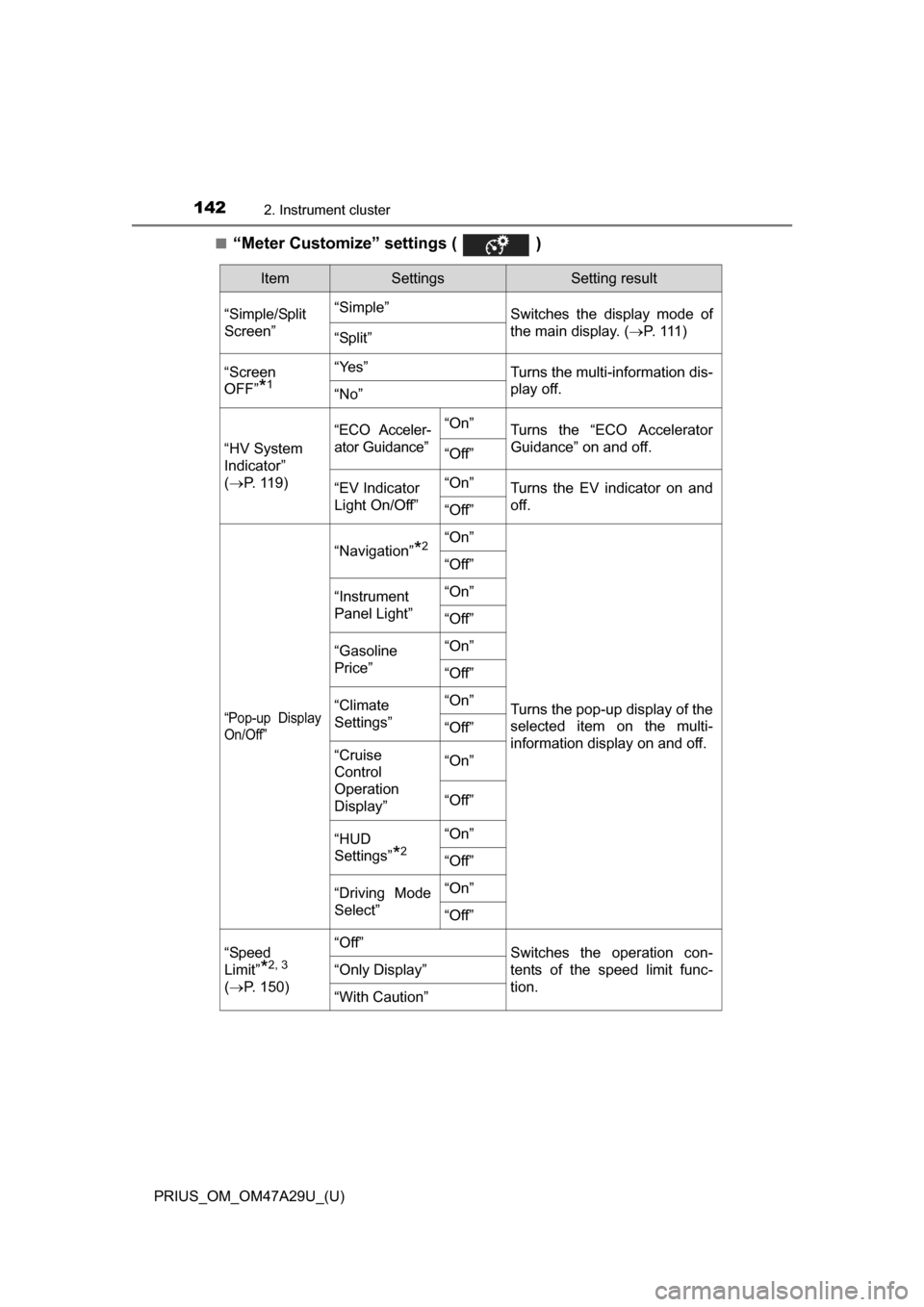
■“Meter Customize” settings ( )
ItemSettingsSetting result
“Simple/Split
Screen” “Simple”
Switches the display mode of
the main display. (P. 111 )
“Split”
“Screen
OFF”
*1
“Yes”Turns the multi-information dis-
play off.
“No”
“HV System
Indicator”
( P. 119)
“ECO Acceler-
ator Guidance”“On”Turns the “ECO Accelerator
Guidance” on and off.
“Off”
“EV Indicator
Light On/Off” “On”Turns the EV indicator on and
off.
“Off”
“Pop-up Display
On/Off”
“Navigation”*2“On”
Turns the pop-up display of the
selected item on the multi-
information display on and off.
“Off”
“Instrument
Panel Light”“On”
“Off”
“Gasoline
Price”
“On”
“Off”
“Climate
Settings”“On”
“Off”
“Cruise
Control
Operation
Display”“On”
“Off”
“HUD
Settings”
*2
“On”
“Off”
“Driving Mode
Select”
“On”
“Off”
“Speed
Limit”
*2, 3
(
P. 150)
“Off”Switches the operation con-
tents of the speed limit func-
tion.
“Only Display”
“With Caution”
Page 143 of 800
PRIUS_OM_OM47A29U_(U)
1432. Instrument cluster
2
Instrument cluster
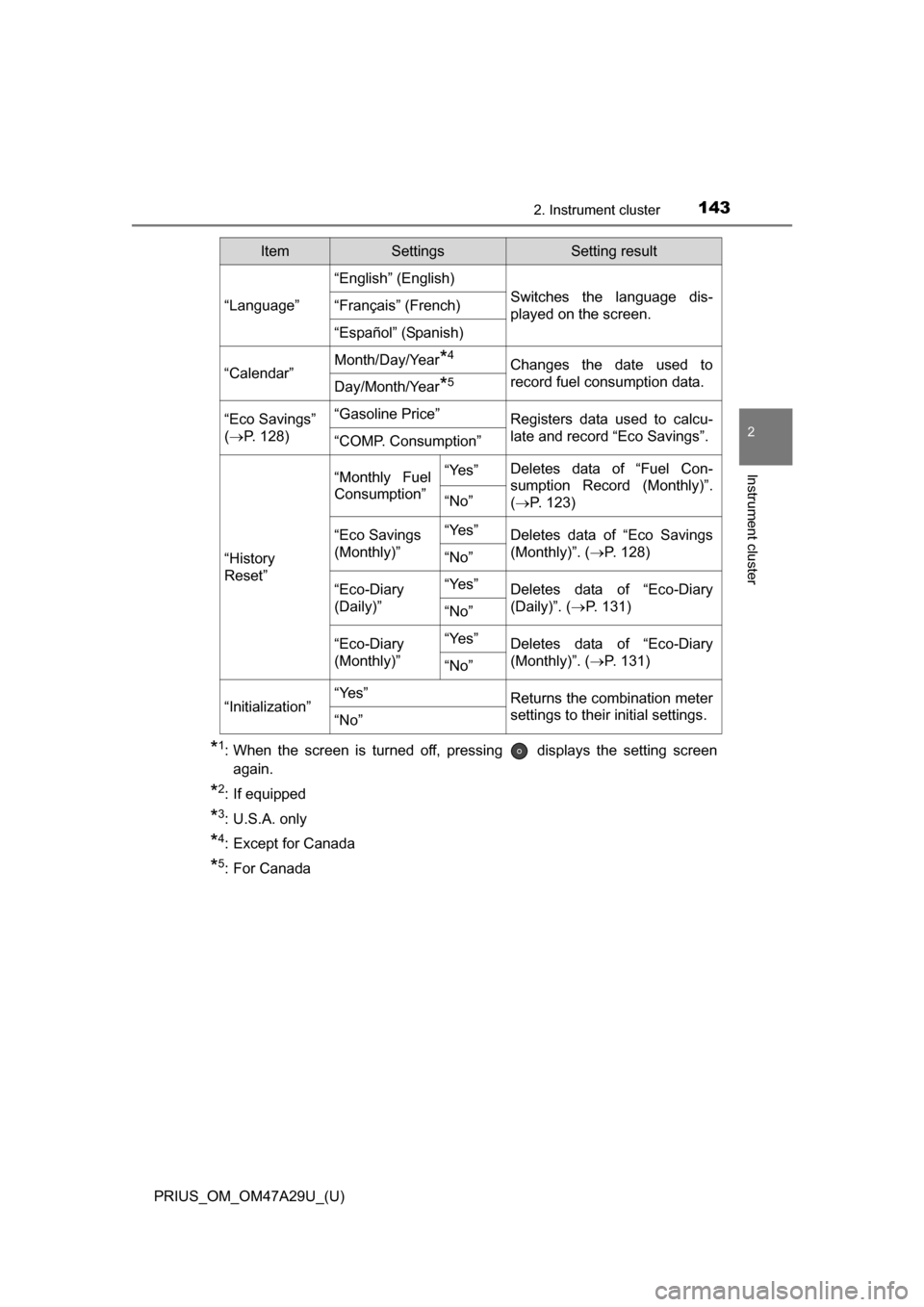
*1: When the screen is turned off, pressing displays the setting screenagain.
*2: If equipped
*3: U.S.A. only
*4: Except for Canada
*5: For Canada
“Language”
“English” (English)
Switches the language dis-
played on the screen.“Français” (French)
“Español” (Spanish)
“Calendar”
Month/Day/Year*4Changes the date used to
record fuel consumption data.
Day/Month/Year*5
“Eco Savings”
( P. 128)“Gasoline Price”Registers data used to calcu-
late and record “Eco Savings”.
“COMP. Consumption”
“History
Reset”
“Monthly Fuel
Consumption”“Yes”Deletes data of “Fuel Con-
sumption Record (Monthly)”.
(P. 123)
“No”
“Eco Savings
(Monthly)”“Yes”Deletes data of “Eco Savings
(Monthly)”. ( P. 128)
“No”
“Eco-Diary
(Daily)”“Yes”Deletes data of “Eco-Diary
(Daily)”. (P. 131)
“No”
“Eco-Diary
(Monthly)”“Yes”Deletes data of “Eco-Diary
(Monthly)”. ( P. 131)
“No”
“Initialization”“Yes”Returns the combination meter
settings to their initial settings.
“No”
ItemSettingsSetting result
Page 145 of 800
PRIUS_OM_OM47A29U_(U)
1452. Instrument cluster
2
Instrument cluster
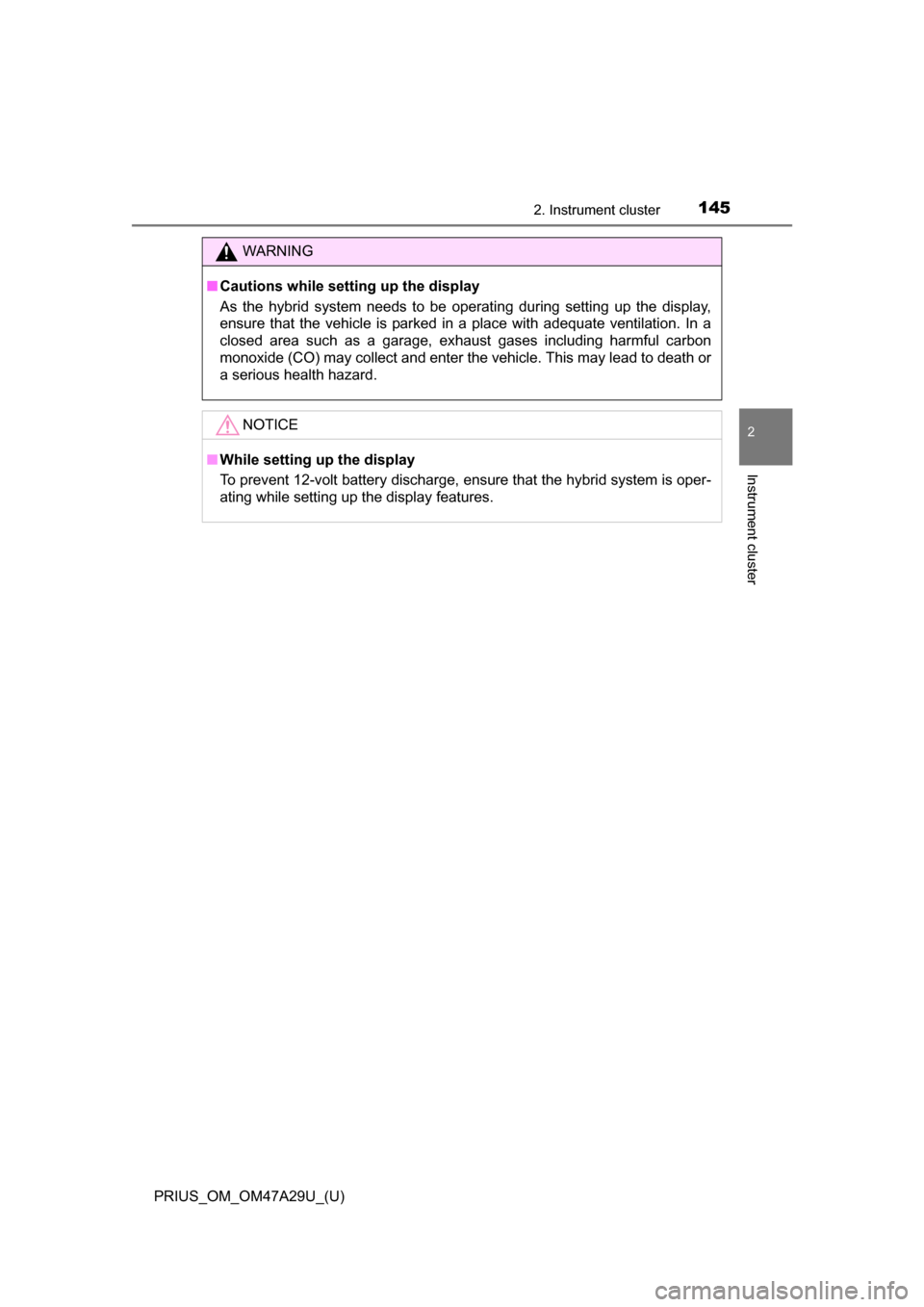
WARNING
■Cautions while setting up the display
As the hybrid system needs to be operating during setting up the display,
ensure that the vehicle is parked in a place with adequate ventilation. In a
closed area such as a garage, exhaust gases including harmful carbon
monoxide (CO) may collect and enter the vehicle. This may lead to death or
a serious health hazard.
NOTICE
■While setting up the display
To prevent 12-volt battery discharge, ensure that the hybrid system is oper-
ating while setting up the display features.