Setting TOYOTA PRIUS 2016 4.G User Guide
[x] Cancel search | Manufacturer: TOYOTA, Model Year: 2016, Model line: PRIUS, Model: TOYOTA PRIUS 2016 4.GPages: 800, PDF Size: 16.69 MB
Page 113 of 800
PRIUS_OM_OM47A29U_(U)
1132. Instrument cluster
2
Instrument cluster
■Outside temperature display
●In the following situations, the correct outside temperature may not be dis-
played, or the display may take longer than normal to change.
• When stopped, or driving at low speeds (less than 12 mph [20 km/h])
• When the outside temperature has changed suddenly (at the entrance/
exit of a garage, tunnel, etc.)
● When “-” or “E” is displayed, the system may be malfunctioning.
Take your vehicle to your Toyota dealer.
■ Distance to empty
●This distance is computed based on your average fuel consumption. As a
result, the actual distance that can be driven may differ from that displayed.
● When only a small amount of fuel is added to the tank, the display may not
be updated.
When refueling, turn the power switch off. If the vehicle is refueled without
turning the power switch off, the display may not be updated.
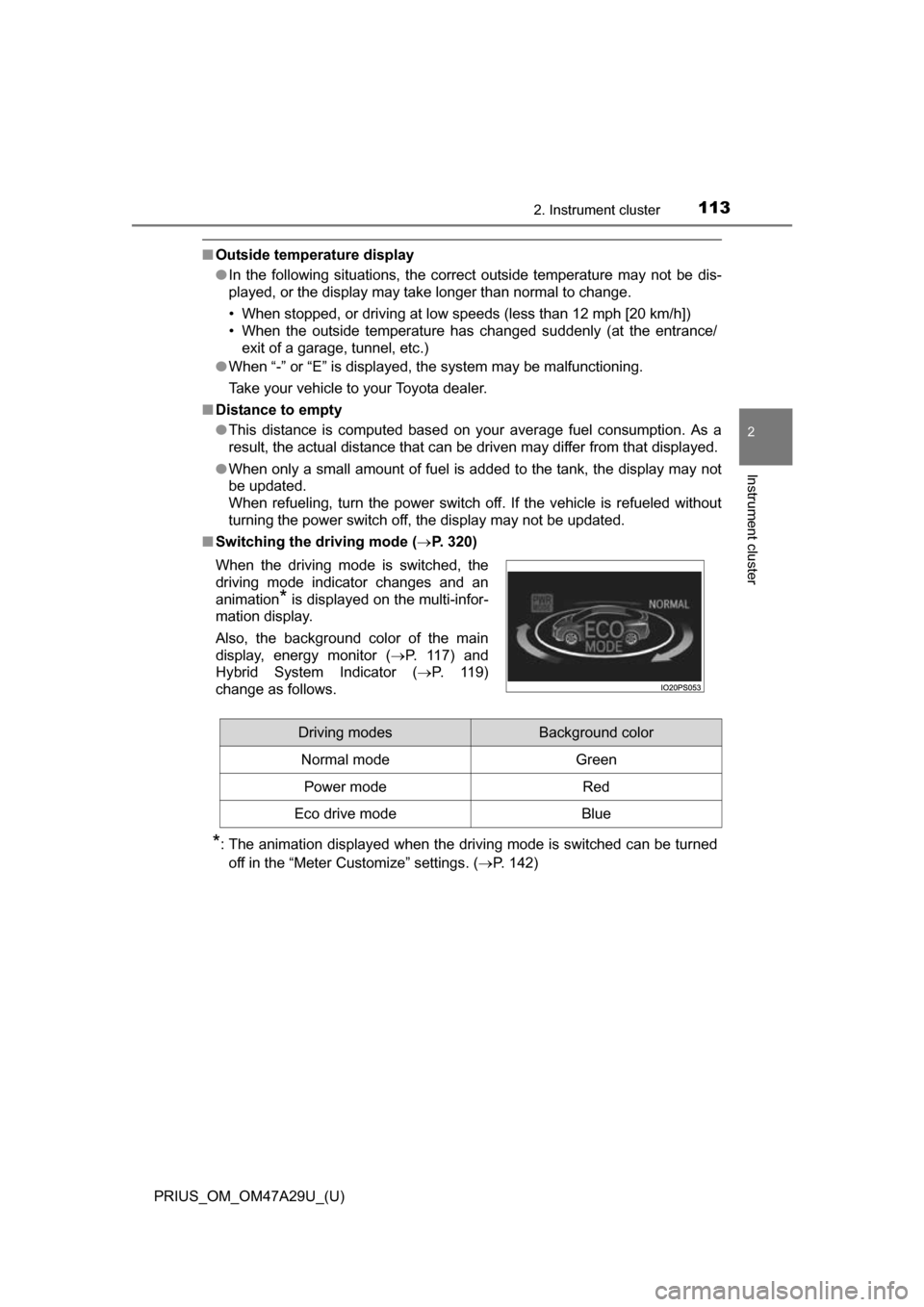
■ Switching the driving mode ( P. 320)
*: The animation displayed when the driving mode is switched can be turned
off in the “Meter Customize” settings. ( P. 142)
When the driving mode is switched, the
driving mode indicator changes and an
animation
* is displayed on the multi-infor-
mation display.
Also, the background color of the main
display, energy monitor ( P. 1 1 7 ) a n d
Hybrid System Indicator ( P. 119)
change as follows.
Driving modesBackground color
Normal mode Green
Power modeRed
Eco drive modeBlue
Page 114 of 800
114
PRIUS_OM_OM47A29U_(U)
2. Instrument cluster
Multi-infor mation display
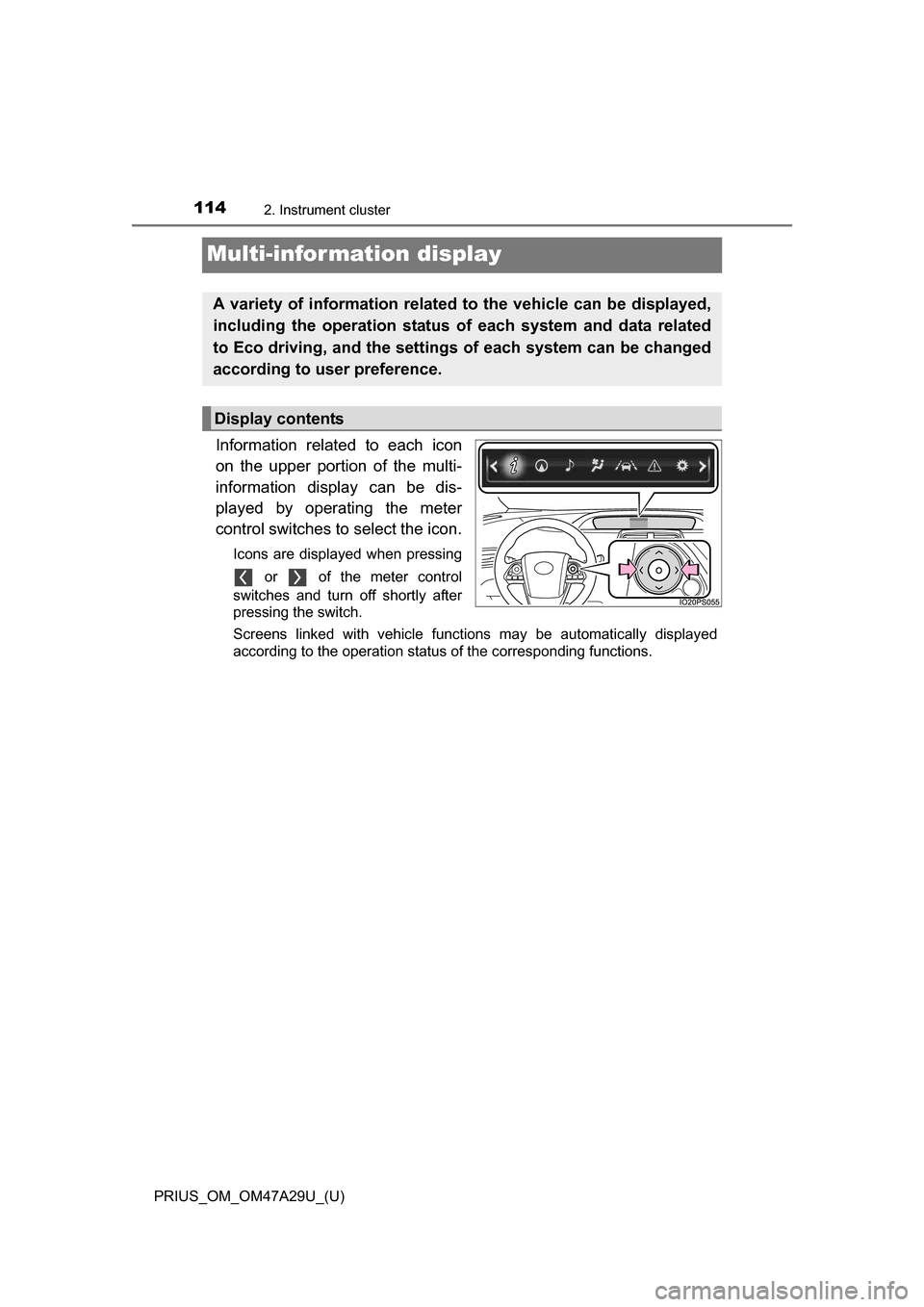
Information related to each icon
on the upper portion of the multi-
information display can be dis-
played by operating the meter
control switches to select the icon.
Icons are displayed when pressing or of the meter control
switches and turn off shortly after
pressing the switch.
Screens linked with vehicle functions may be automatically displayed
according to the operation status of the corresponding functions.
A variety of informati on related to the vehic le can be displayed,
including the operation status of each system and data related
to Eco driving, and the settings of each system can be changed
according to user preference.
Display contents
Page 115 of 800
PRIUS_OM_OM47A29U_(U)
1152. Instrument cluster
2
Instrument cluster
*1: If equipped
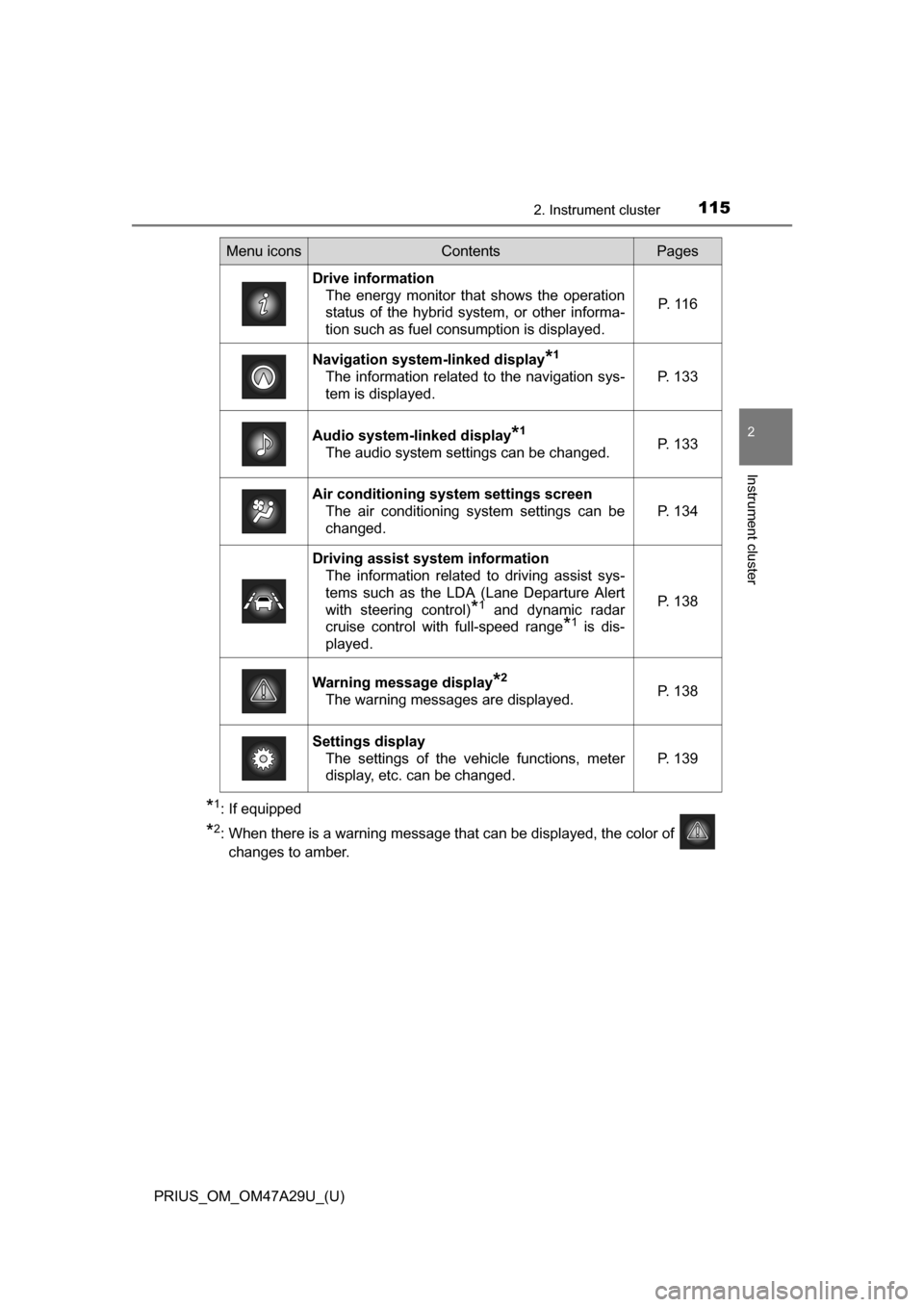
*2: When there is a warning message that can be displayed, the color of changes to amber.
Menu iconsContentsPages
Drive information The energy monitor that shows the operation
status of the hybrid system, or other informa-
tion such as fuel consumption is displayed. P. 1 1 6
Navigation system-linked display*1
The information related to the navigation sys-
tem is displayed.P. 133
Audio system-linked display*1
The audio system settings can be changed.P. 133
Air conditioning system settings screen
The air conditioning system settings can be
changed.
P. 134
Driving assist system informationThe information related to driving assist sys-
tems such as the LDA (Lane Departure Alert
with steering control)
*1 and dynamic radar
cruise control with full-speed range
*1 is dis-
played.
P. 138
Warning message display*2
The warning messages are displayed.P. 138
Settings display The settings of the vehicle functions, meter
display, etc. can be changed.
P. 139
Page 120 of 800
120
PRIUS_OM_OM47A29U_(U)
2. Instrument cluster
EV indicator*2, 3
The EV indicator comes on when the vehicle is driven using only the
electric motor (traction motor) or the gasoline engine is stopped.
Hybrid battery (traction battery) status
P. 1 1 8
Eco score
P. 121
●By keeping the indicator within Ec o area, more Eco-friendly driv-
ing can be achieved.
● Charge area indicates regeneration
*4 status. Regenerated
energy will be used to charge the hybrid battery (traction battery).
*1: Not displayed on the sub-screen.
*2: Not displayed on the sub-screen or head-up display.
*3: The EV indicator function can be turned off in the “Meter Customize”
settings. ( P. 142)
*4: When used in this manual, “regeneration” refers to the conversion of
energy created by the movement of the vehicle into electrical energy.
■
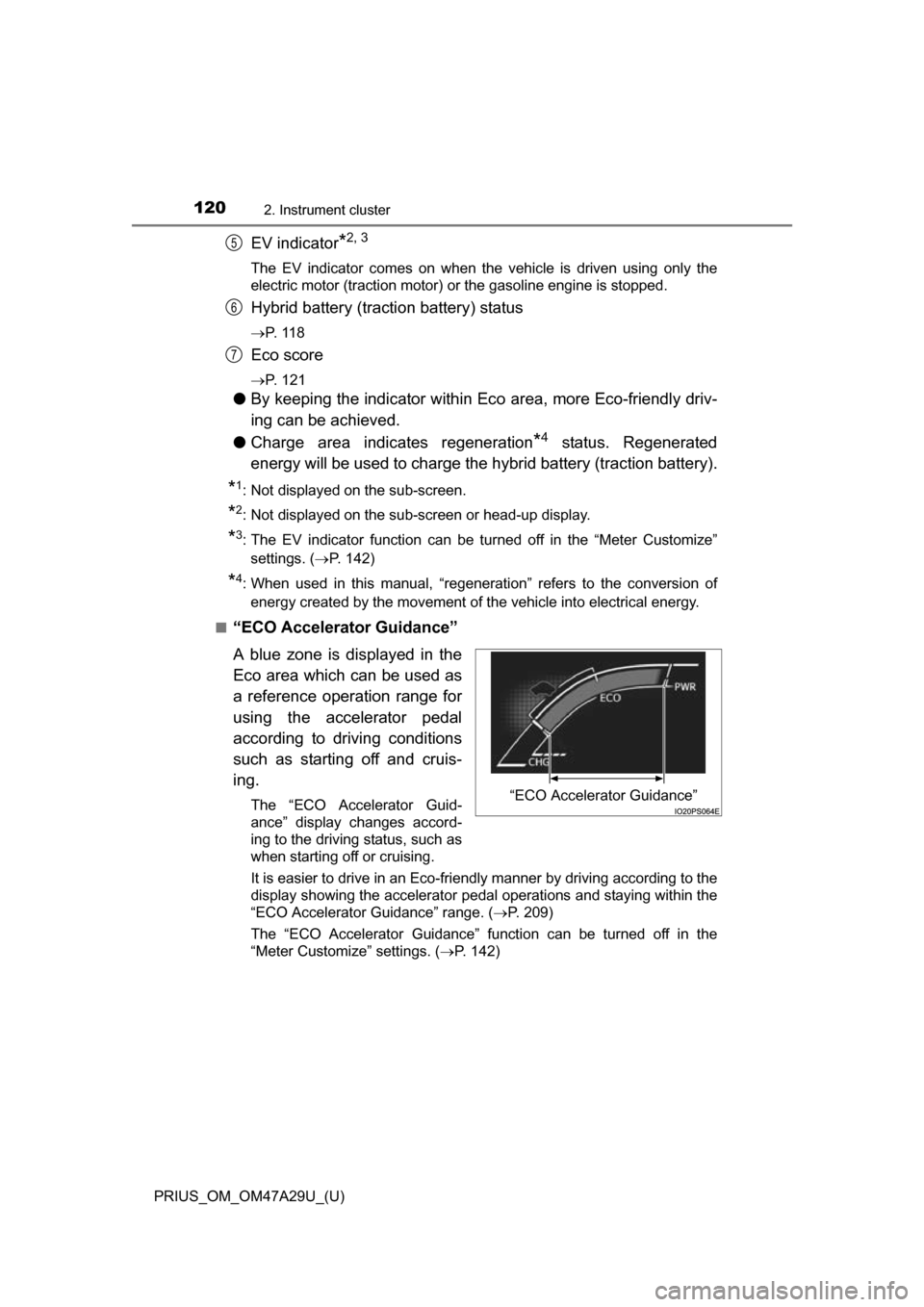
“ECO Accelerator Guidance”
A blue zone is displayed in the
Eco area which can be used as
a reference operation range for
using the accelerator pedal
according to driving conditions
such as starting off and cruis-
ing.
The “ECO Accelerator Guid-
ance” display changes accord-
ing to the driving status, such as
when starting off or cruising.
It is easier to drive in an Eco-friendly manner by driving according to the
display showing the accelerator pedal operations and staying within the
“ECO Accelerator Guidance” range. ( P. 209)
The “ECO Accelerator Guidance” function can be turned off in the
“Meter Customize” settings. ( P. 142)
5
6
7
“ECO Accelerator Guidance”
Page 124 of 800
124
PRIUS_OM_OM47A29U_(U)
2. Instrument cluster
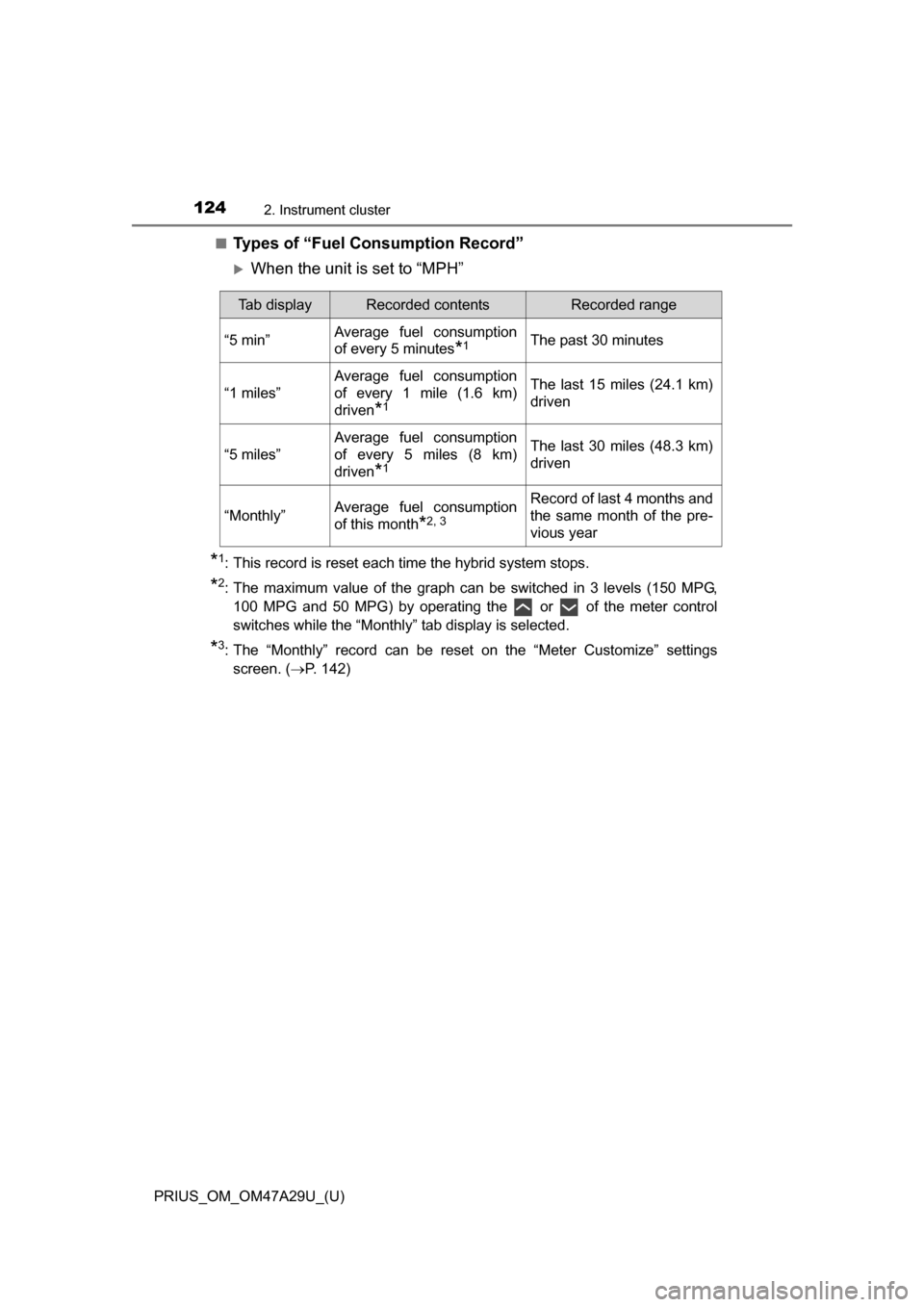
■Types of “Fuel Consumption Record”
When the unit is set to “MPH”
*1: This record is reset each time the hybrid system stops.
*2: The maximum value of the graph can be switched in 3 levels (150 MPG,100 MPG and 50 MPG) by operating the or of the meter control
switches while the “Monthly” tab display is selected.
*3: The “Monthly” record can be reset on the “Meter Customize” settingsscreen. ( P. 142)
Tab displayRecorded contentsRecorded range
“5 min”Average fuel consumption
of every 5 minutes
*1The past 30 minutes
“1 miles”
Average fuel consumption
of every 1 mile (1.6 km)
driven
*1
The last 15 miles (24.1 km)
driven
“5 miles”
Average fuel consumption
of every 5 miles (8 km)
driven
*1
The last 30 miles (48.3 km)
driven
“Monthly”Average fuel consumption
of this month
*2, 3
Record of last 4 months and
the same month of the pre-
vious year
Page 125 of 800
PRIUS_OM_OM47A29U_(U)
1252. Instrument cluster
2
Instrument cluster
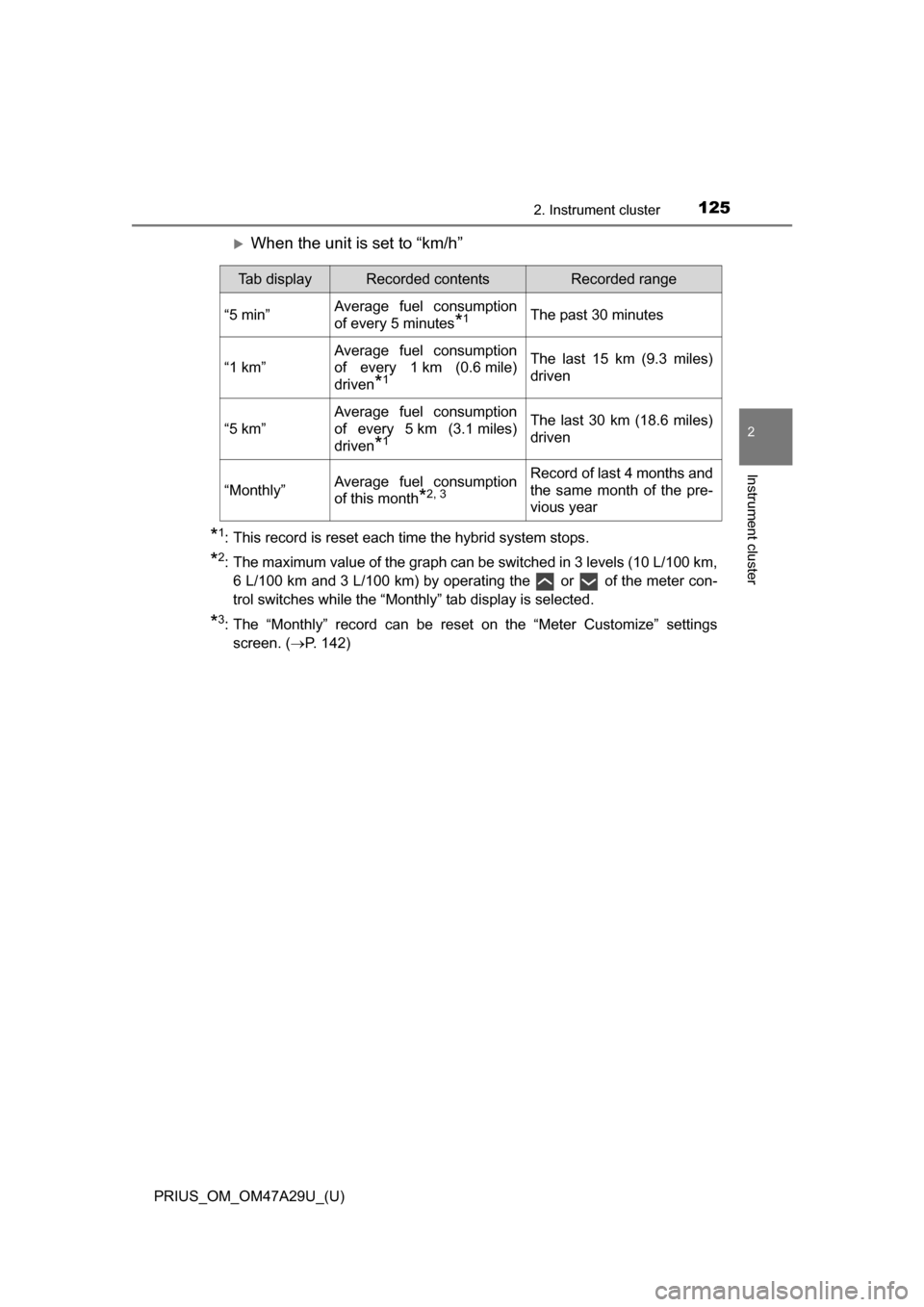
When the unit is set to “km/h”
*1: This record is reset each time the hybrid system stops.
*2: The maximum value of the graph can be switched in 3 levels (10 L/100 km,6 L/100 km and 3 L/100 km) by operating the or of the meter con-
trol switches while the “Monthly” tab display is selected.
*3: The “Monthly” record can be reset on the “Meter Customize” settingsscreen. ( P. 142)
Tab displayRecorded contentsRecorded range
“5 min”Average fuel consumption
of every 5 minutes
*1The past 30 minutes
“1 km”
Average fuel consumption
of every 1 km (0.6 mile)
driven
*1
The last 15 km (9.3 miles)
driven
“5 km”
Average fuel consumption
of every 5 km (3.1 miles)
driven
*1
The last 30 km (18.6 miles)
driven
“Monthly”Average fuel consumption
of this month
*2, 3
Record of last 4 months and
the same month of the pre-
vious year
Page 126 of 800
126
PRIUS_OM_OM47A29U_(U)
2. Instrument cluster
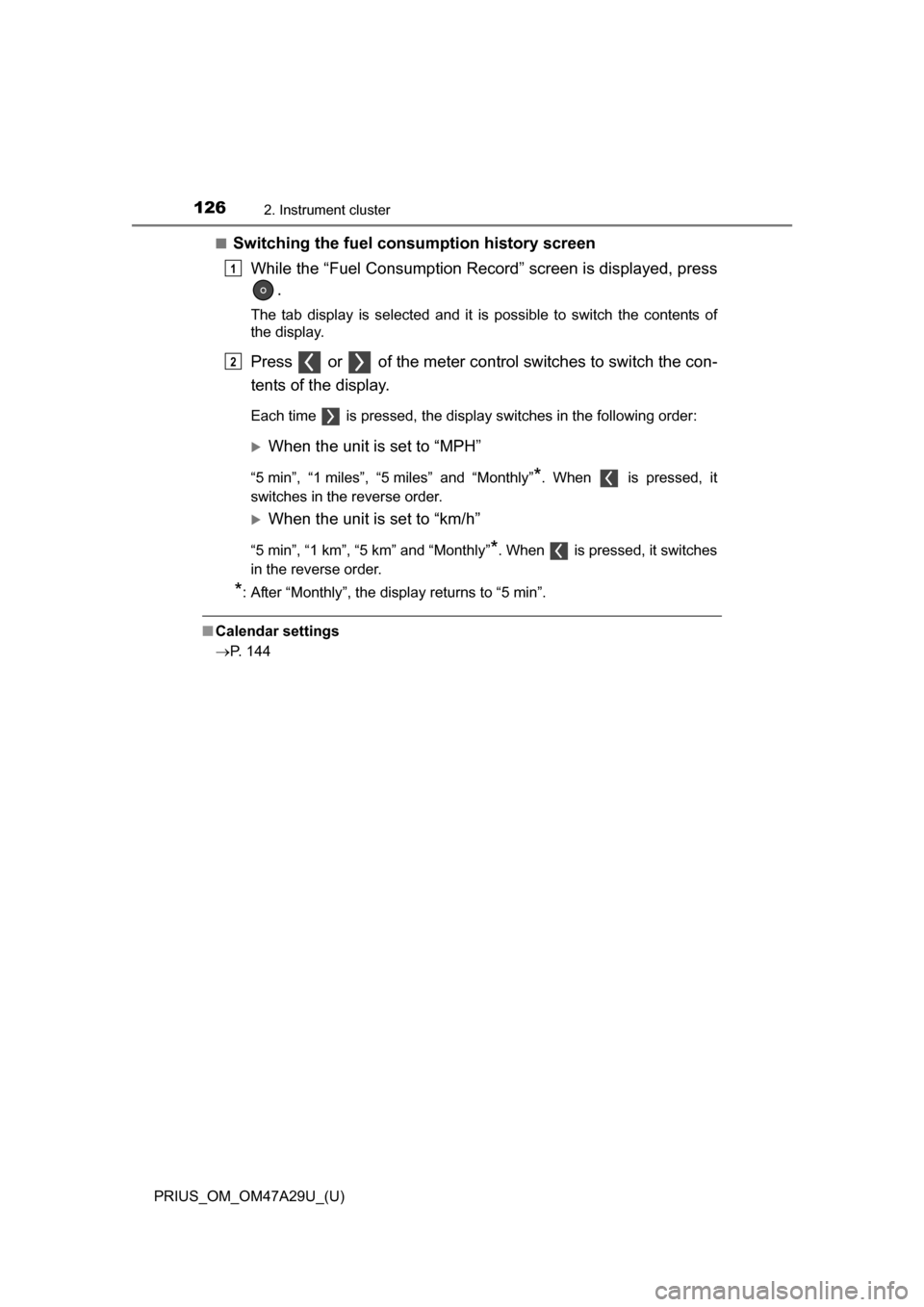
■Switching the fuel consumption history screenWhile the “Fuel Consumption Record” screen is displayed, press .
The tab display is selected and it is possible to switch the contents of
the display.
Press or of the meter control switches to switch the con-
tents of the display.
Each time is pressed, the display switches in the following order:
When the unit is set to “MPH”
“5 min”, “1 miles”, “5 miles” and “Monthly”*. When is pressed, it
switches in the reverse order.
When the unit is set to “km/h”
“5 min”, “1 km”, “5 km” and “Monthly”*. When is pressed, it switches
in the reverse order.
*: After “Monthly”, the display returns to “5 min”.
■ Calendar settings
P. 144
1
2
Page 128 of 800
128
PRIUS_OM_OM47A29U_(U)
2. Instrument cluster
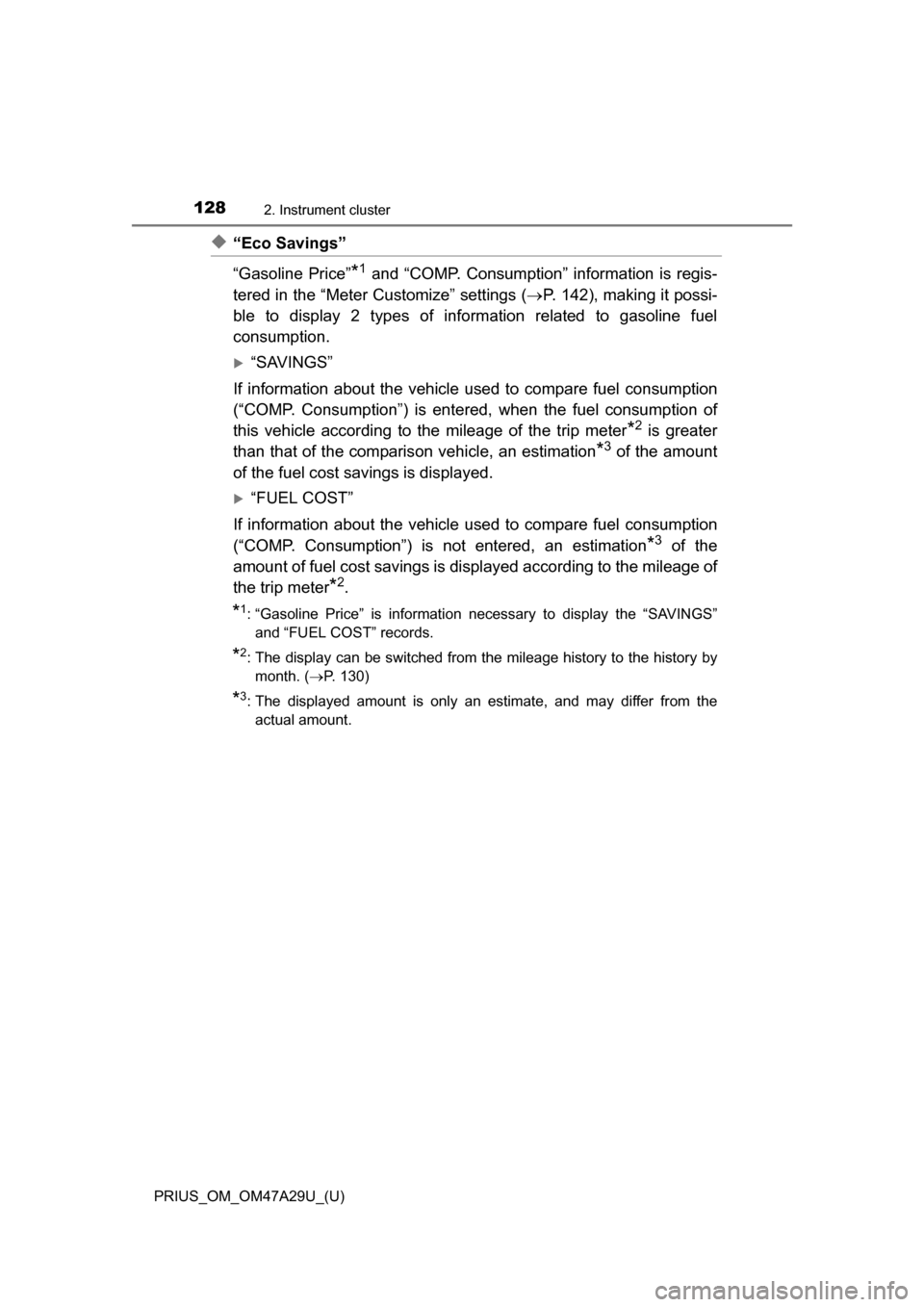
◆“Eco Savings”
“Gasoline Price”
*1 and “COMP. Consumption” information is regis-
tered in the “Meter Customize” settings ( P. 142), making it possi-
ble to display 2 types of information related to gasoline fuel
consumption.
“SAVINGS”
If information about th e vehicle used to comp are fuel consumption
(“COMP. Consumption”) is entered, when the fuel consumption of
this vehicle according to the mileage of the trip meter
*2 is greater
than that of the comparis on vehicle, an estimation
*3 of the amount
of the fuel cost savings is displayed.
“FUEL COST”
If information about th e vehicle used to comp are fuel consumption
(“COMP. Consumption”) is not entered, an estimation
*3 of the
amount of fuel cost savings is displayed according to the mileage of
the trip meter
*2.
*1: “Gasoline Price” is information necessary to display the “SAVINGS” and “FUEL COST” records.
*2: The display can be switched from the mileage history to the history bymonth. ( P. 130)
*3: The displayed amount is only an estimate, and may differ from the
actual amount.
Page 130 of 800
130
PRIUS_OM_OM47A29U_(U)
2. Instrument cluster
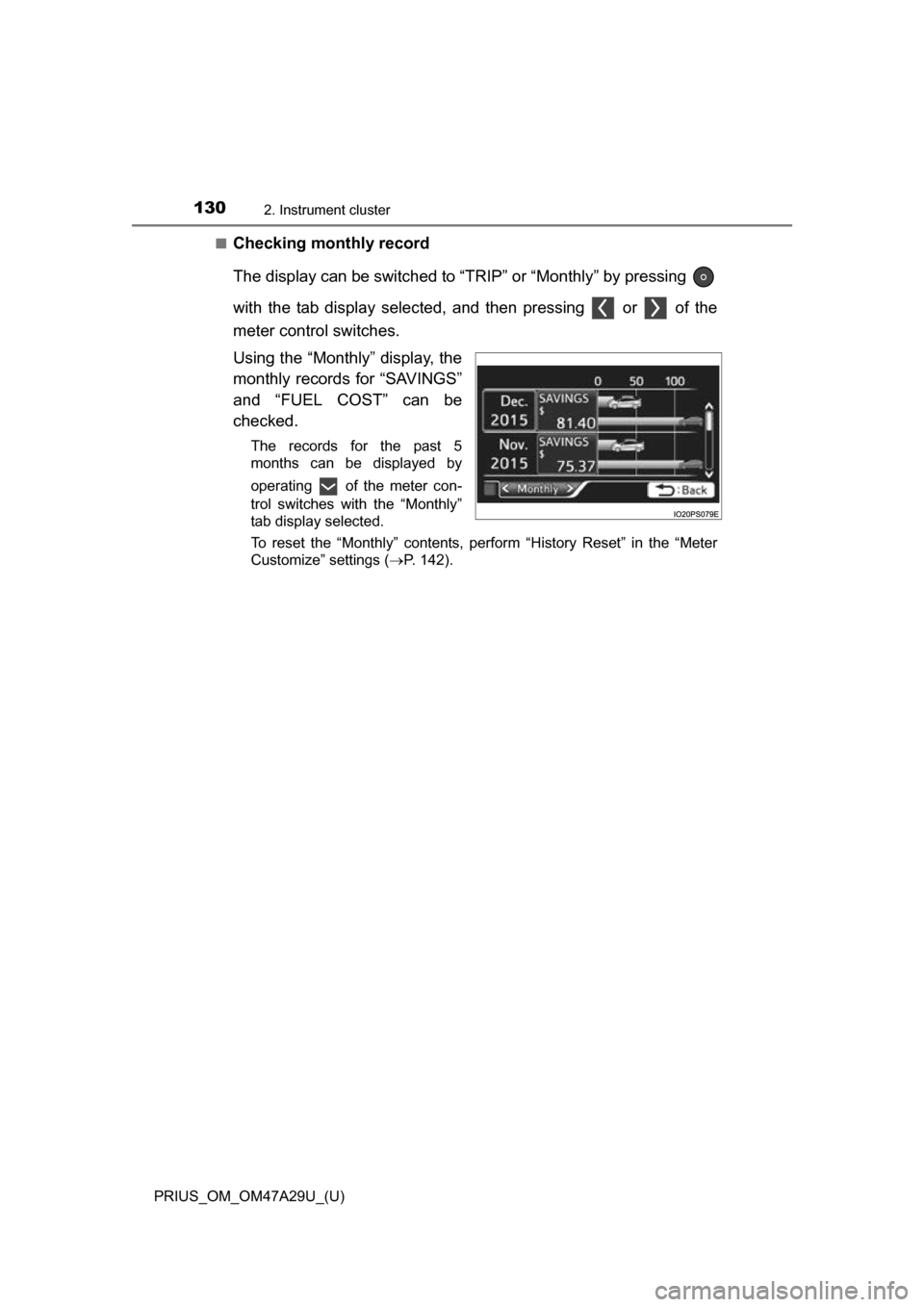
■Checking monthly record
The display can be switched to “TRIP” or “Monthly” by pressing
with the tab display selected, and then pressing or of the
meter control switches.
Using the “Monthly” display, the
monthly records for “SAVINGS”
and “FUEL COST” can be
checked.
The records for the past 5
months can be displayed by
operating of the meter con-
trol switches with the “Monthly”
tab display selected.
To reset the “Monthly” contents, perform “History Reset” in the “Meter
Customize” settings (P. 142).
Page 132 of 800
132
PRIUS_OM_OM47A29U_(U)
2. Instrument cluster
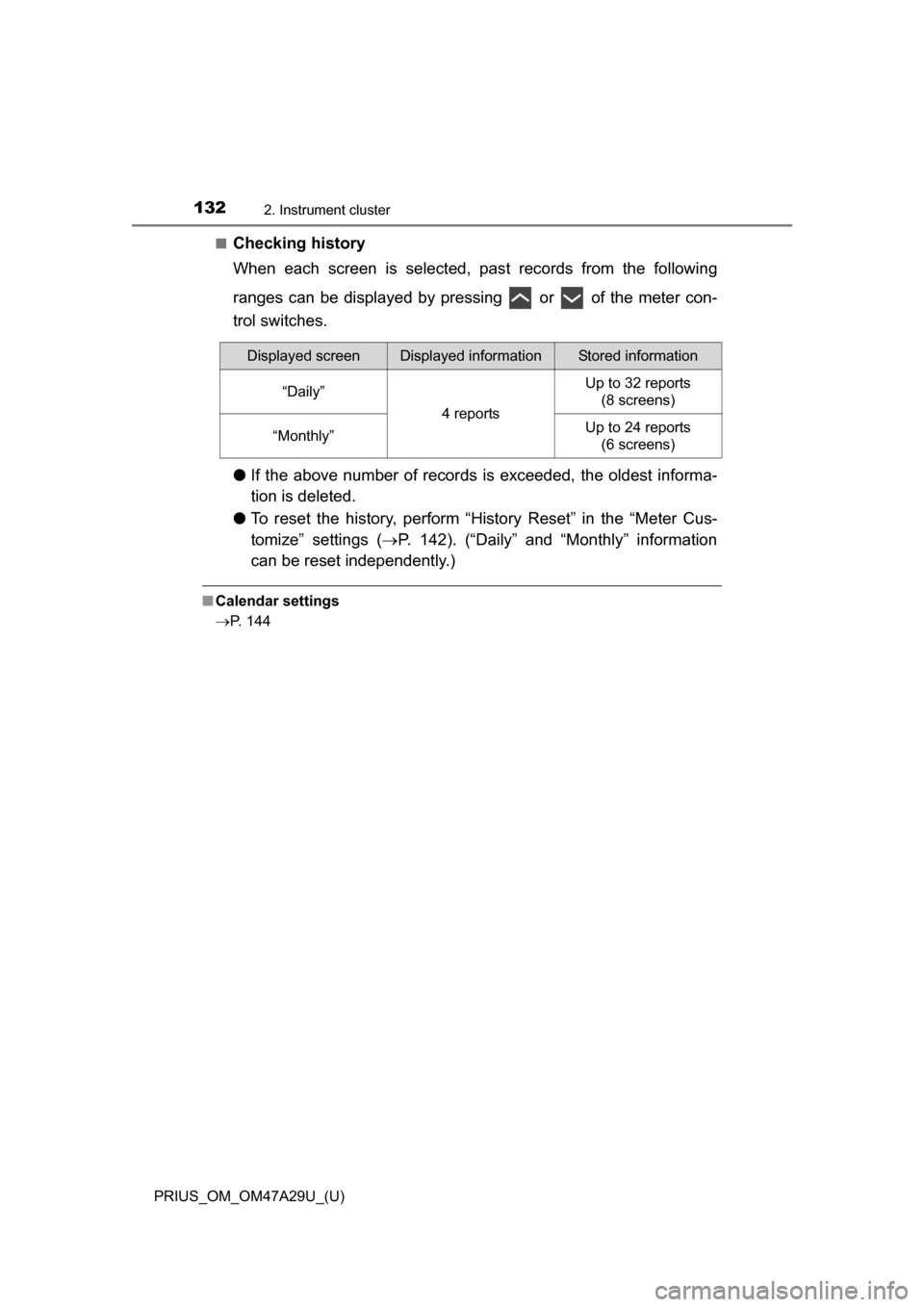
■Checking history
When each screen is selected, past records from the following
ranges can be displayed by pressing or of the meter con-
trol switches.
● If the above number of records is exceeded, the oldest informa-
tion is deleted.
● To reset the history, perform “History Reset” in the “Meter Cus-
tomize” settings ( P. 142). (“Daily” and “Monthly” information
can be reset independently.)
■ Calendar settings
P. 144
Displayed screenDisplayed informationStored information
“Daily”
4 reports
Up to 32 reports
(8 screens)
“Monthly”Up to 24 reports (6 screens)