Setting TOYOTA PRIUS 2016 4.G Workshop Manual
[x] Cancel search | Manufacturer: TOYOTA, Model Year: 2016, Model line: PRIUS, Model: TOYOTA PRIUS 2016 4.GPages: 800, PDF Size: 16.69 MB
Page 305 of 800
PRIUS_OM_OM47A29U_(U)
3054-5. Using the driving support systems
4
Driving
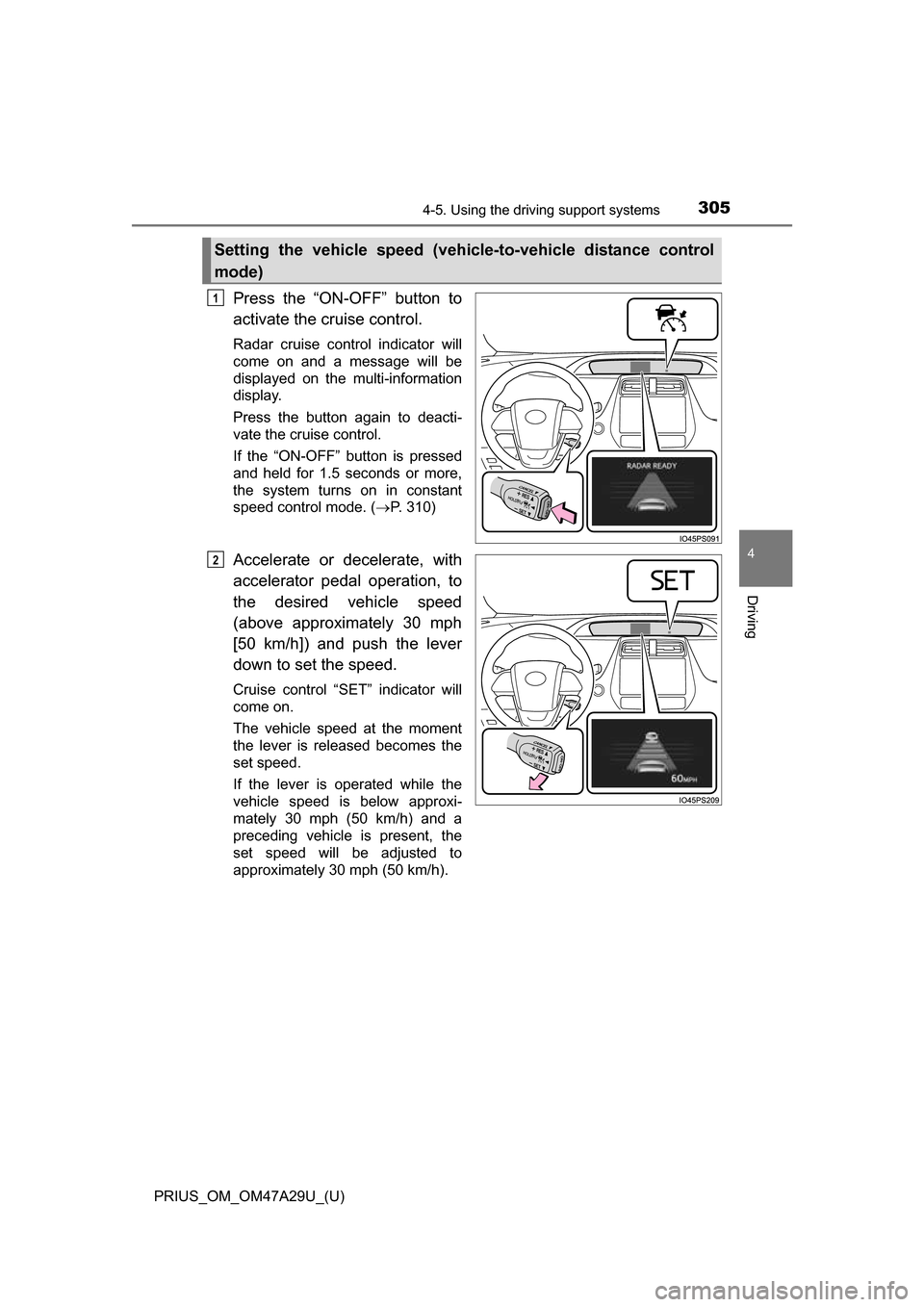
Press the “ON-OFF” button to
activate the cruise control.
Radar cruise control indicator will
come on and a message will be
displayed on the multi-information
display.
Press the button again to deacti-
vate the cruise control.
If the “ON-OFF” button is pressed
and held for 1.5 seconds or more,
the system turns on in constant
speed control mode. ( P. 310)
Accelerate or decelerate, with
accelerator pedal operation, to
the desired vehicle speed
(above approximately 30 mph
[50 km/h]) and push the lever
down to set the speed.
Cruise control “SET” indicator will
come on.
The vehicle speed at the moment
the lever is released becomes the
set speed.
If the lever is operated while the
vehicle speed is below approxi-
mately 30 mph (50 km/h) and a
preceding vehicle is present, the
set speed will be adjusted to
approximately 30 mph (50 km/h).
Setting the vehicle speed (vehicle-to-vehicle distance control
mode)
1
2
Page 307 of 800
PRIUS_OM_OM47A29U_(U)
3074-5. Using the driving support systems
4
Driving
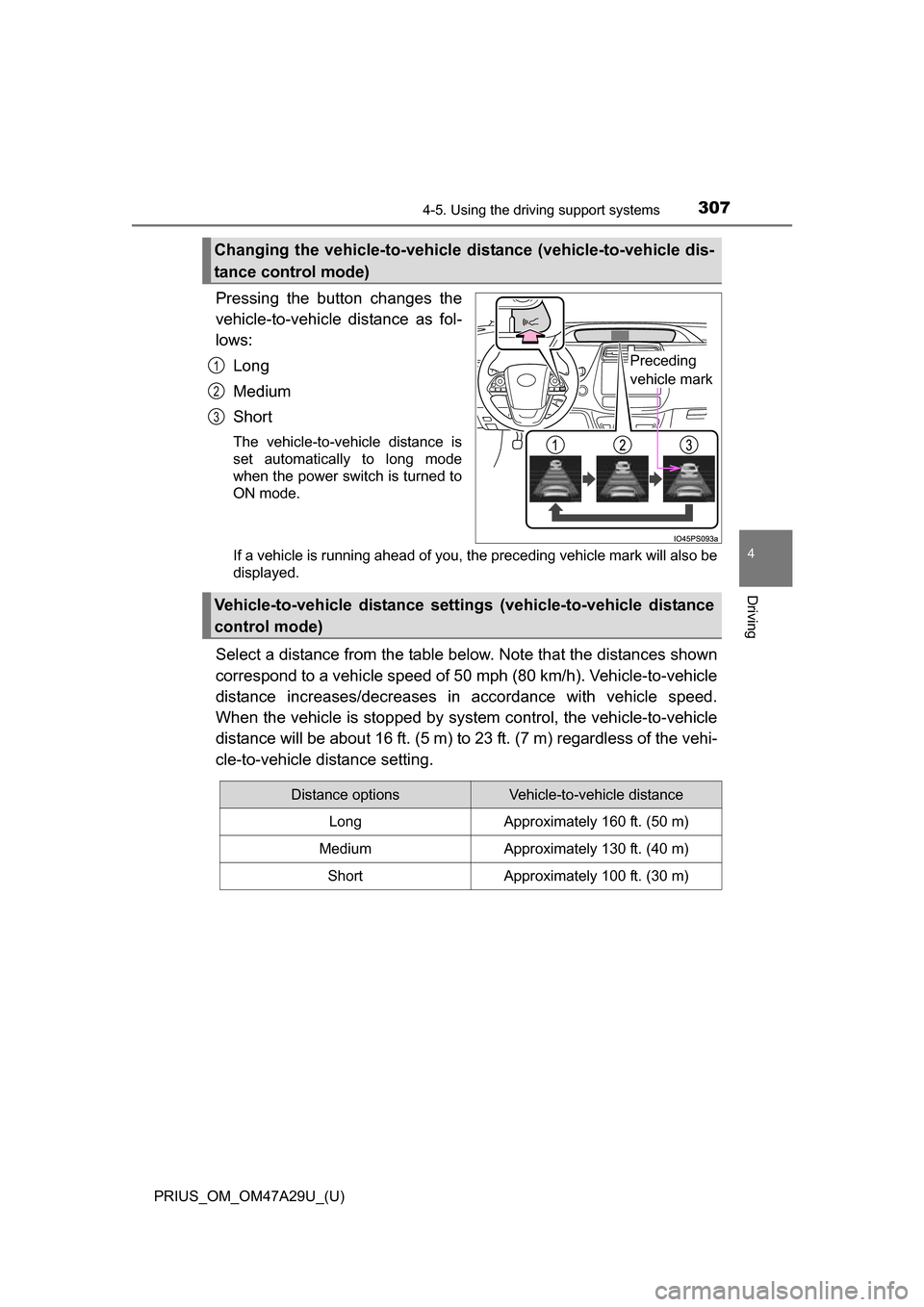
Pressing the button changes the
vehicle-to-vehicle distance as fol-
lows:
Long
Medium
Short
The vehicle-to-vehicle distance is
set automatically to long mode
when the power switch is turned to
ON mode.
If a vehicle is running ahead of you, the preceding vehicle mark will also be
displayed.
Select a distance from the table below. Note that the distances shown
correspond to a vehicle speed of 50 mph (80 km/h). Vehicle-to-vehicle
distance increases/decreases in accordance with vehicle speed.
When the vehicle is stop ped by system control, the vehicle-to-vehicle
distance will be about 16 ft. (5 m) to 23 ft. (7 m) regardless of the vehi-
cle-to-vehicle distance setting.
Changing the vehicle-to-vehicle di stance (vehicle-to-vehicle dis-
tance control mode)
Preceding
vehicle mark1
2
3
Vehicle-to-vehicle distance setti ngs (vehicle-to-vehicle distance
control mode)
Distance optionsVehicle-to-vehicle distance
LongApproximately 160 ft. (50 m)
MediumApproximately 130 ft. (40 m)
ShortApproximately 100 ft. (30 m)
Page 308 of 800
308
PRIUS_OM_OM47A29U_(U)
4-5. Using the driving support systems
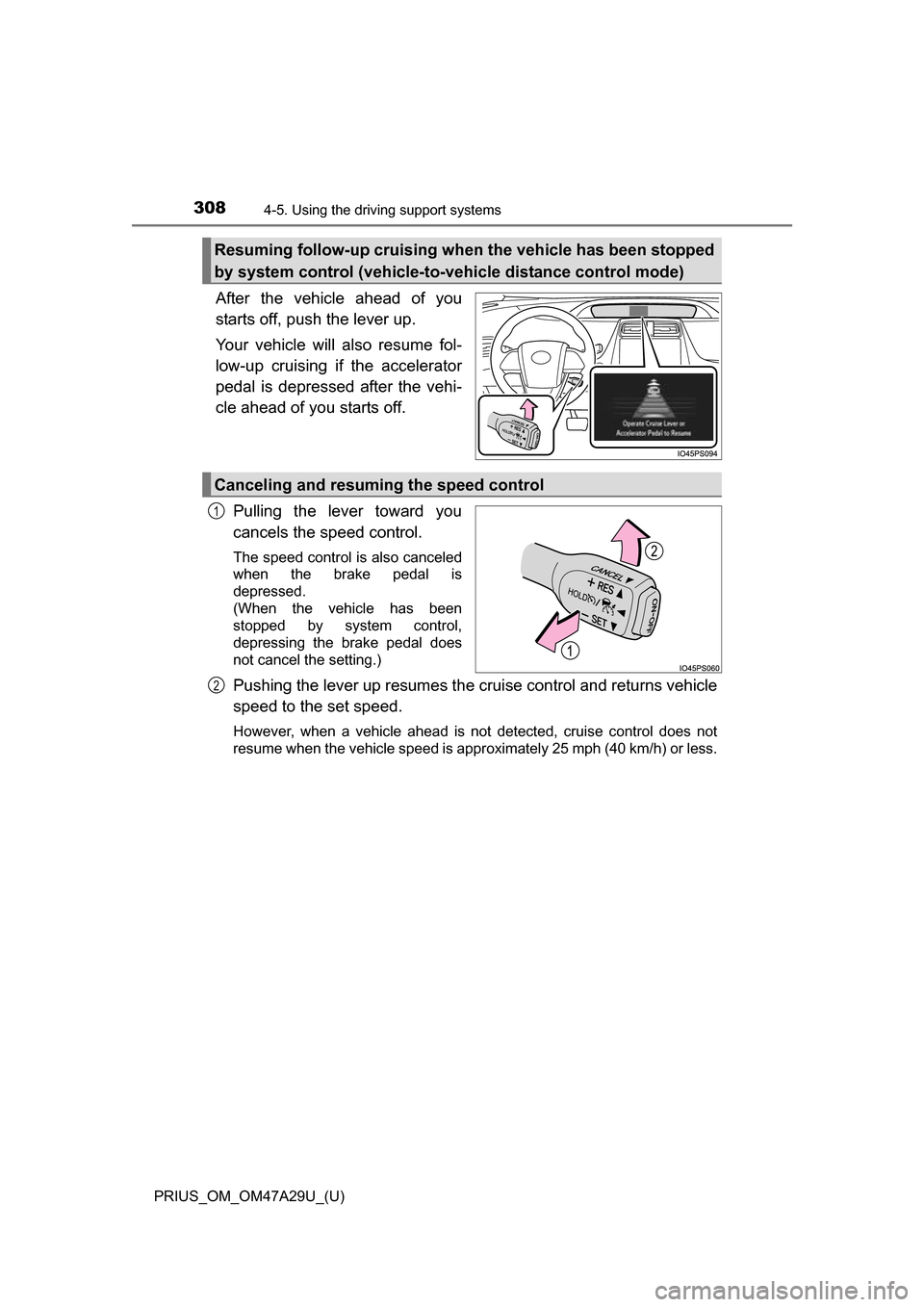
After the vehicle ahead of you
starts off, push the lever up.
Your vehicle will also resume fol-
low-up cruising if the accelerator
pedal is depressed after the vehi-
cle ahead of you starts off.
Pulling the lever toward you
cancels the speed control.
The speed control is also canceled
when the brake pedal is
depressed.
(When the vehicle has been
stopped by system control,
depressing the brake pedal does
not cancel the setting.)
Pushing the lever up resumes the cruise control and returns vehicle
speed to the set speed.
However, when a vehicle ahead is not detected, cruise control does not
resume when the vehicle speed is approximately 25 mph (40 km/h) or less.
Resuming follow-up cruising when the vehicle has been stopped
by system control (vehicle-to-vehicle distance control mode)
Canceling and resuming the speed control
1
2
Page 310 of 800
310
PRIUS_OM_OM47A29U_(U)
4-5. Using the driving support systems
When constant speed cont rol mode is selected, your vehicle will main-
tain a set speed without controlling the vehicle-to-vehicle distance.
Select this mode only when vehicl e-to-vehicle distance control mode
does not function correctly due to a dirty radar sensor.
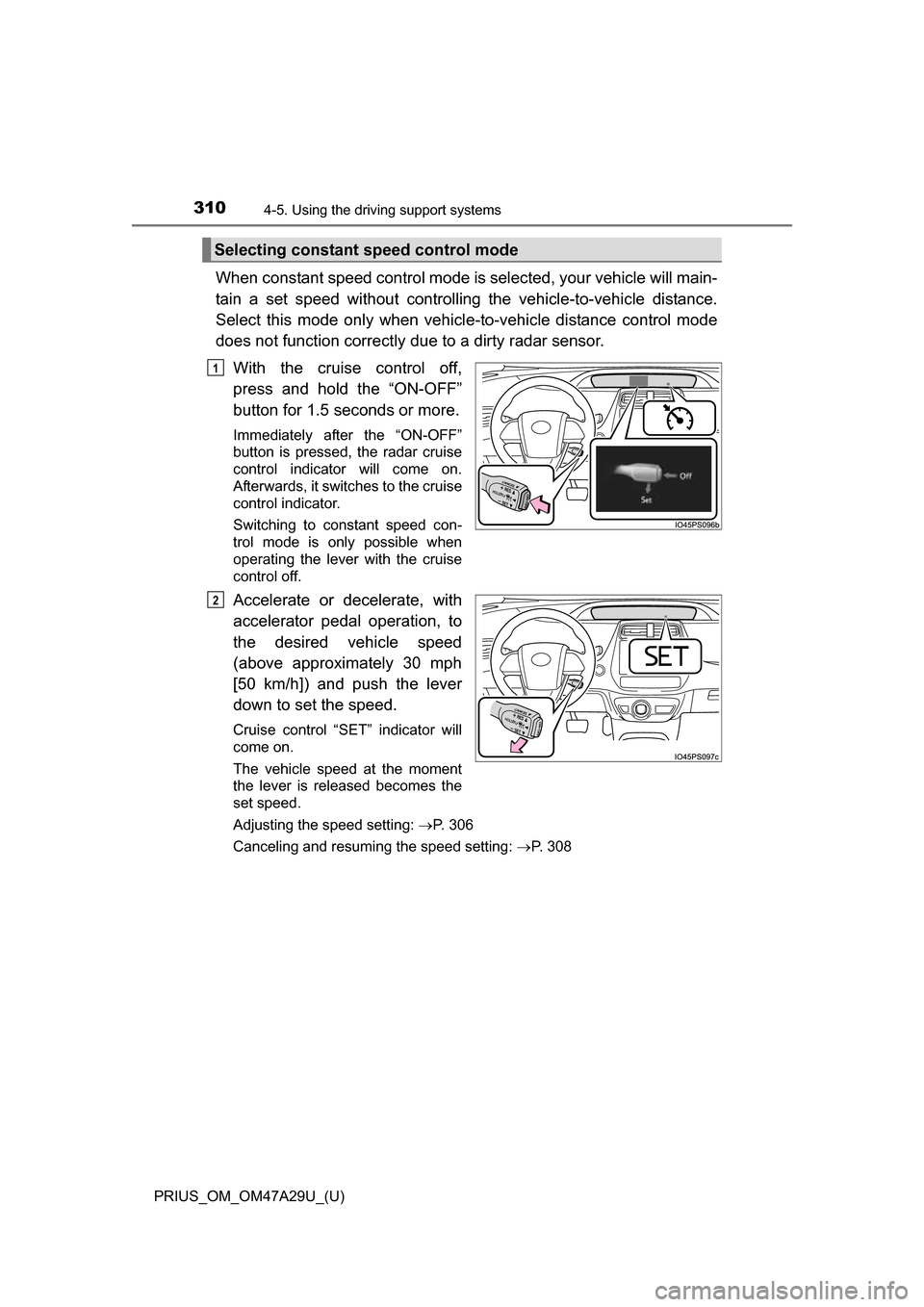
With the cruise control off,
press and hold the “ON-OFF”
button for 1.5 seconds or more.
Immediately after the “ON-OFF”
button is pressed, the radar cruise
control indicator will come on.
Afterwards, it switches to the cruise
control indicator.
Switching to constant speed con-
trol mode is only possible when
operating the lever with the cruise
control off.
Accelerate or decelerate, with
accelerator pedal operation, to
the desired vehicle speed
(above approximately 30 mph
[50 km/h]) and push the lever
down to set the speed.
Cruise control “SET” indicator will
come on.
The vehicle speed at the moment
the lever is released becomes the
set speed.
Adjusting the speed setting: P. 306
Canceling and resuming the speed setting: P. 308
Selecting constant speed control mode
1
2
Page 311 of 800
PRIUS_OM_OM47A29U_(U)
3114-5. Using the driving support systems
4
Driving
■Dynamic radar cruise control with full-speed range can be set when
● The shift position is in D.
● Vehicle speed is above approximately 30 mph (50 km/h).
However, when a preceding vehicle is detected, the dynamic radar cruise
control with full-speed range can be set even if the vehicle speed is at or
below approximately 30 mph (50 km/h).
■ Accelerating after setting the vehicle speed
The vehicle can accelerate by operating the accelerator pedal. After acceler-
ating, the set speed resumes. However, during vehicle-to-vehicle distance
control mode, the vehicle speed may decrease below the set speed in order
to maintain the distance to the preceding vehicle.
■ Automatic cancelation of vehicle -to-vehicle distance control mode
Vehicle-to-vehicle distance control mode is automatically canceled in the fol-
lowing situations.
● Actual vehicle speed falls below approximately 25 mph (40 km/h) when
there are no vehicles ahead.
● The preceding vehicle leaves the lane when your vehicle is following at a
vehicle speed below approximately 25 m ph (40 km/h). Otherwise, the sen-
sor can not properly detect the vehicle.
● VSC is activated.
● TRAC is activated for a period of time.
● When the VSC or TRAC system is turned off by pressing the VSC OFF
switch.
● The sensor cannot detect correctly because it is covered in some way.
● Pre-collision braking is activated.
● The parking brake is operated.
● Intelligent Clearance Sonar is operated. (if equipped)
● The vehicle is stopped by system control on a steep incline.
● The following are detected when the vehicle has been stopped by system
control:
• The driver is not wearing a seat belt.
• The driver’s door is opened.
• The vehicle has been stopped for about 3 minutes.
In this situation, the shift position may automatically switch to P. ( P. 237)
If vehicle-to-vehicle distance control mode is automatically canceled for any
other reason, there may be a malfunction in the system. Contact your Toyota
dealer.
Page 315 of 800
315
PRIUS_OM_OM47A29U_(U)
4-5. Using the driving support systems
4
Driving
Cruise control
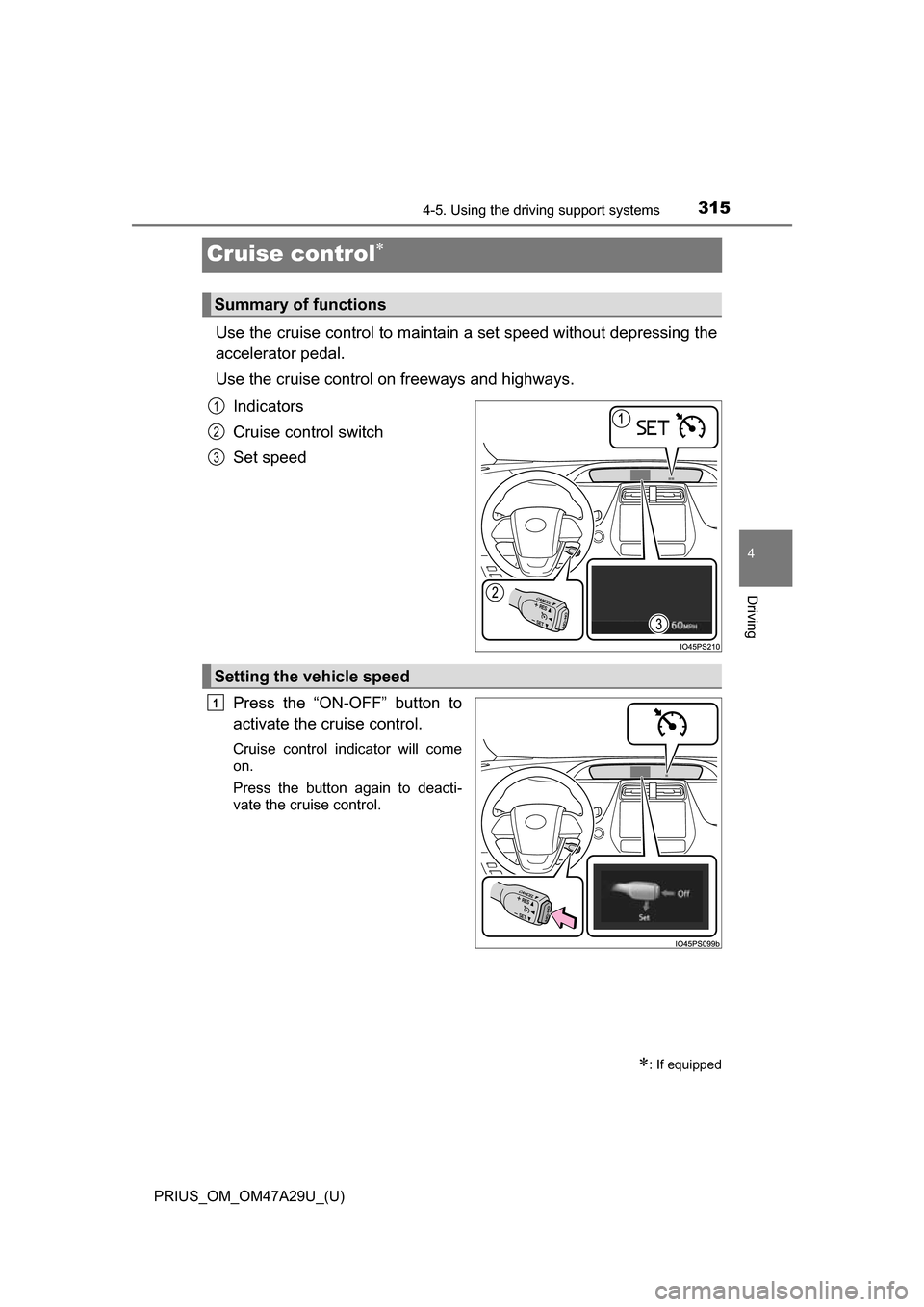
Use the cruise control to maintain a set speed without depressing the
accelerator pedal.
Use the cruise control on freeways and highways.
Indicators
Cruise control switch
Set speed
Press the “ON-OFF” button to
activate the cruise control.
Cruise control indicator will come
on.
Press the button again to deacti-
vate the cruise control.
: If equipped
Summary of functions
1
2
3
Setting the vehicle speed
1
Page 317 of 800
PRIUS_OM_OM47A29U_(U)
3174-5. Using the driving support systems
4
Driving
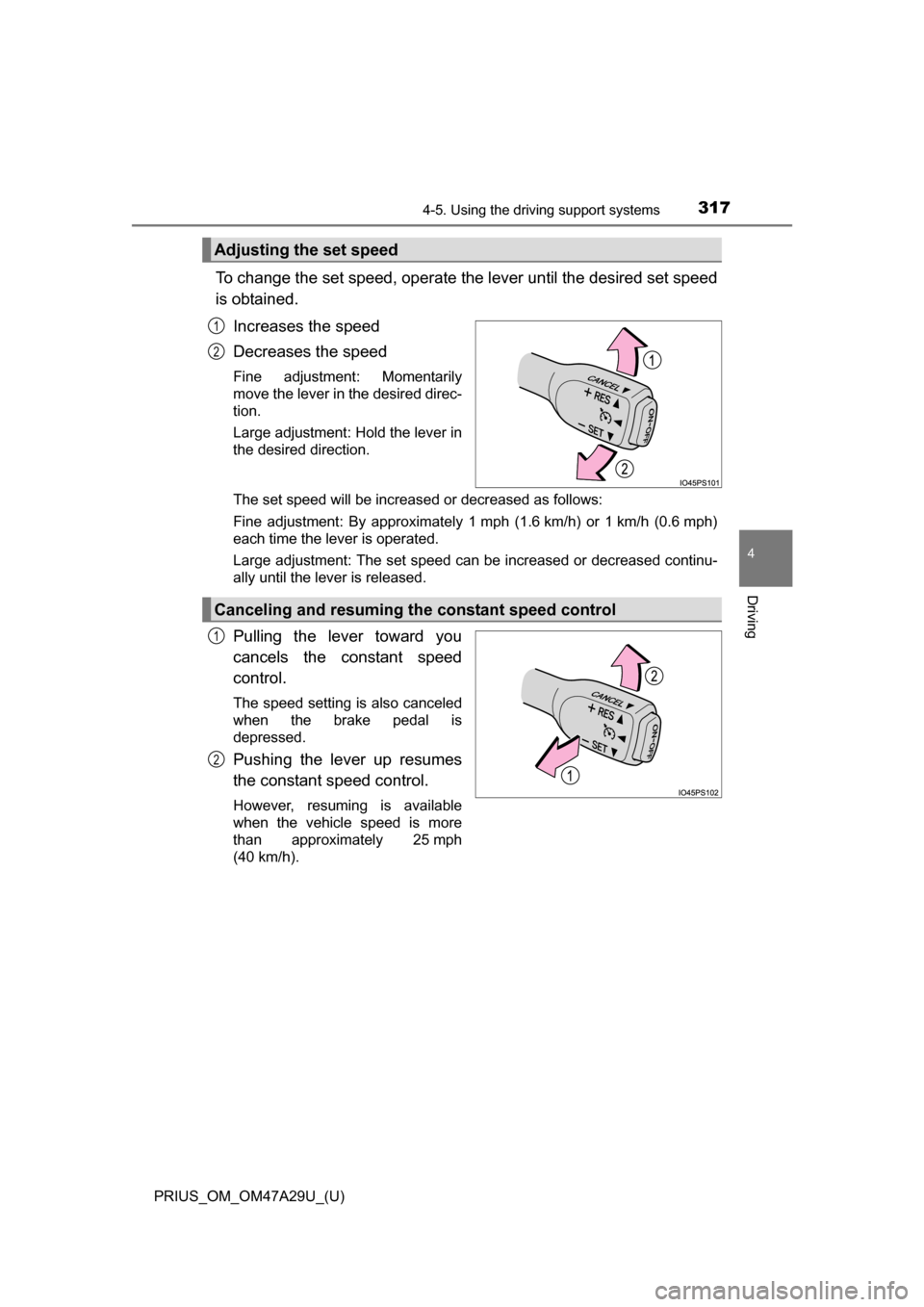
To change the set speed, operate the lever until the desired set speed
is obtained.
Increases the speed
Decreases the speed
Fine adjustment: Momentarily
move the lever in the desired direc-
tion.
Large adjustment: Hold the lever in
the desired direction.
The set speed will be increased or decreased as follows:
Fine adjustment: By approximately 1 mph (1.6 km/h) or 1 km/h (0.6 mph)
each time the lever is operated.
Large adjustment: The set speed can be increased or decreased continu-
ally until the lever is released.
Pulling the lever toward you
cancels the constant speed
control.
The speed setting is also canceled
when the brake pedal is
depressed.
Pushing the lever up resumes
the constant speed control.
However, resuming is available
when the vehicle speed is more
than approximately 25 mph
(40 km/h).
Adjusting the set speed
1
2
Canceling and resuming the constant speed control
1
2
Page 318 of 800
318
PRIUS_OM_OM47A29U_(U)
4-5. Using the driving support systems
■Cruise control can be set when
●The shift position is in D.
● Vehicle speed is above approximately 25 mph (40 km/h).
■ Accelerating after setting the vehicle speed
●The vehicle can be accelerated by operating accelerator pedal. After accel-
erating, the set speed resumes.
● Even without canceling the cruise control, the set speed can be increased
by first accelerating the vehicle to the desired speed and then pushing the
lever down to set the new speed.
■ Automatic cancelation of cruise control
Cruise control is automatically canceled in any of the following situati\
ons.
●Actual vehicle speed falls more than approximately 10 mph (16 km/h) below
the set speed.
At this time, the memorized set speed is not retained.
● Actual vehicle speed is below approximately 25 mph (40km/h).
● VSC is activated.
● TRAC is activated for a period of time.
● When the VSC or TRAC system is turned off by pressing the VSC OFF
switch.
● Intelligent Clearance Sonar is operated. (if equipped)
■ If “Check Cruise Control System Visit Your Dealer” is displayed on the
multi-information display
Press the “ON-OFF” button once to deactivate the system, and then press
the button again to reactivate the system.
If the cruise control speed cannot be set or if the cruise control cancels imme-
diately after being activated, there may be a malfunction in the cruise control
system. Have the vehicle inspected by your Toyota dealer.
Page 323 of 800
PRIUS_OM_OM47A29U_(U)
3234-5. Using the driving support systems
4
Driving
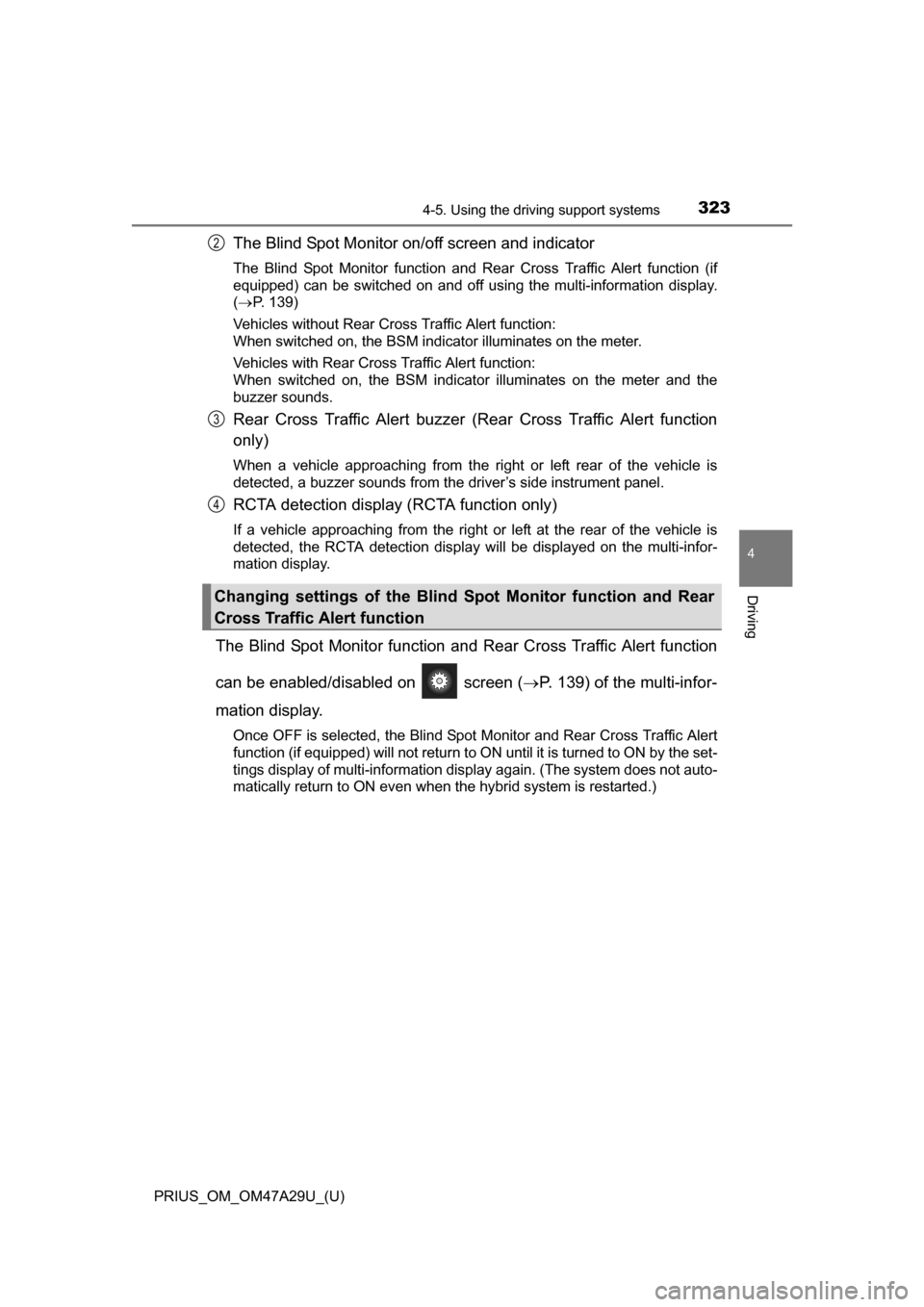
The Blind Spot Monitor on/off screen and indicator
The Blind Spot Monitor function and Rear Cross Traffic Alert function (if
equipped) can be switched on and off using the multi-information display.
( P. 139)
Vehicles without Rear Cross Traffic Alert function:
When switched on, the BSM indicator illuminates on the meter.
Vehicles with Rear Cross Traffic Alert function:
When switched on, the BSM indicator illuminates on the meter and the
buzzer sounds.
Rear Cross Traffic Alert buzzer (Rear Cross Traffic Alert function
only)
When a vehicle approaching from the right or left rear of the vehicle is
detected, a buzzer sounds from the driver’s side instrument panel.
RCTA detection display (RCTA function only)
If a vehicle approaching from the right or left at the rear of the vehicle is
detected, the RCTA detection display will be displayed on the multi-infor-
mation display.
The Blind Spot Monitor function and Rear Cross Traffic Alert function
can be enabled/disabled on screen ( P. 139) of the multi-infor-
mation display.
Once OFF is selected, the Blind Spot Monitor and Rear Cross Traffic Alert
function (if equipped) will not return to ON until it is turned to ON by the set-
tings display of multi-information display again. (The system does not auto-
matically return to ON even when the hybrid system is restarted.)
Changing settings of the Blind Spot Monitor function and Rear
Cross Traffic Alert function
2
3
4
Page 335 of 800
335
PRIUS_OM_OM47A29U_(U)
4-5. Using the driving support systems
4
Driving
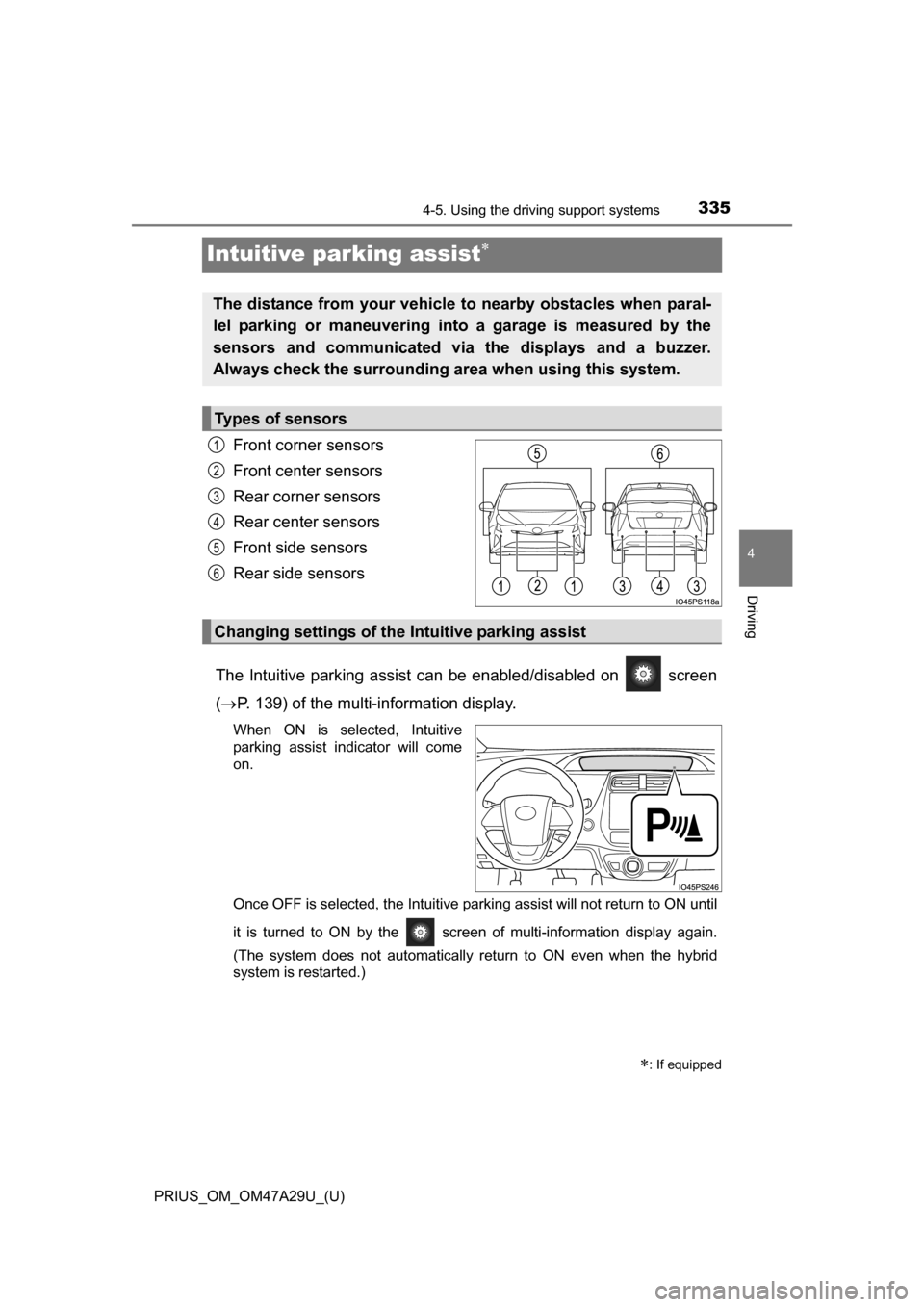
Intuitive parking assist
Front corner sensors
Front center sensors
Rear corner sensors
Rear center sensors
Front side sensors
Rear side sensors
The Intuitive parking assist ca n be enabled/disabled on screen
( P. 139) of the multi-information display.
When ON is selected, Intuitive
parking assist indicator will come
on.
Once OFF is selected, the Intuitive parking assist will not return to ON until
it is turned to ON by the screen of multi-information display again.
(The system does not automatically return to ON even when the hybrid
system is restarted.)
: If equipped
The distance from your vehicle to nearby obstacles when paral-
lel parking or maneuvering into a garage is measured by the
sensors and communicated via the displays and a buzzer.
Always check the surrounding area when using this system.
Types of sensors
1
2
3
4
5
6
Changing settings of the Intuitive parking assist