glove box TOYOTA PRIUS 2016 4.G Owners Manual
[x] Cancel search | Manufacturer: TOYOTA, Model Year: 2016, Model line: PRIUS, Model: TOYOTA PRIUS 2016 4.GPages: 800, PDF Size: 16.69 MB
Page 5 of 800
5
1
9 8
7
6 4 3
2
PRIUS_OM_OM47A29U_(U)
10
5
5-9. Bluetooth® phone
Using a Bluetooth®
Phone ............................. 470
Making a call..................... 473
Receiving a call ................ 476
Speaking on the phone..... 477
Bluetooth
® phone
message function ........... 480
Using the steering wheel switches.......................... 484
Bluetooth
® phone
settings ........................... 485
Contact/Call History Settings .......................... 486
What to do if... (Troubleshooting) ........... 495
5-10. Bluetooth
®
Bluetooth®........................ 499
5-11. Using the voice command system
Voice command system ... 505 6-1. Using the air conditioning
system and defogger
Automatic air conditioning system ............................. 512
Seat heaters ...................... 523
6-2. Using the interior lights Interior lights list................. 525• Front interior light .......... 526
• Front personal lights...... 526
• Rear interior light ........... 527
6-3. Using the storage features List of storage features ...... 528• Glove box ...................... 529
• Console box .................. 529
• Cup holders/ bottle holders/
door pockets.................. 530
• Auxiliary boxes .............. 532
Luggage compartment features ........................... 533
6Interior features
Page 179 of 800
PRIUS_OM_OM47A29U_(U)
1793-2. Opening, closing and locking the doors
3
Operation of each component
■Note for the entry function
●Even when the electronic key is within the effective range (detection areas),
the system may not operate properly in the following cases:
• The electronic key is too close to the window or outside door handle, near
the ground, or in a high place when the doors are locked or unlocked.
• The electronic key is on the instrument panel, floor, or in the door pockets
or glove box when the hybrid system is started or power switch modes
are changed.
● Do not leave the electronic key on top of the instrument panel or near the
door pockets when exiting the vehicle. Depending on the radio wave recep-
tion conditions, it may be detected by the antenna outside the cabin and the
door will become lockable from the outside, possibly trapping the electronic
key inside the vehicle.
● As long as the electronic key is within the effective range, the doors may be
unlocked or locked by anyone.
● Even if the electronic key is not inside the vehicle, it may be possible to start
the hybrid system if the electronic key is near the window.
● The doors may unlock if a large amount of water splashes on the door han-
dle, such as in the rain or in a car wash when the electronic key is within the
effective range. (The door will automatically be locked after approximately
60 seconds if the doors are not opened and closed.)
● If the wireless remote control is used to lock the doors when the electronic
key is near the vehicle, there is a possibility that the door may not be
unlocked by the entry function. (Use the wireless remote control to unlock
the doors.)
● Touching the door lock sensor while wearing gloves may delay or prevent
lock operation. Remove the gloves and touch the lock sensor again.
● When the lock operation is performed using the lock sensor, recognition sig-
nals will be shown up to two consecutive times. After this, no recognition
signals will be given.
● If the door handle becomes wet while the electronic key is within the effec-
tive range, the door may lock and unlock repeatedly. In this case, follow the
following correction procedures to wash the vehicle.
• Place the electronic key in a location 6 ft. (2 m) or more away from the
vehicle. (Take care to ensure that the key is not stolen.)
• Set electronic key to battery-saving mode to disable the smart key sys-
tem. ( P. 178)
● If the electronic key is inside the vehicle and a door handle becomes wet
during a car wash, a message may be shown on the multi-information dis-
play and a buzzer will sound outside the vehicle. To turn off the alarm, lock
all the doors.
Page 215 of 800
PRIUS_OM_OM47A29U_(U)
2154-1. Before driving
4
Driving
WARNING
Observe the following precautions.
Failure to do so may result in death or serious injury.
■When the vehicle is parked
●Do not leave glasses, cigarette lighters, spray cans, or soft drink cans in
the vehicle when it is in the sun.
Doing so may result in the following:
• Gas may leak from a cigarette lighter or spray can, and may lead to a fire.
• The temperature inside the vehicle may cause the plastic lenses and
plastic material of glasses to deform or crack.
• Soft drink cans may fracture, causing the contents to spray over the
interior of the vehicle, and may also cause a short circuit in the vehicle’s
electrical components.
● Do not leave cigarette lighters in the vehicle. If a cigarette lighter is in a
place such as the glove box or on the floor, it may be lit accidentally when
luggage is loaded or the seat is adjusted, causing a fire.
● Do not attach adhesive discs to the windshield or windows. Do not place con-
tainers such as air fresheners on the instrument panel or dashboard. Adhe-
sive discs or containers may act as lenses, causing a fire in the vehicle.
● Do not leave a door or window open if the curved glass is coated with a
metallized film such as a silver-colored one. Reflected sunlight may cause
the glass to act as a lens, causing a fire.
● Always apply the parking brake, shift the shift position to P, stop the hybrid
system and lock the vehicle.
Do not leave the vehicle unattended while the “READY” indicator is illumi-
nated.
● Do not touch the exhaust pipe while the “READY” indicator is illuminated
or immediately after turning the hybrid system off.
Doing so may cause burns.
Page 500 of 800
5005-10. Bluetooth®
PRIUS_OM_OM47A29U_(U)■
Bluetooth
® antenna
The antenna is built into the display.
If the Bluetooth
® device is behind the seat or in the glove box or console box,
or is touching or covered by metal objects, the connection status may deterio-
rate.
■ Battery charge/signal status
●This display may not correspond exactly with the portable audio player or
cellular phone itself.
● This system does not have a charging function.
● The portable audio player or cellular phone battery will be depleted quickly
when the device is connected to Bluetooth
®.
■ When using the Bluetooth
® audio and hands-free system at the same
time
The following problems may occur.
● The Bluetooth
® audio connection may be interrupted.
● Noise may be heard during Bluetooth
® audio playback.
■ About the contact in this system
The following data is stored for every registered cellular phone. When
another phone is connecting, you cannot read the registered data.
●Contact data
● Call history
● Favorite
● Message
When removing a Bluetooth
® phone from the system, the above-mentioned
data is also deleted.
■ About Bluetooth
®
The Bluetooth® word mark and logos are
registered trademarks owned by Blue-
tooth SIG, Inc. and any use of such marks
by Panasonic Corporation is under
license. Other trademarks and trade
names are those of their respective own-
ers.
Page 511 of 800
511
PRIUS_OM_OM47A29U_(U)
6Interior features
6-1. Using the air conditioning system and defogger
Automatic air conditioning system ............................ 512
Seat heaters...................... 523
6-2. Using the interior lights Interior lights list ................ 525• Front interior light .......... 526
• Front personal lights ..... 526
• Rear interior light .......... 527
6-3. Using the storage features List of storage features ..... 528• Glove box...................... 529
• Console box .................. 529
• Cup holders/ bottle holders/
door pockets ................. 530
• Auxiliary boxes.............. 532
Luggage compartment features ........................... 533
6-4. Using the other interior features
Other interior features ....... 542 • Sun visors ..................... 542
• Vanity mirrors................ 542
• Power outlets ................ 543
• Wireless charger ........... 544
• Armrest ......................... 552
• Coat hooks.................... 552
• Assist grips ................... 553
Garage door opener.......... 554
Safety Connect ................. 561
Page 528 of 800
528
PRIUS_OM_OM47A29U_(U)
6-3. Using the storage features
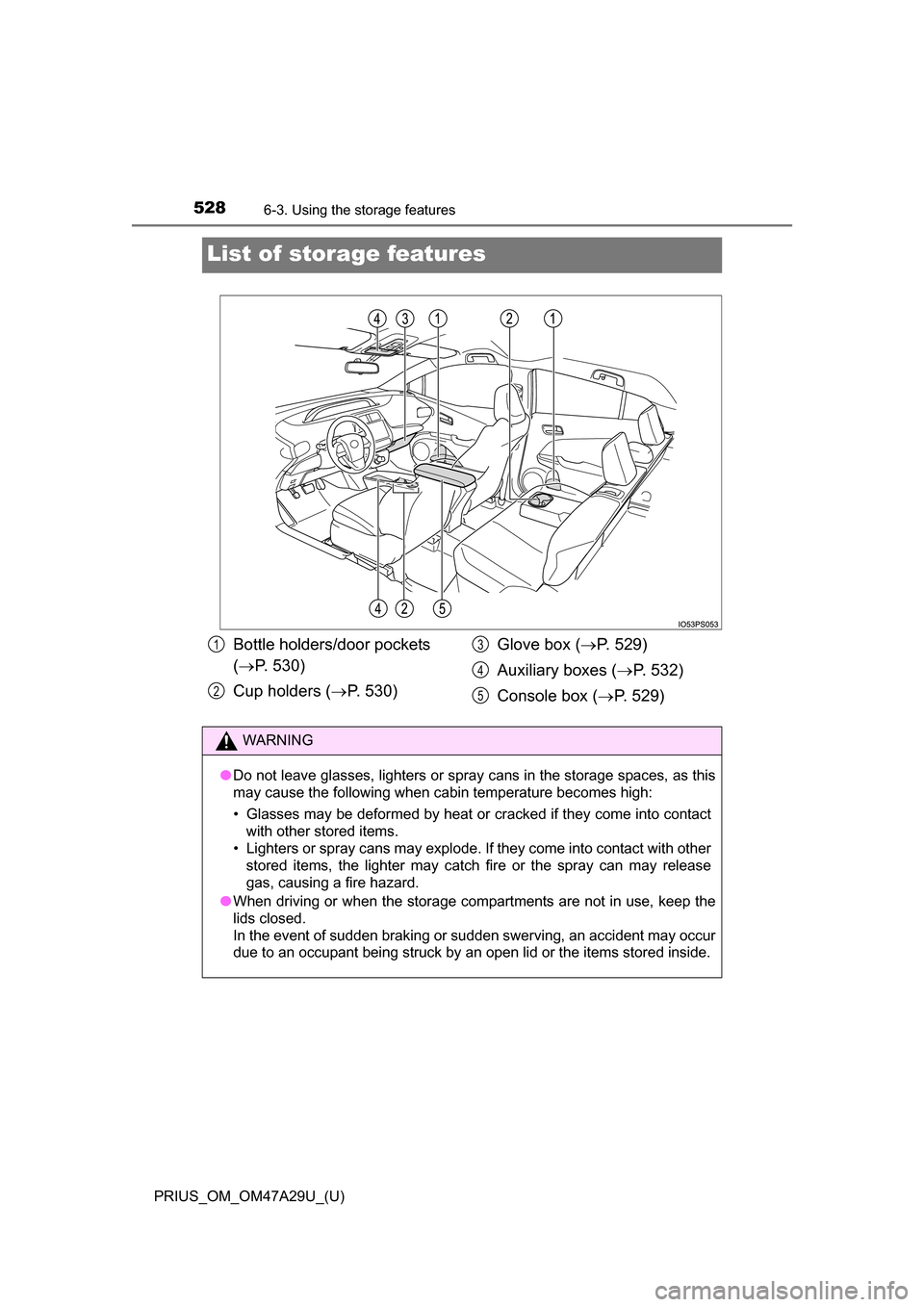
List of storage features
Bottle holders/door pockets
( P. 530)
Cup holders ( P. 530) Glove box (
P. 529)
Auxiliary boxes ( P. 532)
Console box ( P. 529)1
2
3
4
5
WARNING
●Do not leave glasses, lighters or spray cans in the storage spaces, as this
may cause the following when cabin temperature becomes high:
• Glasses may be deformed by heat or cracked if they come into contact
with other stored items.
• Lighters or spray cans may explode. If they come into contact with other
stored items, the lighter may catch fire or the spray can may release
gas, causing a fire hazard.
● When driving or when the storage compartments are not in use, keep the
lids closed.
In the event of sudden braking or sudden swerving, an accident may occur
due to an occupant being struck by an open lid or the items stored inside.
Page 529 of 800
PRIUS_OM_OM47A29U_(U)
5296-3. Using the storage features
6
Interior features
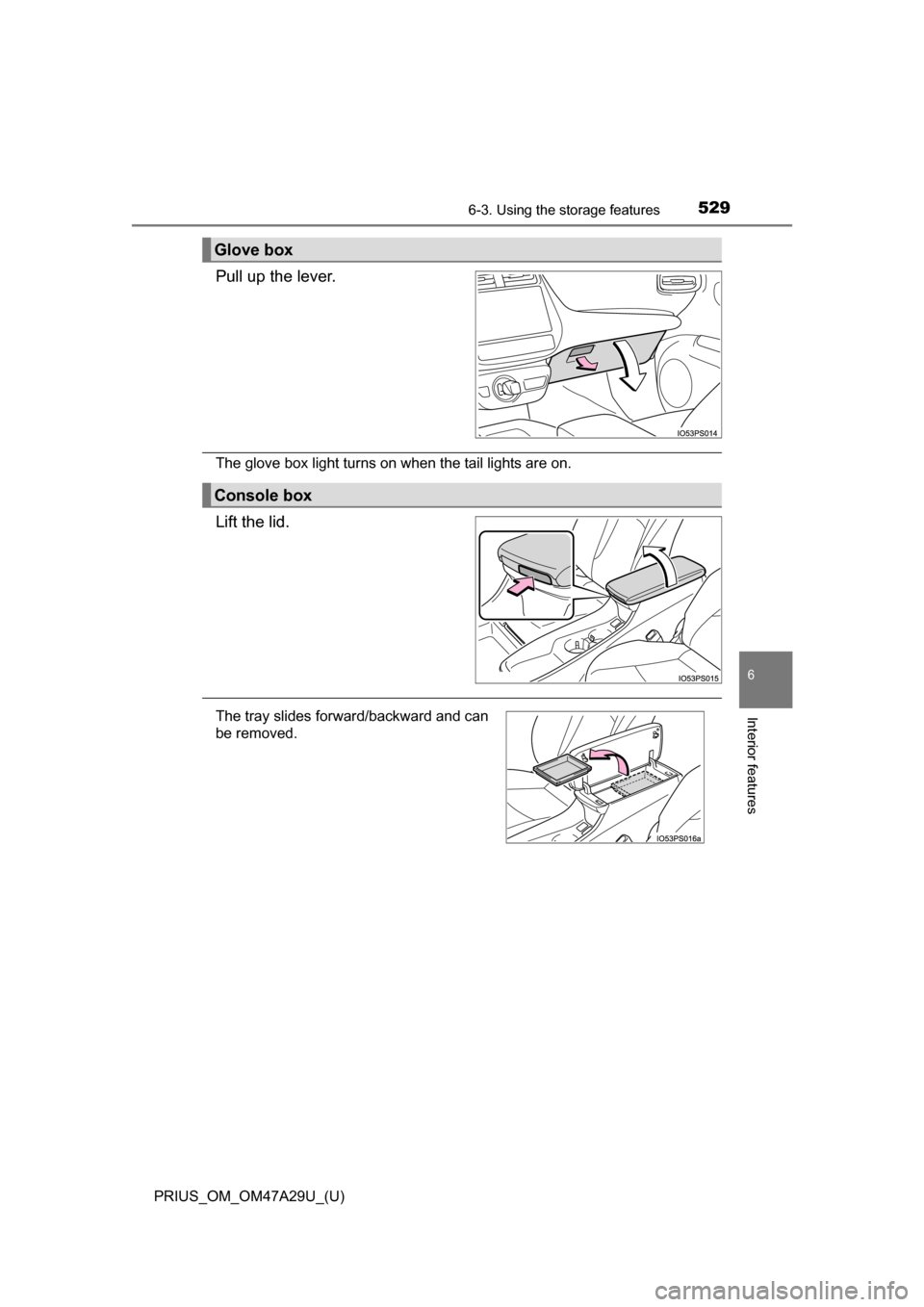
Pull up the lever.
The glove box light turns on when the tail lights are on.
Lift the lid.
Glove box
Console box
The tray slides forward/backward and can
be removed.
Page 621 of 800
621
PRIUS_OM_OM47A29U_(U)
7-3. Do-it-yourself maintenance
7
Maintenance and care
Air conditioning filter
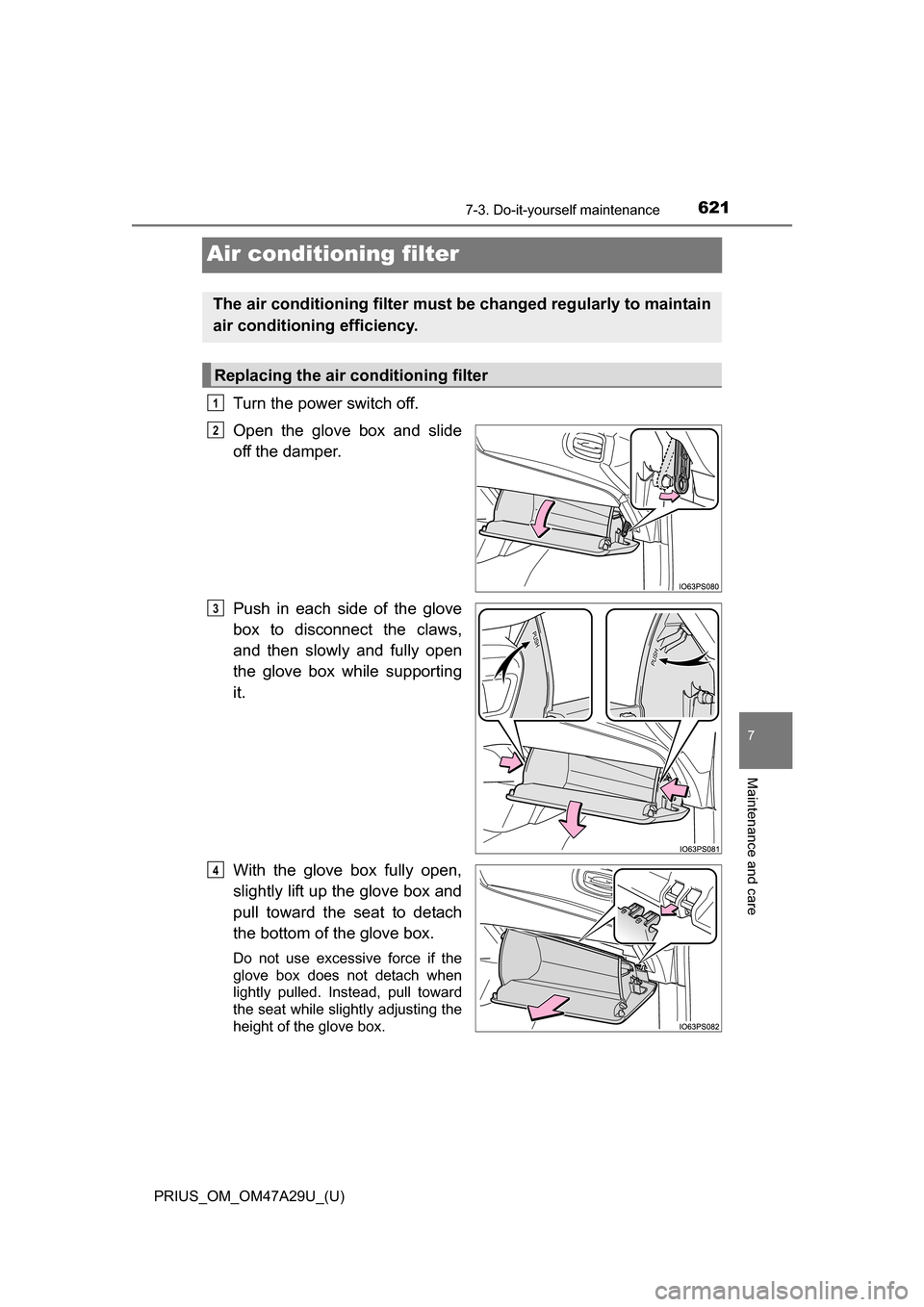
Turn the power switch off.
Open the glove box and slide
off the damper.
Push in each side of the glove
box to disconnect the claws,
and then slowly and fully open
the glove box while supporting
it.
With the glove box fully open,
slightly lift up the glove box and
pull toward the seat to detach
the bottom of the glove box.
Do not use excessive force if the
glove box does not detach when
lightly pulled. Instead, pull toward
the seat while slightly adjusting the
height of the glove box.
The air conditioning filter must be changed regularly to maintain
air conditioning efficiency.
Replacing the air conditioning filter
1
2
3
4
Page 623 of 800
PRIUS_OM_OM47A29U_(U)
6237-3. Do-it-yourself maintenance
7
Maintenance and care
■Checking interval
Inspect and replace the air conditioning filter according to the maintenance
schedule. In dusty areas or areas with heavy traffic flow, early replacement
may be required. (For scheduled maintenance information, please refer to the
“Scheduled Maintenance Guide” or “Owner’s Manual Supplement”.)
■ If air flow from the vents decreases dramatically
The filter may be clogged. Check the filter and replace if necessary.
■ Air conditioning filter with deodorizing function
When fragrances are placed in your vehicle, the deodorizing effect may
become significantly weakened in a short period.
When an air conditioning odor comes out continuously, replace the air condi-
tioning filter.
NOTICE
■ When using the ai r conditioning system
Make sure that a filter is always installed.
Using the air conditioning system without a filter may cause damage to the
system.
■ When removing the glove box
Always follow the specified procedure to remove the glove box (P. 621). If
the glove box is removed without following the specified procedure, the
hinge of the glove box may become damaged.
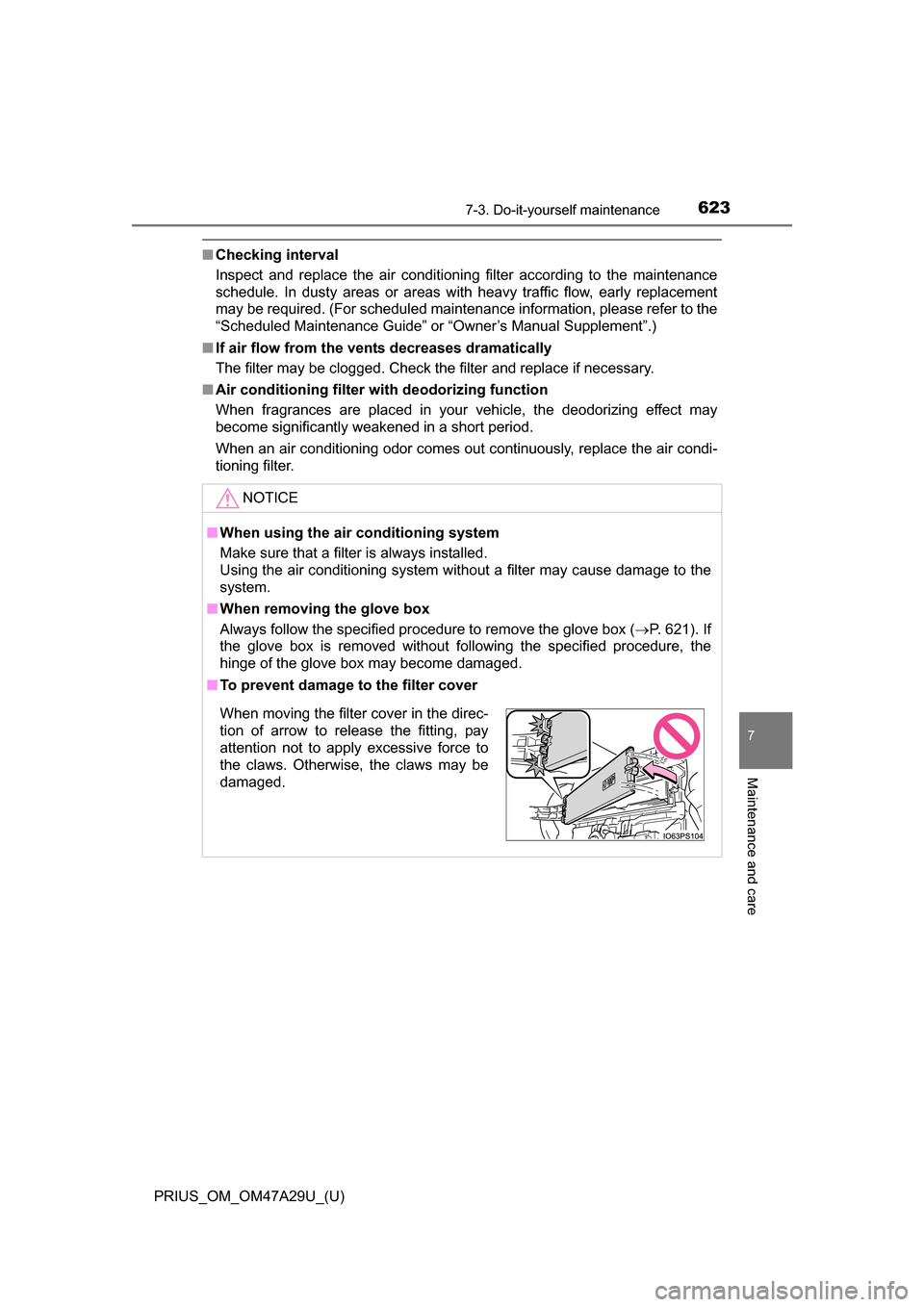
■ To prevent damage to the filter cover
When moving the filter cover in the direc-
tion of arrow to release the fitting, pay
attention not to apply excessive force to
the claws. Otherwise, the claws may be
damaged.
Page 788 of 800
788Alphabetical index
PRIUS_OM_OM47A29U_(U)
Flat tire...................................... 673
Floor mats .................................. 26
FluidBrake .................................... 733
Transmission ........................ 733
Washer ................................. 603
Fog lights Replacing light bulbs............. 642
Switch ................................... 252
Footwell lights ......................... 525
Front doors .............................. 165
Front fog lights Replacing light bulbs............. 642
Switch ................................... 252
Front passenger occupant classification system .............. 50
Front passenger’s seat
belt reminder light ................. 658
Front seats ............................... 184 Adjustment ............................ 184
Cleaning................................ 574
Correct driving posture ........... 28
Head restraints ..................... 189
Seat heaters ......................... 523
Front side marker lights Light switch ........................... 242
Replacing light bulbs............. 642
Front turn signal lights Replacing light bulbs............. 638
Turn signal lever ................... 240
Wattage ................................ 736 Fuel
Capacity................................ 729
Fuel gauge............................ 108
Gas station information......... 800
Information............................ 737
Refueling .............................. 262
Type...................................... 729
Warning light......................... 657
Fuel filler door ......................... 262 Opener.................................. 264
Refueling .............................. 262
When the fuel filler door cannot be opened .............. 265
Fuses ........................................ 631
Gas station information .......... 800
Garage door opener ................ 554
Glove box ................................. 529
Hands-free system (for cellular phone) ............... 470
Head restraints ........................ 189
Head-up display....................... 146
Headlights ................................ 242 Automatic High Beam
system .......... ...................... 247
Headlight aim................ 634, 774
Light switch ........................... 242
Replacing light bulbs ............ 642
Heaters Automatic air conditioning
system .......... ...................... 512
Outside rear view mirrors ..... 517
Seat heaters ......................... 523
F
G
H