lights TOYOTA PRIUS 2017 4.G User Guide
[x] Cancel search | Manufacturer: TOYOTA, Model Year: 2017, Model line: PRIUS, Model: TOYOTA PRIUS 2017 4.GPages: 796, PDF Size: 20.13 MB
Page 51 of 796
511-1. For safe use
PRIUS_OM_OM47B54U_(U)
1
For safety and security
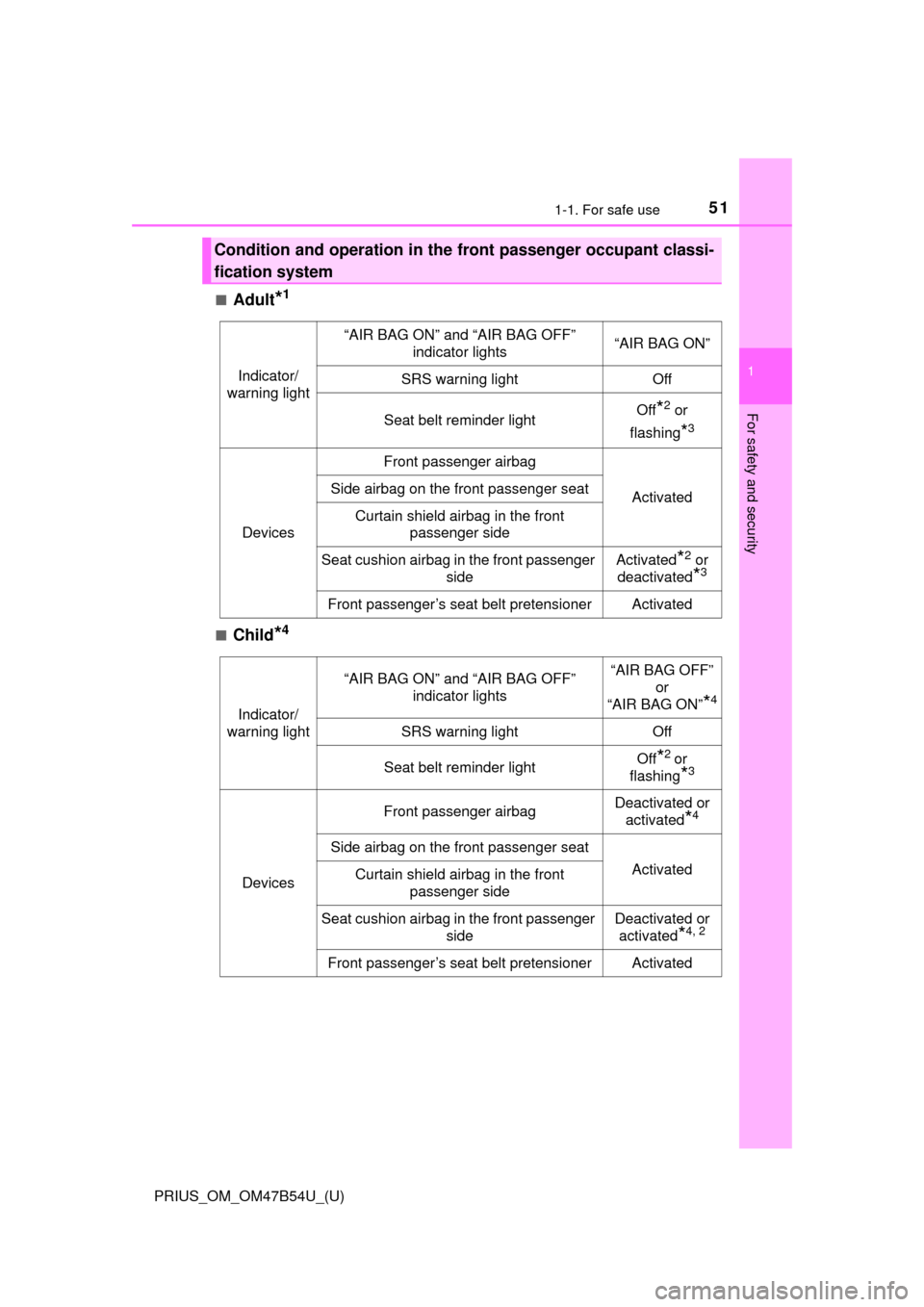
■Adult*1
■Child*4
Condition and operation in the front passenger occupant classi-
fication system
Indicator/
warning light
“AIR BAG ON” and “AIR BAG OFF” indicator lights“AIR BAG ON”
SRS warning lightOff
Seat belt reminder lightOff*2 or
flashing
*3
Devices
Front passenger airbag
ActivatedSide airbag on the front passenger seat
Curtain shield airbag in the front passenger side
Seat cushion airbag in the front passenger sideActivated*2 or
deactivated
*3
Front passenger’s seat belt pretensionerActivated
Indicator/
warning light
“AIR BAG ON” and “AIR BAG OFF” indicator lights“AIR BAG OFF”
or
“AIR BAG ON”
*4
SRS warning lightOff
Seat belt reminder lightOff*2 or
flashing
*3
Devices
Front passenger airbagDeactivated or activated
*4
Side airbag on the front passenger seat
ActivatedCurtain shield airbag in the front passenger side
Seat cushion airbag in the front passenger sideDeactivated or activated
*4, 2
Front passenger’s seat belt pretensionerActivated
Page 52 of 796
521-1. For safe use
PRIUS_OM_OM47B54U_(U)■
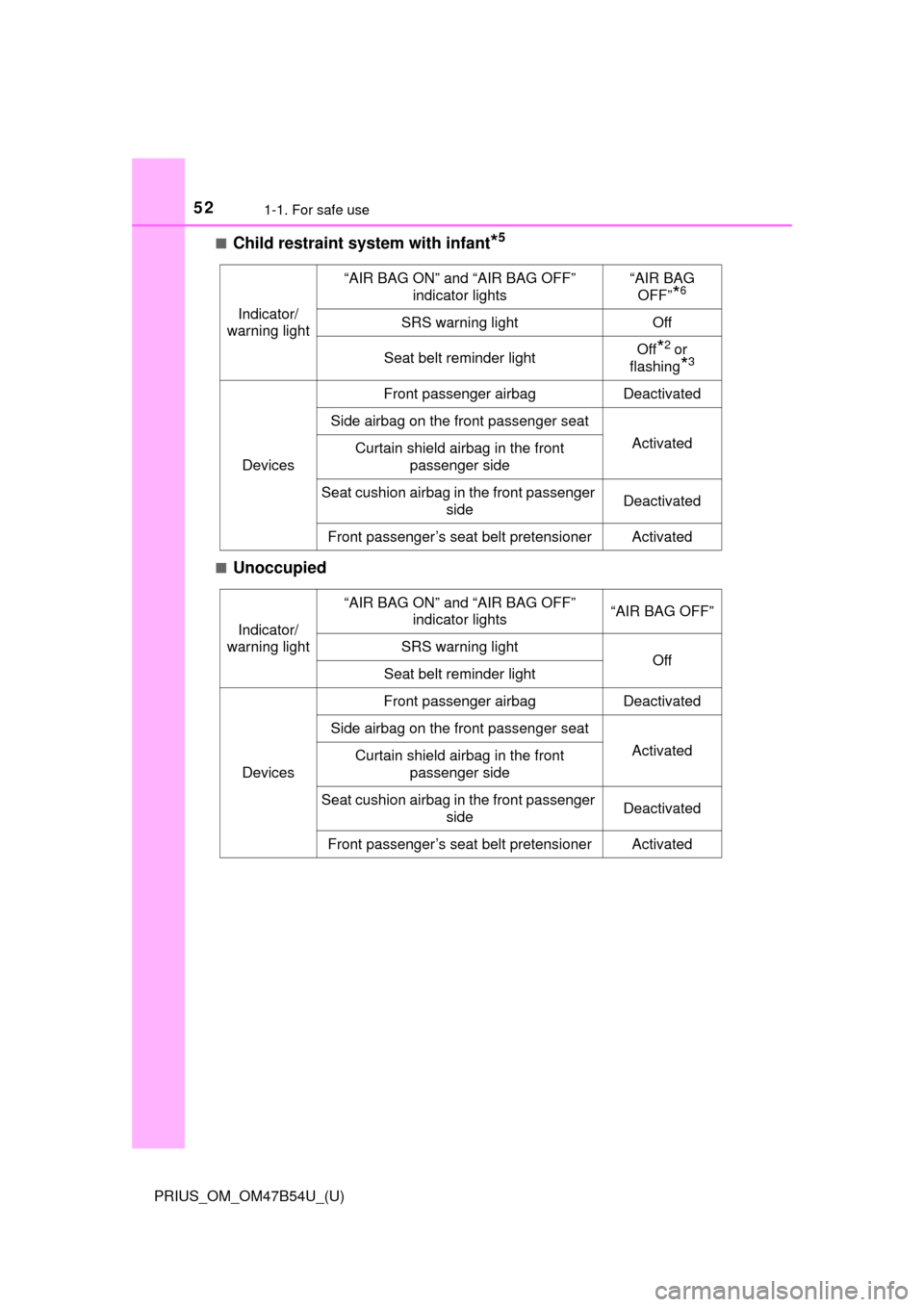
Child restraint system with infant*5
■Unoccupied
Indicator/
warning light
“AIR BAG ON” and “AIR BAG OFF” indicator lights“AIR BAG OFF”
*6
SRS warning lightOff
Seat belt reminder lightOff*2 or
flashing
*3
Devices
Front passenger airbagDeactivated
Side airbag on the front passenger seat
ActivatedCurtain shield airbag in the front passenger side
Seat cushion airbag in the front passenger sideDeactivated
Front passenger’s seat belt pretensionerActivated
Indicator/
warning light
“AIR BAG ON” and “AIR BAG OFF” indicator lights“AIR BAG OFF”
SRS warning lightOffSeat belt reminder light
Devices
Front passenger airbagDeactivated
Side airbag on the front passenger seat
ActivatedCurtain shield airbag in the front passenger side
Seat cushion airbag in the front passenger sideDeactivated
Front passenger’s seat belt pretensionerActivated
Page 53 of 796
531-1. For safe use
PRIUS_OM_OM47B54U_(U)
1
For safety and security
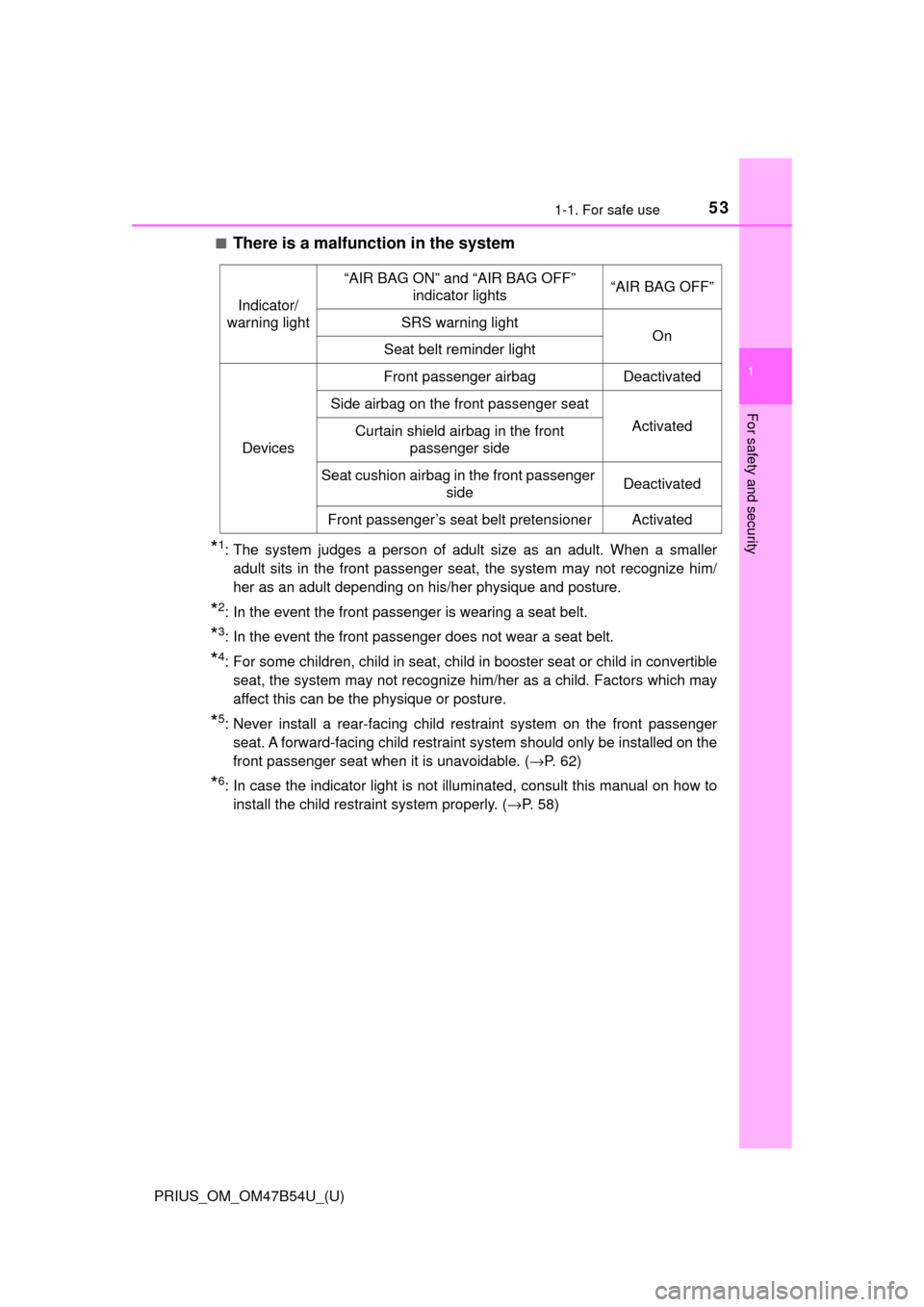
■There is a malfunction in the system
*1: The system judges a person of adult size as an adult. When a smalleradult sits in the front passenger seat, the system may not recognize him/
her as an adult depending on his/her physique and posture.
*2: In the event the front passenger is wearing a seat belt.
*3: In the event the front passenger does not wear a seat belt.
*4: For some children, child in seat, child in booster seat or child in convertible
seat, the system may not recognize him/her as a child. Factors which may
affect this can be the physique or posture.
*5: Never install a rear-facing child restraint system on the front passengerseat. A forward-facing child restraint system should only be installed on the
front passenger seat when it is unavoidable. ( →P. 62)
*6: In case the indicator light is not illuminated, consult this manual on how to
install the child restraint system properly. ( →P. 58)
Indicator/
warning light
“AIR BAG ON” and “AIR BAG OFF” indicator lights“AIR BAG OFF”
SRS warning lightOnSeat belt reminder light
Devices
Front passenger airbagDeactivated
Side airbag on the front passenger seat
ActivatedCurtain shield airbag in the front
passenger side
Seat cushion airbag in the front passenger sideDeactivated
Front passenger’s seat belt pretensionerActivated
Page 91 of 796
91
PRIUS_OM_OM47B54U_(U)
Instrument cluster2
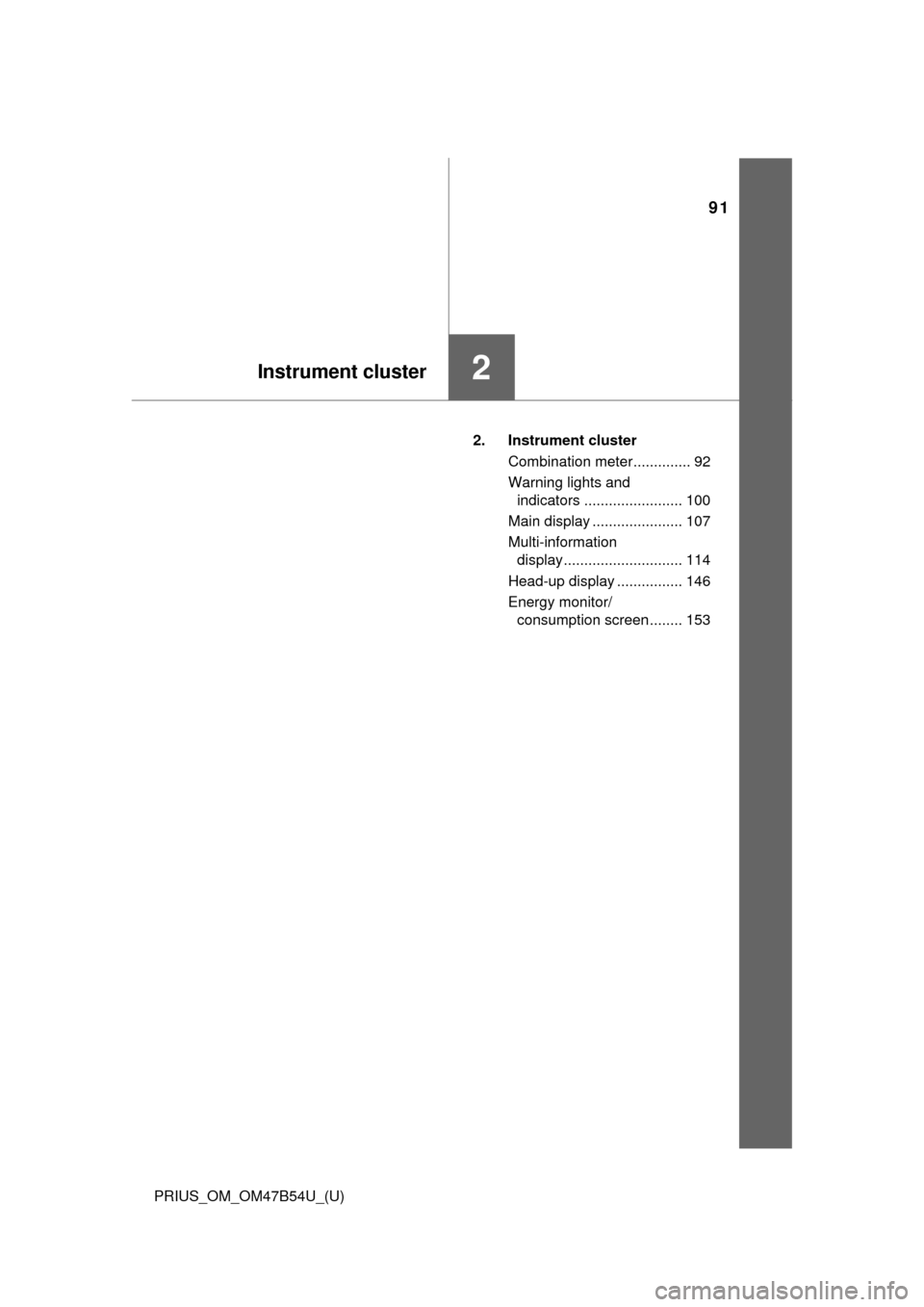
2. Instrument clusterCombination meter.............. 92
Warning lights and indicators ........................ 100
Main display ...................... 107
Multi-information display............................. 114
Head-up display ................ 146
Energy monitor/ consumption screen ........ 153
Page 92 of 796
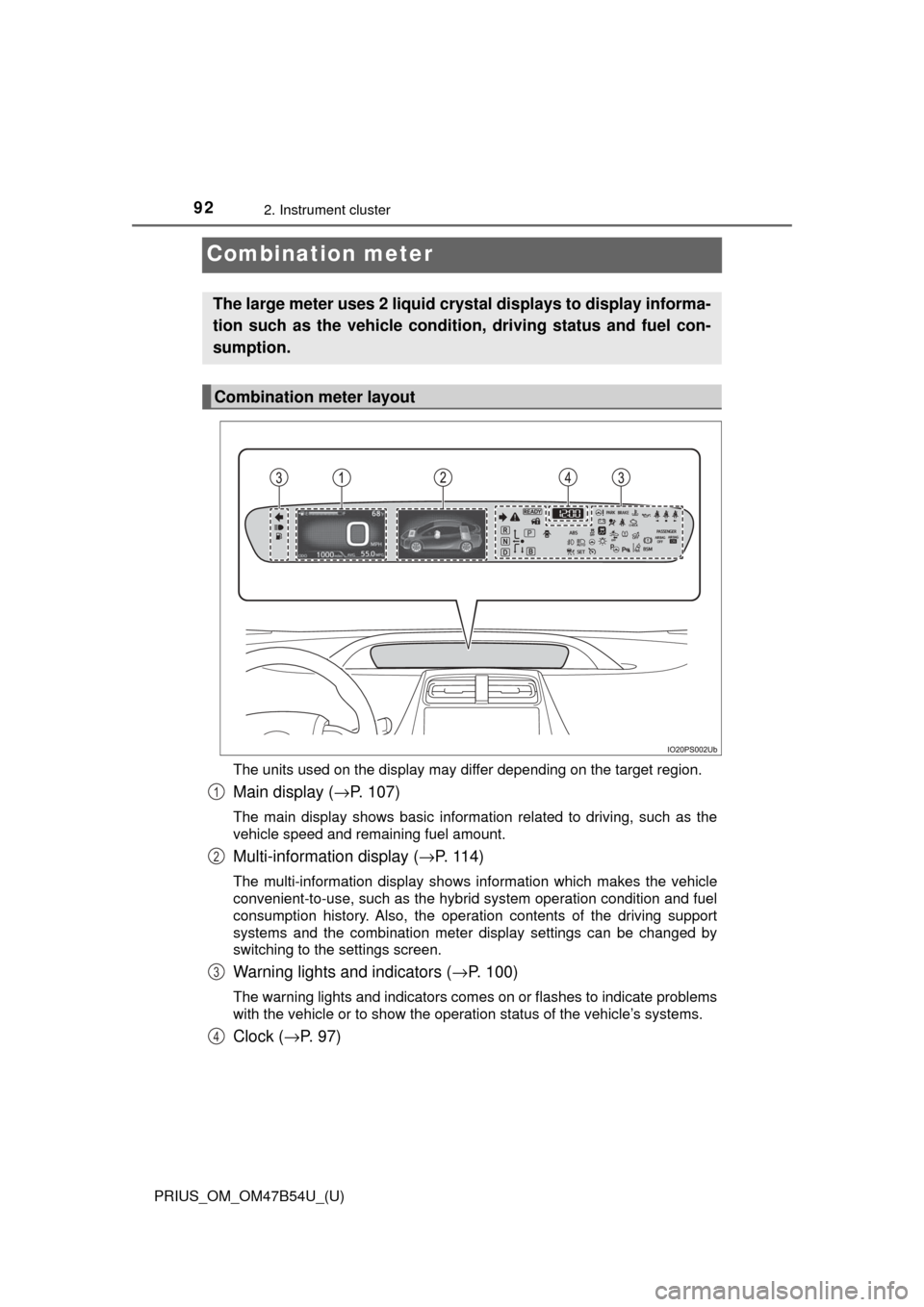
92
PRIUS_OM_OM47B54U_(U)
2. Instrument cluster
Combination meter
The units used on the display may differ depending on the target region.
Main display (→P. 107)
The main display shows basic information related to driving, such as the
vehicle speed and remaining fuel amount.
Multi-information display ( →P. 114)
The multi-information display shows information which makes the vehicle
convenient-to-use, such as the hybrid system operation condition and fuel
consumption history. Also, the operation contents of the driving support
systems and the combination meter display settings can be changed by
switching to the settings screen.
Warning lights and indicators (→ P. 100)
The warning lights and indicators comes on or flashes to indicate problems
with the vehicle or to show the operation status of the vehicle’s systems.
Clock (→P. 97)
The large meter uses 2 liquid crys tal displays to display informa-
tion such as the vehicle condition, driving status and fuel con-
sumption.
Combination meter layout
1
2
3
4
Page 94 of 796
94
PRIUS_OM_OM47B54U_(U)
2. Instrument cluster
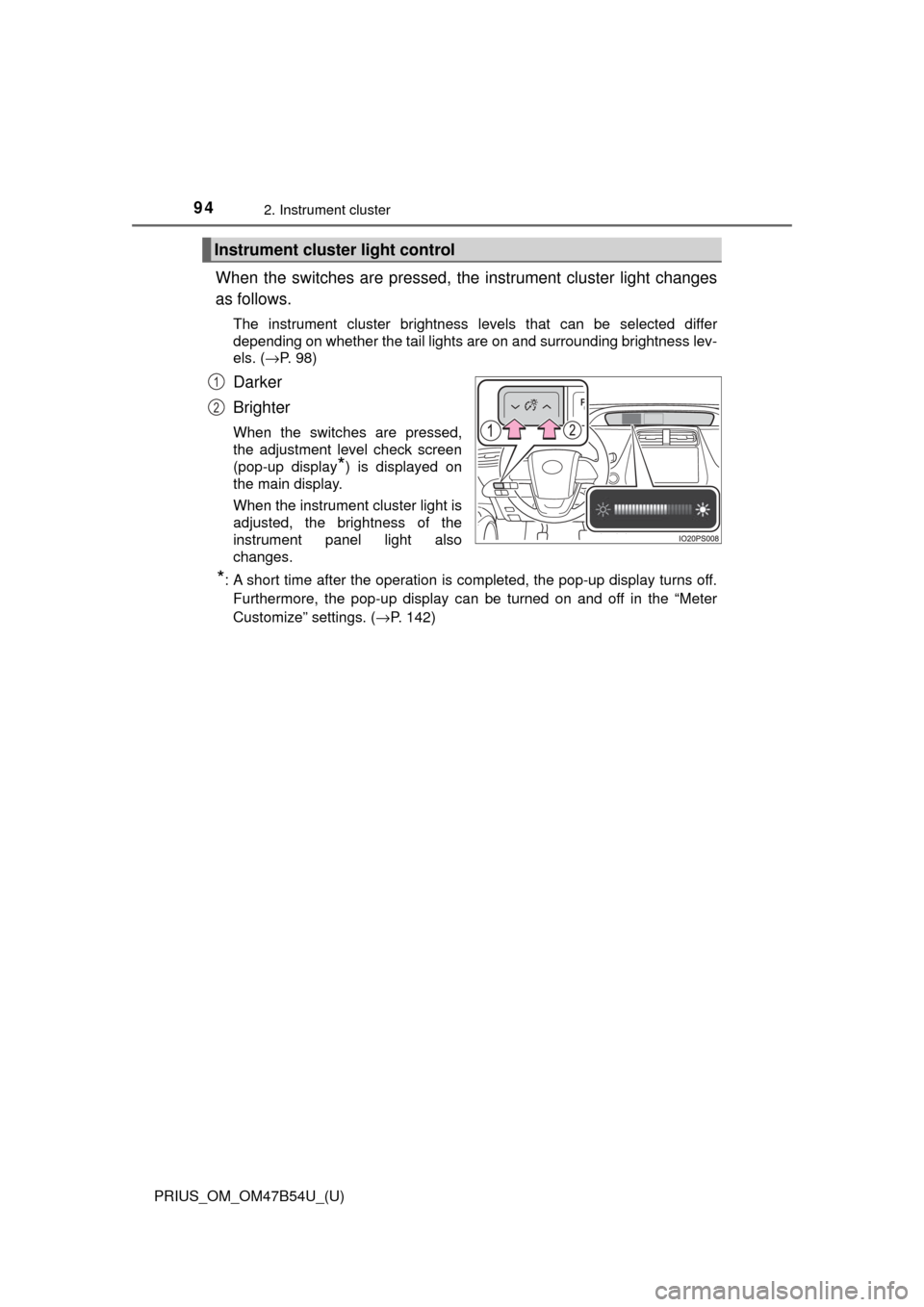
When the switches are pressed, the instrument cluster light changes
as follows.
The instrument cluster brightness levels that can be selected differ
depending on whether the tail lights are on and surrounding brightness lev-
els. ( →P. 98)
Darker
Brighter
When the switches are pressed,
the adjustment level check screen
(pop-up display
*) is displayed on
the main display.
When the instrument cluster light is
adjusted, the brightness of the
instrument panel light also
changes.
*: A short time after the operation is completed, the pop-up display turns off.
Furthermore, the pop-up display can be turned on and off in the “Meter
Customize” settings. ( →P. 142)
Instrument cluster light control
1
2
Page 98 of 796
98
PRIUS_OM_OM47B54U_(U)
2. Instrument cluster
■The meters and display illuminate when
The power switch is in ON mode.
■ Adjusting the instrument cluster brightness (→P. 94)
● The brightness levels that can be selected differ depending on whether the
tail lights are on and surrounding brightness levels, as shown in the table
below.
*: 22 levels of the brightness are displayed on the setting screen. However,
the brightness setting will be the brightest when other than 1st level (the
darkest) is selected. If other than 1st or 22nd level is selected, when the
tail lights are turned on in a dark place, the instrument cluster brightness
setting will be the selected level.
● If the taillights are illuminated in a dark environment, the instrument cluster
light dims. However, when the brightness of the instrument cluster is set to
minimum or maximum (1st or 22nd level of the instrument cluster bright-
ness), even if the taillights are illuminated, the instrument cluster light will
not dim.
■ When disconnecting and reconnect ing 12-volt battery terminals
The settings of the clock will be reset.
■ Calendar settings
●Until the calendar settings are set, the check screen is displayed every time
the power switch is turned to ON mode.
● After the calendar information is set, it can be changed in the “Meter Cus-
tomize” settings. (→P. 142)
The tail lights are offThe tail lights are on
In a bright place2 levels*2 levels*
In a dark place22 levels
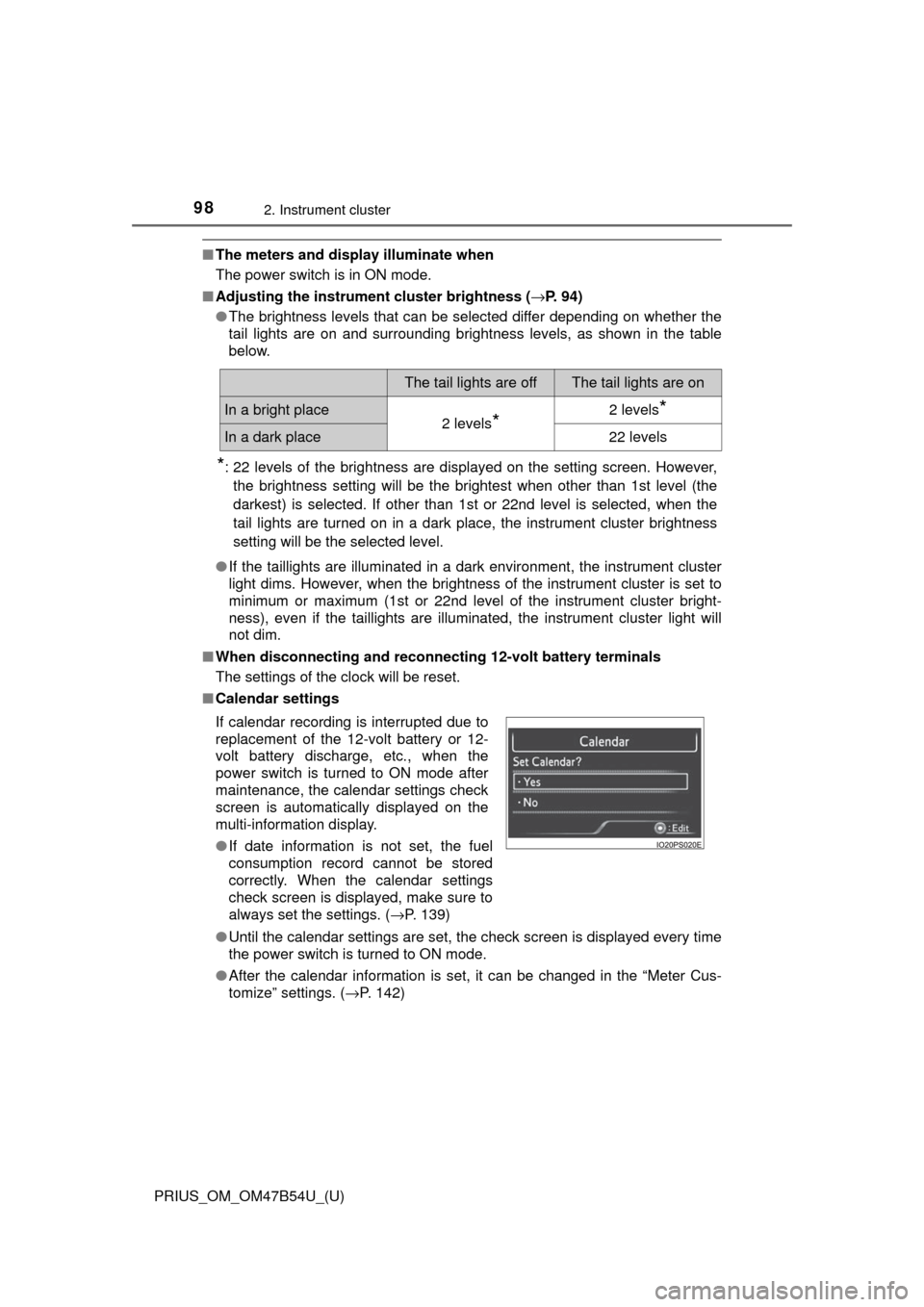
If calendar recording is interrupted due to
replacement of the 12-volt battery or 12-
volt battery discharge, etc., when the
power switch is turned to ON mode after
maintenance, the calendar settings check
screen is automatically displayed on the
multi-information display.
● If date information is not set, the fuel
consumption record cannot be stored
correctly. When the calendar settings
check screen is displayed, make sure to
always set the settings. ( →P. 139)
Page 100 of 796
100
PRIUS_OM_OM47B54U_(U)
2. Instrument cluster
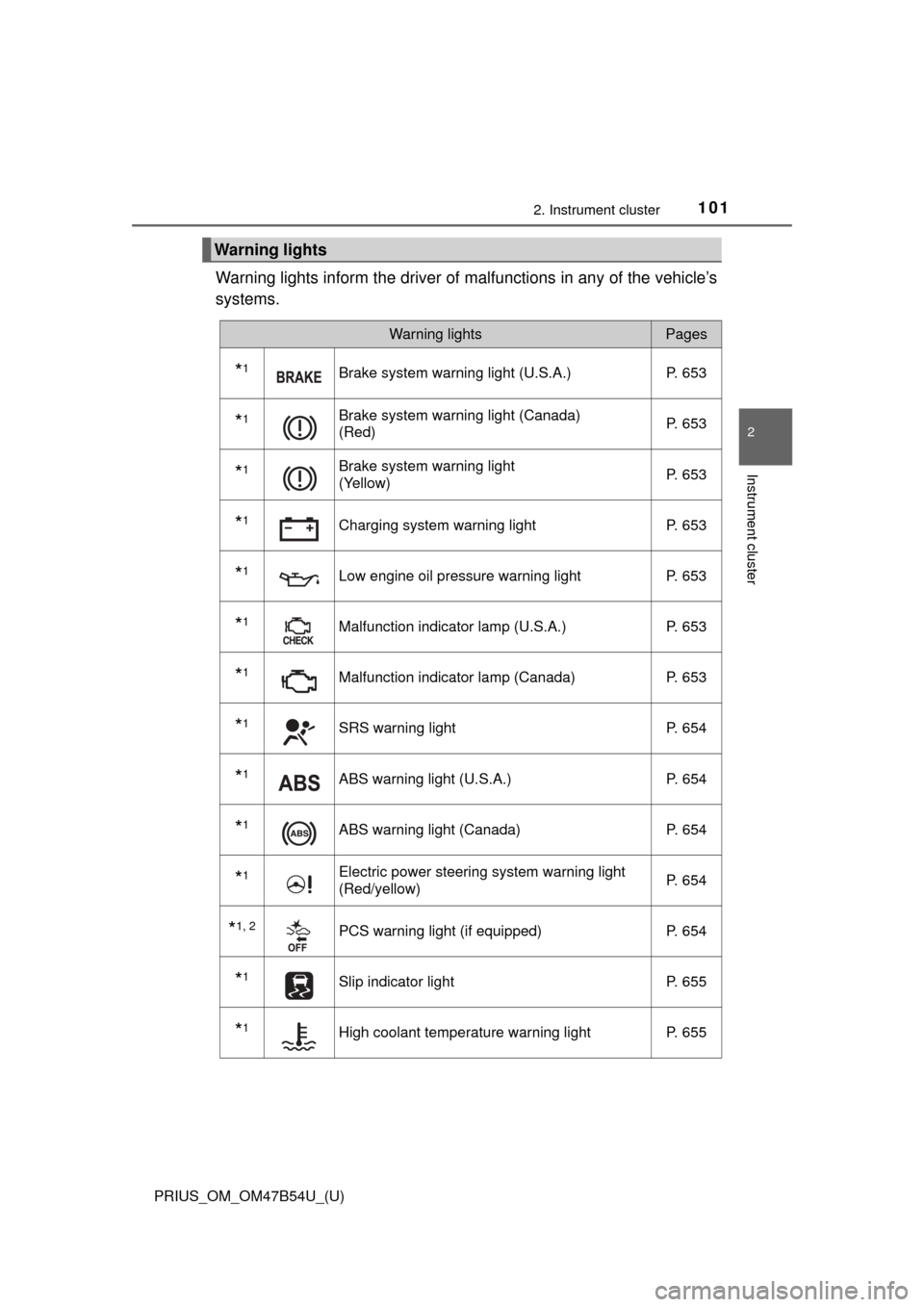
Warning lights and indicators
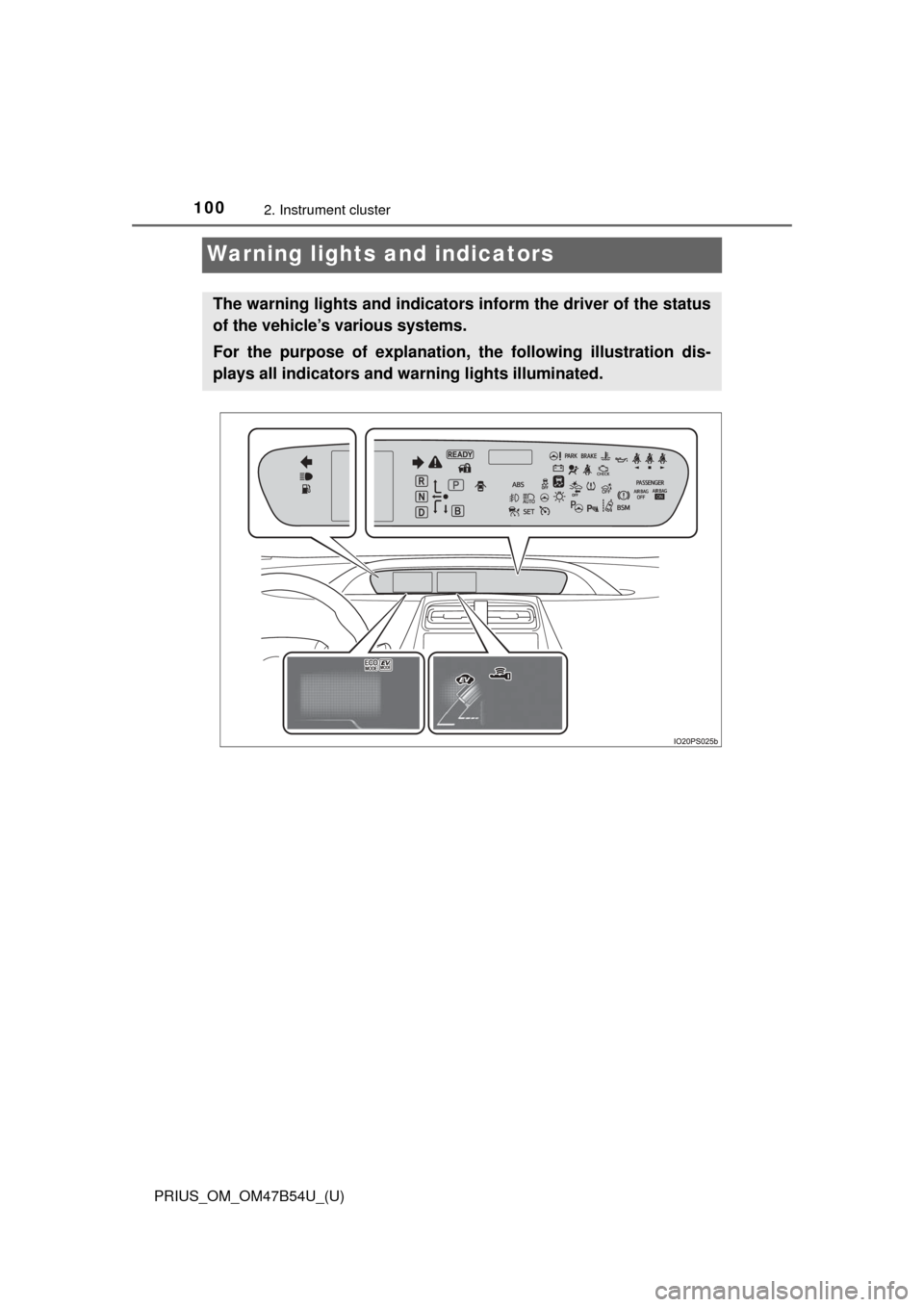
The warning lights and indicators inform the driver of the status
of the vehicle’s various systems.
For the purpose of explanation, the following illustration dis-
plays all indicators and wa rning lights illuminated.
Page 101 of 796
PRIUS_OM_OM47B54U_(U)
1012. Instrument cluster
2
Instrument cluster
Warning lights inform the driver of malfunctions in any of the vehicle’s
systems.
Warning lights
Warning lightsPages
*1Brake system warning light (U.S.A.) P. 653
*1Brake system warning light (Canada)
(Red)P. 653
*1Brake system warning light
(Yellow)P. 653
*1Charging system warning light
P. 653
*1Low engine oil pressure warning lightP. 653
*1Malfunction indicator lamp (U.S.A.) P. 653
*1Malfunction indicator lamp (Canada) P. 653
*1SRS warning lightP. 654
*1ABS warning light (U.S.A.) P. 654
*1ABS warning light (Canada)P. 654
*1Electric power steering system warning light
(Red/yellow)P. 654
*1, 2PCS warning light (if equipped)
P. 654
*1Slip indicator light P. 655
*1High coolant temperature warning lightP. 655
Page 102 of 796
102
PRIUS_OM_OM47B54U_(U)
2. Instrument cluster
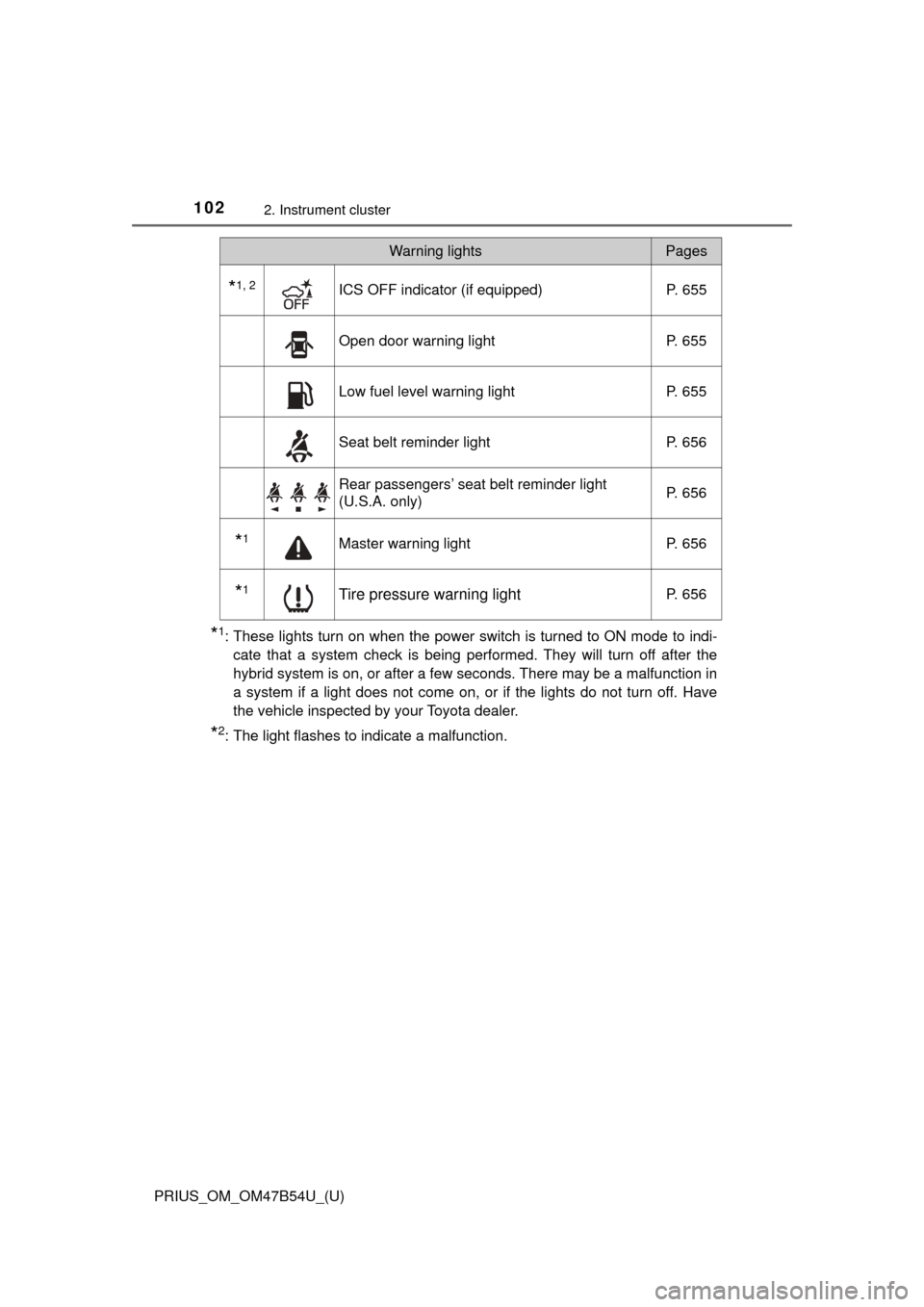
*1: These lights turn on when the power switch is turned to ON mode to indi-cate that a system check is being performed. They will turn off after the
hybrid system is on, or after a few seconds. There may be a malfunction in
a system if a light does not come on, or if the lights do not turn off. Have
the vehicle inspected by your Toyota dealer.
*2: The light flashes to indicate a malfunction.
*1, 2ICS OFF indicator (if equipped) P. 655
Open door warning lightP. 655
Low fuel level warning lightP. 655
Seat belt reminder lightP. 656
Rear passengers’ seat belt reminder light
(U.S.A. only) P. 656
*1Master warning light
P. 656
*1Tire pressure warning lightP. 656
Warning lightsPages