display TOYOTA PRIUS 2017 4.G Owners Manual
[x] Cancel search | Manufacturer: TOYOTA, Model Year: 2017, Model line: PRIUS, Model: TOYOTA PRIUS 2017 4.GPages: 796, PDF Size: 20.13 MB
Page 510 of 796
510
PRIUS_OM_OM47B54U_(U)
6-1. Using the air conditioning system and defogger
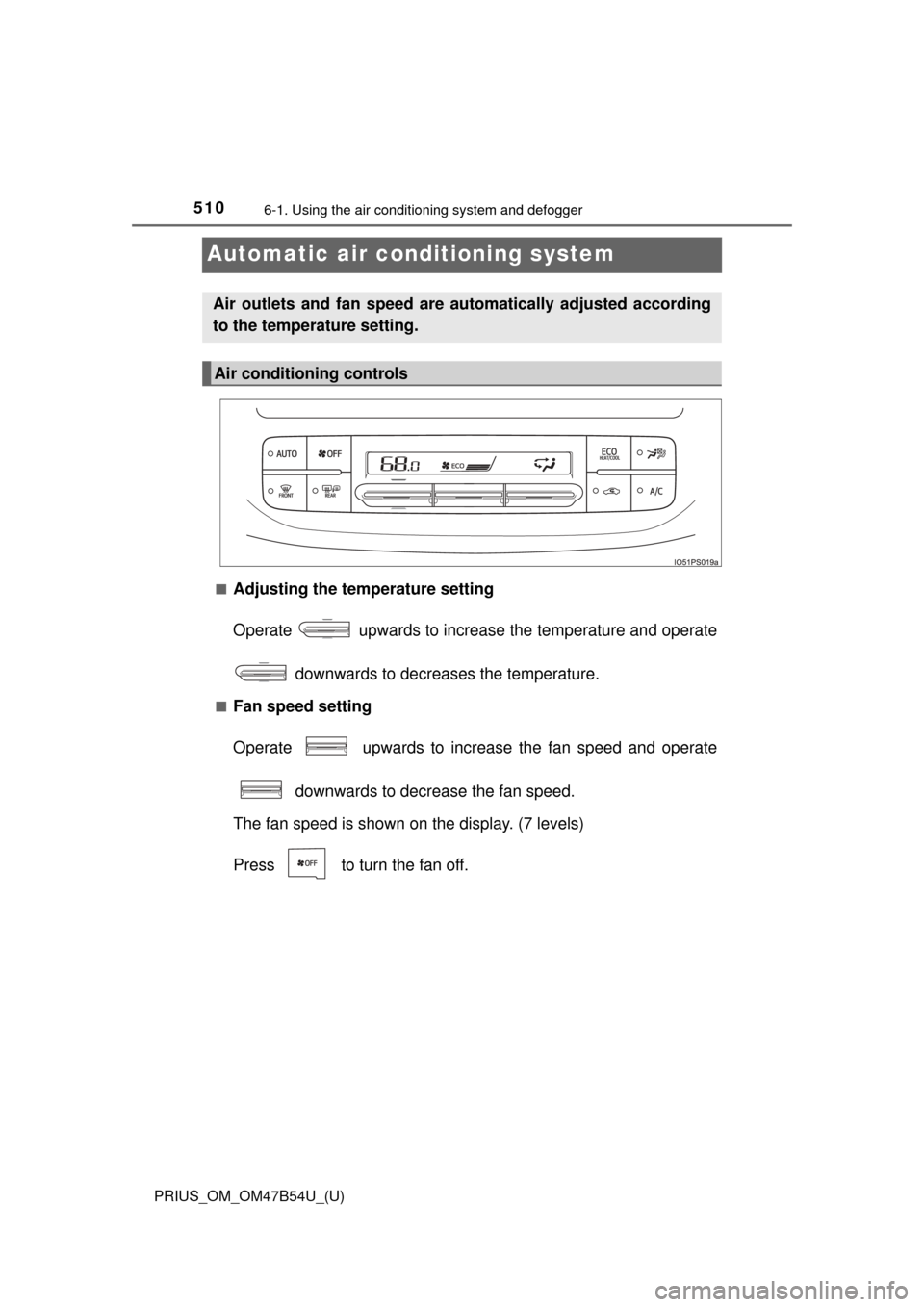
Automatic air conditioning system
■Adjusting the temperature setting
Operate upwards to increase the temperature and operate
downwards to decreases the temperature.
■Fan speed setting
Operate upwards to increase the fan speed and operate downwards to decrease the fan speed.
The fan speed is shown on the display. (7 levels)
Press to turn the fan off.
Air outlets and fan speed are automatically adjusted according
to the temperature setting.
Air conditioning controls
Page 513 of 796
PRIUS_OM_OM47B54U_(U)
5136-1. Using the air conditioning system and defogger
6
Interior features
Press .
Adjust the temperature setting.
To stop the operation, press .
■Automatic mode indicator
If the fan speed setting or air fl ow modes are operated, the auto-
matic mode indicator goes off. However, automatic mode for func-
tions other than that operated is maintained.
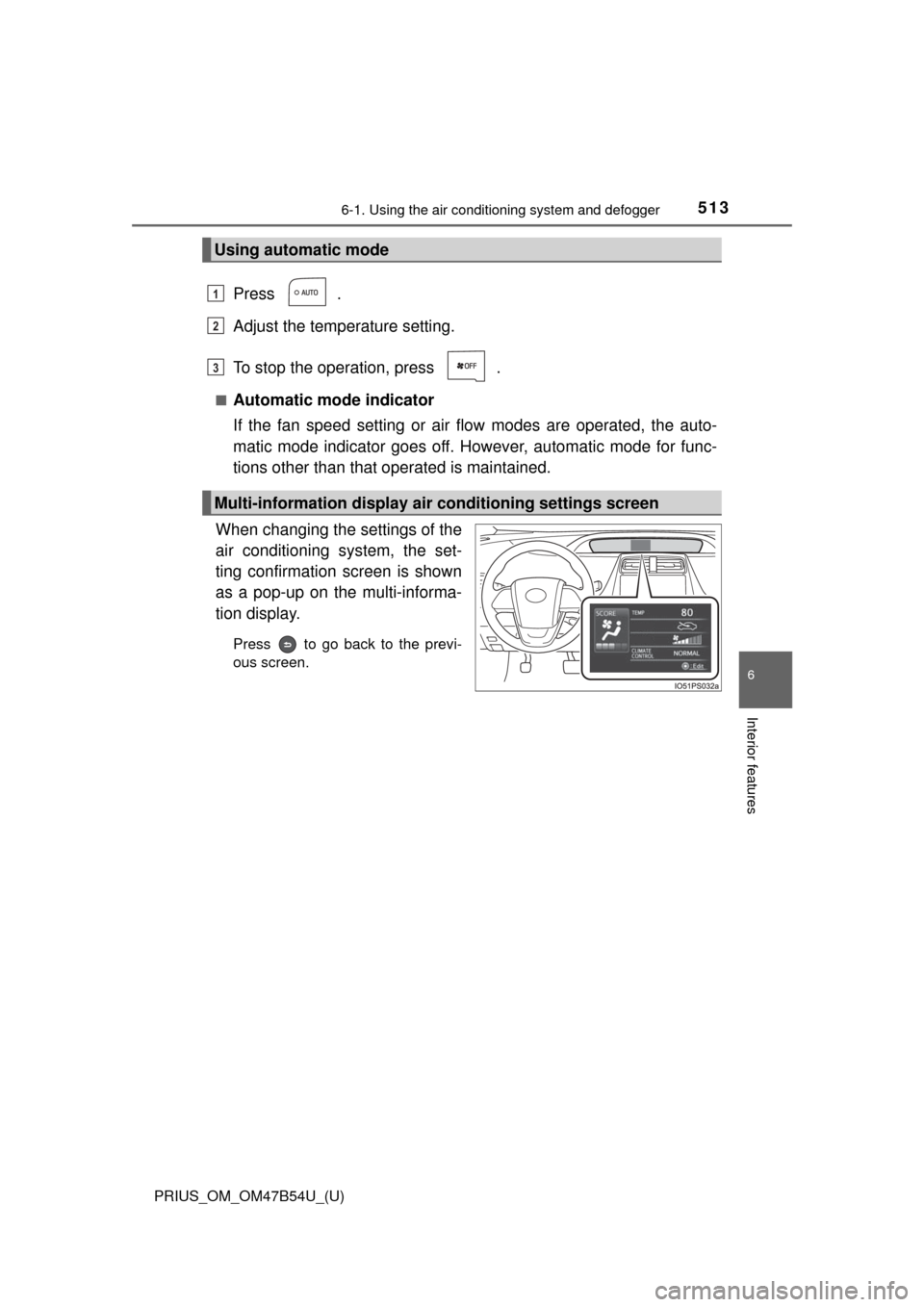
When changing the settings of the
air conditioning system, the set-
ting confirmation screen is shown
as a pop-up on the multi-informa-
tion display.
Press to go back to the previ-
ous screen.
Using automatic mode
Multi-information display air conditioning settings screen
1
2
3
Page 514 of 796
5146-1. Using the air conditioning system and defogger
PRIUS_OM_OM47B54U_(U)■
Switching between outside air
and recirculated air modes
Press .
The mode switches between outside air mode (indicator off) and recir-
culated air mode (indicator on) each time is pressed.
■
Fresh air intake system while parking
When parking, the system automatically switches to fresh air intake
mode to encourage better air circulation throughout the vehicle,
helping to reduce odors that occur when starting the vehicle.
■Using the Climate control
Press .
When “ECO” is displayed on the air conditioning screen, the air
conditioning is controlled with lo w fuel consumption prioritized such
as reducing fan speed, etc.
The Climate control is turned on when the power switch is turned to ON
mode while the driving mode is Eco drive mode.
Pressing again will cancel climate control.
Other functions
Page 517 of 796
PRIUS_OM_OM47B54U_(U)
5176-1. Using the air conditioning system and defogger
6
Interior features
■Using automatic mode
Fan speed is adjusted automatically according to the temperature setting and
the ambient conditions.
Therefore, the fan may stop for a while until warm or cool air is ready to flow
immediately after is pressed.
■ S-FLOW mode operation
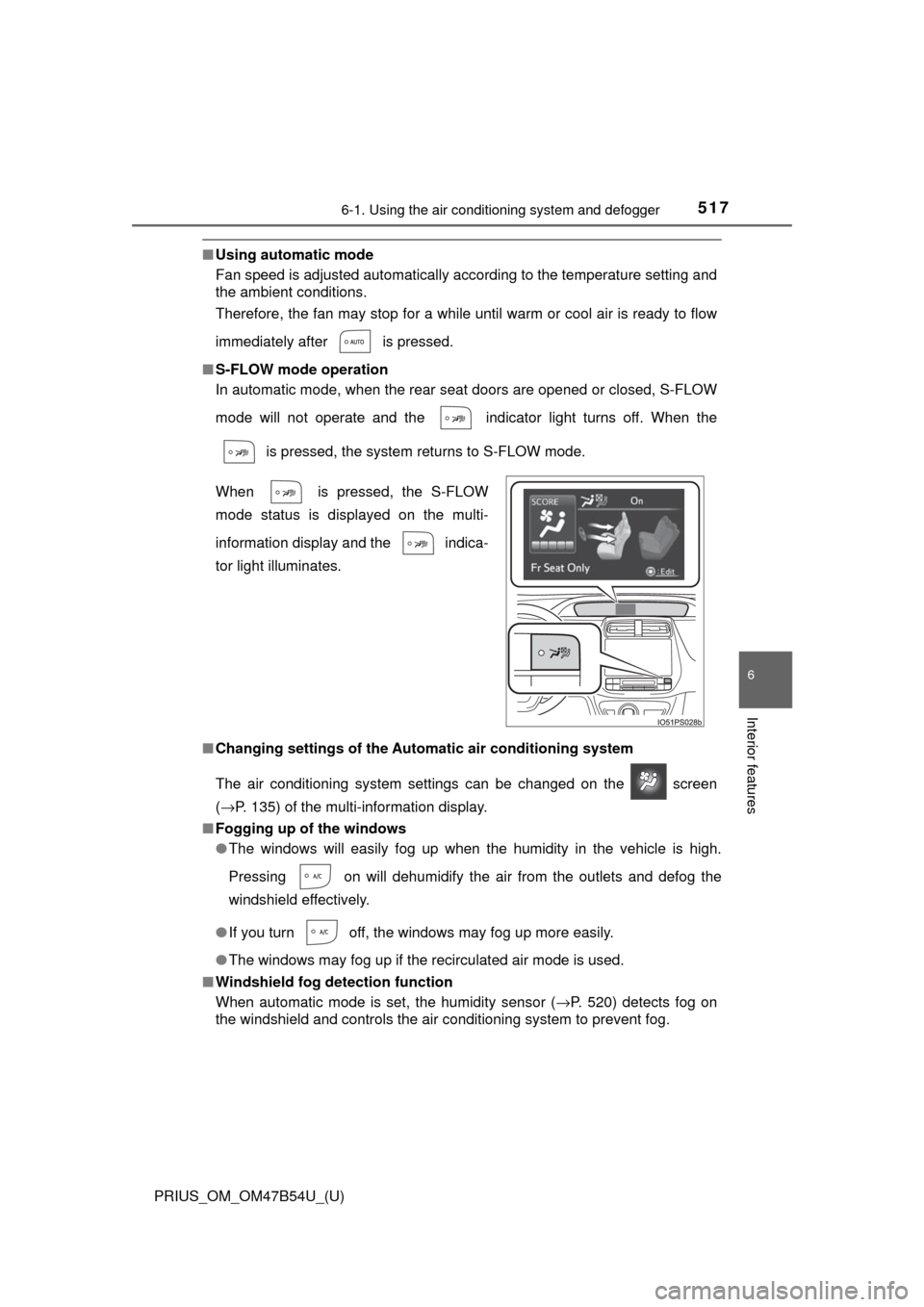
In automatic mode, when the rear seat doors are opened or closed, S-FLOW
mode will not operate and the indicator light turns off. When the
is pressed, the system returns to S-FLOW mode.
■ Changing settings of the Automatic air conditioning system
The air conditioning system settings can be changed on the screen
(→P. 135) of the multi-information display.
■ Fogging up of the windows
●The windows will easily fog up when the humidity in the vehicle is high.
Pressing on will dehumidify the air from the outlets and defog the
windshield effectively.
● If you turn off, the windows may fog up more easily.
● The windows may fog up if the recirculated air mode is used.
■ Windshield fog detection function
When automatic mode is set, the humidity sensor ( →P. 520) detects fog on
the windshield and controls the air conditioning system to prevent fog. When is pressed, the S-FLOW
mode status is displayed on the multi-
information display and the indica-
tor light illuminates.
Page 549 of 796
PRIUS_OM_OM47B54U_(U)
5496-4. Using the other interior features
6
Interior features
WARNING
■Conditions in which the function may not operate correctly
In the following conditions, it may not operate correctly
● The portable device is fully charged
● There is foreign matter between the charge area and portable device
● The temperature of the portable device gets higher from charging
● The charging surface of the portable device is facing up
● The placement of the portable device is out of alignment with the charge
area
● Near a TV tower, electric power plant, gas station, radio station, large dis-
play, airport or other facility that generates strong radio waves or electri\
cal
noise
● When the electronic key is in contact with, or is covered by the following
metallic objects
• Cards to which aluminum foil is attached
• Cigarette boxes that have aluminum foil inside
• Metallic wallets or bags
• Coins
• Hand warmers made of metal
• Media such as CDs and DVDs
● When other wireless keys (that emit radio waves) are being used nearby
In addition, excluding the above-mentioned, when the charger does not per-
form normally or the operation display lamp is flashing continuously, it is
considered that the wireless charger is malfunctioning. Contact your Toyota
dealer.
■ To prevent failure or damage to data
● Do not bring magnetic cards, such as credit cards, or magnetic recording
media, etc., close to the charger while charging, otherwise, data may dis-
appear under the influence of magnetism. Also, do not bring precision
instruments such as wrist watches, etc., close to the charger, as such
objects may break.
● Do not leave portable devices in the cabin. The temperature inside the
cabin may become high, when under the sun, and cause damage to the
device.
■ To prevent 12-volt battery discharge
When the hybrid system is stopped, do not use the wireless charger for a
long time.
Page 574 of 796

574
PRIUS_OM_OM47B54U_(U)
7-1. Maintenance and care
■Caring for leather areas
Toyota recommends cleaning the interior of the vehicle at least twice a year to
maintain the quality of the vehicle’s interior.
■ Shampooing the carpets
There are several commercial foaming-type cleaners available. Use a sponge
or brush to apply the foam. Rub in overlapping circles. Do not use water.
Wipe dirty surfaces and let them dry. Excellent results are obtained by keep-
ing the carpet as dry as possible.
■ Seat belts
Clean with mild soap and lukewarm water using a cloth or sponge. Also
check the belts periodically for excessive wear, fraying or cuts.
■ Cleaning the air intake vent
●If the vehicle is driven further after dust has built up and clogged the air
intake vent and filter, the hybrid battery (traction battery) will overheat,
reducing the driving range of the electric motor and worsening fuel econ-
omy. Periodically clean the air intake vent to keep dust from building up in
the air intake vent and filter.
● Improper handling may result in damage to the air intake vent cover. If you
have any concerns about cleaning the part yourself, contact your Toyota
dealer.
● The necessary cleaning interval of the air intake vent will differ according to
the vehicle usage environment.
■ If “Maintenance required for Traction battery cooling parts See owner’s
manual” is shown on the multi-information display
● If “Maintenance required for Traction battery cooling parts See owner’s
manual” is shown on the multi-information display, the air intake vent and fil-
ter may be clogged due to dust build-up. Refer to the cleaning procedure
and clean the air intake vent.
● If the vehicle is driven further while “Maintenance required for Traction bat-
tery cooling parts See owner’s manual” is shown on the multi-information
display, the hybrid battery (traction battery) may overheat, reducing the driv-
ing range, worsening fuel economy and causing damage. Periodically clean
the air intake vent to keep dust from building up in the air intake vent and fil-
ter.
● If the warning message continues to be shown on the multi-information dis-
play even after cleaning the air intake vent, have the vehicle inspected by
your Toyota dealer.
Page 578 of 796
578
PRIUS_OM_OM47B54U_(U)
7-2. Maintenance
■Repair and replacement
It is recommended that genuine Toyota parts be used for repairs to ensure
performance of each system. If non-Toyota parts are used in replacement or if
a repair shop other than a Toyota dealer performs repairs, confirm the war-
ranty coverage.
■ Resetting the message indicating maintenance is required (U.S.A. only)
After the required maintenance is preformed according to the maintenance
schedule, please reset the message.
To reset the message, follow the procedures described below:
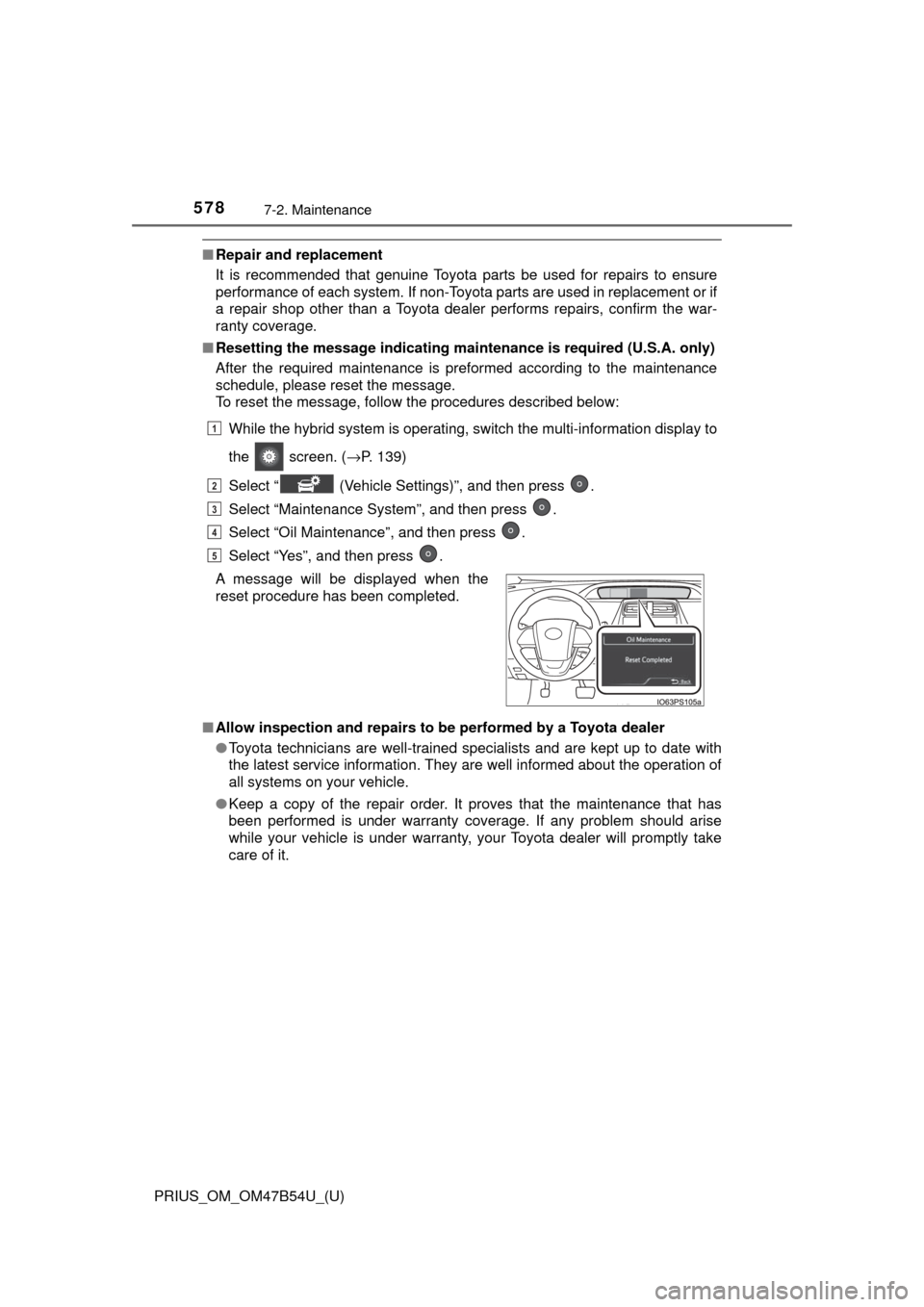
While the hybrid system is operating, switch the multi-information display to
the screen. ( →P. 139)
Select “ (Vehicle Settings)”, and then press .
Select “Maintenance System”, and then press .
Select “Oil Maintenance”, and then press .
Select “Yes”, and then press .
■ Allow inspection and repairs to be performed by a Toyota dealer
●Toyota technicians are well-trained specialists and are kept up to date with
the latest service information. They are well informed about the operation of
all systems on your vehicle.
● Keep a copy of the repair order. It proves that the maintenance that has
been performed is under warranty cove rage. If any problem should arise
while your vehicle is under warranty, your Toyota dealer will promptly take
care of it.
A message will be displayed when the
reset procedure has been completed.
1
2
3
4
5
Page 585 of 796
PRIUS_OM_OM47B54U_(U)
5857-3. Do-it-yourself maintenance
7
Maintenance and care
Tire inflation
pressure
(→ P. 614)• Tire pressure gauge
• Compressed air source
Washer fluid
(→ P. 602)• Water or washer fluid containing antifreeze (for win-
ter use)
• Funnel (used only for adding water or washer fluid)
WARNING
The engine compartment contains many mechanisms and fluids that may
move suddenly, become hot, or become electrically energized. To avoid death
or serious injury, observe the following precautions.
■When working on the engine compartment
● Make sure that the “Accessory”, “Ignition ON” or mileage display
(→P. 108) on the main display and the “READY” indicator are both off.
● Keep hands, clothing and tools away from the moving fan.
● Be careful not to touch the engine, power control unit, radiator, exhaust
manifold, etc. right after driving as they may be hot. Oil and other fluids
may also be hot.
● Do not leave anything that may burn easily, such as paper and rags, in the
engine compartment.
● Do not smoke, cause sparks or expose an open flame to fuel. Fuel fumes
are flammable.
■ When working near the electric cooling fans or radiator grille
Be sure the power switch is off.
With the power switch in ON mode, t he electric cooling fans may automati-
cally start to run if the air conditioning is on and/or the coolant temperature
is high. ( →P. 596)
■ Safety glasses
Wear safety glasses to prevent flying or falling material, fluid spray, etc.
from getting in your eyes.
ItemsParts and tools
Page 607 of 796
PRIUS_OM_OM47B54U_(U)
6077-3. Do-it-yourself maintenance
7
Maintenance and care
■How to initialize the tire pressure warning systemPark the vehicle in a safe place and turn the power switch off.
Initialization cannot be performed while the vehicle is moving.
Adjust the tire inflation pressure to the specified cold tire inflation
pressure level. ( →P. 730)
Make sure to adjust the tire pressu re to the specified cold tire infla-
tion pressure level. The tire pressure warning system will operate
based on this pressure level.
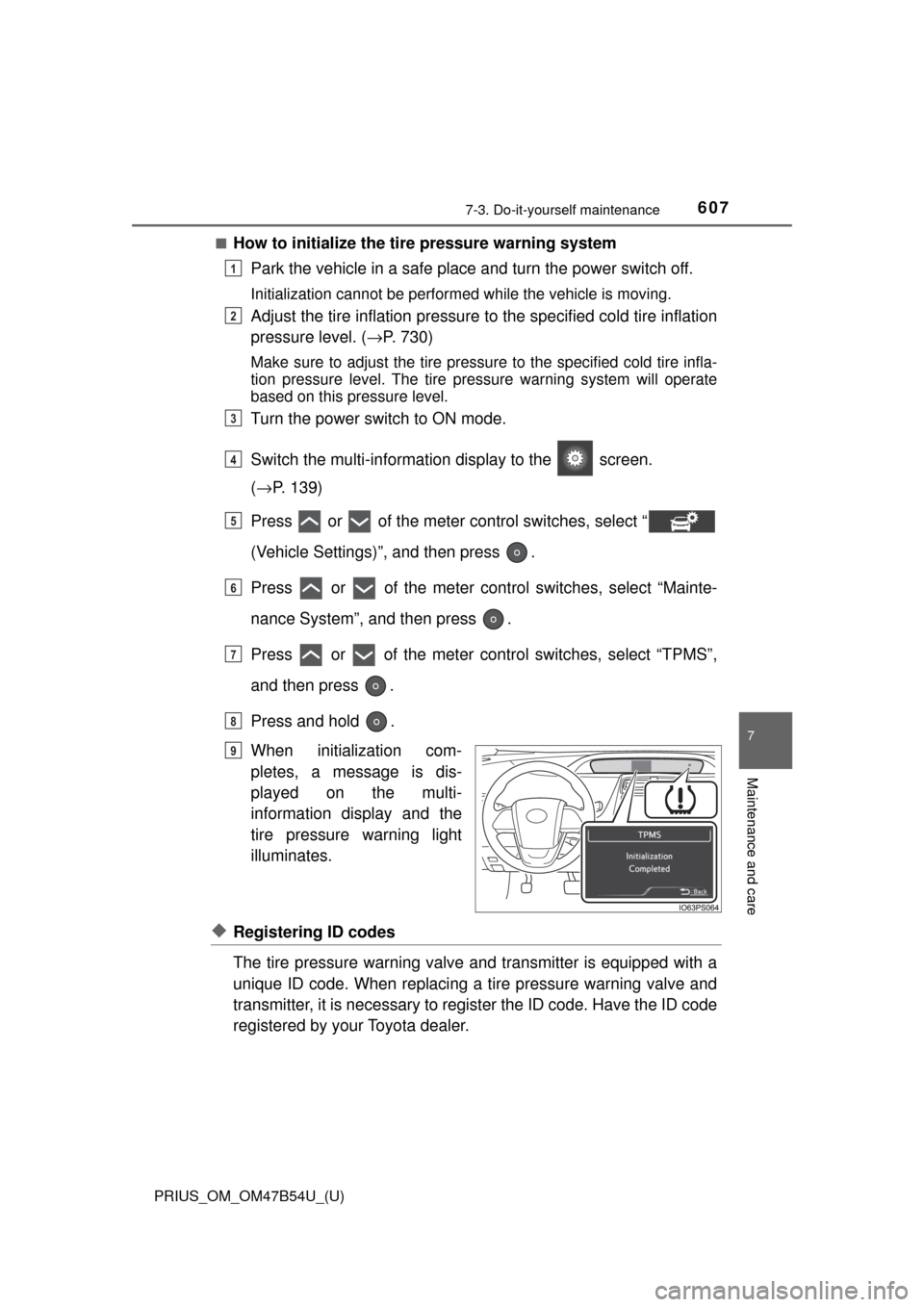
Turn the power switch to ON mode.
Switch the multi-informatio n display to the screen.
( → P. 139)
Press or of the meter control switches, select “
(Vehicle Settings)”, and then press .
Press or of the meter cont rol switches, select “Mainte-
nance System”, and then press .
Press or of the meter control switches, select “TPMS”,
and then press .
Press and hold .
When initialization com-
pletes, a message is dis-
played on the multi-
information display and the
tire pressure warning light
illuminates.
◆Registering ID codes
The tire pressure warning valve and transmitter is equipped with a
unique ID code. When replacing a tire pressure warning valve and
transmitter, it is necessary to register the ID code. Have the ID code
registered by your Toyota dealer.
1
2
3
4
5
6
7
8
Until Complete
9
Page 610 of 796

610
PRIUS_OM_OM47B54U_(U)
7-3. Do-it-yourself maintenance
■Situations in which the tire pressure warning system may not oper-
ate properly
●In the following cases, the tire pressure warning system may not operate
properly.
• If non-genuine Toyota wheels are used.
• When a replacement tire is used , the system may not operate cor-
rectly due to the structure of the replacement tire.
• A tire has been replaced with a tire that is not of the specified size.
• Tire chains etc. are equipped.
• An auxiliary-supported run- flat tire is equipped.
• If a window tint that affects the radio wave signals is installed.
• If there is a lot of snow or ice on the vehicle, particularly around the wheels or wheel housings.
• If the tire inflation pressure is extremely higher than the specified level.
• If wheel without the tire pressure warning valve and transmitter is
used.
• If the ID code on the tire pressure warning valves and transmitters is not registered in the tire pressure warning computer.
●Performance may be affected in the following situations.
• Near a TV tower, electric power plant, gas station, radio station, largedisplay, airport or other facility that generates strong radio waves or
electrical noise
• When carrying a portable radio, cellular phone, cordless phone or other wireless communication device
●When the vehicle is parked, the time taken for the warning to start or go
off could be extended.
●When tire inflation pressure declines rapidly for example when a tire has
burst, the warning may not function.
■The initialization operation
●Make sure to carry out in itialization after adjusting the tire inflation pres-
sure.
Also, make sure the tires are cold be fore carrying out initialization or tire
inflation pressure adjustment.
●If you have accidentally turned the po wer switch off during initialization,
it is not necessary to press the reset switch again as initialization will
restart automatically when the powe r switch has been turned to ON
mode for the next time.
●If you accidentally press the reset s witch when initialization is not neces-
sary, adjust the tire inflation pressu re to the specified level when the
tires are cold, and conduct initialization again.