remote control TOYOTA PRIUS 2017 4.G Owner's Manual
[x] Cancel search | Manufacturer: TOYOTA, Model Year: 2017, Model line: PRIUS, Model: TOYOTA PRIUS 2017 4.GPages: 796, PDF Size: 20.13 MB
Page 558 of 796
558
PRIUS_OM_OM47B54U_(U)
6-4. Using the other interior features
For vehicles sold in Canada
■ When support is necessary
Visit on the web at www.homelink.com
or call 1-800-355-3515.
WARNING
■When programming a garage door or other remote control device
The garage door or other device may operate, so ensure people and
objects are out of danger to prevent potential harm.
■ Conforming to federal safety standards
Do not use the HomeLink
® compatible transceiver with any garage door
opener or device that lacks safety stop and reverse features as required by
federal safety standards.
This includes any garage door that cannot detect an interfering object. A
door or device without these features increases the risk of death or ser\
ious
injury.
Page 597 of 796
PRIUS_OM_OM47B54U_(U)
5977-3. Do-it-yourself maintenance
7
Maintenance and care
Check the 12-volt battery as follows:
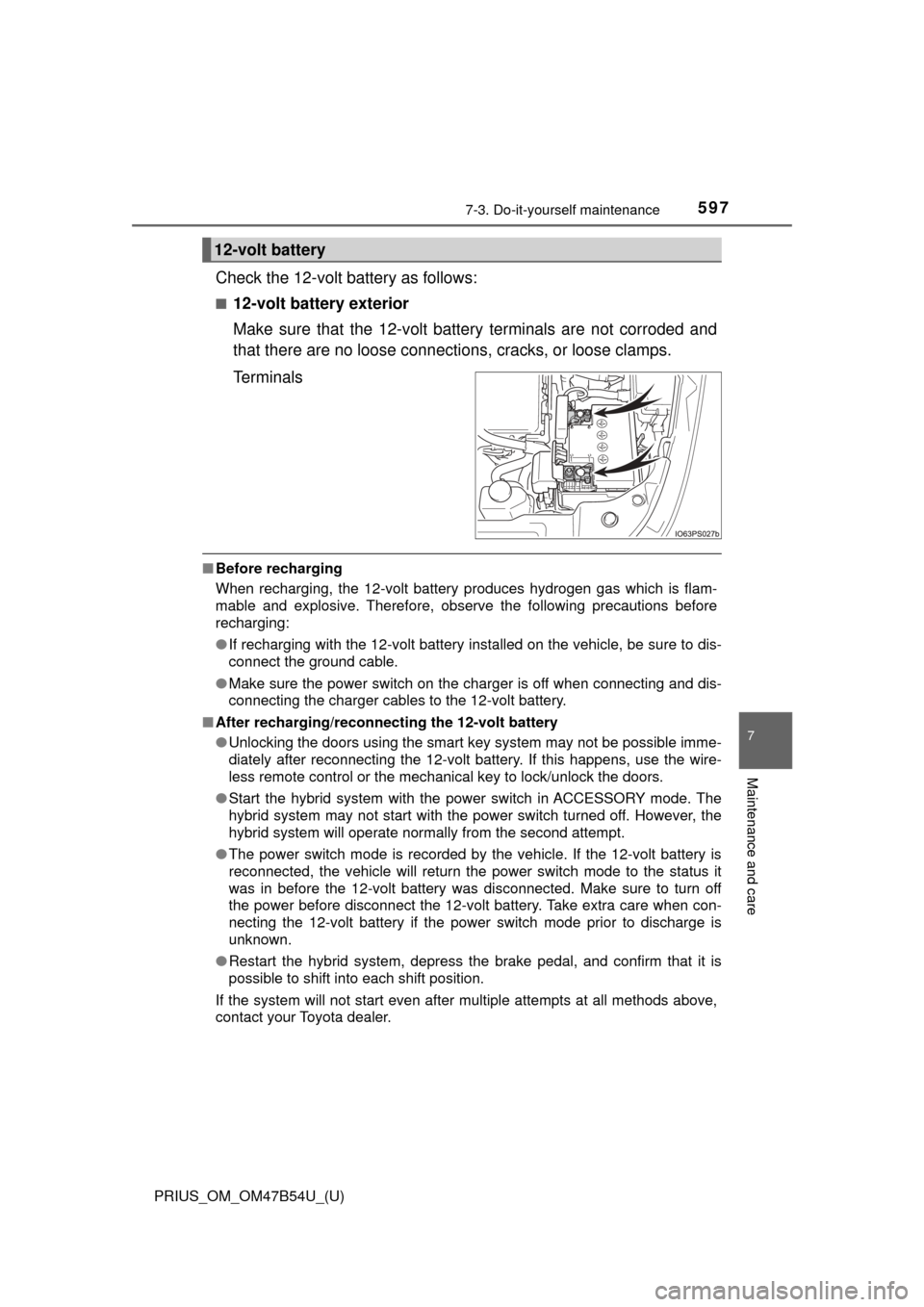
■12-volt battery exterior
Make sure that the 12-volt battery terminals are not corroded and
that there are no loose connections, cracks, or loose clamps.
Terminals
■ Before recharging
When recharging, the 12-volt battery produces hydrogen gas which is flam-
mable and explosive. Therefore, observe the following precautions before
recharging:
●If recharging with the 12-volt battery installed on the vehicle, be sure to dis-
connect the ground cable.
● Make sure the power switch on the charger is off when connecting and dis-
connecting the charger cables to the 12-volt battery.
■ After recharging/reconnect ing the 12-volt battery
● Unlocking the doors using the smart key system may not be possible imme-
diately after reconnecting the 12-volt battery. If this happens, use the wire-
less remote control or the mechanical key to lock/unlock the doors.
● Start the hybrid system with the power switch in ACCESSORY mode. The
hybrid system may not start with the power switch turned off. However, the
hybrid system will operate normally from the second attempt.
● The power switch mode is recorded by the vehicle. If the 12-volt battery is
reconnected, the vehicle will return the power switch mode to the status it
was in before the 12-volt battery was disconnected. Make sure to turn off
the power before disconnect the 12-volt battery. Take extra care when con-
necting the 12-volt battery if the power switch mode prior to discharge is
unknown.
● Restart the hybrid system, depress the brake pedal, and confirm that it is
possible to shift into each shift position.
If the system will not start even after multiple attempts at all methods above,
contact your Toyota dealer.
12-volt battery
Page 628 of 796
628
PRIUS_OM_OM47B54U_(U)
7-3. Do-it-yourself maintenance
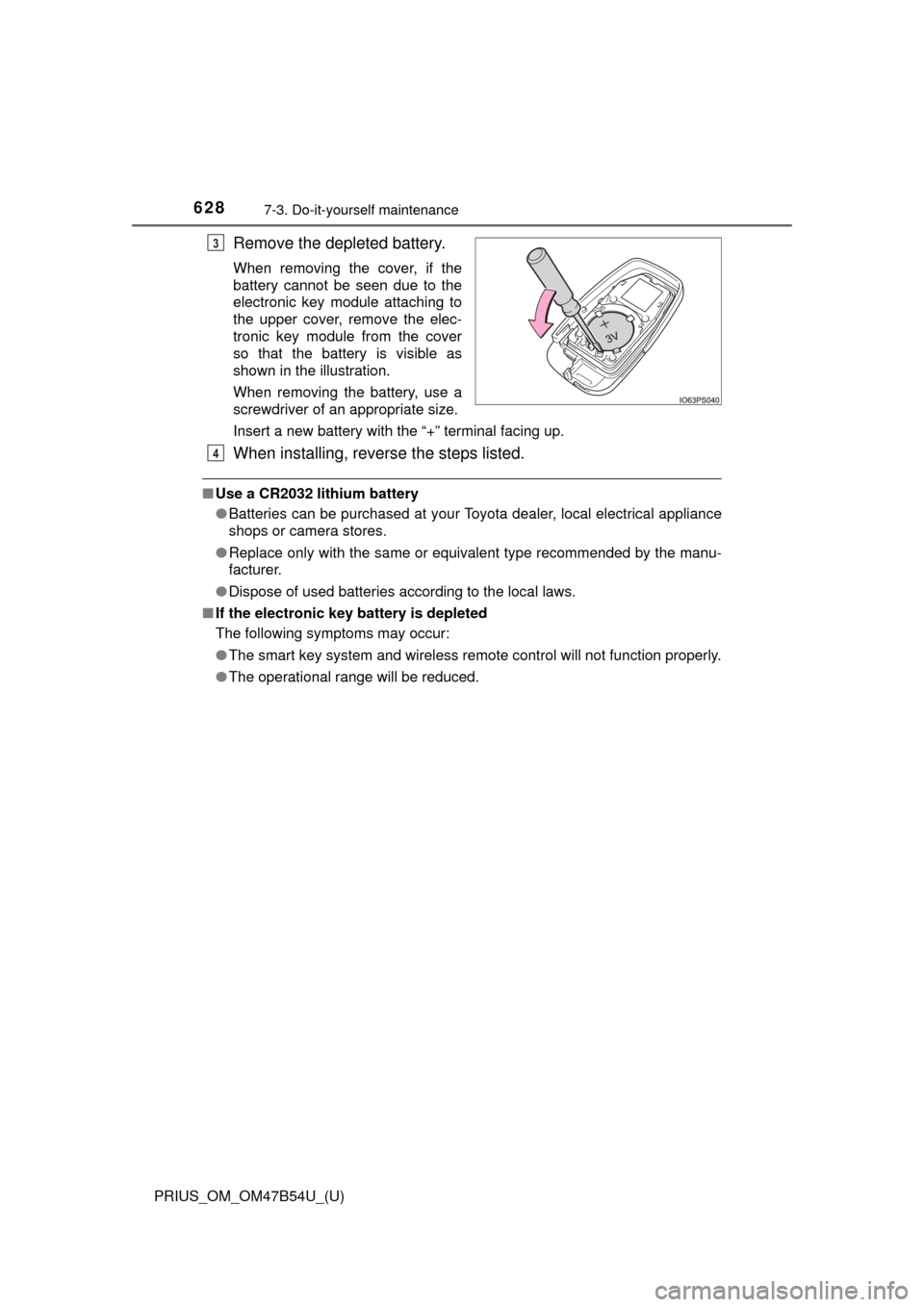
Remove the depleted battery.
When removing the cover, if the
battery cannot be seen due to the
electronic key module attaching to
the upper cover, remove the elec-
tronic key module from the cover
so that the battery is visible as
shown in the illustration.
When removing the battery, use a
screwdriver of an appropriate size.
Insert a new battery with the “+” terminal facing up.
When installing, reverse the steps listed.
■Use a CR2032 lithium battery
●Batteries can be purchased at your Toyota dealer, local electrical appliance
shops or camera stores.
● Replace only with the same or equivalent type recommended by the manu-
facturer.
● Dispose of used batteries according to the local laws.
■ If the electronic key battery is depleted
The following symptoms may occur:
●The smart key system and wireless remote control will not function properly.
● The operational range will be reduced.
3
4
Page 629 of 796
PRIUS_OM_OM47B54U_(U)
6297-3. Do-it-yourself maintenance
7
Maintenance and care
WARNING
■Removed battery and other parts
These parts are small and if swallowed by a child, they can cause choking.
Keep away from children. Failure to do so could result in death or serious
injury.
NOTICE
■For normal operation after replacing the battery
Observe the following precautions to prevent accidents:
● Always work with dry hands.
Moisture may cause the battery to rust.
● Do not touch or move any other component inside the remote control.
● Do not bend either of the battery terminals.
Page 705 of 796
705
PRIUS_OM_OM47B54U_(U)
8
When trouble arises
8-2. Steps to take in an emergency
If the electronic key does not operate
properly
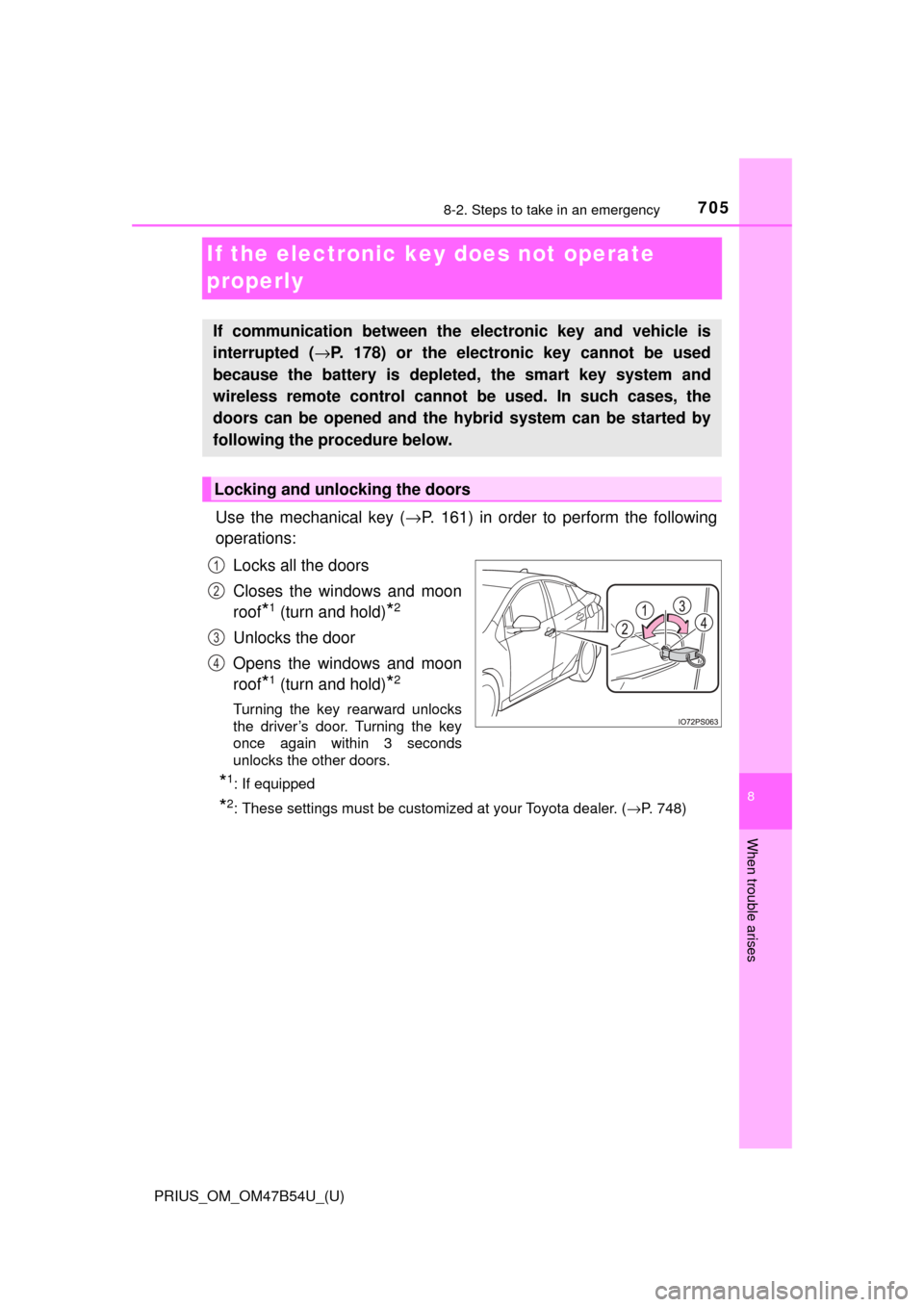
Use the mechanical key (→P. 161) in order to perform the following
operations:
Locks all the doors
Closes the windows and moon
roof
*1 (turn and hold)*2
Unlocks the door
Opens the windows and moon
roof
*1 (turn and hold)*2
Turning the key rearward unlocks
the driver’s door. Turning the key
once again within 3 seconds
unlocks the other doors.
*1: If equipped
*2: These settings must be customized at your Toyota dealer. ( →P. 748)
If communication between the electronic key and vehicle is
interrupted ( →P. 178) or the electronic key cannot be used
because the battery is depleted, the smart key system and
wireless remote control cannot be used. In such cases, the
doors can be opened and the hybrid system can be started by
following the procedure below.
Locking and unlocking the doors
1
2
3
4
Page 711 of 796
7118-2. Steps to take in an emergency
PRIUS_OM_OM47B54U_(U)
8
When trouble arises
■When recharging or repl acing the 12-volt battery
● In some cases, it may not be possible to unlock the doors using the smart
key system when the 12-volt battery is discharged. Use the wireless remote
control or the mechanical key to lock or unlock the doors.
● The hybrid system may not start on the first attempt after the 12-volt battery
has recharged but will start normally after the second attempt. This is not a
malfunction.
● The power switch mode is memorized by the vehicle. When the 12-volt bat-
tery is reconnected, the system will return to the mode it was in before the
12-volt battery was discharged. Before disconnecting the 12-volt battery,
turn the power switch off.
If you are unsure what mode the power switch was in before the 12-volt bat-
tery discharged, be especially careful when reconnecting the 12-volt battery.
● If the 12-volt battery discharges while the shift position is in P, it may not be
possible to shift the shift position to other positions. In this case, the vehicle
cannot be towed without lifting both front wheels because the front whee\
ls
will be locked. ( →P. 646)
■ When exchanging the 12-volt battery
●Use a 12-volt battery that conforms to European regulations.
● Use a 12-volt battery with the same case size as the previous 12-volt battery
and an equivalent 20 hour rate capacity (20HR) or greater.
• If the sizes differ, the 12-volt battery cannot be properly secured.
• If the 20 hour rate capacity is low, even if the time period where the vehi-
cle is not used is a short time, the 12-volt battery may discharge and the
hybrid system may not be able to start.
● For details, consult your Toyota dealer.
Page 750 of 796
750
PRIUS_OM_OM47B54U_(U)
9-2. Customization
■HUD (Head-up display)* (→ P. 146)
*: If equipped
■
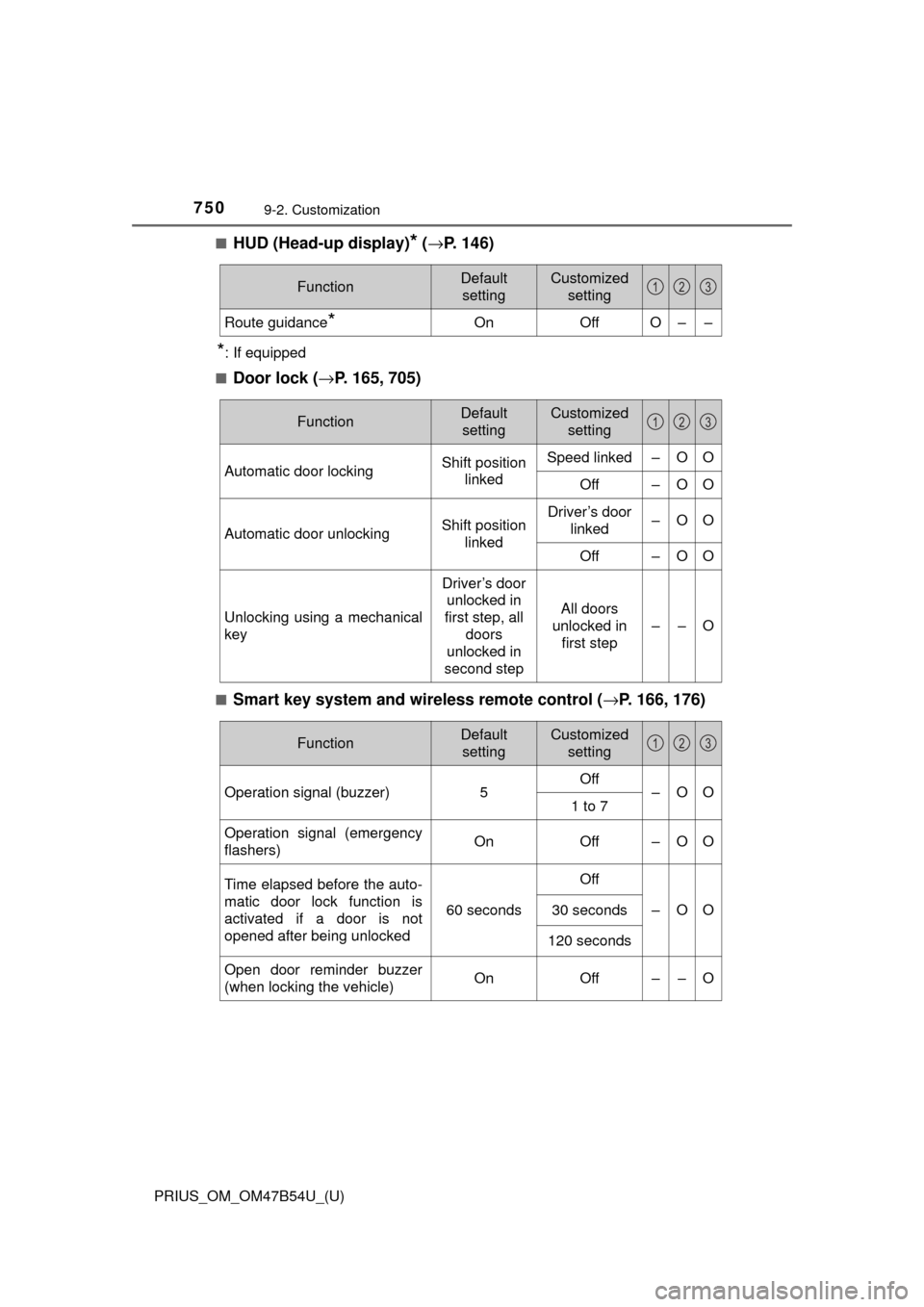
Door lock ( →P. 165, 705)
■Smart key system and wireless remote control ( →P. 166, 176)
FunctionDefault
settingCustomized setting
Route guidance*OnOffO––
123
FunctionDefault settingCustomized setting
Automatic door lockingShift position linkedSpeed linked–OO
Off–OO
Automatic door unlockingShift position linkedDriver’s door linked–OO
Off–OO
Unlocking using a mechanical
key
Driver’s door unlocked in
first step, all
doors
unlocked in
second step
All doors
unlocked in first step
––O
123
FunctionDefault settingCustomized setting
Operation signal (buzzer) 5Off
–OO
1 to 7
Operation signal (emergency
flashers) On
Off – O O
Time elapsed before the auto-
matic door lock function is
activated if a door is not
opened after being unlocked
60 seconds
Off
–OO30 seconds
120 seconds
Open door reminder buzzer
(when locking the vehicle)OnOff––O
123
Page 751 of 796
PRIUS_OM_OM47B54U_(U)
7519-2. Customization
9
Vehicle specifications
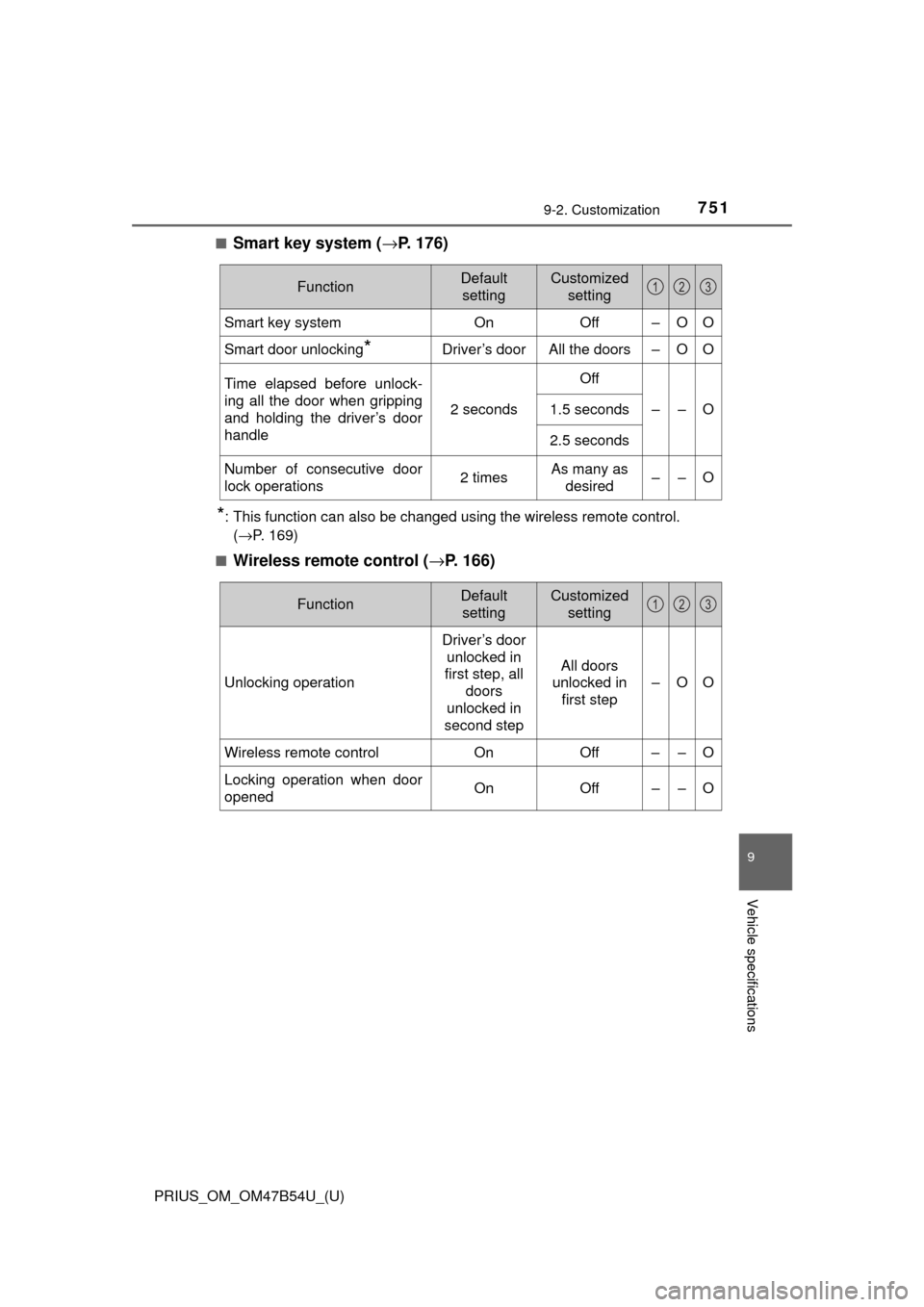
■Smart key system (→P. 176)
*: This function can also be changed using the wireless remote control.
(→P. 169)
■
Wireless remote control ( →P. 166)
FunctionDefault
settingCustomized setting
Smart key systemOnOff–OO
Smart door unlocking*Driver’s doorAll the doors–OO
Time elapsed before unlock-
ing all the door when gripping
and holding the driver’s door
handle
2 seconds
Off
––O1.5 seconds
2.5 seconds
Number of consecutive door
lock operations2 timesAs many as
desired––O
123
FunctionDefault settingCustomized setting
Unlocking operation
Driver’s door unlocked in
first step, all
doors
unlocked in
second step
All doors
unlocked in first step
–OO
Wireless remote control On Off – – O
Locking operation when door
opened On Off – – O
123
Page 752 of 796
752
PRIUS_OM_OM47B54U_(U)
9-2. Customization
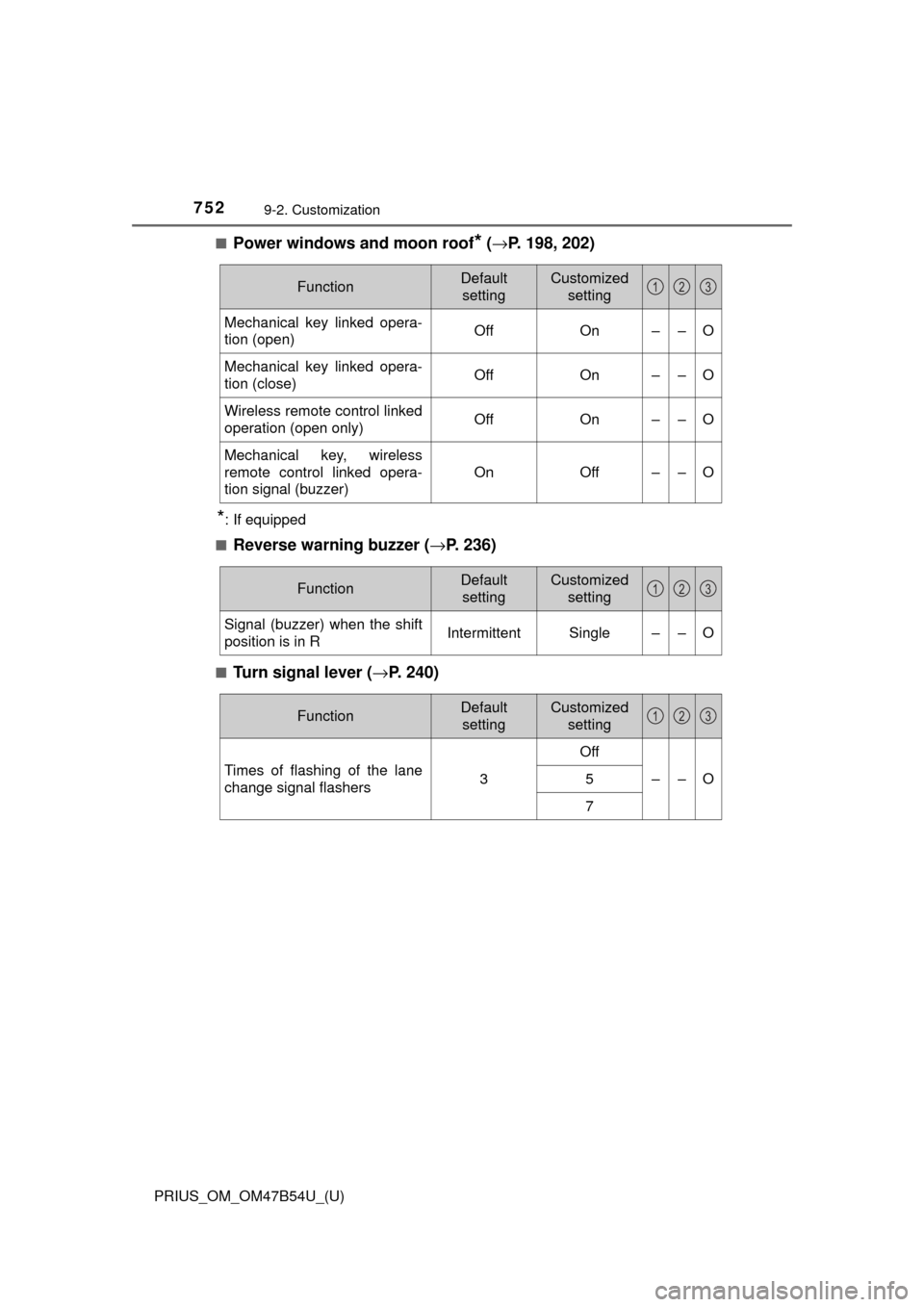
■Power windows and moon roof* (→ P. 198, 202)
*: If equipped
■
Reverse warning buzzer (→ P. 236)
■Turn signal lever (→P. 240)
FunctionDefault
settingCustomized setting
Mechanical key linked opera-
tion (open)OffOn––O
Mechanical key linked opera-
tion (close)OffOn––O
Wireless remote control linked
operation (open only)OffOn––O
Mechanical key, wireless
remote control linked opera-
tion signal (buzzer)
OnOff––O
123
FunctionDefault
settingCustomized setting
Signal (buzzer) when the shift
position is in RIntermittentSingle––O
123
FunctionDefault settingCustomized setting
Times of flashing of the lane
change signal flashers3
Off
––O5
7
123
Page 786 of 796

786Alphabetical index
PRIUS_OM_OM47B54U_(U)
JackPositioning a floor jack .......... 589
Vehicle-equipped
jack ............................. 671, 686
Jack handle ...................... 671, 686
Jam protection function
Moon roof.............................. 203
Power windows ..................... 199
Keyless entry Smart key system ................. 176
Wireless remote control ........ 160
Keys .......................................... 160
Electronic key ....................... 160
Engine switch........................ 225
If the electronic key does not operate properly ........... 705
If you lose your keys ..... 161, 164
Key number plate.................. 160
Keyless entry ........................ 160
Keys ...................................... 160
Mechanical key ..................... 160
Power switch......................... 225
Replacing the battery ............ 627
Warning buzzer..................... 177
Wireless remote control key ...................................... 160
Knee airbags .............................. 36 Language
(multi-information
display) .................................. 142
LATCH system ........................... 61
LDA (Lane Departure Alert with steering control) ........... 287
Lever Auxiliary catch lever.............. 587
Hood lock release lever ........ 587
Shift lever.............................. 234
Turn signal lever ................... 240
Wiper lever ........................... 254
License plate lights Light switch ........................... 242
Replacing light bulbs ............ 641
Light Automatic High Beam
system .......... ...................... 247
Door courtesy lights .............. 523
Fog light switch ..................... 252
Headlight switch ................... 242
Illuminated entry system ....... 525
Interior lights ................. 524, 525
Interior light list ..................... 523
Luggage compartment light..................................... 172
Personal lights ...................... 524
Replacing light bulbs ............ 635
Shift lever light ...................... 523
Turn signal lever ................... 240
Vanity lights .......................... 540
Wattage ................................ 732
Light bulbs
Replacing.............................. 635
Wattage ................................ 732
Luggage cover ......................... 535
J
K
L