display TOYOTA PRIUS 2017 4.G Owner's Guide
[x] Cancel search | Manufacturer: TOYOTA, Model Year: 2017, Model line: PRIUS, Model: TOYOTA PRIUS 2017 4.GPages: 796, PDF Size: 20.13 MB
Page 117 of 796
PRIUS_OM_OM47B54U_(U)
1172. Instrument cluster
2
Instrument cluster
◆Energy monitor
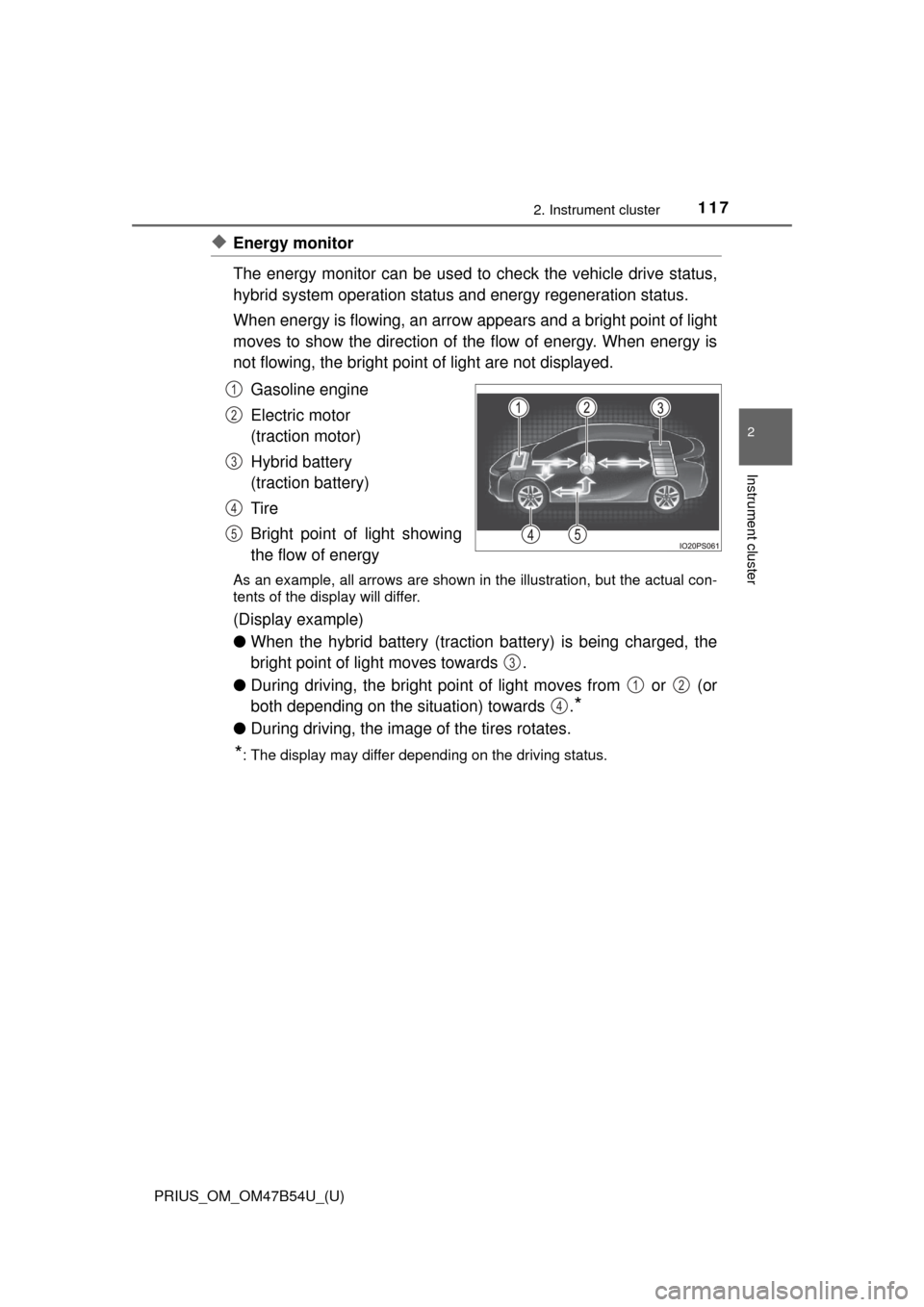
The energy monitor can be used to check the vehicle drive status,
hybrid system operation status and energy regeneration status.
When energy is flowing, an arrow appears and a bright point of light
moves to show the direction of the flow of energy. When energy is
not flowing, the bright point of light are not displayed.
Gasoline engine
Electric motor
(traction motor)
Hybrid battery
(traction battery)
Tire
Bright point of light showing
the flow of energy
As an example, all arrows are shown in the illustration, but the actual con-
tents of the display will differ.
(Display example)
●When the hybrid battery (traction battery) is being charged, the
bright point of light moves towards .
● During driving, the bright point of light moves from or (or
both depending on the situation) towards .
*
●During driving, the image of the tires rotates.
*: The display may differ depending on the driving status.
1
2
3
4
5
3
12
4
Page 118 of 796
118
PRIUS_OM_OM47B54U_(U)
2. Instrument cluster
■Hybrid battery (tract ion battery) status
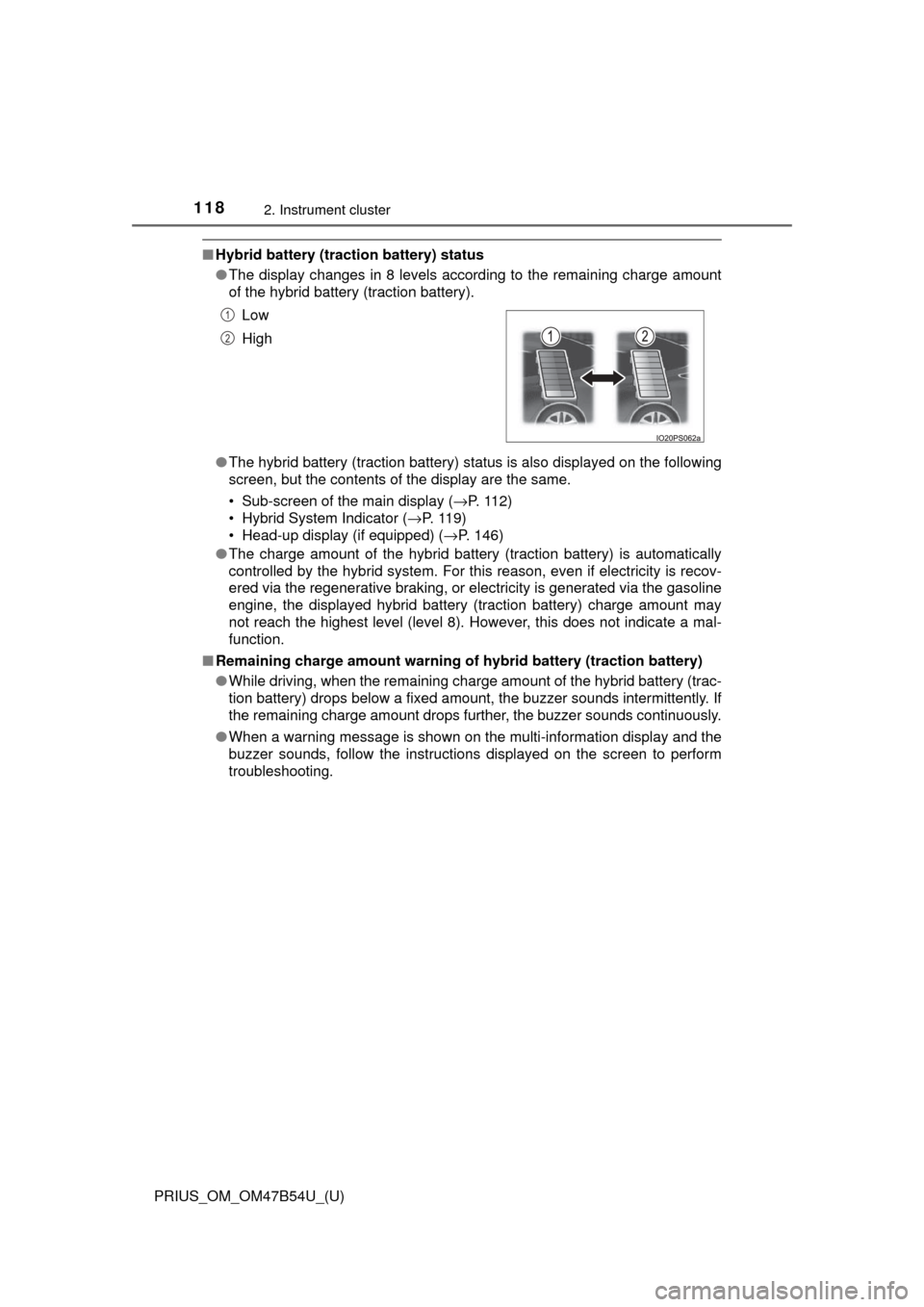
● The display changes in 8 levels according to the remaining charge amount
of the hybrid battery (traction battery).
● The hybrid battery (traction battery) status is also displayed on the following
screen, but the contents of the display are the same.
• Sub-screen of the main display ( →P. 112)
• Hybrid System Indicator ( →P. 11 9 )
• Head-up display (if equipped) ( →P. 146)
● The charge amount of the hybrid battery (traction battery) is automatically
controlled by the hybrid system. For this reason, even if electricity is recov-
ered via the regenerative braking, or electricity is generated via the gasoline
engine, the displayed hybrid battery (traction battery) charge amount may
not reach the highest level (level 8). However, this does not indicate a mal-
function.
■ Remaining charge amount warning of hybrid battery (traction battery)
●While driving, when the remaining charge amount of the hybrid battery (trac-
tion battery) drops below a fixed amount, the buzzer sounds intermittently. If
the remaining charge amount drops further, the buzzer sounds continuously.
● When a warning message is shown on the multi-information display and the
buzzer sounds, follow the instructions displayed on the screen to perform
troubleshooting.Low
High
1
2
Page 119 of 796
PRIUS_OM_OM47B54U_(U)
1192. Instrument cluster
2
Instrument cluster
◆Hybrid System Indicator
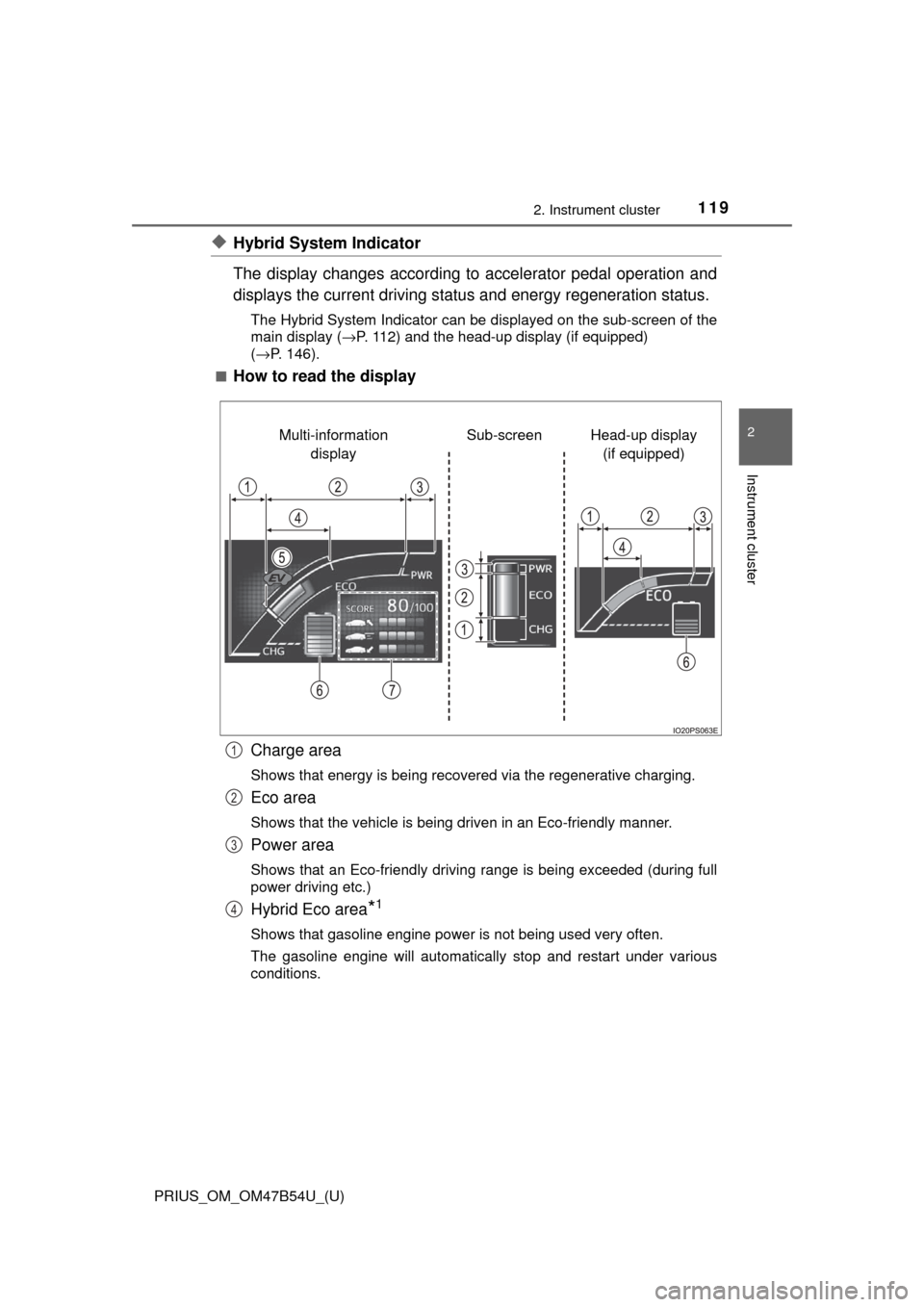
The display changes according to accelerator pedal operation and
displays the current driving status and energy regeneration status.
The Hybrid System Indicator can be displayed on the sub-screen of the
main display (→P. 112) and the head-up display (if equipped)
( →P. 146).
■
How to read the display
Charge area
Shows that energy is being recovered via the regenerative charging.
Eco area
Shows that the vehicle is being driven in an Eco-friendly manner.
Power area
Shows that an Eco-friendly driving range is being exceeded (during full
power driving etc.)
Hybrid Eco area*1
Shows that gasoline engine power is not being used very often.
The gasoline engine will automatically stop and restart under various
conditions.
Head-up display (if equipped)
Sub-screen
Multi-information
display
1
2
3
4
Page 120 of 796
120
PRIUS_OM_OM47B54U_(U)
2. Instrument cluster
EV indicator*2, 3
The EV indicator comes on when the vehicle is driven using only the
electric motor (traction motor) or the gasoline engine is stopped.
Hybrid battery (traction battery) status
→P. 1 1 8
Eco score
→P. 121
●By keeping the indicator within Ec o area, more Eco-friendly driv-
ing can be achieved.
● Charge area indicates regeneration
*4 status. Regenerated
energy will be used to charge the hybrid battery (traction battery).
*1: Not displayed on the sub-screen.
*2: Not displayed on the sub-screen or head-up display.
*3: The EV indicator function can be turned off in the “Meter Customize”
settings. ( →P. 142)
*4: When used in this manual, “regeneration” refers to the conversion of
energy created by the movement of the vehicle into electrical energy.
■
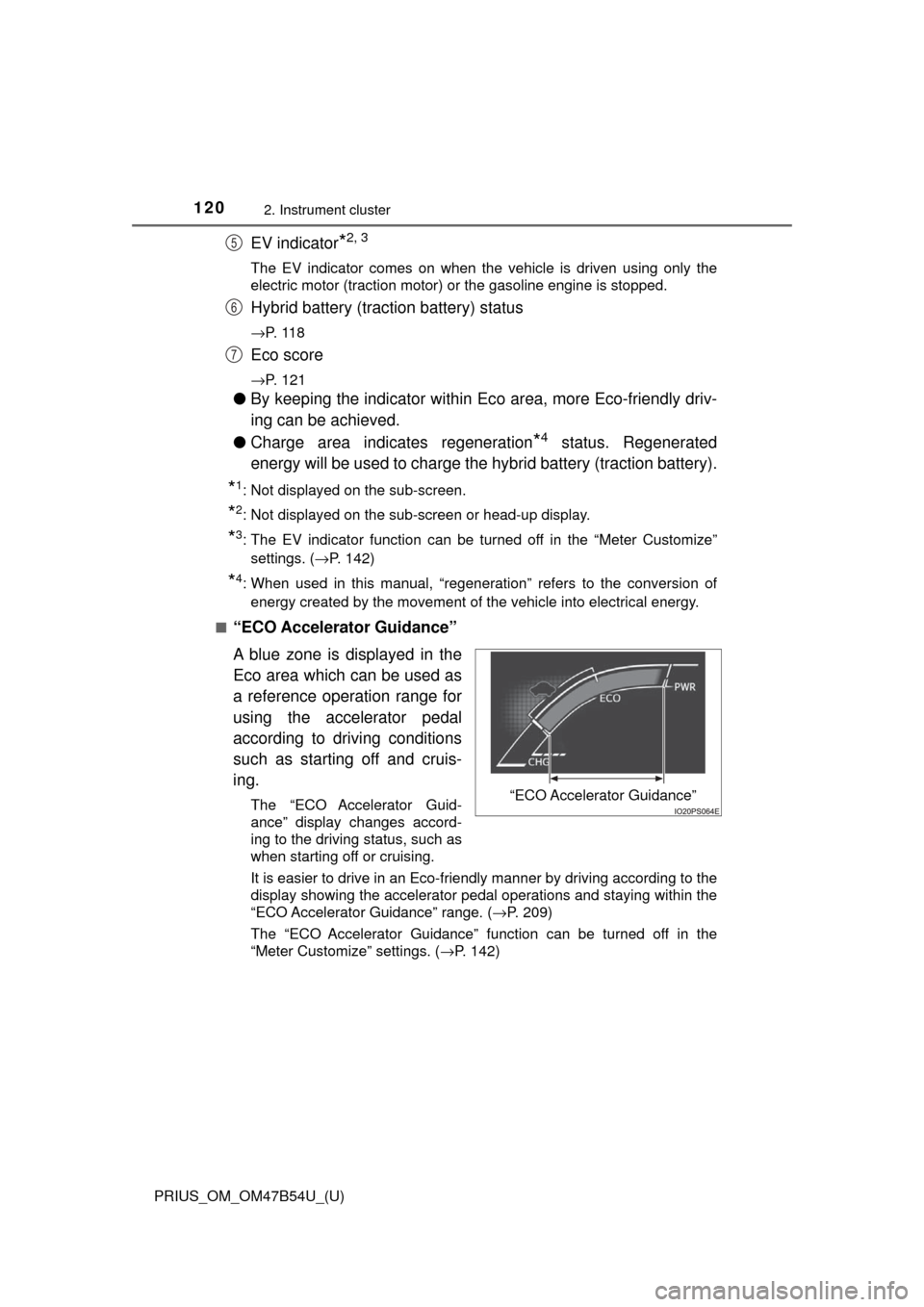
“ECO Accelerator Guidance”
A blue zone is displayed in the
Eco area which can be used as
a reference operation range for
using the accelerator pedal
according to driving conditions
such as starting off and cruis-
ing.
The “ECO Accelerator Guid-
ance” display changes accord-
ing to the driving status, such as
when starting off or cruising.
It is easier to drive in an Eco-friendly manner by driving according to the
display showing the accelerator pedal operations and staying within the
“ECO Accelerator Guidance” range. ( →P. 209)
The “ECO Accelerator Guidance” function can be turned off in the
“Meter Customize” settings. ( →P. 142)
5
6
7
“ECO Accelerator Guidance”
Page 121 of 796
PRIUS_OM_OM47B54U_(U)
1212. Instrument cluster
2
Instrument cluster
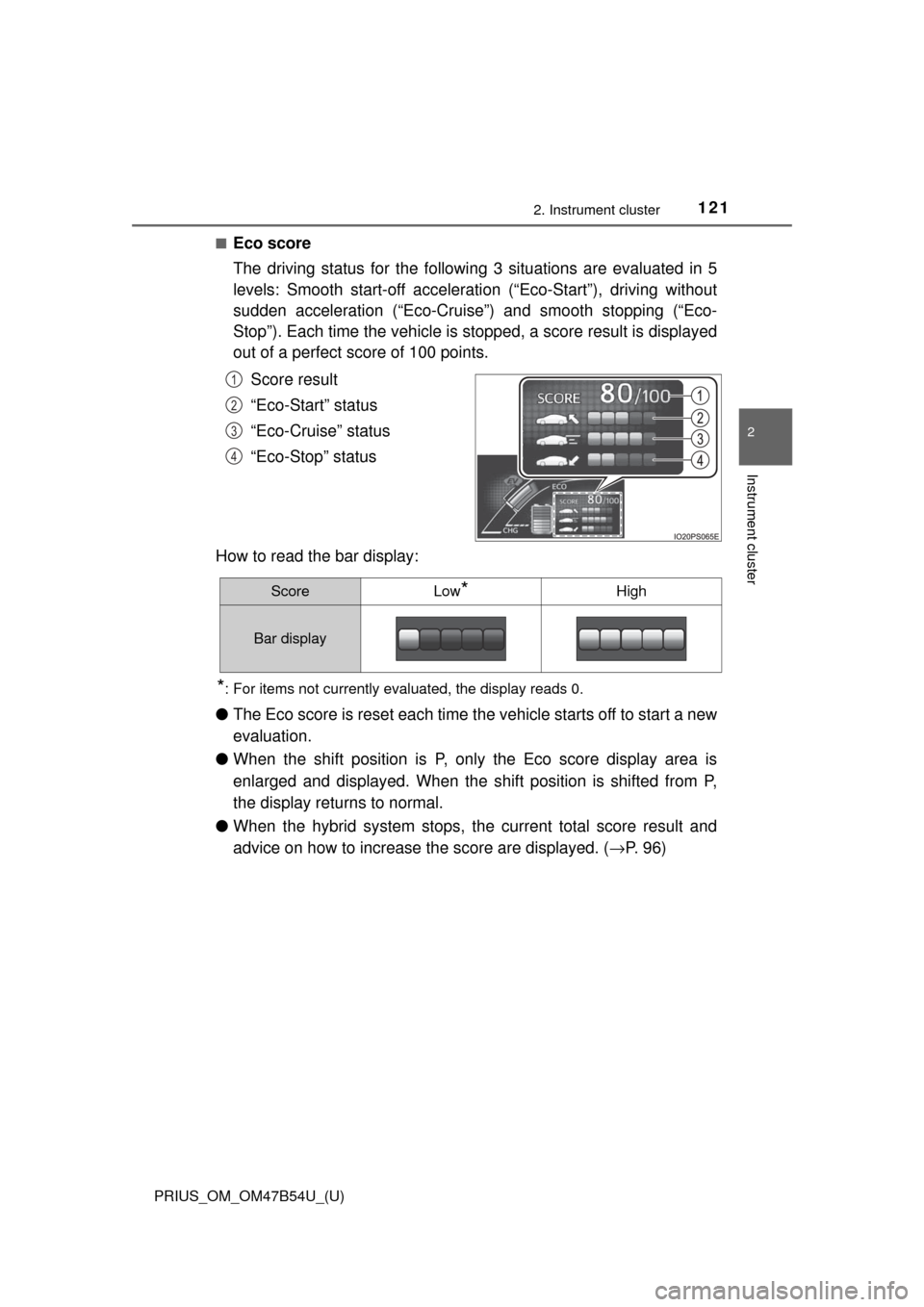
■Eco score
The driving status for the following 3 situations are evaluated in 5
levels: Smooth start-off accelerati on (“Eco-Start”), driving without
sudden acceleration (“Eco-Cruise”) and smooth stopping (“Eco-
Stop”). Each time the vehicle is stopped, a score result is displayed
out of a perfect score of 100 points.
Score result
“Eco-Start” status
“Eco-Cruise” status
“Eco-Stop” status
How to read the bar display:
*: For items not currently evaluated, the display reads 0.
● The Eco score is reset each time t he vehicle starts off to start a new
evaluation.
● When the shift position is P, only the Eco score display area is
enlarged and displayed. When the shift position is shifted from P,
the display returns to normal.
● When the hybrid system stops, the current total score result and
advice on how to increase the score are displayed. ( →P. 9 6 )
1
2
3
4
ScoreLow*High
Bar display
Page 122 of 796

122
PRIUS_OM_OM47B54U_(U)
2. Instrument cluster
■When operation of each function stops
● The Hybrid System Indicator stops operating in the following situations.
• The “READY” indicator is not illuminated.
• The shift position is not D or B.
● The Eco score and “ECO Accelerator Guidance” stop operating in the fol-
lowing situations.
• The Hybrid System Indicator is not operating.
• Cruise control (if equipped) or dynamic radar cruise control with full-
speed range (if equipped) is being used.
■ About the Eco score
●After starting off, Eco score display does not start until the vehicle speed
exceeds approximately 12 mph (20 km/h).
● In addition to the vehicle driving status, the Eco score also evaluates the air
conditioning system usage condition ( →P. 136). The score displayed when
the hybrid system stops is the total result of the driving status after the
hybrid system starts and the air conditioning usage condition.
Page 123 of 796
PRIUS_OM_OM47B54U_(U)
1232. Instrument cluster
2
Instrument cluster
◆“Fuel Consumption Record”
The transitions of the average fuel consumption after the hybrid
system starts can be checked in such a unit as every 5 minutes or
every 1 mile (1.6 km)
*1 or 1 km (0.6 mile)*2 of driving. Also, it is
possible to check the average fu el consumption history for each
month by switching to the “Monthly” display.
*1: When the unit is set to “MPH”
*2: When the unit is set to “km/h”
■
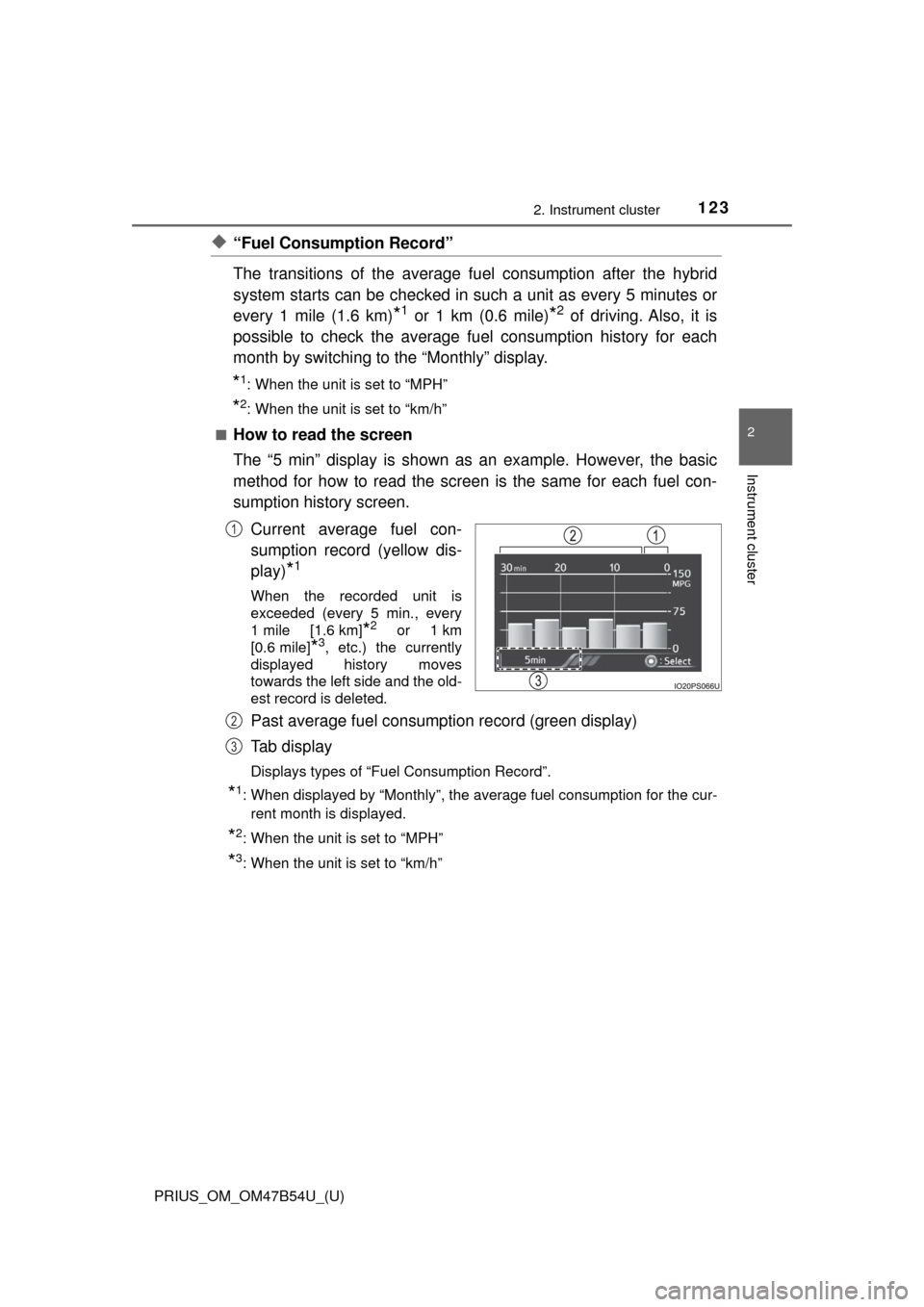
How to read the screen
The “5 min” display is shown as an example. However, the basic
method for how to read the screen is the same for each fuel con-
sumption history screen.
Current average fuel con-
sumption record (yellow dis-
play)
*1
When the recorded unit is
exceeded (every 5 min., every
1 mile [1.6 km]
*2 or 1 km
[0.6 mile]
*3, etc.) the currently
displayed history moves
towards the left side and the old-
est record is deleted.
Past average fuel consumption record (green display)
Tab display
Displays types of “Fuel Consumption Record”.
*1: When displayed by “Monthly”, the average fuel consumption for the cur-
rent month is displayed.
*2: When the unit is set to “MPH”
*3: When the unit is set to “km/h”
1
2
3
Page 124 of 796
124
PRIUS_OM_OM47B54U_(U)
2. Instrument cluster
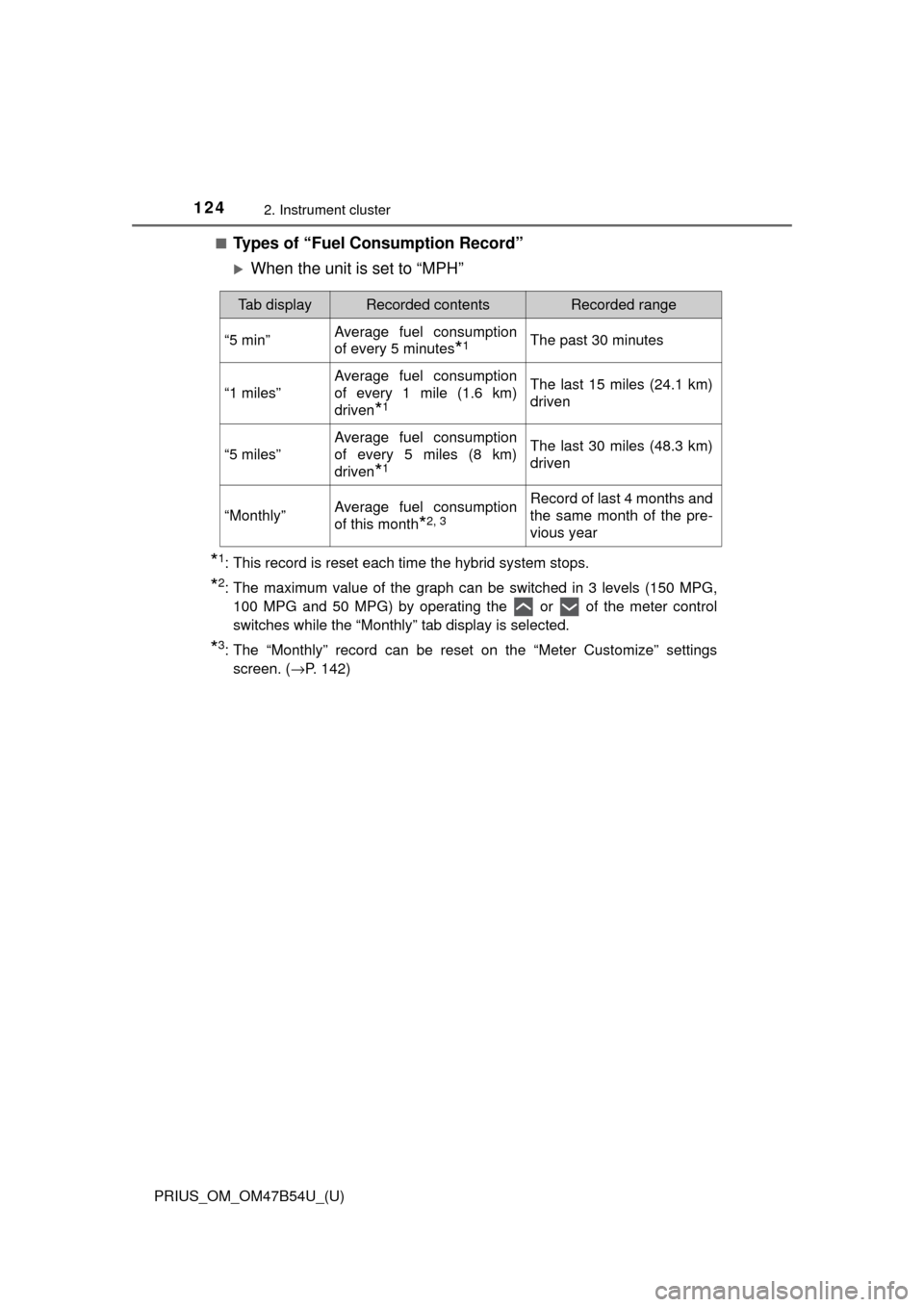
■Types of “Fuel Consumption Record”
When the unit is set to “MPH”
*1: This record is reset each time the hybrid system stops.
*2: The maximum value of the graph can be switched in 3 levels (150 MPG,100 MPG and 50 MPG) by operating the or of the meter control
switches while the “Monthly” tab display is selected.
*3: The “Monthly” record can be reset on the “Meter Customize” settingsscreen. ( →P. 142)
Tab displayRecorded contentsRecorded range
“5 min”Average fuel consumption
of every 5 minutes
*1The past 30 minutes
“1 miles”
Average fuel consumption
of every 1 mile (1.6 km)
driven
*1
The last 15 miles (24.1 km)
driven
“5 miles”
Average fuel consumption
of every 5 miles (8 km)
driven
*1
The last 30 miles (48.3 km)
driven
“Monthly”Average fuel consumption
of this month
*2, 3
Record of last 4 months and
the same month of the pre-
vious year
Page 125 of 796
PRIUS_OM_OM47B54U_(U)
1252. Instrument cluster
2
Instrument cluster
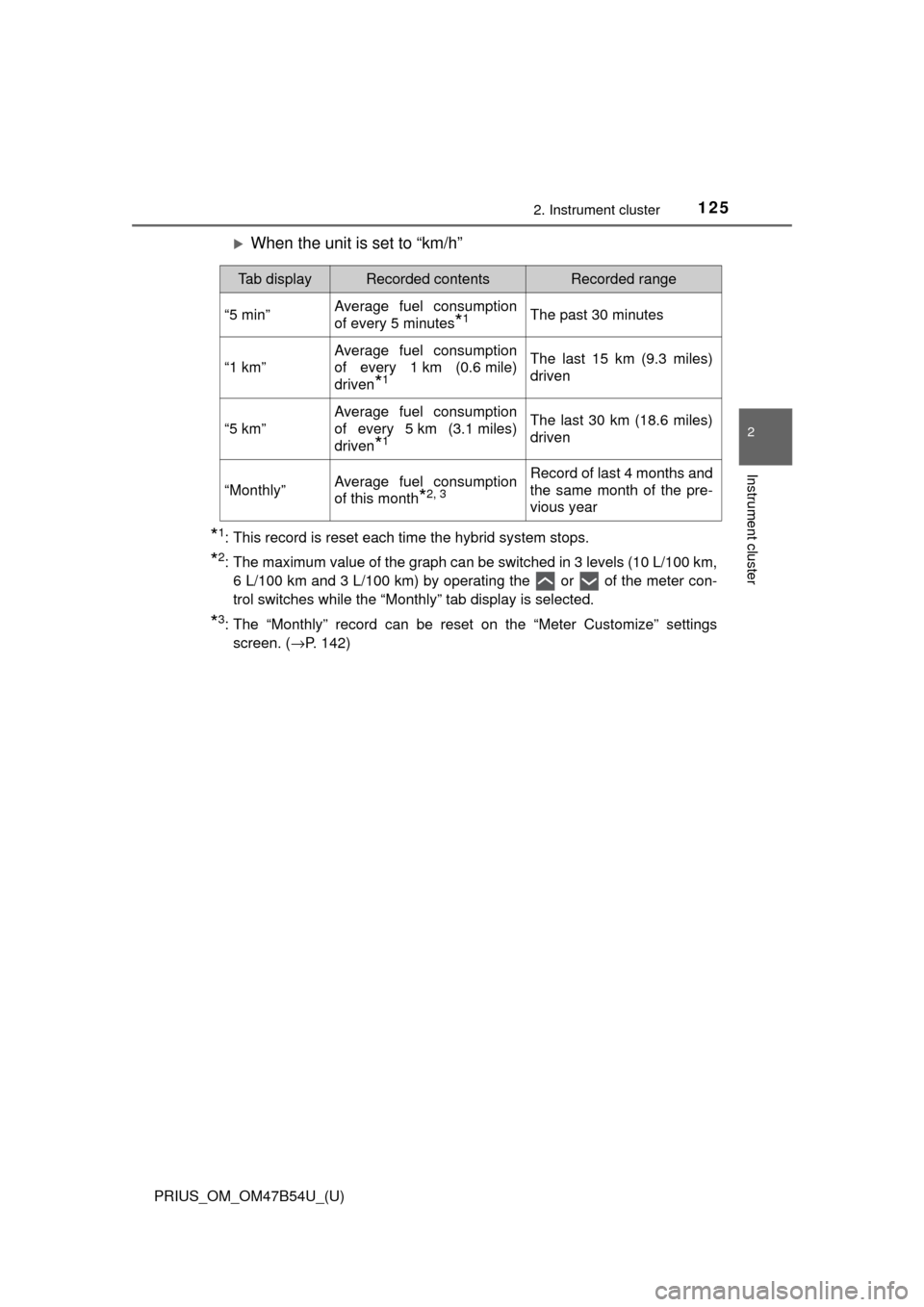
When the unit is set to “km/h”
*1: This record is reset each time the hybrid system stops.
*2: The maximum value of the graph can be switched in 3 levels (10 L/100 km,6 L/100 km and 3 L/100 km) by operating the or of the meter con-
trol switches while the “Monthly” tab display is selected.
*3: The “Monthly” record can be reset on the “Meter Customize” settingsscreen. ( →P. 142)
Tab displayRecorded contentsRecorded range
“5 min”Average fuel consumption
of every 5 minutes
*1The past 30 minutes
“1 km”
Average fuel consumption
of every 1 km (0.6 mile)
driven
*1
The last 15 km (9.3 miles)
driven
“5 km”
Average fuel consumption
of every 5 km (3.1 miles)
driven
*1
The last 30 km (18.6 miles)
driven
“Monthly”Average fuel consumption
of this month
*2, 3
Record of last 4 months and
the same month of the pre-
vious year
Page 126 of 796
126
PRIUS_OM_OM47B54U_(U)
2. Instrument cluster
■Switching the fuel consumption history screenWhile the “Fuel Consumption Record” screen is displayed, press .
The tab display is selected and it is possible to switch the contents of
the display.
Press or of the meter control switches to switch the con-
tents of the display.
Each time is pressed, the display switches in the following order:
When the unit is set to “MPH”
“5 min”, “1 miles”, “5 miles” and “Monthly”*. When is pressed, it
switches in the reverse order.
When the unit is set to “km/h”
“5 min”, “1 km”, “5 km” and “Monthly”*. When is pressed, it switches
in the reverse order.
*: After “Monthly”, the display returns to “5 min”.
■ Calendar settings
→P. 144
1
2