battery TOYOTA PRIUS 2017 4.G Workshop Manual
[x] Cancel search | Manufacturer: TOYOTA, Model Year: 2017, Model line: PRIUS, Model: TOYOTA PRIUS 2017 4.GPages: 796, PDF Size: 20.13 MB
Page 521 of 796
521
PRIUS_OM_OM47B54U_(U)
6-1. Using the air conditioning system and defogger
6
Interior features
Seat heaters∗
∗: If equipped
Seat heaters heat the front seats.
WARNING
●Care should be taken to prevent injury if anyone in the following categories
comes in contact with the seats when the heater is on:
• Babies, small children, the elderly, the sick and the physically chal-
lenged
• Persons with sensitive skin
• Persons who are fatigued
• Persons who have taken alcohol or drugs that induce sleep (sleeping drugs, cold remedies, etc.)
● Observe the following precautions to prevent minor burns or overheating:
• Do not cover the seat with a blanket or cushion when using the seat
heater.
• Do not use seat heater more than necessary.
NOTICE
● Do not put heavy objects that have an uneven surface on the seat and do
not stick sharp objects (needles, nails, etc.) into the seat.
● To prevent 12-volt battery discharge, do not use the functions when the
hybrid system is off.
Page 525 of 796
PRIUS_OM_OM47B54U_(U)
5256-2. Using the interior lights
6
Interior features
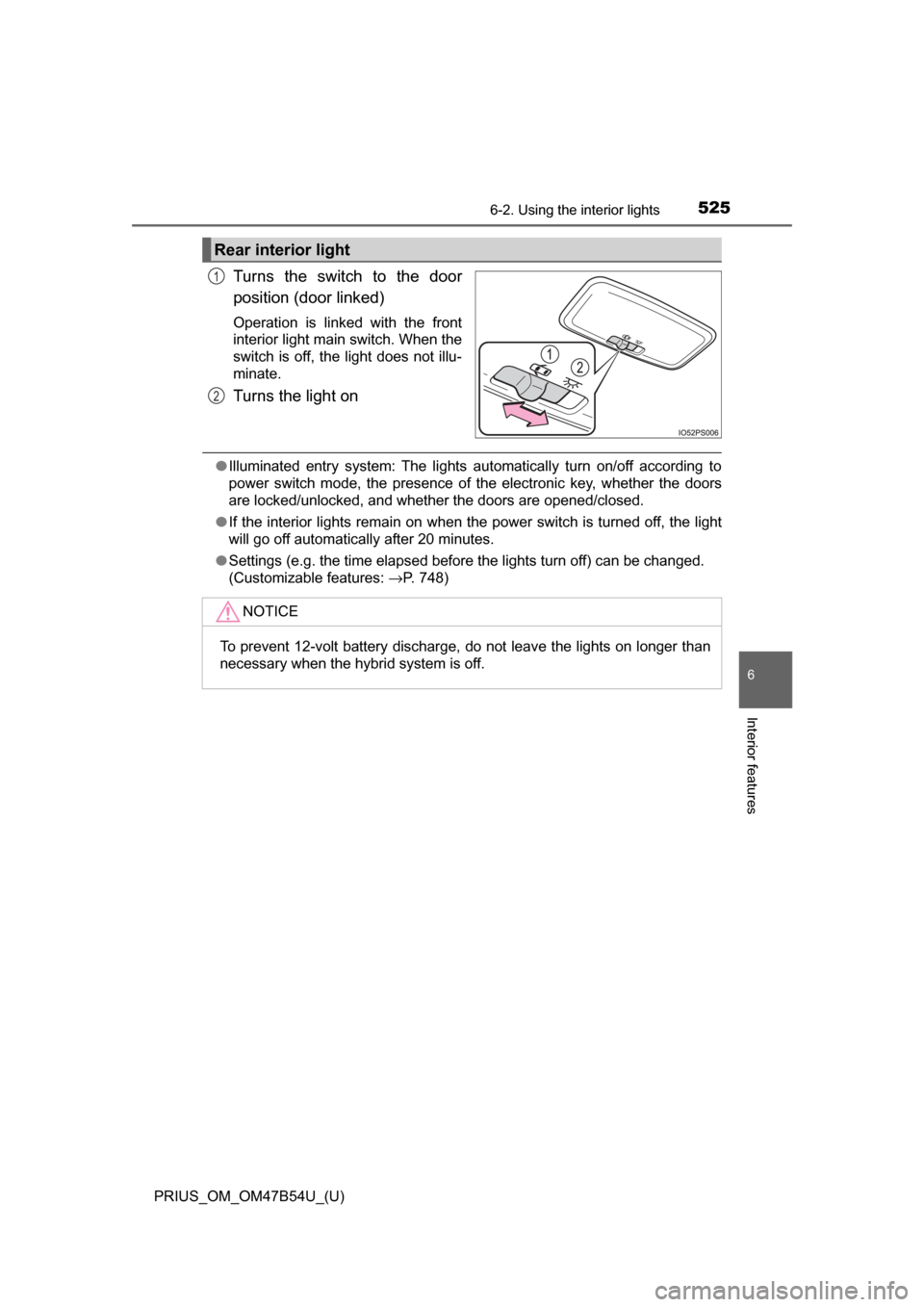
Turns the switch to the door
position (door linked)
Operation is linked with the front
interior light main switch. When the
switch is off, the light does not illu-
minate.
Turns the light on
●Illuminated entry system: The lights automatically turn on/off according to
power switch mode, the presence of the electronic key, whether the doors
are locked/unlocked, and whether the doors are opened/closed.
● If the interior lights remain on when the power switch is turned off, the light
will go off automatically after 20 minutes.
● Settings (e.g. the time elapsed before the lights turn off) can be changed.
(Customizable features: →P. 748)
Rear interior light
1
2
NOTICE
To prevent 12-volt battery discharge, do not leave the lights on longer than
necessary when the hybrid system is off.
Page 540 of 796
540
PRIUS_OM_OM47B54U_(U)
6-4. Using the other interior features
Other interior features
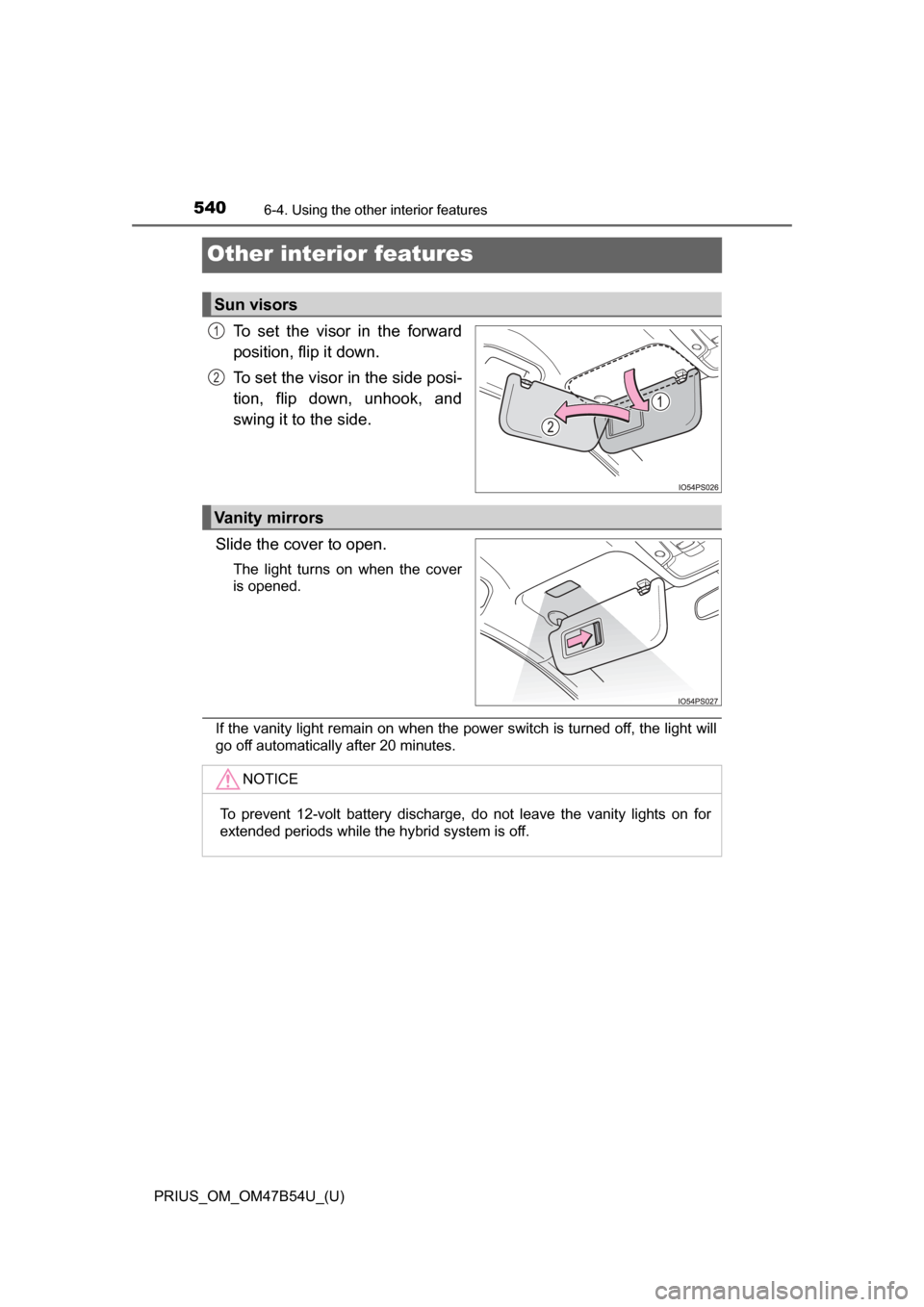
To set the visor in the forward
position, flip it down.
To set the visor in the side posi-
tion, flip down, unhook, and
swing it to the side.
Slide the cover to open.
The light turns on when the cover
is opened.
If the vanity light remain on when the power switch is turned off, the light will
go off automatically after 20 minutes.
Sun visors
1
2
Vanity mirrors
NOTICE
To prevent 12-volt battery discharge, do not leave the vanity lights on for
extended periods while the hybrid system is off.
Page 541 of 796
PRIUS_OM_OM47B54U_(U)
5416-4. Using the other interior features
6
Interior features
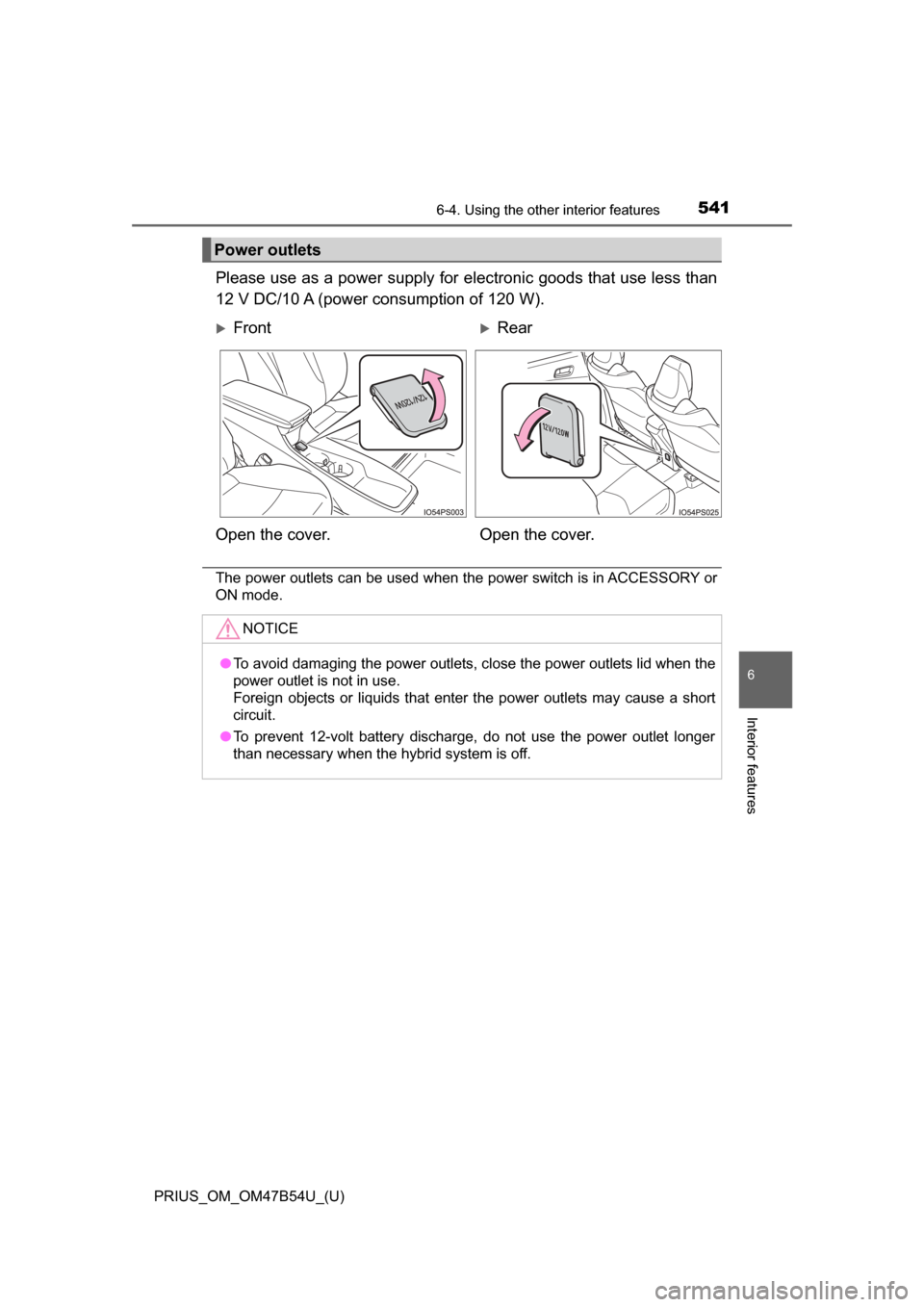
Please use as a power supply for electronic goods that use less than
12 V DC/10 A (power consumption of 120 W).
The power outlets can be used when the power switch is in ACCESSORY or
ON mode.
Power outlets
FrontRear
Open the cover. Open the cover.
NOTICE
●To avoid damaging the power outlets, close the power outlets lid when the
power outlet is not in use.
Foreign objects or liquids that enter the power outlets may cause a short
circuit.
● To prevent 12-volt battery discharge, do not use the power outlet longer
than necessary when the hybrid system is off.
Page 549 of 796
PRIUS_OM_OM47B54U_(U)
5496-4. Using the other interior features
6
Interior features
WARNING
■Conditions in which the function may not operate correctly
In the following conditions, it may not operate correctly
● The portable device is fully charged
● There is foreign matter between the charge area and portable device
● The temperature of the portable device gets higher from charging
● The charging surface of the portable device is facing up
● The placement of the portable device is out of alignment with the charge
area
● Near a TV tower, electric power plant, gas station, radio station, large dis-
play, airport or other facility that generates strong radio waves or electri\
cal
noise
● When the electronic key is in contact with, or is covered by the following
metallic objects
• Cards to which aluminum foil is attached
• Cigarette boxes that have aluminum foil inside
• Metallic wallets or bags
• Coins
• Hand warmers made of metal
• Media such as CDs and DVDs
● When other wireless keys (that emit radio waves) are being used nearby
In addition, excluding the above-mentioned, when the charger does not per-
form normally or the operation display lamp is flashing continuously, it is
considered that the wireless charger is malfunctioning. Contact your Toyota
dealer.
■ To prevent failure or damage to data
● Do not bring magnetic cards, such as credit cards, or magnetic recording
media, etc., close to the charger while charging, otherwise, data may dis-
appear under the influence of magnetism. Also, do not bring precision
instruments such as wrist watches, etc., close to the charger, as such
objects may break.
● Do not leave portable devices in the cabin. The temperature inside the
cabin may become high, when under the sun, and cause damage to the
device.
■ To prevent 12-volt battery discharge
When the hybrid system is stopped, do not use the wireless charger for a
long time.
Page 557 of 796
PRIUS_OM_OM47B54U_(U)
5576-4. Using the other interior features
6
Interior features
Press and hold the desired HomeLink® button. After 20 seconds, the
HomeLink® indicator light will start flashing slowly. Keep pressing the
HomeLink® button and press and hold the transmitter button until the
HomeLink® indicator light changes from a slow to a rapid flash.
Release the buttons.
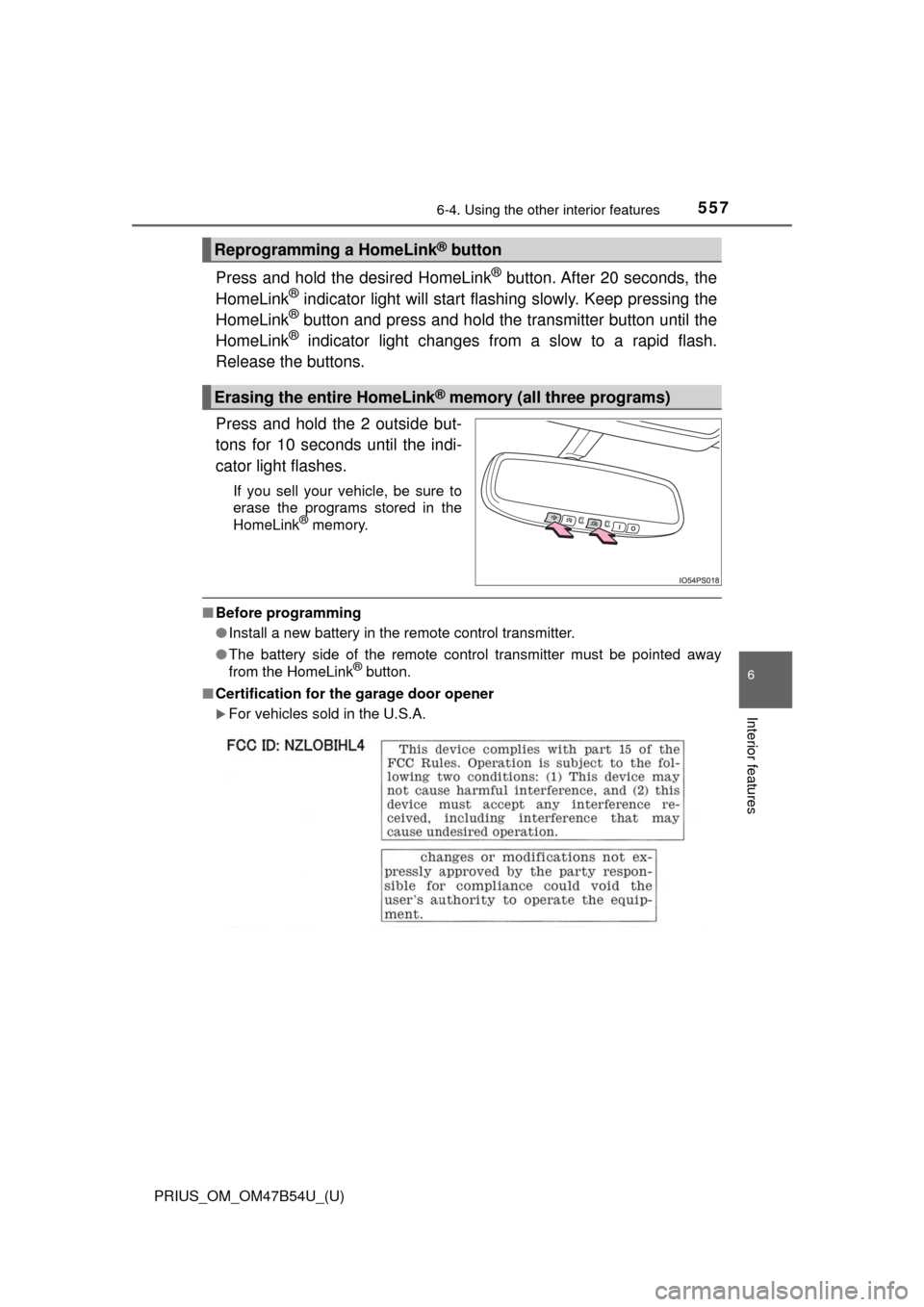
Press and hold the 2 outside but-
tons for 10 seconds until the indi-
cator light flashes.
If you sell your vehicle, be sure to
erase the programs stored in the
HomeLink
® memory.
■ Before programming
●Install a new battery in the remote control transmitter.
● The battery side of the remote control transmitter must be pointed away
from the HomeLink
® button.
■ Certification for the garage door opener
For vehicles sold in the U.S.A.
Reprogramming a HomeLink® button
Erasing the entire HomeLink® memory (all three programs)
Page 565 of 796
565
PRIUS_OM_OM47B54U_(U)
7Maintenance and care
7-1. Maintenance and careCleaning and protecting the vehicle exterior .......... 566
Cleaning and protecting the vehicle interior ........... 572
7-2. Maintenance Maintenance requirements ................... 577
General maintenance........ 580
Emission inspection and maintenance (I/M)
programs......................... 583
7-3. Do-it-yourself maintenance Do-it-yourself service precautions ..................... 584
Hood ................................. 587
Positioning a floor jack ...... 589
Engine compartment ......... 590
Tires .................................. 604
Tire inflation pressure ....... 614
Wheels .............................. 617
Air conditioning filter.......... 620
Wiper rubber replacement .................... 623
Electronic key battery........ 627
Checking and replacing fuses ............................... 630
Headlight aim .................... 633
Light bulbs......................... 635
Page 567 of 796

5677-1. Maintenance and care
7
Maintenance and care
■Note for a smart key system
If the door handle becomes wet while the electronic key is within the ef\
fective
range, the do")
PRIUS_OM_OM47B54U_(U)
5677-1. Maintenance and care
7
Maintenance and care
■Note for a smart key system
If the door handle becomes wet while the electronic key is within the ef\
fective
range, the door may lock and unlock repeatedly. In that case, follow the fol-
lowing correction procedures to wash the vehicle:
●Place the key in a position 6 ft. (2 m) or more separate from the vehicle
while the vehicle is being washed. (Take care to ensure that the key is not
stolen.)
● Set the electronic key to battery-saving mode to disable the smart key sys-
tem. ( →P. 178)
■ Aluminum wheels
●Remove any dirt immediately by using a neutral detergent. Do not use hard
brushes or abrasive cleaners. Do not use strong or harsh chemical clean-
ers.
Use the same mild detergent and wax as used on the paint.
● Do not use detergent on the wheels when they are hot, for example after
driving for long distance in the hot weather.
● Wash detergent from the wheels immediately after use.
■ Bumpers
Do not scrub with abrasive cleaners.
■ Front side windows water-repellent coating (if equipped)
The following precautions can extend the effectiveness of the water-repellent
coating.
●Remove any dirt, etc. from the front side windows regularly.
● Do not allow dirt and dust to accumulate on the windows for a long period.
Clean the windows with a soft, damp cloth as soon as possible.
● Do not use wax or glass cleaners that contain abrasives when cleaning the
windows.
● Do not use any metallic objects to remove condensation build up.
Page 573 of 796
PRIUS_OM_OM47B54U_(U)
5737-1. Maintenance and care
7
Maintenance and care
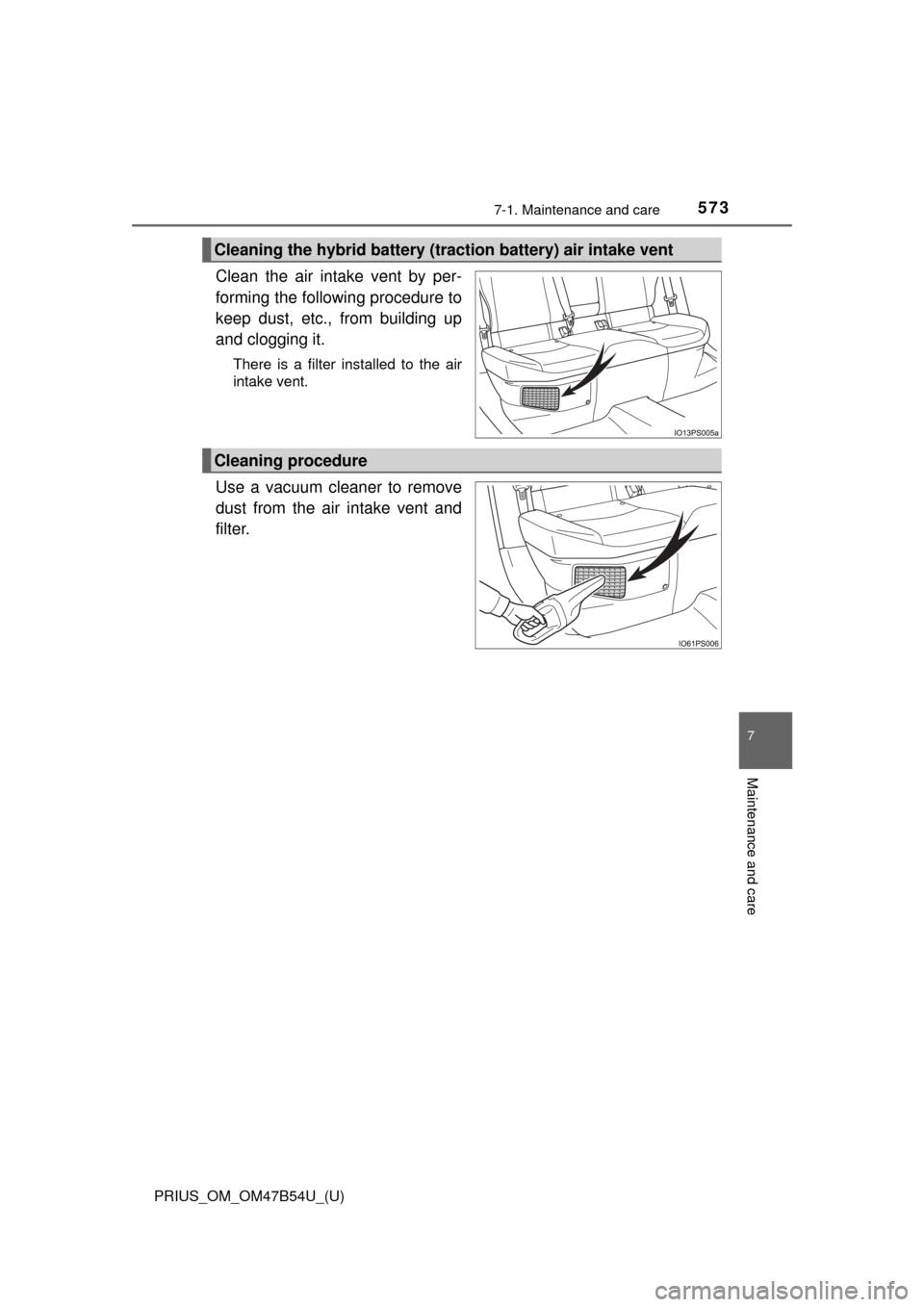
Clean the air intake vent by per-
forming the following procedure to
keep dust, etc., from building up
and clogging it.
There is a filter installed to the air
intake vent.
Use a vacuum cleaner to remove
dust from the air intake vent and
filter.
Cleaning the hybrid battery (traction battery) air intake vent
Cleaning procedure
Page 574 of 796

574
PRIUS_OM_OM47B54U_(U)
7-1. Maintenance and care
■Caring for leather areas
Toyota recommends cleaning the interior of the vehicle at least twice a year to
maintain the quality of the vehicle’s interior.
■ Shampooing the carpets
There are several commercial foaming-type cleaners available. Use a sponge
or brush to apply the foam. Rub in overlapping circles. Do not use water.
Wipe dirty surfaces and let them dry. Excellent results are obtained by keep-
ing the carpet as dry as possible.
■ Seat belts
Clean with mild soap and lukewarm water using a cloth or sponge. Also
check the belts periodically for excessive wear, fraying or cuts.
■ Cleaning the air intake vent
●If the vehicle is driven further after dust has built up and clogged the air
intake vent and filter, the hybrid battery (traction battery) will overheat,
reducing the driving range of the electric motor and worsening fuel econ-
omy. Periodically clean the air intake vent to keep dust from building up in
the air intake vent and filter.
● Improper handling may result in damage to the air intake vent cover. If you
have any concerns about cleaning the part yourself, contact your Toyota
dealer.
● The necessary cleaning interval of the air intake vent will differ according to
the vehicle usage environment.
■ If “Maintenance required for Traction battery cooling parts See owner’s
manual” is shown on the multi-information display
● If “Maintenance required for Traction battery cooling parts See owner’s
manual” is shown on the multi-information display, the air intake vent and fil-
ter may be clogged due to dust build-up. Refer to the cleaning procedure
and clean the air intake vent.
● If the vehicle is driven further while “Maintenance required for Traction bat-
tery cooling parts See owner’s manual” is shown on the multi-information
display, the hybrid battery (traction battery) may overheat, reducing the driv-
ing range, worsening fuel economy and causing damage. Periodically clean
the air intake vent to keep dust from building up in the air intake vent and fil-
ter.
● If the warning message continues to be shown on the multi-information dis-
play even after cleaning the air intake vent, have the vehicle inspected by
your Toyota dealer.