phone TOYOTA PRIUS 2017 4.G Repair Manual
[x] Cancel search | Manufacturer: TOYOTA, Model Year: 2017, Model line: PRIUS, Model: TOYOTA PRIUS 2017 4.GPages: 796, PDF Size: 20.13 MB
Page 542 of 796
542
PRIUS_OM_OM47B54U_(U)
6-4. Using the other interior features
A portable device can be charged by just placing Qi standard wireless
charge compatible portable devices according to the Wireless Power
Consortium, such as smart phones an d mobile batteries, etc., on the
charge area.
This function cannot be used with portable devices that are larger
than the charging area. Also, depend ing on the portable device, it may
not operate as normal. Please read the operation manual for portable
devices to be used.
■The “Qi” symbol
The “Qi” symbol is a trademark of the Wireless Power Consortium.
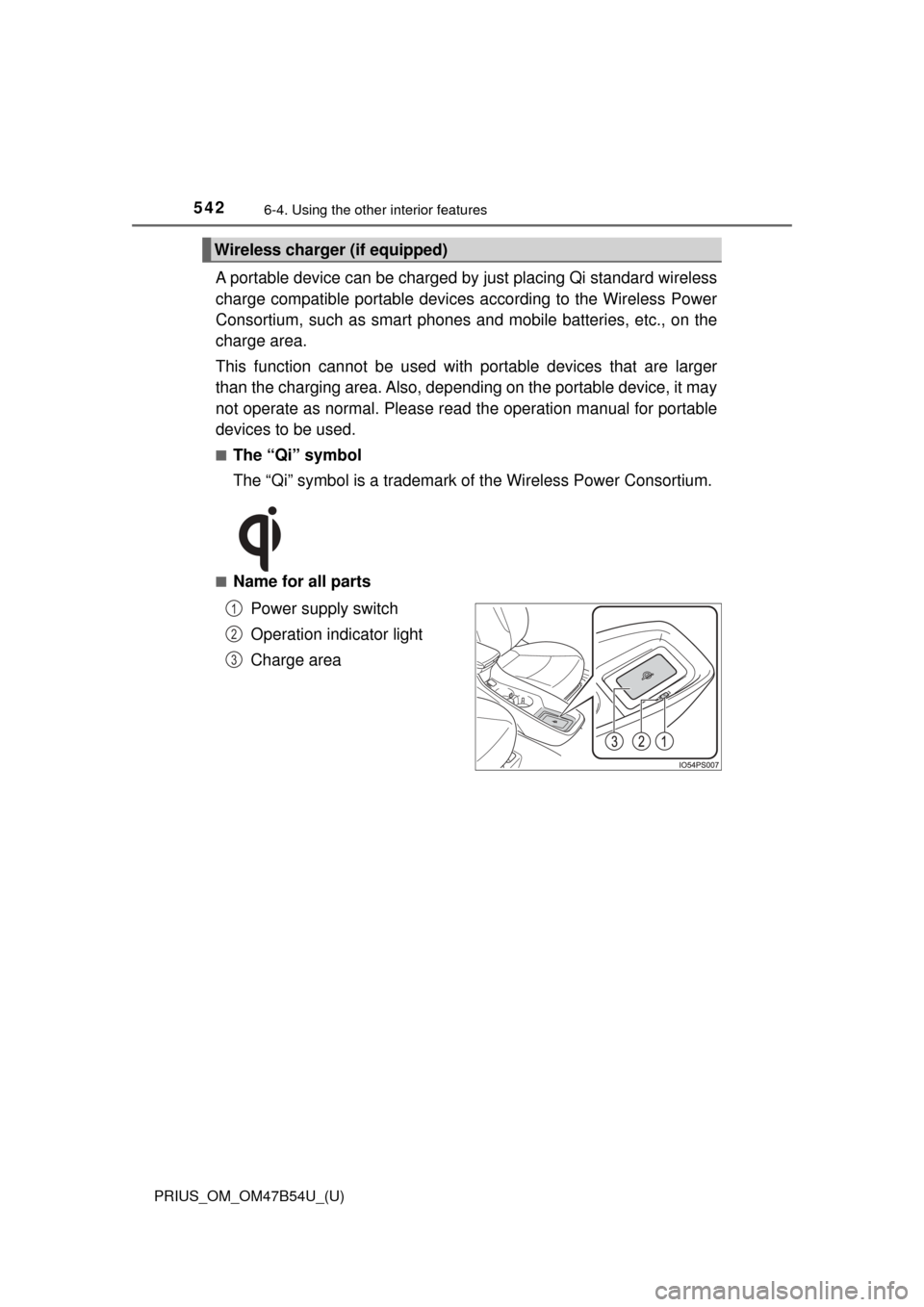
■Name for all parts
Power supply switch
Operation indicator light
Charge area
Wireless charger (if equipped)
1
2
3
Page 545 of 796

PRIUS_OM_OM47B54U_(U)
5456-4. Using the other interior features
6
Interior features
■The wireless charger can be operated when
The power switch is in ACCESSORY or ON mode.
■ Usable portable devices
Qi standard wireless charge standard can be used on compatible devices.
However, not all Qi standard devices and compatibility are guaranteed.
Starting with mobile phones and smart phones , it is aimed for low power elec-
trically supplied portable devices of no more than 5W.
■ When covers and accessories are attached to portable devices
Do not charge in situations where cover and accessories not able to handle
Qi are attached to the portable device. Depending on the type of cover and
accessory, it may not be possible to charge. When charging is not performed
even with the portable device placed on the charge area, remove the cover
and accessories.
■ While charging, noise enters the AM radio
Turn off the wireless charger and confirm that the noise has decreased. If the
noise decreases, continuously pushing the power supply switch of the wire-
less charger for 2 seconds, the frequency of the charger can be changed and
the noise can be reduced.
Also, on that occasion, the operation indicator light will flash orange 2 times.
■ Important points of the wireless charger
●If the electronic key cannot be detected within the vehicle interior, charging
cannot be done. When the door is opened and closed, charging may be
temporarily suspended.
● When charging, the wireless charging device and portable device will get
warmer, however this is not a malfunction.
When a portable device gets warm while charging, charging may stop due
to the protection function on the portable device side. In this case, when the
temperature of the portable device drops significantly, charge again.
■ Operation sounds
When the power supply is turned on, while searching for the portable device a
sound will be produced, however this is not a malfunction.
Page 559 of 796
559
PRIUS_OM_OM47B54U_(U)
6-4. Using the other interior features
6
Interior features
Safety Connect∗
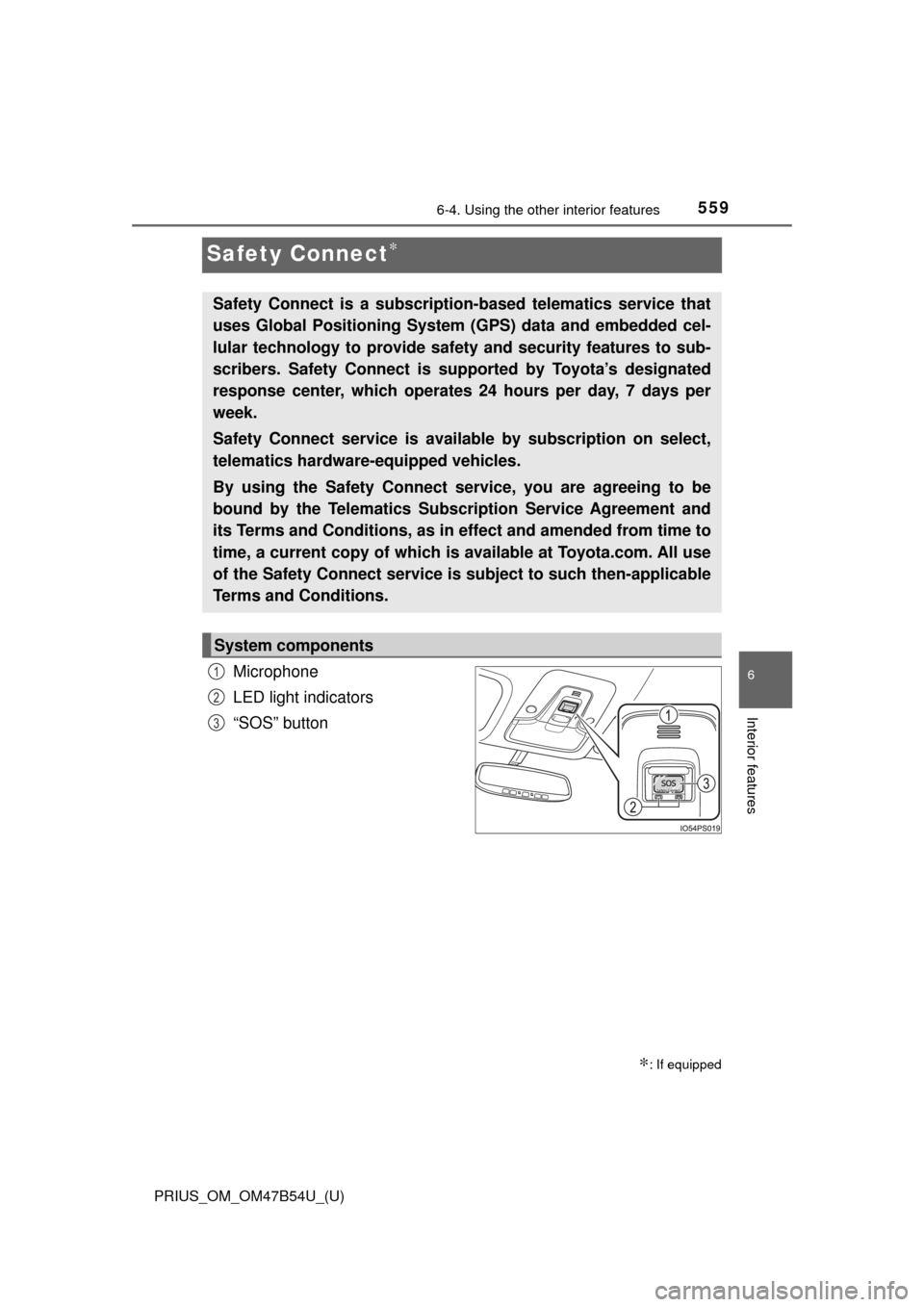
Microphone
LED light indicators
“SOS” button
∗: If equipped
Safety Connect is a subscription-based telematics service that
uses Global Positioning System (GPS) data and embedded cel-
lular technology to provide safety and security features to sub-
scribers. Safety Connect is s upported by Toyota’s designated
response center, which operates 24 hours per day, 7 days per
week.
Safety Connect service is avai lable by subscription on select,
telematics hardware-equipped vehicles.
By using the Safety Connect service, you are agreeing to be
bound by the Telematics Subscription Service Agreement and
its Terms and Conditions, as in ef fect and amended from time to
time, a current copy of which is available at Toyota.com. All use
of the Safety Connect service is subject to such then-applicable
Terms and Conditions.
System components
1
2
3
Page 561 of 796
PRIUS_OM_OM47B54U_(U)
5616-4. Using the other interior features
6
Interior features
■Safety Connect Services Information
●Phone calls using the vehicles Bluetooth® technology will not be possible
during Safety Connect.
● Safety Connect is available beginning Fall 2009 on select Toyota models.
Contact with the Safety Connect response center is dependent upon the
telematics device being in operative condition, cellular connection availabil-
ity, and GPS satellite signal reception, which can limit the ability to reach the
response center or receive emergency service support. Enrollment and
Telematics Subscription Service Agreement required. A variety of subscrip-
tion terms is available; charges vary by subscription term selected.
● Automatic Collision Notification, Emergency Assistance, Stolen Vehicle
Location, and Enhanced Roadside Assistance will function in the United
States, including Hawaii and Alaska, and in Canada. No Safety Connect
services will function outside of the United States in countries other than
Canada.
● Safety Connect services are not subject to section 255 of the Telecommuni-
cations Act and the device is not TTY compatible.
■ Languages
The Safety Connect response center will offer support in multiple languages.
The Safety Connect system will offer voice prompts in English and Spanish.
Please indicate your language of choice when enrolling.
■ When contacting th e response center
You may be unable to contact the response center if the network is busy.
When the power switch is turned to ON mode, the red indicator light
comes on for 2 seconds then turns off. Afterward, the green indicator
light comes on, indicating t hat the service is active.
The following indicator light pattern s indicate specific system usage
conditions:
● Green indicator light on = Active service
● Green indicator light flashing = Sa fety Connect call in process
● Red indicator light (except at vehicle start-up) = System malfunction
(contact your Toyota dealer)
● No indicator light (off) = Safety Connect service not active
Safety Connect LE D light Indicators
Page 563 of 796
PRIUS_OM_OM47B54U_(U)
5636-4. Using the other interior features
6
Interior features
■Enhanced Roadside Assistance
Enhanced Roadside Assistance adds GPS data to the already
included warranty-based Toyota roadside service.
Subscribers can press the “SOS” bu tton to reach a Safety Connect
response-center agent, who can help with a wide range of needs,
such as: towing, flat tire, fuel deli very, etc. For a description of the
Roadside Assistance se rvices and their limitations, please see the
Safety Connect Terms and Conditions, which are available at
Toyota.com.
Important! Read this informatio n before using Safety Connect.
■Exposure to radio frequency signals
The Safety Connect system install ed in your vehicle is a low-power
radio transmitter and receiver. It receives and also sends out radio
frequency (RF) signals.
In August 1996, the Federal Communications Commission (FCC)
adopted RF exposure gui delines with safety levels for mobile wire-
less phones. Those guidelines are c onsistent with the safety stan-
dards previously set by the fo llowing U.S. and international
standards bodies.
● ANSI (American National Stand ards Institute) C95.1 [1992]
● NCRP (National Council on Radi ation Protection and Measure-
ment) Report 86 [1986]
● ICNIRP (International Commiss ion on Non-Ionizing Radiation
Protection) [1996]
Those standards were based on comprehensive and periodic eval-
uations of the relevant scientific literature. Over 120 scientists, engi-
neers, and physicians from uni versities, and government health
agencies and industries reviewed t he available body of research to
develop the ANSI Standard (C95.1).
The design of Safety Connect complies with the FCC guidelines in
addition to those standards.
Safety information for Safety Connect
Page 610 of 796

610
PRIUS_OM_OM47B54U_(U)
7-3. Do-it-yourself maintenance
■Situations in which the tire pressure warning system may not oper-
ate properly
●In the following cases, the tire pressure warning system may not operate
properly.
• If non-genuine Toyota wheels are used.
• When a replacement tire is used , the system may not operate cor-
rectly due to the structure of the replacement tire.
• A tire has been replaced with a tire that is not of the specified size.
• Tire chains etc. are equipped.
• An auxiliary-supported run- flat tire is equipped.
• If a window tint that affects the radio wave signals is installed.
• If there is a lot of snow or ice on the vehicle, particularly around the wheels or wheel housings.
• If the tire inflation pressure is extremely higher than the specified level.
• If wheel without the tire pressure warning valve and transmitter is
used.
• If the ID code on the tire pressure warning valves and transmitters is not registered in the tire pressure warning computer.
●Performance may be affected in the following situations.
• Near a TV tower, electric power plant, gas station, radio station, largedisplay, airport or other facility that generates strong radio waves or
electrical noise
• When carrying a portable radio, cellular phone, cordless phone or other wireless communication device
●When the vehicle is parked, the time taken for the warning to start or go
off could be extended.
●When tire inflation pressure declines rapidly for example when a tire has
burst, the warning may not function.
■The initialization operation
●Make sure to carry out in itialization after adjusting the tire inflation pres-
sure.
Also, make sure the tires are cold be fore carrying out initialization or tire
inflation pressure adjustment.
●If you have accidentally turned the po wer switch off during initialization,
it is not necessary to press the reset switch again as initialization will
restart automatically when the powe r switch has been turned to ON
mode for the next time.
●If you accidentally press the reset s witch when initialization is not neces-
sary, adjust the tire inflation pressu re to the specified level when the
tires are cold, and conduct initialization again.
Page 773 of 796

773
PRIUS_OM_OM47B54U_(U)
Index
What to do if... (Troubleshooting) .................... 774
Alphabetical index ..................... 778
For vehicles with Entune Premium Audio with Navigation,
refer to the “NAVIGATION SYSTEM OWNER’S MANUAL” for
information regarding the equipment listed below.
• Navigation system
• Hands-free system (for cellular phone)
• Audio/visual system
Page 779 of 796
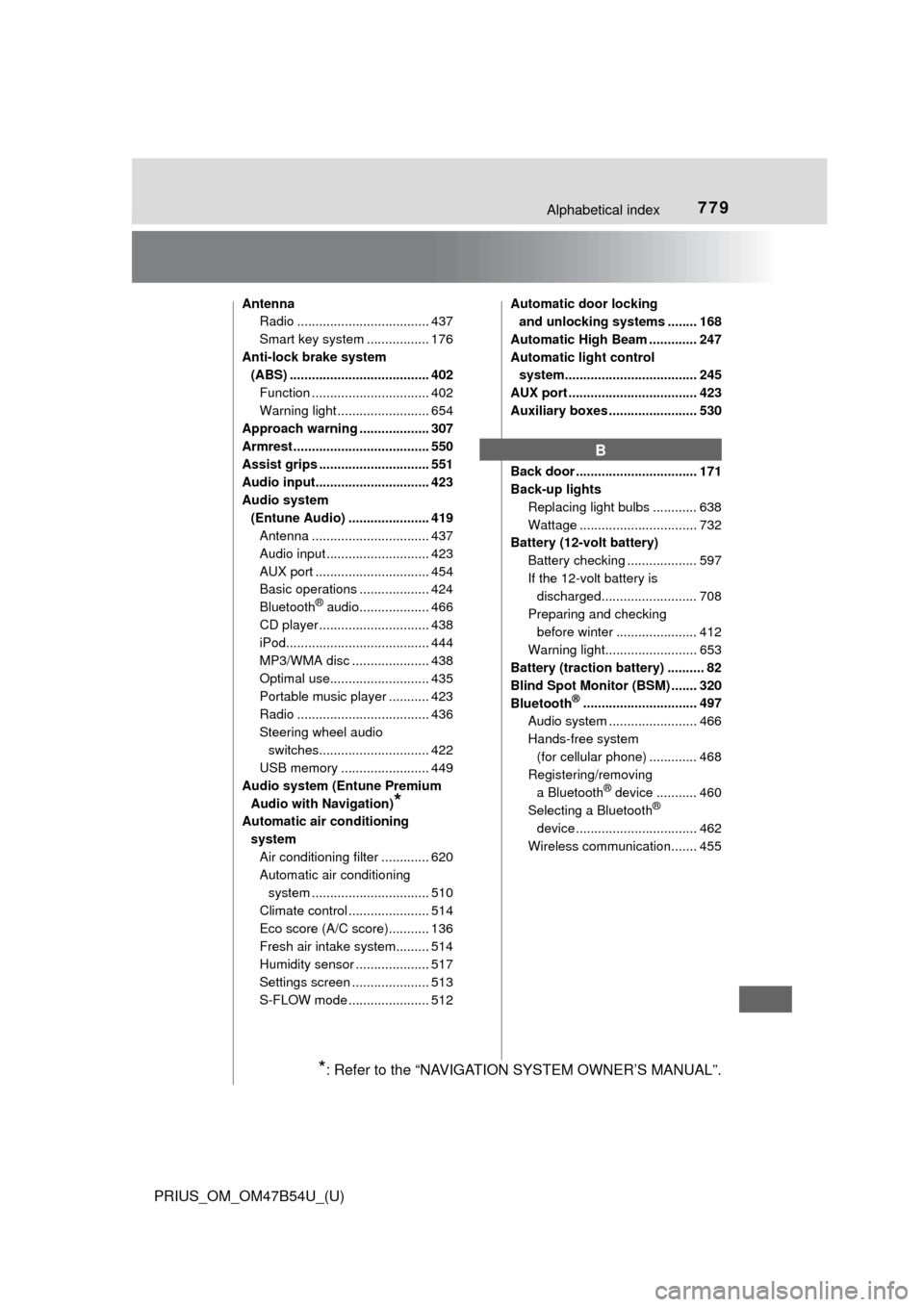
779Alphabetical index
PRIUS_OM_OM47B54U_(U)
AntennaRadio .................................... 437
Smart key system ................. 176
Anti-lock brake system (ABS) ...................................... 402
Function ................................ 402
Warning light ......................... 654
Approach warning ................... 307
Armrest ..................................... 550
Assist grips .............................. 551
Audio input............................... 423
Audio system
(Entune Audio) ...................... 419 Antenna ................................ 437
Audio input ............................ 423
AUX port ............................... 454
Basic operations ................... 424
Bluetooth
® audio................... 466
CD player .............................. 438
iPod....................................... 444
MP3/WMA disc ..................... 438
Optimal use........................... 435
Portable music player ........... 423
Radio .................................... 436
Steering wheel audio switches.............................. 422
USB memory ........................ 449
Audio system (Entune Premium Audio with Navigation)
*
Automatic air conditioning system Air conditioning filter ............. 620
Automatic air conditioning system ......... ....................... 510
Climate control ...................... 514
Eco score (A/C score)........... 136
Fresh air intake system......... 514
Humidity sensor .................... 517
Settings screen ..................... 513
S-FLOW mode ...................... 512 Automatic door locking
and unlocking systems ........ 168
Automatic High Beam ............. 247
Automatic light control system.................................... 245
AUX port ................................... 423
Auxiliary boxes ........................ 530
Back door ................................. 171
Back-up lights Replacing light bulbs ............ 638
Wattage ................................ 732
Battery (12-volt battery)
Battery checking ................... 597
If the 12-volt battery is discharged.......................... 708
Preparing and checking before winter ...................... 412
Warning light......................... 653
Battery (traction battery) .......... 82
Blind Spot Monitor (BSM) ....... 320
Bluetooth
®............................... 497
Audio system .................. ...... 466
Hands-free system (for cellular phone) ............. 468
Registering/removing
a Bluetooth
® device ........... 460
Selecting a Bluetooth®
device ................................. 462
Wireless communication....... 455
B
*: Refer to the “NAVIGATION SYSTEM OWNER’S MANUAL”.
Page 780 of 796

780Alphabetical index
PRIUS_OM_OM47B54U_(U)
Bluetooth® audio ..................... 466
Bluetooth® phone .................... 468
Deleting the call history......... 488
Making a call ......................... 471
Managing the contacts.......... 484
Message function.................. 478
Phone settings ...................... 483
Receiving a call..................... 474
Speaking on the phone ......... 475
Bottle holders .......................... 528
Brake Fluid ...................................... 729
Parking brake........................ 241
Regenerative braking.............. 80
Warning light ......................... 653
Brake assist ............................. 402
Brake Override System ........... 209
Break-in tips ............................. 210
Brightness control Instrument cluster
light control ........................... 94
BSM (Blind Spot Monitor) ....... 320
Care Aluminum wheels.................. 567
Camera sensor ..................... 271
Exterior ................................. 566
Interior................................... 572
Radar sensor ........................ 270
Seat belts .............................. 574
Water-repellent coating......... 567
Cargo capacity ......................... 222
Catch protection function ....... 199
Cargo hooks............................. 532 CD player.................................. 438
Chains ...................................... 413
Child restraint system............... 58
Fixed with a LATCH system .......... ..................... ... 71
Fixed with a seat belt .............. 65
Front passenger occupant classification syst em ............ 50
Points to remember ................ 59
Riding with children ................ 57
Types of child restraint system installation
method ................................. 61
Using an anchor
bracket ................................. 74
Child safety ................................ 57 12-volt battery precautions ... 598
Airbag precautions.................. 39
Back door precautions .......... 173
Child restraint system ............. 58
How your child should
wear the seat belt ................. 31
Installing child restraints ......... 61
Moon roof precautions .......... 205
Power window lock switch .... 198
Power window precautions ... 200
Rear door child-protectors .... 168
Removed key battery
precautions......................... 629
Riding with children ................ 57
Seat belt extender
precautions........................... 35
Seat belt precautions .............. 70
Seat heater precautions ....... 521
C
Page 784 of 796
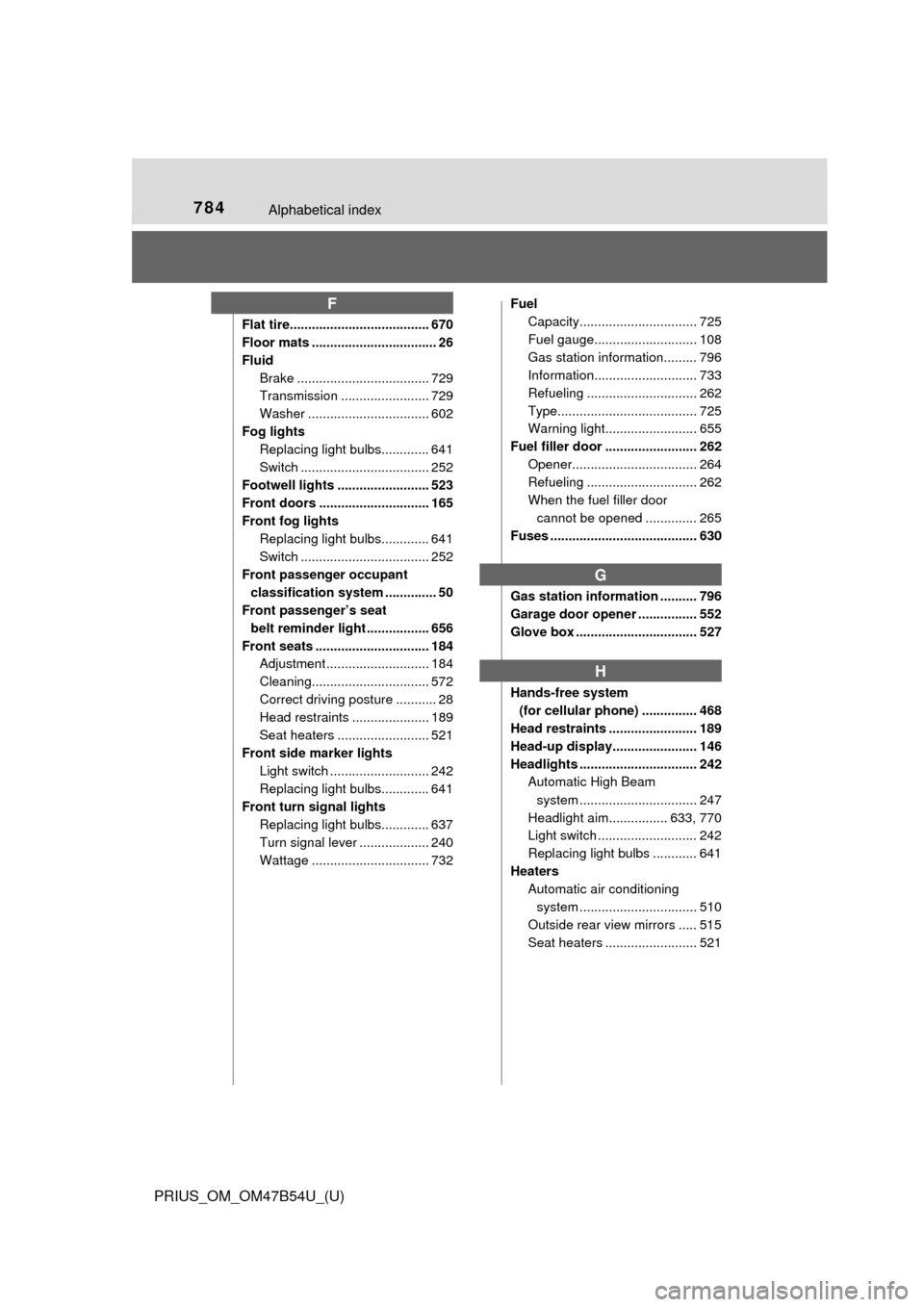
784Alphabetical index
PRIUS_OM_OM47B54U_(U)
Flat tire...................................... 670
Floor mats .................................. 26
FluidBrake .................................... 729
Transmission ........................ 729
Washer ................................. 602
Fog lights Replacing light bulbs............. 641
Switch ................................... 252
Footwell lights ......................... 523
Front doors .............................. 165
Front fog lights Replacing light bulbs............. 641
Switch ................................... 252
Front passenger occupant classification system .............. 50
Front passenger’s seat
belt reminder light ................. 656
Front seats ............................... 184 Adjustment ............................ 184
Cleaning................................ 572
Correct driving posture ........... 28
Head restraints ..................... 189
Seat heaters ......................... 521
Front side marker lights Light switch ........................... 242
Replacing light bulbs............. 641
Front turn signal lights Replacing light bulbs............. 637
Turn signal lever ................... 240
Wattage ................................ 732 Fuel
Capacity................................ 725
Fuel gauge............................ 108
Gas station information......... 796
Information............................ 733
Refueling .............................. 262
Type...................................... 725
Warning light......................... 655
Fuel filler door ......................... 262 Opener.................................. 264
Refueling .............................. 262
When the fuel filler door cannot be opened .............. 265
Fuses ........................................ 630
Gas station information .......... 796
Garage door opener ................ 552
Glove box ................................. 527
Hands-free system (for cellular phone) ............... 468
Head restraints ........................ 189
Head-up display....................... 146
Headlights ................................ 242 Automatic High Beam
system .......... ...................... 247
Headlight aim................ 633, 770
Light switch ........................... 242
Replacing light bulbs ............ 641
Heaters Automatic air conditioning
system .......... ...................... 510
Outside rear view mirrors ..... 515
Seat heaters ......................... 521
F
G
H