maintenance TOYOTA PRIUS 2017 4.G Manual Online
[x] Cancel search | Manufacturer: TOYOTA, Model Year: 2017, Model line: PRIUS, Model: TOYOTA PRIUS 2017 4.GPages: 796, PDF Size: 20.13 MB
Page 638 of 796
638
PRIUS_OM_OM47B54U_(U)
7-3. Do-it-yourself maintenance
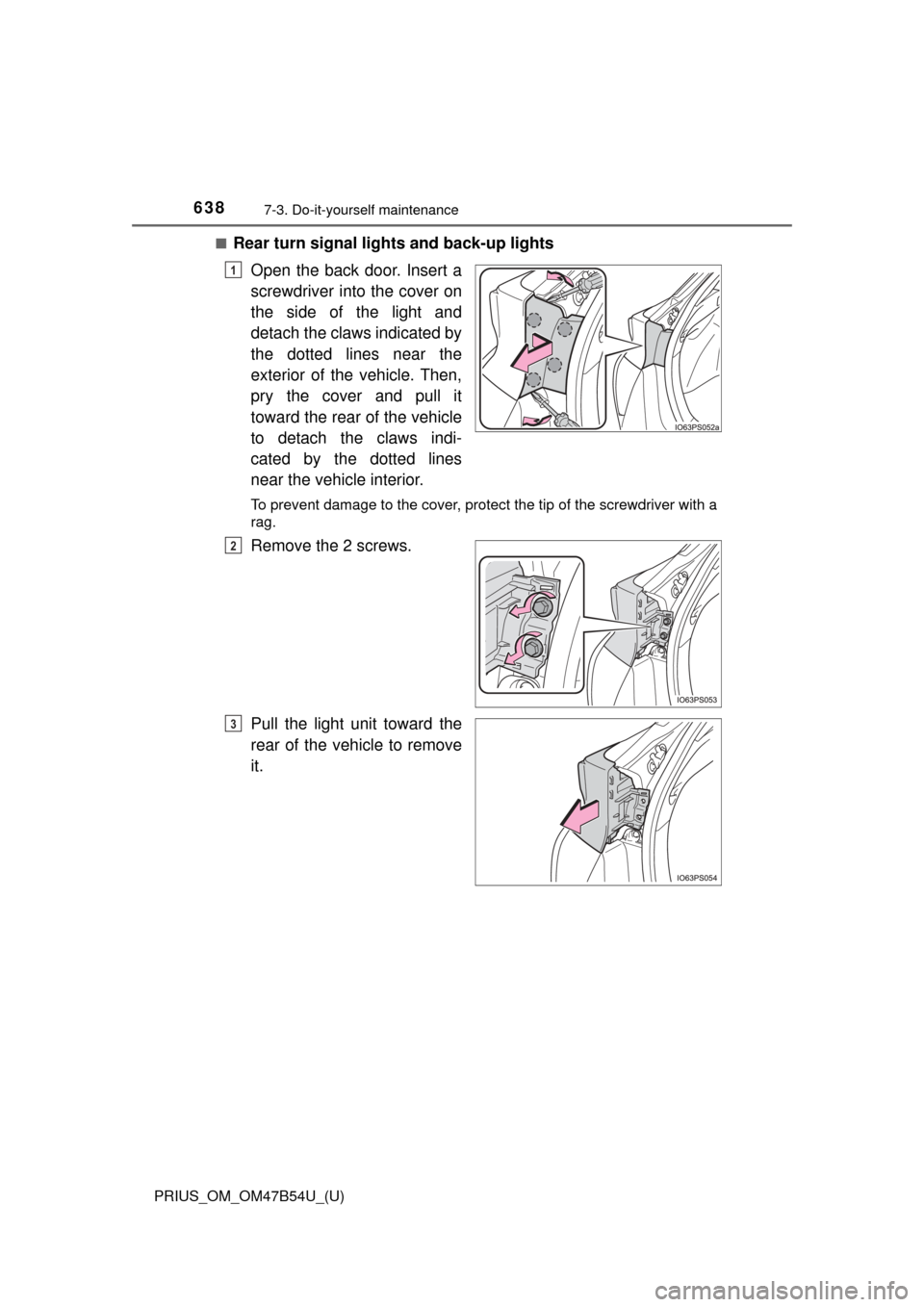
■Rear turn signal lights and back-up lightsOpen the back door. Insert a
screwdriver into the cover on
the side of the light and
detach the claws indicated by
the dotted lines near the
exterior of the vehicle. Then,
pry the cover and pull it
toward the rear of the vehicle
to detach the claws indi-
cated by the dotted lines
near the vehicle interior.
To prevent damage to the cover, protect the tip of the screwdriver with a
rag.
Remove the 2 screws.
Pull the light unit toward the
rear of the vehicle to remove
it.
1
2
3
Page 639 of 796
PRIUS_OM_OM47B54U_(U)
6397-3. Do-it-yourself maintenance
7
Maintenance and care
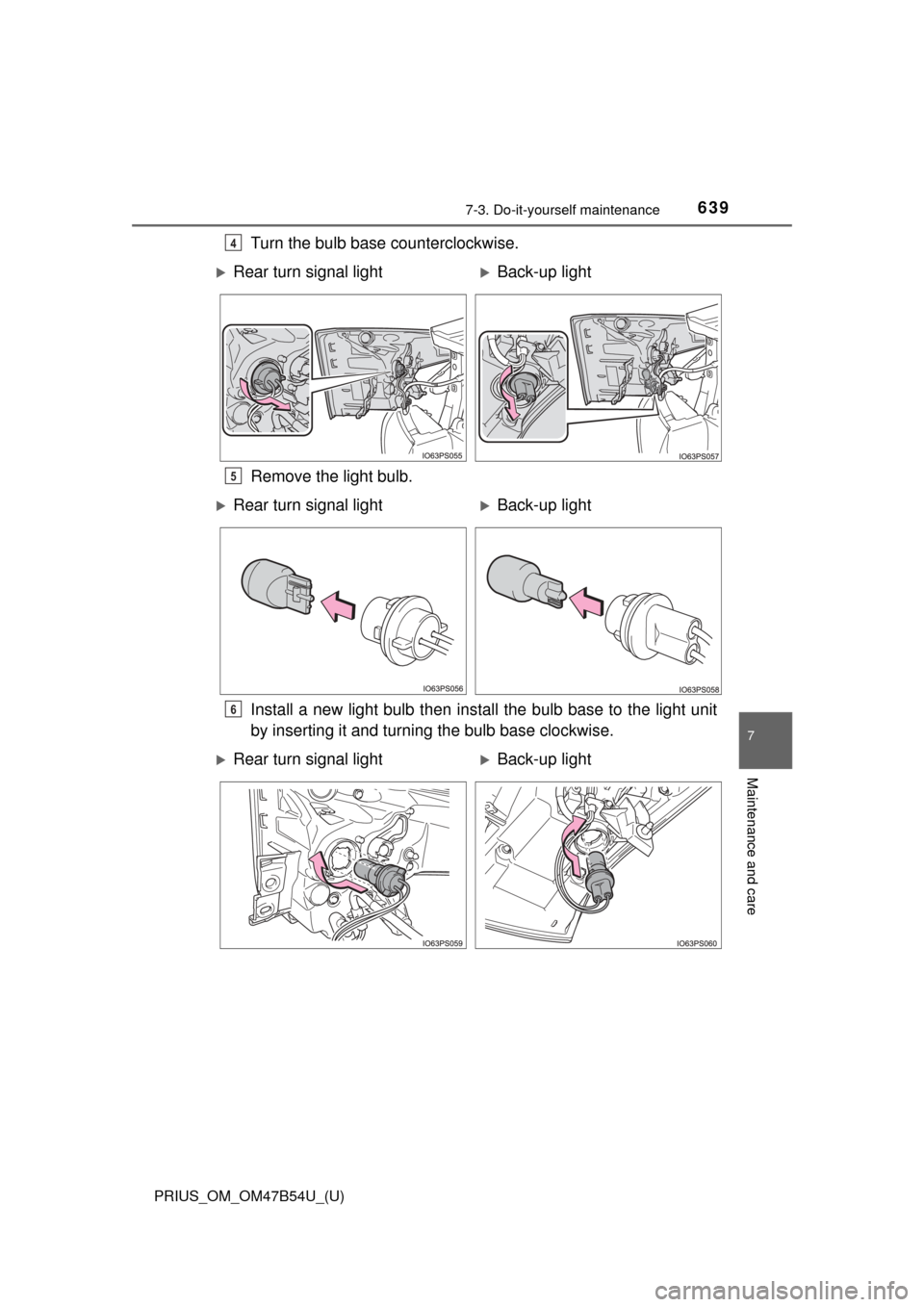
Turn the bulb base counterclockwise.
Remove the light bulb.
Install a new light bulb then install the bulb base to the light unit
by inserting it and turning the bulb base clockwise.4
Rear turn signal lightBack-up light
5
Rear turn signal lightBack-up light
6
Rear turn signal lightBack-up light
Page 640 of 796
640
PRIUS_OM_OM47B54U_(U)
7-3. Do-it-yourself maintenance
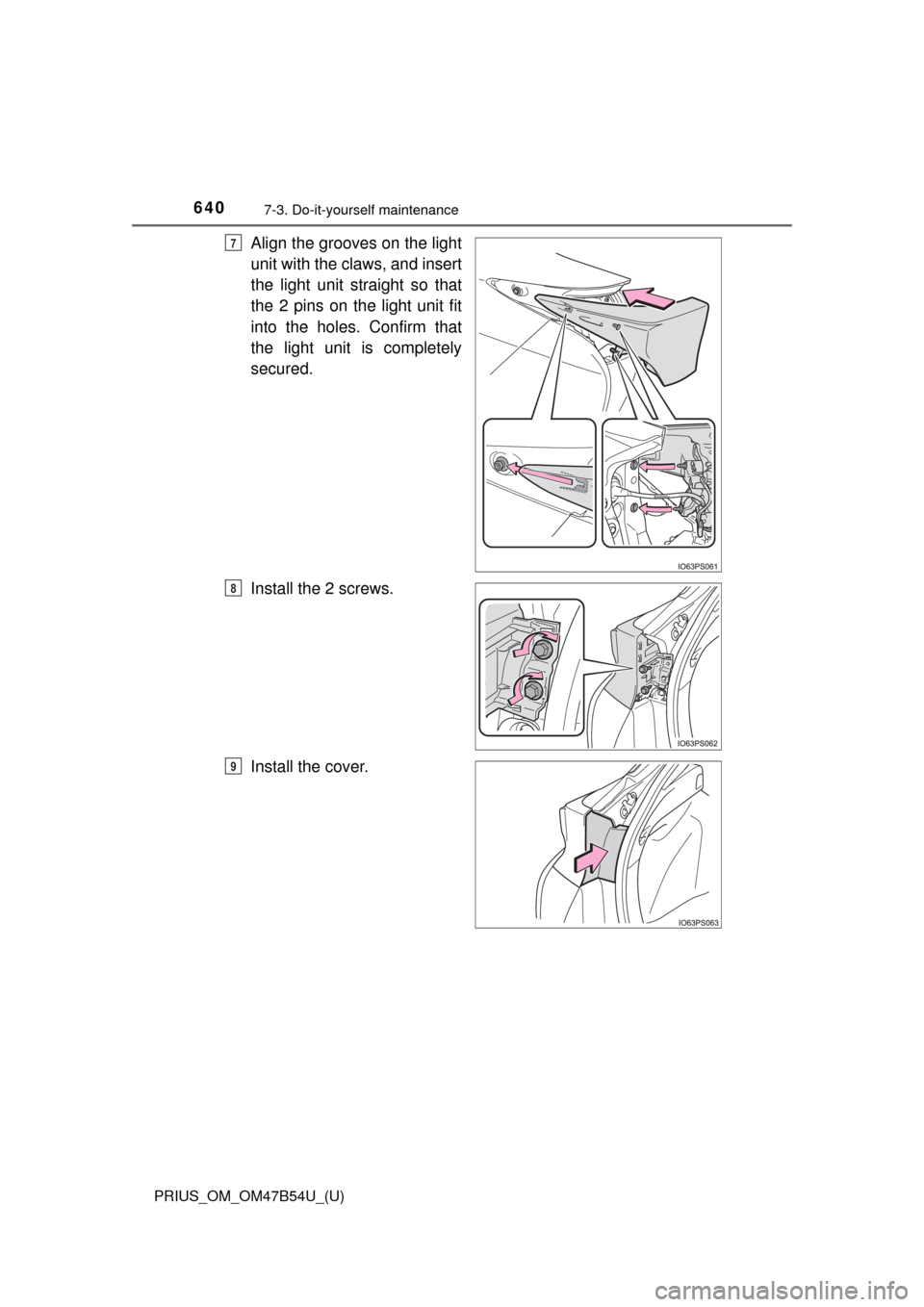
Align the grooves on the light
unit with the claws, and insert
the light unit straight so that
the 2 pins on the light unit fit
into the holes. Confirm that
the light unit is completely
secured.
Install the 2 screws.
Install the cover.7
8
9
Page 641 of 796

PRIUS_OM_OM47B54U_(U)
6417-3. Do-it-yourself maintenance
7
Maintenance and care
■Replacing the following bulbs
If any of the lights listed below has burnt out, have it replaced by
your Toyota dealer.
● Headlights and daytime running lights
● Front side marker lights
● Parking lights (LED type: if equipped)
● Fog lights
● Rear side marker/tail lights
● Stop lights
● High mounted stoplight
● License plate lights
■LED lights
The lights other than the parking lights (bulb type: if equipped), front turn sig-
nal lights, rear turn signal lights and back-up lights each consist of a number
of LEDs. If any of the LEDs burn out, take your vehicle to your Toyota dealer
to have the light replaced.
■ Condensation build-up on the inside of the lens
Temporary condensation build-up on the inside of the headlight lens does not
indicate a malfunction. Contact your Toyota dealer for more information in the
following situations:
●Large drops of water have built up on the inside of the lens.
● Water has built up inside the headlight.
■ When replacing light bulbs
→P. 632
Page 642 of 796

642
PRIUS_OM_OM47B54U_(U)
7-3. Do-it-yourself maintenance
WARNING
■Replacing light bulbs
● Be sure to stop the hybrid system and turn off the lights. Do not attempt to
replace the bulb immediately after turning off the lights.
The bulbs become very hot and may cause burns.
● Do not touch the glass portion of the light bulb with bare hands. When it is
unavoidable to hold the glass portion, use and hold with a clean dry cloth
to avoid getting moisture and oils on the bulb.
Also, if the bulb is scratched or dropped, it may blow out or crack.
● Fully install light bulbs and any parts used to secure them. Failure to do so
may result in heat damage, fire, or water entering the headlight unit. This
may damage the headlights or cause condensation to build up on the lens.
● Do not attempt to repair or disassemble light bulbs, connectors, electric
circuits or component parts.
Doing so may result in death or serious injury due to electric shock.
■ To prevent damage or fire
● Make sure bulbs are fully seated and locked.
● Check the wattage of the bulb before installing to prevent heat damage.
Page 661 of 796
6618-2. Steps to take in an emergency
PRIUS_OM_OM47B54U_(U)
8
When trouble arises
WARNING
■Maintenance of the tires
Each tire, including the spare (if provided), should be checked monthly
when cold and inflated to the inflation pressure recommended by the
vehicle manufacturer on the vehicle placard or tire inflation pressure
label (tire and load information label). (If your vehicle has tires of a dif-
ferent size than the size indicated on the vehicle placard or tire inflation
pressure label [tire and load information label], you should determine
the proper tire inflation pressure for those tires.)
As an added safety feature, your vehicle has been equipped with a tire
pressure monitoring system (TPMS-ti re pressure warning system) that
illuminates a low tire pre ssure telltale (tire pressure warning light) when
one or more of your tires is significantly under-inflated. Accordingly,
when the low tire pressure telltale (tire pressure warning light) illumi-
nates, you should stop and check your tires as soon as possible, and
inflate them to the proper pressure. Driving on a significantly under-
inflated tire causes the tire to overheat and can lead to tire failure.
Under-inflation also reduces fuel effi ciency and tire tread life, and may
affect the vehicle’s handling and stopping ability.
Please note that the TPMS (tire pressure warning system) is not a sub-
stitute for proper ti re maintenance, and it is the driver’s responsibility to
maintain correct tire pressure, even if under-inflation has not reached
the level to trigger illumination of the TPMS low tire pressure telltale (tire
pressure warning light).
Your vehicle has also been equipped with a TPMS (tire pressure warn-
ing system) malfunction indicator to indicate when the system is not
operating properly. The TPMS (tire pressure warning system) malfunc-
tion indicator is combined with the lo w tire pressure telltale (tire pressure
warning light). When the system detects a malfunction, the telltale will
flash for approximately one minute and then remain continuously illumi-
nated. This sequence will continue upon subsequent vehicle start-ups as long as the malfunction exists. When the malfunction indicator is illu-
minated, the system may not be able to detect or signal low tire pres-
sure as intended.
TPMS (tire pressure warning system) malfunctions may occur for a vari-
ety of reasons, including the installation of replacement or alternate tires
or wheels on the vehicle that prevent the TPMS (tire pressure warning
system) from functioning properly. Always check the TPMS (tire pres-
sure warning system) malfunction te lltale after replacing one or more
tires or wheels on your vehicle to ensure that the replacement or alter-
nate tires and wheels allow the TPMS (tire pressure warning system) to
continue to function properly.
Page 663 of 796
663
PRIUS_OM_OM47B54U_(U)
8
When trouble arises
8-2. Steps to take in an emergency
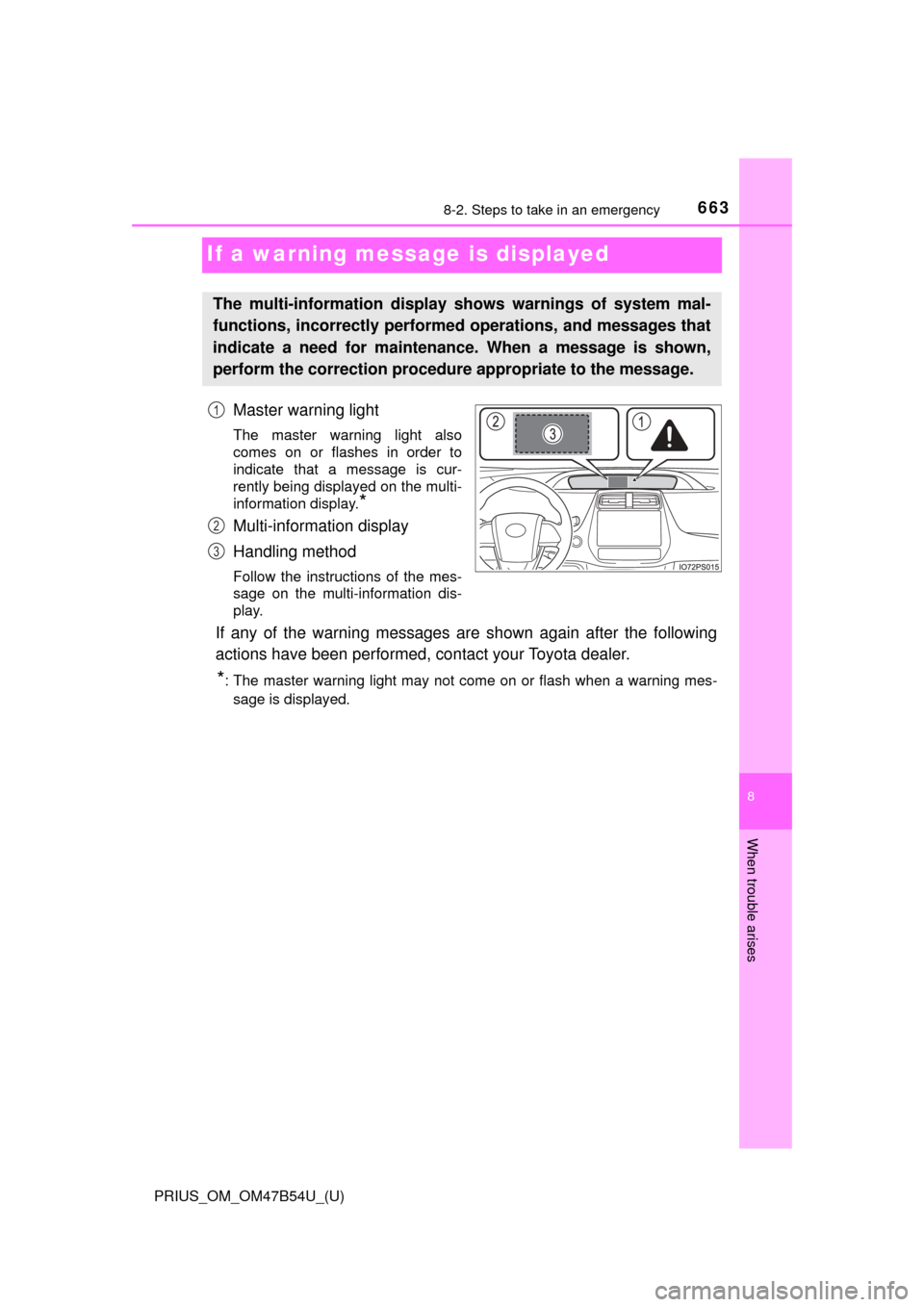
If a warning message is displayed
Master warning light
The master warning light also
comes on or flashes in order to
indicate that a message is cur-
rently being displayed on the multi-
information display.
*
Multi-information display
Handling method
Follow the instructions of the mes-
sage on the multi-information dis-
play.
If any of the warning messages are shown again after the following
actions have been performed, contact your Toyota dealer.
*: The master warning light may not come on or flash when a warning mes-
sage is displayed.
The multi-information display shows warnings of system mal-
functions, incorrectly performe d operations, and messages that
indicate a need for maintenance. When a message is shown,
perform the correction procedur e appropriate to the message.
1
2
3
Page 664 of 796
6648-2. Steps to take in an emergency
PRIUS_OM_OM47B54U_(U)
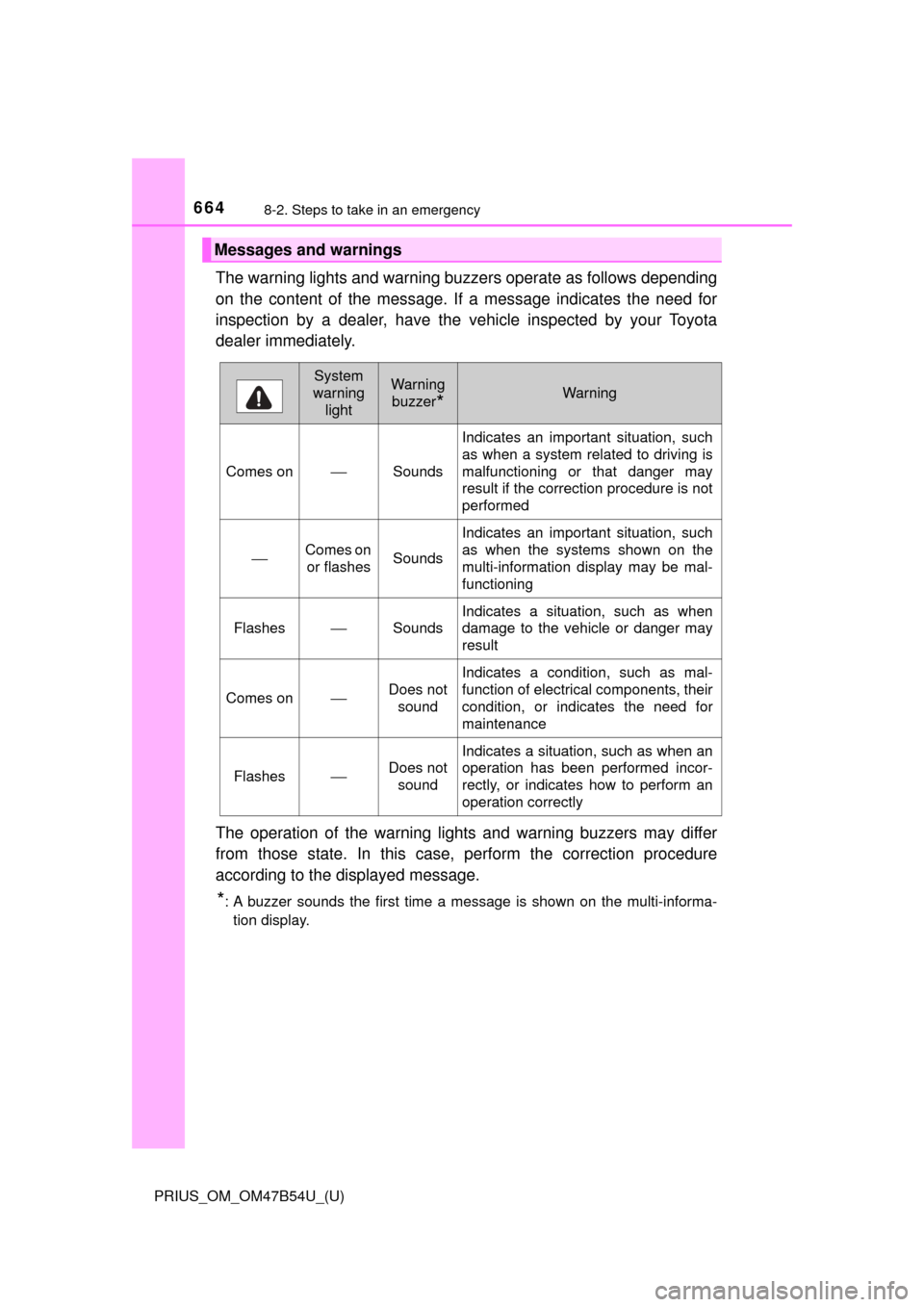
The warning lights and warning buzzers operate as follows depending
on the content of the message. If a message indicates the need for
inspection by a dealer, have the vehicle inspected by your Toyota
dealer immediately.
The operation of the warning lights and warning buzzers may differ
from those state. In this case, perform the correction procedure
according to the displayed message.
*: A buzzer sounds the first time a message is shown on the multi-informa- tion display.
Messages and warnings
System
warning lightWarning
buzzer
*Warning
Comes on⎯Sounds
Indicates an important situation, such
as when a system related to driving is
malfunctioning or that danger may
result if the correction procedure is not
performed
⎯Comes on or flashesSounds
Indicates an important situation, such
as when the systems shown on the
multi-information display may be mal-
functioning
Flashes⎯Sounds
Indicates a situation, such as when
damage to the vehicle or danger may
result
Comes on⎯Does not sound
Indicates a condition, such as mal-
function of electrical components, their
condition, or indicates the need for
maintenance
Flashes⎯Does not
sound
Indicates a situation, such as when an
operation has been performed incor-
rectly, or indicates how to perform an
operation correctly
Page 667 of 796
6678-2. Steps to take in an emergency
PRIUS_OM_OM47B54U_(U)
8
When trouble arises
■If “Shift System Malfunction See Owner’s Manual” is shown
Indicates a malfunction in the shift control system. Immediately have the sys-
tem inspected by your Toyota dealer.
The system may not operate properly.
■ If “Low 12-Volt Battery Apply Parking Brake Securely While Parking See
Owner’s Manual” is shown
Indicates that the 12-volt battery charge is insufficient. Charge or replace the
12-volt battery.
●When the message is shown, the hybrid system may not start or the shift
position may not be changed normally. (Coping method: →P. 669)
● After charging the 12-volt battery, the message may not go off until the shift
position is changed from P.
■ If “Shifting Unavailable Low 12-Volt Battery See Owner’s Manual” is
shown
Indicates that the shift position cannot be changed because the voltage of the
12-volt battery drops. Charge or replace the 12-volt battery.
(Coping method in the case the 12-volt battery is discharged: →P. 708)
■ If “Hybrid System Overheated. Re duced Output Power.” is shown
The message may be shown when driving under severe operating conditions.
(For example, when driving up a long steep hill or driving up a steep hill in
reverse.)
Coping method: →P. 714
■ If “Maintenance required for Traction battery cooling parts See owner’s
manual” is shown
The cooling air intake vent and filter may be clogged, the cooling air intake
vent may be blocked, or there may be a gap in the duct.
● If the air intake vent is dirty, refer to P. 573 for information on how to clean
the air intake vent.
● If the warning message is shown when the air intake vent is not dirty, have
the vehicle inspected by your Toyota dealer.
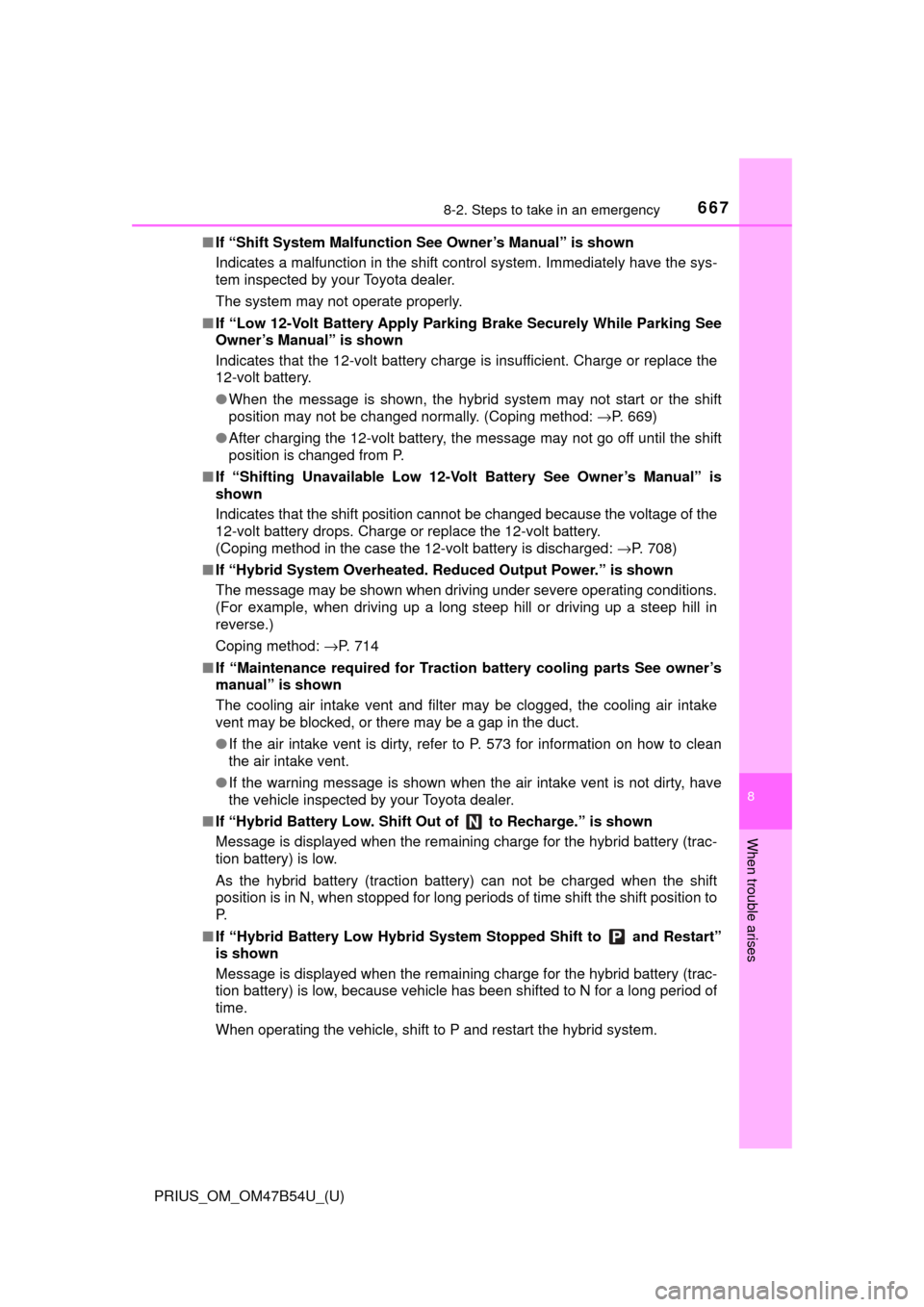
■ If “Hybrid Battery Low. Shift Ou t of to Recharge.” is shown
Message is displayed when the remaining charge for the hybrid battery (trac-
tion battery) is low.
As the hybrid battery (traction battery) can not be charged when the shift
position is in N, when stopped for long periods of time shift the shift position to
P.
■ If “Hybrid Battery Low Hybrid Syst em Stopped Shift to and Restart”
is shown
Message is displayed when the remaining charge for the hybrid battery (trac-
tion battery) is low, because vehicle has been shifted to N for a long period of
time.
When operating the vehicle, shift to P and restart the hybrid system.
Page 668 of 796

6688-2. Steps to take in an emergency
PRIUS_OM_OM47B54U_(U)■
If “Shift to Position When Parked” is shown
Message is displayed when the driver’s door is opened without turning the
power switch to off with the shift position in any position other than P.
Shift the shift position to P.
■ If “Shift is in Release Acceler ator Before Shifting” is shown
Message is displayed when the accelerator pedal has been depressed and
the shift position is in N.
Release the accelerator pedal and shift the shift position to D or R.
■ If “Depress Brake When Vehicle is Stopped. Hybrid System may Over-
heat.” is shown
The message may be shown when the accelerator pedal is depressed to hold
the vehicle while the vehicle is stopped on an uphill, etc.
The hybrid system may overheat. Release the accelerator pedal and depress
the brake pedal.
■ If “Auto Power OFF to Conserve Battery” is shown
The power switch has been turned off by the automatic power off function.
When starting the hybrid system next time, operate the hybrid system for
approximately 5 minutes to recharge the 12-volt battery.
■ If “Forward Camera System Unavaila ble” or “Forward Camera System
Unavailable Clean Windshield” is displayed. *
The following systems may be suspended until the problem shown in the
message is resolved.
● PCS (Pre-Collision System)
*
●LDA (Lane Departure Alert with steering control)*
●Dynamic radar cruise control with full-speed range*
●Automatic High Beam*
*
: If equipped
■ If “Maintenance Required Soon” is displayed (U.S.A. only)
Indicates that all maintenance according to the driven distance on the mainte-
nance schedule
* should be performed soon.
Comes on approximately 4500 miles (7200 km) after the message has been
reset.
If necessary, perform maintenance. Please reset the message after the main-
tenance is performed. ( →P. 578)
*: Refer to the separate “Scheduled Maintenance Guide” or “Owner’s Manual
Supplement” for the maintenance interval applicable to your vehicle.