wheel TOYOTA PRIUS 2017 4.G Manual Online
[x] Cancel search | Manufacturer: TOYOTA, Model Year: 2017, Model line: PRIUS, Model: TOYOTA PRIUS 2017 4.GPages: 796, PDF Size: 20.13 MB
Page 477 of 796
PRIUS_OM_OM47B54U_(U)
4775-9. Bluetooth® phone
5
Audio system
Select “Handset Mode” to on from a hands-free call to a cellular
phone call.
Select “Handset Mode” to off from a cellular phone call to a hands-free
call.Select “Transmit Volume”.
Select the desired level for the transmit volume.
Select “OK”.
Press the switch on the steering wheel or select .
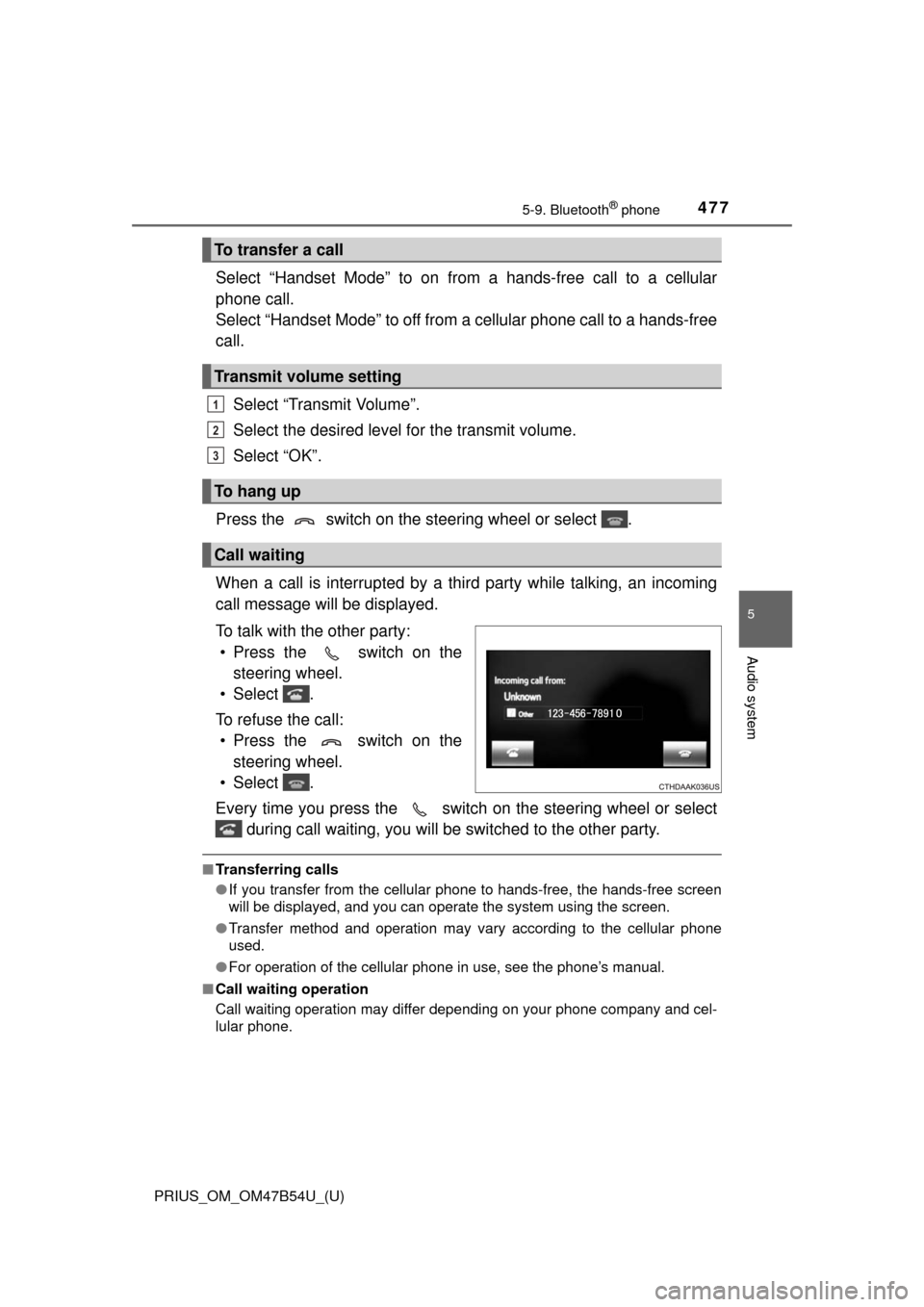
When a call is interrupted by a third party while talking, an incoming
call message will be displayed.
To talk with the other party: • Press the switch on the steering wheel.
• Select .
To refuse the call: • Press the switch on the steering wheel.
• Select .
Every time you press the switch on the steering wheel or select during call waiting, you will be switched to the other party.
■Transferring calls
●If you transfer from the cellular phone to hands-free, the hands-free screen
will be displayed, and you can operate the system using the screen.
● Transfer method and operation may vary according to the cellular phone
used.
● For operation of the cellular phone in use, see the phone’s manual.
■ Call waiting operation
Call waiting operation may differ depending on your phone company and cel-
lular phone.
To transfer a call
Transmit volume setting
To hang up
Call waiting
1
2
3
Page 480 of 796
4805-9. Bluetooth® phone
PRIUS_OM_OM47B54U_(U)
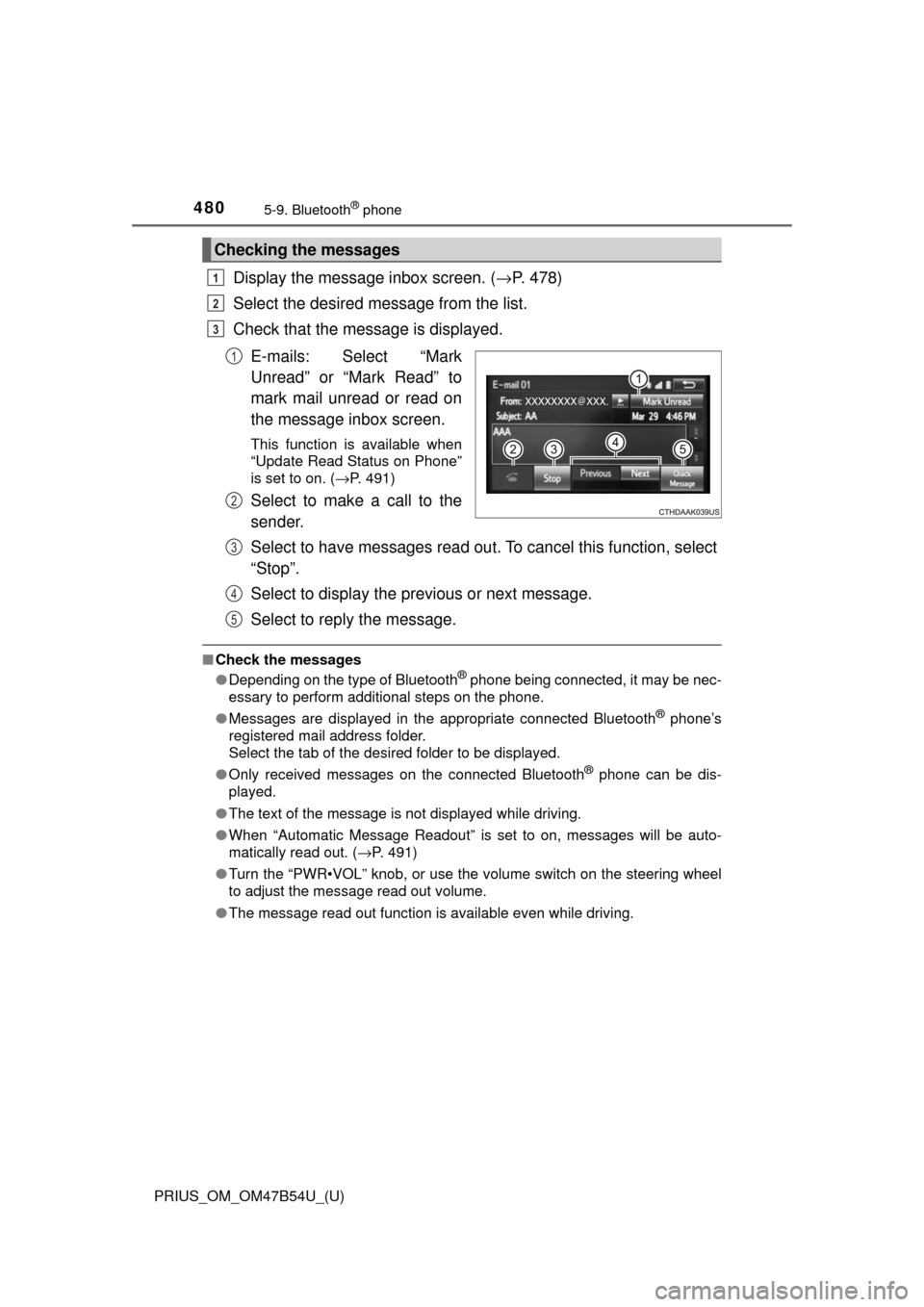
Display the message inbox screen. (→P. 478)
Select the desired message from the list.
Check that the message is displayed.
E-mails: Select “Mark
Unread” or “Mark Read” to
mark mail unread or read on
the message inbox screen.
This function is available when
“Update Read Status on Phone”
is set to on. ( →P. 491)
Select to make a call to the
sender.
Select to have messages read ou t. To cancel this function, select
“Stop”.
Select to display the previous or next message.
Select to reply the message.
■ Check the messages
●Depending on the type of Bluetooth® phone being connected, it may be nec-
essary to perform additional steps on the phone.
● Messages are displayed in the appropriate connected Bluetooth
® phone’s
registered mail address folder.
Select the tab of the desired folder to be displayed.
● Only received messages on the connected Bluetooth
® phone can be dis-
played.
● The text of the message is not displayed while driving.
● When “Automatic Message Readout” is set to on, messages will be auto-
matically read out. ( →P. 491)
● Turn the “PWR•VOL” knob, or use the volume switch on the steering wheel
to adjust the message read out volume.
● The message read out function is available even while driving.
Checking the messages
1
2
3
1
2
3
4
5
Page 482 of 796
482
PRIUS_OM_OM47B54U_(U)
5-9. Bluetooth® phone
Using the steering wheel switches
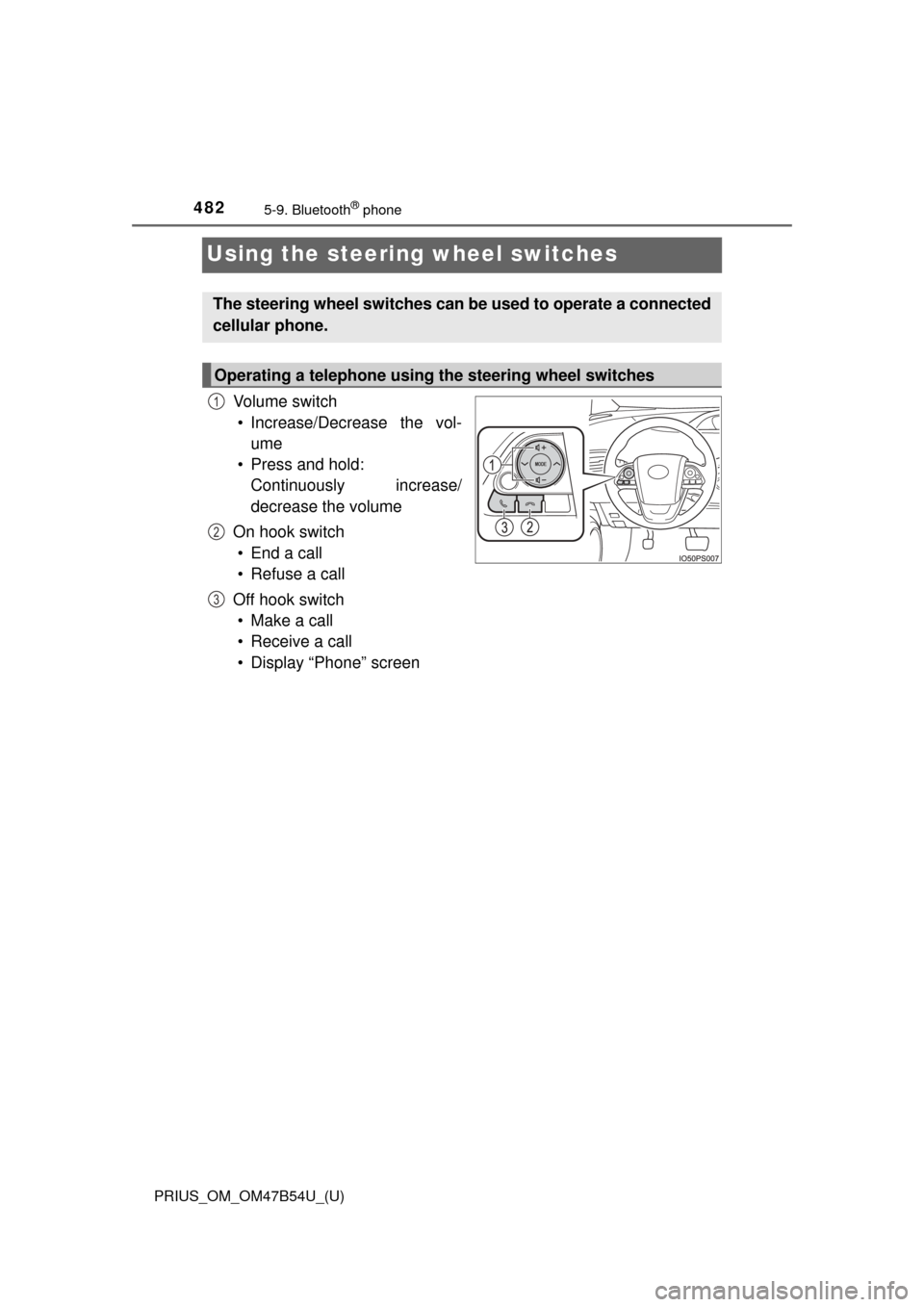
Vo l u m e s w i t c h
• Increase/Decrease the vol- ume
• Press and hold: Continuously increase/
decrease the volume
On hook switch • End a call
• Refuse a call
Off hook switch • Make a call
• Receive a call
• Display “Phone” screen
The steering wheel switches can be used to operate a connected
cellular phone.
Operating a telephone using the steering wheel switches
1
2
3
Page 507 of 796
PRIUS_OM_OM47B54U_(U)
5075-11. Using the voice command system
5
Audio system
The Mobile Assistant feature will activate Apple’s Siri® Eyes Free
mode via the steering wheel switc hes. To operate the Mobile Assis-
tant, a compatible cellular phone must be registered and connected to
this system via Bluetooth
®. ( → P. 456)
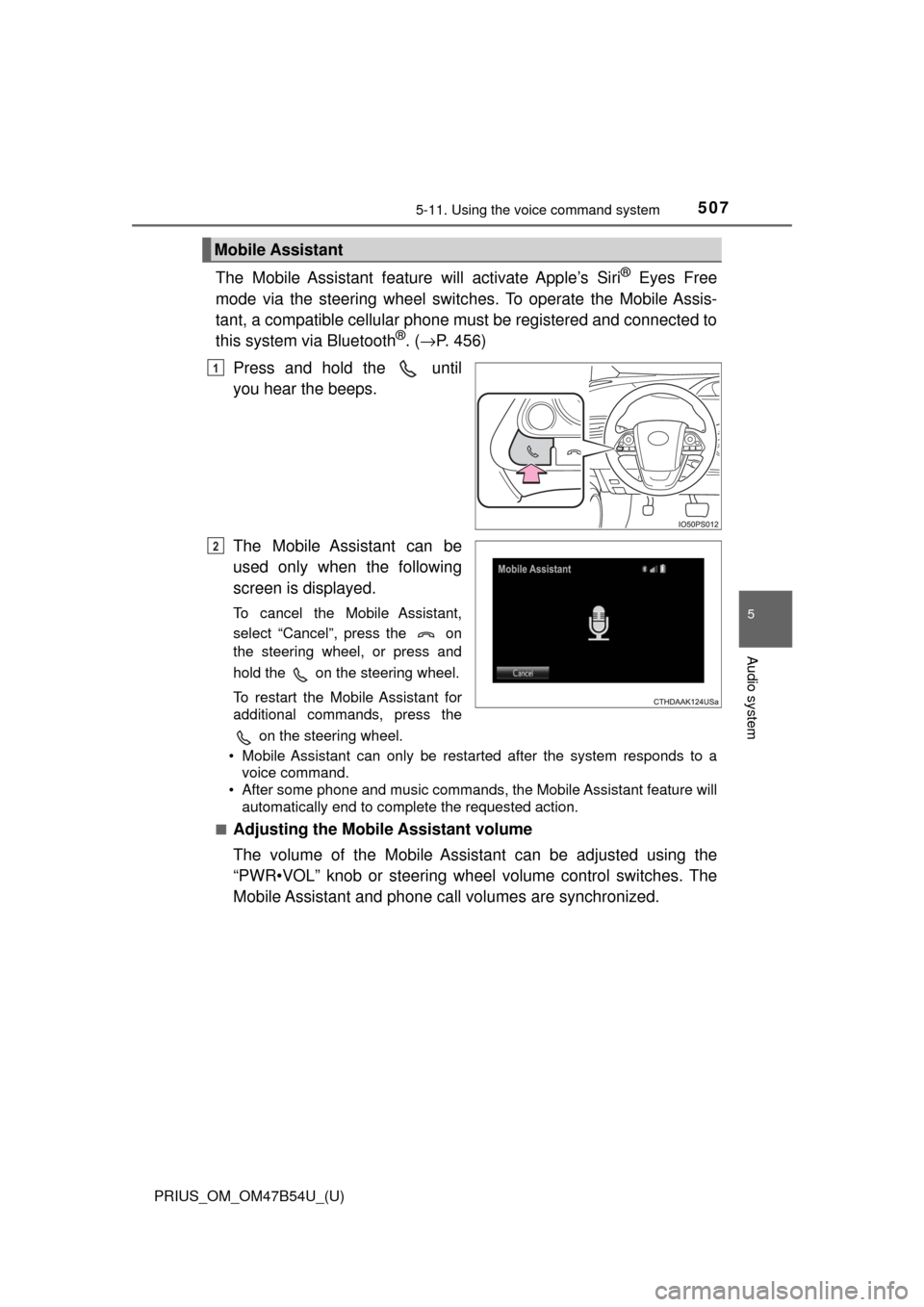
Press and hold the until
you hear the beeps.
The Mobile Assistant can be
used only when the following
screen is displayed.
To cancel the Mobile Assistant,
select “Cancel”, press the on
the steering wheel, or press and
hold the on the steering wheel.
To restart the Mobile Assistant for
additional commands, press the on the steering wheel.
• Mobile Assistant can only be restarted after the system responds to a voice command.
• After some phone and music commands, the Mobile Assistant feature will
automatically end to complete the requested action.
■
Adjusting the Mobile Assistant volume
The volume of the Mobile Assistant can be adjusted using the
“PWR•VOL” knob or steering wheel volume control switches. The
Mobile Assistant and phone call volumes are synchronized.
Mobile Assistant
1
2
Page 565 of 796
565
PRIUS_OM_OM47B54U_(U)
7Maintenance and care
7-1. Maintenance and careCleaning and protecting the vehicle exterior .......... 566
Cleaning and protecting the vehicle interior ........... 572
7-2. Maintenance Maintenance requirements ................... 577
General maintenance........ 580
Emission inspection and maintenance (I/M)
programs......................... 583
7-3. Do-it-yourself maintenance Do-it-yourself service precautions ..................... 584
Hood ................................. 587
Positioning a floor jack ...... 589
Engine compartment ......... 590
Tires .................................. 604
Tire inflation pressure ....... 614
Wheels .............................. 617
Air conditioning filter.......... 620
Wiper rubber replacement .................... 623
Electronic key battery........ 627
Checking and replacing fuses ............................... 630
Headlight aim .................... 633
Light bulbs......................... 635
Page 566 of 796
566
PRIUS_OM_OM47B54U_(U)
7-1. Maintenance and care
Cleaning and protecting the vehicle exterior
●Working from top to bottom, liber ally apply water to the vehicle
body, wheel wells and underside of the vehicle to remove any dirt
and dust.
● Wash the vehicle body using a sponge or soft cloth, such as a
chamois.
● For hard-to-remove marks, use car wash soap and rinse thoroughly
with water.
● Wipe away any water.
● Wax the vehicle when the wate rproof coating deteriorates.
If water does not bead on a clean surface, apply wax when the vehicle
body is cool.
■Automatic car washes
●Fold the mirrors before washing the vehicle. Start washing from the fron\
t of
the vehicle. Make sure to extend the mirrors before driving.
● Brushes used in automatic car washes may scratch the vehicle surface and
harm your vehicle’s paint.
● Rear spoiler may not be washable in some automatic car washes. There
may also be an increased risk of damage to vehicle.
■ High pressure car washes
●Do not allow the nozzles of the car wash to come within close proximity of
the windows.
● Before using the car wash, check that the fuel filler door on your vehicle is
closed properly.
Perform the following to protect the vehicle and maintain it in
prime condition:
Page 567 of 796

5677-1. Maintenance and care
7
Maintenance and care
■Note for a smart key system
If the door handle becomes wet while the electronic key is within the ef\
fective
range, the do")
PRIUS_OM_OM47B54U_(U)
5677-1. Maintenance and care
7
Maintenance and care
■Note for a smart key system
If the door handle becomes wet while the electronic key is within the ef\
fective
range, the door may lock and unlock repeatedly. In that case, follow the fol-
lowing correction procedures to wash the vehicle:
●Place the key in a position 6 ft. (2 m) or more separate from the vehicle
while the vehicle is being washed. (Take care to ensure that the key is not
stolen.)
● Set the electronic key to battery-saving mode to disable the smart key sys-
tem. ( →P. 178)
■ Aluminum wheels
●Remove any dirt immediately by using a neutral detergent. Do not use hard
brushes or abrasive cleaners. Do not use strong or harsh chemical clean-
ers.
Use the same mild detergent and wax as used on the paint.
● Do not use detergent on the wheels when they are hot, for example after
driving for long distance in the hot weather.
● Wash detergent from the wheels immediately after use.
■ Bumpers
Do not scrub with abrasive cleaners.
■ Front side windows water-repellent coating (if equipped)
The following precautions can extend the effectiveness of the water-repellent
coating.
●Remove any dirt, etc. from the front side windows regularly.
● Do not allow dirt and dust to accumulate on the windows for a long period.
Clean the windows with a soft, damp cloth as soon as possible.
● Do not use wax or glass cleaners that contain abrasives when cleaning the
windows.
● Do not use any metallic objects to remove condensation build up.
Page 569 of 796
PRIUS_OM_OM47B54U_(U)
5697-1. Maintenance and care
7
Maintenance and care
NOTICE
■To prevent paint deterioration and corrosion on the body and compo-
nents (aluminum wheels etc.)
● Wash the vehicle immediately in the following cases:
• After driving near the sea coast
• After driving on salted roads
• If coal tar or tree sap is present on the paint surface
• If dead insects, insect droppings or bird droppings are present on the
paint surface
• After driving in an area contaminated with soot, oily smoke, mine dust, iron powder or chemical substances
• If the vehicle becomes heavily soiled with dust or mud
• If liquids such as benzene and gasoline are spilled on the paint surface
● If the paint is chipped or scratched, have it repaired immediately.
● To prevent the wheels from corroding, remove any dirt and store in a place
with low humidity when storing the wheels.
■ To prevent damage to the windshield wiper arms
When lifting the wiper arms away from the windshield pull the driver side
wiper arm upward first, and repeat for the passenger’s side. When returning
the wipers to their original position, do so from the passenger’s side first.
■ Cleaning the exterior lights
● Wash carefully. Do not use organic substances or scrub with a hard brush.
This may damage the surfaces of the lights.
● Do not apply wax to the surfaces of the lights.
Wax may cause damage to the lenses.
Page 570 of 796
570
PRIUS_OM_OM47B54U_(U)
7-1. Maintenance and care
NOTICE
■Handling the decorative resin parts (for vehicles equipped with 17-
inch tires)
●Make sure to observe the following when handling wheels equipped
with decorative resin parts. Failure to observe these precautions may
result in damage to the decorative resin parts or wheels.
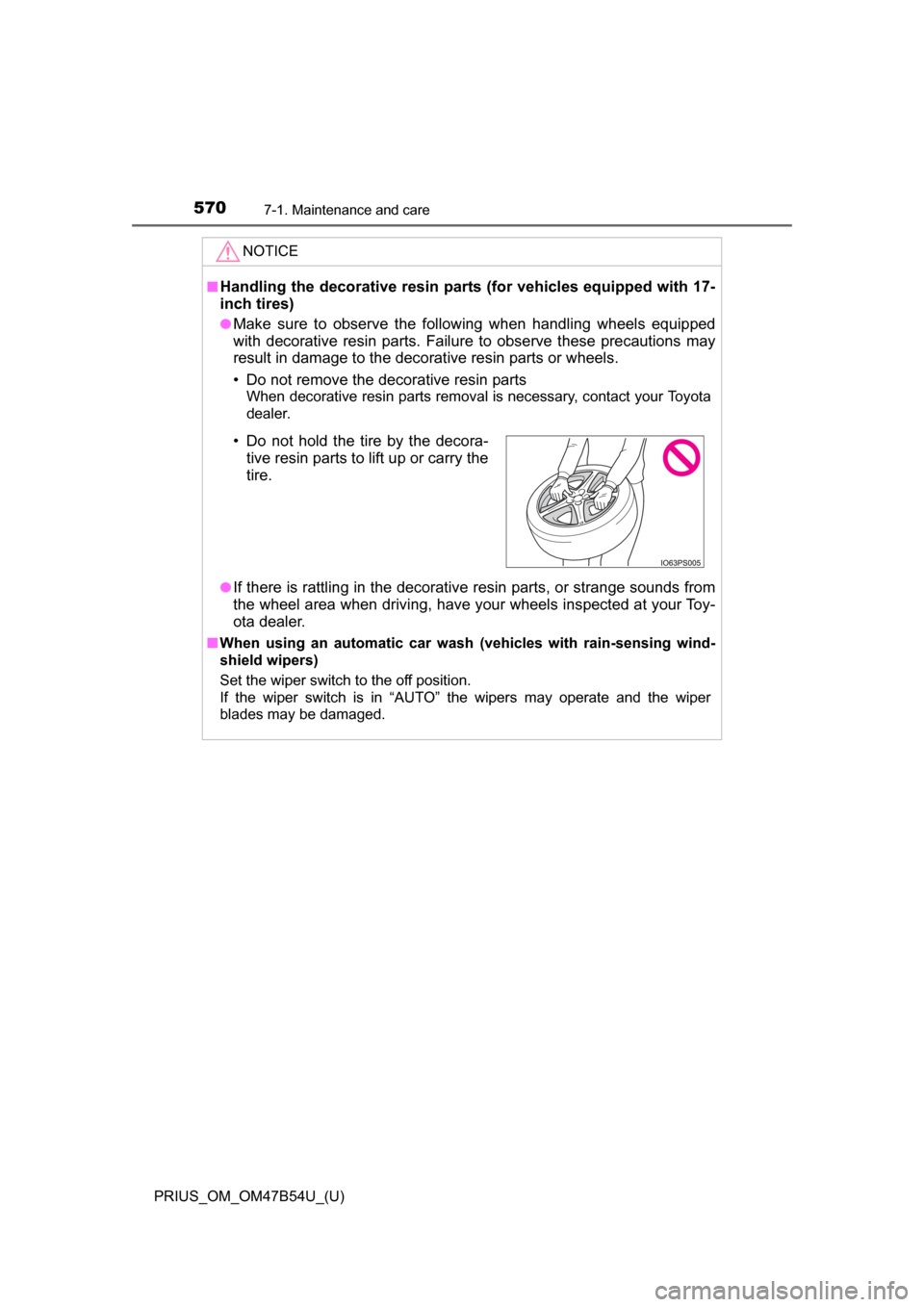
• Do not remove the decorative resin parts
When decorative resin parts removal is necessary, contact your Toyota
dealer.
●
If there is rattling in the decorative resin parts, or strange sounds from
the wheel area when driving, have your wheels inspected at your Toy-
ota dealer.
■ When using an automatic car wash (vehicles with rain-sensing wind-
shield wipers)
Set the wiper switch to the off position.
If the wiper switch is in “AUTO” the wipers may operate and the wiper
blades may be damaged.
• Do not hold the tire by the decora-
tive resin parts to lift up or carry the
tire.
Page 581 of 796
PRIUS_OM_OM47B54U_(U)
5817-2. Maintenance
7
Maintenance and care
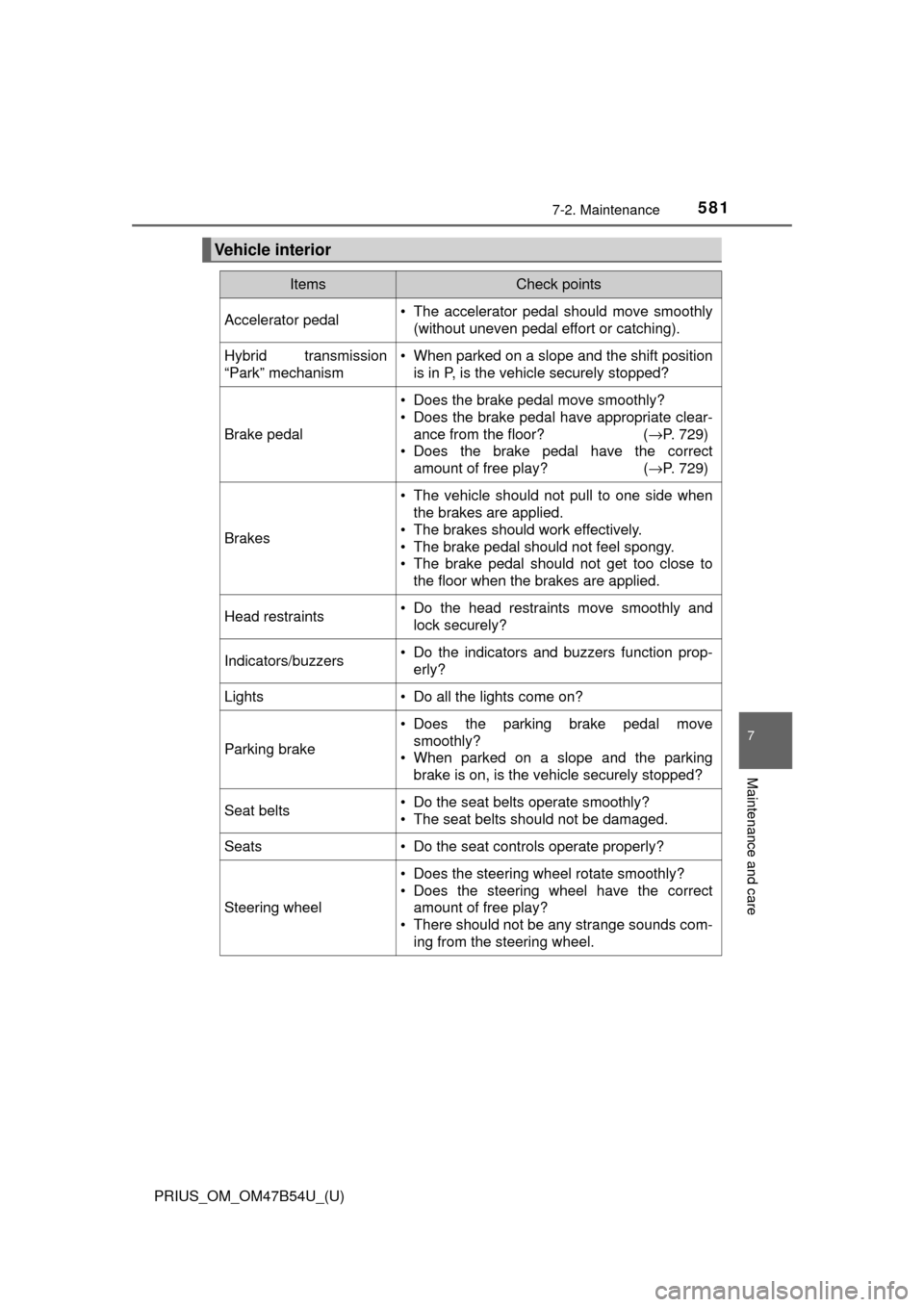
Vehicle interior
ItemsCheck points
Accelerator pedal• The accelerator pedal should move smoothly(without uneven pedal effort or catching).
Hybrid transmission
“Park” mechanism• When parked on a slope and the shift positionis in P, is the vehicle securely stopped?
Brake pedal
• Does the brake pedal move smoothly?
• Does the brake pedal have appropriate clear-
ance from the floor? ( →P. 729)
• Does the brake pedal have the correct amount of free play? ( →P. 729)
Brakes
• The vehicle should not pull to one side when
the brakes are applied.
• The brakes should work effectively.
• The brake pedal should not feel spongy.
• The brake pedal should not get too close to the floor when the brakes are applied.
Head restraints• Do the head restraints move smoothly andlock securely?
Indicators/buzzers• Do the indicators and buzzers function prop-erly?
Lights• Do all the lights come on?
Parking brake
• Does the parking brake pedal movesmoothly?
• When parked on a slope and the parking brake is on, is the vehicle securely stopped?
Seat belts• Do the seat belts operate smoothly?
• The seat belts should not be damaged.
Seats• Do the seat controls operate properly?
Steering wheel
• Does the steering wheel rotate smoothly?
• Does the steering wheel have the correctamount of free play?
• There should not be any strange sounds com- ing from the steering wheel.